Introduction
Privileged Access Management (PAM) refers to a set of security solutions designed to control, monitor, and secure accounts with elevated privileges within an organization. These privileged accounts, often held by IT administrators or system operators, have access to critical systems, sensitive data, and infrastructure. Without proper oversight, these accounts can become high-risk vectors for cyberattacks or insider threats.In , as enterprises increasingly adopt hybrid IT environments, cloud services, and remote access, PAM has become an essential component of cybersecurity strategy. It ensures that privileged credentials are tightly managed, auditable, and only used for authorized purposes.Real-world use cases include controlling access to cloud infrastructure, securing administrative accounts for critical applications, auditing privileged activity, managing third-party contractor access, and enforcing least-privilege policies across enterprise networks.
When evaluating PAM tools, organizations should assess features such as credential vaulting, session monitoring, access request workflows, automation, integration with IAM and SIEM systems, compliance reporting, scalability, deployment flexibility, user experience, and total cost of ownership.
Best for: Security teams, IT administrators, enterprises with complex IT infrastructure, organizations subject to compliance requirements such as HIPAA, GDPR, or SOC 2.
Not ideal for: Small organizations with minimal privileged accounts or low regulatory requirements; simpler account management solutions may suffice.
Key Trends in Privileged Access Management (PAM)
- Integration with AI/ML for anomaly detection and risk-based access
- Cloud-first deployment and hybrid PAM solutions
- Automation of access provisioning and de-provisioning
- Unified integration with IAM, SSO, and MFA platforms
- Real-time session monitoring and recording
- Support for zero-trust security frameworks
- Enhanced auditing, reporting, and compliance capabilities
- Credential vaulting and password rotation automation
- Adaptive access policies based on risk scoring
- Flexible subscription and consumption-based pricing models
How We Selected These Tools (Methodology)
- Market adoption and brand recognition
- Completeness of core PAM features: vaulting, session management, access controls
- Reliability, uptime, and performance signals
- Security posture and compliance certifications
- Integrations with IAM, SSO, and SIEM solutions
- Support for multi-cloud and hybrid IT environments
- Ease of deployment, administration, and scaling
- Automation and workflow capabilities for privileged access
- Customer fit across industries and company sizes
- Total cost of ownership and ROI considerations
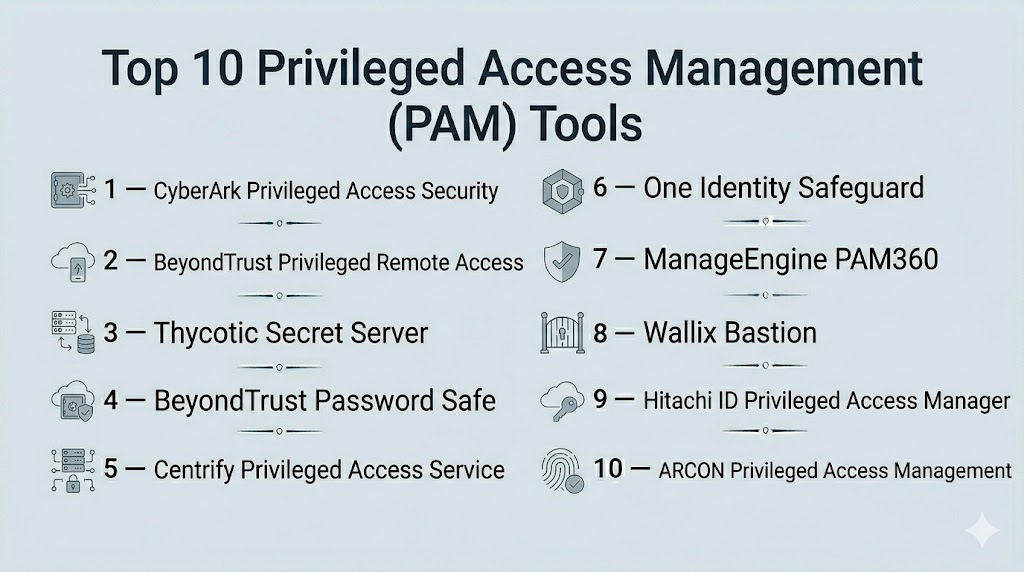
Top 10 Privileged Access Management (PAM) Tools
#1 — CyberArk Privileged Access Security
Short description : CyberArk is an enterprise-focused PAM platform that secures, monitors, and manages privileged accounts across on-premises, cloud, and hybrid environments. It is designed for large-scale organizations requiring advanced security controls.
Key Features
- Centralized credential vaulting
- Session recording and monitoring
- Least-privilege enforcement
- Threat analytics and anomaly detection
- Cloud and hybrid deployment support
- Integration with IAM, SIEM, and SSO systems
Pros
- Robust security architecture for enterprises
- Comprehensive auditing and compliance reporting
- Advanced threat detection for privileged accounts
Cons
- High pricing for smaller organizations
- Complexity requires dedicated administrative resources
Platforms / Deployment
- Web / Windows / macOS / Linux
- Cloud / Hybrid / On-premises
Security & Compliance
- SOC 2, ISO 27001, GDPR, HIPAA
Integrations & Ecosystem
Supports broad enterprise ecosystems with APIs and connectors:
- IAM systems
- SIEM solutions
- SSO platforms
- Cloud infrastructure providers
Support & Community
- 24/7 support, enterprise onboarding, training programs
#2 — BeyondTrust Privileged Remote Access
Short description : BeyondTrust enables secure remote access for privileged users, combining credential management with session monitoring and threat analytics.
Key Features
- Remote privileged session access
- Credential vault and rotation
- Real-time session monitoring
- Integration with SIEM and IAM
- Risk-based access policies
Pros
- Strong remote access control
- Granular auditing of privileged sessions
- Cloud and on-premises flexibility
Cons
- May require significant setup for complex environments
- Enterprise-focused pricing
Platforms / Deployment
- Web / Windows / macOS / Linux
- Cloud / On-premises / Hybrid
Security & Compliance
- SOC 2, ISO 27001, GDPR
Integrations & Ecosystem
- IAM connectors
- SIEM integrations
- API extensibility
Support & Community
- Enterprise support, knowledge base, training
#3 — Thycotic Secret Server
Short description : Thycotic Secret Server centralizes privileged credentials in a secure vault, providing automated password rotation, auditing, and compliance reporting.
Key Features
- Password and secret vault
- Automated credential rotation
- Session monitoring and recording
- Role-based access controls
- Integration with SIEM and IAM
Pros
- Automated management reduces human error
- Strong audit and compliance capabilities
- Flexible deployment options
Cons
- Interface may require learning curve
- Advanced features require premium plans
Platforms / Deployment
- Web / Windows / macOS / Linux
- Cloud / On-premises / Hybrid
Security & Compliance
- SOC 2, ISO 27001, GDPR, HIPAA
Integrations & Ecosystem
- IAM and SSO integration
- SIEM connectors
- REST APIs
Support & Community
- Documentation, enterprise onboarding, support tiers
#4 — BeyondTrust Password Safe
Short description : BeyondTrust Password Safe provides secure storage and automated management for privileged credentials, enabling compliance and threat detection.
Key Features
- Centralized vault
- Automated password rotation
- Policy-based access controls
- Audit and reporting
- Integration with enterprise security systems
Pros
- Enterprise-grade credential management
- Reduces risk of password misuse
- Cloud and on-premises flexibility
Cons
- May require technical expertise to deploy
- Higher cost for SMBs
Platforms / Deployment
- Web / Windows / Linux
- Cloud / On-premises
Security & Compliance
- SOC 2, ISO 27001, GDPR
Integrations & Ecosystem
- IAM and SSO platforms
- SIEM integrations
- API support
Support & Community
- 24/7 support, training resources, community forums
#5 — Centrify Privileged Access Service
Short description : Centrify provides cloud-ready PAM with zero-trust access, credential vaulting, and session monitoring for hybrid IT environments.
Key Features
- Privileged credential vault
- Zero-trust access policies
- Session recording and monitoring
- Integration with IAM and SSO
- Audit and compliance reporting
Pros
- Cloud-native architecture
- Supports hybrid and multi-cloud
- Strong compliance support
Cons
- Complexity for smaller teams
- Cost may be high for SMBs
Platforms / Deployment
- Web / Windows / macOS / Linux
- Cloud / Hybrid
Security & Compliance
- SOC 2, ISO 27001, GDPR, HIPAA
Integrations & Ecosystem
- IAM connectors
- SIEM integration
- APIs for extensibility
Support & Community
- Enterprise support, knowledge base, training
#6 — One Identity Safeguard
Short description : One Identity Safeguard offers privileged credential management, session monitoring, and secure remote access with centralized auditing.
Key Features
- Privileged account vault
- Session recording and control
- Automated password rotation
- Integration with IAM and SIEM
- Risk-based access policies
Pros
- Unified view of privileged accounts
- Strong auditing and compliance features
- Flexible deployment
Cons
- Premium pricing for advanced features
- Admin interface requires training
Platforms / Deployment
- Web / Windows / macOS / Linux
- Cloud / On-premises / Hybrid
Security & Compliance
- SOC 2, ISO 27001, GDPR
Integrations & Ecosystem
- SSO and IAM platforms
- SIEM integration
- REST APIs
Support & Community
- Documentation, 24/7 support, enterprise training
#7 — ManageEngine PAM360
Short description : PAM360 provides end-to-end privileged access management with automated password management, session monitoring, and compliance reporting.
Key Features
- Credential vault and rotation
- Session recording and auditing
- Role-based access control
- Integration with IAM and SIEM
- Reporting and compliance dashboards
Pros
- Cost-effective for SMBs and mid-market
- Easy deployment and administration
- Flexible policy controls
Cons
- Fewer integrations compared to larger vendors
- Advanced analytics limited
Platforms / Deployment
- Web / Windows / Linux
- Cloud / On-premises
Security & Compliance
- SOC 2, ISO 27001, GDPR
Integrations & Ecosystem
- IAM integration
- SIEM connectors
- APIs
Support & Community
- Knowledge base, email support, enterprise support
#8 — Wallix Bastion
Short description : Wallix Bastion secures privileged access by managing credentials, controlling sessions, and auditing privileged activity for compliance.
Key Features
- Privileged account vault
- Session management and recording
- Access request workflows
- Audit and compliance reporting
- Integration with IAM and SIEM
Pros
- Strong session control
- Simplified administration
- Compliance-focused features
Cons
- UI may require training
- Enterprise-focused pricing
Platforms / Deployment
- Web / Windows / Linux
- Cloud / On-premises / Hybrid
Security & Compliance
- SOC 2, ISO 27001, GDPR
Integrations & Ecosystem
- IAM and SSO connectors
- SIEM integration
- API access
Support & Community
- Vendor support, knowledge base, training
#9 — Hitachi ID Privileged Access Manager
Short description : Hitachi ID PAM manages privileged credentials, provides session monitoring, and enables audit-ready compliance reporting for enterprises.
Key Features
- Credential vault and rotation
- Session monitoring and recording
- Role-based access control
- Integration with IAM and SIEM
- Compliance dashboards
Pros
- Enterprise-ready
- Strong audit and reporting
- Supports hybrid IT
Cons
- Complexity for small teams
- Costlier than SMB-focused tools
Platforms / Deployment
- Web / Windows / Linux
- Cloud / On-premises
Security & Compliance
- SOC 2, ISO 27001, GDPR
Integrations & Ecosystem
- IAM platforms
- SIEM connectors
- API extensibility
Support & Community
- Enterprise support, documentation, training
#10 — ARCON Privileged Access Management
Short description : ARCON PAM secures and monitors privileged accounts, provides real-time alerts, and automates password management for regulated enterprises.
Key Features
- Credential vault and rotation
- Session monitoring and alerting
- Role-based access policies
- Integration with IAM, SSO, and SIEM
- Compliance reporting
Pros
- Strong automation
- Real-time monitoring
- Enterprise compliance support
Cons
- Limited global presence
- Training may be required for admins
Platforms / Deployment
- Web / Windows / Linux
- Cloud / On-premises / Hybrid
Security & Compliance
- SOC 2, ISO 27001, GDPR, HIPAA
Integrations & Ecosystem
- IAM connectors
- SIEM integration
- API access
Support & Community
- Vendor support, documentation, and training
Comparison Table (Top 10)
| Tool Name | Best For | Platform(s) Supported | Deployment | Standout Feature | Public Rating |
|---|---|---|---|---|---|
| CyberArk | Enterprise | Web, Windows, macOS, Linux | Cloud/Hybrid | Comprehensive vault & session monitoring | N/A |
| BeyondTrust PRA | Enterprise | Web, Windows, macOS, Linux | Cloud/Hybrid | Remote privileged access | N/A |
| Thycotic Secret Server | Enterprise | Web, Windows, macOS, Linux | Cloud/Hybrid | Credential vault & rotation | N/A |
| BeyondTrust Password Safe | Enterprise | Web, Windows, Linux | Cloud/On-premises | Automated password management | N/A |
| Centrify | Enterprise | Web, Windows, macOS, Linux | Cloud/Hybrid | Zero-trust access | N/A |
| One Identity Safeguard | Enterprise | Web, Windows, macOS, Linux | Cloud/Hybrid | Unified privileged account management | N/A |
| ManageEngine PAM360 | SMB/Mid-market | Web, Windows, Linux | Cloud/On-premises | Cost-effective PAM | N/A |
| Wallix Bastion | Enterprise | Web, Windows, Linux | Cloud/Hybrid | Session management | N/A |
| Hitachi ID PAM | Enterprise | Web, Windows, Linux | Cloud/On-premises | Compliance-ready PAM | N/A |
| ARCON PAM | Enterprise | Web, Windows, Linux | Cloud/Hybrid | Real-time monitoring | N/A |
Evaluation & Scoring of Privileged Access Management (PAM)
| Tool Name | Core (25%) | Ease (15%) | Integrations (15%) | Security (10%) | Performance (10%) | Support (10%) | Value (15%) | Weighted Total |
|---|---|---|---|---|---|---|---|---|
| CyberArk | 10 | 8 | 9 | 10 | 9 | 9 | 8 | 9.2 |
| BeyondTrust PRA | 9 | 8 | 9 | 9 | 9 | 8 | 8 | 8.7 |
| Thycotic Secret Server | 9 | 8 | 8 | 9 | 8 | 8 | 8 | 8.4 |
| BeyondTrust Password Safe | 9 | 7 | 8 | 9 | 8 | 8 | 8 | 8.3 |
| Centrify | 9 | 7 | 8 | 9 | 8 | 8 | 7 | 8.2 |
| One Identity Safeguard | 9 | 7 | 8 | 9 | 8 | 8 | 7 | 8.1 |
| ManageEngine PAM360 | 8 | 8 | 7 | 8 | 8 | 7 | 8 | 7.9 |
| Wallix Bastion | 8 | 7 | 7 | 8 | 8 | 7 | 7 | 7.7 |
| Hitachi ID PAM | 8 | 7 | 7 | 8 | 8 | 7 | 7 | 7.7 |
| ARCON PAM | 8 | 7 | 7 | 8 | 8 | 7 | 7 | 7.7 |
Interpretation: Higher weighted totals indicate tools with robust core capabilities, integration, security, and enterprise value.
Which Privileged Access Management (PAM) Tool Is Right for You?
Solo / Freelancer
PAM solutions are generally overkill for individual use; lightweight credential vaults or password managers suffice.
SMB
ManageEngine PAM360 and ARCON PAM provide cost-effective options for SMBs with moderate privileged account needs.
Mid-Market
Thycotic Secret Server and One Identity Safeguard offer scalable management with strong compliance and automation capabilities.
Enterprise
CyberArk, BeyondTrust, Centrify, and Wallix Bastion are best suited for enterprises with complex IT environments and regulatory requirements.
Budget vs Premium
SMBs may choose PAM360 for affordability; large enterprises benefit from CyberArk, BeyondTrust, and Centrify for comprehensive functionality.
Feature Depth vs Ease of Use
Enterprise solutions prioritize depth, compliance, and auditability; SMB tools prioritize simplicity and quick deployment.
Integrations & Scalability
Cloud and hybrid deployment support integration with IAM, SSO, SIEM, and multi-cloud infrastructure for large-scale adoption.
Security & Compliance Needs
SOC 2, ISO 27001, GDPR, and HIPAA compliance remain critical for regulated industries.
Frequently Asked Questions (FAQs)
1. What is the difference between PAM and standard IAM?
PAM focuses on accounts with elevated privileges and enforces tighter controls, monitoring, and auditing beyond standard user identity management.
2. Can PAM integrate with SSO and MFA solutions?
Yes, leading PAM platforms integrate with SSO, MFA, and enterprise IAM systems to enhance security.
3. Are cloud PAM solutions secure?
Yes, enterprise-grade cloud PAM providers implement encryption, zero-trust policies, and compliance certifications.
4. How does PAM help with compliance?
PAM provides audit trails, access reports, and policy enforcement to support regulatory requirements such as SOC 2, GDPR, and HIPAA.
5. Can PAM manage third-party vendor access?
Yes, PAM solutions offer temporary and controlled access for contractors and third-party users.
6. Is session recording mandatory in PAM?
Not mandatory, but session recording enhances accountability and compliance monitoring.
7. How scalable are PAM tools?
Cloud and hybrid deployments allow PAM solutions to scale from SMBs to large enterprises seamlessly.
8. Does PAM support multi-cloud environments?
Yes, modern PAM platforms integrate with on-premises and multi-cloud infrastructures.
9. How do PAM solutions handle password rotation?
Automated credential rotation ensures privileged passwords are updated regularly, reducing security risk.
10. What are the typical deployment models for PAM?
Cloud, on-premises, and hybrid deployments allow organizations to choose based on infrastructure and compliance needs.
Conclusion
Privileged Access Management is essential for controlling and monitoring high-risk accounts across enterprises. SMBs can leverage ManageEngine PAM360 and ARCON PAM for cost-effective solutions, while large enterprises benefit from CyberArk, BeyondTrust, and Centrify for comprehensive control, auditing, and compliance. Selection should be guided by scale, integration needs, security posture, and regulatory compliance. Organizations should evaluate tools via pilot deployments, enforce strict policies, and monitor usage to mitigate risks associated with privileged accounts.

Find Trusted Cardiac Hospitals
Compare heart hospitals by city and services — all in one place.
Explore Hospitals
PAM is useful for controlling privileged access, but emergency situations can make access management difficult. Teams should have a clear break-glass process for urgent access, with proper approval and logging afterward. This can help administrators respond quickly without creating permanent exceptions.