Introduction
Cloud migration tools help organizations move applications, databases, servers, virtual machines, files, workloads, and business systems from on-premises infrastructure, legacy hosting, or one cloud environment to another. These tools simplify planning, discovery, dependency mapping, data transfer, workload replication, testing, cutover, and post-migration optimization. Cloud migration matters now because companies are modernizing legacy systems, reducing data center dependency, improving scalability, adopting AI-ready infrastructure, and building more flexible hybrid or multi-cloud environments. A strong migration platform helps reduce downtime, avoid data loss, control costs, and make complex moves more predictable. Buyers should evaluate supported workloads, cloud compatibility, automation depth, security controls, migration speed, downtime requirements, monitoring, cost visibility, integration ecosystem, support quality, and long-term modernization needs before selecting the right tool.
Real-world use cases include:
- Data center exit projects: Companies use cloud migration tools to move servers, applications, and databases from physical data centers to public cloud platforms.
- Application modernization: Teams migrate legacy applications to cloud-native environments, containers, managed databases, or scalable infrastructure.
- Database migration: Organizations move databases from on-premises systems to managed cloud databases while minimizing downtime and data loss.
- Disaster recovery modernization: Businesses replicate workloads to the cloud to improve resilience and recovery readiness.
- Cloud-to-cloud migration: Teams move workloads between AWS, Microsoft Azure, Google Cloud, Oracle Cloud, or other platforms due to cost, compliance, performance, or strategic changes.
- Mergers and acquisitions: IT teams consolidate applications, users, data, and infrastructure after business acquisitions or restructuring.
What buyers should evaluate:
- Workload coverage: Check whether the tool supports virtual machines, databases, file systems, applications, containers, storage, mainframe workloads, or SaaS data.
- Cloud platform compatibility: Confirm support for AWS, Microsoft Azure, Google Cloud, Oracle Cloud, VMware environments, private cloud, and hybrid infrastructure.
- Discovery and assessment: Look for automated inventory, dependency mapping, application grouping, readiness scoring, and migration planning features.
- Downtime and cutover control: Evaluate live replication, incremental sync, rollback options, testing environments, and cutover orchestration.
- Security controls: Review encryption, identity access, RBAC, audit logs, secure transfer, key management, and compliance support.
- Automation and orchestration: A strong tool should automate repetitive migration steps, reduce manual scripting, and support repeatable migration waves.
- Performance and reliability: Migration speed, bandwidth optimization, error handling, data integrity checks, and large workload support are important.
- Cost visibility: Buyers should evaluate cloud cost estimation, right-sizing recommendations, licensing impact, and post-migration optimization.
- Integration ecosystem: Check compatibility with CI/CD tools, ITSM systems, monitoring platforms, CMDBs, security tools, and cloud-native services.
- Support and services: Migration projects often need vendor support, partner ecosystem, documentation, training, and professional services.
Best for: Cloud migration tools are best for IT leaders, cloud architects, DevOps teams, platform engineering teams, infrastructure managers, database administrators, security teams, MSPs, system integrators, and enterprises planning cloud adoption, data center exit, modernization, or multi-cloud transformation.
Not ideal for: Cloud migration tools may not be necessary for very small applications, simple static websites, or teams that can manually redeploy from source code with minimal data movement. They also cannot replace cloud architecture planning, security design, cost governance, application refactoring, or change management.
Key Trends in Cloud Migration Tools
- AI-assisted migration planning: More tools are adding intelligent recommendations for workload grouping, right-sizing, risk detection, dependency mapping, and modernization paths.
- Hybrid and multi-cloud migration: Organizations increasingly need tools that support movement between on-premises systems, private cloud, public cloud, and multiple cloud providers.
- Application modernization focus: Migration is no longer only about moving virtual machines; buyers want containerization, database modernization, Kubernetes adoption, and managed service mapping.
- Lower-downtime migration: Businesses want live replication, incremental sync, staged testing, and safer cutover methods to reduce disruption.
- Security-first migration: Encryption, least-privilege access, audit logs, vulnerability checks, and compliance reporting are becoming standard expectations.
- FinOps-aware migration: Cloud migration tools increasingly include cost estimation, licensing visibility, right-sizing, and post-migration optimization guidance.
- Automated discovery and dependency mapping: Tools that can map application relationships, network dependencies, and infrastructure usage help reduce migration risk.
- DevOps and infrastructure-as-code alignment: Teams want migration workflows that connect with Terraform, CI/CD pipelines, GitOps, monitoring, and automated provisioning.
- Data migration at scale: Database and storage migration features are improving to support large datasets, replication, validation, and rollback strategies.
- Managed service provider enablement: MSPs and system integrators need repeatable migration templates, multi-customer visibility, reporting, and automation for large-scale projects.
How We Selected These Tools
- Market adoption: We selected cloud migration tools widely used by enterprises, cloud architects, MSPs, DevOps teams, and infrastructure modernization programs.
- Workload coverage: Tools were evaluated for support across servers, virtual machines, databases, applications, storage, containers, and hybrid cloud workloads.
- Cloud ecosystem fit: We considered compatibility with AWS, Azure, Google Cloud, Oracle Cloud, VMware, private cloud, and multi-cloud environments.
- Migration planning depth: Tools with discovery, assessment, dependency mapping, cost estimation, and readiness analysis were prioritized.
- Execution capability: We evaluated replication, data transfer, cutover orchestration, downtime reduction, and rollback support.
- Security posture: We considered encryption, access control, audit logs, identity integration, and secure transfer capabilities where clearly known.
- Automation and scalability: Tools that support migration waves, templates, repeatable workflows, APIs, and large-scale projects received stronger consideration.
- Support ecosystem: Documentation, partner networks, professional services, community resources, and enterprise support were included in evaluation.
- Customer fit: The list balances hyperscaler-native tools, enterprise platforms, database-focused tools, VMware migration options, and MSP-friendly solutions.
- Value and practicality: We considered whether each tool solves real migration problems without adding unnecessary complexity.
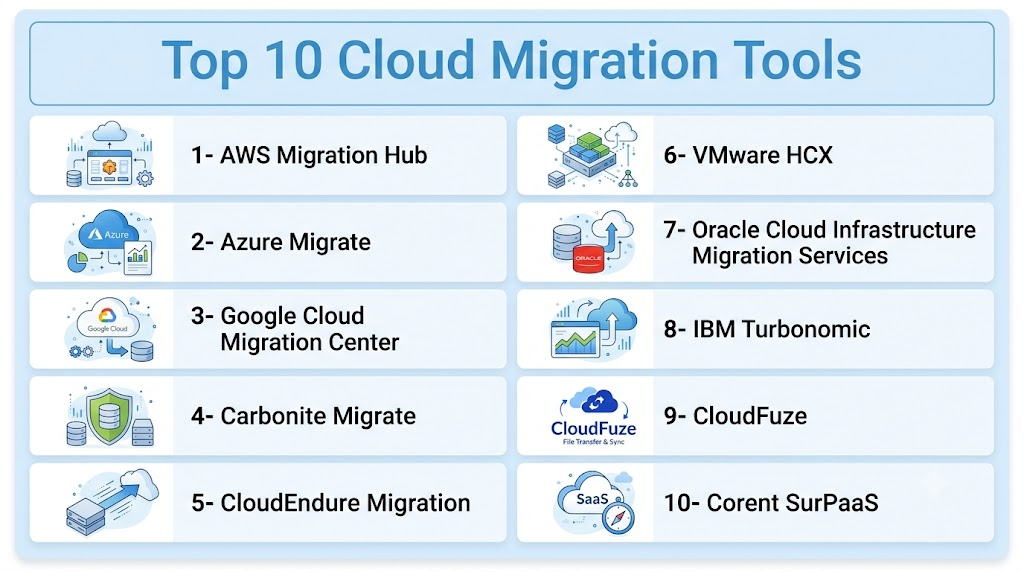
Top 10 Cloud Migration Tools
1- AWS Migration Hub
Short description: AWS Migration Hub helps organizations plan, track, and manage application migrations to Amazon Web Services. It is best suited for teams moving workloads into AWS and needing visibility across migration tasks, discovery data, and related AWS migration services.
Key Features
- Centralized migration tracking for AWS-focused projects
- Discovery and assessment support through related AWS tools
- Integration with AWS Application Migration Service
- Application grouping and migration progress visibility
- Support for server and workload migration planning
- Helps coordinate migration waves across teams
- Useful dashboard for AWS migration status and reporting
Pros
- Strong fit for organizations standardizing on AWS
- Works well with the broader AWS migration ecosystem
- Helpful for coordinating large migration programs
Cons
- Best suited for AWS migration rather than neutral multi-cloud migration
- Requires AWS knowledge for effective use
- Advanced migration design may still need architecture planning
Platforms / Deployment
Web
Cloud
Security & Compliance
Supports AWS identity, access controls, encryption, and audit-related capabilities depending on AWS configuration.
SOC 2, ISO 27001, GDPR, HIPAA: Not publicly stated
Integrations & Ecosystem
AWS Migration Hub fits teams that want to manage cloud migration inside the AWS ecosystem. It connects with AWS-native migration, discovery, modernization, and monitoring services to help coordinate migration activities.
- AWS Application Migration Service
- AWS Database Migration Service
- AWS discovery and assessment tools
- AWS cloud monitoring and logging workflows
- Application grouping and migration wave planning
- AWS partner and professional services ecosystem
Support & Community
AWS provides extensive documentation, training material, partner support, and enterprise support options. The AWS community and partner ecosystem are strong for migration planning, architecture, and implementation.
2- Azure Migrate
Short description: Azure Migrate is Microsoft’s cloud migration platform for assessing and migrating servers, databases, web apps, and virtual desktops to Azure. It is ideal for organizations already using Microsoft technologies and planning cloud modernization around Azure.
Key Features
- Server discovery, assessment, and migration planning
- Dependency analysis for application migration groups
- Database assessment and migration support through related services
- VMware, Hyper-V, and physical server migration support
- Cost estimation and Azure readiness insights
- Integration with Azure services and monitoring
- Migration dashboard for tracking progress
Pros
- Strong fit for Microsoft and Azure-centered organizations
- Useful assessment tools for migration readiness and sizing
- Supports common enterprise migration scenarios
Cons
- Best suited for Azure migrations rather than vendor-neutral migration
- Requires Azure expertise for planning and execution
- Complex estates may need additional tooling or partner support
Platforms / Deployment
Web
Cloud / Hybrid
Security & Compliance
Supports Azure identity, RBAC, encryption, logging, and policy controls depending on configuration.
SOC 2, ISO 27001, GDPR, HIPAA: Not publicly stated
Integrations & Ecosystem
Azure Migrate is deeply connected with Azure infrastructure, database, monitoring, security, and modernization services. It is especially useful for organizations migrating Windows Server, SQL Server, VMware, and Microsoft-centric workloads.
- Azure Site Recovery workflows
- Azure Database Migration Service
- Azure Monitor and governance tools
- VMware and Hyper-V assessment
- Microsoft identity and RBAC
- Azure landing zone and modernization workflows
Support & Community
Microsoft provides documentation, migration guides, partner services, and enterprise support. Azure Migrate is well supported by Microsoft’s cloud partner ecosystem.
3- Google Cloud Migration Center
Short description: Google Cloud Migration Center helps organizations assess, plan, and execute migrations to Google Cloud. It is useful for teams evaluating cloud readiness, modernization paths, infrastructure sizing, and workload migration into Google Cloud environments.
Key Features
- Infrastructure discovery and assessment
- Migration planning and cost estimation
- Workload inventory and dependency insights
- Support for Google Cloud modernization planning
- Integration with Google Cloud migration services
- Helps evaluate cloud readiness and right-sizing
- Centralized view of migration planning data
Pros
- Strong fit for organizations moving to Google Cloud
- Useful for assessment and planning before execution
- Helps connect migration planning with modernization goals
Cons
- Best suited for Google Cloud-focused migrations
- Requires Google Cloud expertise for full implementation
- Complex multi-cloud projects may need additional tools
Platforms / Deployment
Web
Cloud
Security & Compliance
Supports Google Cloud identity, access controls, encryption, and logging depending on configuration.
SOC 2, ISO 27001, GDPR, HIPAA: Not publicly stated
Integrations & Ecosystem
Google Cloud Migration Center fits teams building migration strategies around Google Cloud infrastructure, data analytics, Kubernetes, AI, and managed services. It helps support assessment and planning before migration execution.
- Google Cloud infrastructure services
- Google Cloud database migration workflows
- Google Kubernetes Engine modernization paths
- Cost estimation and right-sizing workflows
- Google Cloud operations and monitoring
- Partner-led migration services
Support & Community
Google Cloud provides documentation, training, support options, and partner assistance. The platform is best used by teams with cloud architecture planning and Google Cloud migration experience.
4- Carbonite Migrate
Short description: Carbonite Migrate supports workload migration with replication and cutover capabilities across physical, virtual, and cloud environments. It is useful for organizations that need reliable workload movement with reduced downtime and flexible infrastructure support.
Key Features
- Workload migration across physical, virtual, and cloud environments
- Continuous replication for lower-downtime migration
- Cutover testing and failback options depending on configuration
- Support for Windows and Linux workloads
- Migration automation and orchestration capabilities
- Useful for disaster recovery and migration scenarios
- Helps reduce risk during workload movement
Pros
- Strong workload replication and migration capability
- Useful for heterogeneous infrastructure environments
- Helps reduce downtime during migration events
Cons
- May require careful technical setup
- Licensing and scope should be reviewed before selection
- Less focused on application modernization than cloud-native tools
Platforms / Deployment
Windows, Linux, Web
Cloud / Self-hosted / Hybrid
Security & Compliance
Supports secure workload replication and administrative controls depending on deployment.
SOC 2, ISO 27001, GDPR, HIPAA: Not publicly stated
Integrations & Ecosystem
Carbonite Migrate fits environments where infrastructure teams need practical workload migration rather than only cloud assessment. It can support migration between physical, virtual, and cloud infrastructure.
- Physical server migration
- Virtual workload migration
- Cloud target environments
- Replication and cutover workflows
- Disaster recovery alignment
- IT operations processes
Support & Community
Carbonite provides business support, documentation, and implementation resources. It is best suited for IT teams with infrastructure migration experience.
5- CloudEndure Migration
Short description: CloudEndure Migration is known for automated server migration to AWS using replication-based migration workflows. It is relevant for organizations that want to move machines to AWS with minimal disruption and structured cutover planning.
Key Features
- Server migration to AWS
- Continuous block-level replication approach
- Automated machine conversion for AWS targets
- Cutover and testing workflows
- Supports migration wave planning
- Helps reduce downtime during server moves
- Useful for lift-and-shift migration projects
Pros
- Strong fit for AWS server migration
- Replication-based migration can reduce downtime
- Useful for large lift-and-shift programs
Cons
- Primarily relevant for AWS-focused migration
- Not a general multi-cloud migration platform
- Application modernization still requires separate planning
Platforms / Deployment
Web
Cloud
Security & Compliance
Supports secure replication and AWS-based access controls depending on deployment and configuration.
SOC 2, ISO 27001, GDPR, HIPAA: Not publicly stated
Integrations & Ecosystem
CloudEndure Migration fits AWS migration programs where teams need to move servers efficiently. It is commonly aligned with AWS migration planning, replication, testing, and cutover workflows.
- AWS migration workflows
- Server replication and conversion
- Migration wave execution
- Cutover testing
- Lift-and-shift planning
- AWS landing zone alignment
Support & Community
Support and documentation are tied to AWS migration resources and cloud migration partners. Teams should evaluate current AWS migration service guidance before planning new projects.
6- VMware HCX
Short description: VMware HCX helps organizations migrate and extend VMware workloads across data centers and cloud environments. It is best suited for VMware-heavy enterprises moving workloads to VMware Cloud environments or modernizing hybrid cloud operations.
Key Features
- VMware workload migration
- Hybrid cloud workload mobility
- Network extension for migration scenarios
- Bulk migration and live migration options depending on setup
- Supports data center extension use cases
- Useful for VMware Cloud migration paths
- Helps reduce complexity in VMware-based migrations
Pros
- Strong fit for VMware-centered organizations
- Supports complex workload mobility scenarios
- Useful for hybrid cloud and data center migration
Cons
- Best value is in VMware environments
- Requires VMware expertise and planning
- Not ideal for non-VMware migration strategies
Platforms / Deployment
Web, VMware environments
Cloud / Self-hosted / Hybrid
Security & Compliance
Supports secure connectivity, access control, and VMware security features depending on deployment.
SOC 2, ISO 27001, GDPR, HIPAA: Not publicly stated
Integrations & Ecosystem
VMware HCX works best in environments where VMware infrastructure is central to the migration strategy. It is useful for organizations extending, migrating, or consolidating VMware workloads.
- VMware vSphere environments
- VMware Cloud environments
- Hybrid cloud networking
- Bulk and live migration workflows
- Data center extension scenarios
- Enterprise infrastructure operations
Support & Community
VMware provides documentation, enterprise support, partner resources, and implementation guidance. VMware HCX is best managed by infrastructure teams with VMware migration experience.
7- Oracle Cloud Infrastructure Migration Services
Short description: Oracle Cloud Infrastructure migration services help organizations move databases, applications, and workloads into Oracle Cloud. They are especially relevant for enterprises running Oracle databases, enterprise applications, and Oracle-heavy workloads.
Key Features
- Migration support for Oracle workloads
- Database migration and replication options
- Application and infrastructure migration guidance
- Support for Oracle Cloud target environments
- Tools for planning and execution
- Useful for enterprise database modernization
- Integration with Oracle Cloud services
Pros
- Strong fit for Oracle database and application environments
- Useful for enterprises modernizing Oracle workloads
- Aligns with Oracle Cloud infrastructure and database services
Cons
- Best suited for Oracle-centered environments
- Requires Oracle Cloud and database expertise
- Less relevant for organizations not using Oracle workloads
Platforms / Deployment
Web
Cloud / Hybrid
Security & Compliance
Supports Oracle Cloud identity, access controls, encryption, and logging depending on configuration.
SOC 2, ISO 27001, GDPR, HIPAA: Not publicly stated
Integrations & Ecosystem
Oracle Cloud migration services are most useful where Oracle databases, middleware, and enterprise applications are core to the business. They support migration planning, database movement, and workload modernization within Oracle Cloud.
- Oracle Database migration
- Oracle Cloud infrastructure services
- Enterprise application migration
- Hybrid database workflows
- Managed database services
- Oracle partner ecosystem
Support & Community
Oracle provides enterprise support, documentation, migration guidance, and partner services. It is suitable for organizations with Oracle application and database administration expertise.
8- IBM Turbonomic
Short description: IBM Turbonomic helps organizations optimize application resources and cloud infrastructure decisions, making it useful before, during, and after migration. It is not only a migration execution tool but also helps with resource planning, right-sizing, and performance-aware cloud operations.
Key Features
- Application resource optimization
- Cloud and infrastructure planning insights
- Right-sizing recommendations
- Performance and cost balancing
- Hybrid cloud visibility
- Automation recommendations for resource allocation
- Useful for migration readiness and post-migration optimization
Pros
- Strong for cloud cost and performance optimization
- Helps avoid over-provisioning during migration
- Useful across hybrid and enterprise environments
Cons
- Not a standalone migration execution tool
- Best value comes when paired with broader cloud operations
- Requires operational maturity to use recommendations effectively
Platforms / Deployment
Web
Cloud / Hybrid
Security & Compliance
Supports role-based access, administrative controls, and enterprise security features depending on deployment.
SOC 2, ISO 27001, GDPR, HIPAA: Not publicly stated
Integrations & Ecosystem
IBM Turbonomic supports migration planning by helping teams understand resource needs, application performance, and cloud cost trade-offs. It is useful for large organizations trying to optimize workloads before and after migration.
- Hybrid cloud platforms
- Application performance workflows
- Cloud cost optimization
- Infrastructure monitoring
- Automation and orchestration tools
- Enterprise IT operations
Support & Community
IBM provides enterprise support, documentation, consulting resources, and partner services. It is best for organizations with established cloud operations and optimization practices.
9- CloudFuze
Short description: CloudFuze focuses on cloud-to-cloud migration for files, users, collaboration data, and SaaS content across storage and productivity platforms. It is useful for businesses migrating between cloud storage systems, collaboration suites, or consolidating user data after business changes.
Key Features
- Cloud-to-cloud file and user migration
- Support for popular storage and collaboration platforms
- Metadata and permission migration depending on platform
- Migration monitoring and reporting
- User mapping and transfer workflows
- Suitable for mergers, consolidation, and tenant migration
- Helps reduce manual data transfer effort
Pros
- Strong fit for SaaS and cloud storage migration
- Useful for tenant consolidation and collaboration migration
- Practical for business users and IT teams
Cons
- Not focused on server or infrastructure migration
- Application coverage should be verified before purchase
- Complex permission structures may require careful planning
Platforms / Deployment
Web
Cloud
Security & Compliance
Supports secure data transfer and access controls depending on configuration.
SOC 2, ISO 27001, GDPR, HIPAA: Not publicly stated
Integrations & Ecosystem
CloudFuze fits cloud storage and SaaS migration projects where organizations need to move user data between platforms. It is useful during mergers, cloud storage standardization, and productivity suite transitions.
- Cloud storage migration
- SaaS collaboration migration
- User and permission mapping
- Migration reporting
- Tenant consolidation workflows
- Business file migration projects
Support & Community
CloudFuze provides migration support, documentation, and project assistance. It is suitable for IT teams handling cloud storage or SaaS content migration.
10- Corent SurPaaS
Short description: Corent SurPaaS is a cloud migration and modernization platform that supports assessment, migration planning, SaaSification, and application modernization use cases. It is useful for enterprises and service providers that need structured migration and transformation support.
Key Features
- Cloud migration assessment
- Application modernization planning
- Workload discovery and analysis
- Migration automation support
- Multi-cloud and hybrid cloud planning
- SaaSification and transformation capabilities
- Useful for system integrators and enterprise migration programs
Pros
- Strong migration assessment and modernization orientation
- Useful for complex transformation projects
- Supports broader strategy beyond basic workload movement
Cons
- May be more complex than needed for simple migrations
- Requires planning and expertise for best outcomes
- Pricing and implementation scope may vary by project
Platforms / Deployment
Web
Cloud / Hybrid
Security & Compliance
Supports administrative controls and secure migration workflows depending on deployment.
SOC 2, ISO 27001, GDPR, HIPAA: Not publicly stated
Integrations & Ecosystem
Corent SurPaaS fits organizations and service providers managing structured cloud transformation programs. It is relevant where migration includes assessment, modernization, optimization, and application transformation.
- Multi-cloud migration planning
- Application assessment workflows
- Modernization strategy support
- Enterprise transformation projects
- Service provider migration programs
- SaaSification and cloud readiness analysis
Support & Community
Corent provides product documentation, implementation support, and project-oriented assistance. It is best suited for organizations running formal migration and modernization programs.
Comparison Table
| Tool Name | Best For | Platform Supported | Deployment | Standout Feature | Public Rating |
|---|---|---|---|---|---|
| AWS Migration Hub | AWS migration programs | Web | Cloud | Centralized AWS migration tracking | N/A |
| Azure Migrate | Microsoft and Azure workloads | Web | Cloud / Hybrid | Azure readiness and migration assessment | N/A |
| Google Cloud Migration Center | Google Cloud migration planning | Web | Cloud | Cloud readiness and right-sizing insights | N/A |
| Carbonite Migrate | Workload replication and migration | Windows, Linux, Web | Cloud / Self-hosted / Hybrid | Low-downtime workload migration | N/A |
| CloudEndure Migration | AWS lift-and-shift migration | Web | Cloud | Replication-based server migration | N/A |
| VMware HCX | VMware workload mobility | Web, VMware environments | Cloud / Self-hosted / Hybrid | Hybrid VMware migration | N/A |
| Oracle Cloud Infrastructure Migration Services | Oracle workloads and databases | Web | Cloud / Hybrid | Oracle database and app migration | N/A |
| IBM Turbonomic | Migration planning and optimization | Web | Cloud / Hybrid | Resource optimization and right-sizing | N/A |
| CloudFuze | Cloud storage and SaaS migration | Web | Cloud | Cloud-to-cloud content migration | N/A |
| Corent SurPaaS | Migration assessment and modernization | Web | Cloud / Hybrid | App modernization and SaaSification | N/A |
Evaluation and Scoring of Cloud Migration Tools
| Tool Name | Core 25% | Ease 15% | Integrations 15% | Security 10% | Performance 10% | Support 10% | Value 15% | Weighted Total |
|---|---|---|---|---|---|---|---|---|
| AWS Migration Hub | 9 | 8 | 9 | 8 | 8 | 9 | 8 | 8.45 |
| Azure Migrate | 9 | 8 | 9 | 8 | 8 | 9 | 8 | 8.45 |
| Google Cloud Migration Center | 8 | 8 | 8 | 8 | 8 | 8 | 8 | 8.00 |
| Carbonite Migrate | 8 | 7 | 8 | 8 | 9 | 8 | 7 | 7.85 |
| CloudEndure Migration | 8 | 7 | 8 | 8 | 9 | 8 | 7 | 7.85 |
| VMware HCX | 9 | 7 | 9 | 8 | 9 | 8 | 7 | 8.15 |
| Oracle Cloud Infrastructure Migration Services | 8 | 7 | 8 | 8 | 8 | 8 | 8 | 7.85 |
| IBM Turbonomic | 8 | 7 | 9 | 8 | 9 | 9 | 7 | 8.10 |
| CloudFuze | 8 | 8 | 8 | 8 | 8 | 8 | 8 | 8.00 |
| Corent SurPaaS | 8 | 7 | 8 | 8 | 8 | 8 | 7 | 7.70 |
Which Cloud Migration Tool Is Right for You?
Solo / Freelancer
Solo consultants, freelancers, and independent developers usually need simple, targeted migration tools rather than large enterprise platforms. If the project is moving a small app to AWS, Azure, or Google Cloud, native tools like AWS Migration Hub, Azure Migrate, or Google Cloud Migration Center may be enough. For file or SaaS migration projects, CloudFuze may be more practical. The key is to avoid overcomplicating the project with tools designed for large enterprise estates.
SMB
Small and medium businesses should prioritize simplicity, cost control, and reliable migration paths for common workloads. Azure Migrate is a strong fit for Microsoft-heavy SMBs, while AWS Migration Hub is useful for AWS-focused teams. CloudFuze can help with cloud storage and collaboration migration. SMBs with VMware environments may consider VMware HCX if they are already invested in VMware infrastructure. The best approach is to start with assessment, pilot one workload, and then migrate in phases.
Mid-Market
Mid-market organizations often have mixed infrastructure, multiple applications, compliance needs, and limited tolerance for downtime. AWS Migration Hub, Azure Migrate, Google Cloud Migration Center, Carbonite Migrate, VMware HCX, and IBM Turbonomic can fit different parts of the migration journey. These teams should focus on discovery, dependency mapping, right-sizing, cutover planning, testing, and rollback. A migration wave strategy is usually better than attempting one large move.
Enterprise
Enterprises need strong governance, security, performance planning, application dependency mapping, migration orchestration, cost visibility, and support. AWS Migration Hub, Azure Migrate, VMware HCX, IBM Turbonomic, Oracle Cloud migration services, Carbonite Migrate, and Corent SurPaaS may be relevant depending on architecture. Enterprises should also involve security, compliance, application owners, finance, and operations teams early. Migration success depends as much on governance and planning as on tool selection.
Budget vs Premium
Budget-conscious teams should begin with native cloud migration tools because AWS, Azure, Google Cloud, and Oracle provide migration services that align with their ecosystems. Premium or specialized tools become valuable when downtime reduction, multi-cloud migration, VMware mobility, advanced assessment, SaaS migration, or optimization are important. Buyers should also consider hidden costs such as bandwidth, refactoring, cloud licensing, testing time, consulting, and post-migration optimization.
Feature Depth vs Ease of Use
For ease of use within a single cloud provider, AWS Migration Hub, Azure Migrate, and Google Cloud Migration Center are practical choices. For deeper workload mobility, VMware HCX and Carbonite Migrate provide stronger capabilities in specific environments. For optimization and resource planning, IBM Turbonomic adds value. For broader modernization and assessment, Corent SurPaaS may be useful. The right balance depends on whether the migration is simple, complex, cloud-native, or modernization-heavy.
Integrations and Scalability
Large-scale migration programs should evaluate integrations with CMDBs, monitoring tools, identity platforms, ticketing systems, infrastructure-as-code workflows, and cloud governance tools. AWS Migration Hub, Azure Migrate, Google Cloud Migration Center, VMware HCX, and IBM Turbonomic fit larger operational environments. CloudFuze is better for cloud storage and SaaS movement, while Oracle migration services fit Oracle-centric ecosystems. Scalability should be measured by migration waves, automation, reporting, and repeatability.
Security and Compliance Needs
Security-focused buyers should evaluate encryption, IAM controls, RBAC, audit logging, data residency, secure transfer, network segmentation, and compliance reporting. Regulated organizations should test migration paths using non-production workloads first. Teams should also review how credentials, secrets, databases, backups, and logs are handled during migration. Security validation should happen before, during, and after cutover.
Frequently Asked Questions
1- What are cloud migration tools?
Cloud migration tools help move applications, databases, servers, files, virtual machines, and workloads from one environment to another. They support discovery, planning, replication, transfer, testing, and cutover. These tools reduce manual effort and help teams manage migration risk more effectively.
2- Why do companies need cloud migration tools?
Companies need cloud migration tools to reduce downtime, avoid data loss, map dependencies, automate repetitive work, and migrate workloads safely. Manual migration can be risky when applications are complex or business-critical. A good tool adds visibility, consistency, and control to the migration process.
3- Which cloud migration tool is best for AWS?
AWS Migration Hub and AWS-related migration services are strong choices for organizations moving workloads into AWS. CloudEndure Migration is also historically associated with AWS-focused server migration workflows. The best option depends on whether the project involves servers, databases, applications, or modernization.
4- Which cloud migration tool is best for Azure?
Azure Migrate is the most practical starting point for organizations moving servers, databases, and workloads into Microsoft Azure. It supports assessment, readiness planning, and migration tracking. It is especially useful for Microsoft-heavy environments using Windows Server, SQL Server, Hyper-V, or VMware.
5- Can cloud migration tools reduce downtime?
Yes, many migration tools reduce downtime through replication, incremental synchronization, testing, and controlled cutover workflows. However, downtime also depends on application architecture, database size, network bandwidth, dependencies, and rollback planning. Teams should test migration steps before production cutover.
6- What is the difference between migration and modernization?
Migration usually means moving workloads from one environment to another, such as from a data center to cloud. Modernization means improving the workload during or after migration, such as moving to containers, managed databases, serverless services, or cloud-native architecture. Many projects include both.
7- Are cloud migration tools secure?
Cloud migration tools can be secure when configured properly with encryption, identity controls, RBAC, audit logs, and secure network paths. Buyers should validate security settings before moving sensitive data. Security teams should also review credential handling, access permissions, and compliance requirements during planning.
8- What mistakes should buyers avoid?
Common mistakes include skipping discovery, underestimating dependencies, ignoring cost changes, failing to test rollback, and migrating without application owner input. Teams also make mistakes by moving workloads without right-sizing or security review. A phased migration plan reduces these risks.
9- How long does cloud migration take?
Cloud migration time depends on workload count, data volume, application complexity, compliance needs, testing cycles, and team readiness. A small migration can be completed quickly, while enterprise migrations may take months across multiple waves. Assessment and pilot phases are essential before scaling.
10- How should companies choose the right tool?
Companies should first define target cloud, workload types, downtime tolerance, security needs, and modernization goals. Then they should shortlist tools that support those requirements, run a pilot migration, validate performance and security, and compare total cost. The best tool is the one that fits the actual migration strategy.
Conclusion
Cloud migration tools are essential for organizations moving from legacy infrastructure to modern cloud platforms, but the best option depends on the workload, target cloud, migration strategy, and business risk. AWS Migration Hub, Azure Migrate, and Google Cloud Migration Center are strong choices for cloud-native migration into their respective ecosystems, while VMware HCX is ideal for VMware-heavy environments, Carbonite Migrate and CloudEndure Migration support replication-based workload movement, Oracle migration services fit Oracle-centered enterprises, IBM Turbonomic helps with optimization and right-sizing, CloudFuze supports SaaS and cloud storage moves, and Corent SurPaaS is useful for broader modernization planning. The smartest next step is to shortlist two or three tools based on your target cloud and workload types, run a pilot with a non-critical application, validate security and rollback workflows, and then scale migration in planned waves.

Find Trusted Cardiac Hospitals
Compare heart hospitals by city and services — all in one place.
Explore Hospitals
Cloud migration tools are most valuable when they simplify the process of moving applications, databases, and workloads from traditional infrastructure to modern cloud environments. By supporting workload assessment, automated migration, data transfer, application modernization, security validation, and performance monitoring, these platforms help organizations reduce migration risks, improve scalability, optimize costs, and accelerate successful cloud adoption.