Introduction
Mobile Analytics SDKs are software development kits integrated into mobile apps to track user behavior, engagement, retention, and other performance metrics. They provide actionable insights to developers, marketers, and product managers, enabling data-driven decision-making. In 2026, with the proliferation of AI-driven personalization, cross-platform apps, and stricter privacy regulations, having a reliable mobile analytics SDK is crucial for maintaining competitive advantage.
Real-world use cases include:
- Tracking user onboarding flows to optimize conversion rates.
- Measuring in-app engagement and feature usage for product improvements.
- Analyzing user retention and churn to inform marketing campaigns.
- Personalizing app experiences using behavioral analytics.
- Monitoring app crashes and performance metrics for quality assurance.
Evaluation criteria for buyers:
- Accuracy and granularity of analytics data.
- Platform and OS coverage (iOS, Android, web).
- Ease of integration and SDK footprint.
- AI-driven insights and predictive analytics.
- Security, privacy, and regulatory compliance.
- Integrations with marketing, CRM, and BI tools.
- Real-time reporting and dashboards.
- Pricing, scalability, and support.
Best for: Mobile product managers, developers, marketers, startups, SMBs, and enterprises seeking actionable app insights.
Not ideal for: Apps with very simple user flows or minimal usage metrics where analytics overhead may outweigh benefits.
Key Trends in Mobile Analytics SDKs for 2026 and Beyond
- Increased adoption of AI and ML for predictive user behavior analytics.
- Privacy-first SDKs supporting GA4, ATT (iOS), and GDPR/CCPA compliance.
- Cross-platform SDKs enabling unified analytics across mobile, web, and desktop.
- Real-time event tracking with server-side data pipelines for large-scale apps.
- Integration with no-code/low-code marketing automation platforms.
- SDKs optimized for performance with smaller payloads to reduce app latency.
- Enhanced visualization dashboards for product, marketing, and growth teams.
- Built-in anomaly detection and automated alerts for business KPIs.
- Subscription-based pricing models with flexible event quotas.
- Focus on customer journey analytics and cohort-based insights.
How We Selected These Tools (Methodology)
- Market adoption and brand recognition among developers and enterprises.
- Feature completeness including event tracking, user segmentation, and AI insights.
- Reliability and performance in large-scale production apps.
- Security posture including encryption, audit logs, and regulatory compliance.
- Ecosystem and integration with BI, marketing, and CRM platforms.
- Scalability and ability to support SMBs to large enterprises.
- Ease of integration and SDK maintenance across multiple OS versions.
- Support quality, community engagement, and documentation richness.
- Historical stability and updates frequency.
- Flexibility for real-time or batch analytics pipelines.
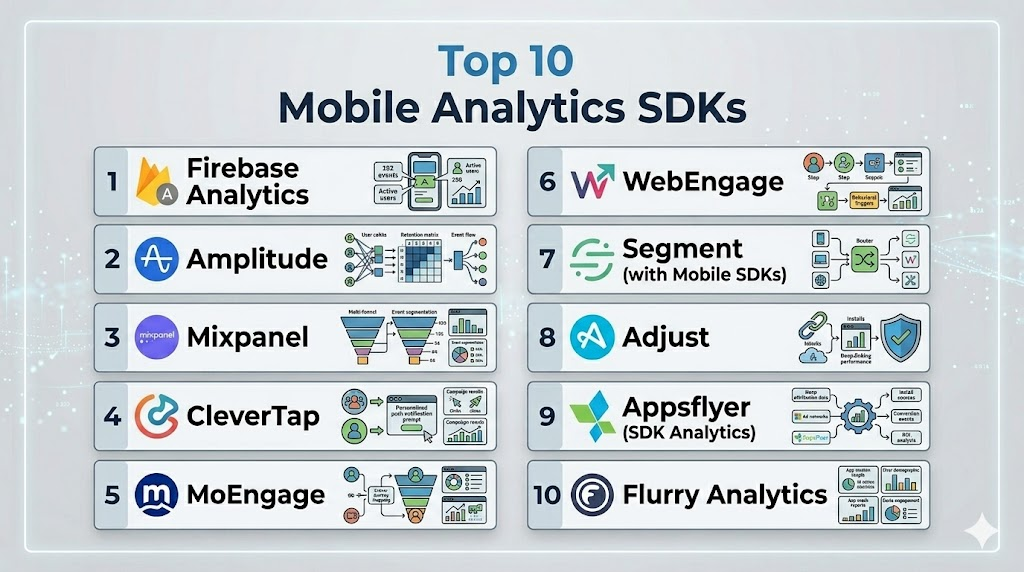
Top 10 Mobile Analytics SDKs
1- Firebase Analytics
Short description: Google’s Firebase Analytics provides free, real-time app analytics for iOS and Android, designed for developers seeking deep integration with Google Cloud and marketing tools.
Key Features
- Event tracking with automatic and custom events.
- Audience segmentation and funnel analysis.
- Integration with Google Ads and BigQuery.
- Cross-platform analytics across Android and iOS.
- AI-powered insights via Google ML.
Pros
- Free tier with robust functionality.
- Strong ecosystem integration with Firebase services.
Cons
- Some advanced reports require BigQuery knowledge.
- Limited offline analytics capabilities.
Platforms / Deployment
- iOS / Android / Web
- Cloud
Security & Compliance
- Not publicly stated
Integrations & Ecosystem
Integrates with Google Ads, BigQuery, Cloud Functions, Crashlytics, and A/B testing tools.
- Google Ads
- BigQuery
- Crashlytics
- Cloud Functions
- Remote Config
Support & Community
Comprehensive documentation, large developer community, multiple tutorials and forums.
2- Amplitude
Short description: Amplitude focuses on product analytics for mobile and web apps, helping teams understand user behavior and optimize retention through cohort and funnel analysis.
Key Features
- Behavioral cohort analysis.
- Retention and churn analytics.
- Real-time dashboards and user segmentation.
- Predictive analytics for engagement trends.
- Integration with experimentation platforms.
Pros
- Advanced analytics tailored for product managers.
- Strong cohort and funnel tracking.
Cons
- Pricing can be high for large event volumes.
- Learning curve for advanced features.
Platforms / Deployment
- iOS / Android / Web
- Cloud
Security & Compliance
- SOC 2 compliant
Integrations & Ecosystem
Supports integration with Segment, Salesforce, Braze, Slack, and data warehouses.
- Segment
- Salesforce
- Braze
- Slack
- Snowflake
Support & Community
Offers enterprise support, extensive documentation, and active community forums.
3- Mixpanel
Short description: Mixpanel is a powerful analytics SDK for mobile and web apps, emphasizing event-based tracking and actionable insights for product and marketing teams.
Key Features
- Event-based analytics.
- Funnels and retention tracking.
- A/B testing integration.
- Predictive analytics with AI-driven recommendations.
- Cohort analysis and segmentation.
Pros
- Flexible event tracking system.
- Strong predictive analytics capabilities.
Cons
- Can be complex for small apps.
- Pricing scales with event volume.
Platforms / Deployment
- iOS / Android / Web
- Cloud
Security & Compliance
- GDPR compliant
Integrations & Ecosystem
Works with Salesforce, HubSpot, Segment, Amplitude, and custom APIs.
- Salesforce
- HubSpot
- Segment
- Amplitude
- Zapier
Support & Community
Documentation, tutorials, dedicated support for enterprise plans, active developer forums.
4- CleverTap
Short description: CleverTap provides analytics and engagement SDKs for mobile apps, combining behavioral insights with marketing automation for retention-focused strategies.
Key Features
- Behavioral segmentation and event tracking.
- Push notifications, in-app messaging, and campaigns.
- Real-time dashboards.
- Cohort analysis and funnel optimization.
- AI-powered recommendations.
Pros
- Combines analytics with engagement tools.
- Strong retention-focused capabilities.
Cons
- Steeper learning curve for integration.
- Some features may require premium plans.
Platforms / Deployment
- iOS / Android / Web
- Cloud
Security & Compliance
- GDPR and SOC 2 compliance
Integrations & Ecosystem
Integrates with CRM, BI tools, marketing automation platforms.
- Salesforce
- HubSpot
- Zapier
- Segment
- Braze
Support & Community
Offers enterprise support, knowledge base, webinars, and active customer community.
5- MoEngage
Short description: MoEngage is a mobile analytics and engagement SDK emphasizing AI-driven personalization and customer lifecycle automation.
Key Features
- Advanced user segmentation.
- Real-time event tracking.
- Push notifications, email, and in-app messaging.
- AI-powered engagement predictions.
- Funnel and retention analysis.
Pros
- AI-driven personalization.
- Omnichannel engagement tools.
Cons
- Advanced features may require high-tier plans.
- Integration can be complex.
Platforms / Deployment
- iOS / Android / Web
- Cloud
Security & Compliance
- Not publicly stated
Integrations & Ecosystem
Supports CRM, marketing, and analytics platforms.
- Salesforce
- Segment
- HubSpot
- Braze
- Zapier
Support & Community
Documentation, tutorials, and enterprise support; moderately active community.
6- WebEngage
Short description: WebEngage combines mobile analytics with customer engagement tools to drive retention and conversion through targeted campaigns.
Key Features
- Event tracking and funnel analytics.
- Real-time user segmentation.
- Push, email, SMS, and in-app campaigns.
- Personalization and automation.
- Retention analysis and A/B testing.
Pros
- Strong engagement and analytics in one SDK.
- Flexible automation workflows.
Cons
- Some analytics features are less advanced than competitors.
- Learning curve for smaller teams.
Platforms / Deployment
- iOS / Android / Web
- Cloud
Security & Compliance
- Not publicly stated
Integrations & Ecosystem
Integrates with CRM, analytics, and marketing tools.
- Salesforce
- Segment
- HubSpot
- Zapier
- Shopify
Support & Community
Documentation, enterprise support, webinars, moderate community presence.
7- Segment (with Mobile SDKs)
Short description: Segment acts as a data pipeline SDK, collecting mobile analytics events and sending them to multiple destinations for reporting and analysis.
Key Features
- Event tracking and data routing.
- Multi-destination support.
- Cross-platform SDKs.
- Data normalization and privacy controls.
- Integrates with over 300 analytics tools.
Pros
- Centralized event collection.
- Reduces SDK overhead for multiple tools.
Cons
- Requires external analytics for deep insights.
- Pricing can scale with event volume.
Platforms / Deployment
- iOS / Android / Web
- Cloud
Security & Compliance
- SOC 2, GDPR, HIPAA (for select plans)
Integrations & Ecosystem
Supports a broad ecosystem of analytics and marketing tools.
- Amplitude
- Mixpanel
- Google Analytics
- Salesforce
- HubSpot
Support & Community
Strong documentation, community forums, and enterprise support.
8- Adjust
Short description: Adjust is a mobile measurement SDK focused on attribution analytics, helping marketers track campaign performance and ROI.
Key Features
- Mobile attribution and performance tracking.
- Fraud prevention and anomaly detection.
- Cohort and retention analytics.
- Deep linking and deferred deep linking.
- GDPR and privacy compliance tools.
Pros
- Excellent attribution analytics.
- Fraud detection capabilities.
Cons
- Less focused on in-app behavior analytics.
- May require additional tools for full product analytics.
Platforms / Deployment
- iOS / Android
- Cloud
Security & Compliance
- SOC 2, GDPR compliant
Integrations & Ecosystem
Integrates with ad networks, BI tools, and marketing platforms.
- Google Ads
- Facebook Ads
- Tableau
- Salesforce
- Branch
Support & Community
Documentation, enterprise support, moderate user community.
9- Appsflyer (SDK Analytics)
Short description: Appsflyer is a mobile attribution and analytics SDK, emphasizing marketing performance measurement and campaign optimization.
Key Features
- Attribution tracking across channels.
- Cohort and retention analytics.
- Fraud detection and protection.
- Deep linking and audience segmentation.
- Marketing automation integrations.
Pros
- Strong marketing analytics.
- Fraud prevention built-in.
Cons
- Limited product behavior analytics.
- Pricing may be high for smaller apps.
Platforms / Deployment
- iOS / Android
- Cloud
Security & Compliance
- SOC 2, GDPR compliant
Integrations & Ecosystem
Supports ad networks, CRM, BI, and analytics tools.
- Google Ads
- Facebook Ads
- Salesforce
- Braze
- Tableau
Support & Community
Enterprise support, documentation, and active marketing-focused community.
10- Flurry Analytics
Short description: Flurry Analytics offers free mobile app analytics, providing basic engagement and retention metrics for iOS and Android developers.
Key Features
- Event tracking and dashboards.
- User segmentation.
- Funnel and retention analysis.
- Audience demographics and device info.
- Basic marketing analytics.
Pros
- Free to use for developers.
- Simple and lightweight SDK.
Cons
- Limited advanced analytics.
- Fewer integrations compared to competitors.
Platforms / Deployment
- iOS / Android
- Cloud
Security & Compliance
- Not publicly stated
Integrations & Ecosystem
Integrates with Yahoo Ad platforms and basic marketing tools.
- Yahoo Ads
- Custom APIs
- Notable SDKs for basic BI
Support & Community
Basic documentation, limited support, smaller community.
Comparison Table (Top 10)
| Tool Name | Best For | Platform(s) Supported | Deployment | Standout Feature | Public Rating |
|---|---|---|---|---|---|
| Firebase Analytics | Developers, SMBs | iOS, Android, Web | Cloud | Free, Google ecosystem | N/A |
| Amplitude | Product teams | iOS, Android, Web | Cloud | Behavioral analytics & cohorts | N/A |
| Mixpanel | Product & marketing | iOS, Android, Web | Cloud | Event-based insights | N/A |
| CleverTap | Retention-focused apps | iOS, Android, Web | Cloud | Engagement + analytics | N/A |
| MoEngage | AI-driven personalization | iOS, Android, Web | Cloud | Lifecycle automation | N/A |
| WebEngage | Engagement + analytics | iOS, Android, Web | Cloud | Omnichannel campaigns | N/A |
| Segment | Data pipeline / multi-tool | iOS, Android, Web | Cloud | Multi-destination routing | N/A |
| Adjust | Marketing attribution | iOS, Android | Cloud | Fraud detection & attribution | N/A |
| Appsflyer | Marketing performance | iOS, Android | Cloud | Campaign optimization | N/A |
| Flurry Analytics | Small developers | iOS, Android | Cloud | Free & lightweight | N/A |
Evaluation & Scoring of Mobile Analytics SDKs
| Tool Name | Core | Ease | Integrations | Security | Performance | Support | Value | Weighted Total |
|---|---|---|---|---|---|---|---|---|
| Firebase Analytics | 9 | 9 | 8 | 7 | 9 | 8 | 10 | 8.8 |
| Amplitude | 9 | 8 | 9 | 8 | 9 | 8 | 7 | 8.5 |
| Mixpanel | 9 | 7 | 8 | 8 | 8 | 8 | 7 | 8.1 |
| CleverTap | 8 | 7 | 8 | 8 | 8 | 7 | 7 | 7.7 |
| MoEngage | 8 | 7 | 7 | 7 | 8 | 7 | 7 | 7.4 |
| WebEngage | 7 | 7 | 7 | 7 | 7 | 7 | 7 | 7.0 |
| Segment | 8 | 8 | 10 | 8 | 8 | 8 | 7 | 8.4 |
| Adjust | 8 | 8 | 8 | 8 | 8 | 7 | 7 | 7.8 |
| Appsflyer | 8 | 8 | 8 | 8 | 8 | 7 | 7 | 7.8 |
| Flurry Analytics | 6 | 9 | 6 | 6 | 7 | 6 | 10 | 7.1 |
Which Mobile Analytics SDK Tool Is Right for You?
Solo / Freelancer
Lightweight, free SDKs like Firebase or Flurry are ideal due to ease of integration and minimal cost.
SMB
Amplitude or Mixpanel offer robust product analytics and engagement insights with scalable pricing.
Mid-Market
CleverTap and MoEngage provide advanced segmentation, retention analysis, and marketing automation.
Enterprise
Segment combined with Amplitude/Mixpanel allows centralized data routing and deep analytics for large apps.
Budget vs Premium
Free tools (Firebase, Flurry) suit budget-conscious teams; premium tools (Amplitude, Mixpanel, MoEngage) provide richer features, AI insights, and integrations.
Feature Depth vs Ease of Use
Choose Firebase or Flurry for simplicity; Mixpanel, Amplitude, and CleverTap for depth with steeper learning curve.
Integrations & Scalability
Segment, Amplitude, and MoEngage excel at scaling and integrating with CRM, marketing, and BI platforms.
Security & Compliance Needs
Ensure tools are GDPR, SOC 2 compliant when handling sensitive user data. Enterprise plans often include advanced security features.
Frequently Asked Questions (FAQs)
- What is the cost of using these SDKs?
Pricing depends on the tool and app scale. Firebase and Flurry offer free tiers, while Amplitude, Mixpanel, and MoEngage use subscription plans based on event volume and features. Enterprises may incur additional costs for advanced analytics. - How difficult is SDK integration?
Integration varies by platform and tool. Firebase and Flurry are straightforward, while Amplitude, CleverTap, and MoEngage may require more configuration. Proper event planning is key for smooth setup. - Can I track users across multiple platforms?
Yes, many SDKs support cross-platform tracking for iOS, Android, and web apps. Segment, Amplitude, and Mixpanel are particularly strong in unifying analytics across devices. - Are these SDKs GDPR and privacy compliant?
Most modern SDKs offer features to support GDPR, SOC 2, and HIPAA compliance. Always verify compliance if handling sensitive user data or operating in regulated regions. - Do these SDKs support real-time analytics?
Yes, real-time event tracking and dashboards are common. Tools like Firebase, Amplitude, and CleverTap provide near-instant reporting for user actions and campaign performance. - Which tool is best for marketing attribution?
Adjust and Appsflyer excel in marketing attribution and ROI tracking. Firebase and Mixpanel offer basic attribution but are more focused on in-app behavior and product analytics. - Can I export analytics data for external BI tools?
Yes, tools like Segment and Amplitude allow exporting to data warehouses or BI platforms. This enables advanced reporting, dashboards, and integration with other business systems. - How do I handle offline user activity?
Most SDKs queue events locally and transmit them once connectivity is restored. Server-side tracking can improve reliability for critical events or high-volume apps. - Is AI analytics available?
Yes, Amplitude, MoEngage, and Firebase provide AI-driven insights, including predictive engagement, churn analysis, and automated recommendations for retention strategies. - What common mistakes should I avoid?
Avoid overloading apps with multiple SDKs, tracking unnecessary events, or neglecting privacy regulations. Planning events, choosing the right SDK, and monitoring performance ensures accurate analytics.
Conclusion
Mobile Analytics SDKs are critical for understanding user behavior, improving app engagement, and making data-driven decisions. Selecting the right SDK depends on app complexity, team size, budget, and integration needs. Lightweight options like Firebase and Flurry suit solo developers or small apps, while Amplitude, Mixpanel, and MoEngage provide advanced analytics for larger teams. Consider cross-platform support, AI-driven insights, and compliance with privacy regulations when choosing. A careful pilot with 2–3 shortlisted SDKs ensures smooth integration and reliable data. Ultimately, the best choice aligns features, scalability, and security with your app growth strategy.

Find Trusted Cardiac Hospitals
Compare heart hospitals by city and services — all in one place.
Explore Hospitals
I am learning about mobile analytics SDKs, and this content helped me understand how different tools can track user behavior and provide insights to improve mobile applications.