Introduction
Motion Capture Software enables organizations to digitally record, analyze, and replicate human movements in 3D environments. These platforms are crucial for industries such as film, gaming, animation, VR/AR, sports analytics, and biomechanics. By capturing precise movement data, they allow studios and research teams to enhance realism, accelerate production, and reduce errors. Real-world examples include capturing actors’ performances for blockbuster films, tracking athletes’ motions to prevent injuries, animating virtual characters for games, and creating immersive VR simulations for training
Buyers evaluating motion capture solutions should consider accuracy, supported capture methods (optical, inertial, markerless), integration with 3D engines and animation software, ease of setup, real-time processing, AI-assisted motion prediction, scalability, security, and cost-effectiveness.
Best for: film studios, game developers, sports analytics teams, VR/AR creators, and research institutions.
Not ideal for: hobbyists with limited budgets or projects that require only basic keyframe animation.
Key Trends in Motion Capture Software
- Increasing adoption of markerless motion capture with AI-driven pose estimation.
- Integration with real-time engines such as Unity and Unreal for instant visualization.
- Enhanced cloud collaboration for distributed teams capturing and reviewing data remotely.
- Expanding use in sports science and biomechanics for performance optimization and injury prevention.
- AI-powered motion prediction and cleanup for faster post-processing.
- Cross-platform support for VR/AR content creation.
- Automated workflows reduce manual cleanup and retargeting time.
- Affordable consumer-grade hardware opens access for small studios.
- Compliance with data privacy standards for biometric motion data.
How We Selected These Tools (Methodology)
- Evaluated market adoption and mindshare in film, gaming, and VR industries.
- Reviewed feature completeness: motion capture types, real-time rendering, AI integration.
- Assessed reliability and performance through user feedback and benchmarks.
- Verified security posture for sensitive motion and biometric data.
- Considered integrations and ecosystem with animation engines and analytics platforms.
- Checked customer fit for different organization sizes: enterprise studios, SMBs, research labs.
- Evaluated ease of onboarding and workflow automation features.
- Balanced hardware requirements vs software capabilities.
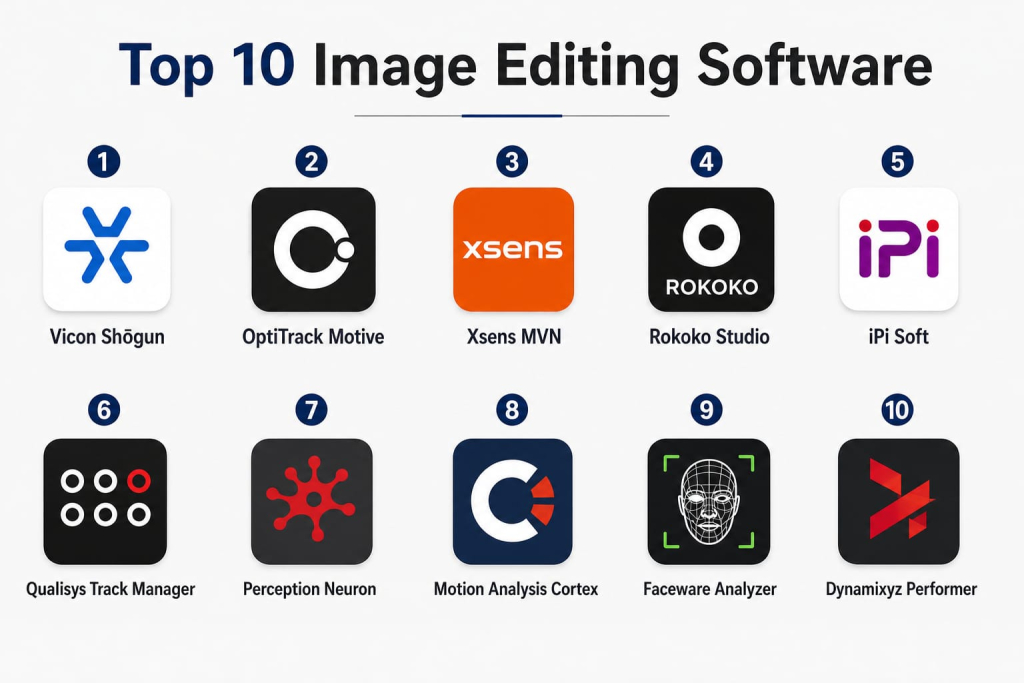
Top 10 Motion Capture Software Tools
1 — Vicon Shōgun
Short description: Vicon Shōgun is a professional optical motion capture solution designed for film, animation, and biomechanics. It provides highly accurate motion capture with multi-camera setups and supports complex full-body and facial capture workflows. Real-world use: capturing stunt and actor performances for high-end films and integrating data into 3D animations for blockbuster projects.
Key Features
- Multi-camera optical tracking
- Real-time streaming to Unity and Unreal
- Retargeting to custom rigs
- AI-assisted marker tracking
- Biomechanical analysis tools
- Facial and full-body capture
- Advanced cleanup utilities
Pros
- Extremely high precision for professional projects
- Seamless integration with production pipelines
- Robust support for complex capture setups
Cons
- High hardware and software cost
- Requires dedicated motion capture studio
- Steep learning curve
Platforms / Deployment
- Windows, macOS
- Hybrid (on-premises + optional cloud)
Security & Compliance
- Not publicly stated
Integrations & Ecosystem
Supports major 3D engines and animation pipelines.
- Unity, Unreal, Maya, MotionBuilder
- Python/SDK for custom integration
Support & Community
Professional support with active user community.
2 — OptiTrack Motive
Short description: OptiTrack Motive offers optical motion capture for animation, VR, and biomechanics, emphasizing precision and real-time workflows. Real-world use: capturing athletic movements for sports research and animating realistic characters in VR games.
Key Features
- Multi-camera optical tracking
- Real-time visualization
- Retargeting for various rigs
- Markerless and marker-based workflows
- Live streaming to engines
- AI-assisted motion cleanup
Pros
- Affordable yet precise
- Real-time preview and streaming
- Flexible studio and field setups
Cons
- Limited AI motion prediction
- Advanced features require extra licensing
- Complex calibration for large volumes
Platforms / Deployment
- Windows
- On-premises
Security & Compliance
- Not publicly stated
Integrations & Ecosystem
- Unity, Unreal, MotionBuilder, Blender
- Python/C++ SDKs
Support & Community
Detailed manuals, forums, and professional support tiers.
3 — Xsens MVN
Short description: Xsens MVN uses wireless inertial motion suits for full-body capture, ideal for on-location filming, VR/AR, and sports analytics. Real-world use: motion analysis of athletes during training sessions and on-set capture for VR productions.
Key Features
- Full-body inertial capture
- Wireless suits for mobility
- Real-time engine streaming
- VR/AR platform support
- Biomechanical motion analysis
- Minimal setup time
Pros
- Highly mobile, ideal for outdoor environments
- Fast setup without cameras
- Accurate full-body capture
Cons
- Inertial drift may need post-processing
- Full suits can be expensive
- Limited facial capture
Platforms / Deployment
- Windows
- Hybrid (suits + software)
Security & Compliance
- Not publicly stated
Integrations & Ecosystem
- Unity, Unreal, MotionBuilder, Maya
- Biomechanics analysis software
Support & Community
Extensive documentation and tutorials.
4 — Rokoko Studio
Short description: Rokoko Studio provides affordable motion capture with markerless and suit-based options, suited for indie studios, animation, and virtual production. Real-world use: small teams capturing body movements for VR indie games and animated shorts.
Key Features
- Rokoko Smartsuit Pro
- Real-time streaming to 3D engines
- Easy retargeting
- AI-assisted motion correction
- Integration with Blender and Maya
- Cloud project sharing
Pros
- Cost-effective for small teams
- Intuitive interface
- Fast onboarding
Cons
- Lower precision compared to high-end systems
- Limited facial capture
- Some advanced analytics unavailable
Platforms / Deployment
- Windows, macOS
- Cloud and on-premises
Security & Compliance
- Not publicly stated
Integrations & Ecosystem
- Unity, Unreal, Blender, Maya
- SDKs and APIs available
Support & Community
Strong online community and tutorials.
5 — iPi Soft
Short description: iPi Soft offers markerless motion capture using multiple cameras or depth sensors, targeting indie game developers and small studios. Real-world use: creating motion for VR games and animating characters for indie films.
Key Features
- Markerless tracking
- Depth sensor support
- Real-time preview
- Retargeting and cleanup
- Skeletal export to engines
- Affordable hardware needs
Pros
- No markers required
- Low cost
- Compatible with consumer hardware
Cons
- Requires good lighting and camera setup
- Lower precision than studio-grade systems
- Limited support for large-scale captures
Platforms / Deployment
- Windows
- On-premises
Security & Compliance
- Not publicly stated
Integrations & Ecosystem
- Unity, Unreal, MotionBuilder, Blender
- FBX/Collada export
Support & Community
User forums and email support.
6 — Qualisys Track Manager
Short description: Qualisys Track Manager is a high-end optical mocap solution for research labs, biomechanics, and film production. Real-world use: analyzing athlete movement in research studies and creating realistic character animation in movies.
Key Features
- Multi-camera optical tracking
- Real-time visualization
- Kinematics and biomechanics analysis
- Advanced retargeting
- AI-assisted motion refinement
- SDKs for custom applications
Pros
- High precision
- Strong analytical capabilities
- Research-grade reliability
Cons
- High cost
- Complex setup
- Requires trained operators
Platforms / Deployment
- Windows
- On-premises
Security & Compliance
- Not publicly stated
Integrations & Ecosystem
- Unity, Unreal, Maya
- Python SDK
- Custom visualization tools
Support & Community
Professional support and research-focused community.
7 — Perception Neuron
Short description: Perception Neuron offers wireless inertial mocap suitable for indie developers and VR content creators. Real-world use: capturing multi-person VR interactions for virtual events or small-scale game studios.
Key Features
- Wireless neuron sensors
- Full-body capture
- Real-time streaming
- Easy retargeting
- Multi-actor support
- Lightweight suits
Pros
- Cost-effective
- Mobile-friendly
- Supports multi-person capture
Cons
- Inertial drift
- Limited facial capture
- Requires calibration
Platforms / Deployment
- Windows, macOS
- Hybrid (local + optional cloud)
Security & Compliance
- Not publicly stated
Integrations & Ecosystem
- Unity, Unreal, Maya, Blender
- SDKs and APIs
Support & Community
User forums and basic support.
8 — Motion Analysis Cortex
Short description: Cortex is optical mocap software for sports, biomechanics, and animation, with an emphasis on accuracy and analytics. Real-world use: analyzing player performance for professional teams and animating motion in animated films.
Key Features
- Multi-camera tracking
- Real-time streaming
- Biomechanical analysis
- Retargeting and cleanup
- AI-assisted motion refinement
- SDKs for integration
Pros
- High accuracy
- Strong analytics
- Lab-ready reliability
Cons
- Expensive
- Complex setup
- Limited portability
Platforms / Deployment
- Windows
- On-premises
Security & Compliance
- Not publicly stated
Integrations & Ecosystem
- Unity, Unreal, Maya
- Python SDK, custom analytics
Support & Community
Professional support and research community.
9 — Faceware Analyzer
Short description: Faceware Analyzer specializes in facial motion capture for games, films, and VR, offering marker-based and markerless tracking. Real-world use: creating realistic facial expressions for game characters and film VFX.
Key Features
- Facial motion tracking
- Real-time preview
- Integrates with body mocap
- AI-assisted expression mapping
- Works with standard video feeds
- Supports Blender, Maya, Unreal
Pros
- Accurate facial capture
- AI-assisted cleanup
- Integrates with body mocap
Cons
- Limited full-body capture
- Expensive for small teams
- Training required for best results
Platforms / Deployment
- Windows
- On-premises
Security & Compliance
- Not publicly stated
Integrations & Ecosystem
- Unity, Unreal, Maya, MotionBuilder
- API for custom integration
Support & Community
Documentation, tutorials, support tiers.
10 — Dynamixyz Performer
Short description: Dynamixyz Performer delivers high-fidelity markerless facial mocap for VFX and animation studios. Real-world use: animating multiple actors’ facial performances in real-time for cinematic productions.
Key Features
- Markerless facial tracking
- Real-time streaming
- Retargeting to rigs
- Integrates with body mocap
- AI-assisted facial cleanup
- Supports multiple actors
Pros
- High accuracy
- Real-time workflows
- Flexible rig support
Cons
- Expensive
- Requires specialized hardware
- Steep learning curve
Platforms / Deployment
- Windows
- On-premises
Security & Compliance
- Not publicly stated
Integrations & Ecosystem
- Unity, Unreal, Maya
- MotionBuilder, Blender
- SDKs for custom pipelines
Support & Community
Professional support with VFX industry community.
Comparison Table (Top 10)
| Tool Name | Best For | Platform(s) Supported | Deployment | Standout Feature | Public Rating |
|---|---|---|---|---|---|
| Vicon Shōgun | Film, Games, Biomechanics | Windows, macOS | Hybrid | Multi-camera optical tracking | N/A |
| OptiTrack Motive | Animation, VR, Biomechanics | Windows | On-premises | Real-time streaming | N/A |
| Xsens MVN | On-location VR/AR, Sports | Windows | Hybrid | Wireless inertial suits | N/A |
| Rokoko Studio | Indie studios, VR | Windows, macOS | Cloud/On-prem | Affordable mobile mocap | N/A |
| iPi Soft | Indie developers, Games | Windows | On-premises | Markerless tracking | N/A |
| Qualisys Track Manager | Research, Biomechanics | Windows | On-premises | High-precision analytics | N/A |
| Perception Neuron | Indie VR, Animation | Windows, macOS | Hybrid | Flexible wireless sensors | N/A |
| Motion Analysis Cortex | Sports, Biomechanics, Animation | Windows | On-premises | Biomechanical analysis | N/A |
| Faceware Analyzer | Facial mocap, Games, VR | Windows | On-premises | Facial motion tracking | N/A |
| Dynamixyz Performer | VFX, Animation Studios | Windows | On-premises | Markerless facial capture | N/A |
Evaluation & Scoring of Motion Capture Software
| Tool Name | Core (25%) | Ease (15%) | Integrations (15%) | Security (10%) | Performance (10%) | Support (10%) | Value (15%) | Weighted Total |
|---|---|---|---|---|---|---|---|---|
| Vicon Shōgun | 10 | 7 | 9 | 7 | 10 | 9 | 6 | 8.6 |
| OptiTrack Motive | 9 | 8 | 8 | 7 | 9 | 8 | 7 | 8.3 |
| Xsens MVN | 9 | 9 | 8 | 7 | 9 | 8 | 7 | 8.4 |
| Rokoko Studio | 7 | 9 | 7 | 6 | 8 | 7 | 9 | 7.8 |
| iPi Soft | 6 | 8 | 7 | 6 | 7 | 7 | 9 | 7.2 |
| Qualisys Track Manager | 10 | 7 | 8 | 7 | 10 | 8 | 6 | 8.4 |
| Perception Neuron | 7 | 8 | 7 | 6 | 8 | 7 | 8 | 7.5 |
| Motion Analysis Cortex | 9 | 7 | 8 | 7 | 9 | 8 | 6 | 8.0 |
| Faceware Analyzer | 8 | 8 | 8 | 7 | 8 | 8 | 7 | 7.9 |
| Dynamixyz Performer | 8 | 7 | 8 | 7 | 8 | 8 | 7 | 7.8 |
Interpretation: Scores help identify software best suited for specific workflows, balancing features, integration, performance, support, and cost.
Which Motion Capture Tool Is Right for You?
Solo / Freelancer
- Rokoko Studio and Perception Neuron offer affordable, mobile-friendly solutions.
SMB
- iPi Soft and Xsens MVN provide professional capabilities with lower hardware requirements.
Mid-Market
- OptiTrack Motive and Motion Analysis Cortex deliver accurate, scalable motion capture with analytics.
Enterprise
- Vicon Shōgun, Qualisys Track Manager, and Dynamixyz Performer provide high-precision, large-scale capture for studios and research labs.
Budget vs Premium
- Budget: Rokoko Studio, Perception Neuron, iPi Soft
- Premium: Vicon Shōgun, Qualisys, Dynamixyz
Feature Depth vs Ease of Use
- Feature depth prioritized: Vicon Shōgun, Qualisys Track Manager
- Ease of use prioritized: Rokoko Studio, Perception Neuron
Integrations & Scalability
- Unity/Unreal integration: supported by all top 10
- Multi-actor or distributed capture: Xsens MVN, Rokoko, Vicon Shōgun
Security & Compliance Needs
- On-premises deployment recommended for sensitive biometric data
Frequently Asked Questions (FAQs)
- What types of motion capture does this software support?
Most tools support optical, inertial, or markerless capture. Choice depends on accuracy, environment, and budget. - Can these platforms integrate with Unity or Unreal Engine?
Yes, nearly all top 10 tools provide SDKs or plugins for real-time streaming and retargeting. - Do I need special hardware?
Optical systems require cameras and markers; inertial systems need suits; some software works with consumer-grade depth sensors. - How difficult is setup and calibration?
Enterprise-grade optical solutions are complex; suit-based or markerless systems are quicker to set up. - Is real-time streaming possible?
Most top tools, including Vicon, Rokoko, and Xsens, allow real-time streaming for VR, animation, or gaming. - Can I capture multiple actors simultaneously?
Yes, some platforms support multi-actor capture, though optical setups may require larger studio space. - Do these tools support facial capture?
Faceware Analyzer and Dynamixyz Performer specialize in facial mocap; others may require plugins or add-on hardware. - Are cloud collaboration features available?
Rokoko and Xsens provide cloud project sharing; enterprise optical systems mostly rely on on-premises deployments. - What are typical costs?
Costs range widely: high-end optical systems are expensive, while indie-oriented solutions are budget-friendly. - Can motion capture data be used for sports analysis?
Yes, many solutions, like Xsens and Cortex, provide biomechanics analytics for athlete performance tracking. - Are there markerless options for small studios?
Yes, iPi Soft and Rokoko offer markerless capture, making them suitable for indie teams. - How is AI used in motion capture?
AI assists in motion cleanup, retargeting, and predicting movements to speed up workflows and improve data accuracy. - Can these tools be integrated into VR/AR projects?
Yes, all top 10 tools support integration with VR/AR engines like Unity and Unreal for immersive content creation.
Conclusion
Motion Capture Software has evolved to provide highly accurate, real-time, and AI-assisted workflows for a wide range of industries. Real-world applications span film production, game development, VR/AR simulations, and sports analytics. Choosing the right tool depends on organization size, budget, required precision, and integration needs. For beginners or small teams, Rokoko Studio and Perception Neuron offer affordable, easy-to-use solutions, while enterprises may benefit from high-end systems like Vicon Shōgun and Qualisys Track Manager. The next steps are: shortlist 2–3 tools based on your workflow, run a pilot to validate capabilities, and verify integration, scalability, and security before scaling.

Find Trusted Cardiac Hospitals
Compare heart hospitals by city and services — all in one place.
Explore Hospitals
Motion capture tools are explained clearly, and the comparison helps in understanding how real-world movements are converted into digital animation in a practical way.