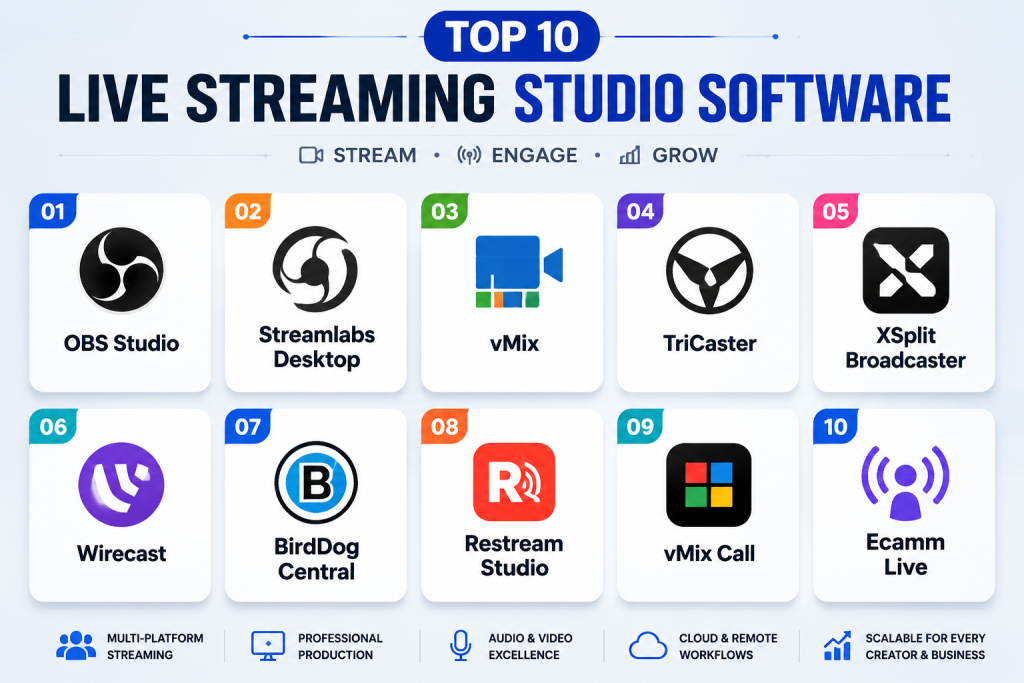
Introduction
Live Streaming Studio Software enables users to produce, manage, and broadcast live video content to audiences across multiple platforms. These tools are crucial for content creators, educators, businesses, and media professionals, providing capabilities like multi-camera switching, live graphics, overlays, audio control, and real-time chat integration. With the increasing demand for interactive, high-quality live video, such software has become a cornerstone for engaging audiences .
Real-world use cases include: streaming webinars or workshops, hosting live events, broadcasting gaming content, producing virtual conferences, and interactive live shows with audience engagement. Buyers should evaluate video quality, multi-platform support, real-time overlays, AI-assisted features, integration with social media, collaboration capabilities, ease of use, security, scalability, and support resources.
Best for: Streamers, educators, businesses, and media production teams needing high-quality, reliable live streaming software.
Not ideal for: Users who only require basic single-camera streams or who prefer simpler, free streaming apps.
Key Trends in Live Streaming Studio Software .
- AI-assisted scene switching and camera automation
- Real-time auto-captioning and transcription
- Enhanced multi-platform simultaneous streaming
- Cloud-based collaboration for remote teams
- Integration with social media and chat platforms
- Advanced analytics and audience insights
- Support for 4K and VR/360-degree streaming
- Subscription-based and scalable licensing models
- Security measures including encryption and access control
- Interactive features for audience engagement and polls
How We Selected These Tools (Methodology)
- Evaluated market adoption and professional use
- Reviewed feature completeness, including video, audio, overlays, and chat integration
- Assessed reliability and performance for high-quality streaming
- Checked security posture, including encryption and access control
- Considered integration capabilities with social media, AI tools, and collaborative platforms
- Evaluated customer fit across solo streamers, SMBs, and enterprise production teams
- Verified cross-platform support and deployment flexibility
- Assessed scalability for large live events
- Reviewed support resources and community engagement
- Balanced cost and subscription flexibility
Top 10 Live Streaming Studio Software Tools
1- OBS Studio
Short description: Open-source, flexible software for professional and hobbyist live streaming and recording.
Key Features
- Multi-scene switching
- Audio mixing and filters
- Stream overlays and transitions
- Plugin support and customization
- Real-time video effects
Pros
- Free and open-source
- Highly customizable
- Wide community support
Cons
- Steeper learning curve
- Limited built-in analytics
Platforms / Deployment
- Windows, macOS, Linux / Desktop
Security & Compliance
- Not publicly stated
Integrations & Ecosystem
- Twitch, YouTube, Facebook Live
- Plugin marketplace
- OBS WebSocket API
Support & Community
- Extensive forums, tutorials, and guides
2- Streamlabs Desktop
Short description: User-friendly live streaming platform with built-in alerts, overlays, and monetization features.
Key Features
- Custom alerts and widgets
- Pre-designed overlay templates
- Multi-platform streaming
- Stream recording and editing
- Donation and tip integration
Pros
- Intuitive interface
- Streamlined setup for beginners
- Integrated monetization
Cons
- Subscription required for full features
- Can be resource-intensive
Platforms / Deployment
- Windows, macOS / Desktop
Security & Compliance
- Not publicly stated
Integrations & Ecosystem
- Twitch, YouTube, Facebook Live
- Merch and donation integrations
- Widgets and third-party apps
Support & Community
- Tutorials, community forums, and live chat
3- vMix
Short description: Professional-grade live production software supporting multi-camera input, overlays, and streaming.
Key Features
- Multi-camera support and switching
- Live graphics and overlays
- 4K streaming
- Recording and instant replay
- Chroma key and transitions
Pros
- High-quality professional streaming
- Flexible input/output options
- Strong for event production
Cons
- Paid license required
- Resource-intensive
Platforms / Deployment
- Windows / Desktop
Security & Compliance
- Not publicly stated
Integrations & Ecosystem
- NDI, RTMP, SDI inputs
- Twitch, YouTube, Facebook Live
- External graphic tools
Support & Community
- Tutorials, documentation, and support tiers
4- XSplit Broadcaster
Short description: Live streaming software for professional and semi-professional broadcasts with plugins and scene management.
Key Features
- Multi-scene switching
- Integrated media sources
- Chroma key and visual effects
- Recording and streaming
- Plugin support
Pros
- User-friendly interface
- Good for gaming and professional streams
- Active plugin ecosystem
Cons
- Paid subscription for premium features
- Windows only
Platforms / Deployment
- Windows / Desktop
Security & Compliance
- Not publicly stated
Integrations & Ecosystem
- Twitch, YouTube, Facebook Live
- Plugin marketplace
- Media source integrations
Support & Community
- Community forums and support resources
5- Wirecast
Short description: Professional streaming platform for live events with multi-camera and advanced production features.
Key Features
- Multi-camera switching
- Live titling and graphics
- Stream recording and encoding
- Instant replay and audio mixing
- Social media distribution
Pros
- Enterprise-grade reliability
- High-quality video production
- Multiple streaming outputs
Cons
- Expensive
- Steep learning curve
Platforms / Deployment
- Windows, macOS / Desktop
Security & Compliance
- Not publicly stated
Integrations & Ecosystem
- Twitch, YouTube, Facebook Live
- NDI integration
- Social media and CDN support
Support & Community
- Tutorials, live support, and documentation
6- Lightstream Studio
Short description: Cloud-based live streaming software for easy setup, overlays, and multi-platform streaming.
Key Features
- Browser-based production
- Integrated overlays and media
- Multi-platform streaming
- Remote guest collaboration
- Cloud recording
Pros
- No installation required
- Easy remote collaboration
- Lightweight and accessible
Cons
- Requires internet connection
- Limited advanced production features
Platforms / Deployment
- Web / Cloud
Security & Compliance
- Not publicly stated
Integrations & Ecosystem
- Twitch, YouTube, Facebook Live
- Remote guest support
- Cloud-based assets
Support & Community
- Documentation and customer support
7- Ecamm Live
Short description: Mac-focused streaming platform with simple multi-camera production and integrated overlays.
Key Features
- Multi-camera support
- Screen sharing and picture-in-picture
- Lower thirds and graphics
- Live streaming to social platforms
- Recording and editing
Pros
- Optimized for Mac
- Easy to use for creators
- Integration with social media
Cons
- macOS only
- Limited advanced effects
Platforms / Deployment
- macOS / Desktop
Security & Compliance
- Not publicly stated
Integrations & Ecosystem
- Facebook Live, YouTube, Twitch
- OBS plugin support
- Stream overlays
Support & Community
- Tutorials, forums, and email support
8- BeLive
Short description: Cloud-based live streaming software for interviews, Q&A, and social engagement.
Key Features
- Guest interviews and split-screen
- Live comments and polls
- Multi-platform streaming
- Branding and overlays
- Recording and replay
Pros
- Interactive audience engagement
- Easy browser-based setup
- Good for interviews and webinars
Cons
- Limited advanced production
- Internet-dependent
Platforms / Deployment
- Web / Cloud
Security & Compliance
- Not publicly stated
Integrations & Ecosystem
- Facebook Live, YouTube
- Remote guest integration
- Social overlays
Support & Community
- Tutorials and customer support
9- StreamYard
Short description: Browser-based streaming software for simple professional live shows and interviews.
Key Features
- Multi-person interviews
- Branding overlays and graphics
- Multi-platform streaming
- Recording and scheduling
- Screen sharing
Pros
- Extremely easy to use
- Works entirely in browser
- No software installation required
Cons
- Limited advanced editing
- Dependent on browser performance
Platforms / Deployment
- Web / Cloud
Security & Compliance
- Not publicly stated
Integrations & Ecosystem
- YouTube, Facebook Live, LinkedIn
- Guest collaboration
- Screen sharing
Support & Community
- Online guides and support
10- vMix Social
Short description: Live streaming software with integrated social media interactions and overlays.
Key Features
- Multi-camera input and switching
- Social media comment overlays
- Stream recording
- Live graphics and titles
- NDI integration
Pros
- Professional multi-platform streaming
- Strong social media integration
- Real-time overlays
Cons
- Windows only
- Paid license required
Platforms / Deployment
- Windows / Desktop
Security & Compliance
- Not publicly stated
Integrations & Ecosystem
- Twitch, YouTube, Facebook Live
- NDI and OBS compatibility
- Social overlays
Support & Community
- Tutorials, forums, and official support
Comparison Table (Top 10)
| Tool Name | Best For | Platform(s) Supported | Deployment | Standout Feature | Public Rating |
|---|---|---|---|---|---|
| OBS Studio | Free, open-source | Windows, macOS, Linux | Desktop | Multi-scene switching | N/A |
| Streamlabs Desktop | Beginner-friendly streaming | Windows, macOS | Desktop | Alerts, overlays, monetization | N/A |
| vMix | Professional event streaming | Windows | Desktop | Multi-camera input, 4K | N/A |
| XSplit Broadcaster | Semi-professional streaming | Windows | Desktop | Plugins and scene management | N/A |
| Wirecast | Enterprise-grade streaming | Windows, macOS | Desktop | Multi-camera production | N/A |
| Lightstream Studio | Cloud-based streaming | Web | Cloud | Remote guest collaboration | N/A |
| Ecamm Live | Mac-focused streaming | macOS | Desktop | Multi-camera and overlays | N/A |
| BeLive | Interactive webinars/interviews | Web | Cloud | Social engagement and polls | N/A |
| StreamYard | Browser-based easy streaming | Web | Cloud | Multi-person interviews | N/A |
| vMix Social | Social media integrated streams | Windows | Desktop | Comment overlays and NDI | N/A |
Evaluation & Scoring
| Tool Name | Core | Ease | Integrations | Security | Performance | Support | Value | Weighted Total |
|---|---|---|---|---|---|---|---|---|
| OBS Studio | 9 | 7 | 8 | 7 | 8 | 7 | 10 | 8.0 |
| Streamlabs Desktop | 8 | 9 | 7 | 6 | 7 | 7 | 8 | 7.7 |
| vMix | 9 | 7 | 8 | 7 | 9 | 8 | 7 | 8.1 |
| XSplit Broadcaster | 8 | 8 | 7 | 6 | 8 | 7 | 7 | 7.5 |
| Wirecast | 9 | 7 | 8 | 7 | 8 | 8 | 6 | 7.8 |
| Lightstream Studio | 8 | 9 | 7 | 6 | 7 | 7 | 7 | 7.5 |
| Ecamm Live | 8 | 9 | 6 | 6 | 7 | 7 | 7 | 7.3 |
| BeLive | 7 | 9 | 6 | 6 | 6 | 7 | 6 | 6.7 |
| StreamYard | 7 | 10 | 6 | 6 | 6 | 7 | 6 | 6.9 |
| vMix Social | 9 | 7 | 8 | 7 | 8 | 7 | 7 | 7.7 |
Which Tool Is Right for You?
Solo / Freelancer
- OBS Studio, Streamlabs Desktop, and StreamYard are excellent for beginners or small solo projects.
SMB
- Lightstream Studio and Ecamm Live provide easy multi-platform streaming and remote collaboration.
Mid-Market
- XSplit Broadcaster, BeLive, and vMix Social suit growing teams needing audience interaction and social features.
Enterprise
- Wirecast and vMix are best for professional-grade live events, high production quality, and multi-camera setups.
Budget vs Premium
- Budget: OBS Studio, Streamlabs, StreamYard
- Premium: Wirecast, vMix, XSplit
Feature Depth vs Ease of Use
- Feature-heavy: vMix, Wirecast
- Ease of use: StreamYard, Lightstream, Streamlabs
Integrations & Scalability
- Enterprise platforms provide multi-platform streaming, remote guest access, and social media integrations.
Security & Compliance Needs
- Choose solutions offering secure access, encryption, and cloud backups, particularly for enterprise or sensitive streams.
Frequently Asked Questions (FAQs)
1. Which tool is best for beginners?
Answer: OBS Studio, Streamlabs Desktop, and StreamYard offer intuitive interfaces, free or low-cost access, and easy setup.
2. Can I stream to multiple platforms simultaneously?
Answer: Yes, most platforms like Lightstream, Wirecast, and vMix support multi-platform streaming.
3. Do these platforms support remote guests?
Answer: Lightstream, BeLive, and StreamYard provide remote guest integration with live audio and video.
4. Are cloud-based solutions reliable?
Answer: Cloud-based platforms generally provide high uptime and easy access, but stable internet is critical.
5. Can I use overlays and graphics?
Answer: Yes, all major platforms support graphics, overlays, and lower-thirds to enhance live streams.
6. Are these tools suitable for enterprise events?
Answer: vMix and Wirecast provide professional multi-camera switching, high resolution, and reliability for enterprise production.
7. Do these platforms offer analytics?
Answer: Many offer basic to advanced analytics, including viewer metrics, engagement stats, and geographic insights.
8. Can I monetize my streams?
Answer: Some platforms, like Streamlabs Desktop, integrate with donations, ads, and subscriptions for monetization.
9. Are there cross-platform options?
Answer: Yes, OBS Studio and Streamlabs support Windows, macOS, and Linux, while most cloud platforms are accessible via browser.
10. How steep is the learning curve?
Answer: Platforms like OBS Studio and vMix offer powerful features but require time to learn; StreamYard and Lightstream are more beginner-friendly.
Conclusion
Choosing the right Live Streaming Studio Software depends on your team size, production needs, and technical expertise. Beginners can start with OBS Studio, Streamlabs Desktop, or StreamYard for simplicity and low cost. SMBs and mid-market teams benefit from Lightstream, Ecamm Live, and BeLive for multi-platform streaming and remote collaboration. Enterprises or professional event producers should consider vMix, Wirecast, or XSplit for multi-camera production, high-quality video, and robust streaming features.

Find Trusted Cardiac Hospitals
Compare heart hospitals by city and services — all in one place.
Explore Hospitals
Live streaming studio software is explained clearly, and the comparison helps in understanding how different tools support streaming, recording, and real-time content creation workflows.