Introduction
Archiving Tools help organizations store, manage, and retain historical data such as emails, documents, chat messages, business records, and digital communications in a secure, searchable, and compliant format. These tools ensure that critical information is preserved for long-term access while reducing primary storage load and meeting regulatory requirements. In today’s digital-first environment, businesses generate massive volumes of structured and unstructured data across email systems, collaboration platforms, cloud applications, and enterprise systems. Archiving solutions have become essential for compliance, legal discovery, data governance, and cost optimization. They also help organizations respond quickly to audits, investigations, and internal data requests.
Real-world use cases include:
- Email retention for legal and compliance requirements
- Long-term storage of business communications
- eDiscovery for legal investigations
- Reducing primary storage costs
- Governance of enterprise data across cloud systems
What buyers should Evaluate:
- Retention and compliance capabilities
- Search and eDiscovery performance
- Security and encryption standards
- Cloud vs on-premise deployment options
- Integration with communication platforms
- Scalability for growing data volumes
- Policy management and automation
- Data retrieval speed and indexing
- Audit and reporting capabilities
- Cost efficiency and storage optimization
Best for: Enterprises, financial institutions, healthcare organizations, government agencies, and regulated industries needing secure, long-term data retention and compliance-ready archiving.
Not ideal for: Small teams with minimal compliance requirements or businesses that rely only on short-term file storage without governance or audit needs.
Key Trends in Archiving Tools
- Cloud-native archiving is replacing traditional on-premise systems
- AI-powered search is improving data retrieval and eDiscovery
- Regulatory compliance requirements are increasing globally
- Unified data governance platforms are becoming standard
- Communication archiving is expanding beyond email (chat, voice, video)
- Immutable storage is becoming essential for compliance
- Integration with collaboration tools is increasing rapidly
- Automated retention policies are reducing manual governance work
- Security-first archiving with zero trust architecture is rising
- Cost-optimized cold storage tiers are becoming more common
How We Selected These Tools (Methodology)
- Market adoption and enterprise usage
- Compliance and regulatory readiness
- Archiving depth (email, files, communication data)
- Search and retrieval performance
- Security architecture and encryption standards
- Integration ecosystem strength
- Scalability across enterprise workloads
- Cloud and hybrid deployment flexibility
- eDiscovery and legal hold capabilities
- Overall reliability and operational maturity
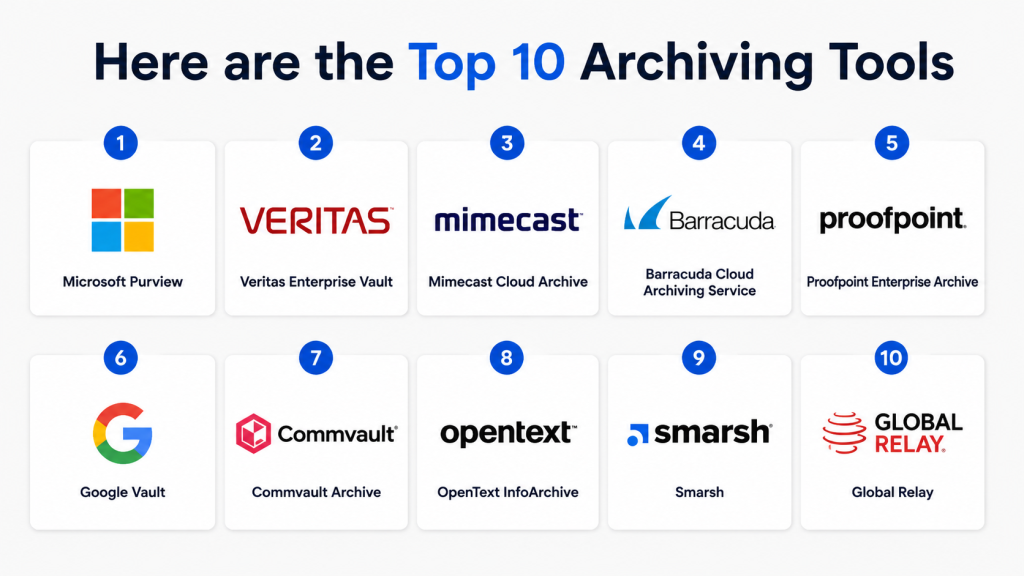
Top 10 Archiving Tools
1- Microsoft Purview
Short description: Cloud-native enterprise archiving and compliance platform for managing data retention, eDiscovery, and governance across Microsoft 365 environments. It is widely used for enterprise-scale regulatory compliance and information lifecycle management.
Key Features
- Data retention and lifecycle policies
- eDiscovery and legal hold
- Email and file archiving
- Compliance monitoring
- Sensitive data classification
- Audit-ready reporting
- Microsoft 365 integration
Pros
- Strong Microsoft ecosystem integration
- High compliance capability
- Scalable for large enterprises
Cons
- Complex setup and configuration
- Best suited for Microsoft environments
Platforms / Deployment
Cloud / Hybrid
Security & Compliance
SSO/SAML, MFA, encryption, RBAC, audit logs
Integrations & Ecosystem
Microsoft ecosystem integration
- Microsoft 365
- Teams
- Exchange
- SharePoint
Support & Community
Strong enterprise documentation and global support ecosystem
2- Veritas Enterprise Vault
Short description: Enterprise-grade archiving platform designed for email, file, and content retention with strong compliance and legal discovery capabilities. It is widely adopted in regulated industries requiring long-term data governance.
Key Features
- Email archiving and retention
- File and content storage
- eDiscovery and legal hold
- Compliance automation
- Advanced search indexing
- Storage optimization
- Policy-based retention
Pros
- Mature enterprise solution
- Strong compliance support
- Highly scalable architecture
Cons
- Complex deployment process
- Traditional interface experience
Platforms / Deployment
Cloud / On-premise / Hybrid
Security & Compliance
Encryption, RBAC, audit logs, compliance policies
Integrations & Ecosystem
Enterprise IT integration
- Microsoft Exchange
- Office 365
- Storage systems
- Enterprise databases
Support & Community
Strong enterprise-level support and consulting ecosystem
3- Mimecast Cloud Archive
Short description: Cloud-based email archiving platform focused on secure retention, compliance, eDiscovery, and email continuity for modern enterprises. It is widely used for secure email lifecycle management.
Key Features
- Email archiving and retention
- Advanced search and retrieval
- eDiscovery tools
- Email continuity
- Compliance reporting
- Policy management
- Security integration
Pros
- Strong cloud-native design
- Easy search and retrieval
- Good security integration
Cons
- Mostly email-focused
- Advanced features need setup
Platforms / Deployment
Cloud
Security & Compliance
Encryption, MFA, RBAC, audit logs
Integrations & Ecosystem
Email and security ecosystem integration
- Microsoft 365
- Google Workspace
- Email gateways
- Security tools
Support & Community
Strong enterprise customer support and documentation
4- Barracuda Cloud Archiving Service
Short description: Cloud archiving solution designed for email retention, compliance management, and long-term storage optimization for SMBs and enterprises. It simplifies archiving with cloud-based deployment.
Key Features
- Email archiving
- Retention policy management
- eDiscovery search
- Cloud storage management
- Compliance reporting
- Automated archiving rules
- Data recovery support
Pros
- Easy deployment
- Cost-effective solution
- Good SMB suitability
Cons
- Limited advanced governance features
- Mostly email-centric
Platforms / Deployment
Cloud
Security & Compliance
Encryption, RBAC, audit logs
Integrations & Ecosystem
Cloud email ecosystem integration
- Microsoft 365
- Google Workspace
- Email security systems
Support & Community
Good SMB and mid-market support structure
5- Proofpoint Enterprise Archive
Short description: Enterprise compliance and archiving platform focused on secure retention, regulatory compliance, and communication monitoring for large organizations. It is widely used in regulated industries.
Key Features
- Email archiving
- Compliance monitoring
- eDiscovery workflows
- Legal hold management
- Risk detection
- Secure search
- Retention policies
Pros
- Strong compliance capabilities
- Excellent for regulated industries
- Advanced security features
Cons
- High cost
- Complex configuration
Platforms / Deployment
Cloud / Hybrid
Security & Compliance
Encryption, RBAC, audit logs, compliance controls
Integrations & Ecosystem
Enterprise communication integration
- Microsoft 365
- Email systems
- Security platforms
Support & Community
Enterprise-grade compliance support ecosystem
6- Google Vault
Short description: Archiving and eDiscovery platform for Google Workspace that provides retention, legal hold, and secure data governance. It is widely used by organizations relying on Google ecosystem.
Key Features
- Email archiving
- Data retention policies
- Legal hold
- eDiscovery search
- Workspace data export
- Compliance tools
- Policy management
Pros
- Simple to use
- Strong Google Workspace integration
- Cost-effective
Cons
- Limited outside Google ecosystem
- Basic advanced governance
Platforms / Deployment
Cloud
Security & Compliance
Encryption, RBAC, audit logs
Integrations & Ecosystem
Google Workspace ecosystem
- Gmail
- Drive
- Google Chat
- Google Meet
Support & Community
Standard Google enterprise support
7- Commvault Archive
Short description: Enterprise archiving platform designed for long-term data retention, compliance management, and storage optimization across hybrid and multi-cloud environments.
Key Features
- Data archiving workflows
- Cloud retention management
- eDiscovery support
- Data lifecycle policies
- Backup integration
- Compliance reporting
- Intelligent indexing
Pros
- Strong enterprise scalability
- Advanced data lifecycle control
- Multi-cloud support
Cons
- Complex setup
- Requires expertise
Platforms / Deployment
Cloud / Hybrid
Security & Compliance
Encryption, RBAC, audit logs, compliance controls
Integrations & Ecosystem
Enterprise infrastructure integration
- AWS
- Azure
- VMware
- Enterprise storage
Support & Community
Strong enterprise support and professional services
8- OpenText InfoArchive
Short description: Enterprise-grade archiving platform focused on legacy data preservation, compliance management, and long-term enterprise data governance. It is widely used in large regulated organizations.
Key Features
- Legacy data archiving
- Compliance retention
- Structured/unstructured data support
- Data governance tools
- Search and retrieval
- Long-term storage
- Policy management
Pros
- Strong enterprise governance
- Excellent legacy system support
- Highly scalable
Cons
- Complex deployment
- Enterprise-only focus
Platforms / Deployment
Cloud / Hybrid / On-premise
Security & Compliance
Encryption, RBAC, audit logs
Integrations & Ecosystem
Enterprise IT systems integration
- ERP systems
- Databases
- Cloud platforms
Support & Community
Enterprise consulting and support ecosystem
9- Smarsh
Short description: Compliance-focused archiving platform designed for capturing and retaining digital communications across multiple channels for regulated industries like finance and government.
Key Features
- Communication archiving
- Multi-channel data capture
- Compliance monitoring
- eDiscovery tools
- Search and analytics
- Retention policies
- Regulatory reporting
Pros
- Strong compliance focus
- Multi-channel archiving support
- High regulatory reliability
Cons
- Complex setup
- Premium pricing
Platforms / Deployment
Cloud
Security & Compliance
Encryption, RBAC, audit logs, compliance controls
Integrations & Ecosystem
Communication ecosystem integration
- Email platforms
- Messaging systems
- Financial systems
Support & Community
Strong regulated-industry support ecosystem
10- Global Relay
Short description: Enterprise archiving and surveillance platform designed for regulated industries requiring secure communication retention, monitoring, and compliance reporting.
Key Features
- Communication archiving
- Compliance surveillance
- eDiscovery tools
- Multi-channel capture
- Secure retention storage
- Audit reporting
- Regulatory compliance workflows
Pros
- Strong compliance coverage
- Excellent financial industry fit
- Multi-channel support
Cons
- High cost
- Complex enterprise setup
Platforms / Deployment
Cloud
Security & Compliance
Encryption, RBAC, audit logs, compliance monitoring
Integrations & Ecosystem
Enterprise communication integration
- Email systems
- Messaging platforms
- Financial systems
Support & Community
Enterprise compliance-focused support services
Comparison Table
| Tool Name | Best For | Platform(s) Supported | Deployment | Standout Feature | Public Rating |
|---|---|---|---|---|---|
| Microsoft Purview | Enterprise compliance | Microsoft ecosystem | Cloud | Data governance | N/A |
| Veritas Enterprise Vault | Large enterprises | Windows/Linux | Hybrid | Mature archiving | N/A |
| Mimecast | Email archiving | Email platforms | Cloud | Email continuity | N/A |
| Barracuda | SMB archiving | Email systems | Cloud | Simple deployment | N/A |
| Proofpoint | Regulated industries | Enterprise systems | Cloud/Hybrid | Compliance strength | N/A |
| Google Vault | Workspace users | Google ecosystem | Cloud | Workspace integration | N/A |
| Commvault | Enterprise data lifecycle | Multi-cloud | Cloud/Hybrid | Data lifecycle mgmt | N/A |
| OpenText InfoArchive | Legacy systems | Enterprise systems | Hybrid | Legacy archiving | N/A |
| Smarsh | Financial compliance | Communication platforms | Cloud | Multi-channel archiving | N/A |
| Global Relay | Regulated industries | Communication systems | Cloud | Compliance surveillance | N/A |
Evaluation & Scoring
| Tool | Core | Ease | Integrations | Security | Performance | Support | Value | Weighted Total |
|---|---|---|---|---|---|---|---|---|
| Microsoft Purview | 9.2 | 8.5 | 9.5 | 9.5 | 9.0 | 9.0 | 8.8 | 9.1 |
| Veritas Enterprise Vault | 9.0 | 7.5 | 8.5 | 9.0 | 8.8 | 8.8 | 8.2 | 8.6 |
| Mimecast | 8.8 | 8.8 | 9.0 | 9.0 | 8.7 | 8.8 | 8.7 | 8.8 |
| Barracuda | 8.5 | 9.0 | 8.5 | 8.7 | 8.5 | 8.6 | 9.0 | 8.7 |
| Proofpoint | 9.0 | 8.0 | 9.0 | 9.2 | 8.8 | 8.9 | 8.3 | 8.8 |
| Google Vault | 8.4 | 9.2 | 8.8 | 8.8 | 8.5 | 8.6 | 9.1 | 8.7 |
| Commvault | 9.1 | 7.8 | 9.0 | 9.0 | 9.0 | 8.8 | 8.4 | 8.8 |
| OpenText InfoArchive | 8.9 | 7.5 | 8.7 | 9.0 | 8.6 | 8.7 | 8.0 | 8.5 |
| Smarsh | 9.0 | 8.0 | 8.9 | 9.2 | 8.8 | 8.9 | 8.2 | 8.8 |
| Global Relay | 9.0 | 7.9 | 8.8 | 9.2 | 8.8 | 8.8 | 8.1 | 8.7 |
Which Archiving Tool Is Right for You?
Solo / Freelancer
Google Vault, Barracuda
SMB
Barracuda, Mimecast
Mid-Market
Proofpoint, Smarsh
Enterprise
Microsoft Purview, Veritas, Commvault, OpenText
Budget vs Premium
- Budget: Google Vault, Barracuda
- Premium: Proofpoint, Global Relay, OpenText
Feature Depth vs Ease of Use
- Easy: Google Vault, Barracuda
- Advanced: Veritas, Commvault, OpenText
Integrations & Scalability
- Microsoft ecosystem: Purview
- Multi-channel leaders: Smarsh, Global Relay
Security & Compliance Needs
- High compliance: Proofpoint, Global Relay
- Enterprise governance: Microsoft Purview, OpenText
Frequently Asked Questions (FAQs)
1. What are Archiving Tools?
Archiving Tools are software solutions that store and manage long-term business data such as emails, documents, chats, and communications.
They ensure data is securely preserved for compliance, legal, and operational needs.
These tools also make it easy to search and retrieve historical information when required.
They are widely used in enterprise and regulated industries.
2. Why do businesses need archiving tools?
Businesses use archiving tools to meet legal and regulatory compliance requirements.
They help retain important records for audits, investigations, and governance purposes.
They also reduce storage pressure on primary systems by moving old data to secure archives.
This improves performance, security, and cost efficiency.
3. Do archiving tools only store email data?
No, modern archiving tools store much more than email data.
They can archive chats, files, collaboration data, voice records, and SaaS application data.
This ensures complete visibility across all communication channels.
It helps organizations maintain unified and searchable digital records.
4. What is eDiscovery in archiving systems?
eDiscovery is the ability to search, locate, and retrieve archived data for legal or compliance purposes.
It is commonly used during audits, legal cases, or internal investigations.
This feature allows organizations to quickly access relevant historical data.
It significantly improves legal response time and compliance readiness.
5. Who should use Archiving Tools?
Archiving tools are essential for enterprises, government agencies, healthcare providers, and financial institutions.
Any organization that must follow strict compliance or data retention policies benefits from them.
They are also useful for mid-sized companies handling growing data volumes.
Industries with heavy regulatory requirements rely on them heavily.
6. Are cloud archiving tools better than on-premise solutions?
Cloud archiving tools are easier to deploy, scale, and maintain compared to on-premise systems.
They offer flexible storage, automatic updates, and remote access capabilities.
However, on-premise solutions provide more control over sensitive data.
The best choice depends on compliance, security, and infrastructure needs.
7. How secure are Archiving Tools?
Most archiving tools use encryption, role-based access control, and audit logging to protect data.
They are designed to meet strict security and compliance standards.
Advanced platforms also include ransomware protection and immutable storage.
Security levels vary depending on the vendor and deployment model.
8. Can archived data be modified or deleted?
In most enterprise archiving systems, data cannot be modified or deleted due to compliance rules.
This ensures data integrity and prevents unauthorized changes.
Many systems use immutable storage to protect records.
This is important for legal and regulatory compliance requirements.
9. How do archiving tools improve business efficiency?
They reduce the load on primary systems by storing old data in optimized storage.
This improves system performance and reduces operational costs.
They also simplify search and retrieval of historical information.
Overall, they help businesses operate more efficiently and securely.
10. How should I choose the right archiving tool?
You should evaluate compliance needs, data volume, integration requirements, and security features.
Also consider scalability, ease of use, and deployment options (cloud or hybrid).
Industry-specific requirements like finance or healthcare compliance are important.
The right tool depends on your business size and regulatory environment.
Conclusion
Archiving Tools are essential for modern enterprises that need secure long-term data retention, regulatory compliance, and fast information retrieval. As digital communication continues to grow across email, chat, and cloud platforms, archiving systems ensure organizations remain audit-ready and legally compliant. Microsoft Purview leads enterprise governance, while tools like Mimecast and Barracuda simplify SMB adoption. For regulated industries, Smarsh and Global Relay provide strong compliance capabilities. Ultimately, the right choice depends on your ecosystem, compliance needs, and scale of data management. A well-planned archiving strategy improves security, reduces storage cost, and strengthens organizational governance across all industries.

Find Trusted Cardiac Hospitals
Compare heart hospitals by city and services — all in one place.
Explore Hospitals
I learned how archiving tools help preserve important data for long-term storage while improving compliance and reducing storage costs. I’d like to explore more about how businesses choose between cloud-based and on-premise archiving solutions.