Introduction
Webinar Platforms help businesses, educators, creators, marketers, trainers, and organizations host live, automated, on-demand, and hybrid online presentations. These tools usually include registration pages, email reminders, live video delivery, screen sharing, chat, polls, Q&A, recordings, attendee analytics, lead capture, and integrations with CRM or marketing systems. Webinars matter because teams now use them for product demos, lead generation, customer education, employee training, thought leadership, onboarding, and community engagement. A strong webinar platform can improve audience reach, automate communication, capture attendee data, and turn online sessions into measurable business outcomes.
Real World Use Cases:
- Hosting product demos and sales webinars
- Running customer onboarding and training sessions
- Delivering educational workshops and certification programs
- Creating automated or on-demand webinars for lead generation
- Managing Q&A, polls, chat, and audience engagement
- Tracking attendance, engagement, and conversion signals
Evaluation Criteria for Buyers:
- Live webinar quality and reliability
- Registration page and email automation
- Engagement tools such as polls, Q&A, chat, and surveys
- Recording, replay, and on-demand webinar support
- CRM and marketing automation integrations
- Analytics, attendee tracking, and lead scoring
- Branding and customization options
- Presenter and moderator controls
- Security, privacy, and access controls
- Pricing fit for audience size and webinar frequency
Best for: Marketing teams, SaaS companies, trainers, educators, consultants, sales teams, HR teams, agencies, nonprofits, and enterprises that need structured online presentations, audience engagement, lead generation, or recurring training workflows.
Not ideal for: Very small internal meetings or casual video calls may not need a dedicated webinar platform. A basic video conferencing tool may be enough when there is no registration, email automation, lead tracking, replay library, or audience analytics requirement.
Key Trends in Webinar Platforms
- AI-assisted webinar production is growing: Platforms are adding AI support for summaries, transcripts, content clips, email suggestions, audience insights, and follow-up recommendations.
- On-demand webinars are becoming more important: Businesses increasingly reuse live webinar recordings as evergreen lead generation assets, training modules, and customer education content.
- Automated webinars support scalable marketing: Teams use scheduled, simulated-live, or recurring webinars to reach audiences across time zones without presenting live every time.
- Engagement quality matters more than attendance: Buyers now evaluate chat, Q&A, polls, surveys, reactions, handouts, and audience interaction instead of only registration numbers.
- CRM and marketing automation integrations are essential: Webinar data must flow into lead scoring, nurturing, sales follow-up, campaign reporting, and customer lifecycle workflows.
- Security and privacy controls are under review: Companies want password protection, authenticated access, registration controls, role-based access, data retention, and secure recording management.
- Shorter webinar formats are increasing: Brands are using 20-minute demos, quick expert sessions, customer panels, and micro-webinars instead of only long presentations.
- Hybrid webinar workflows are expanding: Some teams combine in-person presentations with online audiences, livestreams, chat moderation, and post-event recordings.
- Sales and marketing alignment is tighter: Webinar platforms are now expected to help identify high-intent attendees and trigger sales follow-up based on engagement.
- Better content repurposing is becoming standard: Recordings, transcripts, clips, Q&A summaries, and attendee questions are reused for blogs, emails, social posts, and knowledge bases.
How We Selected These Tools
The tools below were selected using practical webinar software evaluation logic:
- Market recognition among marketers, educators, sales teams, trainers, creators, and enterprise users
- Ability to support live, automated, on-demand, recurring, and hybrid webinar workflows
- Streaming reliability and presenter experience
- Registration, email reminder, and attendee management capabilities
- Engagement features such as polls, Q&A, chat, surveys, handouts, and reactions
- Reporting depth for attendance, engagement, drop-off, replay views, and lead quality
- CRM, marketing automation, analytics, and sales tool integration potential
- Usability for hosts, moderators, presenters, and attendees
- Scalability for small sessions, large webinars, and recurring programs
- Security and administration maturity where publicly stated or expected
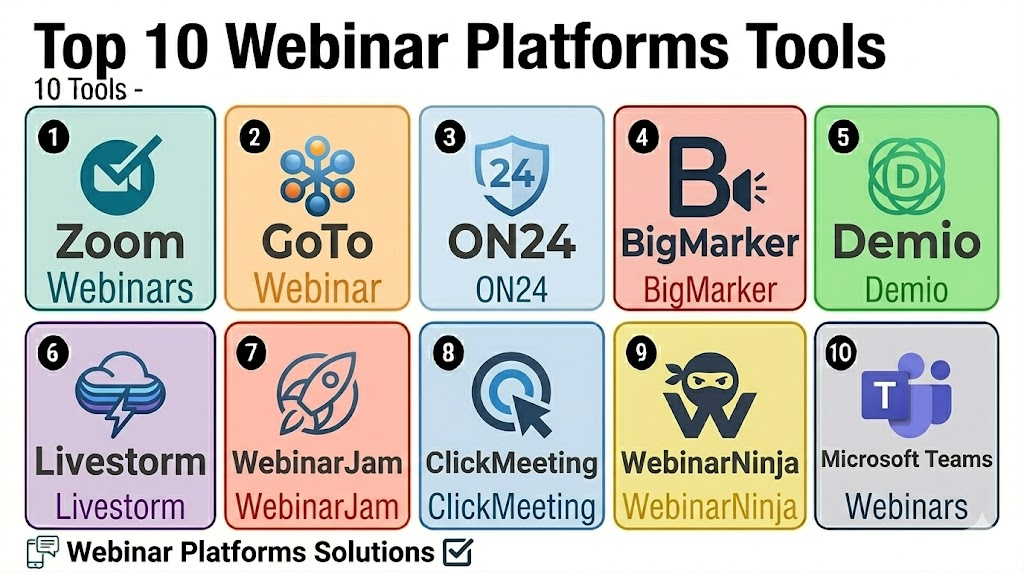
Top 10 Webinar Platforms Tools
1- Zoom Webinars
Short description: Zoom Webinars is a widely used webinar solution built on the familiar Zoom ecosystem. It is useful for businesses, educators, marketers, and trainers that need reliable live webinars with registration, panelists, Q&A, polls, and recordings.
Key Features
- Live webinar hosting with panelist and attendee roles
- Registration and attendee management
- Q&A, chat, polls, and reactions
- Recording and replay support
- Screen sharing and presenter controls
- Large audience support depending on plan
- Integration with calendars, CRM, and business tools
Pros
- Familiar experience for many hosts and attendees
- Reliable for live presentations, training, and corporate webinars
- Strong fit for organizations already using Zoom
Cons
- Advanced marketing automation may require integrations
- Branding and landing page customization may be limited compared with webinar marketing tools
- Large-scale or highly produced events may need additional event software
Platforms / Deployment
Web / Windows / macOS / Linux / iOS / Android
Cloud
Security & Compliance
Varies / N/A. Buyers should validate SSO, MFA, waiting rooms, passcodes, role permissions, recording controls, encryption, and account-level security settings directly.
Integrations & Ecosystem
Zoom Webinars works well for teams that already use Zoom for meetings and want to extend into structured webinar delivery.
- Calendar integrations
- CRM workflows
- Marketing automation tools
- Learning and training systems
- Recording and content workflows
- Analytics and reporting exports
Support & Community
Zoom provides documentation, training resources, community support, and customer support options. Support depth may vary by plan and account size.
2- GoTo Webinar
Short description: GoTo Webinar is a long-standing webinar platform used by businesses, educators, trainers, and marketers for professional online presentations. It supports registration, reminders, polls, surveys, attendee reports, recordings, and reliable live delivery.
Key Features
- Live webinar hosting and attendee registration
- Automated email reminders and follow-ups
- Polls, surveys, Q&A, and handouts
- Webinar recordings and replay access
- Attendee reports and engagement analytics
- Presenter and organizer controls
- Support for recurring webinar programs
Pros
- Strong fit for professional business webinars
- Reliable for recurring training, marketing, and education sessions
- Practical reporting for attendance and engagement
Cons
- Interface may feel less modern than some newer platforms
- Advanced event branding may require another tool
- Marketing teams may need integrations for deeper lead nurturing
Platforms / Deployment
Web / Windows / macOS / iOS / Android
Cloud
Security & Compliance
Varies / N/A. Buyers should confirm access controls, attendee privacy settings, recording controls, encryption, and account administration requirements directly.
Integrations & Ecosystem
GoTo Webinar fits teams that need dependable webinar delivery with attendee data and follow-up workflows.
- CRM integrations
- Marketing automation tools
- Calendar workflows
- Email follow-up workflows
- Reporting exports
- Training and education workflows
Support & Community
GoTo provides documentation, support resources, and customer service options. Support depth may vary by plan and organization size.
3- ON24
Short description: ON24 is a digital engagement and webinar platform used by enterprise marketing, sales, and training teams. It is strong for branded webinars, engagement tracking, content hubs, lead generation, and data-driven digital experiences.
Key Features
- Live, on-demand, and simulive webinar support
- Branded webinar experiences
- Engagement tools such as polls, surveys, Q&A, and resources
- Content hubs and replay experiences
- Lead scoring and attendee analytics
- CRM and marketing automation integrations
- Reporting for engagement and conversion insights
Pros
- Strong fit for enterprise marketing and demand generation
- Useful for tracking audience engagement and intent
- Good option for recurring webinar and content programs
Cons
- May be more advanced than needed for simple webinars
- Setup and strategy require planning to get full value
- Pricing may be less suitable for small teams
Platforms / Deployment
Web
Cloud
Security & Compliance
Varies / N/A. Buyers should validate SSO, permissions, privacy controls, encryption, attendee data handling, and enterprise security needs directly.
Integrations & Ecosystem
ON24 is valuable when webinar data needs to connect with marketing, sales, CRM, and content engagement workflows.
- CRM integrations
- Marketing automation tools
- Lead scoring workflows
- Content hub workflows
- Sales enablement workflows
- Analytics and reporting systems
Support & Community
ON24 provides onboarding, documentation, customer success, and support resources for webinar and digital engagement teams. Support scope may vary by contract and program size.
4- BigMarker
Short description: BigMarker is a webinar, virtual event, and video marketing platform used for live webinars, automated webinars, summits, demos, and online events. It is useful for marketing teams, educators, trainers, and businesses that need flexible webinar experiences.
Key Features
- Live, automated, evergreen, and on-demand webinars
- Registration pages and landing page workflows
- Chat, polls, Q&A, offers, and engagement tools
- Video marketing and content features
- Email reminders and follow-up workflows
- CRM and marketing integrations
- Analytics and attendee tracking
Pros
- Strong fit for marketing webinars and automated webinar funnels
- Useful for product demos, summits, and recurring webinar programs
- Good balance of engagement, automation, and branding
Cons
- Advanced setup may require time and testing
- Large enterprise teams should validate governance and support needs
- Interface complexity may increase with advanced features
Platforms / Deployment
Web
Cloud
Security & Compliance
Varies / N/A. Buyers should verify permissions, privacy controls, secure access, encryption, recording settings, and data handling directly.
Integrations & Ecosystem
BigMarker works well for teams that want webinars connected with lead generation, automated nurturing, and video content workflows.
- CRM integrations
- Marketing automation tools
- Landing page workflows
- Email automation
- Analytics and tracking tools
- Video and content marketing workflows
Support & Community
BigMarker provides documentation, onboarding resources, and support options. Support scope may vary by plan, audience size, and webinar complexity.
5- Demio
Short description: Demio is a webinar platform focused on marketing teams that need live, automated, and on-demand webinars with a simple attendee experience. It is useful for SaaS companies, agencies, educators, and teams running lead generation webinars.
Key Features
- Live, automated, and on-demand webinar support
- Simple registration pages
- Chat, polls, handouts, and featured actions
- Email reminders and follow-up automation
- Attendee engagement analytics
- CRM and marketing integrations
- Browser-based attendee experience
Pros
- Clean and easy webinar experience
- Strong fit for marketing and customer education webinars
- Useful for teams that want less technical friction
Cons
- May not fit very large enterprise event programs
- Advanced virtual event features may be limited
- Buyers should validate attendee limits and integration needs
Platforms / Deployment
Web
Cloud
Security & Compliance
Varies / N/A. Buyers should validate access settings, privacy controls, attendee data handling, recording controls, and admin permissions directly.
Integrations & Ecosystem
Demio is useful when webinar data needs to support lead generation, follow-up, and simple marketing workflows.
- CRM integrations
- Marketing automation platforms
- Email workflows
- Analytics tools
- Lead capture workflows
- Replay and on-demand workflows
Support & Community
Demio provides support resources and onboarding guidance for webinar teams. Support depth may vary by plan and organization size.
6- Livestorm
Short description: Livestorm is a browser-based webinar and video engagement platform for marketing, sales, customer success, and training teams. It supports live, on-demand, and automated sessions with registration, engagement, and analytics.
Key Features
- Live, on-demand, and automated webinar support
- Browser-based hosting and attendance
- Registration pages and email reminders
- Chat, polls, Q&A, and engagement tools
- Team collaboration and presenter controls
- CRM and marketing integrations
- Attendance and engagement analytics
Pros
- Easy browser-based experience for attendees
- Good fit for webinars, demos, training, and customer education
- Useful reporting for engagement and attendance
Cons
- Advanced large-scale event features may be limited
- Buyers should validate attendee capacity and integration fit
- Highly produced events may need additional tools
Platforms / Deployment
Web
Cloud
Security & Compliance
Varies / N/A. Buyers should validate user roles, access controls, privacy settings, encryption, and data handling requirements directly.
Integrations & Ecosystem
Livestorm works well for teams that need webinars connected with sales, marketing, and customer education workflows.
- CRM integrations
- Marketing automation tools
- Calendar workflows
- Email reminders
- Analytics and reporting
- Customer education workflows
Support & Community
Livestorm provides documentation, support resources, and product guidance. Support options may vary by plan and business size.
7- WebinarJam
Short description: WebinarJam is a webinar platform commonly used by marketers, coaches, educators, and online business owners for live webinars, product presentations, and sales-focused sessions. It is designed for audience engagement and conversion-oriented webinar workflows.
Key Features
- Live webinar hosting
- Registration pages and email reminders
- Chat, Q&A, polls, and attendee interaction
- Offer and call-to-action features
- Recording and replay support
- Presenter and moderator controls
- Webinar analytics and attendee tracking
Pros
- Strong fit for sales and marketing webinars
- Useful for coaches, creators, and online business teams
- Engagement and offer features support conversion workflows
Cons
- Enterprise governance features should be validated
- Branding and integration needs may vary by use case
- Not ideal for formal corporate event programs requiring deep compliance controls
Platforms / Deployment
Web
Cloud
Security & Compliance
Varies / N/A. Buyers should confirm access controls, privacy settings, data handling, recording permissions, and account security directly.
Integrations & Ecosystem
WebinarJam fits teams that use webinars for promotion, education, and sales conversion.
- Email marketing workflows
- CRM integrations where available
- Payment and offer workflows
- Replay workflows
- Landing page tools
- Analytics and conversion tracking
Support & Community
WebinarJam provides help resources and support options. Support availability may vary by subscription and business needs.
8- ClickMeeting
Short description: ClickMeeting is a webinar and online meeting platform used by trainers, educators, marketers, HR teams, and businesses. It supports live webinars, automated webinars, online meetings, registration, engagement tools, and analytics.
Key Features
- Live and automated webinars
- Online meetings and training sessions
- Registration pages and invitations
- Polls, surveys, Q&A, and chat
- Screen sharing and presentation tools
- Recording and replay support
- Attendee statistics and reporting
Pros
- Good fit for training, education, and business webinars
- Practical engagement and webinar automation tools
- Useful for teams needing both webinars and online meetings
Cons
- Large enterprise event needs should be validated
- Interface and branding flexibility should be tested
- Advanced marketing workflows may require integrations
Platforms / Deployment
Web / iOS / Android
Cloud
Security & Compliance
Varies / N/A. Buyers should validate attendee access controls, privacy settings, recording controls, encryption, and user administration directly.
Integrations & Ecosystem
ClickMeeting is practical for teams that need webinar delivery, training sessions, and attendee reporting.
- Email workflows
- CRM and marketing integrations where available
- Calendar integrations
- Recording workflows
- Training and education workflows
- Analytics exports
Support & Community
ClickMeeting provides help resources, documentation, and support options. Support depth may vary by plan and audience size.
9- WebinarNinja
Short description: WebinarNinja is a webinar platform designed for creators, coaches, educators, marketers, and small businesses. It supports live, automated, hybrid, and series webinars with registration, email reminders, replay pages, and attendee engagement tools.
Key Features
- Live, automated, hybrid, and series webinars
- Registration pages and email reminders
- Chat, polls, Q&A, and offers
- Webinar replay pages
- Attendee analytics and reporting
- Simple setup for creators and small teams
- Integration with marketing and email tools
Pros
- Good fit for creators, educators, and small businesses
- Supports multiple webinar formats
- Easier to manage than some enterprise platforms
Cons
- May not fit complex enterprise or large-scale event needs
- Integration depth should be validated before purchase
- Advanced branding and analytics may be limited compared with premium tools
Platforms / Deployment
Web
Cloud
Security & Compliance
Varies / N/A. Buyers should validate privacy controls, secure access, user permissions, recording settings, and data handling directly.
Integrations & Ecosystem
WebinarNinja supports simple webinar marketing and education workflows for smaller teams.
- Email marketing workflows
- CRM tools where available
- Replay workflows
- Registration pages
- Offer and conversion workflows
- Analytics dashboards
Support & Community
WebinarNinja provides support resources, help content, and onboarding guidance. Support depth may vary by plan and usage level.
10- Microsoft Teams Webinars
Short description: Microsoft Teams Webinars is part of the Teams ecosystem and supports structured webinars for organizations already using Microsoft 365. It is useful for business webinars, internal training, customer sessions, employee communication, and professional presentations.
Key Features
- Webinar scheduling and registration
- Presenter and attendee role management
- Live video, chat, and Q&A support
- Attendance reporting
- Integration with Microsoft 365 ecosystem
- Calendar and email workflow support
- Security and admin controls through Microsoft environment
Pros
- Strong fit for organizations already using Microsoft 365
- Useful for internal and external business webinars
- Familiar experience for enterprise users
Cons
- Advanced marketing webinar features may be limited
- Landing page and conversion workflows may need other tools
- External attendee experience should be tested before major webinars
Platforms / Deployment
Web / Windows / macOS / iOS / Android
Cloud
Security & Compliance
Varies / N/A. Buyers should validate Microsoft 365 admin settings, permissions, access controls, guest policies, recording controls, and organization-specific compliance settings.
Integrations & Ecosystem
Microsoft Teams Webinars works best for organizations that want webinar workflows inside their existing Microsoft productivity environment.
- Microsoft 365 ecosystem
- Outlook and calendar workflows
- Teams collaboration workflows
- SharePoint and content workflows
- Admin and identity controls
- Reporting and attendance exports
Support & Community
Microsoft provides extensive documentation, admin resources, community support, and enterprise support options. Support depth depends on the Microsoft 365 plan and organizational support model.
Comparison Table
| Tool Name | Best For | Platform Supported | Deployment | Standout Feature | Public Rating |
|---|---|---|---|---|---|
| Zoom Webinars | General business webinars and training | Web, Windows, macOS, Linux, iOS, Android | Cloud | Familiar live webinar experience | N/A |
| GoTo Webinar | Professional recurring webinars | Web, Windows, macOS, iOS, Android | Cloud | Reliable business webinar delivery | N/A |
| ON24 | Enterprise marketing and digital engagement | Web | Cloud | Webinar engagement and lead scoring | N/A |
| BigMarker | Marketing webinars and automated funnels | Web | Cloud | Live, automated, and video marketing workflows | N/A |
| Demio | SaaS and marketing webinars | Web | Cloud | Simple browser-based webinar experience | N/A |
| Livestorm | Sales, training, and customer education | Web | Cloud | Browser-based webinars and analytics | N/A |
| WebinarJam | Sales-focused live webinars | Web | Cloud | Conversion-focused engagement and offer tools | N/A |
| ClickMeeting | Training, education, and business webinars | Web, iOS, Android | Cloud | Live and automated webinar workflows | N/A |
| WebinarNinja | Creators, coaches, and small businesses | Web | Cloud | Live, automated, hybrid, and series webinars | N/A |
| Microsoft Teams Webinars | Microsoft 365 business users | Web, Windows, macOS, iOS, Android | Cloud | Webinar workflows inside Microsoft Teams | N/A |
Evaluation & Scoring of Webinar Platforms
| Tool Name | Core 25% | Ease 15% | Integrations 15% | Security 10% | Performance 10% | Support 10% | Value 15% | Weighted Total |
|---|---|---|---|---|---|---|---|---|
| Zoom Webinars | 8.7 | 8.8 | 8.5 | 8.0 | 8.9 | 8.2 | 8.1 | 8.6 |
| GoTo Webinar | 8.5 | 8.2 | 8.0 | 7.8 | 8.6 | 8.1 | 7.9 | 8.3 |
| ON24 | 9.0 | 7.8 | 8.8 | 8.0 | 8.6 | 8.3 | 7.4 | 8.4 |
| BigMarker | 8.7 | 8.3 | 8.4 | 7.6 | 8.4 | 8.0 | 8.1 | 8.3 |
| Demio | 8.2 | 8.8 | 8.1 | 7.4 | 8.2 | 7.9 | 8.3 | 8.2 |
| Livestorm | 8.4 | 8.6 | 8.3 | 7.6 | 8.3 | 8.0 | 8.1 | 8.3 |
| WebinarJam | 8.0 | 8.2 | 7.7 | 7.2 | 8.0 | 7.7 | 8.2 | 7.9 |
| ClickMeeting | 8.1 | 8.3 | 7.8 | 7.4 | 8.1 | 7.8 | 8.1 | 8.0 |
| WebinarNinja | 7.8 | 8.4 | 7.5 | 7.2 | 7.9 | 7.6 | 8.2 | 7.8 |
| Microsoft Teams Webinars | 8.0 | 8.4 | 8.2 | 8.2 | 8.5 | 8.0 | 8.4 | 8.2 |
Which Webinar Platforms Tool Is Right for You?
Solo / Freelancer
Solo creators, coaches, consultants, and educators should focus on ease of use, simple registration, affordable pricing, and replay support. Demio, WebinarNinja, WebinarJam, ClickMeeting, and Zoom Webinars are practical starting points.
If the webinar is casual or internal, a basic meeting tool may be enough. If registration, follow-up, and lead capture matter, a dedicated webinar platform is better.
SMB
Small and mid-sized businesses need reliable live delivery, audience engagement, email reminders, CRM integration, and attendee reports. Zoom Webinars, GoTo Webinar, BigMarker, Demio, Livestorm, and ClickMeeting are strong candidates.
SMBs should choose based on whether the main goal is training, product demos, sales webinars, or evergreen lead generation.
Mid-Market
Mid-market teams often need better branding, automation, lead tracking, analytics, replay content, and integrations with CRM or marketing systems. ON24, BigMarker, Livestorm, Zoom Webinars, GoTo Webinar, and Demio can work well depending on use case.
This segment should validate integration quality, audience capacity, data exports, and marketing workflow support.
Enterprise
Enterprise teams need scalable webinar delivery, security controls, admin management, data governance, CRM integration, and reliable support. ON24, Zoom Webinars, GoTo Webinar, Microsoft Teams Webinars, BigMarker, and Livestorm are strong options for larger organizations.
Enterprise buyers should involve IT, marketing operations, sales operations, security, and training teams before finalizing a platform.
Budget vs Premium
Budget-conscious teams should evaluate WebinarNinja, ClickMeeting, WebinarJam, Demio, and Microsoft Teams Webinars if they already use Microsoft 365. These tools can support many common webinar needs without heavy enterprise complexity.
Premium buyers should evaluate ON24, Zoom Webinars, GoTo Webinar, BigMarker, and Livestorm when automation, analytics, reliability, and integrations matter more than lowest cost.
Feature Depth vs Ease of Use
If ease of use is the main priority, Zoom Webinars, Demio, Livestorm, and ClickMeeting are strong starting points. If feature depth matters more, ON24, BigMarker, GoTo Webinar, and Microsoft Teams Webinars should be reviewed closely.
The best tool is the one that makes webinars easy for presenters and smooth for attendees.
Integrations & Scalability
Teams should validate integrations with CRM, marketing automation, calendar tools, analytics platforms, learning systems, sales tools, and email systems. ON24, Zoom Webinars, BigMarker, Livestorm, GoTo Webinar, and Microsoft Teams Webinars are strong options for integration-focused buyers.
For recurring programs, also check templates, replay libraries, automation rules, and reporting exports.
Security & Compliance Needs
Webinar platforms handle attendee names, emails, questions, chat records, recordings, engagement data, and sometimes business lead information. Buyers should review access controls, SSO, MFA, privacy settings, encryption, recording permissions, and data retention policies.
Enterprise and regulated organizations should include IT and compliance teams before rollout.
Frequently Asked Questions
1. What is a Webinar Platform?
A Webinar Platform helps teams host structured online presentations for audiences.
It usually includes registration, live video, screen sharing, chat, Q&A, polls, recordings, and analytics.
Unlike a basic meeting tool, it is designed for audience management and one-to-many communication.
It is useful for marketing, training, education, sales, and customer engagement.
2. Who needs Webinar Platforms?
Marketing teams, educators, trainers, SaaS companies, consultants, HR teams, and enterprises can use webinar platforms.
They are especially useful when sessions require registration, reminders, engagement, replay access, or attendee tracking.
Webinars can support lead generation, product demos, onboarding, and thought leadership.
Small internal calls may only need basic video conferencing.
3. How much do Webinar Platforms cost?
Pricing varies by vendor, attendee capacity, webinar frequency, automation features, integrations, and support level.
Some tools are affordable for creators and small businesses, while enterprise platforms often use custom pricing.
Buyers should compare attendee limits, recording storage, email automation, and add-on costs.
Total cost should be reviewed before selecting a platform.
4. What is the difference between webinar software and meeting software?
Meeting software is usually designed for small group collaboration where everyone may speak and interact equally.
Webinar software is designed for structured presentations with hosts, panelists, attendees, registration, and analytics.
Webinar platforms often include Q&A, polls, replays, email reminders, and lead tracking.
The right choice depends on audience size and event purpose.
5. Can Webinar Platforms support automated webinars?
Yes, many platforms support automated, evergreen, or on-demand webinars.
These allow teams to reuse recorded sessions for lead generation, training, and customer education.
Automation can include scheduled replays, email reminders, and follow-up workflows.
Buyers should test the attendee experience before using automation at scale.
6. Which Webinar Platform is best for small businesses?
Demio, Livestorm, ClickMeeting, WebinarNinja, WebinarJam, and Zoom Webinars are practical options for many small businesses.
They offer useful webinar features without heavy enterprise complexity.
The best choice depends on budget, audience size, branding needs, and marketing integrations.
Small teams should prioritize ease of setup and attendee experience.
7. Which Webinar Platform is best for enterprise teams?
ON24, Zoom Webinars, GoTo Webinar, Microsoft Teams Webinars, BigMarker, and Livestorm are strong options for enterprise needs.
They can support larger audiences, integrations, security controls, reporting, and recurring programs.
Enterprise buyers should validate SSO, admin controls, data policies, and CRM workflows.
A pilot webinar with real users is recommended before rollout.
8. What are common mistakes when choosing webinar software?
Common mistakes include choosing only by price, ignoring attendee experience, and not testing audio or video quality.
Teams also forget to check replay workflows, CRM sync, email reminders, and engagement reporting.
Another mistake is using a meeting tool when lead tracking and automation are needed.
Testing one full webinar flow helps avoid launch problems.
9. Can Webinar Platforms integrate with CRM and marketing tools?
Many webinar platforms integrate with CRM, marketing automation, email tools, analytics platforms, and sales systems.
These integrations help teams track registrations, attendance, engagement, and follow-up actions.
Integration depth varies by vendor and plan.
Buyers should test data sync before relying on it for sales or marketing reporting.
10. What are alternatives to Webinar Platforms?
Alternatives include video meeting tools, livestream platforms, learning management systems, virtual event platforms, and basic screen-sharing tools.
These may work for simple sessions with limited audience tracking.
When registration, automation, replays, analytics, and lead capture matter, dedicated webinar software is better.
The best option depends on webinar goals and audience complexity.
Conclusion
Webinar Platforms help organizations deliver professional online presentations with registration, engagement, automation, recordings, and measurable audience insights. The best platform depends on whether the team needs live webinars, automated funnels, training sessions, enterprise marketing programs, or simple educational presentations. Zoom Webinars and GoTo Webinar are strong general-purpose options, while ON24 is a strong fit for enterprise digital engagement and demand generation. BigMarker, Demio, Livestorm, WebinarJam, ClickMeeting, WebinarNinja, and Microsoft Teams Webinars each serve different needs across marketing, training, sales, education, and business communication. The smartest next step is to shortlist two or three platforms, run a test webinar, validate registration and engagement workflows, check CRM and marketing integrations, review security settings, and compare the total cost before committing to a full rollout.

Find Trusted Cardiac Hospitals
Compare heart hospitals by city and services — all in one place.
Explore Hospitals
Webinar platforms are most valuable when they help organizations host, manage, and deliver engaging online events, training sessions, and virtual presentations to global audiences. By providing live streaming, audience registration, attendee management, screen sharing, interactive polls, Q&A sessions, chat features, webinar recording, analytics, marketing integrations, and automation tools, these platforms enable businesses and educators to improve audience engagement, expand reach, generate leads, deliver effective online learning experiences, and measure webinar performance.