Introduction
Device Testing Clouds are platforms that provide remote access to a wide range of physical devices over the cloud for automated and manual testing of applications. In plain English, they let developers test their apps on real devices without maintaining an in-house lab, ensuring apps perform reliably across multiple operating systems, screen sizes, and hardware configurations. In 2026, as mobile and IoT usage grows, device fragmentation makes cloud-based testing essential for timely release cycles and consistent user experience.
Real-world use cases include:
- Cross-device testing: Ensuring mobile apps function consistently across hundreds of iOS, Android, and hybrid devices.
- Regression testing: Automating repeated tests across OS versions and hardware without maintaining physical devices.
- UI/UX validation: Testing visual layouts, interactions, and accessibility features on real screens.
- Performance and network testing: Simulating slow networks, memory load, and battery usage scenarios.
- Integration testing: Validating APIs and app interactions with backend services across real devices.
What buyers should evaluate:
- Device variety and OS coverage
- Automation support for regression and functional tests
- Manual access and debugging capabilities
- Performance, battery, and network simulation features
- CI/CD pipeline integration
- Security and compliance
- Reporting, analytics, and logs
- Scalability and parallel testing capabilities
- Pricing and licensing flexibility
- Support and community engagement
Best for: Mobile app developers, QA engineers, enterprise testing teams, and software companies needing large-scale device coverage for app validation.
Not ideal for: Teams with a limited number of devices, low testing complexity, or apps targeting a narrow set of devices where local testing suffices.
Key Trends in Device Testing Clouds
- AI-assisted test automation for smarter test script generation and anomaly detection.
- Support for hybrid and low-code apps across multiple platforms.
- Integration with CI/CD pipelines to enable continuous testing during development.
- Enhanced security and compliance for enterprise app testing.
- Global device farms to simulate regional network conditions.
- Parallel testing capabilities for faster test execution.
- Cross-browser and cross-platform support for web and mobile apps.
- Cloud-native orchestration and scalability for high-volume testing.
- Detailed analytics dashboards for performance, crash, and UX metrics.
- Flexible subscription and pay-per-use pricing models.
How We Selected These Tools (Methodology)
- Market adoption and mindshare among enterprises and developers.
- Feature completeness for automation, manual access, and multi-device support.
- Reliability and performance signals from uptime and latency metrics.
- Security posture, including SSO, encryption, and compliance frameworks.
- Integration with CI/CD, test frameworks, and analytics platforms.
- Fit for organizations of different sizes: SMB to enterprise.
- Scalability and parallel testing capabilities.
- Ease of onboarding and platform usability.
- Support quality and community activity.
- Vendor track record for updates and modern device coverage.
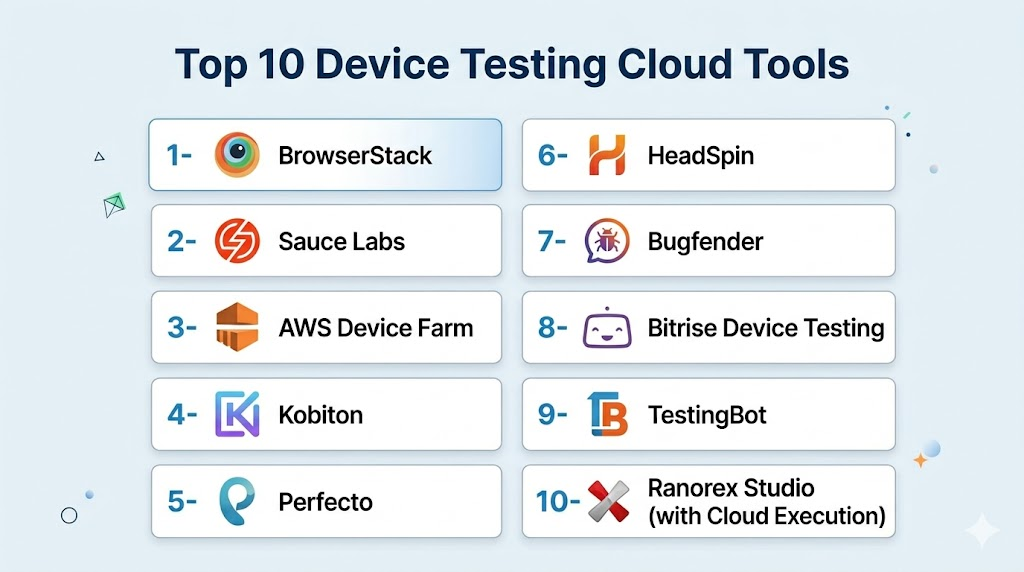
Top 10 Device Testing Clouds
1- BrowserStack
Short description: BrowserStack provides cloud-based real device access for testing web and mobile applications. It is suitable for developers and QA teams needing immediate access to hundreds of devices without managing a local lab. BrowserStack supports both automated and manual testing workflows.
Key Features
- Real device testing on iOS and Android
- Automated Selenium and Appium integration
- Live interactive debugging
- Parallel testing for faster execution
- CI/CD pipeline support
- Screenshot and visual testing capabilities
Pros
- Large device coverage
- Easy integration with test frameworks
Cons
- Premium pricing for enterprise-level access
- Limited offline network simulation
Platforms / Deployment
- iOS / Android / Web
- Cloud
Security & Compliance
- SSO, encryption, RBAC
- SOC 2, GDPR
Integrations & Ecosystem
Supports popular DevOps and test automation tools.
- Jenkins / GitHub Actions / GitLab CI
- Selenium / Appium
- Jira / Slack
Support & Community
Responsive support; extensive documentation and active community forums.
2- Sauce Labs
Short description: Sauce Labs provides a cloud platform for automated and live testing on real devices and browsers. It is ideal for enterprises and large QA teams aiming to streamline cross-platform testing.
Key Features
- Real and virtual device testing
- Automated test execution with Appium, Selenium
- Live interactive testing with debugging
- Parallel and CI/CD integrated testing
- Cross-browser testing
Pros
- Enterprise-grade platform
- Scalable parallel testing
Cons
- Complexity for small teams
- Cost scales with device usage
Platforms / Deployment
- iOS / Android / Web
- Cloud
Security & Compliance
- Not publicly stated for compliance certifications
Integrations & Ecosystem
- CI/CD pipelines (Jenkins, GitHub Actions)
- Test automation frameworks
- Slack / Jira notifications
Support & Community
Strong enterprise support; active knowledge base and community.
3- AWS Device Farm
Short description: AWS Device Farm allows developers to test applications on a variety of physical devices in the AWS cloud. It is suitable for teams already leveraging AWS infrastructure for scalable testing solutions.
Key Features
- Real device testing at scale
- Automated test scripts using Appium, Calabash
- Remote access for manual testing
- Performance and functional testing
- CI/CD integration with AWS services
Pros
- Scalable and flexible device coverage
- Integrated with AWS ecosystem
Cons
- Limited non-AWS integration
- Learning curve for new users
Platforms / Deployment
- iOS / Android / Web
- Cloud
Security & Compliance
- Not publicly stated
Integrations & Ecosystem
- AWS CI/CD services
- Appium / Selenium / Calabash
- Slack / email notifications
Support & Community
AWS enterprise support; active developer community.
4- Kobiton
Short description: Kobiton is a device cloud that provides real device testing for web and mobile apps. It is designed for developers and QA teams seeking manual and automated testing with detailed device insights.
Key Features
- Real device cloud testing
- Appium and Selenium automation
- Manual device access
- Parallel execution for faster testing
- Test analytics and logs
Pros
- Affordable enterprise options
- Real-time access to devices
Cons
- Device inventory may be limited compared to larger providers
- Advanced analytics features may require higher plans
Platforms / Deployment
- iOS / Android / Web
- Cloud
Security & Compliance
- Not publicly stated
Integrations & Ecosystem
- CI/CD pipelines
- Jira / Slack
- Test automation frameworks
Support & Community
Responsive support and growing user community.
5- Perfecto
Short description: Perfecto provides a cloud-based platform for automated and manual testing on real devices. It is ideal for enterprises needing global device access and advanced automation features.
Key Features
- Real device cloud with global coverage
- Automated testing with Selenium, Appium
- Visual and functional testing
- Parallel execution
- CI/CD integration
Pros
- Large device coverage
- Advanced automation capabilities
Cons
- Enterprise pricing
- Setup can be complex
Platforms / Deployment
- iOS / Android / Web
- Cloud
Security & Compliance
- Not publicly stated
Integrations & Ecosystem
- Jenkins / GitLab CI
- Test automation frameworks
- Collaboration tools
Support & Community
Enterprise support; documentation provided.
6- HeadSpin
Short description: HeadSpin offers a global device cloud for performance, functional, and automation testing. Best suited for enterprises needing network and performance testing across multiple geographies.
Key Features
- Real device cloud with global locations
- Performance and network testing
- Automated test execution
- CI/CD integration
- Analytics dashboards
Pros
- Excellent for performance testing
- Global device access
Cons
- Higher pricing for small teams
- Learning curve for setup
Platforms / Deployment
- iOS / Android / Web
- Cloud
Security & Compliance
- Not publicly stated
Integrations & Ecosystem
- CI/CD pipelines
- Selenium / Appium
- Analytics and reporting tools
Support & Community
Enterprise support available; documentation comprehensive.
7- Bugfender
Short description: Bugfender allows remote logging and crash monitoring for mobile apps with optional cloud device access. Suitable for developers needing live debugging across multiple devices.
Key Features
- Remote device logs
- Crash reporting
- Manual testing access
- Analytics and user session tracking
- Alerts for critical issues
Pros
- Easy remote debugging
- Developer-friendly
Cons
- Limited automated testing
- Smaller device coverage
Platforms / Deployment
- iOS / Android / Web
- Cloud
Security & Compliance
- Not publicly stated
Integrations & Ecosystem
- Jira / Slack / CI/CD
- APIs for logging and alerts
Support & Community
Responsive developer support; active online forums.
8- Bitrise Device Testing
Short description: Bitrise Device Testing provides CI/CD integrated cloud device testing. Ideal for teams focusing on automated testing and deployment pipelines.
Key Features
- Automated testing on real devices
- CI/CD integration
- Parallel test execution
- Version and build tracking
- Performance metrics
Pros
- Tight CI/CD integration
- Supports multiple platforms
Cons
- Limited manual device access
- Device library smaller than competitors
Platforms / Deployment
- iOS / Android
- Cloud
Security & Compliance
- Not publicly stated
Integrations & Ecosystem
- GitHub / GitLab / Bitbucket
- Slack / email notifications
- Test automation frameworks
Support & Community
Developer support; documentation available.
9- TestingBot
Short description: TestingBot provides cross-browser and device cloud testing for mobile and web applications. Suitable for teams requiring combined device and browser coverage.
Key Features
- Real device testing
- Cross-browser support
- Automation with Selenium / Appium
- Parallel test execution
- Reporting and analytics
Pros
- Combined web and mobile testing
- Affordable for SMBs
Cons
- Limited advanced enterprise analytics
- Device pool smaller than top providers
Platforms / Deployment
- iOS / Android / Web
- Cloud
Security & Compliance
- Not publicly stated
Integrations & Ecosystem
- CI/CD pipelines
- Jira / Slack
- Automation frameworks
Support & Community
Documentation available; responsive support team.
10- Ranorex Studio (with Cloud Execution)
Short description: Ranorex Studio offers automated testing for mobile and web apps with cloud execution. Best for teams already using Ranorex for functional testing wanting cloud scalability.
Key Features
- Automated test execution
- Real device cloud access
- CI/CD integration
- Parallel testing
- Reporting and analytics
Pros
- Integrates with Ranorex functional testing
- Cloud scalability
Cons
- Requires Ranorex licensing
- Manual testing limited
Platforms / Deployment
- iOS / Android / Web
- Cloud
Security & Compliance
- Not publicly stated
Integrations & Ecosystem
- CI/CD pipelines
- Jira / Slack
- Test automation frameworks
Support & Community
Enterprise support; documentation available.
Comparison Table (Top 10)
| Tool Name | Best For | Platform(s) Supported | Deployment | Standout Feature | Public Rating |
|---|---|---|---|---|---|
| BrowserStack | Cross-device testing | iOS / Android / Web | Cloud | Real device access | N/A |
| Sauce Labs | Automated and manual testing | iOS / Android / Web | Cloud | Parallel execution | N/A |
| AWS Device Farm | AWS ecosystem teams | iOS / Android / Web | Cloud | Scalable device coverage | N/A |
| Kobiton | Manual + automated testing | iOS / Android / Web | Cloud | Live device debugging | N/A |
| Perfecto | Enterprise testing | iOS / Android / Web | Cloud | Global device farm | N/A |
| HeadSpin | Performance & network testing | iOS / Android / Web | Cloud | Geo-distributed devices | N/A |
| Bugfender | Remote logging & crash monitoring | iOS / Android / Web | Cloud | Live debugging | N/A |
| Bitrise Device Testing | CI/CD integrated testing | iOS / Android | Cloud | Automated parallel tests | N/A |
| TestingBot | Web & device combined testing | iOS / Android / Web | Cloud | Cross-browser + device | N/A |
| Ranorex Studio | Functional + cloud execution | iOS / Android / Web | Cloud | Ranorex integration | N/A |
Evaluation & Scoring of Device Testing Clouds
| Tool Name | Core (25%) | Ease (15%) | Integrations (15%) | Security (10%) | Performance (10%) | Support (10%) | Value (15%) | Weighted Total (0–10) |
|---|---|---|---|---|---|---|---|---|
| BrowserStack | 9 | 8 | 9 | 8 | 9 | 8 | 8 | 8.5 |
| Sauce Labs | 9 | 7 | 8 | 8 | 9 | 8 | 7 | 8.2 |
| AWS Device Farm | 8 | 7 | 8 | 8 | 8 | 7 | 8 | 7.9 |
| Kobiton | 7 | 8 | 7 | 7 | 8 | 7 | 7 | 7.4 |
| Perfecto | 9 | 6 | 8 | 8 | 9 | 7 | 7 | 7.9 |
| HeadSpin | 8 | 7 | 7 | 7 | 8 | 7 | 7 | 7.5 |
| Bugfender | 6 | 8 | 6 | 7 | 6 | 7 | 7 | 6.7 |
| Bitrise Device Testing | 7 | 8 | 8 | 7 | 8 | 7 | 7 | 7.5 |
| TestingBot | 7 | 8 | 7 | 7 | 7 | 7 | 7 | 7.1 |
| Ranorex Studio | 7 | 7 | 7 | 7 | 7 | 7 | 7 | 7.0 |
Which Device Testing Cloud Tool Is Right for You?
Solo / Freelancer
- Bitrise, Kobiton, and BrowserStack provide accessible device access and automated testing for small teams or independent developers.
SMB
- BrowserStack, Sauce Labs, and AWS Device Farm balance automation, device coverage, and cost for growing teams.
Mid-Market
- Perfecto, HeadSpin, and Kobiton deliver enterprise-grade performance, parallel execution, and regional testing.
Enterprise
- BrowserStack, Sauce Labs, and AWS Device Farm offer full scalability, global device farms, and robust CI/CD integrations for large teams.
Budget vs Premium
- Budget-friendly: Kobiton, Bitrise, Bugfender
- Premium/Enterprise: BrowserStack, Sauce Labs, AWS Device Farm, Perfecto
Feature Depth vs Ease of Use
- Developer-friendly: Bitrise, Kobiton, Bugfender
- Enterprise-grade: BrowserStack, Sauce Labs, AWS Device Farm, Perfecto
Integrations & Scalability
- Select tools with CI/CD support, test automation frameworks, and global device access for scalable deployment.
Security & Compliance Needs
- Enterprise-focused platforms with SSO, encryption, and audit logging provide better compliance assurance.
Frequently Asked Questions (FAQs)
- Which devices are supported?
Most device testing clouds provide iOS and Android devices, and many support web browsers. Enterprise platforms offer hundreds of device models and OS versions to cover fragmented user bases. - Can I run automated tests?
Yes, all major platforms support automation using Appium, Selenium, or proprietary frameworks, enabling regression and functional testing at scale. - Is manual testing possible on these clouds?
Yes, platforms like Kobiton and BrowserStack allow live remote access for manual testing and debugging on real devices. - How do CI/CD integrations work?
Device clouds integrate with CI/CD pipelines like Jenkins, GitHub Actions, and GitLab CI to automatically trigger tests during build and deployment processes. - Can I simulate network and performance conditions?
Yes, tools like HeadSpin and Perfecto allow network throttling, battery simulation, and CPU/memory load testing to emulate real-world scenarios. - What about security and compliance?
Many enterprise platforms support SSO, encryption, and RBAC. SOC 2 and GDPR compliance is offered by top providers like BrowserStack and Sauce Labs. - How scalable are these clouds?
Enterprise-grade clouds allow parallel testing on hundreds of devices, reducing overall test cycles and speeding up release timelines. - Do these platforms provide analytics and reporting?
Yes, detailed dashboards provide logs, screenshots, performance metrics, and test success/failure rates for actionable insights. - Are there free or trial options?
Many providers like BrowserStack, Kobiton, and Bitrise offer limited free trials or developer tiers to evaluate the platform before enterprise adoption. - How do I choose the right tool?
Consider device coverage, automation needs, integration with CI/CD pipelines, scalability, and cost. Pilot testing a few options can identify the best fit for your organization.
Conclusion
Choosing the right device testing cloud ensures consistent app performance across devices, operating systems, and network conditions. Small teams benefit from Bitrise, Kobiton, or Bugfender for cost-effective testing and automation. Mid-market and enterprise organizations should consider BrowserStack, Sauce Labs, or AWS Device Farm for scalable parallel testing and global device access. Integration with CI/CD pipelines and analytics platforms enhances efficiency and visibility. Teams should shortlist 2–3 platforms, run a pilot, and validate usability and security. The right platform accelerates testing, reduces release cycles, and improves user experience.

Find Trusted Cardiac Hospitals
Compare heart hospitals by city and services — all in one place.
Explore Hospitals
I am learning about device testing platforms, and this content helped me understand how cloud-based testing can improve application quality across different devices and environments.