Introduction
Transcoding & Encoding Tools are essential software solutions that convert video and audio files into different formats, resolutions, and bitrates to ensure compatibility across devices and platforms. their importance has grown significantly due to the rapid expansion of OTT platforms, high-quality video formats like 4K and 8K, and global content delivery demands. These tools help optimize media for streaming, storage, and broadcasting while maintaining quality and reducing bandwidth usage. They are widely used across industries such as media, entertainment, education, and enterprise communication. Modern solutions now include AI-based optimization, hardware acceleration, and automated workflows for efficiency. They also support adaptive streaming, ensuring smooth playback under different network conditions. Choosing the right tool depends on performance, scalability, codec support, integrations, and ease of use.
Why It Matters
- Ensures seamless playback across multiple devices and network conditions
- Reduces bandwidth usage through optimized compression
- Enables adaptive bitrate streaming for better user experience
- Supports large-scale content delivery globally
- Essential for modern video platforms and digital media workflows
Real-World Use Cases
- OTT platforms delivering multi-quality video streams worldwide
- Live streaming platforms encoding real-time video feeds
- Social media platforms optimizing uploaded video formats
- Broadcasting and media production workflows
- Enterprise video training and internal communication
What to Evaluate
- Codec support (H.264, H.265, AV1, VP9)
- Encoding/transcoding speed and hardware acceleration
- Cloud vs on-premise deployment flexibility
- API and automation capabilities
- Output quality and bitrate control
- Integration with CDNs and media pipelines
- Scalability for high workloads
- Cost and licensing model
- Security and access control
- Ease of use and workflow management
Best for: Media companies, OTT platforms, developers, video engineers, and content creators handling large-scale video workflows.
Not ideal for: Users needing occasional video conversion—basic tools or simple editors may suffice.
Key Trends in Transcoding & Encoding Tools
- AI-driven encoding optimization for better compression efficiency
- Rapid adoption of AV1 codec for bandwidth savings
- GPU and hardware acceleration becoming standard
- Cloud-native transcoding replacing traditional infrastructure
- Ultra-low latency encoding for live streaming
- Workflow automation via APIs and pipelines
- Multi-bitrate adaptive streaming (HLS/DASH) as default
- Edge transcoding for faster content delivery
- Integration with analytics and monitoring tools
- Focus on energy-efficient encoding technologies
How We Selected These Tools (Methodology)
- Evaluated global adoption and industry usage
- Assessed codec support and output quality
- Reviewed performance, speed, and scalability
- Considered deployment flexibility (cloud vs local)
- Analyzed API and automation capabilities
- Included open-source and enterprise solutions
- Evaluated integration ecosystems
- Considered ease of use and onboarding
- Reviewed support and community strength
- Ensured coverage across different use cases and budgets
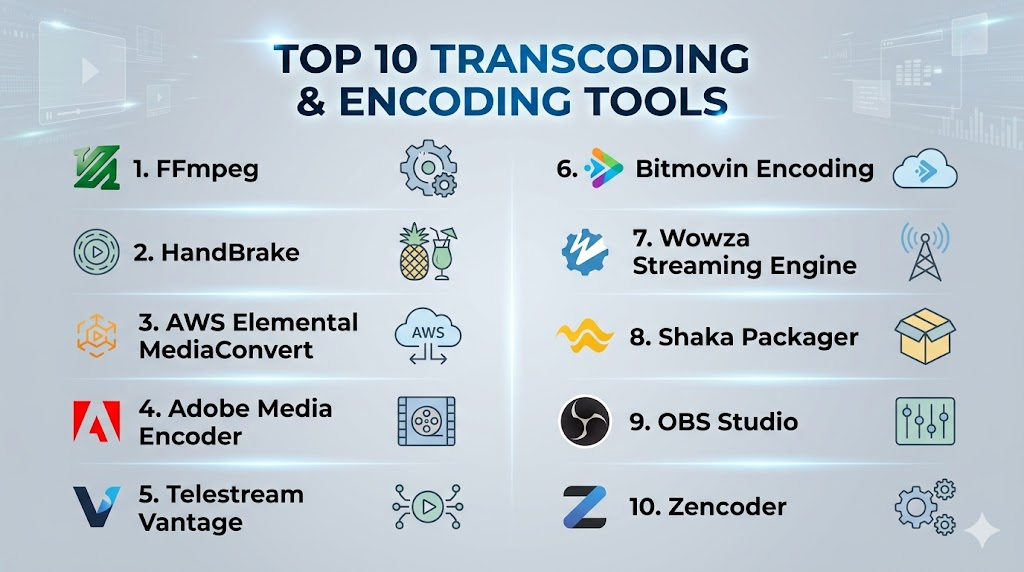
Top 10 Transcoding & Encoding Tools
1 — FFmpeg
Short description: A powerful open-source framework widely used for encoding, transcoding, and processing multimedia files across industries.
Key Features
- Supports almost all codecs and formats
- Command-line automation and scripting
- Batch processing
- Hardware acceleration support
- Streaming and recording capabilities
- Advanced filters and editing
Pros
- Extremely flexible and powerful
- Completely free and open-source
Cons
- Steep learning curve
- No built-in GUI
Platforms / Deployment
Windows / macOS / Linux
Security & Compliance
Not publicly stated
Integrations & Ecosystem
Widely integrated into media pipelines and platforms.
- APIs and SDKs
- Streaming services
- Custom workflows
Support & Community
Very large global developer community with extensive documentation.
2 — HandBrake
Short description: A user-friendly open-source transcoder designed for simple video conversion tasks.
Key Features
- Graphical user interface
- Device-specific presets
- Batch processing
- Subtitle support
- Video filters
- Hardware acceleration
Pros
- Easy for beginners
- Free to use
Cons
- Limited automation
- Not suitable for enterprise workflows
Platforms / Deployment
Windows / macOS / Linux
Security & Compliance
Not publicly stated
Integrations & Ecosystem
- Local workflows
- Basic integrations
Support & Community
Strong open-source community.
3 — AWS Elemental MediaConvert
Short description: A cloud-based, broadcast-grade transcoding service designed for scalable video processing.
Key Features
- High-quality encoding
- Adaptive bitrate streaming
- DRM support
- Automated workflows
- Scalable infrastructure
- Multi-format outputs
Pros
- Enterprise scalability
- Reliable performance
Cons
- Complex pricing
- Requires cloud expertise
Platforms / Deployment
Cloud
Security & Compliance
Encryption, IAM access control (others not publicly stated)
Integrations & Ecosystem
- Cloud pipelines
- APIs
- Media workflows
Support & Community
Enterprise-level support.
4 — Adobe Media Encoder
Short description: A professional encoding tool integrated into Adobe Creative Cloud for content creators and studios.
Key Features
- Integration with Premiere Pro
- Batch encoding
- Presets for platforms
- Watch folders
- GPU acceleration
- Format conversion
Pros
- Seamless Adobe integration
- High-quality output
Cons
- Subscription required
- Resource-heavy
Platforms / Deployment
Windows / macOS
Security & Compliance
Not publicly stated
Integrations & Ecosystem
- Adobe ecosystem
- Creative workflows
Support & Community
Strong professional support.
5 — Telestream Vantage
Short description: An enterprise-grade platform for automated media processing and transcoding workflows.
Key Features
- Workflow automation
- Multi-format support
- Hybrid deployment
- Quality control tools
- Integration with media systems
Pros
- Highly scalable
- Advanced automation
Cons
- Expensive
- Complex implementation
Platforms / Deployment
Windows / Cloud / Hybrid
Security & Compliance
Not publicly stated
Integrations & Ecosystem
- Broadcast systems
- APIs
- Media asset management
Support & Community
Enterprise support.
6 — Bitmovin Encoding
Short description: A cloud-native encoding platform optimized for speed, performance, and developer workflows.
Key Features
- AI-based encoding optimization
- Multi-codec support
- API-first architecture
- Real-time encoding
- Adaptive streaming
Pros
- High performance
- Developer-friendly
Cons
- Requires technical expertise
- Pricing not publicly stated
Platforms / Deployment
Cloud
Security & Compliance
Encryption, access control (others not publicly stated)
Integrations & Ecosystem
- APIs
- CDN integrations
- Streaming pipelines
Support & Community
Enterprise support.
7 — Wowza Streaming Engine
Short description: A streaming platform with built-in transcoding for live and on-demand video delivery.
Key Features
- Live transcoding
- Low-latency streaming
- Multi-protocol support
- Scalable deployment
- Real-time processing
Pros
- Strong live streaming capabilities
- Flexible deployment
Cons
- Complex setup
- Licensing costs
Platforms / Deployment
Windows / Linux / Cloud
Security & Compliance
Access control (others not publicly stated)
Integrations & Ecosystem
- Streaming platforms
- APIs
- CDN integrations
Support & Community
Enterprise support.
8 — Shaka Packager
Short description: An open-source tool focused on packaging and encrypting media for streaming delivery.
Key Features
- DASH and HLS packaging
- DRM support
- Encryption
- High performance
- Streaming optimization
Pros
- Free and efficient
- Great for streaming workflows
Cons
- Limited UI
- Requires technical knowledge
Platforms / Deployment
Linux / Windows
Security & Compliance
Encryption support
Integrations & Ecosystem
- Streaming workflows
- APIs
Support & Community
Developer-focused community.
9 — OBS Studio
Short description: A free open-source tool for live streaming and real-time encoding.
Key Features
- Real-time encoding
- Scene composition
- Plugin support
- Cross-platform
- Streaming integration
Pros
- Free
- Easy to start
Cons
- Not built for large-scale transcoding
- Limited automation
Platforms / Deployment
Windows / macOS / Linux
Security & Compliance
Not publicly stated
Integrations & Ecosystem
- Streaming platforms
- Plugins
Support & Community
Large global community.
10 — Zencoder
Short description: A cloud-based encoding solution designed for scalable video processing and developer integration.
Key Features
- Cloud encoding
- API-first design
- Multi-format outputs
- Scalable processing
- Fast encoding
Pros
- Easy integration
- Scalable
Cons
- Limited customization
- Pricing varies
Platforms / Deployment
Cloud
Security & Compliance
Not publicly stated
Integrations & Ecosystem
- APIs
- Media workflows
Support & Community
Enterprise support.
Comparison Table (Top 10)
| Tool Name | Best For | Platform(s) Supported | Deployment | Standout Feature | Public Rating |
|---|---|---|---|---|---|
| FFmpeg | Developers | Multi-platform | Self-hosted | Codec support | N/A |
| HandBrake | Beginners | Desktop | Local | Ease of use | N/A |
| AWS MediaConvert | Enterprise | Cloud | Cloud | Scalability | N/A |
| Adobe Media Encoder | Creators | Desktop | Local | Adobe integration | N/A |
| Telestream Vantage | Enterprise | Hybrid | Hybrid | Automation | N/A |
| Bitmovin Encoding | Developers | Cloud | Cloud | API-first | N/A |
| Wowza | Live streaming | Multi-platform | Hybrid | Low latency | N/A |
| Shaka Packager | Streaming workflows | Desktop | Local | Packaging | N/A |
| OBS Studio | Live streaming | Multi-platform | Local | Real-time encoding | N/A |
| Zencoder | Developers | Cloud | Cloud | API integration | N/A |
Evaluation & Scoring of Transcoding & Encoding Tools
| Tool Name | Core (25%) | Ease (15%) | Integrations (15%) | Security (10%) | Performance (10%) | Support (10%) | Value (15%) | Weighted Total |
|---|---|---|---|---|---|---|---|---|
| FFmpeg | 10 | 5 | 9 | 6 | 9 | 9 | 10 | 8.3 |
| HandBrake | 7 | 9 | 6 | 6 | 7 | 8 | 9 | 7.6 |
| AWS MediaConvert | 9 | 6 | 9 | 8 | 9 | 9 | 7 | 8.3 |
| Adobe Media Encoder | 8 | 8 | 8 | 6 | 8 | 8 | 7 | 7.9 |
| Telestream Vantage | 9 | 6 | 8 | 7 | 9 | 9 | 6 | 8.0 |
| Bitmovin Encoding | 9 | 7 | 9 | 8 | 9 | 8 | 7 | 8.3 |
| Wowza Streaming Engine | 8 | 6 | 8 | 7 | 8 | 8 | 7 | 7.7 |
| Shaka Packager | 7 | 5 | 7 | 7 | 8 | 7 | 9 | 7.3 |
| OBS Studio | 7 | 8 | 7 | 6 | 7 | 8 | 10 | 7.7 |
| Zencoder | 8 | 7 | 8 | 7 | 8 | 8 | 7 | 7.8 |
Which Transcoding & Encoding Tool Is Right for You?
Solo / Freelancer
HandBrake and OBS Studio are ideal for simple workflows and budget-friendly setups.
SMB
Adobe Media Encoder and FFmpeg provide a balance between usability and advanced capabilities.
Mid-Market
Bitmovin and Wowza offer scalable solutions with strong API and streaming support.
Enterprise
AWS Elemental MediaConvert and Telestream Vantage are best for large-scale, automated workflows.
Budget vs Premium
- Budget: FFmpeg, HandBrake
- Premium: AWS MediaConvert, Telestream
Feature Depth vs Ease of Use
- Advanced: FFmpeg
- Beginner-friendly: HandBrake
Integrations & Scalability
- Best: AWS MediaConvert, Bitmovin
Security & Compliance Needs
- Best: AWS MediaConvert
Frequently Asked Questions (FAQs)
1. What are Transcoding & Encoding Tools?
Transcoding & Encoding Tools are software used to convert video and audio files into different formats, resolutions, and bitrates, ensuring smooth playback across devices and platforms while also optimizing file size and streaming performance for media workflows.
2. What is the difference between encoding and transcoding?
Encoding converts raw media into a digital format for the first time, while transcoding converts already encoded files into another format for compatibility or optimization, and both processes work together to enable efficient media delivery.
3. Are these tools free or paid?
Some tools like FFmpeg and HandBrake are free and open-source, while enterprise-grade solutions offer paid subscriptions or usage-based pricing depending on features, scalability, and performance requirements.
4. Do I need technical knowledge to use them?
Some tools are beginner-friendly with graphical interfaces, while advanced tools like FFmpeg require technical expertise, and cloud platforms often simplify usage through automation and APIs.
5. Can these tools handle live streaming?
Yes, many transcoding tools support real-time encoding for live streaming with low latency, adaptive bitrate streaming, and multi-device delivery, although capabilities vary by platform.
6. What codecs are commonly supported?
Common codecs include H.264, H.265, AV1, and VP9, which are used to balance compression efficiency and video quality, with newer codecs offering better performance and lower bandwidth usage.
7. Is cloud transcoding better than local?
Cloud transcoding offers scalability, flexibility, and automation, while local transcoding provides more control and potentially lower long-term costs, making the best choice dependent on workload and budget.
8. Can I automate transcoding workflows?
Yes, many tools provide APIs and automation features that allow batch processing, workflow integration, and reduced manual effort, especially useful for large-scale media operations.
9. Is transcoding resource-intensive?
Yes, transcoding is highly resource-intensive and relies heavily on CPU or GPU power, but hardware acceleration and cloud processing can significantly improve speed and efficiency.
10. What are alternatives to these tools?
Alternatives include basic video converters and editing software, but they usually lack scalability, automation, and advanced encoding features required for professional media workflows.
Conclusion
Transcoding & Encoding Tools are essential for delivering high-quality video content efficiently across devices and platforms in today’s digital ecosystem. From open-source solutions like FFmpeg to enterprise-grade platforms like AWS Elemental MediaConvert and Bitmovin, there are options for every scale and requirement. The right choice depends on your workflow, technical expertise, and scalability needs. Businesses should prioritize performance, automation, and integrations, while individuals may focus on ease of use and cost. Evaluating a few tools through real-world testing is the best way to identify the right fit. Start by shortlisting 2–3 tools, run a pilot, and choose the solution that offers the best balance of quality, efficiency, and long-term value.

Find Trusted Cardiac Hospitals
Compare heart hospitals by city and services — all in one place.
Explore Hospitals
I am learning about transcoding and encoding tools, and this content helped me understand how different platforms process and optimize media files for better performance and compatibility.