Introduction
Goal Tracking Apps are digital tools that help individuals and teams define, monitor, and achieve their objectives. they are increasingly essential for boosting productivity, accountability, and measurable progress. Modern apps offer AI-driven analytics, habit tracking, and cross-device synchronization. Users can track personal development, fitness, learning, and professional goals in one platform. Teams can set OKRs, KPIs, and milestones for collaborative goal management. Reminders, notifications, and visual dashboards help maintain consistency and motivation. When evaluating apps, consider ease of use, integrations, security, and analytics capabilities. The right app turns goal setting into structured, measurable, and actionable progress.
Real-world use cases include:
- Tracking personal development goals such as fitness, learning, or wellness targets.
- Managing professional OKRs, KPIs, and performance metrics.
- Habit formation and progress monitoring over time.
- Collaborative goal tracking for teams, departments, or project groups.
- Automating reminders, nudges, and progress reports to maintain accountability.
Evaluation criteria for buyers include:
- Ease of use and intuitive interface.
- Cross-platform support and device synchronization.
- Task, milestone, and habit tracking features.
- AI-driven insights and analytics.
- Integration with calendars, productivity, or communication apps.
- Security, privacy, and data backup options.
- Customizable notifications and reminders.
- Pricing flexibility and subscription options.
Best for: Professionals, teams, freelancers, and anyone seeking structured goal management and progress tracking.
Not ideal for: Casual users who prefer manual tracking methods or minimalistic task lists without analytics.
Key Trends in Goal Tracking Apps
- AI-powered suggestions for goal setting, habit formation, and reminders.
- Gamification and rewards systems to boost user engagement.
- Integration with wearable devices and fitness trackers for holistic tracking.
- Advanced analytics dashboards for individuals and team managers.
- Cross-device synchronization including web, desktop, and mobile apps.
- Privacy-focused features with encryption and secure cloud storage.
- Collaborative team goals with shared OKRs and KPIs.
- Voice assistant and natural language goal entry.
- Subscription and freemium pricing models for flexible adoption.
- Interoperability with productivity, calendar, and task management platforms.
How We Selected These Tools (Methodology)
- Market adoption and visibility among productivity and goal-setting users.
- Feature completeness covering personal, team, and habit tracking.
- Reliability and performance signals across platforms.
- Security posture, including encryption, MFA, and backup mechanisms.
- Integration flexibility with third-party apps like calendars, messaging, and project management tools.
- Applicability to various user segments: solo, SMB, mid-market, and enterprise.
- Ease of onboarding and usability.
- Community and support resources.
- Value relative to subscription and free tiers.
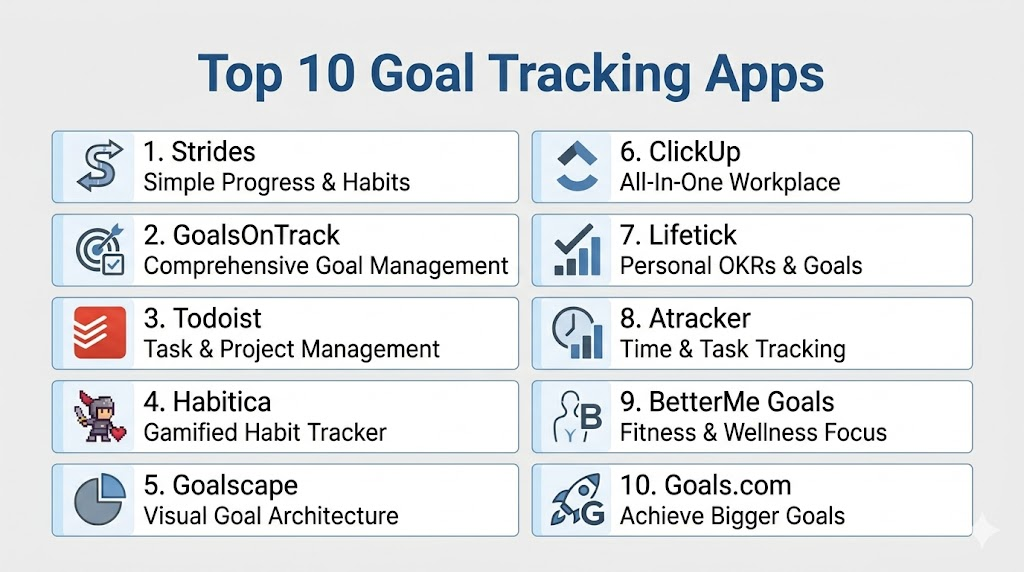
Top 10 Goal Tracking Apps
1- Strides
Short description: Strides offers structured goal tracking for individuals with visual dashboards and habit monitoring.
Key Features
- Goal and habit tracking
- Milestone reminders
- Progress charts and dashboards
- Templates for common goal types
- Daily streak tracking
Pros
- Intuitive interface with visual progress
- Customizable reminders
- Supports multiple goal types
Cons
- Premium required for full feature set
- Limited collaborative features
Platforms / Deployment
- iOS, Web
- Cloud
Security & Compliance
- Not publicly stated
Integrations & Ecosystem
- Calendar integrations
- Email notifications
- Mobile reminders
Support & Community
- Email support, FAQ guides
2- GoalsOnTrack
Short description: GoalsOnTrack focuses on personal and professional goal management with a focus on SMART goals and task hierarchies.
Key Features
- SMART goal templates
- Task and milestone tracking
- Habit tracker
- Progress reporting
- Visual dashboards
Pros
- Structured SMART goal framework
- Detailed progress tracking
- Supports recurring habits
Cons
- Slightly dated UI
- Subscription required for full features
Platforms / Deployment
- Web, iOS, Android
- Cloud
Security & Compliance
- Not publicly stated
Integrations & Ecosystem
- Calendar syncing
- Email reminders
- Export to spreadsheets
Support & Community
- Email support, online tutorials
3- Todoist
Short description: Todoist is a task management platform that doubles as a goal tracker with recurring task scheduling and analytics.
Key Features
- Task lists and projects
- Recurring task automation
- Productivity tracking
- Priority and labeling system
- Team collaboration
Pros
- Flexible for both personal and team goals
- Cross-platform support
- Productivity analytics
Cons
- Limited dedicated goal visualization
- Full analytics require premium
Platforms / Deployment
- Web, iOS, Android, macOS, Windows
- Cloud
Security & Compliance
- Data encrypted in transit and at rest
Integrations & Ecosystem
- Google Calendar
- Slack
- Zapier
Support & Community
- Email, community forums, tutorials
4- Habitica
Short description: Habitica gamifies goal tracking with RPG-style elements, rewards, and accountability.
Key Features
- Habit, daily, and to-do tracking
- RPG gamification and points system
- Social and collaborative guilds
- Custom rewards
- Progress analytics
Pros
- Engaging gamified approach
- Encourages consistent habit formation
- Collaborative accountability
Cons
- Learning curve for RPG mechanics
- Limited corporate/enterprise use
Platforms / Deployment
- Web, iOS, Android
- Cloud
Security & Compliance
- Not publicly stated
Integrations & Ecosystem
- Zapier
- API access
- Notifications
Support & Community
- Active online community, support forums
5- Goalscape
Short description: Goalscape visualizes goals as nested circles, providing a clear view of progress and priorities.
Key Features
- Visual nested goal mapping
- Progress percentage tracking
- Milestone markers
- Project and sub-goal hierarchy
- Export options
Pros
- Visual clarity for complex goals
- Helps prioritize objectives
- Intuitive drag-and-drop interface
Cons
- Limited task-level detail
- Paid plan needed for full features
Platforms / Deployment
- Web, Windows, macOS
- Cloud
Security & Compliance
- Not publicly stated
Integrations & Ecosystem
- Calendar exports
- PDF export
- Cloud storage sync
Support & Community
- Email support, guides
6- ClickUp
Short description: ClickUp is a full-featured productivity platform with goal tracking, task management, and analytics for teams.
Key Features
- Team and personal goals
- Milestone tracking
- Custom dashboards
- Task dependencies
- Analytics and reporting
Pros
- Suitable for individuals and teams
- Highly customizable
- Advanced reporting tools
Cons
- Complex interface for beginners
- Overkill for solo users
Platforms / Deployment
- Web, iOS, Android, macOS, Windows
- Cloud
Security & Compliance
- Not publicly stated
Integrations & Ecosystem
- Slack
- Google Workspace
- Zapier
Support & Community
- Tutorials, webinars, email support
7- Lifetick
Short description: Lifetick emphasizes values-driven goal tracking with structured planning and reflective journaling.
Key Features
- Values-based goal framework
- Task and milestone tracking
- Progress visualization
- Recurring tasks
- Reporting and analytics
Pros
- Focus on meaningful goal setting
- Simple, clean interface
- Reflective journaling support
Cons
- Limited integrations
- Mobile apps less advanced
Platforms / Deployment
- Web, iOS, Android
- Cloud
Security & Compliance
- Not publicly stated
Integrations & Ecosystem
- Calendar export
- Email reminders
Support & Community
- Email support, knowledge base
8- Atracker
Short description: Atracker combines time tracking with goal management to help users monitor progress efficiently.
Key Features
- Task and goal tracking
- Time tracking per activity
- Visual charts and statistics
- Daily reminders
- Multi-goal support
Pros
- Combines time tracking with goal monitoring
- Visual reports enhance accountability
- Easy-to-use interface
Cons
- Limited collaboration features
- Some advanced analytics require subscription
Platforms / Deployment
- iOS, Android
- Cloud
Security & Compliance
- Not publicly stated
Integrations & Ecosystem
- Calendar integration
- Email notifications
- CSV export
Support & Community
- Email support, guides
9- BetterMe Goals
Short description: BetterMe Goals focuses on health, fitness, and lifestyle goal tracking with AI-driven suggestions.
Key Features
- Personalized goal recommendations
- Progress tracking and analytics
- Daily reminders
- Habit formation guidance
- Motivational prompts
Pros
- AI-driven insights for personal goals
- User-friendly interface
- Encourages consistency
Cons
- Limited non-health-related goal tracking
- Subscription required for AI features
Platforms / Deployment
- iOS, Android
- Cloud
Security & Compliance
- Not publicly stated
Integrations & Ecosystem
- HealthKit
- Calendar sync
- Notifications
Support & Community
- Email support, tutorials
10- Goals.com
Short description: Goals.com is a goal-tracking platform that emphasizes SMART goal setting, tracking, and accountability.
Key Features
- SMART goal templates
- Task and milestone tracking
- Progress analytics
- Reminders and notifications
- Team collaboration features
Pros
- Structured SMART goal framework
- Good progress visibility
- Supports individual and team goals
Cons
- Interface can feel dated
- Some features behind paywall
Platforms / Deployment
- Web, iOS, Android
- Cloud
Security & Compliance
- Not publicly stated
Integrations & Ecosystem
- Calendar export
- Email reminders
Support & Community
- Email support, FAQs
Comparison Table (Top 10)
| Tool Name | Best For | Platform(s) Supported | Deployment | Standout Feature | Public Rating |
|---|---|---|---|---|---|
| Strides | Personal goal tracking | iOS, Web | Cloud | Visual dashboards | N/A |
| GoalsOnTrack | SMART goals | Web, iOS, Android | Cloud | Task hierarchies | N/A |
| Todoist | Task + goals | Web, iOS, Android, macOS, Windows | Cloud | Productivity analytics | N/A |
| Habitica | Gamified goals | Web, iOS, Android | Cloud | RPG-style gamification | N/A |
| Goalscape | Visual mapping | Web, Windows, macOS | Cloud | Nested goal visualization | N/A |
| ClickUp | Teams & goals | Web, iOS, Android, macOS, Windows | Cloud | Advanced reporting | N/A |
| Lifetick | Values-driven | Web, iOS, Android | Cloud | Reflective journaling | N/A |
| Atracker | Time + goals | iOS, Android | Cloud | Time tracking | N/A |
| BetterMe Goals | Health/lifestyle | iOS, Android | Cloud | AI-driven suggestions | N/A |
| Goals.com | SMART goal platform | Web, iOS, Android | Cloud | Team collaboration | N/A |
Evaluation & Scoring of Goal Tracking Apps
| Tool Name | Core | Ease | Integrations | Security | Performance | Support | Value | Weighted Total |
|---|---|---|---|---|---|---|---|---|
| Strides | 9 | 9 | 7 | 7 | 8 | 8 | 7 | 8.0 |
| GoalsOnTrack | 8 | 8 | 7 | 7 | 8 | 7 | 7 | 7.6 |
| Todoist | 8 | 9 | 8 | 8 | 9 | 8 | 7 | 8.3 |
| Habitica | 8 | 8 | 7 | 7 | 8 | 7 | 7 | 7.6 |
| Goalscape | 8 | 8 | 7 | 7 | 8 | 7 | 7 | 7.6 |
| ClickUp | 9 | 7 | 8 | 8 | 9 | 8 | 7 | 8.2 |
| Lifetick | 7 | 8 | 6 | 7 | 7 | 7 | 7 | 7.2 |
| Atracker | 7 | 8 | 6 | 7 | 8 | 7 | 7 | 7.3 |
| BetterMe Goals | 8 | 8 | 7 | 7 | 8 | 7 | 7 | 7.5 |
| Goals.com | 8 | 7 | 7 | 7 | 8 | 7 | 7 | 7.4 |
Which Goal Tracking App Is Right for You?
Solo / Freelancer
- Strides, GoalsOnTrack, or Todoist for personal goal tracking with analytics and habit monitoring.
SMB
- ClickUp or Habitica for collaborative goal tracking and team engagement.
Mid-Market
- Goalscape or Lifetick for structured goal visualization and values-based tracking.
Enterprise
- ClickUp or Goals.com for team-based OKRs, advanced reporting, and integrations.
Budget vs Premium
- Free tiers like Todoist or Atracker suffice for basic tracking. Premium features unlock AI insights, gamification, and advanced reporting.
Feature Depth vs Ease of Use
- Strides and Todoist: balanced between usability and features.
- ClickUp and Goalscape: advanced features but steeper learning curve.
Integrations & Scalability
- Prioritize apps with calendar, messaging, and analytics integration if scaling across multiple users or teams.
Security & Compliance Needs
- For corporate or sensitive goal tracking, prioritize apps with encryption, backup, and enterprise-grade authentication.
Frequently Asked Questions (FAQs)
1. Are goal tracking apps free?
Many apps offer free tiers with basic goal and habit tracking.
Premium subscriptions unlock advanced analytics, AI suggestions, and team collaboration.
Some apps require a monthly or yearly fee for full features.
Free versions are suitable for personal or simple goal tracking.
Evaluate based on feature needs before choosing a plan.
2. Can I use these apps across multiple devices?
Yes, most apps sync data across smartphones, tablets, and desktops.
Web versions often allow additional access from any browser.
Cross-device sync ensures goals and progress remain consistent.
Some apps support offline entry with later sync.
Check supported platforms before committing.
3. Can teams collaborate on goals?
Apps like ClickUp, Goals.com, and Habitica allow team collaboration.
Users can share dashboards, assign tasks, and track team milestones.
Permissions and visibility settings help manage access.
Collaboration improves accountability and progress tracking.
Smaller apps may focus on individual goal tracking only.
4. How secure is my data?
Security varies by app and subscription level.
Many provide encryption in transit and at rest, backups, and authentication.
Check for features like MFA, SSO, or enterprise-grade compliance.
Personal data like habits, health, or performance may be sensitive.
Always verify privacy policies before storing information.
5. Can I track habits along with goals?
Yes, habit tracking is integrated in many apps like Strides and Habitica.
Helps reinforce routines that support long-term goals.
Users can set recurring tasks and receive reminders.
Analytics and streak tracking provide motivation.
Combining goals and habits improves accountability.
6. Are notifications and reminders included?
Most apps offer push notifications, emails, and calendar alerts.
Reminders help maintain consistent goal tracking and habit formation.
Customizable frequency and timing improve adherence.
Recurring notifications can be tied to specific tasks or milestones.
Ensure your preferred method is supported before adopting.
7. Can I export my progress?
Yes, many apps allow exporting to PDF, CSV, or other formats.
This supports reporting, backups, and migration to other platforms.
Export options vary by app and subscription level.
Some apps also allow printing progress summaries.
Always check export flexibility if data portability matters.
8. Are these apps suitable for personal development?
Yes, apps like BetterMe Goals and Lifetick focus on personal growth.
Track health, learning, financial, or professional development goals.
AI insights and analytics help identify patterns and progress.
Custom reminders encourage consistency and reflection.
Select apps aligned with your specific development goals.
9. Can I include health or fitness goals?
Yes, many apps integrate with health trackers and wearable devices.
Apps like Atracker and BetterMe Goals track activity and habits.
Analytics can measure performance, trends, and achievements.
Notifications and AI suggestions improve adherence to routines.
Integration with other apps enhances comprehensive tracking.
10. How do I switch apps without losing progress?
Most apps offer export/import features like CSV or PDF.
Ensure all goals, tasks, and milestones are backed up.
Some apps allow direct migration or integration with other platforms.
Review subscription levels to retain access to premium features.
Test the migration before fully switching platforms.
Conclusion
Goal Tracking Apps in 2026 provide structured, intelligent ways to define, monitor, and achieve personal and professional objectives. The best app depends on your use case: individual, team, or enterprise. Security, integrations, AI features, and analytics are key differentiators. Start by shortlisting 2–3 apps aligned with your needs, then pilot them to test usability, collaboration, and reliability. Evaluate premium features if you require advanced analytics, gamification, or AI-driven suggestions. Ensure backups, encryption, and cross-platform sync for long-term consistency. Use visual dashboards and progress reports to maintain motivation and accountability. Leverage collaborative features if tracking goals with a team. Ultimately, the ideal app makes goal achievement clear, measurable, and engaging. Shortlist, pilot, and validate before full adoption.

Find Trusted Cardiac Hospitals
Compare heart hospitals by city and services — all in one place.
Explore Hospitals
Goal tracking apps are most valuable when they turn long-term objectives into clear, actionable milestones. By offering progress tracking, reminders, habit integration, and performance insights, these tools help users stay motivated, measure achievements, and consistently work toward personal and professional goals.