Introduction
Digital Reading & Annotation Apps are software solutions designed to help users read, highlight, annotate, and organize digital content efficiently. They go beyond simple PDF readers by enabling interactive note-taking, collaborative commenting, and knowledge management directly within documents. the need for such tools has grown due to remote work, online learning, and the increasing consumption of digital research and technical content.
Real-world use cases include:
- Academic research: Students and researchers highlight text, make notes, and organize references.
- Professional documentation: Engineers, lawyers, and analysts annotate contracts, manuals, and reports collaboratively.
- Team collaboration: Teams review project documents, provide comments, and track feedback in real time.
- Knowledge management: Professionals capture key insights from articles, whitepapers, and PDFs for future reference.
- Learning & eBooks: Users annotate textbooks, technical guides, and eBooks to enhance retention.
Evaluation criteria for buyers include:
- Annotation and highlighting features
- File format support (PDF, EPUB, DOCX, etc.)
- Collaboration capabilities
- Cross-device synchronization
- Search and organization tools
- Integration with cloud storage and note apps
- Security and compliance
- Performance and reliability
- Pricing and value
Best for: Students, researchers, professionals in law, finance, or technical fields, and remote teams requiring collaborative document workflows. Ideal for organizations of any size that rely heavily on digital documents.
Not ideal for: Casual readers who primarily consume content without annotating, or teams using specialized document management platforms with built-in annotation features.
Key Trends in Digital Reading & Annotation Apps
- AI-assisted summarization and annotation suggestions.
- Seamless multi-device synchronization across web, desktop, and mobile.
- Collaboration features with real-time commenting and version tracking.
- Integration with knowledge management and note-taking platforms.
- Support for diverse file formats including PDFs, eBooks, and scientific journals.
- Enhanced security: encryption, SSO, MFA, and compliance with GDPR/HIPAA.
- Cloud-based deployment with offline reading capabilities.
- Automated citation and bibliography generation for academic workflows.
- Embedded multimedia annotation (audio, video, links).
- Pricing models shifting to subscription and usage-based tiers for flexibility.
How We Selected These Tools (Methodology)
- Analyzed market adoption and user mindshare across industries.
- Assessed feature completeness, especially annotation, collaboration, and AI capabilities.
- Evaluated reliability and performance signals from user feedback and reviews.
- Checked security posture, including encryption and compliance certifications.
- Reviewed integrations and ecosystem compatibility with cloud storage, note-taking, and productivity tools.
- Considered customer fit across solo, SMB, mid-market, and enterprise segments.
- Factored in ease of use and onboarding experience.
- Verified cross-platform support and deployment flexibility.
- Examined pricing and perceived value in real-world scenarios.
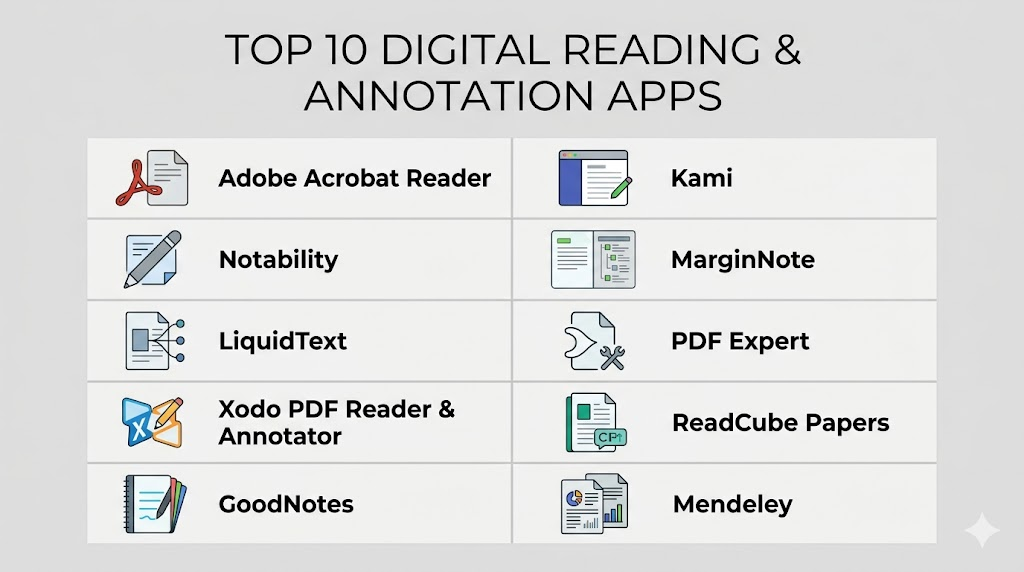
Top 10 Digital Reading & Annotation Apps
1- Adobe Acrobat Reader
Short description: A widely used PDF reader and annotation tool for professionals and students seeking reliable highlighting, commenting, and document management.
Key Features
- Comprehensive annotation tools (highlight, underline, notes)
- PDF editing and commenting
- Cloud storage integration (Adobe Document Cloud)
- Digital signatures
- Form filling and e-signature
- Text search and organization
Pros
- Mature and widely trusted platform
- Strong PDF editing capabilities
- Cross-device synchronization
Cons
- Subscription required for full features
- Can be heavy on resources
Platforms / Deployment
- Windows / macOS / iOS / Android / Web
- Cloud / Hybrid
Security & Compliance
- SSO/SAML, MFA, encryption
- SOC 2, ISO 27001, GDPR compliant
Integrations & Ecosystem
Supports integration with:
- Microsoft Office
- Google Drive
- Dropbox
- Evernote
- API for workflow automation
Support & Community
- Extensive documentation
- Tiered support plans
- Large user community
2- Notability
Short description: Popular note-taking and annotation app for iPad and Mac users, combining handwritten notes, PDF annotation, and multimedia integration.
Key Features
- Handwriting and stylus support
- PDF annotation
- Audio recording linked to notes
- Multi-media embedding
- Cloud backup
- Tagging and organization
Pros
- Excellent for iPad stylus use
- Intuitive interface
- Multimedia annotations enhance learning
Cons
- Limited Windows support
- Lacks advanced enterprise features
Platforms / Deployment
- macOS / iOS
- Cloud backup (iCloud)
Security & Compliance
- Not publicly stated
Integrations & Ecosystem
- iCloud
- Export to PDF/Images
- Limited API support
Support & Community
- In-app tutorials
- Active user forums
- Responsive email support
3- LiquidText
Short description: An interactive document reading platform designed for research-intensive workflows, emphasizing deep annotation, document linking, and workspace consolidation.
Key Features
- Dynamic document interaction
- Multi-document import
- Linking highlights across sources
- Freeform workspace
- Touch and stylus support
- Summarization tools
Pros
- Highly visual and interactive
- Streamlines complex research tasks
Cons
- Learning curve for new users
- Limited platform support beyond Apple devices
Platforms / Deployment
- macOS / iOS
- Cloud (proprietary sync)
Security & Compliance
- Not publicly stated
Integrations & Ecosystem
- Dropbox
- OneDrive
- PDF export
Support & Community
- Documentation and tutorials
- Active research-focused community
4- Xodo PDF Reader & Annotator
Short description: Free PDF reader and annotation tool optimized for productivity with collaboration and cross-platform access.
Key Features
- Real-time collaboration
- Highlight, underline, notes
- Form filling
- Cloud storage integration
- Tabbed viewing
- Offline reading
Pros
- Free with rich features
- Real-time collaboration
Cons
- UI can feel cluttered
- Advanced features limited compared to paid tools
Platforms / Deployment
- Web / Windows / macOS / iOS / Android
- Cloud
Security & Compliance
- Not publicly stated
Integrations & Ecosystem
- Google Drive
- Dropbox
- OneDrive
- Slack (indirect via exports)
Support & Community
- Active online forums
- Documentation and FAQs
5- GoodNotes
Short description: Note-taking and annotation app for iOS users, emphasizing digital handwriting, PDF import, and organization.
Key Features
- Handwriting recognition
- PDF annotation
- Shape and diagram tools
- Notebook organization
- Cloud sync
Pros
- Excellent handwriting and stylus support
- Well-organized notebooks
Cons
- iOS/macOS only
- No collaborative real-time editing
Platforms / Deployment
- iOS / macOS
- iCloud sync
Security & Compliance
- Not publicly stated
Integrations & Ecosystem
- iCloud
- Export PDFs
- Limited third-party app support
Support & Community
- Tutorials and guides
- Moderate online community
6- Kami
Short description: Web-based annotation and collaboration platform for education and enterprise, enabling PDF, document, and image markup.
Key Features
- Real-time collaboration
- Highlighting and annotation
- Drawing and shape tools
- PDF & image support
- LMS integrations
- Cloud storage support
Pros
- Excellent for education
- Multi-user collaboration
Cons
- Performance can lag with large documents
- Free tier limited
Platforms / Deployment
- Web / ChromeOS / iOS / Android
- Cloud
Security & Compliance
- SSO, encryption
- GDPR compliant
Integrations & Ecosystem
- Google Classroom
- Microsoft Teams
- Canvas
- Google Drive
Support & Community
- Tutorials, live webinars
- Responsive support
7- MarginNote
Short description: Advanced study and research app combining reading, annotation, and mind-mapping for deeper comprehension.
Key Features
- PDF/ePub annotation
- Mind-mapping of notes
- Flashcards for study
- Cross-document linking
- Stylus support
Pros
- Ideal for research and study
- Mind-map visualization
Cons
- iOS/macOS only
- Learning curve for beginners
Platforms / Deployment
- iOS / macOS
- Cloud sync
Security & Compliance
- Not publicly stated
Integrations & Ecosystem
- iCloud
- PDF export
- Limited third-party integration
Support & Community
- Guides and forums
- Moderate community support
8- PDF Expert
Short description: Professional PDF editor and annotation app with emphasis on reliability and speed across Apple devices.
Key Features
- Text and image annotation
- Form filling
- Document merging
- PDF editing
- Cloud sync
Pros
- Fast and reliable
- Smooth annotation experience
Cons
- macOS/iOS only
- No advanced collaboration features
Platforms / Deployment
- macOS / iOS
- iCloud / Dropbox
Security & Compliance
- Not publicly stated
Integrations & Ecosystem
- iCloud, Dropbox, Google Drive
- PDF export
- Limited API
Support & Community
- Documentation and email support
- Small but active user community
9- ReadCube Papers
Short description: Research-focused reading and annotation platform with library management, citation tools, and cloud sync.
Key Features
- PDF annotation and highlighting
- Reference management
- Cloud library syncing
- Citation generation
- Collaboration and sharing
Pros
- Tailored for academic research
- Integrated citation tools
Cons
- Paid subscription required
- Complex for casual users
Platforms / Deployment
- Windows / macOS / iOS / Web
- Cloud
Security & Compliance
- Not publicly stated
Integrations & Ecosystem
- Zotero export
- Reference managers
- Google Drive / Dropbox
Support & Community
- Tutorials, email support
- Academic user community
10- Mendeley
Short description: Academic reference manager and PDF annotation tool, optimized for research collaboration and bibliographies.
Key Features
- PDF annotation
- Reference management
- Collaboration groups
- Citation generation
- Cloud sync
Pros
- Excellent for research
- Free tier available
Cons
- Desktop UI can feel outdated
- Limited advanced annotation tools
Platforms / Deployment
- Windows / macOS / Linux / iOS / Android
- Cloud
Security & Compliance
- Not publicly stated
Integrations & Ecosystem
- MS Word, LibreOffice
- Zotero compatibility
- Cloud library sync
Support & Community
- Forums, guides
- Active academic user base
Comparison Table (Top 10)
| Tool Name | Best For | Platform(s) Supported | Deployment | Standout Feature | Public Rating |
|---|---|---|---|---|---|
| Adobe Acrobat Reader | Professionals | Windows, macOS, iOS, Android, Web | Cloud/Hybrid | PDF editing & annotations | N/A |
| Notability | Students / iPad users | iOS, macOS | Cloud (iCloud) | Handwriting + audio | N/A |
| LiquidText | Researchers | iOS, macOS | Cloud | Multi-document linking | N/A |
| Xodo PDF Reader & Annotator | Teams / general | Web, Windows, macOS, iOS, Android | Cloud | Real-time collaboration | N/A |
| GoodNotes | Students | iOS, macOS | Cloud (iCloud) | Digital handwriting | N/A |
| Kami | Education / Enterprise | Web, ChromeOS, iOS, Android | Cloud | Multi-user collaboration | N/A |
| MarginNote | Researchers / Students | iOS, macOS | Cloud | Mind-map notes | N/A |
| PDF Expert | Professionals | macOS, iOS | Cloud | PDF editing | N/A |
| ReadCube Papers | Researchers | Windows, macOS, iOS, Web | Cloud | Library + citation management | N/A |
| Mendeley | Academic teams | Windows, macOS, Linux, iOS, Android | Cloud | Reference management | N/A |
Evaluation & Scoring of Digital Reading & Annotation Apps
| Tool Name | Core (25%) | Ease (15%) | Integrations (15%) | Security (10%) | Performance (10%) | Support (10%) | Value (15%) | Weighted Total |
|---|---|---|---|---|---|---|---|---|
| Adobe Acrobat Reader | 9 | 8 | 9 | 9 | 9 | 8 | 8 | 8.85 |
| Notability | 8 | 9 | 6 | 7 | 8 | 8 | 7 | 7.85 |
| LiquidText | 9 | 7 | 6 | 7 | 8 | 7 | 7 | 7.6 |
| Xodo | 8 | 8 | 7 | 7 | 8 | 7 | 9 | 7.85 |
| GoodNotes | 8 | 9 | 5 | 7 | 8 | 7 | 7 | 7.55 |
| Kami | 8 | 8 | 7 | 7 | 7 | 8 | 8 | 7.75 |
| MarginNote | 9 | 7 | 6 | 7 | 8 | 7 | 7 | 7.6 |
| PDF Expert | 8 | 9 | 6 | 7 | 8 | 7 | 7 | 7.55 |
| ReadCube Papers | 9 | 7 | 7 | 7 | 8 | 7 | 7 | 7.65 |
| Mendeley | 9 | 7 | 7 | 7 | 8 | 8 | 8 | 7.85 |
Which Digital Reading & Annotation App Is Right for You?
Solo / Freelancer
Choose Notability or GoodNotes for personal note-taking and lightweight document annotation. Simple, intuitive, and mobile-friendly.
SMB
Xodo or Kami are ideal for small teams needing collaborative PDF workflows without heavy enterprise overhead.
Mid-Market
Adobe Acrobat Reader or PDF Expert offer robust annotation, editing, and integration capabilities for professional teams handling diverse document types.
Enterprise
Adobe Acrobat Reader, ReadCube Papers, or Mendeley provide security, compliance, and collaboration features suitable for larger organizations or research institutions.
Budget vs Premium
Free tools like Xodo and Mendeley are feature-rich for basic annotation. Premium solutions like Adobe Acrobat or LiquidText offer advanced editing, AI, and integration capabilities.
Feature Depth vs Ease of Use
High-feature apps like LiquidText and MarginNote have steeper learning curves but excel in complex research. Apps like Notability and GoodNotes are intuitive but less feature-dense.
Integrations & Scalability
Teams needing integrations with cloud storage or LMS should prioritize Kami, Adobe Acrobat, or ReadCube Papers for smooth workflow scaling.
Security & Compliance Needs
Enterprise users handling sensitive documents should choose apps with SSO, encryption, and compliance certifications such as Adobe Acrobat Reader.
Frequently Asked Questions (FAQs)
1: What are typical pricing models for digital reading apps?
Many apps use subscription tiers, freemium models, or one-time purchases. Enterprise licenses often include multi-user discounts and advanced features.
2: How easy is onboarding for teams?
Onboarding varies. Cloud-first apps like Kami and Xodo are simple; complex research tools like LiquidText require tutorials or guided adoption.
3: Can I switch between tools without losing annotations?
Most support PDF export, but advanced annotations or linked notes may not transfer perfectly between platforms.
4: Are these apps secure for sensitive documents?
Enterprise-grade apps like Adobe Acrobat offer encryption, SSO, and compliance; simpler apps may lack advanced security.
5: Do these tools support multi-device synchronization?
Yes, most apps support cloud sync across desktop and mobile. Check platform-specific limitations for full compatibility.
6: Can teams collaborate in real time?
Apps like Xodo, Kami, and Adobe Acrobat support real-time comments and annotation sharing. Others are single-user focused.
7: What file formats are supported?
Commonly PDF, EPUB, DOCX, and images. Some apps also support scanned or research journal formats.
8: Are AI features available?
Modern apps integrate AI for summarization, smart highlighting, or keyword extraction. Availability depends on platform and subscription tier.
9: What are common mistakes when using these apps?
Overcomplicating workflows, relying on unsupported formats, or ignoring backup can limit effectiveness. Choose apps aligned with your device ecosystem.
10: Are there open-source alternatives?
Yes, some tools like Xodo offer free use, but enterprise-grade open-source options are limited in 2026.
Conclusion
Digital Reading & Annotation Apps have become essential for professionals, students, and researchers to read, annotate, and manage documents efficiently. Choosing the right tool depends on your workflow, device ecosystem, collaboration needs, and security requirements. Solo users benefit from intuitive apps like Notability or GoodNotes, while teams and enterprises gain value from Adobe Acrobat, ReadCube Papers, or Kami. Collaboration, AI-assisted features, and cross-device syncing are key differentiators. Free and budget-friendly tools like Xodo or Mendeley offer strong functionality for cost-conscious users. It’s important to pilot 2–3 tools to validate integrations, ease of use, and compliance. Ultimately, selecting the right app ensures productivity, seamless annotation workflows, and better document insights.

Find Trusted Cardiac Hospitals
Compare heart hospitals by city and services — all in one place.
Explore Hospitals
Digital reading and annotation apps are most effective when they combine seamless reading with powerful note-taking and collaboration features. By enabling highlighting, comments, document organization, and cloud synchronization, these tools help students, researchers, and professionals improve comprehension, retain knowledge, and work more productively across digital documents.