Introduction
AR Education Apps are interactive applications that use augmented reality technology to enhance learning experiences. By overlaying digital content on the real world, these apps make abstract concepts tangible, increase engagement, and improve knowledge retention. AR education is becoming a mainstream learning modality in classrooms, corporate training, and online learning platforms, leveraging mobile and wearable devices to create immersive experiences.
Real-world use cases include:
- Anatomy and biology visualization for medical students.
- Historical site reconstructions for history classes.
- Virtual chemistry labs for safe experimentation.
- Interactive mathematics and geometry exercises.
- Language learning through gamified AR experiences.
What buyers should evaluate:
- Device compatibility (iOS, Android, AR glasses)
- Content quality and curriculum alignment
- Ease of use and onboarding
- Teacher or trainer analytics and reporting
- Integration with LMS or educational platforms
- Multi-user collaboration features
- Engagement metrics tracking
- Offline access and caching options
- AR object accuracy and realism
- Scalability for classroom or corporate deployment
Best for: K-12 schools, universities, corporate training departments, and edtech platforms seeking interactive learning solutions.
Not ideal for: Small-scale tutoring or text-based learning where AR adds minimal value.
Key Trends in AR Education Apps
- Integration of AI-driven adaptive learning within AR experiences.
- Expansion of AR cloud platforms enabling persistent, shared AR content.
- Growth of wearable AR devices for immersive hands-free learning.
- Gamification and engagement analytics for better student outcomes.
- Increased LMS integration for curriculum and assessment alignment.
- Adoption of 3D scanning and modeling tools for custom AR content.
- Cloud-based AR content streaming for low-latency experiences.
- Focus on STEM and vocational training applications.
- AR-enhanced language learning and cultural immersion experiences.
- Enhanced security and privacy compliance for student data.
How We Selected These Tools (Methodology)
- Assessed market adoption and user base in education technology.
- Evaluated feature completeness, including interactivity, collaboration, and analytics.
- Reviewed device compatibility and scalability for schools or enterprises.
- Verified content quality and alignment with learning objectives.
- Examined integration with LMS, cloud platforms, and AR SDKs.
- Checked ease of use and onboarding for students and teachers.
- Considered support and community, including documentation and training.
- Evaluated engagement and performance analytics.
- Assessed security and privacy compliance.
- Ensured 2026+ relevance with modern AR features and AI enhancements.
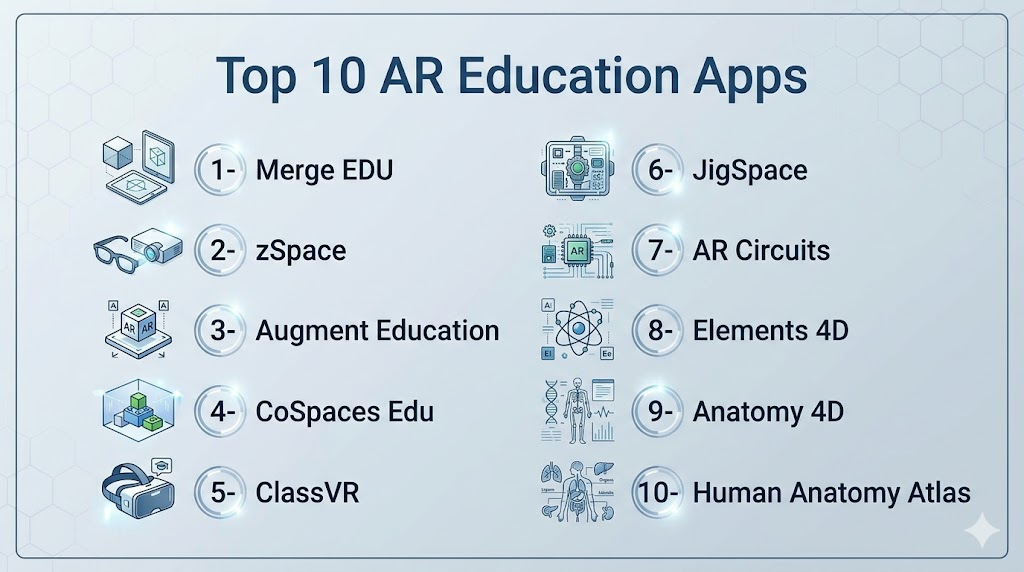
Top 10 AR Education Apps
1- Merge EDU
Short description: AR platform for STEM education with hands-on activities and interactive 3D models. Ideal for K-12 classrooms.
Key Features
- 3D object manipulation and simulations
- Curriculum-aligned STEM lessons
- Multi-user collaboration mode
- Teacher dashboards with analytics
- Cross-platform support (iOS, Android)
Pros
- Engaging STEM experiences
- Easy integration with classroom devices
- Robust teacher analytics
Cons
- Limited non-STEM content
- Requires devices with AR capabilities
Platforms / Deployment
- iOS, Android
- Cloud / Hybrid
Security & Compliance
- Not publicly stated
Integrations & Ecosystem
- LMS integration
- Cloud content storage
- Collaboration APIs
Support & Community
- Official documentation and educator community forums.
2- zSpace
Short description: AR/VR platform offering interactive science, math, and career simulations. Suitable for K-12 and vocational training.
Key Features
- Interactive virtual labs
- 3D STEM simulations
- Curriculum-aligned modules
- Multi-user collaborative experiences
- Analytics for student performance
Pros
- Immersive learning experiences
- Hands-on virtual labs reduce safety risks
- Strong STEM curriculum alignment
Cons
- Requires dedicated hardware
- Higher setup costs
Platforms / Deployment
- Windows, macOS
- Self-hosted / Cloud
Security & Compliance
- Not publicly stated
Integrations & Ecosystem
- LMS integration
- VR/AR headset support
- Educational content APIs
Support & Community
- Vendor support, educator training programs.
3- Augment Education
Short description: Mobile AR app for visualizing complex subjects in 3D. Suitable for K-12 and higher education.
Key Features
- 3D object library
- Curriculum-aligned AR lessons
- Multi-platform support
- Offline mode for classroom use
- Teacher analytics and reporting
Pros
- Simple mobile deployment
- Enhances conceptual understanding
- Supports offline use
Cons
- Limited advanced interactivity
- Smaller content library compared to larger platforms
Platforms / Deployment
- iOS, Android
- Cloud / Hybrid
Security & Compliance
- Not publicly stated
Integrations & Ecosystem
- LMS compatibility
- API for content integration
- Teacher dashboards
Support & Community
- Documentation and support portal.
4- CoSpaces Edu
Short description: AR and VR creation tool for students to build interactive learning experiences. Ideal for creative projects.
Key Features
- Drag-and-drop AR/VR content creation
- Real-time collaboration
- Lesson plan integration
- 3D model import and export
- Analytics and student progress tracking
Pros
- Fosters creativity and coding skills
- Collaborative projects for classrooms
- Wide platform support
Cons
- May require training for younger students
- Limited pre-built lessons
Platforms / Deployment
- Web, iOS, Android
- Cloud / Hybrid
Security & Compliance
- Not publicly stated
Integrations & Ecosystem
- LMS integration
- 3D model libraries
- Collaboration APIs
Support & Community
- Active educator community and tutorials.
5- ClassVR
Short description: VR and AR learning platform with pre-built lessons and teacher dashboards. Suitable for K-12 schools.
Key Features
- Immersive STEM and history modules
- Teacher dashboards and analytics
- Multi-user AR experiences
- VR/AR headset support
- Curriculum-aligned content
Pros
- Ready-to-use lessons
- Engaging immersive content
- Classroom-focused analytics
Cons
- Hardware costs for VR/AR kits
- Limited customization
Platforms / Deployment
- Windows, iOS, Android
- Self-hosted / Cloud
Security & Compliance
- Not publicly stated
Integrations & Ecosystem
- LMS integration
- VR/AR device support
- Teacher content portals
Support & Community
- Vendor support and educator training.
6- JigSpace
Short description: Interactive AR platform for exploring concepts through 3D animations. Suitable for STEM and vocational learning.
Key Features
- Pre-built 3D learning modules
- Step-by-step animations
- Interactive exploration
- Mobile-first design
- Collaboration features
Pros
- Highly visual and interactive
- Easy to use on mobile
- Supports STEM learning
Cons
- Limited advanced customization
- Smaller content library
Platforms / Deployment
- iOS, Android
- Cloud / Hybrid
Security & Compliance
- Not publicly stated
Integrations & Ecosystem
- LMS integration
- API for content import
- Teacher dashboards
Support & Community
- Documentation and support portal.
7- AR Circuits
Short description: AR app for electronics and physics education, visualizing circuits in 3D. Best for STEM classrooms.
Key Features
- Interactive 3D circuits
- Real-time component simulation
- Curriculum-aligned lessons
- Multi-user collaboration
- Teacher analytics
Pros
- Hands-on electronics learning
- Reduces physical lab resource needs
- Engaging visualizations
Cons
- Focused on electronics only
- Limited platform support
Platforms / Deployment
- iOS, Android
- Cloud / Hybrid
Security & Compliance
- Not publicly stated
Integrations & Ecosystem
- LMS integration
- Simulation APIs
- Teacher dashboards
Support & Community
- Documentation and community support.
8- Elements 4D
Short description: AR app for chemistry education using interactive 3D molecules. Ideal for high school and college labs.
Key Features
- 3D chemical elements and reactions
- Interactive molecule manipulation
- Curriculum-aligned experiments
- Real-time feedback and assessment
- Teacher analytics
Pros
- Safe virtual chemistry experiments
- Enhances student engagement
- Mobile-friendly
Cons
- Limited non-chemistry content
- Smaller lesson library
Platforms / Deployment
- iOS, Android
- Cloud / Hybrid
Security & Compliance
- Not publicly stated
Integrations & Ecosystem
- LMS integration
- 3D object library
- Teacher dashboards
Support & Community
- Official support and tutorials.
9- Anatomy 4D
Short description: AR app for anatomy education with 3D visualizations of human body systems. Suitable for K-12 and medical students.
Key Features
- 3D human anatomy models
- Interactive system exploration
- Multi-layered visualization
- Teacher analytics and reporting
- Mobile-friendly AR experience
Pros
- Highly detailed and interactive
- Supports visual learning
- Cross-platform mobile deployment
Cons
- Focused only on anatomy
- Requires AR-capable devices
Platforms / Deployment
- iOS, Android
- Cloud / Hybrid
Security & Compliance
- Not publicly stated
Integrations & Ecosystem
- LMS integration
- Teacher dashboards
- Educational content APIs
Support & Community
- Documentation and user forums.
10- Human Anatomy Atlas
Short description: 3D AR/VR anatomy learning platform for in-depth medical education. Best for universities and medical schools.
Key Features
- High-resolution 3D anatomy models
- AR/VR immersive learning
- Curriculum alignment for medical studies
- Assessment and quizzes
- Multi-user collaboration
Pros
- Comprehensive anatomy content
- Supports AR/VR immersive experiences
- Teacher and student analytics
Cons
- Higher hardware and licensing costs
- Limited to medical content
Platforms / Deployment
- iOS, Android, Windows
- Cloud / Self-hosted / Hybrid
Security & Compliance
- Not publicly stated
Integrations & Ecosystem
- LMS integration
- VR/AR headset support
- Collaboration tools
Support & Community
- Vendor support, documentation, and training.
Comparison Table (Top 10)
| Tool Name | Best For | Platform(s) Supported | Deployment | Standout Feature | Public Rating |
|---|---|---|---|---|---|
| Merge EDU | STEM K-12 | iOS, Android | Cloud/Hybrid | Interactive 3D STEM simulations | N/A |
| zSpace | STEM & Vocational | Windows, macOS | Cloud/Self-hosted | Virtual labs & simulations | N/A |
| Augment Education | Mobile learning | iOS, Android | Cloud/Hybrid | Curriculum-aligned AR content | N/A |
| CoSpaces Edu | Creative projects | Web, iOS, Android | Cloud/Hybrid | Drag-and-drop AR/VR creation | N/A |
| ClassVR | Classroom VR/AR | Windows, iOS, Android | Self-hosted/Cloud | Pre-built lessons & dashboards | N/A |
| JigSpace | STEM visualizations | iOS, Android | Cloud/Hybrid | Interactive 3D learning modules | N/A |
| AR Circuits | Electronics education | iOS, Android | Cloud/Hybrid | Interactive circuit simulation | N/A |
| Elements 4D | Chemistry | iOS, Android | Cloud/Hybrid | Interactive molecules & reactions | N/A |
| Anatomy 4D | Anatomy | iOS, Android | Cloud/Hybrid | 3D body system exploration | N/A |
| Human Anatomy Atlas | Medical education | iOS, Android, Windows | Cloud/Self-hosted/Hybrid | High-resolution AR/VR anatomy | N/A |
Evaluation & Scoring of AR Education Apps
| Tool Name | Core | Ease | Integrations | Security | Performance | Support | Value | Weighted Total |
|---|---|---|---|---|---|---|---|---|
| Merge EDU | 9 | 9 | 8 | 6 | 9 | 8 | 8 | 8.3 |
| zSpace | 9 | 8 | 8 | 6 | 9 | 7 | 7 | 7.9 |
| Augment Education | 8 | 9 | 8 | 6 | 8 | 7 | 8 | 7.8 |
| CoSpaces Edu | 8 | 8 | 8 | 6 | 8 | 7 | 8 | 7.7 |
| ClassVR | 9 | 8 | 8 | 6 | 9 | 8 | 7 | 8.0 |
| JigSpace | 8 | 9 | 7 | 6 | 8 | 7 | 8 | 7.7 |
| AR Circuits | 8 | 8 | 7 | 6 | 8 | 7 | 7 | 7.5 |
| Elements 4D | 8 | 8 | 7 | 6 | 8 | 7 | 7 | 7.5 |
| Anatomy 4D | 9 | 8 | 8 | 6 | 9 | 8 | 7 | 8.0 |
| Human Anatomy Atlas | 9 | 8 | 8 | 6 | 9 | 8 | 7 | 8.0 |
Which AR Education App Is Right for You?
Solo / Freelancer
- JigSpace, Augment Education, CoSpaces Edu for interactive content creation and experimentation.
SMB
- Merge EDU, AR Circuits, Elements 4D for small classrooms or online learning startups.
Mid-Market
- zSpace, ClassVR, Anatomy 4D for schools and mid-sized institutions requiring multiple devices.
Enterprise
- Human Anatomy Atlas, ClassVR, Merge EDU for universities, corporate training, and medical education.
Budget vs Premium
- Open-source/lightweight apps like CoSpaces and JigSpace reduce cost.
- Enterprise solutions like zSpace and Human Anatomy Atlas offer scalability and curated content.
Feature Depth vs Ease of Use
- Simple apps provide engagement and mobile compatibility.
- Premium platforms offer robust analytics, VR support, and advanced content.
Integrations & Scalability
- LMS integration and multi-device deployment are critical for large institutions.
- Cloud-based platforms simplify scaling and content updates.
Security & Compliance Needs
- Ensure student data privacy and compliance with FERPA/GDPR where applicable.
- Enterprise apps often include managed security features.
Frequently Asked Questions (FAQs)
1- What are AR education apps?
Applications that overlay digital content on the real world to teach concepts.
Enhance engagement and knowledge retention.
Used across K-12, universities, and corporate learning.
Leverage mobile, tablet, or AR headset devices.
2- How do AR apps improve learning?
They provide interactive 3D visualization of abstract concepts.
Enable safe experimentation in virtual labs.
Increase engagement through gamified experiences.
Support multi-sensory learning approaches.
3- Which devices support AR education apps?
Mobile devices with cameras (iOS/Android).
Tablets and hybrid devices.
AR glasses and headsets for immersive experiences.
Some require dedicated hardware like VR/AR kits.
4- Are these apps suitable for STEM education?
Yes, apps like Merge EDU and zSpace focus on STEM subjects.
Interactive labs and 3D models enhance comprehension.
Support hands-on experiments without physical risks.
Include curriculum-aligned content.
5- Can AR apps be used remotely?
Many support cloud content streaming.
Offline caching allows classroom or remote use.
Students can access modules from home.
Collaboration features enable multi-user experiences.
6- Do these apps integrate with LMS platforms?
Yes, most support integration with popular LMS.
Teacher dashboards feed data into grading systems.
Analytics can track student engagement and progress.
APIs allow customization and content updates.
7- Are AR apps expensive for schools?
Costs vary based on licensing, devices, and content.
Lightweight apps reduce entry barriers.
Premium platforms offer more content and analytics.
Hardware requirements may increase total cost.
8- What subjects are best suited for AR learning?
STEM, anatomy, chemistry, history, and language learning.
Vocational and technical training also benefits.
Abstract concepts and visualizations are ideal.
Creative projects foster engagement.
9- Can multiple students use AR apps simultaneously?
Yes, multi-user and collaborative modes exist.
Shared AR objects enable group projects.
Teacher dashboards track interactions.
Supports classroom and remote learning.
10- Are there privacy concerns with AR apps?
Apps may access camera and device sensors.
Ensure compliance with student data privacy laws.
Enterprise platforms offer managed security features.
FERPA/GDPR alignment is critical for education.
Conclusion
AR Education Apps are transforming the learning experience by making abstract concepts interactive and immersive.
They improve engagement, retention, and comprehension across K-12, higher education, and corporate training.
Choosing the right app depends on curriculum needs, device compatibility, and budget.
Open-source apps offer cost-effective entry points for smaller institutions.
Premium solutions provide advanced analytics, VR/AR support, and curated content.
Integration with LMS platforms ensures tracking and reporting of student progress.
Multi-user collaboration and offline support are key for classroom scalability.
STEM, anatomy, and vocational subjects benefit the most from AR interactivity.

Find Trusted Cardiac Hospitals
Compare heart hospitals by city and services — all in one place.
Explore Hospitals
I was interested in learning how AR education apps enhance learning, and this content gave me a better understanding of their features and practical uses in education.