Introduction
Release Management Tools are specialized platforms that help organizations plan, schedule, coordinate, and automate software releases across development, testing, and production environments. These tools streamline deployment pipelines, reduce errors, and provide end-to-end visibility into release cycles, ensuring consistent and reliable delivery of software.
In the landscape, where CI/CD, DevOps, and hybrid cloud environments dominate, release management has become critical for maintaining speed, quality, and compliance. Teams are increasingly under pressure to release features quickly while minimizing downtime and mitigating risk.
Real-world use cases include:
- Automating software deployments across multiple environments (development, staging, production).
- Managing release calendars and coordination among distributed teams.
- Enforcing approval workflows and governance for regulatory compliance.
- Integrating with CI/CD pipelines to reduce manual interventions and errors.
- Tracking release performance and post-deployment issues.
Buyers should evaluate these criteria:
- Automation and orchestration capabilities
- Integration with CI/CD pipelines and DevOps tools
- Visibility into release lifecycle and dashboards
- Compliance and audit reporting features
- Environment and dependency management
- Deployment flexibility (cloud, on-prem, hybrid)
- Scalability across teams and geographies
- Alerting and rollback capabilities
- User experience and ease of adoption
- Pricing, licensing, and support options
Best for: DevOps engineers, IT operations teams, enterprise software development teams, SaaS providers, and companies managing frequent software releases.
Not ideal for: Small teams with infrequent releases, organizations using manual release processes, or teams without structured CI/CD pipelines.
Key Trends in Release Management Tools
- AI-assisted release planning and risk prediction
- Full CI/CD integration for automated deployments
- Cloud-native and hybrid environment support
- Environment-aware deployment with dependency management
- Automated rollback and remediation workflows
- Enhanced dashboards and analytics for release tracking
- Support for multi-cloud and containerized applications
- Compliance automation and audit logging
- Workflow templates for standardization
- Usage-based and subscription pricing models
How We Selected These Tools (Methodology)
- Market adoption, brand recognition, and enterprise mindshare
- Feature completeness including automation, orchestration, and CI/CD integration
- Reliability and performance in large-scale deployments
- Security posture including access control, audit logs, and encryption
- Ecosystem and integration capabilities with DevOps, cloud, and ITSM tools
- Customer fit across SMB, mid-market, and enterprise
- Community engagement, documentation, and support tiers
- Product roadmap and frequency of updates
- Support for hybrid, multi-cloud, and containerized deployments
- User experience, onboarding ease, and scalability
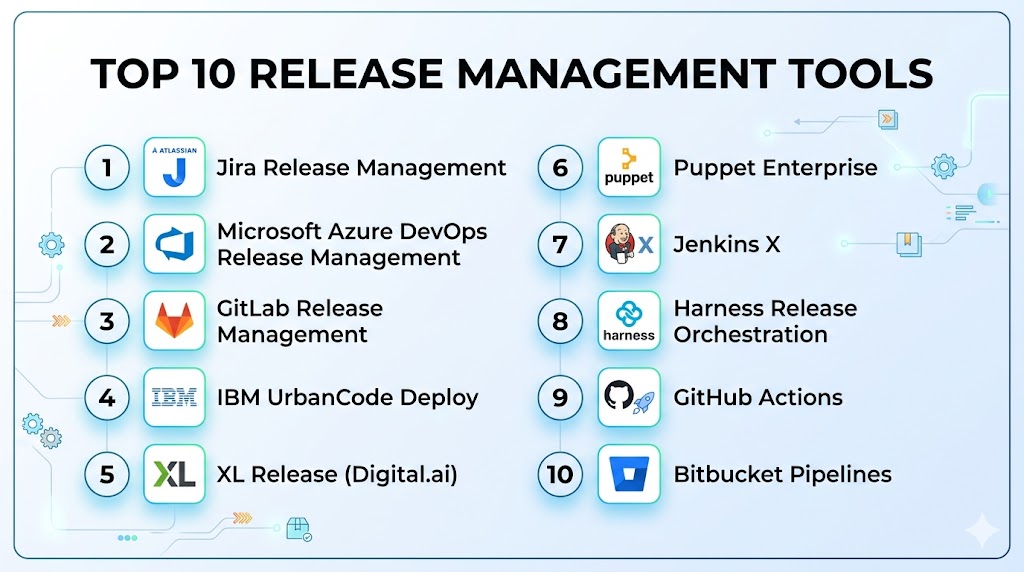
Top 10 Release Management Tools
#1 — Jira Release Management
Short description: Jira Release Management enables teams to plan, track, and automate software releases, integrating seamlessly with Jira Software and other Atlassian tools for end-to-end visibility.
Key Features
- Release planning and roadmapping
- Integration with Jira Software issues and workflows
- Deployment tracking and reporting
- Automation of release tasks and approvals
- Version control visibility
- Role-based access and governance
- CI/CD pipeline integration
Pros
- Deep integration with Atlassian ecosystem
- Customizable workflows and dashboards
Cons
- Can be complex for non-Atlassian users
- Advanced features may require premium tiers
Platforms / Deployment
- Web / Windows / macOS / Linux
- Cloud / On-prem
Security & Compliance
- SSO, MFA, encryption, audit logs
- Not publicly stated
Integrations & Ecosystem
- Bitbucket, Bamboo, Jenkins
- REST API for automation
- Slack, Microsoft Teams
Support & Community
- Atlassian support tiers
- Extensive documentation and community forums
#2 — Microsoft Azure DevOps Release Management
Short description: Azure DevOps Release Management provides release orchestration, pipeline automation, and approval workflows for teams building on Microsoft and cloud-native platforms.
Key Features
- Automated deployment pipelines
- Approval and gating workflows
- Multi-environment release management
- Integration with Azure Repos and GitHub
- Rollback and remediation support
- Analytics and reporting dashboards
- CI/CD pipeline orchestration
Pros
- Native integration with Microsoft cloud services
- Scalable for enterprise deployments
Cons
- Can be complex for small teams
- Pricing varies by Azure subscription
Platforms / Deployment
- Web / Windows / Linux / macOS
- Cloud / Hybrid
Security & Compliance
- SSO, MFA, RBAC, audit logs
- SOC 2, ISO 27001
Integrations & Ecosystem
- Azure Repos, GitHub, Jenkins
- API and CLI support
- Microsoft Teams, Slack
Support & Community
- Microsoft enterprise support
- Documentation and user community
#3 — GitLab Release Management
Short description: GitLab Release Management offers integrated CI/CD pipelines and release orchestration within the GitLab platform, enabling automation and visibility for DevOps teams.
Key Features
- Integrated CI/CD pipelines
- Release notes generation and version tagging
- Automated deployments and approvals
- Rollback and remediation workflows
- Multi-environment support
- Analytics and monitoring
- API-first automation
Pros
- Unified platform for code and release management
- Strong automation capabilities
Cons
- Self-hosted GitLab setup may require additional resources
- Limited integration outside GitLab ecosystem
Platforms / Deployment
- Web / Windows / Linux / macOS
- Cloud / Self-hosted / Hybrid
Security & Compliance
- SSO, MFA, audit logs
- Not publicly stated
Integrations & Ecosystem
- CI/CD tools, Kubernetes, cloud providers
- API and SDK support
- Slack, Teams
Support & Community
- GitLab support tiers
- Active developer community
#4 — IBM UrbanCode Deploy
Short description: UrbanCode Deploy automates complex application deployments across hybrid environments, supporting orchestration, approvals, and compliance for enterprise teams.
Key Features
- Deployment automation for multi-environment applications
- Integration with CI/CD pipelines
- Release governance and approvals
- Application modeling and dependency mapping
- Analytics dashboards
- Role-based access control
- Integration with ITSM tools
Pros
- Enterprise-grade deployment automation
- Strong governance features
Cons
- High complexity for smaller organizations
- Premium pricing
Platforms / Deployment
- Windows / Linux / macOS
- Cloud / On-prem / Hybrid
Security & Compliance
- SSO, MFA, RBAC, audit logs
- Not publicly stated
Integrations & Ecosystem
- Jenkins, GitHub, Jira
- REST API and SDK
- ITSM tools (ServiceNow)
Support & Community
- Enterprise support
- Documentation and professional services
#5 — XL Release (Digital.ai)
Short description: XL Release orchestrates release pipelines across tools and environments, providing visibility, automation, and compliance tracking for enterprise DevOps teams.
Key Features
- Release orchestration and scheduling
- Dependency and environment management
- CI/CD pipeline integration
- Governance and approvals
- Analytics and dashboards
- Automation of repeatable tasks
- Multi-tool integration
Pros
- Strong orchestration across tools
- Enterprise reporting and audit support
Cons
- Requires training for complex pipelines
- Premium pricing for enterprise features
Platforms / Deployment
- Web / Windows / Linux / macOS
- Cloud / On-prem / Hybrid
Security & Compliance
- SSO, MFA, RBAC, audit logs
- Not publicly stated
Integrations & Ecosystem
- Jenkins, GitLab, Jira, Azure DevOps
- REST API and SDK
- ITSM integrations
Support & Community
- Enterprise support tiers
- Knowledge base and community
#6 — Puppet Enterprise
Short description: Puppet Enterprise provides release orchestration, configuration management, and deployment automation for DevOps teams managing hybrid IT environments.
Key Features
- Infrastructure and release automation
- Integration with CI/CD pipelines
- Reporting and analytics
- Environment and dependency management
- Role-based access control
- Rollback and remediation workflows
Pros
- Automates complex releases
- Scales across hybrid environments
Cons
- Steep learning curve
- Pricing varies based on node count
Platforms / Deployment
- Windows / Linux / macOS
- Cloud / On-prem / Hybrid
Security & Compliance
- SSO, MFA, RBAC, audit logs
- Not publicly stated
Integrations & Ecosystem
- CI/CD tools, cloud providers, Kubernetes
- API and CLI support
- ITSM tools integration
Support & Community
- Enterprise support tiers
- Active documentation and community
#7 — Jenkins X
Short description: Jenkins X automates CI/CD pipelines and release management for Kubernetes and cloud-native applications, focusing on developer productivity and automation.
Key Features
- Kubernetes-native release pipelines
- Automated promotion of builds through environments
- Versioning and tagging
- Integration with GitOps workflows
- CI/CD automation
- Metrics and monitoring
Pros
- Ideal for cloud-native deployments
- Strong automation capabilities
Cons
- Requires Kubernetes expertise
- Limited traditional environment support
Platforms / Deployment
- Linux / macOS / Windows
- Cloud / Self-hosted
Security & Compliance
- SSO, MFA
- Not publicly stated
Integrations & Ecosystem
- Kubernetes, Helm, GitHub, GitLab
- REST API
- Monitoring tools
Support & Community
- Community support
- Extensive open-source documentation
#8 — Harness Release Orchestration
Short description: Harness automates and orchestrates software releases with AI-powered verification, rollback, and compliance features, suitable for modern DevOps teams.
Key Features
- AI-driven deployment verification
- Rollback automation
- Multi-environment release orchestration
- CI/CD integration
- Analytics dashboards
- Governance and approvals
Pros
- Reduces deployment errors
- AI-assisted monitoring
Cons
- Premium pricing
- Learning curve for advanced features
Platforms / Deployment
- Web / Windows / Linux / macOS
- Cloud
Security & Compliance
- SSO, MFA, RBAC, audit logs
- Not publicly stated
Integrations & Ecosystem
- CI/CD tools, Kubernetes, cloud providers
- API and SDK support
- ITSM integrations
Support & Community
- Enterprise support tiers
- Documentation and knowledge base
#9 — GitHub Actions
Short description: GitHub Actions provides automation and release management directly in GitHub repositories, enabling CI/CD workflows and deployment automation for developers.
Key Features
- Git-based workflow automation
- Multi-environment deployments
- Event-triggered releases
- CI/CD integration
- Versioning and tagging
- Marketplace for prebuilt actions
Pros
- Integrated into GitHub ecosystem
- Easy automation for developers
Cons
- Limited for multi-tool enterprise orchestration
- Cloud-only
Platforms / Deployment
- Web / Windows / Linux / macOS
- Cloud
Security & Compliance
- SSO, MFA
- Not publicly stated
Integrations & Ecosystem
- GitHub repos, cloud providers, CI/CD tools
- REST API and CLI
- Marketplace actions
Support & Community
- GitHub support
- Large developer community
#10 — Bitbucket Pipelines
Short description: Bitbucket Pipelines automates release workflows, CI/CD pipelines, and deployment orchestration within the Atlassian ecosystem for agile teams.
Key Features
- Integrated CI/CD pipelines
- Multi-environment deployment
- Approval workflows
- Versioning and tagging
- Metrics and monitoring
- Automation of build and release tasks
Pros
- Seamless Atlassian integration
- Easy setup for developers
Cons
- Limited enterprise orchestration outside Atlassian
- Cloud-focused
Platforms / Deployment
- Web / Windows / Linux / macOS
- Cloud
Security & Compliance
- SSO, MFA
- Not publicly stated
Integrations & Ecosystem
- Jira, Bitbucket repos, CI/CD tools
- REST API
- Slack, Teams
Support & Community
- Atlassian support tiers
- Documentation and community forums
Comparison Table (Top 10)
| Tool Name | Best For | Platform(s) Supported | Deployment | Standout Feature | Public Rating |
|---|---|---|---|---|---|
| Jira Release Management | Atlassian ecosystem teams | Web, Windows, macOS, Linux | Cloud / On-prem | Integrated release visibility | N/A |
| Azure DevOps Release Mgmt | Microsoft stack enterprises | Web, Windows, Linux, macOS | Cloud / Hybrid | CI/CD orchestration | N/A |
| GitLab Release Management | GitLab DevOps teams | Web, Windows, Linux, macOS | Cloud / Self-hosted | Unified code & release platform | N/A |
| IBM UrbanCode Deploy | Complex enterprise deployments | Web, Windows, Linux, macOS | Cloud / On-prem / Hybrid | Enterprise deployment automation | N/A |
| XL Release (Digital.ai) | Enterprise orchestration | Web, Windows, Linux, macOS | Cloud / On-prem / Hybrid | Multi-tool pipeline orchestration | N/A |
| Puppet Enterprise | Hybrid IT teams | Web, Windows, Linux, macOS | Cloud / On-prem / Hybrid | Configuration & release automation | N/A |
| Jenkins X | Kubernetes & cloud-native | Linux, macOS, Windows | Cloud / Self-hosted | Kubernetes-native CI/CD | N/A |
| Harness Release Orchestration | AI-assisted DevOps teams | Web, Windows, Linux, macOS | Cloud | AI deployment verification | N/A |
| GitHub Actions | GitHub developers | Web, Windows, Linux, macOS | Cloud | Integrated GitHub automation | N/A |
| Bitbucket Pipelines | Atlassian agile teams | Web, Windows, Linux, macOS | Cloud | CI/CD workflow automation | N/A |
Evaluation & Scoring of Release Management Tools
| Tool Name | Core (25%) | Ease (15%) | Integrations (15%) | Security (10%) | Performance (10%) | Support (10%) | Value (15%) | Weighted Total (0–10) |
|---|---|---|---|---|---|---|---|---|
| Jira Release Management | 9 | 8 | 9 | 8 | 8 | 8 | 7 | 8.3 |
| Azure DevOps Release Mgmt | 9 | 7 | 8 | 8 | 8 | 7 | 7 | 8.0 |
| GitLab Release Management | 8 | 8 | 8 | 8 | 8 | 7 | 7 | 7.9 |
| IBM UrbanCode Deploy | 9 | 7 | 8 | 9 | 8 | 8 | 6 | 8.0 |
| XL Release (Digital.ai) | 8 | 7 | 8 | 8 | 8 | 7 | 6 | 7.7 |
| Puppet Enterprise | 8 | 7 | 8 | 8 | 8 | 7 | 6 | 7.7 |
| Jenkins X | 7 | 8 | 7 | 8 | 7 | 7 | 6 | 7.2 |
| Harness Release Orchestration | 8 | 7 | 8 | 8 | 8 | 7 | 6 | 7.7 |
| GitHub Actions | 7 | 8 | 7 | 7 | 7 | 7 | 6 | 7.0 |
| Bitbucket Pipelines | 7 | 8 | 7 | 7 | 7 | 7 | 6 | 7.0 |
Scores are comparative and illustrate relative strengths in core features, usability, integrations, security, performance, support, and value.
Which Release Management Tool Is Right for You?
Solo / Freelancer
Use GitHub Actions or Bitbucket Pipelines for lightweight CI/CD and release automation.
SMB
Jira Release Management, GitLab, or Azure DevOps provide visibility, automation, and governance suitable for small-to-medium teams.
Mid-Market
XL Release and Puppet Enterprise offer enterprise orchestration, automation, and reporting for growing teams.
Enterprise
Select IBM UrbanCode Deploy, Harness Release Orchestration, or Azure DevOps for complex environments, multi-cloud deployments, and compliance.
Budget vs Premium
SaaS-focused tools like GitHub Actions are cost-effective, while enterprise solutions provide advanced automation, governance, and analytics.
Feature Depth vs Ease of Use
Enterprise tools offer rich orchestration and governance but require dedicated training; SaaS solutions prioritize ease and speed.
Integrations & Scalability
Tools with APIs and CI/CD integrations, such as Azure DevOps, Jira, and XL Release, scale efficiently across multi-cloud and hybrid environments.
Security & Compliance Needs
Organizations with strict compliance requirements should focus on IBM UrbanCode Deploy, XL Release, or Harness for audit-ready release management.
Frequently Asked Questions (FAQs)
1. What is a release management tool?
It is a platform that orchestrates, automates, and monitors software releases across development, testing, and production environments.
2. How do these tools integrate with CI/CD pipelines?
They connect to build and version control systems, automating deployments, approvals, and rollbacks within the CI/CD workflow.
3. Can release management tools prevent downtime?
Yes, automation, rollback features, and environment awareness help reduce deployment errors and minimize service interruptions.
4. What platforms are supported?
Most tools support Windows, Linux, macOS, and cloud-native environments.
5. Are AI-powered features common?
Modern tools increasingly provide AI-assisted verification, risk detection, and anomaly monitoring in releases.
6. How is pricing typically structured?
Pricing varies: SaaS tools often charge per user or pipeline, while enterprise solutions use subscriptions or perpetual licenses.
7. Can these tools handle multi-cloud environments?
Yes, enterprise-grade tools like IBM UrbanCode, Azure DevOps, and XL Release provide multi-cloud orchestration.
8. What mistakes should teams avoid?
Avoid manual releases, neglecting approvals, ignoring dependency mapping, and failing to monitor deployment performance.
9. How do these tools support compliance?
They provide audit logs, approval workflows, and reporting dashboards to meet regulatory standards.
10. Can open-source teams benefit from these tools?
Yes, developer-friendly platforms like GitHub Actions, Jenkins X, and GitLab provide automation without heavy enterprise overhead.
Conclusion
Release Management Tools are essential for orchestrating, automating, and monitoring software deployments across complex development environments. Choosing the right tool depends on team size, deployment model, compliance needs, and platform support. Enterprise teams benefit from full-featured orchestration and governance, while SMBs and developers may prioritize SaaS solutions for ease of use and cost efficiency. Teams should pilot shortlisted tools, validate integrations, and assess compliance and reporting capabilities before full-scale adoption. Effective release management reduces risk, increases deployment speed, and enhances software quality, enabling organizations to deliver software reliably and securely.

Find Trusted Cardiac Hospitals
Compare heart hospitals by city and services — all in one place.
Explore Hospitals
Release management is not only about getting a new version into production. It is also important to know what to do if the release causes an unexpected problem. Having a tested rollback plan and clear ownership can help teams recover faster without adding more confusion during an incident.