Introduction
Runbook Automation Tools are platforms that automate operational procedures and incident response workflows within IT and DevOps environments. These tools transform manual runbooks—step-by-step instructions for handling operational tasks—into automated workflows, reducing human error, accelerating incident resolution, and ensuring consistent execution. By automating repetitive tasks, teams can focus on critical issues and improve overall system reliability.
In with increasingly complex cloud-native infrastructures, microservices, and hybrid IT environments, runbook automation is crucial for operational efficiency. Real-world use cases include automated server provisioning, self-healing application incidents, compliance-driven workflow execution, automated database backups, and incident response orchestration. Evaluating these tools requires examining their automation capabilities, integration with monitoring and incident management platforms, ease of use, scalability, and security.
Best for: IT operations, DevOps, SRE teams, security operations, mid-market to enterprise organizations managing complex IT environments.
Not ideal for: Teams with minimal operations complexity, low incident volume, or simple scripting needs where manual runbooks suffice.
Evaluation criteria include:
- Automation of manual runbooks and workflows
- Integration with monitoring and incident management tools
- Scalability for high-volume operations
- Real-time execution and logging
- Error handling and rollback capabilities
- Security and compliance (SSO, MFA, RBAC, encryption)
- Multi-cloud and hybrid environment support
- Analytics and reporting
- Ease of setup and usability
- Pricing and total cost of ownership
Key Trends in Runbook Automation Tools
- AI-driven automation to recommend and execute workflows
- Integration with observability and incident management platforms
- Self-healing and auto-remediation capabilities
- Multi-cloud and hybrid environment support
- Compliance automation and audit-ready logging
- Template-driven and low-code workflow creation
- Collaboration and team-based workflow approvals
- Predictive analytics for proactive maintenance
- Subscription and usage-based pricing models
- Centralized dashboards for visibility and reporting
How We Selected These Tools (Methodology)
- Evaluated market adoption and industry recognition
- Assessed automation capabilities and workflow complexity
- Measured reliability and performance under operational load
- Reviewed security and compliance features
- Examined integration ecosystem with monitoring, ITSM, and DevOps tools
- Considered scalability across multiple teams and environments
- Evaluated ease of setup and usability
- Checked analytics and reporting features
- Assessed vendor support, documentation, and community engagement
- Balanced cost versus feature set for SMBs and enterprises
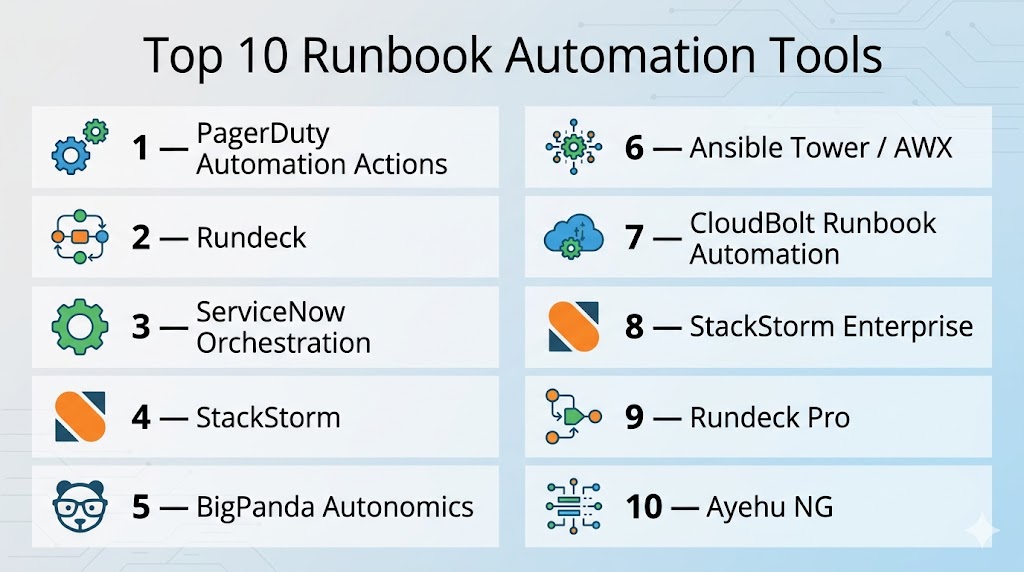
Top 10 Runbook Automation Tools
#1 — PagerDuty Automation Actions
Short description : PagerDuty Automation Actions enables teams to automate incident response workflows, orchestrate runbooks, and accelerate remediation across IT and DevOps environments.
Key Features
- Automated incident response workflows
- Runbook orchestration and execution
- Integration with monitoring and ITSM tools
- Event enrichment and AI-assisted decision making
- Multi-cloud and hybrid support
- Analytics and reporting dashboards
Pros
- Reduces manual intervention and response times
- AI-assisted insights for incident prioritization
- Extensive integration ecosystem
Cons
- Cloud-only deployment
- High subscription cost for small teams
- Complexity in configuring advanced workflows
Platforms / Deployment
- Web, iOS, Android
- Cloud
Security & Compliance
- SOC 2, ISO 27001
- SSO, MFA, encryption
Integrations & Ecosystem
- Integrates with monitoring (Datadog, New Relic), ITSM (ServiceNow), and messaging platforms (Slack, Teams)
- APIs for custom automation and dashboards
Support & Community
Enterprise support, online documentation, and user community.
#2 — Rundeck
Short description : Rundeck provides workflow automation and runbook execution, enabling DevOps and IT operations teams to automate routine tasks and incident responses securely and efficiently.
Key Features
- Job scheduling and automation
- Access control with RBAC
- Multi-node execution and orchestration
- Logging and audit trails
- API-driven automation
- Integration with monitoring and DevOps tools
Pros
- Open-source with self-hosted options
- Flexible workflow automation
- Strong access control and audit capabilities
Cons
- Requires technical expertise to configure
- Learning curve for large-scale orchestration
- Community support may be limited
Platforms / Deployment
- Web
- Self-hosted / Hybrid
Security & Compliance
- Encryption, RBAC
- Not publicly stated
Integrations & Ecosystem
- APIs for workflow execution
- Integration with Ansible, Jenkins, Kubernetes
- Webhooks for monitoring alerts
Support & Community
Documentation, forums, and enterprise support for paid editions.
#3 — ServiceNow Orchestration
Short description : ServiceNow Orchestration allows organizations to automate IT workflows, integrate runbooks with ITSM processes, and execute complex operations across systems.
Key Features
- Runbook automation for ITSM
- Integration with monitoring and alerting tools
- Multi-step workflow orchestration
- Compliance and audit tracking
- Analytics for workflow efficiency
- Pre-built integrations and connectors
Pros
- Enterprise-grade automation
- Seamless ITSM integration
- Compliance-ready workflows
Cons
- High cost for SMBs
- Requires ServiceNow expertise
- Cloud dependency
Platforms / Deployment
- Web
- Cloud / Hybrid
Security & Compliance
- SOC 2, ISO 27001
- Encryption, SSO, MFA
Integrations & Ecosystem
- Monitoring: Nagios, Splunk
- ITSM: ServiceNow modules
- APIs for custom workflow automation
Support & Community
Enterprise support, documentation, and active ITSM community.
#4 — StackStorm
Short description : StackStorm is an open-source automation platform that enables runbook execution, event-driven workflows, and incident response orchestration for DevOps teams.
Key Features
- Event-driven automation
- Workflow and rule-based runbooks
- Integration with CI/CD and monitoring tools
- Logging and auditing
- Extensible with packs and APIs
Pros
- Open-source and flexible
- Integrates with multiple tools and platforms
- Supports complex automation workflows
Cons
- Technical expertise required
- Limited enterprise support in community edition
- Cloud deployment requires custom setup
Platforms / Deployment
- Web
- Self-hosted / Hybrid
Security & Compliance
- RBAC and encryption
- Not publicly stated
Integrations & Ecosystem
- CI/CD: Jenkins, GitLab
- Monitoring: Nagios, Prometheus
- APIs and extensible packs
Support & Community
Community-driven with documentation and paid enterprise support options.
#5 — BigPanda Autonomics
Short description : BigPanda Autonomics automates incident response and runbook execution, reducing alert noise and accelerating operational remediation for large IT teams.
Key Features
- AI-assisted incident correlation
- Automated workflow execution
- Multi-tool integration for monitoring and ITSM
- Analytics for operational efficiency
- Multi-cloud support
Pros
- Reduces alert noise
- Fast incident resolution
- Scalable for enterprise environments
Cons
- Cloud-only
- Enterprise pricing
- Learning curve for advanced automation
Platforms / Deployment
- Web
- Cloud
Security & Compliance
- SOC 2
- Encryption, SSO
Integrations & Ecosystem
- Datadog, New Relic, ServiceNow
- Slack, Teams, Jira
- APIs for custom automation
Support & Community
Enterprise support and professional services.
#6 — Ansible Tower / AWX
Short description : Ansible Tower (commercial) and AWX (open-source) automate IT workflows and runbooks, providing DevOps teams with centralized control and scheduling capabilities.
Key Features
- Playbook automation
- RBAC and audit logging
- Workflow orchestration
- Job scheduling and execution
- Integration with CI/CD and monitoring
Pros
- Mature and widely adopted
- Strong workflow automation
- Enterprise and open-source options
Cons
- Learning curve for playbooks
- AWX requires self-hosting
- Limited built-in monitoring
Platforms / Deployment
- Web
- Cloud / Self-hosted / Hybrid
Security & Compliance
- SOC 2 (Tower)
- Encryption, SSO, MFA
Integrations & Ecosystem
- Jenkins, GitLab, Kubernetes
- Monitoring tools: Prometheus, Nagios
- APIs for job execution
Support & Community
Enterprise support for Tower; active community for AWX.
#7 — CloudBolt Runbook Automation
Short description : CloudBolt automates cloud and IT workflows, providing runbook execution, approval workflows, and orchestration for hybrid and multi-cloud environments.
Key Features
- Runbook automation across clouds
- Approval workflows
- Integration with ITSM and monitoring tools
- Analytics and reporting
- Multi-cloud provisioning
Pros
- Strong hybrid cloud support
- Customizable automation
- Analytics and compliance features
Cons
- Enterprise pricing
- Requires platform expertise
- Cloud dependency
Platforms / Deployment
- Web
- Cloud / Hybrid
Security & Compliance
- SOC 2
- Encryption, SSO, MFA
Integrations & Ecosystem
- AWS, Azure, GCP
- Jira, ServiceNow, Slack
- APIs for custom workflows
Support & Community
Enterprise support, professional services, and documentation.
#8 — StackStorm Enterprise
Short description : StackStorm Enterprise adds enterprise-grade support and features to the open-source StackStorm, providing scalable runbook automation for large IT teams.
Key Features
- Event-driven automation
- Workflow orchestration
- Integration with DevOps and monitoring tools
- Logging and auditing
- Enterprise support
Pros
- Combines open-source flexibility with enterprise support
- Scales for large organizations
- Supports complex automation workflows
Cons
- Enterprise edition requires subscription
- Technical setup needed
- Cloud deployment requires configuration
Platforms / Deployment
- Web
- Self-hosted / Hybrid
Security & Compliance
- Encryption, RBAC
- SOC 2 (Enterprise)
Integrations & Ecosystem
- CI/CD: Jenkins, GitLab
- Monitoring: Prometheus, Nagios
- APIs and automation packs
Support & Community
Enterprise support plus community forums and documentation.
#9 — Rundeck Pro
Short description : Rundeck Pro adds enterprise features and professional support to the open-source Rundeck, enabling secure, scalable runbook automation for critical operations.
Key Features
- Enterprise-grade workflow automation
- Role-based access control and audit trails
- Multi-node execution
- Integration with monitoring and ITSM tools
- Analytics dashboards
Pros
- Enterprise support and SLA
- Enhanced security and compliance
- Scalable and customizable
Cons
- Paid subscription required
- Technical expertise needed
- Cloud deployment optional
Platforms / Deployment
- Web
- Cloud / Self-hosted / Hybrid
Security & Compliance
- SOC 2
- RBAC, encryption
Integrations & Ecosystem
- Jira, Slack, ServiceNow
- Monitoring integrations
- APIs for workflow automation
Support & Community
Enterprise support and documentation.
#10 — Ayehu NG
Short description : Ayehu NG provides IT automation and runbook execution for incident response, integrating with monitoring, ITSM, and DevOps tools to accelerate operational tasks.
Key Features
- Workflow and runbook automation
- Incident response orchestration
- Integration with ITSM and monitoring platforms
- Analytics and reporting
- Multi-cloud support
Pros
- Rapid deployment and automation
- Scales for enterprise use
- Integration with multiple IT platforms
Cons
- Enterprise pricing
- Technical setup required
- Cloud or on-prem deployment choice
Platforms / Deployment
- Web
- Cloud / Self-hosted
Security & Compliance
- SOC 2, ISO 27001
- SSO, MFA, encryption
Integrations & Ecosystem
- ServiceNow, Jira, Slack
- Datadog, Nagios, Splunk
- APIs for automation
Support & Community
Enterprise support, documentation, and professional services.
Comparison Table (Top 10)
| Tool Name | Best For | Platform(s) Supported | Deployment | Standout Feature | Public Rating |
|---|---|---|---|---|---|
| PagerDuty Automation Actions | Enterprise IT & DevOps | Web, iOS, Android | Cloud | AI-assisted incident workflows | N/A |
| Rundeck | DevOps teams & IT | Web | Self-hosted / Hybrid | Open-source orchestration | N/A |
| ServiceNow Orchestration | Enterprise IT | Web | Cloud / Hybrid | ITSM workflow integration | N/A |
| StackStorm | DevOps & IT | Web | Self-hosted / Hybrid | Event-driven automation | N/A |
| BigPanda Autonomics | Enterprise IT | Web | Cloud | AI-driven alert correlation | N/A |
| Ansible Tower / AWX | DevOps & IT | Web | Cloud / Self-hosted / Hybrid | Playbook automation | N/A |
| CloudBolt Runbook Automation | Multi-cloud IT | Web | Cloud / Hybrid | Cloud provisioning workflows | N/A |
| StackStorm Enterprise | Large IT & DevOps | Web | Self-hosted / Hybrid | Enterprise support + automation | N/A |
| Rundeck Pro | Enterprise IT | Web | Cloud / Self-hosted / Hybrid | Security & SLA | N/A |
| Ayehu NG | IT & DevOps | Web | Cloud / Self-hosted | Incident response automation | N/A |
Evaluation & Scoring of Runbook Automation Tools
| Tool Name | Core (25%) | Ease (15%) | Integrations (15%) | Security (10%) | Performance (10%) | Support (10%) | Value (15%) | Weighted Total (0–10) |
|---|---|---|---|---|---|---|---|---|
| PagerDuty Automation Actions | 9 | 8 | 9 | 9 | 9 | 8 | 6 | 8.5 |
| Rundeck | 8 | 7 | 8 | 7 | 8 | 7 | 7 | 7.7 |
| ServiceNow Orchestration | 9 | 7 | 8 | 9 | 9 | 8 | 6 | 8.3 |
| StackStorm | 8 | 7 | 8 | 7 | 8 | 7 | 6 | 7.6 |
| BigPanda Autonomics | 8 | 7 | 8 | 8 | 8 | 7 | 6 | 7.7 |
| Ansible Tower / AWX | 8 | 7 | 8 | 8 | 8 | 7 | 6 | 7.7 |
| CloudBolt Runbook Automation | 8 | 7 | 8 | 8 | 8 | 7 | 6 | 7.7 |
| StackStorm Enterprise | 8 | 7 | 8 | 8 | 8 | 7 | 6 | 7.7 |
| Rundeck Pro | 8 | 7 | 8 | 8 | 8 | 7 | 6 | 7.7 |
| Ayehu NG | 8 | 7 | 8 | 8 | 8 | 7 | 6 | 7.7 |
Interpretation: Weighted totals reflect comparative effectiveness across core features, ease of use, integration capabilities, security, and value. High scores indicate enterprise readiness; selection should align with organizational requirements, IT environment complexity, and budget.
Which Runbook Automation Tool Is Right for You?
Solo / Freelancer
Rundeck or StackStorm for lightweight, open-source automation workflows.
SMB
Ayehu NG, Rundeck, or Ansible Tower for cost-effective automation with moderate scalability.
Mid-Market
PagerDuty Automation Actions, BigPanda, or CloudBolt for multi-cloud workflow orchestration and integrations.
Enterprise
ServiceNow Orchestration, Rundeck Pro, StackStorm Enterprise for large-scale automation, AI-assisted workflows, and compliance tracking.
Budget vs Premium
Open-source or entry-level editions offer low cost but require technical setup. Premium enterprise tools provide automation, analytics, and SLA-backed support.
Feature Depth vs Ease of Use
PagerDuty and BigPanda offer depth and AI capabilities, while Rundeck and AWX provide simpler, flexible open-source options.
Integrations & Scalability
Enterprise-scale teams benefit from ServiceNow, PagerDuty, and CloudBolt for extensive integrations and high-volume automation.
Security & Compliance Needs
Organizations with strict regulatory requirements should consider ServiceNow Orchestration, StackStorm Enterprise, or PagerDuty for robust compliance features.
Frequently Asked Questions (FAQs)
1. What pricing models exist?
Subscription-based, usage-based, or open-source (self-hosted) models are common. Enterprise editions offer SLA-backed support.
2. How long does onboarding take?
Open-source tools can be operational within hours but may require configuration; enterprise tools may require days for full deployment and integration.
3. Can these tools scale for global teams?
Yes, tools like PagerDuty, ServiceNow, and BigPanda scale for multi-region and multi-cloud environments.
4. Are AI features standard?
AI-assisted automation, anomaly detection, and workflow recommendations are primarily available in enterprise-grade tools.
5. What platforms are supported?
Web dashboards are standard; mobile apps are available for PagerDuty, Ayehu NG, and StackStorm Enterprise.
6. How secure are these tools?
Enterprise tools provide encryption, SSO, MFA, RBAC, and adherence to SOC 2 and ISO 27001 where stated.
7. Can they integrate with monitoring and ITSM systems?
Yes, most tools integrate with monitoring (Datadog, New Relic), ITSM (ServiceNow), and collaboration platforms (Slack, Teams).
8. Do these tools replace ITSM?
No, they complement ITSM by automating workflows, runbooks, and incident response procedures.
9. What are common implementation mistakes?
Neglecting workflow version control, failing to define rollback processes, and underestimating integration requirements.
10. Are open-source options viable?
Yes, Rundeck, AWX, and StackStorm offer flexible open-source options, though enterprise features require subscription.
Conclusion
Runbook Automation Tools are critical for modern IT operations, DevOps, and SRE teams, enabling efficient incident response, operational consistency, and reduced human error. Enterprise solutions like PagerDuty, ServiceNow Orchestration, and BigPanda provide AI-assisted workflows, multi-cloud orchestration, and advanced analytics, while open-source options such as Rundeck and StackStorm offer flexibility for SMBs and technical teams. Evaluating tools based on integrations, automation depth, compliance requirements, and scalability ensures teams can optimize operations, improve uptime, and maintain regulatory standards. Organizations should shortlist tools, pilot workflows, and validate automation effectiveness to enhance operational resilience and efficiency.

Find Trusted Cardiac Hospitals
Compare heart hospitals by city and services — all in one place.
Explore Hospitals
Runbook automation can save time, but runbooks also need regular updates as systems change. An old step or command may work differently after a software, cloud, or configuration change. Reviewing important runbooks after major system changes can help prevent automation from making an incident worse.