Introduction
Wi-Fi Planning Tools are specialized software solutions designed to help network engineers, IT administrators, and organizations optimize the design, deployment, and management of wireless networks. These tools enable teams to simulate network coverage, predict interference, analyze capacity requirements, and ensure reliable connectivity before physically deploying access points. In with the rise of IoT devices, hybrid work models, and high-density environments, proper Wi-Fi planning has become critical for operational efficiency and end-user satisfaction.
Real-world use cases include designing campus networks, optimizing coverage for large events or venues, monitoring and troubleshooting network performance, capacity planning for high-density office environments, and ensuring seamless roaming across multiple access points. Key criteria buyers should evaluate include predictive modeling accuracy, ease of use, integration with existing network management systems, scalability, automation capabilities, reporting and analytics, support for multiple Wi-Fi standards (Wi-Fi 6/6E/7), cloud vs on-premises deployment, and vendor support quality.
Best for: Network engineers, IT operations teams, enterprise organizations, educational institutions, hospitals, and service providers requiring reliable wireless connectivity.
Not ideal for: Small offices or home networks where manual deployment and native access point tools are sufficient.
Key Trends in Wi-Fi Planning Tools
- AI-driven predictive modeling for coverage and interference
- Automation for access point placement and channel assignment
- Multi-floor and multi-building network simulation
- Integration with IoT and smart device management
- Support for Wi-Fi 6E and Wi-Fi 7 standards
- Cloud-based planning and collaboration tools
- Real-time monitoring and analytics
- Hybrid deployment support (on-premises + cloud)
- Role-based access and reporting for compliance
- Subscription-based and usage-based pricing models
How We Selected These Tools (Methodology)
- Market adoption and brand recognition
- Feature completeness, including predictive modeling and analytics
- Performance reliability and simulation accuracy
- Security posture and compliance features
- Integration capabilities with network management and ITSM tools
- Customer fit across SMB, mid-market, and enterprise environments
- Ease of use and learning curve
- Scalability for multi-building and high-density deployments
- Support and documentation quality
- AI and automation capabilities for modern Wi-Fi networks
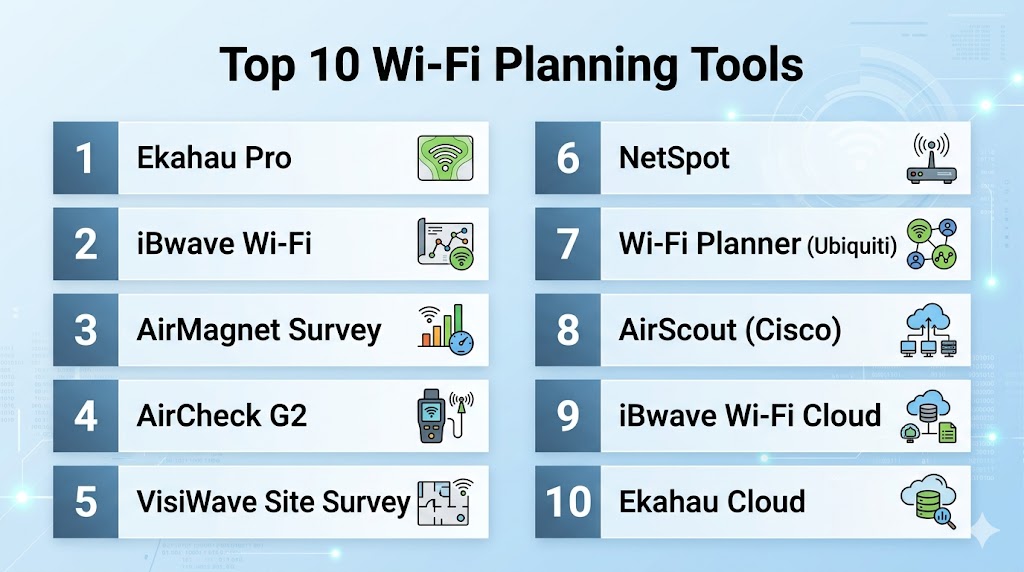
Top 10 Wi-Fi Planning Tools
#1 — Ekahau Pro
Short description : Ekahau Pro is a comprehensive Wi-Fi planning and site survey tool that enables network engineers to design, visualize, and optimize wireless networks with precision, including predictive modeling and post-deployment validation.
Key Features
- Predictive Wi-Fi coverage mapping
- Heatmaps for signal strength and interference
- Automated channel and power assignment
- Integration with Ekahau Sidekick hardware
- Real-time simulation of multi-floor environments
- Reporting and analytics dashboards
Pros
- Highly accurate predictive modeling
- Supports complex enterprise deployments
- Extensive reporting and visualization tools
Cons
- High cost for smaller organizations
- Requires training to utilize advanced features
Platforms / Deployment
- Windows, macOS
- Desktop / Cloud for collaboration
Security & Compliance
- Not publicly stated
Integrations & Ecosystem
- Network management platforms
- ITSM integration via API
- Ekahau Sidekick hardware
Support & Community
Comprehensive vendor support and training programs.
#2 — iBwave Wi-Fi
Short description : iBwave Wi-Fi focuses on large-scale indoor and outdoor wireless network design, offering detailed propagation modeling, capacity planning, and multi-vendor access point support.
Key Features
- Multi-floor and multi-building simulations
- Advanced propagation modeling
- Capacity and performance prediction
- Integration with 3D building models
- Reporting and automated documentation
Pros
- Detailed large-scale network planning
- Supports multi-vendor APs and Wi-Fi standards
- Strong simulation accuracy
Cons
- Steep learning curve
- Higher cost for SMBs
Platforms / Deployment
- Windows
- Desktop / Cloud collaboration
Security & Compliance
- Not publicly stated
Integrations & Ecosystem
- CAD and BIM integration
- API for network management systems
Support & Community
Enterprise support, online documentation, and training.
#3 — AirMagnet Survey
Short description : AirMagnet Survey by NetAlly provides comprehensive Wi-Fi site survey capabilities, predictive modeling, and real-time interference analysis for enterprise wireless networks.
Key Features
- RF spectrum analysis
- Predictive coverage mapping
- Interference detection
- Capacity planning for high-density networks
- Integration with network monitoring tools
Pros
- Detailed RF and interference analysis
- Supports Wi-Fi 6 and 6E networks
- Accurate predictive modeling
Cons
- Hardware dependency for full features
- Complex for smaller-scale networks
Platforms / Deployment
- Windows
- Desktop
Security & Compliance
- Not publicly stated
Integrations & Ecosystem
- Network monitoring platforms
- API support for automation
Support & Community
Professional support and training resources available.
#4 — AirCheck G2
Short description : AirCheck G2 is a handheld Wi-Fi testing and troubleshooting tool designed for site surveys and real-time network performance validation.
Key Features
- Instant Wi-Fi performance testing
- Interference and coverage detection
- Network discovery and analysis
- Reporting and documentation
Pros
- Portable and easy to use
- Quick troubleshooting for live networks
- Real-time validation
Cons
- Limited predictive planning capabilities
- Smaller feature set for large-scale designs
Platforms / Deployment
- Handheld device (iOS/Android companion apps)
- Standalone
Security & Compliance
- Not publicly stated
Integrations & Ecosystem
- Exports to network management tools
- Limited API capabilities
Support & Community
Vendor support and documentation provided.
#5 — VisiWave Site Survey
Short description : VisiWave Site Survey provides mapping, visualization, and reporting for Wi-Fi networks, focusing on signal coverage and performance metrics.
Key Features
- Floor plan-based mapping
- Heatmaps for coverage and signal strength
- Capacity planning
- Automated reporting
Pros
- Simple visualization tools
- Affordable for SMBs
- Easy to generate reports
Cons
- Limited advanced predictive modeling
- Less suitable for complex multi-floor networks
Platforms / Deployment
- Windows
- Desktop
Security & Compliance
- Not publicly stated
Integrations & Ecosystem
- Data export for network management systems
Support & Community
Online documentation and basic vendor support.
#6 — NetSpot
Short description : NetSpot is a versatile Wi-Fi site survey and analysis tool for SMBs and IT teams, offering visual heatmaps and network troubleshooting features.
Key Features
- Coverage and signal mapping
- Wi-Fi troubleshooting tools
- Heatmaps for signal strength and noise
- Channel interference analysis
- Reporting and documentation
Pros
- User-friendly interface
- Affordable and quick to deploy
- Suitable for SMBs and IT professionals
Cons
- Limited enterprise-grade predictive modeling
- Not ideal for multi-building campuses
Platforms / Deployment
- Windows, macOS
- Desktop
Security & Compliance
- Not publicly stated
Integrations & Ecosystem
- Export CSV and reports for documentation
Support & Community
Documentation and email support available.
#7 — Wi-Fi Planner (Ubiquiti)
Short description : Wi-Fi Planner is a cloud-based tool for Ubiquiti access points, offering predictive modeling, coverage mapping, and capacity planning for small to mid-size networks.
Key Features
- Predictive heatmaps
- AP placement recommendations
- Channel planning
- Coverage visualization
- Cloud-based collaboration
Pros
- Easy to use for Ubiquiti hardware
- Quick setup and planning
- Cloud access
Cons
- Limited to Ubiquiti devices
- Fewer enterprise-grade analytics
Platforms / Deployment
- Web
- Cloud
Security & Compliance
- Not publicly stated
Integrations & Ecosystem
- Ubiquiti hardware integration
- Cloud export options
Support & Community
Vendor support via forums and documentation.
#8 — AirScout (Cisco)
Short description : Cisco AirScout provides enterprise-grade Wi-Fi planning, analytics, and optimization tools designed for large-scale network deployments.
Key Features
- Predictive coverage mapping
- Capacity and throughput planning
- RF interference analysis
- Multi-floor and multi-building support
- Integration with Cisco network tools
Pros
- Enterprise-grade analytics
- Accurate predictive modeling
- Integrates with Cisco ecosystem
Cons
- Premium pricing
- Complexity for SMBs
Platforms / Deployment
- Web
- Cloud / Hybrid
Security & Compliance
- ISO 27001, SOC 2 (Cisco standard)
Integrations & Ecosystem
- Cisco hardware and network management platforms
- APIs for automation
Support & Community
Enterprise support and professional services.
#9 — iBwave Wi-Fi Cloud
Short description : Cloud-based version of iBwave Wi-Fi enabling multi-site planning, collaboration, and predictive analysis for enterprises.
Key Features
- Cloud collaboration and planning
- Multi-building simulation
- Predictive coverage modeling
- Reporting and analytics
- Wi-Fi 6/6E support
Pros
- Cloud-native for distributed teams
- Scalable multi-site planning
- Accurate predictive modeling
Cons
- Enterprise pricing
- Requires familiarity with Wi-Fi planning concepts
Platforms / Deployment
- Web
- Cloud
Security & Compliance
- Not publicly stated
Integrations & Ecosystem
- CAD/BIM import
- API for network management
Support & Community
Enterprise support and training available.
#10 — Ekahau Cloud
Short description : Ekahau Cloud extends Ekahau Pro features to a cloud-based collaborative environment, enabling predictive planning, team collaboration, and analytics.
Key Features
- Predictive heatmaps and coverage modeling
- Cloud collaboration and sharing
- Multi-floor and multi-building support
- Automated reporting
- Wi-Fi 6/6E/7 support
Pros
- Cloud-native for team collaboration
- Enterprise-grade predictive analytics
- Seamless integration with Ekahau Pro
Cons
- Requires Ekahau Pro license for full features
- Higher cost for smaller deployments
Platforms / Deployment
- Web
- Cloud
Security & Compliance
- Not publicly stated
Integrations & Ecosystem
- Ekahau Sidekick hardware
- Export to network management tools
- APIs for automation
Support & Community
Professional support and documentation, training available.
Comparison Table (Top 10)
| Tool Name | Best For | Platform(s) Supported | Deployment | Standout Feature | Public Rating |
|---|---|---|---|---|---|
| Ekahau Pro | Enterprise | Windows, macOS | Desktop / Cloud | Predictive modeling | N/A |
| iBwave Wi-Fi | Large-scale networks | Windows | Desktop / Cloud | Multi-building simulations | N/A |
| AirMagnet Survey | Enterprise IT | Windows | Desktop | RF spectrum analysis | N/A |
| AirCheck G2 | Field engineers | Handheld, iOS/Android | Standalone | Real-time troubleshooting | N/A |
| VisiWave Site Survey | SMBs | Windows | Desktop | Floor plan mapping | N/A |
| NetSpot | SMB/IT pros | Windows, macOS | Desktop | Wi-Fi heatmaps | N/A |
| Wi-Fi Planner (Ubiquiti) | Ubiquiti networks | Web | Cloud | AP placement recommendations | N/A |
| AirScout (Cisco) | Enterprise | Web | Cloud / Hybrid | Multi-building planning | N/A |
| iBwave Wi-Fi Cloud | Multi-site enterprise | Web | Cloud | Collaborative planning | N/A |
| Ekahau Cloud | Enterprise | Web | Cloud | Cloud collaboration | N/A |
Evaluation & Scoring of Wi-Fi Planning Tools
| Tool Name | Core (25%) | Ease (15%) | Integrations (15%) | Security (10%) | Performance (10%) | Support (10%) | Value (15%) | Weighted Total (0–10) |
|---|---|---|---|---|---|---|---|---|
| Ekahau Pro | 9 | 8 | 8 | 7 | 9 | 8 | 7 | 8.2 |
| iBwave Wi-Fi | 9 | 7 | 8 | 7 | 9 | 8 | 7 | 8.0 |
| AirMagnet Survey | 8 | 7 | 7 | 7 | 8 | 7 | 7 | 7.6 |
| AirCheck G2 | 7 | 8 | 6 | 7 | 7 | 7 | 7 | 7.3 |
| VisiWave Site Survey | 7 | 8 | 6 | 7 | 7 | 7 | 8 | 7.4 |
| NetSpot | 7 | 9 | 6 | 6 | 7 | 7 | 8 | 7.5 |
| Wi-Fi Planner | 6 | 9 | 6 | 6 | 7 | 7 | 8 | 7.3 |
| AirScout | 9 | 7 | 8 | 8 | 9 | 8 | 7 | 8.1 |
| iBwave Wi-Fi Cloud | 9 | 7 | 8 | 7 | 9 | 8 | 7 | 8.0 |
| Ekahau Cloud | 9 | 8 | 8 | 7 | 9 | 8 | 7 | 8.1 |
Interpretation: Weighted totals provide a comparative evaluation based on features, usability, integrations, security, performance, support, and value. Higher scores indicate better overall suitability for enterprise planning and network design needs.
Which Wi-Fi Planning Tools Tool Is Right for You?
Solo / Freelancer
NetSpot or VisiWave Site Survey offers easy deployment and affordability for small projects.
SMB
Ekahau Pro and Wi-Fi Planner provide user-friendly visualization and predictive modeling for small to medium networks.
Mid-Market
AirMagnet Survey and iBwave Wi-Fi offer robust simulations, multi-floor planning, and analytics.
Enterprise
Ekahau Cloud, AirScout, and iBwave Wi-Fi Cloud deliver enterprise-grade predictive modeling, cloud collaboration, and multi-building support.
Budget vs Premium
Open-source and SMB tools reduce costs but lack predictive modeling; premium tools offer advanced simulations, automation, and reporting.
Feature Depth vs Ease of Use
Enterprise solutions provide comprehensive features; SMB tools prioritize simplicity and fast deployment.
Integrations & Scalability
Cloud-native tools with API support facilitate integration with ITSM, network monitoring, and multi-site management.
Security & Compliance Needs
Enterprise platforms include role-based access, audit logging, and encryption to meet regulatory requirements.
Frequently Asked Questions (FAQs)
1. What pricing models are available?
Subscription, one-time licenses, and cloud usage-based plans. SMB tools are more affordable than enterprise-grade solutions.
2. How long does deployment take?
Cloud-native tools can be deployed quickly; enterprise multi-floor and multi-building setups may take several days.
3. Do these tools support Wi-Fi 6/6E/7?
Yes, most modern Wi-Fi planning tools support the latest Wi-Fi standards.
4. Are AI-driven features included?
Some tools provide AI-based predictive modeling for coverage, interference, and capacity planning.
5. Can these tools perform real-time network analysis?
Yes, tools like AirCheck G2 and AirMagnet Survey offer real-time RF analysis and troubleshooting.
6. How secure are these platforms?
Enterprise tools include encryption, role-based access, and audit logs; cloud tools offer multi-tenant security.
7. Can these integrate with ITSM platforms?
Yes, enterprise tools support API integrations with ServiceNow, Jira, and network management systems.
8. Are open-source Wi-Fi planning tools reliable?
For small-scale deployments, yes; for large enterprises, commercial tools provide better predictive accuracy.
9. Do these tools provide reporting?
Yes, all tools offer varying levels of reporting, from coverage heatmaps to automated analytics dashboards.
10. What are common mistakes in Wi-Fi planning?
Neglecting interference, improper AP placement, failing to account for high-density areas, and ignoring future scalability can reduce network performance.
Conclusion
Wi-Fi Planning Tools are essential for designing, deploying, and managing reliable wireless networks in complex and high-density environments. Enterprise-grade solutions like Ekahau Cloud, AirScout, and iBwave Wi-Fi Cloud provide predictive modeling, multi-building support, and cloud collaboration, while SMB-focused tools like NetSpot and VisiWave Site Survey deliver affordability and ease of use. Choosing the right tool depends on network scale, hardware ecosystem, cloud adoption, and team expertise. IT teams should conduct pilots, validate coverage predictions, and ensure integration with network management systems to optimize Wi-Fi performance.

Find Trusted Cardiac Hospitals
Compare heart hospitals by city and services — all in one place.
Explore Hospitals
Wi-Fi planning can look perfect on a design map but still perform differently after installation. Walls, furniture, nearby networks, and changes in building use can affect the real signal. Doing a post-installation site check can help teams compare the plan with actual coverage and fix weak areas.