Introduction
Bookkeeping Tools are software solutions that automate and simplify the recording, tracking, and management of financial transactions for businesses. They allow organizations to maintain accurate books, generate reports, reconcile accounts, and stay compliant with tax and regulatory requirements. In and beyond, with businesses handling increasingly complex transactions, multi-currency operations, and remote teams, bookkeeping software has become essential to ensure financial clarity, operational efficiency, and timely decision-making.
Real-world use cases include:
- Tracking income and expenses automatically for SMBs
- Reconciling bank and credit card accounts in real-time
- Generating financial statements and reports for management
- Automating payroll and tax calculations
- Integrating with other business systems for seamless workflow
Best for: Small businesses, accountants, finance teams, and freelancers who require automated financial tracking and reporting.
Not ideal for: Very small businesses with minimal transactions that can manage bookkeeping manually, or organizations already using fully integrated ERP solutions.
Key Trends in Bookkeeping Tools
- AI-powered transaction categorization and error detection
- Automated bank reconciliation and real-time financial tracking
- Cloud-based bookkeeping for remote access and collaboration
- Integration with invoicing, payroll, and payment systems
- Mobile-first applications for on-the-go accounting
- Multi-currency and global compliance support
- Enhanced reporting and predictive analytics
- Subscription and usage-based pricing models
- Advanced security with encryption, MFA, and audit trails
- Collaborative features for accountants and finance teams
How We Selected These Tools (Methodology)
- Evaluated market adoption and reputation among SMBs and finance teams
- Assessed feature completeness including automated bookkeeping, reporting, and tax support
- Reviewed performance and reliability based on user feedback and case studies
- Checked security posture, including encryption, access controls, and compliance certifications
- Analyzed integration capabilities with banking, ERP, payroll, and payment systems
- Considered customer fit across small, mid-market, and enterprise businesses
- Prioritized ease of use, mobile access, and scalability
- Balanced automation, AI features, and cost-effectiveness
- Factored in support quality, onboarding, and community resources
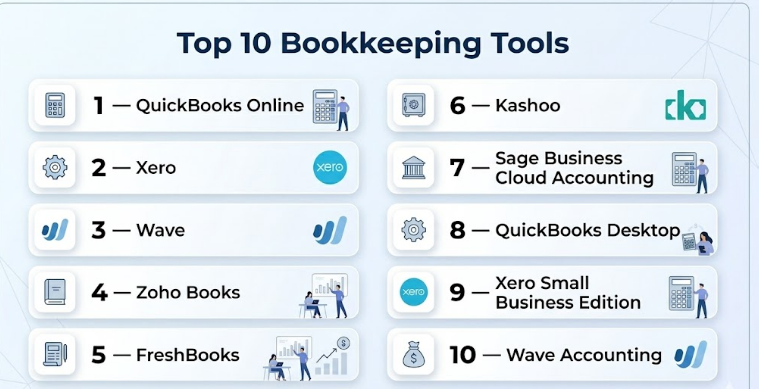
Top 10 Bookkeeping Tools
#1 — QuickBooks Online
Short description : QuickBooks Online is a widely used cloud-based bookkeeping tool that helps SMBs manage invoices, expenses, payroll, and reporting. It is ideal for small businesses and accountants seeking reliable, user-friendly bookkeeping software.
Key Features
- Automated income and expense tracking
- Bank reconciliation and real-time transaction updates
- Customizable invoices and expense categorization
- Payroll management and tax calculation
- Multi-currency support
- Analytics dashboards and financial reports
- Integration with banking, payment, and ERP systems
Pros
- Easy-to-use interface
- Comprehensive accounting features
- Cloud-based with mobile access
Cons
- Advanced features may require premium plans
- Learning curve for complex accounting functions
Platforms / Deployment
- Web / iOS / Android
- Cloud
Security & Compliance
- Encryption, MFA
- SOC 2
Integrations & Ecosystem
- Banking: major banks
- Payments: PayPal, Stripe
- ERP & accounting integrations via APIs
Support & Community
Documentation, tutorials, live chat, and active user forums
#2 — Xero
Short description : Xero is cloud-based bookkeeping software offering automated bank reconciliation, invoicing, and financial reporting. It is suitable for SMBs and growing businesses looking for collaborative, multi-currency accounting.
Key Features
- Bank feeds and automatic reconciliation
- Invoice and expense management
- Multi-currency and tax support
- Real-time financial reporting
- Payroll management
- Analytics and dashboards
- Integrations with ERP and CRM systems
Pros
- User-friendly and intuitive interface
- Excellent for collaboration with accountants
- Strong reporting capabilities
Cons
- Limited enterprise features for high-volume bookkeeping
- Some integrations require add-ons
Platforms / Deployment
- Web / iOS / Android
- Cloud
Security & Compliance
- MFA, encryption
- SOC 2
Integrations & Ecosystem
- Accounting: QuickBooks, Zoho Books
- Payment: Stripe, PayPal
- API support for custom integrations
Support & Community
Knowledge base, online tutorials, and community forums
#3 — Wave
Short description : Wave is a free bookkeeping tool for freelancers and small businesses that automates invoice management, payment tracking, and basic accounting reports.
Key Features
- Free automated income and expense tracking
- Invoice creation and online payment acceptance
- Bank reconciliation
- Payroll management (paid add-on)
- Multi-currency support
- Financial reporting
- Cloud-based access
Pros
- Free and easy to use
- Quick setup for small businesses
- Basic accounting and invoicing in one tool
Cons
- Limited features for growing businesses
- Few integration options
Platforms / Deployment
- Web / iOS / Android
- Cloud
Security & Compliance
- Encryption
- SOC 2
Integrations & Ecosystem
- Payment gateways: Stripe, PayPal
- Accounting add-ons
- API access
Support & Community
Documentation, email support, and user forums
#4 — Zoho Books
Short description : Zoho Books provides automated bookkeeping, invoicing, and expense tracking for small and mid-sized businesses. It integrates seamlessly with other Zoho apps and financial systems.
Key Features
- Recurring invoices and automated payment reminders
- Bank reconciliation
- Expense tracking
- Financial reporting dashboards
- Multi-currency and tax support
- ERP and payment gateway integrations
- Mobile access
Pros
- Affordable and flexible
- Integration with Zoho ecosystem
- Mobile-friendly and accessible
Cons
- Limited enterprise functionality
- Advanced reporting customization is basic
Platforms / Deployment
- Web / iOS / Android
- Cloud
Security & Compliance
- SSO, encryption
- SOC 2
Integrations & Ecosystem
- Zoho CRM, Zoho Expense
- Stripe, PayPal
- API support
Support & Community
Live chat, documentation, and community support
#5 — FreshBooks
Short description : FreshBooks automates bookkeeping, invoicing, and expense tracking for freelancers and small businesses. It focuses on usability and mobile accessibility for simplified financial management.
Key Features
- Automated invoicing and recurring billing
- Expense management and categorization
- Payment tracking
- Bank reconciliation
- Multi-currency support
- Reporting and analytics
- Mobile apps
Pros
- Easy-to-use and intuitive
- Ideal for freelancers and small businesses
- Mobile-friendly
Cons
- Limited advanced bookkeeping features
- Premium plans required for certain features
Platforms / Deployment
- Web / iOS / Android
- Cloud
Security & Compliance
- Encryption, MFA
- SOC 2
Integrations & Ecosystem
- QuickBooks, Xero
- Payment gateways: Stripe, PayPal
- API support
Support & Community
Documentation, tutorials, live chat
#6 — Kashoo
Short description : Kashoo is cloud-based bookkeeping software for small businesses that provides automated income and expense tracking, invoicing, and tax reporting.
Key Features
- Income and expense tracking
- Invoicing and payment reminders
- Bank reconciliation
- Tax preparation reports
- Multi-currency support
- Analytics dashboards
- Mobile app
Pros
- Simple setup and user-friendly
- Affordable for SMBs
- Cloud-based access
Cons
- Limited enterprise features
- Fewer integrations than competitors
Platforms / Deployment
- Web / iOS / Android
- Cloud
Security & Compliance
- Encryption, MFA
- SOC 2
Integrations & Ecosystem
- Payment gateways: Stripe, PayPal
- Accounting systems: QuickBooks, Xero
- API support
Support & Community
Documentation, tutorials, and email support
#7 — Sage Business Cloud Accounting
Short description : Sage Business Cloud Accounting provides small businesses with bookkeeping, invoicing, and financial reporting capabilities with cloud-based access.
Key Features
- Automated ledger entries
- Invoice and payment tracking
- Bank reconciliation
- Tax compliance and reporting
- Analytics dashboards
- Multi-currency support
- Integration with ERP systems
Pros
- Reliable and widely adopted
- Supports basic and advanced bookkeeping
- Cloud access with mobile apps
Cons
- Can be expensive for smaller teams
- Interface less intuitive than competitors
Platforms / Deployment
- Web / iOS / Android
- Cloud
Security & Compliance
- Encryption, MFA
- SOC 2
Integrations & Ecosystem
- ERP: Sage Intacct, QuickBooks
- Payment: Stripe, PayPal
- API support
Support & Community
Documentation, live support, and community forums
#8 — QuickBooks Desktop
Short description : QuickBooks Desktop provides robust bookkeeping, accounting, and financial reporting for SMBs and mid-sized businesses. It is installed locally and offers advanced bookkeeping features.
Key Features
- Ledger management and journal entries
- Invoicing and expense tracking
- Bank reconciliation
- Payroll and tax management
- Financial reporting dashboards
- Multi-user access
- Multi-currency support
Pros
- Advanced accounting features
- Reliable and scalable
- Comprehensive reporting
Cons
- Desktop deployment limits remote access
- Learning curve for beginners
Platforms / Deployment
- Windows / Mac
- Self-hosted
Security & Compliance
- Encryption
- SOC 2
Integrations & Ecosystem
- Payment gateways
- ERP integration via APIs
- Accounting add-ons
Support & Community
Documentation, training, and customer support
#9 — Xero Small Business Edition
Short description : Xero Small Business Edition is designed for micro to small businesses for bookkeeping, invoicing, and bank reconciliation with real-time dashboards.
Key Features
- Automated ledger updates
- Bank feeds and reconciliation
- Invoice creation and tracking
- Expense management
- Tax reporting
- Multi-currency support
- Reporting dashboards
Pros
- Affordable for small businesses
- Easy to use
- Cloud and mobile access
Cons
- Limited advanced features
- Fewer integration options for larger enterprises
Platforms / Deployment
- Web / iOS / Android
- Cloud
Security & Compliance
- MFA, encryption
- SOC 2
Integrations & Ecosystem
- Payment gateways: Stripe, PayPal
- QuickBooks, Zoho Books
- API access
Support & Community
Knowledge base, tutorials, email support
#10 — Wave Accounting
Short description : Wave Accounting provides free bookkeeping and accounting tools for freelancers and very small businesses, including invoicing and financial tracking.
Key Features
- Free ledger and transaction tracking
- Invoice creation and payment tracking
- Bank reconciliation
- Tax reporting
- Multi-currency support
- Expense tracking
- Cloud access
Pros
- Free and easy to use
- Quick setup for freelancers
- Cloud-based with mobile access
Cons
- Limited features for mid-market or enterprise
- Minimal integrations
Platforms / Deployment
- Web / iOS / Android
- Cloud
Security & Compliance
- Encryption
- SOC 2
Integrations & Ecosystem
- Stripe, PayPal
- QuickBooks, Xero
- API support
Support & Community
Documentation, forums, and email support
Comparison Table (Top 10)
| Tool Name | Best For | Platform(s) Supported | Deployment | Standout Feature | Public Rating |
|---|---|---|---|---|---|
| QuickBooks Online | SMBs | Web, iOS, Android | Cloud | Comprehensive bookkeeping | N/A |
| Xero | SMB & mid-market | Web, iOS, Android | Cloud | Multi-currency & collaboration | N/A |
| Wave | Freelancers & SMBs | Web, iOS, Android | Cloud | Free bookkeeping | N/A |
| Zoho Books | SMBs | Web, iOS, Android | Cloud | Zoho ecosystem integration | N/A |
| FreshBooks | Freelancers & SMBs | Web, iOS, Android | Cloud | User-friendly interface | N/A |
| Kashoo | SMBs | Web, iOS, Android | Cloud | Simplified bookkeeping | N/A |
| Sage Business Cloud | SMBs | Web, iOS, Android | Cloud | Cloud-based accounting | N/A |
| QuickBooks Desktop | SMBs | Windows / Mac | Self-hosted | Advanced accounting | N/A |
| Xero Small Business | Micro & small | Web, iOS, Android | Cloud | Real-time dashboards | N/A |
| Wave Accounting | Freelancers | Web, iOS, Android | Cloud | Free and simple | N/A |
Evaluation & Scoring of Bookkeeping Tools
| Tool Name | Core (25%) | Ease (15%) | Integrations (15%) | Security (10%) | Performance (10%) | Support (10%) | Value (15%) | Weighted Total (0–10) |
|---|---|---|---|---|---|---|---|---|
| QuickBooks Online | 9 | 8 | 8 | 8 | 9 | 8 | 7 | 8.2 |
| Xero | 8 | 9 | 7 | 8 | 8 | 7 | 8 | 8.0 |
| Wave | 7 | 9 | 6 | 7 | 7 | 7 | 8 | 7.4 |
| Zoho Books | 8 | 8 | 7 | 7 | 8 | 7 | 8 | 7.8 |
| FreshBooks | 8 | 9 | 7 | 8 | 8 | 7 | 7 | 7.9 |
| Kashoo | 7 | 8 | 6 | 7 | 7 | 7 | 8 | 7.4 |
| Sage Business Cloud | 8 | 7 | 7 | 8 | 8 | 7 | 7 | 7.7 |
| QuickBooks Desktop | 9 | 7 | 7 | 8 | 8 | 7 | 7 | 7.8 |
| Xero Small Business | 7 | 9 | 6 | 7 | 7 | 7 | 8 | 7.5 |
| Wave Accounting | 7 | 9 | 6 | 7 | 7 | 7 | 8 | 7.4 |
Which Bookkeeping Tool Is Right for You?
Solo / Freelancer
Wave, FreshBooks, Kashoo are ideal for freelancers and very small businesses needing simple bookkeeping and invoicing.
SMB
QuickBooks Online, Xero, Zoho Books provide automated bookkeeping, expense tracking, and financial reporting.
Mid-Market
Xero, Sage Business Cloud, QuickBooks Desktop handle multiple accounts, multi-currency, and reporting needs.
Enterprise
QuickBooks Desktop, Sage Business Cloud provide scalable, advanced accounting and reporting features.
Budget vs Premium
Budget-friendly: Wave, Kashoo, FreshBooks. Premium: QuickBooks Desktop, Sage Business Cloud.
Feature Depth vs Ease of Use
Deep features: QuickBooks Desktop, Sage Business Cloud. Ease of use: Wave, FreshBooks.
Integrations & Scalability
Enterprise solutions integrate broadly with ERP and financial systems; SMB solutions cover essential integrations.
Security & Compliance Needs
Enterprise-grade tools provide audit trails, encryption, SOC 2, and compliance support; SMB tools meet standard security needs.
Frequently Asked Questions (FAQs)
1. What pricing models are common?
Subscription, per-user, or free versions; enterprise solutions may use license-based pricing.
2. How long does implementation take?
SMB solutions deploy in days to weeks; enterprise tools require longer setup.
3. Can bookkeeping tools integrate with banks and ERP?
Yes, most platforms offer native and API-based integrations.
4. Are bookkeeping tools secure?
Leading tools use encryption, SSO, MFA, and comply with SOC 2 and GDPR standards.
5. How scalable are these platforms?
Enterprise-grade tools scale across multiple entities; SMB tools suit smaller operations.
6. What mistakes should businesses avoid?
Neglecting integration needs, selecting solely on cost, and underestimating adoption challenges.
7. Do tools support multi-currency accounting?
Yes, most cloud-based bookkeeping tools support multi-currency transactions.
8. How does AI enhance bookkeeping?
AI automates categorization, detects anomalies, and reconciles transactions efficiently.
9. Is switching bookkeeping software easy?
Migration requires careful planning, data transfer, and setup of workflows.
10. Are there alternatives to dedicated bookkeeping tools?
Spreadsheets or basic accounting software can handle small-scale bookkeeping but lack automation and reporting capabilities.
Conclusion
Bookkeeping Tools are essential for modern businesses to maintain accurate records, optimize financial workflows, and stay compliant. Freelancers and SMBs benefit from Wave, FreshBooks, and Kashoo, which offer simplicity and affordability, while mid-market and enterprise organizations gain value from QuickBooks Online, Xero, and Sage Business Cloud, offering advanced features, multi-currency support, and integrated reporting. The right tool depends on business size, transaction volume, integration needs, and budget. Organizations should shortlist tools, conduct pilot testing, and validate workflow and compliance fit to maximize efficiency and ROI. A properly selected bookkeeping platform reduces manual errors, accelerates financial operations, and empowers smarter decision-making.

Find Trusted Cardiac Hospitals
Compare heart hospitals by city and services — all in one place.
Explore Hospitals
AI and bank-feed rules can save a lot of time, but one wrong category or matching rule can affect many transactions. Teams should review unusual transactions, check important accounts before closing the month, and keep a clear record of corrections. This can help keep the books accurate without losing the benefits of automation.