Introduction
Customer Support Ticketing Systems are software solutions designed to manage, track, and resolve customer queries efficiently. They convert incoming requests from email, chat, social media, and other channels into structured tickets, allowing support teams to prioritize, assign, and monitor resolution progress. These systems centralize customer communication, improve response times, and enhance service quality. businesses are increasingly dependent on seamless customer experiences to retain clients and improve satisfaction scores. With distributed teams, AI-enabled chatbots, and omnichannel support becoming the norm, modern ticketing systems are essential to maintain high-quality service at scale.
Real-world use cases:
- Handling high volumes of customer support tickets from multiple channels.
- Prioritizing urgent or high-value customer issues.
- Tracking support team performance and response metrics.
- Automating repetitive responses through AI or templated replies.
- Integrating with CRM, knowledge bases, and workflow tools for seamless operations.
Evaluation criteria buyers should consider:
- Multi-channel support (email, chat, phone, social)
- Automation and AI capabilities
- Customizable workflows and ticket routing
- Analytics and reporting dashboards
- Integration with CRM, knowledge bases, and third-party tools
- Scalability for small to enterprise teams
- Security and compliance standards
- User interface and ease of adoption
- Support and training resources
- Pricing flexibility and cost-to-value alignment
Best for: Customer support teams, help desk managers, IT support, SaaS companies, e-commerce platforms, and mid-market to enterprise organizations.
Not ideal for: Very small teams with minimal support tickets, companies using only informal email or chat for customer support, or organizations that rely exclusively on external call centers.
Key Trends in Customer Support Ticketing Systems
- Adoption of AI for automated ticket triage, suggested responses, and priority scoring.
- Omnichannel support combining email, chat, social media, and voice into a unified platform.
- Predictive analytics for ticket volume forecasting and SLA compliance.
- Integration with CRM, ERP, and collaboration tools for contextual support.
- Low-code workflow customization to adapt to business-specific processes.
- Advanced reporting dashboards for real-time insights and KPIs.
- Cloud-first and hybrid deployment models for scalability and flexibility.
- Enhanced security with MFA, SSO, encryption, and compliance with GDPR, SOC 2, and HIPAA.
- Use of bots and self-service portals to reduce ticket load and improve resolution speed.
- Flexible pricing models including per-agent, per-ticket, and subscription-based tiers.
How We Selected These Tools (Methodology)
- Analyzed market adoption, reputation, and customer feedback.
- Evaluated core features including ticket management, automation, and analytics.
- Reviewed reliability and performance indicators across businesses.
- Verified security posture including access control, encryption, and audit logs.
- Assessed integrations with CRM, knowledge bases, collaboration, and productivity tools.
- Considered scalability for SMBs to enterprise-level operations.
- Examined AI and automation capabilities for reducing manual support effort.
- Checked onboarding, training resources, and support quality.
- Reviewed customization flexibility and workflow automation.
- Prioritized tools offering omnichannel support and advanced reporting.
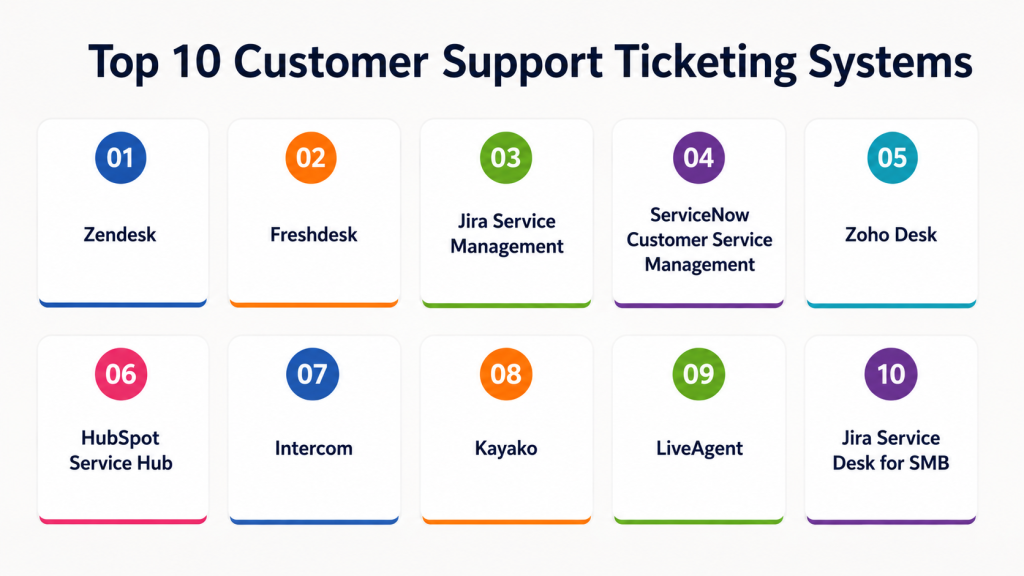
Top 10 Customer Support Ticketing Systems
1- Zendesk
Short description: A cloud-based ticketing system for businesses of all sizes offering multi-channel support and AI-powered automation.
Key Features
- Omnichannel ticket management (email, chat, phone, social)
- AI-powered answer suggestions
- Customizable workflows
- Reporting and analytics dashboards
- SLA tracking and alerts
- Knowledge base integration
Pros
- Scalable for small to enterprise teams
- Strong ecosystem of integrations
Cons
- Can be expensive for large teams
- Some advanced features require additional modules
Platforms / Deployment
- Web / Windows / macOS / iOS / Android
- Cloud
Security & Compliance
- SOC 2, GDPR
- SSO, MFA, encryption
Integrations & Ecosystem
Extensive integrations with CRM, productivity, and collaboration tools:
- Salesforce, HubSpot
- Slack, Microsoft Teams
- Payment gateways
- API for custom workflows
Support & Community
- 24/7 support and dedicated onboarding
- Active online community and knowledge base
2- Freshdesk
Short description: Cloud-based helpdesk software suitable for SMBs and enterprises, offering multi-channel ticketing and automation.
Key Features
- Multi-channel ticket support
- AI-powered ticket assignment
- SLA management
- Automation workflows
- Custom reporting
- Self-service portal
Pros
- Affordable pricing for SMBs
- Easy to set up and use
Cons
- Advanced automation may require premium plans
- Limited AI analytics compared to enterprise tools
Platforms / Deployment
- Web / Windows / macOS / iOS / Android
- Cloud
Security & Compliance
- GDPR, SOC 2
- Role-based access, encryption
Integrations & Ecosystem
- CRM systems (Salesforce, HubSpot)
- Collaboration tools (Slack, Teams)
- E-commerce platforms (Shopify, Magento)
- APIs for custom workflows
Support & Community
- Online help and support tickets
- Knowledge base and forums
3- Jira Service Management
Short description: IT-centric ticketing and service desk platform offering structured workflow automation and integration with DevOps tools.
Key Features
- ITIL-aligned ticketing workflows
- SLA and incident tracking
- Automation rules and templates
- Knowledge base integration
- Reporting dashboards
- Developer tool integration (Jira, Confluence)
Pros
- Strong for IT support and DevOps teams
- Highly customizable
Cons
- Can be complex for non-technical teams
- Learning curve for full feature adoption
Platforms / Deployment
- Web / Windows / macOS / Linux / iOS / Android
- Cloud / Self-hosted
Security & Compliance
- SOC 2, ISO 27001
- SSO, encryption, audit logs
Integrations & Ecosystem
- Atlassian ecosystem (Confluence, Bitbucket)
- Slack, Teams
- CRM and IT monitoring tools
- APIs for workflow automation
Support & Community
- Vendor support tiers
- Large user community and documentation
4- ServiceNow Customer Service Management
Short description: Enterprise-grade ticketing platform with workflow automation, AI, and omnichannel support for large organizations.
Key Features
- Omnichannel support
- Automated workflows
- AI chatbots and virtual agents
- Case and incident management
- Reporting and analytics
- Knowledge management integration
Pros
- Enterprise scalability
- Advanced automation and AI capabilities
Cons
- High cost and complexity
- Requires dedicated admin resources
Platforms / Deployment
- Web / iOS / Android
- Cloud
Security & Compliance
- SOC 2, ISO 27001, HIPAA, GDPR
- MFA, encryption, audit logs
Integrations & Ecosystem
- CRM systems, ERP integrations
- Collaboration tools (Slack, Teams)
- API and extensibility options
Support & Community
- 24/7 enterprise support
- Active community forums
5- Zoho Desk
Short description: Cloud-based helpdesk for SMBs and mid-market, offering AI, automation, and multi-channel support.
Key Features
- Multi-channel ticketing
- AI assistant (Zia) for suggested responses
- Workflow automation
- SLA tracking
- Analytics dashboards
- Knowledge base integration
Pros
- Cost-effective for SMBs
- Easy-to-use interface
Cons
- Limited enterprise features
- Customization options may be constrained
Platforms / Deployment
- Web / Windows / macOS / iOS / Android
- Cloud
Security & Compliance
- GDPR, SOC 2
- SSO, encryption
Integrations & Ecosystem
- CRM systems
- Collaboration tools
- API for custom workflows
- Productivity apps
Support & Community
- Vendor support
- Community forums and help guides
6- HubSpot Service Hub
Short description: Integrated ticketing system for marketing, sales, and support teams with workflow automation and reporting.
Key Features
- Ticket pipeline management
- Automation workflows
- SLA management
- Reporting dashboards
- Knowledge base
- CRM integration
Pros
- Unified platform with CRM and marketing
- Easy adoption for SMBs
Cons
- Advanced features require premium plans
- Limited AI compared to enterprise solutions
Platforms / Deployment
- Web / iOS / Android
- Cloud
Security & Compliance
- GDPR, SOC 2
- Role-based access, encryption
Integrations & Ecosystem
- HubSpot CRM and Marketing Hub
- Slack, Teams
- API for custom integrations
Support & Community
- Vendor support
- Knowledge base and community
7- Intercom
Short description: Conversational support platform combining live chat, ticketing, and AI chatbots for customer engagement.
Key Features
- Live chat and messaging
- Automated ticket creation
- AI-powered bots
- Reporting and analytics
- Customer segmentation
- Integration with CRM and product tools
Pros
- Enhances real-time customer engagement
- AI-assisted automation reduces workload
Cons
- Ticketing is secondary to messaging focus
- Can become expensive at scale
Platforms / Deployment
- Web / iOS / Android
- Cloud
Security & Compliance
- SOC 2, GDPR
- SSO and encryption
Integrations & Ecosystem
- CRMs (Salesforce, HubSpot)
- Product analytics tools
- API for workflow customization
Support & Community
- Vendor support
- Online resources and community forums
8- Kayako
Short description: Unified helpdesk platform providing ticket management, live chat, and self-service portals.
Key Features
- Multi-channel ticketing
- Automation rules
- SLA tracking
- Customer portal
- Reporting dashboards
- Knowledge base integration
Pros
- Easy-to-use interface
- Self-service capabilities reduce ticket load
Cons
- Limited AI functionality
- Advanced customization may require technical expertise
Platforms / Deployment
- Web / Windows / macOS / iOS / Android
- Cloud / Self-hosted
Security & Compliance
- Not publicly stated
Integrations & Ecosystem
- CRM integrations
- Chat and communication tools
- API support for automation
Support & Community
- Vendor support
- Knowledge base and documentation
9- LiveAgent
Short description: Comprehensive ticketing system with live chat, call center support, and multi-channel ticket management.
Key Features
- Multi-channel ticketing (email, chat, phone, social)
- Automation rules and SLA tracking
- Ticket assignment and workflow
- Reporting and analytics
- Knowledge base integration
- Call center integration
Pros
- All-in-one support platform
- Cost-effective for SMBs
Cons
- Advanced analytics may be limited
- Interface can be cluttered for large teams
Platforms / Deployment
- Web / Windows / macOS / iOS / Android
- Cloud / Self-hosted
Security & Compliance
- Not publicly stated
Integrations & Ecosystem
- CRM and productivity tools
- Communication apps
- API for automation
Support & Community
- Vendor support and onboarding
- Community and help resources
10- Jira Service Desk for SMB
Short description: Simplified version of Jira Service Management tailored for small and mid-market support teams.
Key Features
- Ticket management and workflows
- SLA tracking
- Reporting dashboards
- Knowledge base
- CRM integration
- Automation rules
Pros
- Affordable and lightweight
- Integrates with existing Jira projects
Cons
- Limited AI capabilities
- Less suitable for complex enterprise workflows
Platforms / Deployment
- Web / Windows / macOS / iOS / Android
- Cloud / Self-hosted
Security & Compliance
- Not publicly stated
Integrations & Ecosystem
- Atlassian ecosystem
- CRM and productivity tools
- API support
Support & Community
- Vendor support
- Knowledge base and documentation
Comparison Table (Top 10)
| Tool Name | Best For | Platform(s) Supported | Deployment | Standout Feature | Public Rating |
|---|---|---|---|---|---|
| Zendesk | Enterprise support teams | Web, Windows, macOS, iOS, Android | Cloud | AI-powered ticketing | N/A |
| Freshdesk | SMBs and mid-market | Web, Windows, macOS, iOS, Android | Cloud | Affordable multi-channel support | N/A |
| Jira Service Management | IT and DevOps support | Web, Windows, macOS, Linux, iOS, Android | Cloud / Self-hosted | ITIL workflows | N/A |
| ServiceNow CSM | Large enterprises | Web, iOS, Android | Cloud | Enterprise workflow automation | N/A |
| Zoho Desk | SMBs and mid-market | Web, Windows, macOS, iOS, Android | Cloud | AI-assisted automation | N/A |
| HubSpot Service Hub | SMBs with marketing integration | Web, iOS, Android | Cloud | Unified CRM and ticketing | N/A |
| Intercom | Customer engagement | Web, iOS, Android | Cloud | AI-powered chatbots | N/A |
| Kayako | SMB and mid-market | Web, Windows, macOS, iOS, Android | Cloud / Self-hosted | Unified ticketing and portal | N/A |
| LiveAgent | SMBs needing multi-channel | Web, Windows, macOS, iOS, Android | Cloud / Self-hosted | Call center and ticketing | N/A |
| Jira Service Desk for SMB | Small and mid-market | Web, Windows, macOS, iOS, Android | Cloud / Self-hosted | Simplified Jira ticketing | N/A |
Evaluation & Scoring of Customer Support Ticketing Systems
| Tool Name | Core (25%) | Ease (15%) | Integrations (15%) | Security (10%) | Performance (10%) | Support (10%) | Value (15%) | Weighted Total |
|---|---|---|---|---|---|---|---|---|
| Zendesk | 9 | 8 | 9 | 8 | 9 | 8 | 7 | 8.4 |
| Freshdesk | 8 | 9 | 8 | 8 | 8 | 8 | 8 | 8.3 |
| Jira Service Management | 9 | 7 | 8 | 8 | 8 | 7 | 7 | 7.9 |
| ServiceNow CSM | 9 | 7 | 9 | 9 | 9 | 8 | 6 | 8.2 |
| Zoho Desk | 8 | 8 | 8 | 7 | 8 | 7 | 8 | 7.9 |
| HubSpot Service Hub | 8 | 8 | 8 | 7 | 8 | 7 | 7 | 7.7 |
| Intercom | 8 | 9 | 8 | 8 | 8 | 7 | 7 | 7.8 |
| Kayako | 7 | 8 | 7 | 7 | 7 | 7 | 7 | 7.2 |
| LiveAgent | 8 | 8 | 8 | 7 | 7 | 7 | 7 | 7.4 |
| Jira Service Desk for SMB | 7 | 8 | 7 | 7 | 7 | 7 | 7 | 7.1 |
Which Customer Support Ticketing System Is Right for You?
Solo / Freelancer
- Lightweight systems like Freshdesk or Jira Service Desk for SMB provide simple workflows and easy adoption without complexity.
SMB
- Freshdesk, Zoho Desk, and HubSpot Service Hub offer affordable, multi-channel ticketing with automation and dashboards.
Mid-Market
- Zendesk, Intercom, and LiveAgent provide advanced ticket routing, AI assistance, and reporting for growing teams.
Enterprise
- ServiceNow CSM and Zendesk Enterprise handle complex workflows, SLA management, AI-powered routing, and cross-department integration.
Budget vs Premium
- Budget: Freshdesk, Zoho Desk, Jira Service Desk for SMB
- Premium: ServiceNow CSM, Zendesk Enterprise, Intercom
Feature Depth vs Ease of Use
- Feature depth: Zendesk, ServiceNow CSM
- Ease of use: Freshdesk, Zoho Desk, Jira Service Desk for SMB
Integrations & Scalability
- Enterprise integrations: ServiceNow, Zendesk
- API-friendly and customizable: Intercom, LiveAgent
Security & Compliance Needs
- Enterprise compliance: ServiceNow CSM, Zendesk Enterprise
- SMB-focused compliance: Freshdesk, Zoho Desk
Frequently Asked Questions (FAQs)
1- What pricing models exist?
Most ticketing systems offer subscription-based pricing per agent, per month, with tiered features.
2- How long does onboarding take?
Small teams may onboard in a few days; enterprises with integrations may take weeks.
3- Can these systems support multiple channels?
Yes, email, chat, social media, phone, and messaging platforms are commonly supported.
4- How does AI enhance support?
AI automates ticket categorization, routing, response suggestions, and predictive prioritization.
5- Are these tools secure?
Security varies; enterprise tools often support SOC 2, GDPR, MFA, encryption, and audit logs.
6- Can small teams use enterprise-grade tools?
Yes, but simplified editions like Jira Service Desk for SMB or Freshdesk are better suited.
7- Are integrations available?
Most support CRM, knowledge base, productivity, and collaboration tool integrations.
8- What are common adoption mistakes?
Neglecting workflow customization, insufficient staff training, and ignoring analytics setup.
9- Can we switch platforms easily?
Switching requires migration of tickets, user accounts, and historical data; APIs can ease the process.
10- Are there alternatives to ticketing systems?
Yes, shared inboxes or simple CRM workflows, but they lack automation, reporting, and SLA management.
Conclusion
Customer Support Ticketing Systems centralize, automate, and streamline customer service operations. Selection depends on team size, complexity, and integration requirements. Small teams benefit from Freshdesk, Zoho Desk, or Jira Service Desk for SMB, while enterprises require Zendesk, ServiceNow CSM, or Intercom for full-featured, AI-assisted support. To start, shortlist 2–3 tools, run a pilot, and validate integration and compliance capabilities. Proper selection enhances customer satisfaction, reduces response time, and improves support efficiency.

Find Trusted Cardiac Hospitals
Compare heart hospitals by city and services — all in one place.
Explore Hospitals
A ticketing system becomes much more valuable when it helps teams recognize recurring customer issues instead of treating every request as an isolated case. Built-in trend analysis and feedback loops can improve both service quality and long-term operational efficiency.