Introduction
Data migration tools are specialized software platforms that help organizations move data between storage systems, databases, applications, or cloud environments efficiently, securely, and reliably. These tools ensure that critical business data is transferred with minimal downtime, data loss, or corruption, supporting modern IT strategies such as cloud adoption, consolidation, and application modernization. organizations face increased complexity in data ecosystems. Multi-cloud adoption, hybrid IT environments, regulatory compliance, and real-time data integration are driving the need for reliable migration tools. Data migration is no longer just a technical task; it’s a strategic enabler of digital transformation, operational efficiency, and better business insights.
Real-world use cases include:
- Cloud migration: Moving on-premises databases and applications to AWS, Azure, Google Cloud, or hybrid cloud platforms.
- Database consolidation: Combining multiple legacy databases into a single modern platform.
- Application modernization: Migrating legacy applications’ underlying data to support replatforming.
- ERP or CRM upgrades: Transferring critical business data during major software version updates.
- Data center relocation: Moving datasets from aging infrastructure to new physical or virtual environments.
What buyers should evaluate:
- Source and target system compatibility
- Migration speed and performance
- Data integrity and validation capabilities
- Security and compliance support
- Automation and orchestration features
- Ease of use and UI/UX quality
- Integration with analytics, ETL, or cloud services
- Monitoring, logging, and audit capabilities
- Support for incremental and real-time migration
- Total cost of ownership
Best for: IT managers, database administrators, cloud architects, and enterprise teams responsible for large-scale migrations, hybrid IT environments, or modernization initiatives across industries.
Not ideal for: Organizations with minimal data transfer needs, small projects where manual export/import suffices, or companies adopting SaaS solutions that offer built-in migration utilities.
Key Trends in Data Migration Tools
- Cloud-first migration: Organizations increasingly prefer cloud-native migration services for AWS, Azure, Google Cloud, and hybrid solutions.
- AI-assisted mapping and transformation: AI and ML help detect schema mismatches, suggest data transformations, and flag errors proactively.
- Real-time migration: Tools are supporting near-zero downtime replication, streaming data, and continuous synchronization.
- Multi-cloud and hybrid support: Migration tools now handle multi-cloud architectures, on-premises to cloud, and cloud-to-cloud transfers.
- Security and compliance automation: Integrated encryption, RBAC, SSO, audit logging, and GDPR/HIPAA compliance are standard expectations.
- Automated testing and validation: Built-in data integrity checks, validation rules, and post-migration verification reduce risk.
- Integration ecosystem expansion: Modern tools support ETL platforms, analytics pipelines, DevOps, and CI/CD integrations.
- Scalable orchestration: Workflow automation supports large-scale enterprise migrations across databases and geographies.
- Subscription and pay-per-use pricing: Cloud-based licensing models are increasingly common for flexibility.
- Self-service capabilities: Business users can now execute certain migrations safely with guided workflows and templates.
How We Selected These Tools (Methodology)
- Evaluated market adoption and enterprise mindshare across industries.
- Reviewed feature completeness: discovery, transformation, orchestration, validation, and reporting.
- Assessed reliability signals such as performance, error handling, and downtime metrics.
- Checked security posture: encryption, access controls, audit logs, and compliance support.
- Reviewed integration capabilities with analytics, cloud, ETL, and monitoring platforms.
- Measured applicability across enterprise, mid-market, and SMB segments.
- Examined automation support, AI capabilities, and user-friendly interfaces.
- Considered vendor support, community strength, and documentation quality.
- Verified cloud, hybrid, and on-premises deployment options.
- Ensured practical value for phased, incremental, and real-time migration projects.
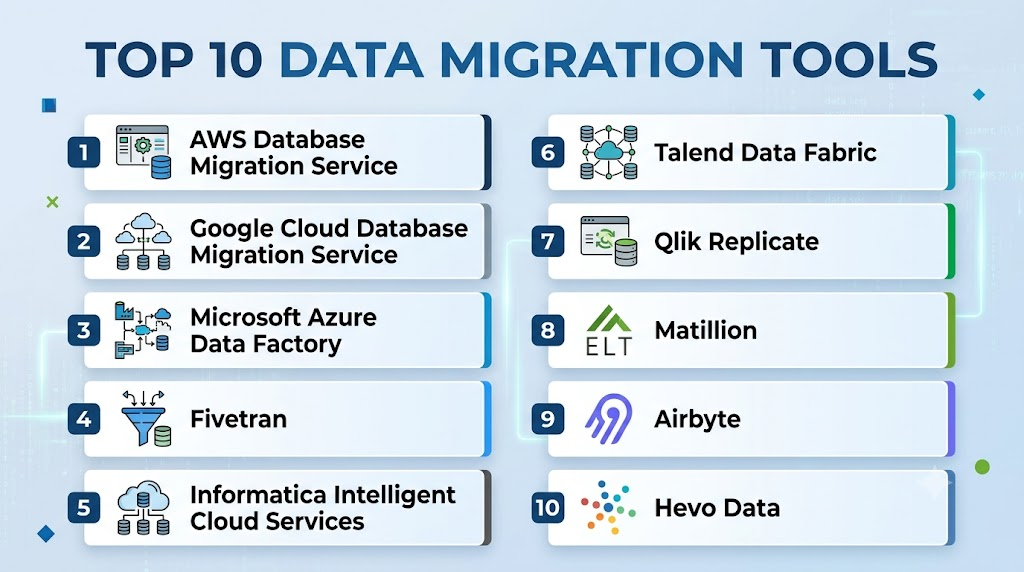
Top 10 Data Migration Tools
1- AWS Database Migration Service
Short description: Simplifies moving on-premises databases to AWS or between cloud environments with minimal downtime. Designed for IT and cloud teams performing database migration or consolidation.
Key Features
- Continuous replication for near real-time migration
- Supports multiple database engines including Oracle, SQL Server, MySQL, PostgreSQL
- Schema conversion support via AWS SCT
- Integrated monitoring and alerts
- Incremental migration and validation tools
- Automation with AWS CloudFormation and Lambda
- Supports hybrid and multi-region deployments
Pros
- Fast and reliable migration for AWS environments
- Minimal downtime with continuous replication
- Deep integration with AWS cloud services
Cons
- Best suited for AWS-centric environments
- Some database transformations require additional tools
- Learning curve for hybrid or complex multi-cloud setups
Platforms / Deployment
Web / Cloud
Security & Compliance
- IAM, encryption in transit and at rest, audit logs
- SOC 2, ISO 27001, GDPR support depending on configuration
Integrations & Ecosystem
Seamlessly integrates with AWS ecosystem for analytics, ETL, monitoring, and serverless workflows.
- AWS SCT (Schema Conversion Tool)
- AWS Lambda and CloudWatch
- S3, Redshift, Aurora
- Third-party ETL tools
- Cloud-native automation and orchestration
Support & Community
Comprehensive documentation, enterprise support plans, and active AWS community forums.
2- Google Cloud Database Migration Service
Short description: Enables automated migration of on-premises or cloud databases to Google Cloud, minimizing downtime and simplifying modernization.
Key Features
- Supports MySQL, PostgreSQL, SQL Server migrations
- Automated schema and data conversion
- Continuous replication for zero downtime
- Cloud-native monitoring and alerting
- Integration with BigQuery for analytics
- Incremental and one-time migration options
Pros
- Simplified migration to Google Cloud
- Minimal downtime and data integrity checks
- Native integration with analytics and cloud services
Cons
- Limited to Google Cloud targets
- Complex legacy migrations may require manual intervention
- Features vary by database engine
Platforms / Deployment
Web / Cloud
Security & Compliance
- Encryption in transit and at rest
- Identity management via IAM
- Supports GDPR and HIPAA compliance
Integrations & Ecosystem
Tightly integrated with GCP services, ETL pipelines, and data analytics.
- BigQuery and Cloud SQL
- Dataflow and Dataproc
- CI/CD pipelines
- API access and automation
Support & Community
Google Cloud provides documentation, enterprise support, and strong developer community engagement.
3- Microsoft Azure Data Factory
Short description: ETL and data integration service for orchestrating data migration, transformation, and ingestion across cloud and on-premises sources.
Key Features
- Code-free, drag-and-drop pipeline creation
- Connectors for 90+ data sources
- Batch and real-time data movement
- Data flow transformation and mapping
- Monitoring dashboards with alerts
- Hybrid integration runtime for on-premises data
- Integration with Azure Synapse Analytics
Pros
- Scalable cloud-native orchestration
- Broad connectivity to cloud and on-prem sources
- Supports both migration and transformation workflows
Cons
- Requires Azure environment familiarity
- Complex pipelines may require advanced expertise
- Costs can increase with large-scale workloads
Platforms / Deployment
Web / Cloud / Hybrid
Security & Compliance
- Role-based access control, managed identity, encryption
- Supports SOC 2, ISO 27001, HIPAA, GDPR
Integrations & Ecosystem
Works within Azure ecosystem for analytics, ETL, data lakes, and DevOps pipelines.
- Azure Synapse, Data Lake, SQL Database
- Azure Functions and Logic Apps
- CI/CD with Azure DevOps
- Third-party connectors
Support & Community
Extensive documentation, tutorials, enterprise support, and active Azure user community.
4- Fivetran
Short description: Fully managed data pipeline for automated, zero-maintenance data migration and synchronization from SaaS and databases to cloud warehouses.
Key Features
- Automated schema detection and mapping
- Incremental data updates for minimal latency
- Supports 150+ prebuilt connectors
- Cloud data warehouse compatibility
- Monitoring and alerting dashboards
- Automated schema drift handling
Pros
- Minimal maintenance and configuration
- Quick setup with prebuilt connectors
- Scales well for cloud data warehouse pipelines
Cons
- Best for cloud-targeted migrations
- Limited control over transformation logic
- Pricing scales with volume
Platforms / Deployment
Web / Cloud
Security & Compliance
- Encrypted data transfer, secure API connectors
- SOC 2 Type II, GDPR compliance
Integrations & Ecosystem
Connects SaaS apps, databases, and analytics platforms.
- Snowflake, BigQuery, Redshift
- Salesforce, HubSpot, Shopify
- APIs for custom sources
- ETL and BI tools
Support & Community
Online documentation, support tickets, and community forums.
5- Informatica Intelligent Cloud Services
Short description: Enterprise-grade data migration and integration platform with cloud and hybrid deployment capabilities for complex data ecosystems.
Key Features
- Supports structured, unstructured, and streaming data
- Automated schema mapping and transformation
- Data quality, governance, and validation tools
- Cloud, on-premises, and hybrid support
- Real-time and batch data movement
- Monitoring, logging, and audit capabilities
Pros
- Enterprise-level reliability and scalability
- Comprehensive feature set for complex migrations
- Supports governance and compliance requirements
Cons
- Higher cost for smaller organizations
- Can require significant implementation effort
- Learning curve for full platform capabilities
Platforms / Deployment
Cloud / Self-hosted / Hybrid
Security & Compliance
- Encryption, RBAC, audit logs, SSO/SAML
- SOC 2, ISO 27001, GDPR, HIPAA
Integrations & Ecosystem
Strong integration across cloud platforms, BI tools, ETL pipelines, and enterprise apps.
- SAP, Salesforce, Oracle
- Cloud storage and data warehouses
- APIs and custom connectors
Support & Community
Enterprise support plans, professional services, and strong global community for best practices.
6- Talend Data Fabric
Short description: Unified platform for ETL, data migration, and integration with hybrid and cloud support, enabling real-time and batch data pipelines.
Key Features
- Low-code and code-based data integration
- Connectors for 1,000+ sources
- Automated data transformation and cleansing
- Real-time and batch pipelines
- Data quality and governance monitoring
- Multi-cloud and hybrid deployment
Pros
- Flexible deployment options
- Broad source and target support
- Strong governance and data quality features
Cons
- Can be complex for small teams
- Pricing scales with data volume and features
- Learning curve for full platform utilization
Platforms / Deployment
Cloud / Self-hosted / Hybrid
Security & Compliance
- Encryption, RBAC, audit logs
- GDPR, SOC 2 compliance
Integrations & Ecosystem
Integrates with cloud platforms, analytics, BI, and workflow automation.
- AWS, Azure, GCP
- Snowflake, Redshift, BigQuery
- Salesforce, SAP, Oracle
- API extensibility
Support & Community
Documentation, enterprise support, community forums, and professional services.
7- Qlik Replicate
Short description: Real-time data replication and migration tool for databases, cloud platforms, and streaming data sources, with minimal disruption.
Key Features
- Change Data Capture (CDC) for near-zero downtime
- Supports multiple relational and cloud databases
- Automated schema mapping and replication
- Continuous monitoring and alerting
- Hybrid deployment support
- Incremental and bulk data migration
Pros
- Efficient real-time replication
- Broad source and target compatibility
- Low-impact migration for critical systems
Cons
- Best suited for enterprise databases
- Licensing and scaling costs can be high
- Transformation capabilities are basic compared to full ETL tools
Platforms / Deployment
Cloud / Self-hosted / Hybrid
Security & Compliance
- Encryption, RBAC, audit logs
- SOC 2, GDPR support
Integrations & Ecosystem
Connects enterprise databases, data warehouses, and analytics platforms.
- Oracle, SQL Server, MySQL, PostgreSQL
- Cloud targets: AWS, Azure, GCP
- BI and analytics integration
Support & Community
Enterprise documentation, support plans, and active community forums.
8- Matillion
Short description: Cloud-native ETL and data migration platform for modern data warehouses with a strong focus on simplicity and performance.
Key Features
- Drag-and-drop ETL workflows
- Prebuilt connectors for cloud data warehouses
- Supports transformation, orchestration, and scheduling
- Cloud-native deployment
- Incremental data load and CDC support
- Monitoring dashboards
Pros
- Easy setup and low-code environment
- Optimized for cloud data warehouses
- Scales with cloud resources
Cons
- Limited on-premises support
- Transformation logic may be less advanced for complex migrations
- Pricing tied to cloud resources
Platforms / Deployment
Web / Cloud
Security & Compliance
- Encryption in transit and at rest
- Access control and audit logging
- SOC 2 compliance
Integrations & Ecosystem
Integrates tightly with Snowflake, Redshift, BigQuery, Salesforce, and other SaaS apps.
- Data warehouses: Snowflake, Redshift, BigQuery
- SaaS connectors: Salesforce, HubSpot
- APIs and cloud storage
- Workflow orchestration tools
Support & Community
Online documentation, cloud-based support, and active user community.
9- Airbyte
Short description: Open-source data integration and migration platform that automates ELT pipelines for cloud and on-premises systems.
Key Features
- Open-source connectors for 200+ sources
- Incremental data sync with CDC support
- Modular and extensible architecture
- Cloud-native deployment
- Supports data warehouses and lakes
- Monitoring and error handling
- Active community for connector development
Pros
- Open-source and highly extensible
- Rapid deployment for cloud migrations
- Active community and frequent updates
Cons
- Enterprise support may require commercial edition
- May need technical expertise to manage connectors
- Transformation capabilities are limited compared to full ETL platforms
Platforms / Deployment
Cloud / Self-hosted
Security & Compliance
- Varies / N/A
- Encryption depends on deployment configuration
Integrations & Ecosystem
Works with data warehouses, lakes, APIs, and cloud platforms.
- Snowflake, BigQuery, Redshift
- SaaS connectors
- API-driven integration
- ETL/ELT pipelines
Support & Community
Community support for open-source, with optional enterprise edition for commercial support.
10- Hevo Data
Short description: No-code data pipeline platform designed for real-time data migration from databases and SaaS apps to cloud warehouses.
Key Features
- Real-time replication and incremental loads
- Prebuilt connectors for SaaS and databases
- Schema mapping and transformation
- Cloud warehouse compatibility
- Monitoring and alerts
- User-friendly dashboard
- Supports both batch and streaming data
Pros
- Easy setup with no coding required
- Minimal downtime during migration
- Suitable for business and IT users
Cons
- Cloud-focused, limited on-premises support
- Advanced transformations require paid plan
- Pricing scales with data volume
Platforms / Deployment
Cloud
Security & Compliance
- Encryption in transit and at rest
- Access controls and audit logs
- GDPR and SOC 2 compliance
Integrations & Ecosystem
Integrates SaaS apps, databases, and cloud data warehouses.
- Snowflake, BigQuery, Redshift
- Salesforce, HubSpot, Stripe
- APIs and ETL pipelines
Support & Community
Documentation, enterprise support, and active online community.
Comparison Table (Top 10)
| Tool Name | Best For | Platform(s) Supported | Deployment | Standout Feature | Public Rating |
|---|---|---|---|---|---|
| AWS Database Migration Service | AWS migrations | Cloud | Cloud | Continuous replication with minimal downtime | N/A |
| Google Cloud Database Migration Service | GCP migrations | Cloud | Cloud | Near-zero downtime and schema conversion | N/A |
| Microsoft Azure Data Factory | ETL + migrations | Web | Cloud / Hybrid | Drag-and-drop pipelines with hybrid support | N/A |
| Fivetran | Cloud ETL | Web | Cloud | Automated connector setup and maintenance | N/A |
| Informatica Intelligent Cloud Services | Enterprise migrations | Cloud / Hybrid | Cloud / Self-hosted / Hybrid | Comprehensive enterprise-grade migration | N/A |
| Talend Data Fabric | Data integration | Cloud / Self-hosted | Cloud / Hybrid | Hybrid and multi-cloud ETL and migration | N/A |
| Qlik Replicate | Real-time replication | Cloud / Self-hosted | Cloud / Hybrid | CDC and incremental replication | N/A |
| Matillion | Cloud warehouse migrations | Web | Cloud | Low-code ETL for cloud data warehouses | N/A |
| Airbyte | Open-source ELT | Cloud / Self-hosted | Cloud / Self-hosted | Open-source extensible connector platform | N/A |
| Hevo Data | No-code data pipelines | Cloud | Cloud | Real-time migration from SaaS & databases | N/A |
Evaluation & Scoring of Data Migration Tools
| Tool Name | Core 25% | Ease 15% | Integrations 15% | Security 10% | Performance 10% | Support 10% | Value 15% | Weighted Total |
|---|---|---|---|---|---|---|---|---|
| AWS Database Migration Service | 9 | 8 | 9 | 9 | 9 | 8 | 8 | 8.65 |
| Google Cloud Database Migration Service | 9 | 8 | 9 | 9 | 8 | 8 | 8 | 8.50 |
| Microsoft Azure Data Factory | 8 | 8 | 8 | 8 | 8 | 8 | 8 | 8.00 |
| Fivetran | 8 | 9 | 8 | 8 | 8 | 7 | 8 | 8.05 |
| Informatica Intelligent Cloud Services | 9 | 7 | 9 | 9 | 9 | 8 | 7 | 8.35 |
| Talend Data Fabric | 8 | 7 | 8 | 8 | 8 | 7 | 7 | 7.65 |
| Qlik Replicate | 8 | 8 | 8 | 8 | 9 | 7 | 7 | 7.90 |
| Matillion | 8 | 9 | 8 | 8 | 8 | 8 | 7 | 8.00 |
| Airbyte | 7 | 8 | 7 | 7 | 8 | 6 | 8 | 7.50 |
| Hevo Data |
Which Data Migration Tool Is Right for You?
Solo / Freelancer
Solo consultants, freelancers, and independent developers usually need tools that are easy to set up, affordable, and flexible. Airbyte is a strong option because it offers open-source deployment and many connectors. Hevo Data can also work well for no-code pipelines when the project involves SaaS apps and cloud warehouses.
If the client uses a specific cloud provider, cloud-native tools such as AWS Database Migration Service, Google Cloud Database Migration Service, or Azure Data Factory may be better. The best choice depends on the client’s target platform and the complexity of the migration.
SMB
SMBs should prioritize simplicity, quick onboarding, and predictable costs. Fivetran, Hevo Data, and Matillion are strong choices for teams moving data from SaaS tools, databases, or applications into cloud warehouses.
For SMBs already using AWS, Azure, or Google Cloud, the native migration tools can reduce complexity. AWS Database Migration Service works well for AWS-first teams, Google Cloud Database Migration Service is suitable for Google Cloud users, and Azure Data Factory fits Microsoft-heavy environments.
Mid-Market
Mid-market companies often need more advanced orchestration, governance, and integration options. Azure Data Factory, Matillion, Qlik Replicate, and Fivetran are practical options depending on the migration pattern.
If real-time replication or change data capture is important, Qlik Replicate is a strong fit. If the company is building modern analytics pipelines, Fivetran, Matillion, and Hevo Data can help connect SaaS apps, databases, and cloud warehouses with less manual effort.
Enterprise
Enterprises should prioritize scalability, security, governance, data quality, monitoring, and support. Informatica Intelligent Cloud Services is a strong choice for complex enterprise data environments with governance and hybrid deployment needs.
Talend Data Fabric is suitable for organizations that need flexible integration, data quality, and hybrid architecture. Qlik Replicate is useful when real-time replication and low-impact database migration are critical. Cloud-native tools from AWS, Azure, and Google Cloud are also strong for enterprises committed to a specific cloud ecosystem.
Budget vs Premium
Budget-focused teams may prefer Airbyte because of its open-source option and flexibility. Hevo Data and Fivetran can also be cost-effective when ease of use and fast setup reduce engineering effort.
Premium buyers with complex compliance, governance, and enterprise integration needs may prefer Informatica, Talend, or Qlik Replicate. These tools are often more suitable for larger environments where downtime, data integrity, and operational risk carry high business impact.
Feature Depth vs Ease of Use
For ease of use, Fivetran, Hevo Data, and Matillion are strong choices because they focus on guided workflows, prebuilt connectors, and reduced manual setup.
For deeper enterprise capabilities, Informatica, Talend, and Qlik Replicate offer more advanced migration, governance, replication, and integration features. However, they may require more skilled users and longer implementation cycles.
Integrations & Scalability
If integration coverage is the top priority, Fivetran, Talend, Informatica, and Airbyte are strong options because they support wide connector ecosystems. Azure Data Factory is also useful for organizations working across Microsoft services and hybrid data environments.
For scalability, cloud-native tools such as AWS Database Migration Service, Google Cloud Database Migration Service, and Azure Data Factory can handle large workloads when properly configured. Enterprise-grade platforms such as Informatica and Qlik Replicate are better suited for mission-critical migrations.
Security & Compliance Needs
Organizations in finance, healthcare, government, telecom, and other regulated industries should evaluate encryption, RBAC, audit logs, SSO, data residency, and compliance documentation before selecting a tool.
Informatica, Talend, Qlik Replicate, AWS Database Migration Service, Azure Data Factory, and Google Cloud Database Migration Service are commonly considered by security-conscious enterprises. However, buyers should validate certifications, deployment responsibilities, and compliance scope directly with the vendor before purchase.
Frequently Asked Questions
1. What are data migration tools?
Data migration tools help move data from one system to another, such as from on-premises databases to cloud platforms or from legacy applications to modern systems. They reduce manual effort, improve accuracy, and help prevent data loss during migration.
2. What is the difference between data migration and data integration?
Data migration usually means moving data from one system to another as part of a project or platform change. Data integration is often ongoing and keeps data synchronized between multiple systems for reporting, analytics, or operations.
3. How much do data migration tools cost?
Pricing varies based on data volume, connector usage, deployment model, number of users, and enterprise support needs. Some tools use pay-as-you-go pricing, while others use subscription or custom enterprise pricing.
4. Which tool is best for cloud database migration?
The best choice depends on the target cloud. AWS Database Migration Service is strong for AWS, Google Cloud Database Migration Service is suitable for Google Cloud, and Azure Data Factory is a good fit for Microsoft Azure environments.
5. Can data migration tools reduce downtime?
Yes, many modern tools support continuous replication, change data capture, and incremental synchronization. These features help reduce downtime by allowing systems to stay in sync until the final cutover.
6. What are common mistakes during data migration?
Common mistakes include poor data profiling, skipping validation, underestimating downtime, ignoring security, and failing to test rollback plans. A pilot migration and strong data quality checks can reduce these risks.
7. Are open-source data migration tools reliable?
Open-source tools like Airbyte can be reliable for many use cases, especially when teams have technical expertise. However, enterprise support, governance, and compliance needs may require a commercial edition or additional tooling.
8. What security features should I look for?
Look for encryption in transit and at rest, RBAC, SSO, audit logs, access controls, private connectivity, and compliance documentation. Regulated industries should validate vendor claims before production migration.
9. Can data migration tools handle real-time data?
Yes, some tools support real-time or near-real-time migration using change data capture and streaming replication. Qlik Replicate, Fivetran, Hevo Data, and cloud-native migration tools are commonly used for low-latency data movement.
10. Do data migration tools support SaaS applications?
Many modern tools support SaaS connectors for applications like CRM, marketing, finance, support, and ecommerce platforms. Tools such as Fivetran, Hevo Data, Airbyte, and Matillion are often used for SaaS-to-warehouse migration.
11. Should I choose ETL or ELT for data migration?
ETL transforms data before loading it, while ELT loads data first and transforms it later in the destination system. ELT is common for cloud data warehouses, while ETL may be better when strict transformation or compliance controls are required before loading.
12. How should I prepare for a data migration project?
Start by profiling source data, identifying dependencies, cleaning duplicate records, defining migration rules, and planning validation checks. Then run a pilot migration, review errors, confirm performance, and prepare a rollback strategy.
Conclusion
Data migration tools are essential for organizations moving from legacy systems to modern cloud, hybrid, and analytics-driven platforms. The best tool depends on your source systems, target platform, data volume, downtime tolerance, compliance needs, and internal technical skills. AWS Database Migration Service, Google Cloud Database Migration Service, and Azure Data Factory are strong for cloud-native migration, while Informatica, Talend, and Qlik Replicate are better suited for complex enterprise environments. Fivetran, Matillion, Hevo Data, and Airbyte are practical choices for analytics pipelines, SaaS data movement, and faster setup. The best next step is to shortlist two or three tools, test them with a real dataset, validate data accuracy and security, and then scale the migration in controlled phases.

Find Trusted Cardiac Hospitals
Compare heart hospitals by city and services — all in one place.
Explore Hospitals
Data migration tools are most valuable when they simplify the secure transfer of data between databases, applications, cloud platforms, and storage systems with minimal downtime. By providing automated data extraction, transformation, validation, synchronization, and error handling, these platforms help organizations accelerate migration projects, preserve data integrity, reduce operational risks, and ensure a smooth transition during system upgrades, cloud adoption, or digital transformation initiatives.