Introduction
Digital Adoption Platforms (DAPs) are specialized software solutions designed to help organizations onboard, train, and guide users through complex digital systems. They provide interactive walkthroughs, in-app guidance, and analytics to ensure employees and customers can efficiently adopt new software or processes. DAPs improve user proficiency, reduce support costs, and accelerate ROI from technology investments.
Organizations increasingly rely on DAPs to manage complex enterprise software rollouts, SaaS adoption, and change management initiatives. They empower users with real-time guidance, ensure compliance with standardized workflows, and gather actionable analytics on adoption and engagement. Real-world use cases include onboarding new employees to enterprise applications, guiding customers through software features, compliance process adherence, ERP/CRM software adoption, and improving operational efficiency through user behavior analytics.
Key evaluation criteria for DAPs include:
- Ease of creating interactive guidance and walkthroughs
- In-app onboarding and contextual support features
- Analytics and adoption reporting
- Integration with enterprise applications (ERP, CRM, HRIS)
- Mobile and multi-device support
- Personalization and adaptive guidance
- Security and compliance standards
- Scalability for enterprise deployment
- Automation and workflow management
- Cost and licensing flexibility
Best for: Enterprises, SaaS providers, HR and L&D teams, and IT departments looking to accelerate software adoption and improve digital proficiency.
Not ideal for: Organizations with minimal software complexity or those seeking traditional LMS-style training without interactive in-app guidance.
Key Trends in Digital Adoption Platforms
- AI-driven in-app guidance and recommendations
- Automation of user onboarding and repetitive tasks
- Integration with ERP, CRM, HRIS, and SaaS ecosystems
- Multi-device and mobile-first adoption experiences
- Analytics dashboards for adoption, engagement, and ROI tracking
- Personalized, contextual, and adaptive guidance
- Subscription-based SaaS pricing and flexible licensing
- Gamification and interactive engagement features
- Security enhancements including SSO, MFA, and encryption
- Support for compliance tracking and workflow standardization
How We Selected These Tools (Methodology)
- Assessed market adoption and recognition among enterprises and SMBs
- Evaluated feature completeness, including in-app guidance, analytics, and personalization
- Analyzed platform reliability, performance, and scalability
- Reviewed security posture, data privacy, and compliance features
- Considered integration capabilities with enterprise applications and SaaS tools
- Evaluated ease of use and onboarding experience for administrators and end-users
- Checked mobile and multi-device accessibility
- Assessed vendor support, community resources, and documentation
- Reviewed automation and AI-enabled features
- Examined pricing transparency and overall value for organizations
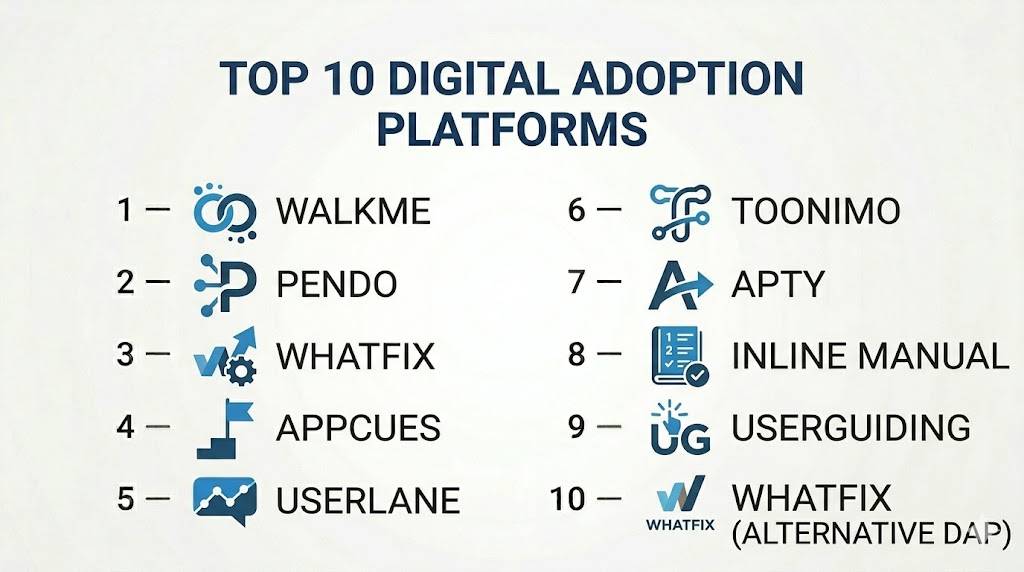
Top 10 Digital Adoption Platforms
#1 — WalkMe
Short description: WalkMe is a leading DAP providing in-app guidance, automation, and analytics to ensure successful software adoption for employees and customers.
Key Features
- Interactive walkthroughs and tooltips
- Automated onboarding and task completion
- Analytics dashboards for adoption metrics
- Mobile and desktop guidance
- Integration with ERP, CRM, and HRIS systems
- AI-powered recommendations
- Security and compliance features
Pros
- Highly scalable for enterprise deployment
- Strong analytics and adoption insights
Cons
- Premium pricing for full-featured plans
- Steep learning curve for advanced features
Platforms / Deployment
- Web / Windows / macOS / iOS / Android
- Cloud
Security & Compliance
- SSO, MFA, encryption, audit logs
- GDPR, SOC 2
Integrations & Ecosystem
- Salesforce, SAP, Oracle, Workday
- API and webhooks
- Collaboration tools
Support & Community
- Enterprise support tiers
- Knowledge base and tutorials
- Active user community
#2 — Pendo
Short description: Pendo offers product analytics and in-app guidance, enabling organizations to understand user behavior and increase adoption through contextual onboarding and messaging.
Key Features
- In-app messaging and walkthroughs
- Product analytics and feature usage tracking
- NPS surveys and feedback collection
- Mobile and web application support
- Integration with CRM and analytics platforms
Pros
- Combines adoption with rich analytics
- Effective for SaaS product teams
Cons
- Limited offline capabilities
- May require technical setup for advanced analytics
Platforms / Deployment
- Web / iOS / Android
- Cloud
Security & Compliance
- SSO, encryption
- GDPR
Integrations & Ecosystem
- Salesforce, HubSpot, Jira
- API for custom integrations
- Analytics dashboards
Support & Community
- Customer support
- Documentation and webinars
- User community forums
#3 — Whatfix
Short description: Whatfix provides interactive guidance, product tours, and analytics to drive user adoption, employee training, and self-service support.
Key Features
- Interactive walkthroughs and tooltips
- Onboarding and task automation
- Analytics for adoption and engagement
- Self-service support modules
- Mobile and desktop support
- Multi-language content creation
Pros
- Easy-to-create guidance flows
- Strong multi-device support
Cons
- Premium features require enterprise plan
- Advanced analytics configuration can be complex
Platforms / Deployment
- Web / iOS / Android
- Cloud
Security & Compliance
- SSO, MFA, encryption
- GDPR, SOC 2
Integrations & Ecosystem
- Salesforce, SAP, Workday
- API access
- Collaboration and reporting tools
Support & Community
- Customer support
- Tutorials and knowledge base
- Community forums
#4 — Appcues
Short description: Appcues focuses on user onboarding, feature adoption, and engagement analytics with easy-to-create in-app experiences.
Key Features
- Drag-and-drop onboarding flows
- Product tours and tooltips
- Behavioral targeting and segmentation
- Analytics dashboards
- Multi-platform support
- Integration with SaaS apps
Pros
- Rapid onboarding and adoption workflows
- User-friendly interface
Cons
- Less suitable for enterprise-scale automation
- Advanced integrations may require technical support
Platforms / Deployment
- Web / iOS / Android
- Cloud
Security & Compliance
- SSO, encryption
- GDPR
Integrations & Ecosystem
- Salesforce, HubSpot, Jira
- API for custom workflows
Support & Community
- Customer support
- Knowledge base and webinars
- Community forum
#5 — Userlane
Short description: Userlane provides interactive guidance and automation for software adoption, helping organizations improve onboarding, training, and productivity.
Key Features
- Interactive guides and tutorials
- Task automation and workflow support
- Analytics and reporting
- Multi-device access
- Integration with enterprise software
- Personalized learning flows
Pros
- Supports large-scale enterprise adoption
- Reduces training and support costs
Cons
- Premium pricing
- Limited offline functionality
Platforms / Deployment
- Web / iOS / Android
- Cloud
Security & Compliance
- SSO, MFA, encryption
- GDPR, SOC 2
Integrations & Ecosystem
- SAP, Oracle, Salesforce
- API and integration tools
- Analytics dashboards
Support & Community
- Enterprise support
- Tutorials and knowledge base
- Active user community
#6 — Toonimo
Short description: Toonimo enables interactive walkthroughs, tooltips, and video guidance to drive adoption and engagement across web applications.
Key Features
- In-app guidance with animations
- Video walkthroughs
- User analytics and engagement metrics
- Integration with web applications
- Mobile and desktop support
Pros
- Engaging animated guidance
- Easy for non-technical teams to implement
Cons
- Limited advanced analytics
- May not scale as well for large enterprises
Platforms / Deployment
- Web / iOS / Android
- Cloud
Security & Compliance
- SSO, encryption
- GDPR
Integrations & Ecosystem
- CRM systems, SaaS applications
- API access
Support & Community
- Customer support
- Tutorials
- Community forum
#7 — Apty
Short description: Apty provides digital adoption, user onboarding, and in-app guidance for complex enterprise applications with robust analytics and automation.
Key Features
- Interactive guidance and walkthroughs
- Task automation
- Adoption analytics dashboards
- Multi-device support
- Integration with ERP, CRM, and HRIS
- Multi-language support
Pros
- Enterprise-grade automation
- Comprehensive analytics
Cons
- Requires initial setup and configuration
- Premium pricing
Platforms / Deployment
- Web / iOS / Android
- Cloud
Security & Compliance
- SSO, encryption, audit logs
- GDPR, SOC 2
Integrations & Ecosystem
- Salesforce, SAP, Workday
- API for custom integrations
- Collaboration tools
Support & Community
- Enterprise support
- Tutorials and documentation
- Community forum
#8 — Inline Manual
Short description: Inline Manual enables interactive walkthroughs, onboarding flows, and task automation to improve software adoption and user proficiency.
Key Features
- Interactive walkthroughs
- Task automation
- Analytics and adoption tracking
- Integration with SaaS platforms
- Multi-device support
Pros
- Easy content creation
- Supports fast adoption
Cons
- Less robust reporting for large organizations
- Premium plan required for advanced features
Platforms / Deployment
- Web / iOS / Android
- Cloud
Security & Compliance
- SSO, encryption
- GDPR
Integrations & Ecosystem
- Salesforce, HubSpot
- API access
- Reporting tools
Support & Community
- Customer support
- Tutorials
- Community forums
#9 — UserGuiding
Short description: UserGuiding provides no-code interactive product tours, checklists, and analytics to boost adoption and user engagement.
Key Features
- No-code walkthrough builder
- Checklists and onboarding flows
- User analytics dashboards
- Multi-device support
- Integration with SaaS applications
Pros
- No technical expertise required
- Fast implementation
Cons
- Limited advanced automation
- Not ideal for enterprise-scale deployments
Platforms / Deployment
- Web / iOS / Android
- Cloud
Security & Compliance
- SSO, encryption
- GDPR
Integrations & Ecosystem
- CRM, LMS, SaaS applications
- API access
Support & Community
- Tutorials and knowledge base
- Customer support
- Community forum
#10 — Whatfix (Alternative DAP)
Short description: Whatfix provides enterprise-focused in-app guidance, onboarding, and performance support to accelerate digital adoption and productivity.
Key Features
- Interactive guides and flows
- Task automation and contextual help
- Analytics dashboards
- Multi-device support
- Integration with enterprise software
Pros
- Enterprise-ready with comprehensive analytics
- Supports multi-platform deployment
Cons
- Premium pricing
- Learning curve for advanced features
Platforms / Deployment
- Web / iOS / Android
- Cloud
Security & Compliance
- SSO, encryption, audit logs
- GDPR, SOC 2
Integrations & Ecosystem
- Salesforce, SAP, Oracle, Workday
- API access
- Reporting dashboards
Support & Community
- Enterprise support
- Tutorials and knowledge base
- Community forums
Comparison Table (Top 10)
| Tool Name | Best For | Platform(s) Supported | Deployment | Standout Feature | Public Rating |
|---|---|---|---|---|---|
| WalkMe | Enterprise | Web / Windows / macOS / iOS / Android | Cloud | Interactive in-app guidance | N/A |
| Pendo | Enterprise | Web / iOS / Android | Cloud | Product analytics + onboarding | N/A |
| Whatfix | Enterprise | Web / iOS / Android | Cloud | Enterprise onboarding and guidance | N/A |
| Appcues | SMB / Mid-market | Web / iOS / Android | Cloud | Rapid onboarding flows | N/A |
| Userlane | Enterprise | Web / iOS / Android | Cloud | Task automation + guidance | N/A |
| Toonimo | SMB | Web / iOS / Android | Cloud | Animated in-app guidance | N/A |
| Apty | Enterprise | Web / iOS / Android | Cloud | Automation + analytics | N/A |
| Inline Manual | SMB | Web / iOS / Android | Cloud | Interactive walkthroughs | N/A |
| UserGuiding | SMB | Web / iOS / Android | Cloud | No-code onboarding flows | N/A |
| Whatfix (Alternative) | Enterprise | Web / iOS / Android | Cloud | Multi-platform adoption guidance | N/A |
Evaluation & Scoring of Digital Adoption Platforms
| Tool Name | Core (25%) | Ease (15%) | Integrations (15%) | Security (10%) | Performance (10%) | Support (10%) | Value (15%) | Weighted Total |
|---|---|---|---|---|---|---|---|---|
| WalkMe | 9 | 8 | 8 | 9 | 8 | 8 | 7 | 8.3 |
| Pendo | 9 | 8 | 8 | 8 | 8 | 8 | 7 | 8.2 |
| Whatfix | 9 | 8 | 8 | 9 | 8 | 8 | 7 | 8.3 |
| Appcues | 8 | 8 | 7 | 8 | 7 | 7 | 7 | 7.6 |
| Userlane | 9 | 8 | 8 | 9 | 8 | 8 | 7 | 8.3 |
| Toonimo | 7 | 8 | 7 | 8 | 7 | 7 | 7 | 7.4 |
| Apty | 9 | 8 | 8 | 9 | 8 | 8 | 7 | 8.3 |
| Inline Manual | 8 | 8 | 7 | 8 | 7 | 7 | 7 | 7.6 |
| UserGuiding | 8 | 8 | 7 | 8 | 7 | 7 | 7 | 7.6 |
| Whatfix (Alt) | 9 | 8 | 8 | 9 | 8 | 8 | 7 | 8.3 |
Interpretation: Scores highlight each platform’s overall capability, ease of use, integrations, security, support, and value. Higher scores indicate well-rounded adoption solutions suitable for large-scale deployments.
Which Digital Adoption Platforms Tool Is Right for You?
Solo / Freelancer
UserGuiding, Toonimo, and Appcues are affordable, easy-to-use, and suitable for small-scale adoption and training projects.
SMB
Appcues, Inline Manual, and UserGuiding support team collaboration and rapid onboarding with moderate analytics.
Mid-Market
Pendo, Appcues, and Inline Manual provide advanced analytics, multi-device support, and scalable adoption workflows.
Enterprise
WalkMe, Whatfix, Userlane, and Apty deliver enterprise-grade automation, analytics, and multi-platform guidance.
Budget vs Premium
Freelancers and SMBs benefit from UserGuiding and Appcues, while enterprises require WalkMe, Whatfix, or Userlane for scalability and comprehensive analytics.
Feature Depth vs Ease of Use
Enterprise deployments prioritize depth and automation; SMBs prioritize rapid adoption and intuitive interfaces.
Integrations & Scalability
Ensure platform connects with ERP, CRM, HRIS, and productivity tools while scaling to support large teams.
Security & Compliance Needs
Enterprise-grade security includes SSO, MFA, encryption, GDPR, and audit logs for safe user adoption workflows.
Frequently Asked Questions (FAQs)
1. What pricing models do DAPs use?
Most platforms use subscription-based pricing, per-user or per-seat, with enterprise licensing for large organizations.
2. How long does it take to implement?
Small teams can deploy within days, while enterprise implementations may take weeks due to integration complexity.
3. Are these platforms mobile-friendly?
Yes, all top DAPs provide mobile-optimized guidance and in-app support.
4. Can DAPs track compliance?
Yes, analytics and workflow tracking support regulatory and internal compliance requirements.
5. How secure is user data?
Platforms implement encryption, SSO/MFA, and comply with GDPR and SOC 2 standards.
6. Can gamification enhance adoption?
Yes, features like badges, progress tracking, and points improve engagement.
7. Are there open-source alternatives?
Few exist; most enterprise-grade solutions are commercial SaaS platforms.
8. How does AI enhance adoption?
AI offers personalized guidance, adaptive walkthroughs, and insights into user behavior.
9. Can multiple admins collaborate?
Yes, cloud-based platforms support real-time collaboration and version control.
10. How is ROI measured?
Track adoption rates, task completion, reduced support tickets, and software ROI metrics.
Conclusion
Digital Adoption Platforms are essential for organizations aiming to accelerate software adoption, improve user proficiency, and reduce support costs. SMBs and small teams benefit from UserGuiding, Appcues, and Inline Manual, while enterprises leverage WalkMe, Whatfix, and Userlane for enterprise-scale automation, analytics, and multi-platform guidance. Selecting the right platform requires evaluating ease of use, integrations, scalability, security, and overall value. Shortlist suitable platforms, run pilot programs, and implement structured adoption workflows to ensure a successful digital transformation.

Find Trusted Cardiac Hospitals
Compare heart hospitals by city and services — all in one place.
Explore Hospitals
A DAP can make software easier to learn, but too many pop-ups and guides can also become distracting for users. It would be useful to regularly check which guidance people actually use and remove steps that are no longer helpful. This can keep the user experience simple while still supporting adoption.