Introduction
eLearning Authoring Tools are platforms that enable instructional designers, trainers, and educators to create interactive, engaging, and effective online courses. They provide features to design multimedia-rich content, quizzes, simulations, and assessments while ensuring learners can access courses seamlessly across devices. These tools are crucial for both corporate training programs and educational institutions aiming to deliver scalable, measurable learning experiences.
Organizations today are prioritizing digital learning to upskill employees, onboard new hires efficiently, ensure compliance, and foster continuous professional development. eLearning Authoring Tools allow teams to standardize content delivery, track learner progress, and analyze training effectiveness. Real-world use cases include employee onboarding, compliance training, customer education programs, professional skill development, and microlearning modules.
When evaluating eLearning Authoring Tools, buyers should consider:
- Ease of course creation and multimedia support
- SCORM/xAPI compliance and standards
- Assessment and quiz creation capabilities
- Mobile and offline learning support
- Analytics and reporting dashboards
- Integration with LMS and HRIS systems
- Collaboration features for teams
- Content library and template availability
- Security and compliance
- Pricing and licensing flexibility
Best for: L&D teams, instructional designers, corporate trainers, and educational institutions of all sizes looking to produce interactive, scalable, and measurable learning content.
Not ideal for: Organizations or individuals needing simple PDF or static content delivery without tracking, interactive features, or assessments.
Key Trends in eLearning Authoring Tools
- AI-powered content creation and recommendations
- Microlearning and mobile-first course delivery
- Enhanced gamification and engagement features
- Integration with LMS, HRIS, and collaboration platforms
- Cloud-based authoring and collaborative workflows
- Real-time analytics and reporting for learner insights
- Support for SCORM, xAPI, and other eLearning standards
- Personalized learning paths and adaptive learning
- Subscription-based SaaS pricing and flexible licensing
- Enhanced security, SSO, and GDPR compliance
How We Selected These Tools (Methodology)
- Evaluated market adoption and brand presence among corporate and educational users
- Assessed feature completeness, including multimedia support, assessments, and gamification
- Analyzed reliability and performance through case studies and user reviews
- Checked security posture, compliance standards, and data privacy features
- Reviewed integration with LMS, HRIS, and productivity tools
- Considered usability, onboarding, and learning curve for teams
- Evaluated scalability for small to enterprise-level deployment
- Analyzed vendor support, documentation, and community presence
- Assessed mobile accessibility and offline course functionality
- Reviewed pricing transparency and total value for organizations
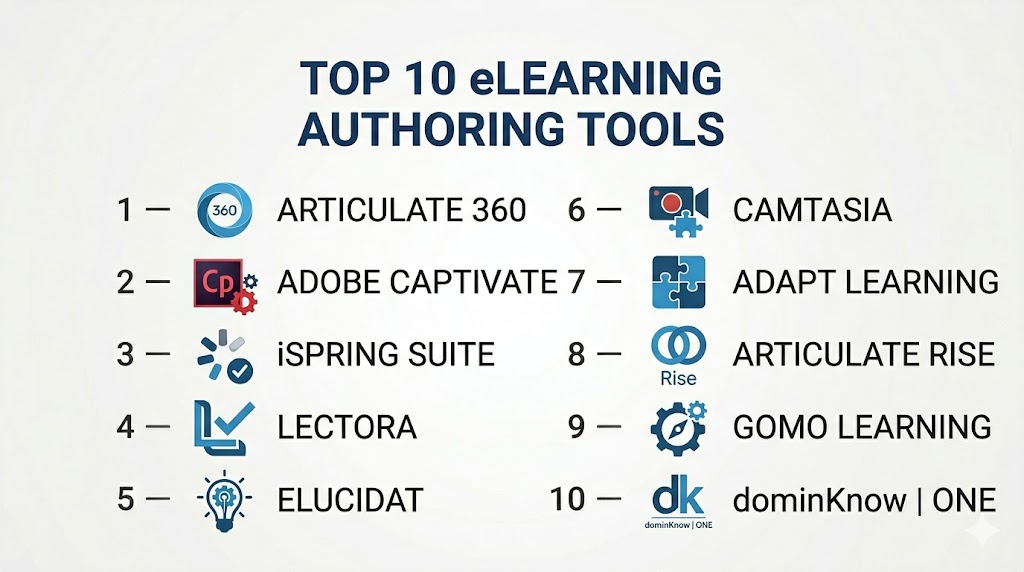
Top 10 eLearning Authoring Tools
#1 — Articulate 360
Short description: Articulate 360 provides a suite of tools for creating interactive courses, quizzes, and simulations, designed for both corporate and academic learning content creators.
Key Features
- Storyline and Rise for course creation
- Multimedia and interactive content support
- Assessments and quizzes
- Responsive design for mobile learning
- Content library of templates and assets
- Collaboration features for teams
- SCORM/xAPI compliance
Pros
- Comprehensive suite covering multiple authoring needs
- Strong community and resources
Cons
- Premium pricing
- Learning curve for advanced features
Platforms / Deployment
- Windows / Web
- Cloud
Security & Compliance
- SSO, encryption
- GDPR
Integrations & Ecosystem
- LMS integration via SCORM/xAPI
- Collaboration and content sharing tools
- API access for extended workflows
Support & Community
- Enterprise support tiers
- Tutorials and webinars
- Active user forums
#2 — Adobe Captivate
Short description: Adobe Captivate enables the creation of responsive, interactive eLearning content, including simulations, scenario-based learning, and mobile-ready courses.
Key Features
- Responsive design for any device
- Interactive elements and branching scenarios
- VR and simulation support
- SCORM/xAPI compliant publishing
- Assessment and quiz tools
- Integration with LMS
Pros
- Supports advanced multimedia and interactive content
- Robust feature set for enterprise learning
Cons
- Steep learning curve
- High cost for small teams
Platforms / Deployment
- Windows / macOS
- Cloud / Self-hosted
Security & Compliance
- SSO, encryption
- GDPR
Integrations & Ecosystem
- LMS systems via SCORM/xAPI
- HRIS and content libraries
- API access
Support & Community
- Vendor support
- Knowledge base and tutorials
- Community forums
#3 — iSpring Suite
Short description: iSpring Suite offers rapid authoring with PowerPoint-based content, quizzes, and interactive assessments for corporate learning and e-learning courses.
Key Features
- PowerPoint integration
- Quiz and survey creation
- Multimedia and simulation support
- SCORM/xAPI publishing
- Mobile-friendly output
- Collaboration tools
Pros
- Rapid development and intuitive interface
- Cost-effective for SMBs
Cons
- Limited advanced gamification
- Smaller content library than competitors
Platforms / Deployment
- Windows
- Cloud / Desktop
Security & Compliance
- SSO, encryption
- GDPR
Integrations & Ecosystem
- LMS integration
- HRIS systems
- API access for content management
Support & Community
- Email and chat support
- Tutorials and documentation
- Community forums
#4 — Lectora
Short description: Lectora provides enterprise-grade eLearning authoring with powerful automation, responsive design, and SCORM/xAPI support for global learning initiatives.
Key Features
- Responsive course design
- Multimedia and interactivity support
- Assessment and quiz tools
- SCORM/xAPI compliance
- Collaboration and version control
- Integration with LMS
Pros
- Enterprise-grade scalability
- Strong automation and workflow support
Cons
- Requires learning for full potential
- Pricing is high for SMBs
Platforms / Deployment
- Windows / Web
- Cloud / Self-hosted
Security & Compliance
- SSO, encryption, audit logs
- GDPR, SOC 2
Integrations & Ecosystem
- LMS integration via SCORM/xAPI
- HRIS and collaboration tools
- API access
Support & Community
- Tiered support options
- Knowledge base and webinars
- Community forums
#5 — Elucidat
Short description: Elucidat is a cloud-based authoring platform for creating responsive, scalable eLearning content with collaborative workflow features.
Key Features
- Responsive course templates
- Cloud-based collaboration
- Multimedia and interactive content
- Quizzes and assessments
- Analytics dashboards
- LMS integration via SCORM/xAPI
Pros
- Simple cloud deployment
- Easy collaboration across teams
Cons
- Less suitable for offline learning
- Limited advanced features for enterprise
Platforms / Deployment
- Web
- Cloud
Security & Compliance
- SSO, encryption
- GDPR
Integrations & Ecosystem
- LMS systems
- HRIS integration
- API for custom workflows
Support & Community
- Customer support
- Knowledge base
- Tutorials
#6 — Camtasia
Short description: Camtasia is a multimedia-focused eLearning authoring tool for creating video-based courses, tutorials, and interactive video content.
Key Features
- Screen recording and video editing
- Interactive quizzes in videos
- Multimedia content integration
- SCORM/xAPI export
- Mobile and desktop playback
Pros
- Excellent for video-based content
- Intuitive for content creators
Cons
- Limited assessment and quiz features
- Not fully cloud-native
Platforms / Deployment
- Windows / macOS
- Desktop
Security & Compliance
- Not publicly stated
Integrations & Ecosystem
- LMS via SCORM/xAPI
- Content libraries
Support & Community
- Knowledge base
- Tutorials and webinars
#7 — Adapt Learning
Short description: Adapt Learning is an open-source eLearning authoring framework for responsive, HTML5-based course creation for web and mobile learners.
Key Features
- Responsive HTML5 content
- Open-source framework
- Interactive content and branching
- SCORM/xAPI support
- Community plugins and extensions
Pros
- Free and highly customizable
- Responsive design out of the box
Cons
- Requires technical setup
- Smaller support community
Platforms / Deployment
- Web
- Self-hosted
Security & Compliance
- Varies / N/A
Integrations & Ecosystem
- LMS systems
- Community plugins
Support & Community
- Community support
- Forums and documentation
#8 — Articulate Rise
Short description: Rise, part of Articulate 360, provides cloud-based rapid authoring for responsive, visually rich courses with collaboration capabilities.
Key Features
- Cloud-based rapid course creation
- Responsive design
- Multimedia integration
- Quizzes and knowledge checks
- LMS publishing
Pros
- Fast course creation
- Visual and responsive templates
Cons
- Limited advanced interactions
- Part of Articulate 360 subscription
Platforms / Deployment
- Web
- Cloud
Security & Compliance
- SSO, encryption
- GDPR
Integrations & Ecosystem
- LMS via SCORM/xAPI
- HRIS and productivity tools
Support & Community
- Customer support
- Knowledge base
- Webinars
#9 — Gomo Learning
Short description: Gomo Learning is a cloud-based authoring tool for responsive, multi-device course creation with analytics and SCORM/xAPI support.
Key Features
- Responsive course design
- Multi-device delivery
- Interactive content and quizzes
- Analytics dashboards
- LMS integration
Pros
- Cloud-native and scalable
- Mobile-first approach
Cons
- Limited offline support
- Premium pricing
Platforms / Deployment
- Web
- Cloud
Security & Compliance
- SSO, encryption
- GDPR
Integrations & Ecosystem
- LMS systems
- HRIS and collaboration tools
Support & Community
- Customer support
- Tutorials and webinars
#10 — dominKnow | ONE
Short description: dominKnow | ONE is an enterprise-level authoring platform for collaborative, responsive eLearning creation with advanced analytics and multi-device support.
Key Features
- Cloud-based collaborative authoring
- Responsive and mobile-ready courses
- SCORM/xAPI publishing
- Assessment and quiz creation
- Analytics and reporting dashboards
Pros
- Strong enterprise capabilities
- Collaboration-focused workflows
Cons
- Costly for SMBs
- Complex for new users
Platforms / Deployment
- Web
- Cloud
Security & Compliance
- SSO, encryption, audit logs
- GDPR, SOC 2
Integrations & Ecosystem
- LMS, HRIS, productivity tools
- API access for custom workflows
Support & Community
- Enterprise support
- Knowledge base, tutorials
- Community forums
Comparison Table (Top 10)
| Tool Name | Best For | Platform(s) Supported | Deployment | Standout Feature | Public Rating |
|---|---|---|---|---|---|
| Articulate 360 | SMB / Enterprise | Web / Windows | Cloud | Suite with Storyline & Rise | N/A |
| Adobe Captivate | Enterprise | Windows / macOS | Cloud / Self-hosted | VR & simulation support | N/A |
| iSpring Suite | SMB / Mid-market | Windows | Cloud / Desktop | PowerPoint integration | N/A |
| Lectora | Enterprise | Windows / Web | Cloud / Self-hosted | Automation & scalability | N/A |
| Elucidat | Mid-market | Web | Cloud | Collaborative cloud authoring | N/A |
| Camtasia | SMB | Windows / macOS | Desktop | Video-based learning | N/A |
| Adapt Learning | SMB / Mid-market | Web | Self-hosted | Open-source & responsive | N/A |
| Articulate Rise | SMB / Mid-market | Web | Cloud | Rapid responsive authoring | N/A |
| Gomo Learning | SMB / Enterprise | Web | Cloud | Multi-device responsive content | N/A |
| dominKnow | ONE | Enterprise | Web | Collaborative cloud authoring | N/A |
Evaluation & Scoring of eLearning Authoring Tools
| Tool Name | Core (25%) | Ease (15%) | Integrations (15%) | Security (10%) | Performance (10%) | Support (10%) | Value (15%) | Weighted Total |
|---|---|---|---|---|---|---|---|---|
| Articulate 360 | 9 | 8 | 8 | 8 | 8 | 8 | 7 | 8.1 |
| Adobe Captivate | 9 | 7 | 7 | 8 | 8 | 8 | 7 | 7.9 |
| iSpring Suite | 8 | 8 | 7 | 8 | 7 | 7 | 7 | 7.6 |
| Lectora | 8 | 7 | 7 | 8 | 7 | 7 | 7 | 7.4 |
| Elucidat | 8 | 8 | 7 | 8 | 7 | 7 | 7 | 7.6 |
| Camtasia | 7 | 8 | 6 | 7 | 7 | 7 | 7 | 7.1 |
| Adapt Learning | 7 | 7 | 6 | 7 | 6 | 6 | 7 | 6.7 |
| Articulate Rise | 8 | 8 | 7 | 8 | 7 | 7 | 7 | 7.6 |
| Gomo Learning | 8 | 8 | 7 | 8 | 7 | 7 | 7 | 7.6 |
| dominKnow | ONE | 9 | 7 | 8 | 8 | 8 | 7 | 8.0 |
Interpretation: Weighted totals reflect overall capability, ease of use, integration, security, support, and value. Higher scores indicate platforms that are well-suited for enterprise and SMB eLearning authoring needs.
Which eLearning Authoring Tools Tool Is Right for You?
Solo / Freelancer
Camtasia, iSpring Suite, and Articulate Rise are cost-effective, easy-to-use, and ideal for individual content creators.
SMB
Elucidat, iSpring Suite, and Gomo Learning provide collaborative features, responsive course delivery, and affordable pricing.
Mid-Market
Elucidat, Articulate 360, and Lectora support advanced analytics, team collaboration, and scalable content creation.
Enterprise
Adobe Captivate, dominKnow | ONE, and Articulate 360 provide enterprise-grade features, multi-device support, and compliance-ready workflows.
Budget vs Premium
Freelancers and SMBs benefit from iSpring Suite or Camtasia, while enterprise organizations invest in Adobe Captivate, Lectora, or dominKnow | ONE for scalability and collaboration.
Feature Depth vs Ease of Use
Enterprises may accept steeper learning curves for advanced functionality; SMBs prioritize intuitive interfaces and rapid deployment.
Integrations & Scalability
Prioritize tools that integrate with LMS, HRIS, and collaboration platforms while scaling to support distributed teams and large content libraries.
Security & Compliance Needs
Ensure SSO, MFA, encryption, GDPR compliance, and audit logs for safe course creation and delivery.
Frequently Asked Questions (FAQs)
1. What pricing models do eLearning authoring tools use?
Most tools are subscription-based, per-user or per-seat, with enterprise licensing for larger teams.
2. How long does it take to implement these tools?
SMBs can deploy in days, while enterprise setups may take weeks due to integrations and content migration.
3. Are eLearning tools mobile-friendly?
Yes, most provide responsive web access and dedicated mobile apps for learners.
4. Can these tools support compliance training?
Yes, SCORM/xAPI compliance allows for certification tracking and regulatory reporting.
5. What integrations are essential?
LMS platforms, HRIS, content libraries, and productivity tools are key for seamless workflows.
6. How secure is authoring content?
Top tools implement encryption, SSO/MFA, and compliance with GDPR and SOC 2 standards.
7. Can these tools support gamification?
Yes, features like badges, points, and leaderboards increase learner engagement.
8. Are open-source alternatives available?
Yes, platforms like Adapt Learning offer open-source flexibility but require technical expertise.
9. How do I measure learning effectiveness?
Track course completion, quiz scores, engagement metrics, and certifications.
10. Can multiple authors collaborate?
Yes, cloud-based platforms provide real-time collaboration, version control, and workflow management.
Conclusion
eLearning Authoring Tools are essential for organizations seeking scalable, engaging, and measurable learning programs. SMBs can benefit from iSpring Suite, Camtasia, and Articulate Rise for affordability and ease of use, while mid-market and enterprise organizations leverage Adobe Captivate, dominKnow | ONE, and Elucidat for advanced collaboration, analytics, and compliance support. Selecting the right tool requires evaluating usability, integrations, scalability, security, and value. Shortlist suitable platforms, run pilot programs, and implement structured workflows to ensure successful learning outcomes.

Find Trusted Cardiac Hospitals
Compare heart hospitals by city and services — all in one place.
Explore Hospitals
Creating eLearning content is only part of the job; keeping it updated can take just as much effort. When processes, products, or policies change, old lessons can quickly become confusing for learners. Having a simple review cycle for existing courses can help keep the training accurate and useful.