Introduction
Home Automation Hubs connect smart devices from different brands and protocols into one control system. Instead of managing lights, sensors, locks, cameras, speakers, thermostats, curtains, plugs, appliances, and security devices separately, a hub helps users control them through one app, voice assistant, dashboard, or automation engine. This category matters because smart homes are becoming more complex. Homes now include Matter, Thread, Zigbee, Z-Wave, Wi-Fi, Bluetooth, infrared, and cloud-connected devices. A good hub improves compatibility, reduces app overload, supports automations, enables local control in some cases, and makes smart homes more reliable.
Real World Use Cases:
- Automating lights, locks, sensors, thermostats, and plugs
- Running “Good Morning,” “Away,” “Night,” and “Movie Mode” scenes
- Connecting Zigbee, Z-Wave, Thread, Matter, Wi-Fi, and Bluetooth devices
- Managing security sensors, cameras, doorbells, and smart locks
- Reducing cloud dependency through local automation where supported
Evaluation Criteria for Buyers:
- Protocol support such as Matter, Thread, Zigbee, Z-Wave, Wi-Fi, and Bluetooth
- Local control versus cloud dependency
- Device compatibility across brands
- Automation depth and rule flexibility
- Voice assistant support
- App quality and dashboard experience
- Privacy and security controls
- Setup complexity and learning curve
- Community support and update frequency
- Long-term ecosystem reliability
Best for: Homeowners, apartment residents, smart home enthusiasts, DIY users, families, property managers, smart home installers, and premium home automation users who want centralized control, reliable automations, device interoperability, and better smart home management.
Not ideal for: Users with only one or two smart devices may not need a dedicated hub. A brand-specific app, smart speaker, or basic Wi-Fi device app may be enough until the home grows into multiple device types, rooms, protocols, and automation needs.
Key Trends in Home Automation Hubs
- Matter support is becoming a standard expectation: Buyers increasingly look for hubs that support Matter because it helps devices work across major ecosystems with less brand lock-in.
- Thread border routers are becoming more important: Thread helps low-power smart devices form a reliable mesh network, especially for sensors, locks, switches, and plugs.
- Local control is gaining momentum: Users want automations that continue working even when internet service is unreliable or cloud services change.
- Multi-protocol hubs are still valuable: Many homes still use Zigbee, Z-Wave, infrared, Bluetooth, Wi-Fi, and older bridges, so broad protocol support remains important.
- AI-assisted automation is emerging: Smart home hubs and assistants are moving toward smarter routines, occupancy-aware suggestions, energy optimization, and contextual automation.
- Privacy is a major buying factor: Cameras, microphones, locks, sensors, and presence data make privacy controls, local processing, and account security more important.
- Energy management is becoming mainstream: Hubs increasingly connect smart plugs, thermostats, energy meters, batteries, and solar systems into practical energy routines.
- DIY and professional smart homes are splitting: DIY users prefer flexible hubs like Home Assistant, Hubitat, and Homey, while luxury homes often use professionally installed systems.
- Voice control is not enough anymore: Buyers now expect dashboards, complex rules, family access, device grouping, automations, alerts, and backup options.
- Ecosystem continuity matters: Users now evaluate whether a hub is actively updated, supported, and compatible with future smart home standards.
How We Selected These Tools
The tools below were selected using practical home automation hub evaluation logic:
- Market recognition among smart home users, installers, DIY communities, and consumer ecosystems
- Support for common device types such as lights, locks, sensors, thermostats, cameras, plugs, speakers, and appliances
- Protocol support across Matter, Thread, Zigbee, Z-Wave, Wi-Fi, Bluetooth, infrared, and cloud integrations
- Automation depth for both beginners and advanced users
- Fit across apartments, budget homes, advanced DIY homes, and premium installations
- Local control capabilities and cloud dependency considerations
- App quality, voice assistant support, dashboard usability, and family access
- Security and privacy posture where publicly stated or reasonably expected
- Community support, documentation, update activity, and ecosystem maturity
- Practical value for reducing device fragmentation and improving smart home reliability
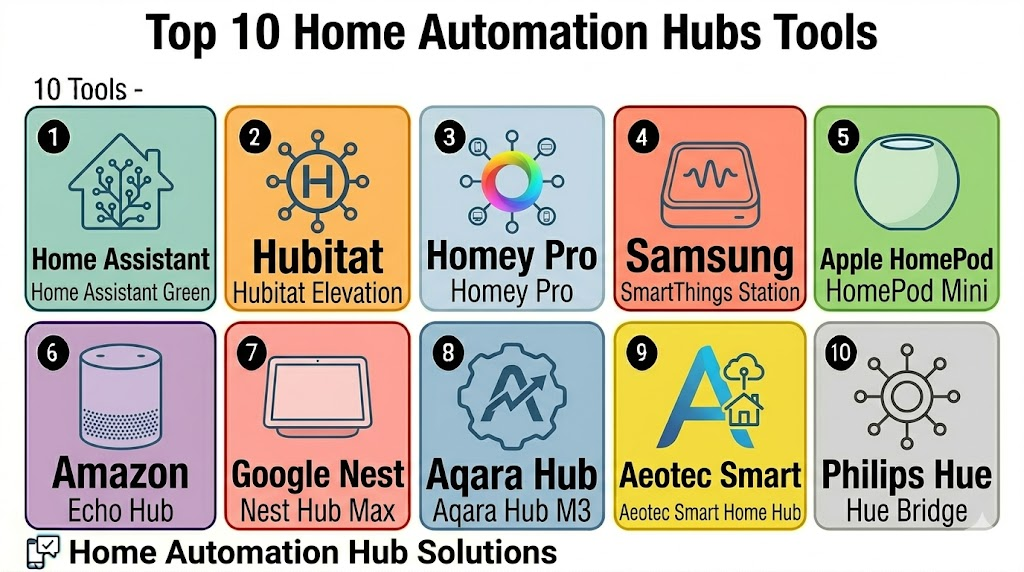
Top 10 Home Automation Hubs Tools
1- Home Assistant Green
Short description: Home Assistant Green is a plug-and-play hub for running Home Assistant, an open-source smart home platform focused on local control, privacy, and deep customization. It is best for DIY users who want a powerful automation hub without building their own server.
Key Features
- Runs Home Assistant out of the box
- Strong local automation and privacy focus
- Large integration ecosystem
- Supports dashboards, scenes, scripts, and automations
- Works with Matter and many device integrations
- Can expand with Zigbee, Z-Wave, or other adapters
- Strong community and open-source ecosystem
Pros
- Excellent automation depth for advanced users
- Strong privacy and local-control approach
- Large community with many integrations and blueprints
Cons
- Learning curve is higher than consumer hubs
- Some device integrations require configuration
- Zigbee or Z-Wave requires compatible add-on hardware
Platforms / Deployment
Web / iOS / Android / Linux-based hub
Self-hosted / Hybrid
Security & Compliance
Not publicly stated. Buyers should manage user access, remote access, backups, encryption, updates, network security, and add-on permissions carefully.
Integrations & Ecosystem
Home Assistant Green works well for users who want one flexible control layer across many devices and brands.
- Matter devices
- Zigbee through supported adapters
- Z-Wave through supported adapters
- MQTT and local network devices
- Cloud integrations where needed
- Custom dashboards and automation blueprints
Support & Community
Home Assistant has one of the strongest DIY smart home communities. Users get extensive documentation, forums, community integrations, add-ons, blueprints, and frequent platform updates.
2- Hubitat Elevation
Short description: Hubitat Elevation is a local-first smart home hub designed for fast automations, privacy, and compatibility with Zigbee, Z-Wave, Matter, and LAN-based devices. It is ideal for users who want strong automation without depending heavily on cloud services.
Key Features
- Local automation processing
- Zigbee and Z-Wave device support
- Matter support depending on device and setup
- Rule-based automation engine
- Dashboards and device control
- LAN and community integrations
- Voice assistant integration support
Pros
- Strong local automation performance
- Good fit for Zigbee and Z-Wave homes
- Privacy-friendly compared with cloud-first platforms
Cons
- Interface is less beginner-friendly than mainstream consumer apps
- Advanced rules require learning
- Device compatibility should be checked before purchase
Platforms / Deployment
Web / iOS / Android / Hub device
Local hub / Hybrid
Security & Compliance
Varies / N/A. Buyers should validate remote access settings, user permissions, local network security, backup options, firmware updates, and device access controls.
Integrations & Ecosystem
Hubitat is useful for homes that need local, reliable, rule-based automation across multiple protocols.
- Zigbee devices
- Z-Wave devices
- Matter devices where supported
- LAN integrations
- Voice assistant integrations
- Community apps and drivers
Support & Community
Hubitat provides official documentation, support resources, and an active enthusiast community. Community drivers can extend capability but should be reviewed carefully.
3- Homey Pro
Short description: Homey Pro is a multi-protocol smart home hub designed to connect many smart home technologies into one platform. It is useful for users who want broad compatibility, visual automation flows, and easier automation than highly technical systems.
Key Features
- Multi-protocol smart home support
- Visual automation flow builder
- Zigbee, Z-Wave, Wi-Fi, Bluetooth, infrared, Thread, and Matter support depending on model and setup
- Mobile and web app control
- Energy usage insights
- Device grouping and scenes
- App-based integration ecosystem
Pros
- Broad protocol support for mixed-device homes
- Easier automation flow builder than many advanced platforms
- Good fit for users who want flexibility without heavy coding
Cons
- Hardware cost may be higher than basic hubs
- Some integrations depend on app availability
- Regional support and device compatibility should be checked
Platforms / Deployment
Web / iOS / Android / Hub device
Local hub / Cloud / Hybrid
Security & Compliance
Varies / N/A. Buyers should validate account security, local and cloud access, user permissions, device privacy settings, update policies, and backup options.
Integrations & Ecosystem
Homey Pro is designed for users with devices across many brands and protocols.
- Zigbee
- Z-Wave
- Matter
- Thread
- Infrared
- Wi-Fi and Bluetooth devices
Support & Community
Homey provides official documentation, app ecosystem support, and user community resources. The app-based integration model helps users connect many device brands.
4- Samsung SmartThings Station
Short description: Samsung SmartThings Station is a compact smart home hub that works with the SmartThings ecosystem and supports modern smart home device control. It is useful for Samsung users and households that want a simple hub for connected devices, routines, and compatible smart home products.
Key Features
- SmartThings app-based control
- Matter support
- Smart home routines and scenes
- Samsung device and appliance ecosystem support
- Device grouping and remote control
- Smart button-style scene triggering
- Compact hub design
Pros
- Good fit for Samsung ecosystem users
- Simple setup compared with advanced DIY hubs
- Useful for Matter and SmartThings-compatible devices
Cons
- Advanced local automation is limited compared with Home Assistant or Hubitat
- Protocol support depends on model and region
- Best value comes when using SmartThings-compatible devices
Platforms / Deployment
Web / Android / iOS / Hub device
Cloud / Hybrid
Security & Compliance
Varies / N/A. Buyers should validate Samsung account security, home sharing permissions, device access rules, privacy settings, and hub-level controls.
Integrations & Ecosystem
SmartThings Station works best for users who already use Samsung devices, SmartThings-compatible products, and Matter-supported devices.
- Samsung appliances and TVs
- Matter-compatible devices
- SmartThings-compatible sensors and plugs
- Mobile app routines
- Voice assistant workflows
- Smart home scenes
Support & Community
Samsung provides SmartThings documentation, product support, and community guidance. SmartThings also has a large user and developer community.
5- Apple HomePod Mini
Short description: Apple HomePod Mini works as a smart speaker and Apple home hub for controlling Apple Home, Siri, HomeKit, Matter, and Thread-enabled accessories. It is ideal for Apple users who want a compact hub with voice control and strong ecosystem integration.
Key Features
- Works as an Apple home hub
- Siri voice control
- HomeKit and Matter accessory support
- Thread support for compatible accessories
- Automations and scenes through Apple Home
- Family and room-based control
- Smart speaker and audio features
Pros
- Strong fit for Apple ecosystem users
- Compact and easy to set up
- Good option for Thread-enabled Matter accessories
Cons
- Best experience requires Apple devices
- Advanced automations may need Apple Shortcuts or other tools
- Not ideal for users outside the Apple ecosystem
Platforms / Deployment
iOS / iPadOS / macOS / watchOS / tvOS
Cloud / Hybrid
Security & Compliance
Apple Home is designed with privacy and security in mind, but buyers should still review account protection, household permissions, camera settings, remote access, and accessory sharing rules.
Integrations & Ecosystem
HomePod Mini is best for Apple households that want HomeKit, Matter, Thread, and Siri control.
- Apple Home
- Siri
- HomeKit accessories
- Matter accessories
- Thread-enabled devices
- Apple Shortcuts
Support & Community
Apple provides official setup guidance, documentation, and product support. The Apple Home community is active, especially around HomeKit accessories and automations.
6- Amazon Echo Hub
Short description: Amazon Echo Hub is a smart home control panel and hub-style device for Alexa-based smart homes. It is useful for users who want a wall-friendly dashboard for controlling lights, locks, cameras, routines, thermostats, and compatible devices.
Key Features
- Alexa smart home control dashboard
- Voice assistant integration
- Matter support depending on device and setup
- Routines and device grouping
- Camera and security device viewing
- Touchscreen control panel
- Smart home widget-style interface
Pros
- Strong fit for Alexa households
- Easy dashboard-style control for families
- Useful for voice control, routines, and quick device access
Cons
- Some workflows depend on cloud services
- Advanced local automations are limited
- Privacy settings should be reviewed carefully
Platforms / Deployment
Web / Android / iOS / Echo Hub device
Cloud / Hybrid
Security & Compliance
Varies / N/A. Buyers should validate Amazon account security, voice recording settings, camera permissions, household access, remote controls, and device sharing.
Integrations & Ecosystem
Echo Hub is useful for Alexa-first homes with many compatible smart devices.
- Alexa voice assistant
- Echo devices
- Matter-compatible devices
- Smart lights, plugs, cameras, locks, and thermostats
- Routines and scenes
- Third-party Alexa skills
Support & Community
Amazon provides setup guides, help resources, device support, and a large user community. Alexa compatibility information is widely available across device brands.
7- Google Nest Hub Max
Short description: Google Nest Hub Max is a smart display that can act as a central control point for Google Home devices, Nest products, Matter devices, routines, cameras, and Google Assistant workflows. It is suitable for Google ecosystem users who want both voice and screen-based smart home control.
Key Features
- Google Home control dashboard
- Google Assistant voice control
- Nest device ecosystem support
- Matter device support through Google Home ecosystem
- Smart display interface
- Camera, speaker, and media features
- Household routines and device grouping
Pros
- Strong fit for Google and Nest households
- Easy voice and display-based smart home control
- Useful for kitchens, living rooms, and shared spaces
Cons
- Advanced automation depth is limited compared with DIY hubs
- Some actions depend on cloud services
- Device compatibility varies by brand and region
Platforms / Deployment
Web / Android / iOS / Nest Hub Max device
Cloud / Hybrid
Security & Compliance
Varies / N/A. Buyers should validate Google account security, camera controls, home member access, privacy settings, remote access, and device permissions.
Integrations & Ecosystem
Nest Hub Max fits homes using Google Home, Nest, Google Assistant, and supported third-party smart devices.
- Google Home
- Google Assistant
- Nest devices
- Matter-compatible devices
- Smart displays and speakers
- Third-party smart home brands
Support & Community
Google provides product help, setup resources, and Google Home support guidance. Community help is strong because Google Home has a broad consumer user base.
8- Aqara Hub M3
Short description: Aqara Hub M3 is a smart home hub for Aqara and broader smart home ecosystems, with support for modern automation workflows and multiple connectivity options. It is useful for users who rely on Aqara sensors, switches, cameras, curtains, locks, and Matter-compatible setups.
Key Features
- Aqara device ecosystem support
- Matter controller and bridge-style workflows depending on setup
- Thread and Zigbee support depending on device configuration
- Local automation support for compatible devices
- Infrared control for some appliances
- App-based scenes and automations
- Smart sensor and security workflows
Pros
- Strong fit for Aqara device users
- Good option for sensor-heavy smart homes
- Useful bridge between Aqara devices and broader ecosystems
Cons
- Best experience comes with Aqara-compatible devices
- Setup details can vary by region and firmware
- Advanced cross-platform behavior should be tested before scaling
Platforms / Deployment
Web / iOS / Android / Hub device
Cloud / Hybrid / Local features where supported
Security & Compliance
Varies / N/A. Buyers should validate account security, device permissions, local automation behavior, camera or sensor privacy settings, and firmware update practices.
Integrations & Ecosystem
Aqara Hub M3 is useful for homes built around Aqara sensors and devices, with broader ecosystem options through Matter and supported integrations.
- Aqara sensors and switches
- Aqara locks and curtain devices
- Matter workflows
- Thread and Zigbee where supported
- Infrared appliance control
- Voice assistant integrations
Support & Community
Aqara provides device documentation, app support, and product help. The user community is active around sensors, HomeKit, Matter, and automation ideas.
9- Aeotec Smart Home Hub
Short description: Aeotec Smart Home Hub is a SmartThings-compatible hub used to connect and automate devices across Zigbee, Z-Wave, and SmartThings workflows. It is useful for users who want SmartThings-style automation with broader hub-based device support.
Key Features
- SmartThings-compatible hub experience
- Zigbee device support
- Z-Wave device support
- Matter support depending on setup and updates
- SmartThings app control
- Automations and scenes
- Device grouping and remote control
Pros
- Good fit for SmartThings users with Zigbee and Z-Wave devices
- Useful for mixed smart homes with legacy devices
- Easier than many advanced DIY platforms
Cons
- Cloud dependency may matter for some users
- Advanced local logic is limited compared with Home Assistant or Hubitat
- Compatibility should be checked for each device type
Platforms / Deployment
Web / Android / iOS / Hub device
Cloud / Hybrid
Security & Compliance
Varies / N/A. Buyers should validate SmartThings account security, user permissions, device sharing, firmware updates, and remote access controls.
Integrations & Ecosystem
Aeotec Smart Home Hub is practical for users who want Zigbee and Z-Wave support inside the SmartThings ecosystem.
- SmartThings app
- Zigbee devices
- Z-Wave devices
- Matter devices where supported
- Samsung ecosystem workflows
- Voice assistant integrations
Support & Community
Support is available through Aeotec and SmartThings resources. Community support is also strong because many users share SmartThings device handlers, migration tips, and automation ideas.
10- Philips Hue Bridge
Short description: Philips Hue Bridge is a dedicated smart lighting hub for Philips Hue lights, accessories, scenes, and lighting automations. It is best for users who want reliable, advanced, and scalable smart lighting control rather than a general-purpose smart home hub.
Key Features
- Central hub for Philips Hue lights
- Zigbee-based Hue lighting control
- Scenes, rooms, zones, and schedules
- Hue accessories and sensor support
- Voice assistant integration
- Entertainment and lighting sync features
- App-based control and automations
Pros
- Excellent smart lighting reliability
- Strong ecosystem for bulbs, strips, lamps, sensors, and switches
- Good fit for users focused on lighting quality and scenes
Cons
- Not a full general-purpose home automation hub
- Best value comes with Philips Hue products
- Advanced cross-device logic may require another platform
Platforms / Deployment
Web / iOS / Android / Bridge device
Cloud / Hybrid
Security & Compliance
Varies / N/A. Buyers should validate account security, remote access, bridge updates, device permissions, and home sharing controls.
Integrations & Ecosystem
Philips Hue Bridge is strongest as a lighting-focused hub that can also integrate with major smart home platforms.
- Philips Hue lights
- Hue switches and sensors
- Apple Home
- Google Home
- Amazon Alexa
- SmartThings and compatible ecosystems
Support & Community
Philips Hue has strong official documentation, app support, and a large user community. Lighting scenes, automations, and accessory recommendations are widely shared.
Comparison Table
| Tool Name | Best For | Platform Supported | Deployment | Standout Feature | Public Rating |
|---|---|---|---|---|---|
| Home Assistant Green | DIY and privacy-focused smart homes | Web, iOS, Android, Linux-based hub | Self-hosted / Hybrid | Open-source local automation | N/A |
| Hubitat Elevation | Local-first Zigbee and Z-Wave homes | Web, iOS, Android, hub device | Local hub / Hybrid | Fast local rule-based automation | N/A |
| Homey Pro | Multi-protocol smart homes | Web, iOS, Android, hub device | Local hub / Cloud / Hybrid | Broad protocol support and visual flows | N/A |
| Samsung SmartThings Station | Samsung and Matter smart homes | Web, Android, iOS, hub device | Cloud / Hybrid | Simple SmartThings ecosystem hub | N/A |
| Apple HomePod Mini | Apple Home and Thread users | iOS, iPadOS, macOS, watchOS, tvOS | Cloud / Hybrid | Compact Apple home hub with Thread | N/A |
| Amazon Echo Hub | Alexa-first smart homes | Web, Android, iOS, Echo Hub device | Cloud / Hybrid | Wall-style Alexa smart home dashboard | N/A |
| Google Nest Hub Max | Google Home and Nest households | Web, Android, iOS, Nest Hub Max device | Cloud / Hybrid | Smart display and Google Home control | N/A |
| Aqara Hub M3 | Aqara sensor and Matter homes | Web, iOS, Android, hub device | Cloud / Hybrid | Aqara ecosystem hub with modern protocol support | N/A |
| Aeotec Smart Home Hub | SmartThings Zigbee and Z-Wave users | Web, Android, iOS, hub device | Cloud / Hybrid | SmartThings-compatible multi-protocol hub | N/A |
| Philips Hue Bridge | Smart lighting-focused homes | Web, iOS, Android, bridge device | Cloud / Hybrid | Reliable Philips Hue lighting control | N/A |
Evaluation & Scoring of Home Automation Hubs
| Tool Name | Core 25% | Ease 15% | Integrations 15% | Security 10% | Performance 10% | Support 10% | Value 15% | Weighted Total |
| Home Assistant Green | 9.3 | 7.3 | 9.5 | 8.4 | 8.8 | 8.7 | 8.8 | 8.7 |
| Hubitat Elevation | 8.8 | 7.6 | 8.6 | 8.3 | 8.9 | 8.0 | 8.4 | 8.4 |
| Homey Pro | 8.9 | 8.2 | 9.0 | 7.9 | 8.5 | 8.0 | 7.7 | 8.4 |
| Samsung SmartThings Station | 8.2 | 8.8 | 8.4 | 7.8 | 8.2 | 8.1 | 8.3 | 8.3 |
| Apple HomePod Mini | 8.1 | 9.0 | 8.0 | 8.7 | 8.5 | 8.2 | 8.4 | 8.4 |
| Amazon Echo Hub | 8.3 | 8.9 | 8.5 | 7.7 | 8.3 | 8.2 | 8.2 | 8.4 |
| Google Nest Hub Max | 8.2 | 8.8 | 8.3 | 7.9 | 8.3 | 8.1 | 8.0 | 8.3 |
| Aqara Hub M3 | 8.4 | 8.1 | 8.3 | 7.7 | 8.4 | 7.9 | 8.1 | 8.2 |
| Aeotec Smart Home Hub | 8.4 | 8.2 | 8.5 | 7.7 | 8.3 | 8.0 | 8.0 | 8.3 |
| Philips Hue Bridge | 7.8 | 9.1 | 8.0 | 7.8 | 8.8 | 8.4 | 8.2 | 8.3 |
Which Home Automation Hubs Tool Is Right for You?
Solo / Freelancer
Solo users, renters, and apartment residents should focus on simple setup, affordable hardware, and easy mobile control. Apple HomePod Mini, Amazon Echo Hub, Google Nest Hub Max, Samsung SmartThings Station, and Philips Hue Bridge are practical choices depending on the ecosystem already used.
If the user is technical and wants more control, Home Assistant Green or Hubitat Elevation may be better, but setup effort is higher.
SMB
Small property operators, boutique rental managers, small offices, and smart apartment projects should prioritize reliability, user access, easy support, and compatibility. Samsung SmartThings Station, Apple HomePod Mini, Google Nest Hub Max, Aqara Hub M3, and Philips Hue Bridge can work well for simple controlled setups.
For more customized properties, Home Assistant Green, Hubitat Elevation, or Homey Pro may offer stronger automation flexibility.
Mid-Market
Mid-market smart property projects, serviced apartments, villas, and larger residential installations need better planning around device compatibility, access control, maintenance, and long-term support. Homey Pro, Home Assistant Green, Hubitat Elevation, SmartThings Station, Aqara Hub M3, and Aeotec Smart Home Hub are strong candidates.
This segment should validate protocol support, installer capability, backup strategy, and device availability before standardizing a hub.
Enterprise
Enterprise-style smart home hub needs usually apply to property developers, managed residences, hospitality villas, senior living, and premium smart communities. Home Assistant-based custom deployments, Homey Pro, Hubitat Elevation, SmartThings-compatible hubs, and professional systems may fit depending on scale.
Enterprise buyers should involve IT, installers, facility managers, property teams, security teams, and support partners before deployment.
Budget vs Premium
Budget-conscious users should evaluate Philips Hue Bridge, Apple HomePod Mini, Amazon Echo Hub, Google Nest Hub Max, and Samsung SmartThings Station depending on device ecosystem. These options cover many common smart home needs without heavy technical setup.
Premium and advanced users should consider Home Assistant Green, Hubitat Elevation, Homey Pro, Aqara Hub M3, or Aeotec Smart Home Hub when protocol depth and automation flexibility matter more.
Feature Depth vs Ease of Use
If ease of use matters most, Apple HomePod Mini, Amazon Echo Hub, Google Nest Hub Max, Samsung SmartThings Station, and Philips Hue Bridge are strong choices. If feature depth matters more, Home Assistant Green, Hubitat Elevation, Homey Pro, Aqara Hub M3, and Aeotec Smart Home Hub should be reviewed closely.
The best hub should match the user’s technical comfort and the level of automation they actually need.
Integrations & Scalability
Home automation hubs should be evaluated for Matter, Thread, Zigbee, Z-Wave, Wi-Fi, Bluetooth, infrared, LAN devices, and cloud integrations. Home Assistant Green, Homey Pro, Hubitat Elevation, Aeotec Smart Home Hub, and Aqara Hub M3 are strong options for mixed-device homes.
For lighting-focused homes, Philips Hue Bridge remains valuable because it provides strong Hue ecosystem reliability.
Security & Compliance Needs
Home automation hubs can control locks, cameras, sensors, microphones, appliances, and occupancy routines. Buyers should review account security, two-factor authentication, local versus cloud control, remote access, firmware updates, family permissions, and device sharing.
Privacy-focused users should consider Home Assistant Green, Hubitat Elevation, Apple HomePod Mini, or other setups where local control and careful permission management are possible.
Frequently Asked Questions
1. What is a Home Automation Hub?
A Home Automation Hub connects smart devices and lets users control them from one system.
It can manage lights, locks, sensors, cameras, thermostats, plugs, and routines.
Some hubs support Zigbee, Z-Wave, Matter, Thread, Wi-Fi, Bluetooth, or infrared.
The main goal is easier control, better automation, and improved device coordination.
2. Do I need a hub for a smart home?
You may not need a hub if you only use a few Wi-Fi smart devices from one brand.
A hub becomes useful when you have many devices, multiple rooms, or different protocols.
It also helps with automations, scenes, dashboards, and sometimes local control.
For advanced smart homes, a hub usually improves reliability and flexibility.
3. Which hub is best for beginners?
Apple HomePod Mini, Amazon Echo Hub, Google Nest Hub Max, Samsung SmartThings Station, and Philips Hue Bridge are practical beginner options.
They are easier to set up than advanced DIY platforms.
The best choice depends on whether you use Apple, Alexa, Google, Samsung, or Hue devices.
Beginners should start with one ecosystem and buy compatible devices.
4. Which hub is best for advanced users?
Home Assistant Green, Hubitat Elevation, and Homey Pro are strong options for advanced users.
They offer deeper automation, broader protocol support, and more customization.
Home Assistant is especially strong for open-source and local-control users.
Advanced users should be comfortable with setup, testing, and troubleshooting.
5. What is the difference between Matter and Thread?
Matter is a smart home interoperability standard that helps devices work across supported ecosystems.
Thread is a low-power wireless mesh network used by many modern smart home devices.
Matter can run over Thread, Wi-Fi, or Ethernet depending on the device.
Buyers should check both Matter support and Thread border router availability.
6. Which hub is best for privacy?
Home Assistant Green and Hubitat Elevation are strong choices for privacy-focused users because they emphasize local control.
Apple HomePod Mini is also a strong option for users already in the Apple ecosystem.
Privacy still depends on device brands, remote access settings, camera use, and account security.
Users should review permissions before adding sensitive devices.
7. Which hub is best for Zigbee and Z-Wave devices?
Hubitat Elevation, Homey Pro, Aeotec Smart Home Hub, and Home Assistant Green with compatible adapters are strong choices.
These hubs can support many legacy and modern Zigbee or Z-Wave devices.
Device compatibility should still be checked before purchase.
Firmware updates and regional radio versions also matter.
8. What are common mistakes when choosing a home automation hub?
Common mistakes include buying devices before checking compatibility, mixing too many ecosystems, and ignoring local control needs.
Users also forget to check whether Thread, Matter, Zigbee, or Z-Wave support is actually built in.
Another mistake is choosing an advanced hub without time to maintain it.
A small pilot setup helps avoid expensive device mismatches.
9. Can I use more than one home automation hub?
Yes, many homes use more than one hub, such as Hue Bridge for lighting and Home Assistant for advanced automations.
Matter can help some devices work across ecosystems, but not every feature transfers perfectly.
Too many hubs can make troubleshooting harder.
It is best to define one primary control platform.
10. What are alternatives to Home Automation Hubs?
Alternatives include individual device apps, smart speakers, brand-specific bridges, Wi-Fi devices, manual timers, and basic voice assistant routines.
These may work for small homes with only a few devices.
As the smart home grows, separate apps become harder to manage.
A dedicated hub becomes more useful when compatibility, automation, and reliability matter.
Conclusion
Home Automation Hubs help bring smart devices into one more reliable, organized, and automated system. The best hub depends on the user’s ecosystem, device count, protocol needs, privacy expectations, budget, and technical comfort. Home Assistant Green, Hubitat Elevation, and Homey Pro are strong choices for advanced users who want deeper control and multi-protocol support. Samsung SmartThings Station, Apple HomePod Mini, Amazon Echo Hub, and Google Nest Hub Max are better for users who want simpler ecosystem-based control. Aqara Hub M3, Aeotec Smart Home Hub, and Philips Hue Bridge are valuable for specific device ecosystems and focused use cases. The smartest next step is to shortlist two or three hubs, check device compatibility, test a few important automations, review security settings, and expand the smart home gradually.

Find Trusted Cardiac Hospitals
Compare heart hospitals by city and services — all in one place.
Explore Hospitals
Home automation hubs are most valuable when they act as a central controller that connects and manages multiple smart home devices from different manufacturers through a single platform. By supporting device integration, automation routines, voice assistant compatibility, remote control, scheduling, security management, energy monitoring, protocol support such as Zigbee, Z-Wave, Matter, and Wi-Fi, and real-time notifications, these hubs enable homeowners to create a seamless smart home ecosystem, improve convenience, enhance security, optimize energy usage, and simplify the management of connected devices.