Introduction
Home Security Monitoring Apps help users monitor, control, and manage home safety devices such as security cameras, video doorbells, smart locks, motion sensors, alarm panels, sirens, smoke detectors, glass-break sensors, flood sensors, and professional monitoring systems from one mobile app. These apps provide live video, alerts, event history, arming and disarming, emergency response options, automation rules, and family access. This category matters because home security is now connected, mobile-first, AI-assisted, and increasingly integrated with smart home ecosystems. Users expect fast alerts, reliable camera access, privacy controls, cloud or local storage options, professional monitoring choices, and easy device management across homes, apartments, rental properties, and small offices.
Real World Use Cases:
- Monitoring cameras, doorbells, locks, and motion sensors remotely
- Receiving alerts for people, packages, vehicles, doors, windows, or alarms
- Arming and disarming home security systems from a mobile app
- Sharing access with family members, tenants, or trusted contacts
- Reviewing recorded events, live video, and security history
Evaluation Criteria for Buyers:
- Camera, alarm, and sensor compatibility
- Mobile app reliability and alert speed
- Professional monitoring availability
- Video recording and storage options
- AI detection for people, packages, vehicles, and pets
- Smart lock, doorbell, and sensor support
- Privacy settings and account security
- Smart home integrations
- Ease of setup and device management
- Subscription cost and long-term value
Best for: Homeowners, renters, families, apartment residents, landlords, property managers, small offices, remote workers, and security-conscious users who want mobile alerts, camera access, alarm control, device automation, and optional professional monitoring.
Not ideal for: Users who only need a basic camera feed or one simple doorbell may not need a full security monitoring app ecosystem. A standalone camera app, local DVR system, or traditional alarm service may be enough when there is no need for multi-device monitoring, automation, or mobile security workflows.
Key Trends in Home Security Monitoring Apps
- AI event detection is becoming standard: Apps increasingly identify people, vehicles, pets, packages, familiar faces, unusual motion, and sound events to reduce false alerts.
- Privacy controls are a stronger buying factor: Users now pay closer attention to video encryption, account protection, shared access, camera zones, cloud storage, and data retention.
- Professional monitoring is becoming more flexible: Many systems offer self-monitoring, optional monitoring, or full professional monitoring plans depending on budget and risk level.
- Smart home integrations are expanding: Security apps now connect with smart locks, lights, thermostats, speakers, garage doors, voice assistants, and routines.
- Video doorbells remain a major entry point: Many users start with a doorbell app and later expand into cameras, alarms, sensors, and monitoring.
- Local storage and hybrid storage are gaining attention: Users who do not want fully cloud-dependent video are looking at local storage, home hubs, SD cards, and network video options.
- Subscription value is under review: Buyers compare cloud recording, AI detection, emergency response, warranty coverage, and professional monitoring before choosing paid plans.
- Rental-friendly security is growing: Wire-free cameras, peel-and-stick sensors, battery devices, and app-based setup are important for renters and apartment users.
- False alarm reduction is a priority: Smarter detection zones, person detection, alarm verification, and better notification logic help reduce unnecessary alerts.
- Cybersecurity expectations are higher: Security apps protect sensitive video, location, access, and household activity data, so MFA, device permissions, and account recovery matter.
How We Selected These Tools
The tools below were selected using practical home security monitoring evaluation logic:
- Market recognition among homeowners, renters, families, security buyers, and smart home users
- Strength of app experience for cameras, doorbells, alarms, sensors, and smart locks
- Fit across self-monitoring, optional monitoring, and professionally monitored systems
- Support for live video, event recording, alerts, automation, and shared access
- Device ecosystem depth across cameras, locks, sensors, sirens, panels, and accessories
- AI detection and alert quality for people, packages, motion, vehicles, and activity zones
- Integration potential with smart home platforms, voice assistants, lights, locks, and routines
- Privacy and account security considerations for video and alarm data
- Ease of setup for DIY users and support availability for professionally installed systems
- Long-term value based on hardware, app reliability, subscriptions, monitoring, and ecosystem strength
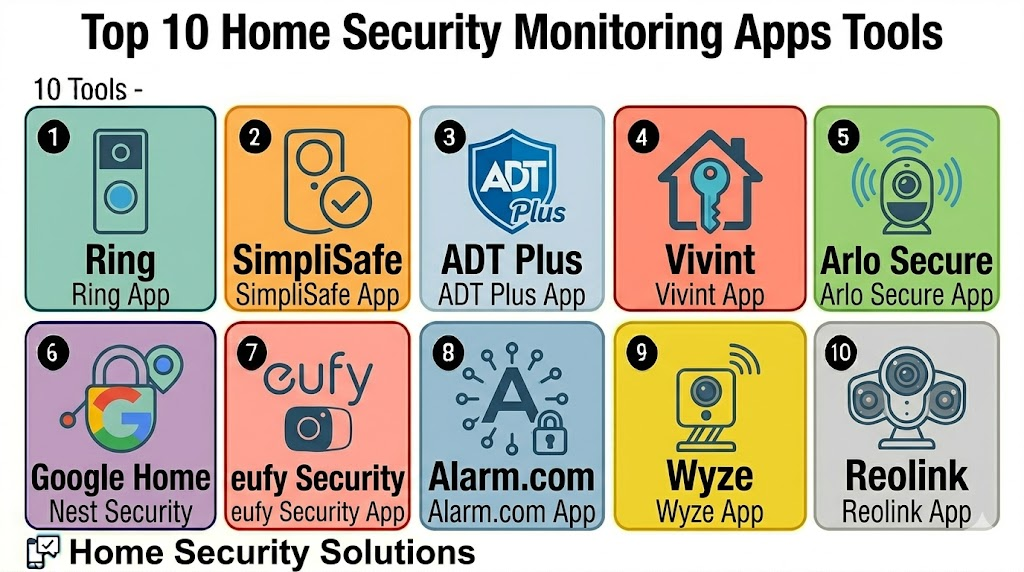
Top 10 Home Security Monitoring Apps Tools
1- Ring
Short description: Ring is a home security monitoring app and device ecosystem known for video doorbells, cameras, alarms, sensors, and neighborhood-style security features. It is useful for homeowners and renters who want easy camera monitoring, alerts, and optional alarm monitoring.
Key Features
- Video doorbell and security camera monitoring
- Live view and recorded event access
- Motion alerts and activity zones
- Ring Alarm system control
- Shared user access
- Alexa integration
- Optional subscription-based recording and monitoring features
Pros
- Strong video doorbell and camera ecosystem
- Easy setup for many DIY users
- Good fit for users already using Alexa devices
Cons
- Many advanced features require subscriptions
- Privacy settings should be reviewed carefully
- Best experience depends on internet and camera placement quality
Platforms / Deployment
iOS / Android / Web access varies
Cloud / Hybrid
Security & Compliance
Varies / N/A. Buyers should validate two-factor authentication, shared user permissions, video privacy settings, device encryption, account security, and subscription-specific security options.
Integrations & Ecosystem
Ring works well for users who want cameras, doorbells, alarms, and Alexa-connected home security in one app.
- Ring video doorbells
- Ring cameras
- Ring Alarm devices
- Alexa devices
- Smart lighting and sirens
- Subscription-based cloud recording workflows
Support & Community
Ring provides app support, setup guidance, device documentation, and customer service resources. Community knowledge is strong because Ring devices are widely used in consumer home security.
2- SimpliSafe
Short description: SimpliSafe is a home security monitoring app for DIY alarm systems, cameras, sensors, keypads, locks, sirens, and optional professional monitoring. It is useful for users who want a simple security system without heavy installation complexity.
Key Features
- Alarm system arming and disarming
- Entry, motion, glass-break, smoke, and water sensor support
- Camera monitoring and event alerts
- Optional professional monitoring
- Mobile notifications and emergency workflows
- Smart lock and keypad support
- Family and user access controls
Pros
- Strong DIY home alarm experience
- Good fit for renters and homeowners
- Optional professional monitoring adds flexibility
Cons
- Some app and monitoring features may require a paid plan
- Smart home integrations may be less broad than open platforms
- Camera ecosystem may not suit every advanced video user
Platforms / Deployment
iOS / Android / Web access varies
Cloud / Hybrid
Security & Compliance
Varies / N/A. Buyers should validate account security, alarm access permissions, monitoring plan details, camera privacy, user roles, and data handling settings.
Integrations & Ecosystem
SimpliSafe is best for users who want a dedicated alarm-first home security system with app control.
- SimpliSafe base station
- Entry and motion sensors
- Indoor and outdoor cameras
- Smart lock
- Keypad and siren devices
- Optional professional monitoring workflows
Support & Community
SimpliSafe provides setup resources, app support, customer service, and monitoring-related support options. DIY setup guidance is a key part of the ecosystem.
3- ADT Plus
Short description: ADT Plus is a security monitoring app experience connected with ADT home security services, smart home devices, cameras, alarms, and professional monitoring workflows. It is useful for users who want a trusted security brand with monitoring and smart control options.
Key Features
- Alarm system control
- Professional monitoring workflows
- Camera and video doorbell support
- Smart home device control
- Mobile alerts and event history
- Emergency response features
- Integration with compatible security devices
Pros
- Strong fit for users who want professional monitoring
- Established home security service ecosystem
- Useful for families and homeowners wanting managed security
Cons
- May cost more than self-monitoring options
- Contract, plan, and equipment terms should be reviewed carefully
- DIY users may prefer lighter app-first platforms
Platforms / Deployment
iOS / Android / Web access varies
Cloud / Hybrid / Professional deployment options
Security & Compliance
Varies / N/A. Buyers should validate account protection, monitoring plan terms, user access, device security, video privacy, emergency contact handling, and professional service requirements.
Integrations & Ecosystem
ADT Plus fits users who want app-based control connected with professional monitoring and broader home security workflows.
- ADT security panels and sensors
- Cameras and doorbells
- Smart locks and compatible devices
- Professional monitoring
- Emergency contact workflows
- Smart home integrations where supported
Support & Community
ADT provides customer support, installation options, monitoring support, and product guidance. Support experience may vary by plan, equipment, installation model, and region.
4- Vivint
Short description: Vivint is a smart home security monitoring app and professionally installed ecosystem for alarms, cameras, locks, sensors, garage control, and home automation. It is useful for users who want premium smart security with installation and managed service options.
Key Features
- Alarm control and monitoring
- Indoor, outdoor, and doorbell camera support
- Smart lock and garage control
- Motion, door, window, and safety sensors
- Professional monitoring options
- Smart home automation workflows
- Mobile alerts and event history
Pros
- Strong premium smart home security ecosystem
- Professional installation can reduce setup burden
- Good fit for users who want security plus automation
Cons
- Cost may be higher than DIY options
- Long-term service and equipment terms should be reviewed
- Less flexible for users who prefer fully DIY control
Platforms / Deployment
iOS / Android / Web access varies
Cloud / Hybrid / Professional deployment
Security & Compliance
Varies / N/A. Buyers should validate account security, professional monitoring terms, camera privacy, user permissions, smart lock access, and data handling settings.
Integrations & Ecosystem
Vivint works well when home security is part of a professionally installed smart home setup.
- Vivint cameras
- Smart locks
- Door and window sensors
- Motion sensors
- Garage control
- Smart home automation devices
Support & Community
Vivint provides professional installation, customer support, monitoring assistance, and device service options. Support scope may vary by plan and equipment package.
5- Arlo Secure
Short description: Arlo Secure is a home security monitoring app for Arlo cameras, video doorbells, floodlights, sensors, and subscription-based video intelligence. It is useful for users who prioritize high-quality camera monitoring and flexible wireless security devices.
Key Features
- Live camera and doorbell monitoring
- Cloud video recording options
- AI-based detection features depending on plan
- Activity zones and alert customization
- Wireless camera ecosystem
- Emergency response features where available
- Smart home integration support
Pros
- Strong camera-first security experience
- Good fit for wireless indoor and outdoor monitoring
- Useful alert controls and detection features
Cons
- Many advanced features require subscription plans
- Alarm ecosystem may not be as broad as dedicated alarm companies
- Battery and Wi-Fi performance need regular attention
Platforms / Deployment
iOS / Android / Web access varies
Cloud / Hybrid
Security & Compliance
Varies / N/A. Buyers should validate account security, video encryption options, cloud storage settings, camera sharing, access permissions, and privacy controls.
Integrations & Ecosystem
Arlo Secure fits users who want camera-centric home monitoring with flexible device placement.
- Arlo cameras
- Video doorbells
- Floodlight cameras
- Arlo Secure plans
- Voice assistant integrations
- Smart home platforms where supported
Support & Community
Arlo provides support documentation, setup resources, and customer assistance. Community knowledge is useful for camera placement, battery performance, and alert tuning.
6- Google Home Nest Security
Short description: Google Home Nest Security brings Nest cameras, doorbells, displays, speakers, locks, and smart home security alerts into the Google Home app. It is useful for Google and Nest households that want security monitoring integrated with broader smart home control.
Key Features
- Nest camera and doorbell monitoring
- Live view and event history
- Person, package, animal, and vehicle detection depending on device and plan
- Google Assistant integration
- Smart display and speaker support
- Home and away routines
- Family access and home member controls
Pros
- Strong fit for Google Home and Nest users
- Smooth integration with Google smart displays and speakers
- Good camera and doorbell monitoring experience
Cons
- Advanced video history may require subscription
- Best experience depends on compatible Nest devices
- Users outside Google ecosystem may prefer other apps
Platforms / Deployment
iOS / Android / Web access varies
Cloud / Hybrid
Security & Compliance
Varies / N/A. Buyers should validate Google account security, home member access, camera privacy settings, recording options, location permissions, and device sharing rules.
Integrations & Ecosystem
Google Home Nest Security works well for users who want cameras and security devices connected with the Google Home ecosystem.
- Nest cameras
- Nest doorbells
- Google smart displays
- Google Assistant
- Smart locks where supported
- Google Home routines
Support & Community
Google provides help resources, product setup guides, and app support. Community support is strong because Google Home and Nest products are widely used.
7- eufy Security
Short description: eufy Security is a home security app for cameras, video doorbells, smart locks, sensors, and local-storage-focused security devices. It is useful for users who want camera monitoring with more attention to local storage and fewer cloud-dependent workflows.
Key Features
- Camera and video doorbell monitoring
- Local storage support on selected devices
- Motion and person detection depending on device
- Smart lock and sensor support
- App alerts and event history
- HomeBase ecosystem support
- Family sharing and device management
Pros
- Strong fit for users interested in local storage options
- Good camera and doorbell device variety
- Useful for DIY home security setups
Cons
- Feature behavior can vary by device model
- Users should review privacy and storage settings carefully
- Professional monitoring depth may be limited compared with alarm-first platforms
Platforms / Deployment
iOS / Android
Cloud / Hybrid / Local storage options on selected devices
Security & Compliance
Varies / N/A. Buyers should validate local storage behavior, remote access, encryption options, account security, device sharing, and camera privacy settings.
Integrations & Ecosystem
eufy Security works well for users who want DIY camera monitoring with local storage options on supported hardware.
- eufy cameras
- eufy video doorbells
- eufy smart locks
- HomeBase devices
- Sensors and security accessories
- Smart home integrations where supported
Support & Community
eufy provides product documentation, setup resources, and customer support. Community discussion is common around local storage, camera placement, and device compatibility.
8- Alarm.com
Short description: Alarm.com is a security and smart property monitoring platform used through professional security providers and installers. It supports alarms, cameras, locks, automation, energy devices, and monitoring workflows for homes and businesses.
Key Features
- Alarm system monitoring and control
- Security camera and video workflows
- Smart lock, garage, and sensor integration
- Professional monitoring provider ecosystem
- Automation and scene support
- Property and access monitoring
- Alerts, history, and remote control
Pros
- Strong fit for professionally monitored systems
- Broad security and smart property ecosystem
- Useful for homes, small businesses, and managed properties
Cons
- Usually accessed through service providers
- Pricing and features can vary by installer or monitoring plan
- Less DIY-direct than app-first consumer systems
Platforms / Deployment
iOS / Android / Web access varies
Cloud / Hybrid / Professional deployment
Security & Compliance
Varies / N/A. Buyers should validate provider-specific security, account access, monitoring details, device permissions, camera privacy, and emergency workflows.
Integrations & Ecosystem
Alarm.com works well for users who want professionally supported security and smart property management.
- Alarm panels and sensors
- Cameras and video analytics
- Smart locks
- Garage and access devices
- Energy and automation devices
- Professional monitoring workflows
Support & Community
Support is typically provided through authorized dealers, installers, and monitoring providers. This can be helpful for setup and service but may vary by provider.
9- Wyze
Short description: Wyze is a budget-friendly home security app for cameras, video doorbells, sensors, smart locks, plugs, bulbs, and monitoring-related services. It is useful for users who want affordable camera monitoring and simple smart home security features.
Key Features
- Indoor and outdoor camera monitoring
- Video doorbell support
- Motion and sound alerts
- Smart lock and sensor support
- Cloud recording options depending on plan
- Smart home device control
- Simple app-based routines
Pros
- Budget-friendly security and smart home devices
- Easy for beginners to start with cameras and sensors
- Good fit for affordable DIY monitoring
Cons
- Advanced security features may require subscriptions
- Privacy and account security settings should be reviewed
- Professional monitoring depth may not match alarm-first systems
Platforms / Deployment
iOS / Android
Cloud / Hybrid
Security & Compliance
Varies / N/A. Buyers should validate two-factor authentication, camera privacy, account settings, device sharing, subscription terms, and app permissions.
Integrations & Ecosystem
Wyze works well for users who want affordable cameras, sensors, locks, and smart home devices in one app.
- Wyze cameras
- Wyze video doorbells
- Wyze sensors
- Wyze locks
- Smart plugs and lights
- Voice assistant integrations where supported
Support & Community
Wyze provides product documentation, support resources, and a large user community. Community help is common for budget smart home setups and camera tuning.
10- Reolink
Short description: Reolink is a security camera monitoring app for wired, wireless, solar, PoE, battery, and local-recording camera setups. It is useful for users who want camera-focused monitoring with strong local NVR or SD card recording options.
Key Features
- Live view and camera monitoring
- Local storage and NVR support
- Motion, person, vehicle, and animal detection depending on camera
- Wired, wireless, PoE, and battery camera options
- Remote access and push alerts
- Multi-camera viewing
- Playback and event review
Pros
- Strong fit for camera-focused security setups
- Good local recording and NVR options
- Useful for homes, small offices, farms, and larger properties
Cons
- Alarm and sensor ecosystem may be less broad than full security platforms
- Setup can be more technical for NVR or PoE systems
- Smart home integration depth should be checked by use case
Platforms / Deployment
iOS / Android / Windows / macOS / Web access varies
Cloud / Local / Hybrid
Security & Compliance
Varies / N/A. Buyers should validate local storage security, remote access, password settings, firmware updates, network security, and user permissions.
Integrations & Ecosystem
Reolink is best for users who want video monitoring and recording flexibility.
- Reolink cameras
- Reolink NVR systems
- SD card recording
- PoE camera setups
- Solar and battery cameras
- Smart detection workflows
Support & Community
Reolink provides setup guides, product documentation, app support, and user community resources. Community guidance is useful for camera placement, NVR setup, and network configuration.
Comparison Table
| Tool Name | Best For | Platform Supported | Deployment | Standout Feature | Public Rating |
|---|---|---|---|---|---|
| Ring | Doorbells, cameras, and DIY alarm users | iOS, Android, web varies | Cloud / Hybrid | Video doorbells and Alexa-connected security | N/A |
| SimpliSafe | DIY alarms with optional monitoring | iOS, Android, web varies | Cloud / Hybrid | Simple alarm system with monitoring options | N/A |
| ADT Plus | Professionally monitored home security | iOS, Android, web varies | Cloud / Hybrid / Professional | Established monitoring and smart security service | N/A |
| Vivint | Premium smart home security | iOS, Android, web varies | Cloud / Hybrid / Professional | Professionally installed security and automation | N/A |
| Arlo Secure | Wireless camera-first monitoring | iOS, Android, web varies | Cloud / Hybrid | Flexible wireless cameras and AI alerts | N/A |
| Google Home Nest Security | Google and Nest households | iOS, Android, web varies | Cloud / Hybrid | Nest cameras inside Google Home ecosystem | N/A |
| eufy Security | Local-storage-focused DIY security | iOS, Android | Cloud / Hybrid / Local options | Camera monitoring with local storage options | N/A |
| Alarm.com | Professional provider-based systems | iOS, Android, web varies | Cloud / Hybrid / Professional | Dealer-supported alarms, cameras, and automation | N/A |
| Wyze | Budget DIY home security | iOS, Android | Cloud / Hybrid | Affordable cameras, sensors, locks, and devices | N/A |
| Reolink | Camera and NVR-focused monitoring | iOS, Android, Windows, macOS, web varies | Cloud / Local / Hybrid | Local recording and camera flexibility | N/A |
Evaluation & Scoring of Home Security Monitoring Apps
| Tool Name | Core 25% | Ease 15% | Integrations 15% | Security 10% | Performance 10% | Support 10% | Value 15% | Weighted Total |
|---|---|---|---|---|---|---|---|---|
| Ring | 8.8 | 8.8 | 8.5 | 7.8 | 8.5 | 8.2 | 8.0 | 8.5 |
| SimpliSafe | 8.6 | 8.7 | 7.8 | 7.8 | 8.4 | 8.2 | 8.2 | 8.3 |
| ADT Plus | 9.0 | 8.0 | 8.2 | 8.1 | 8.6 | 8.6 | 7.4 | 8.4 |
| Vivint | 9.0 | 8.1 | 8.5 | 8.0 | 8.7 | 8.5 | 7.2 | 8.4 |
| Arlo Secure | 8.5 | 8.5 | 8.2 | 7.8 | 8.5 | 8.0 | 7.8 | 8.2 |
| Google Home Nest Security | 8.4 | 8.6 | 8.6 | 8.0 | 8.4 | 8.1 | 7.8 | 8.3 |
| eufy Security | 8.3 | 8.4 | 7.8 | 7.8 | 8.3 | 8.0 | 8.4 | 8.2 |
| Alarm.com | 8.9 | 7.9 | 8.6 | 8.1 | 8.6 | 8.4 | 7.3 | 8.4 |
| Wyze | 7.8 | 8.7 | 7.6 | 7.3 | 7.9 | 7.8 | 8.8 | 8.0 |
| Reolink | 8.2 | 8.1 | 7.8 | 7.7 | 8.4 | 8.0 | 8.5 | 8.1 |
Which Home Security Monitoring Apps Tool Is Right for You?
Solo / Freelancer
Solo users, renters, and apartment residents should focus on easy setup, mobile alerts, basic camera monitoring, and affordable devices. Ring, Wyze, eufy Security, Arlo Secure, and Reolink are practical options depending on whether the priority is doorbell security, local storage, or camera coverage.
If the user wants a simple alarm with optional monitoring, SimpliSafe is also a strong starting point.
SMB
Small offices, clinics, shops, studios, cafes, and service businesses should prioritize alerts, shared access, video review, smart locks, and optional monitoring. Ring, Arlo Secure, Reolink, Alarm.com, ADT Plus, and SimpliSafe can fit depending on security needs.
SMBs should define who receives alerts, who can access footage, and how emergency response will be handled.
Mid-Market
Mid-market properties, managed rentals, multi-unit buildings, small warehouses, and premium homes need stronger device management, professional monitoring, access control, and multi-camera reliability. ADT Plus, Vivint, Alarm.com, Arlo Secure, Google Home Nest Security, and Reolink are strong candidates.
This segment should validate subscription terms, retention needs, user roles, camera placement, and network reliability.
Enterprise
Enterprise-style home security monitoring needs usually apply to managed properties, executive homes, residential communities, hospitality villas, and property management portfolios. ADT Plus, Vivint, Alarm.com, Reolink, and professionally deployed camera systems are stronger options for complex environments.
Enterprise buyers should involve property teams, IT, physical security, legal, facilities, and monitoring providers before standardizing an app.
Budget vs Premium
Budget-conscious users should evaluate Wyze, eufy Security, Reolink, Ring, and SimpliSafe. These apps can support practical security monitoring without requiring a full professional installation in every case.
Premium buyers should evaluate ADT Plus, Vivint, Alarm.com, Arlo Secure, and Google Nest setups when professional monitoring, advanced cameras, installation, and service quality matter more.
Feature Depth vs Ease of Use
If ease of use matters most, Ring, SimpliSafe, Wyze, Google Home Nest Security, and eufy Security are strong starting points. If feature depth matters more, ADT Plus, Vivint, Alarm.com, Arlo Secure, and Reolink should be reviewed closely.
The best app should match the user’s security risk, budget, and technical comfort level.
Integrations & Scalability
Home security apps should be checked for compatibility with cameras, sensors, locks, alarms, sirens, voice assistants, smart lights, smart displays, and home automation platforms. Ring, Google Home Nest, Vivint, Alarm.com, and ADT Plus are strong options for connected security ecosystems.
For larger properties, users should test Wi-Fi strength, camera placement, storage needs, alert routing, and multi-user permissions.
Security & Compliance Needs
Security monitoring apps may process live video, recorded events, door activity, family access, location information, emergency contacts, and alarm history. Buyers should review two-factor authentication, account recovery, shared access, encryption, video retention, local storage security, and privacy settings.
Users should also define who can view cameras, download clips, change alarm settings, and receive emergency notifications.
Frequently Asked Questions
1. What is a Home Security Monitoring App?
A Home Security Monitoring App lets users control and monitor cameras, alarms, sensors, locks, and doorbells from a phone.
It can send alerts, show live video, record events, and help users arm or disarm security systems.
Some apps also support professional monitoring and emergency response features.
The main goal is better visibility and faster action when something happens.
2. Which Home Security Monitoring App is best for beginners?
Ring, SimpliSafe, Wyze, eufy Security, and Google Home Nest Security are practical beginner options.
They offer app-based setup, alerts, cameras, and simple device controls.
The best choice depends on whether the user wants cameras, alarms, doorbells, or professional monitoring.
Beginners should start with one or two devices before expanding.
3. Do home security apps require a subscription?
Some apps work without a subscription, but advanced features often require a paid plan.
Common paid features include cloud recording, AI detection, professional monitoring, emergency response, and longer event history.
Subscription value depends on how much video storage and monitoring the user needs.
Buyers should compare total monthly and yearly cost before choosing.
4. What is professional monitoring?
Professional monitoring means a monitoring center can respond to alarm events and contact emergency services when needed.
It is usually offered through paid plans or professional security providers.
Self-monitoring means the user receives alerts and decides what action to take.
The best option depends on risk level, budget, and response expectations.
5. Which app is best for camera monitoring?
Arlo Secure, Ring, Google Home Nest Security, eufy Security, Reolink, and Wyze are strong camera monitoring options.
They support live video, alerts, recordings, and different camera types.
Reolink is strong for local and NVR-focused setups, while Arlo and Ring are strong for wireless camera ecosystems.
Users should compare storage, detection, and subscription needs.
6. Which app is best for alarm monitoring?
SimpliSafe, ADT Plus, Vivint, and Alarm.com are strong options for alarm monitoring.
They support sensors, alarms, mobile control, and professional monitoring options.
DIY users may prefer SimpliSafe, while users wanting professional installation may prefer ADT, Vivint, or Alarm.com providers.
Plan details should be reviewed before purchase.
7. Which app is best for budget users?
Wyze, eufy Security, Reolink, Ring, and SimpliSafe are practical options for budget-conscious users.
They provide useful security features without always requiring premium installation.
Budget users should still review subscriptions, storage costs, and device support.
The cheapest option is not always best if alerts or recording are unreliable.
8. What are common mistakes when choosing a security app?
Common mistakes include buying cameras before checking Wi-Fi strength, ignoring subscription costs, and skipping privacy settings.
Users also forget to define who can access cameras or alarm controls.
Another mistake is relying only on cameras when sensors or alarms may be needed.
Testing alerts and recording quality before scaling helps avoid problems.
9. Can security monitoring apps work with smart home devices?
Yes, many apps connect with smart locks, lights, speakers, displays, sensors, and voice assistants.
This allows routines such as turning on lights when motion is detected or locking doors at night.
Integration depth varies by app, device model, and ecosystem.
Buyers should confirm exact compatibility before purchasing devices.
10. What are alternatives to Home Security Monitoring Apps?
Alternatives include traditional alarm systems, local DVR or NVR camera systems, standalone cameras, smart locks, motion lights, and manual security checks.
These may work for users who do not need mobile alerts or cloud-connected features.
Security monitoring apps are more useful when users want remote access, alerts, automation, and event history.
The right choice depends on property size, risk level, and budget.
Conclusion
Home Security Monitoring Apps help users protect homes, apartments, rentals, offices, and properties through mobile alerts, live video, alarms, sensors, smart locks, and optional professional monitoring. The best app depends on whether the user wants a camera-first system, alarm-first system, professional monitoring, local recording, budget setup, or broader smart home integration. Ring, Arlo Secure, Google Home Nest Security, eufy Security, Wyze, and Reolink are strong choices for camera monitoring and DIY security. SimpliSafe, ADT Plus, Vivint, and Alarm.com are stronger for alarm workflows and monitoring options. The smartest next step is to shortlist two or three apps, test live view and alert speed, review subscription and storage needs, validate privacy settings, and run a small security setup before expanding across the full property.

Find Trusted Cardiac Hospitals
Compare heart hospitals by city and services — all in one place.
Explore Hospitals
Home security monitoring apps are most valuable when they allow homeowners to remotely monitor and manage their home security systems from anywhere using a smartphone or tablet. By providing live camera streaming, motion detection alerts, door and window sensor monitoring, smart lock control, alarm management, two-way audio, video recording, emergency notifications, automation with smart home devices, and cloud storage, these apps enhance home security, enable faster responses to potential threats, improve convenience, and provide homeowners with greater peace of mind through real-time visibility and control.