Introduction
Resource Management Tools help organizations plan, allocate, and track their resources—people, equipment, and budgets—across projects and programs. These tools provide a centralized view of resource utilization, availability, and allocation, helping businesses avoid overbooking, optimize workloads, and ensure that projects are delivered on time and within budget.
In today’s environment, organizations face complex projects with distributed teams and multiple stakeholders. Resource Management Tools are critical for optimizing talent, monitoring capacity, and forecasting future needs. They provide real-time insights into workloads, highlight potential bottlenecks, and support decision-making for strategic planning.
Common use cases include managing team workloads for multiple projects, allocating equipment and assets across departments, forecasting resource needs for future initiatives, identifying skills gaps and capacity bottlenecks, and improving project delivery efficiency. Buyers should evaluate tools based on features such as resource allocation dashboards, time tracking, reporting capabilities, AI-powered forecasting, integration options, usability, scalability, cost, and security compliance.
Best for: Project managers, PMOs, operations managers, and organizations managing multiple projects with shared resources.
Not ideal for: Teams with single, small-scale projects or those using simple spreadsheets for resource planning.
Key Trends in Resource Management Tools
- AI-driven resource forecasting and optimization
- Automation of workload balancing and task assignments
- Integration with project management, HR, and ERP platforms
- Cloud-first deployment with mobile access for remote teams
- Real-time dashboards for utilization, availability, and productivity
- Predictive analytics for project delays and resource bottlenecks
- Compliance features for GDPR, ISO, SOC 2, and industry standards
- Hybrid methodologies combining agile, waterfall, and traditional frameworks
- Skill-based resource matching and allocation
- Subscription-based pricing models with scalable options for SMBs to enterprises
How We Selected These Tools (Methodology)
- Evaluated market adoption and brand recognition
- Assessed feature completeness for scheduling, forecasting, and reporting
- Reviewed reliability and performance signals from real-world implementations
- Analyzed security posture including encryption, access controls, and audit logs
- Checked integration capabilities with collaboration, ERP, and project management tools
- Considered scalability across teams, projects, and departments
- Balanced enterprise-grade solutions with SMB-friendly options
- Reviewed documentation, onboarding, and support offerings
- Assessed ease of use for technical and non-technical teams
- Evaluated pricing structures and value for money
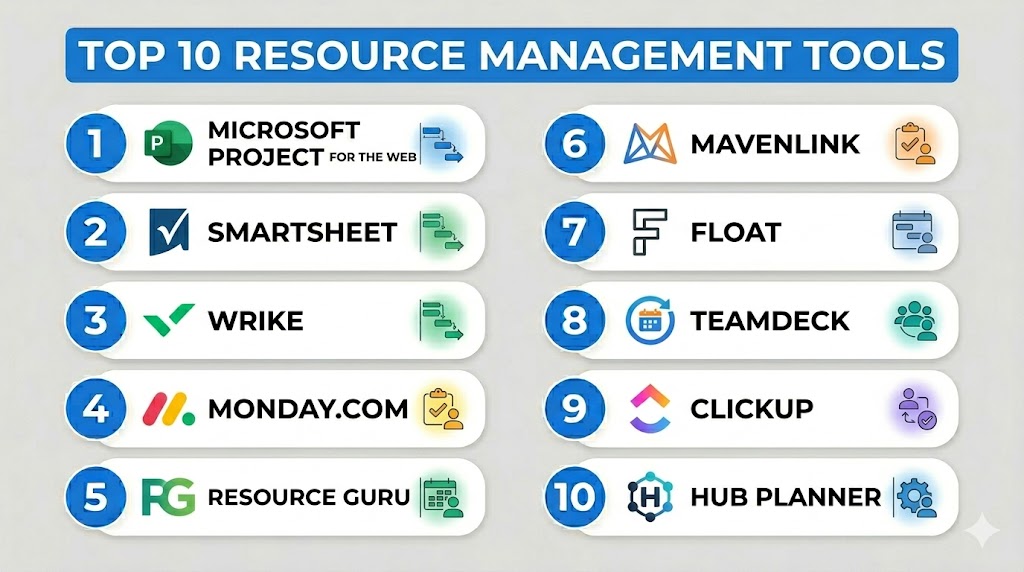
Top 10 Resource Management Tools
#1 — Microsoft Project for the Web
Short description: Comprehensive resource and project management platform, ideal for enterprise teams managing complex portfolios.
Key Features
- Resource allocation and utilization dashboards
- Task scheduling and dependency mapping
- Gantt charts and portfolio reporting
- AI-powered workload forecasting
- Collaboration with Microsoft 365 ecosystem
- Budget tracking and cost analysis
- Mobile accessibility
Pros
- Scalable for enterprise projects
- Deep integration with Microsoft tools
- Robust reporting and forecasting
Cons
- Steep learning curve
- Expensive for smaller teams
- Complex setup
Platforms / Deployment
Web, Windows, iOS, Android / Cloud / Hybrid
Security & Compliance
SSO, MFA, encryption; SOC 2, ISO 27001 Not publicly stated
Integrations & Ecosystem
- Microsoft Teams, Power BI, SharePoint
- API for custom integrations
Support & Community
Enterprise support, documentation, and training programs
#2 — Smartsheet
Short description: Cloud-based resource and project management tool with spreadsheet-like interface and strong collaboration features.
Key Features
- Resource allocation views and dashboards
- Gantt charts and timeline tracking
- Workload balancing and automation
- Reporting and analytics
- Collaboration and file sharing
- Customizable templates
- Mobile access
Pros
- Intuitive, spreadsheet-inspired interface
- Strong automation features
- Scalable for teams of varying sizes
Cons
- Advanced features require premium plans
- Limited offline capabilities
- Reporting can be complex for beginners
Platforms / Deployment
Web, iOS, Android / Cloud
Security & Compliance
SSO, encryption; ISO 27001 Not publicly stated
Integrations & Ecosystem
- Slack, Jira, Google Workspace, Zapier
Support & Community
Documentation, tutorials, webinars, and online community
#3 — Wrike
Short description: Collaborative project and resource management platform providing portfolio-level visibility and workload optimization.
Key Features
- Resource utilization dashboards
- Task dependencies and timeline tracking
- Automated workload balancing
- Portfolio reporting
- Time tracking and analytics
- Collaboration features
- Mobile accessibility
Pros
- Excellent collaboration features
- Flexible and visual dashboards
- Automation reduces manual work
Cons
- Can be complex for small teams
- Advanced reporting requires higher-tier plans
- Learning curve for beginners
Platforms / Deployment
Web, Windows, macOS, iOS, Android / Cloud / Hybrid
Security & Compliance
SSO, encryption; SOC 2 Not publicly stated
Integrations & Ecosystem
- Slack, Jira, Google Workspace, APIs
Support & Community
Documentation, training webinars, responsive support
#4 — Monday.com
Short description: Visual resource management tool with automation, portfolio views, and collaboration features.
Key Features
- Resource allocation dashboards
- Workload and capacity planning
- Automation and workflow management
- Portfolio and timeline views
- Collaboration with internal and external teams
- Reporting and analytics
- Mobile apps
Pros
- Highly customizable and visual interface
- Easy-to-use automation
- Scales across departments
Cons
- Premium plans required for advanced features
- Can be overwhelming for small teams
- Limited offline access
Platforms / Deployment
Web, iOS, Android / Cloud
Security & Compliance
SSO, encryption; SOC 2 Not publicly stated
Integrations & Ecosystem
- Slack, Jira, Google Workspace, Zapier
Support & Community
Documentation, tutorials, and online support
#5 — Resource Guru
Short description: Simple and intuitive resource scheduling tool with calendar and capacity management features.
Key Features
- Resource scheduling and allocation
- Team availability and utilization tracking
- Calendar and timeline views
- Conflict and bottleneck alerts
- Reporting and analytics
- Mobile access
- Integration API
Pros
- Easy to use
- Lightweight and fast setup
- Clear visualization of workloads
Cons
- Limited enterprise-level reporting
- Less automation than competitors
- Integrations require manual configuration
Platforms / Deployment
Web, iOS, Android / Cloud
Security & Compliance
SSO, encryption; Not publicly stated
Integrations & Ecosystem
- Slack, Microsoft Teams, Google Workspace
Support & Community
Email support, documentation, and training guides
#6 — Mavenlink
Short description: Enterprise resource management platform combining project management, financials, and portfolio visibility.
Key Features
- Resource and project scheduling
- Portfolio dashboards
- Time and expense tracking
- Financial forecasting
- Collaboration tools
- Reporting and analytics
- Mobile apps
Pros
- Strong portfolio and resource visibility
- Financial tracking integrated
- Scales for enterprise
Cons
- Expensive for smaller teams
- Complex setup and training
- Learning curve
Platforms / Deployment
Web, iOS, Android / Cloud
Security & Compliance
SSO, MFA, encryption; SOC 2 Not publicly stated
Integrations & Ecosystem
- Salesforce, Slack, Jira, API
Support & Community
Enterprise support, documentation, and training resources
#7 — Float
Short description: Lightweight resource scheduling and planning tool for agencies and creative teams.
Key Features
- Real-time resource scheduling
- Utilization tracking
- Calendar and project views
- Time-off management
- Reporting and analytics
- Team collaboration
- Mobile access
Pros
- Easy to use
- Visual scheduling interface
- Ideal for small to mid-size teams
Cons
- Limited advanced features
- No complex portfolio analytics
- Integrations are fewer than enterprise tools
Platforms / Deployment
Web, iOS, Android / Cloud
Security & Compliance
SSO, encryption; Not publicly stated
Integrations & Ecosystem
- Slack, Google Workspace, Zapier
Support & Community
Documentation, email support, tutorials
#8 — Teamdeck
Short description: Resource scheduling, time tracking, and capacity planning for project-based teams.
Key Features
- Team availability and allocation
- Resource utilization dashboards
- Gantt and calendar views
- Time tracking and reporting
- Collaboration tools
- Skill-based resource assignment
- Mobile access
Pros
- Simple interface
- Effective for project-based teams
- Budget-friendly
Cons
- Limited advanced automation
- Smaller integration ecosystem
- Less suitable for large enterprises
Platforms / Deployment
Web, iOS, Android / Cloud
Security & Compliance
SSO, encryption; Not publicly stated
Integrations & Ecosystem
- Slack, Jira, Google Workspace
Support & Community
Documentation, email support, online guides
#9 — ClickUp
Short description: All-in-one platform for resource management, task management, and portfolio visibility.
Key Features
- Resource allocation dashboards
- Workload views and forecasting
- Task dependencies
- Time tracking
- Collaboration and notifications
- Reporting and analytics
- Mobile apps
Pros
- Flexible and highly customizable
- Strong task and workload management
- Affordable for SMBs and enterprises
Cons
- Can be overwhelming due to feature richness
- Learning curve for new users
- Advanced features require paid plans
Platforms / Deployment
Web, Windows, macOS, iOS, Android / Cloud
Security & Compliance
SSO, encryption; Not publicly stated
Integrations & Ecosystem
- Slack, Google Workspace, Zapier, APIs
Support & Community
Documentation, tutorials, webinars, and online community
#10 — Hub Planner
Short description: Resource scheduling and management tool for teams needing visual planning and forecasting.
Key Features
- Resource scheduling and allocation
- Utilization and capacity tracking
- Calendar and Gantt views
- Time tracking and reporting
- Mobile apps
- Customizable dashboards
- Team collaboration
Pros
- Simple, visual interface
- Forecasting for projects and resources
- Affordable for mid-sized teams
Cons
- Limited advanced automation
- Smaller integration ecosystem
- Less suited for complex enterprise portfolios
Platforms / Deployment
Web, iOS, Android / Cloud
Security & Compliance
SSO, encryption; Not publicly stated
Integrations & Ecosystem
- Slack, Google Workspace, API
Support & Community
Documentation, tutorials, email support
Comparison Table (Top 10)
| Tool Name | Best For | Platform(s) Supported | Deployment | Standout Feature | Public Rating |
|---|---|---|---|---|---|
| Microsoft Project | Enterprise | Web, Windows, iOS, Android | Cloud / Hybrid | Advanced portfolio dashboards | N/A |
| Smartsheet | SMB/Enterprise | Web, iOS, Android | Cloud | Spreadsheet-like interface | N/A |
| Wrike | Mid/Large Teams | Web, Windows, macOS, iOS, Android | Cloud / Hybrid | Automation & dashboards | N/A |
| Monday.com | Cross-department | Web, iOS, Android | Cloud | Visual dashboards | N/A |
| Resource Guru | Small to Mid | Web, iOS, Android | Cloud | Scheduling and allocation | N/A |
| Mavenlink | Enterprise | Web, iOS, Android | Cloud | Financial and resource tracking | N/A |
| Float | SMB / Agencies | Web, iOS, Android | Cloud | Real-time scheduling | N/A |
| Teamdeck | Project Teams | Web, iOS, Android | Cloud | Capacity planning & tracking | N/A |
| ClickUp | SMB / Enterprise | Web, Windows, macOS, iOS, Android | Cloud | All-in-one resource/task management | N/A |
| Hub Planner | Mid-sized Teams | Web, iOS, Android | Cloud | Forecasting and scheduling | N/A |
Evaluation & Scoring of Resource Management Tools
| Tool Name | Core (25%) | Ease (15%) | Integrations (15%) | Security (10%) | Performance (10%) | Support (10%) | Value (15%) | Weighted Total |
|---|---|---|---|---|---|---|---|---|
| Microsoft Project | 9 | 7 | 9 | 8 | 9 | 8 | 7 | 8.2 |
| Smartsheet | 8 | 8 | 8 | 7 | 8 | 8 | 8 | 7.9 |
| Wrike | 8 | 8 | 8 | 8 | 8 | 8 | 8 | 8.0 |
| Monday.com | 9 | 8 | 8 | 8 | 8 | 8 | 8 | 8.2 |
| Resource Guru | 8 | 9 | 7 | 7 | 8 | 8 | 8 | 7.8 |
| Mavenlink | 9 | 7 | 8 | 8 | 9 | 8 | 7 | 8.0 |
| Float | 8 | 9 | 7 | 7 | 8 | 8 | 8 | 7.9 |
| Teamdeck | 8 | 8 | 7 | 7 | 8 | 8 | 8 | 7.8 |
| ClickUp | 9 | 7 | 8 | 8 | 8 | 8 | 8 | 8.0 |
| Hub Planner | 8 | 8 | 7 | 7 | 8 | 8 | 8 | 7.9 |
Interpretation: Higher weighted totals indicate stronger overall suitability for portfolio visibility, workload optimization, and resource planning.
Which Resource Management Tools Tool Is Right for You?
Solo / Freelancer
Float, Resource Guru, and Hub Planner are simple and affordable for managing individual projects or small teams.
SMB
Smartsheet, Monday.com, and ClickUp provide scalable interfaces, automation, and reporting for growing teams.
Mid-Market
Wrike, ClickUp, and Teamdeck offer structured workflows, forecasting, and resource optimization.
Enterprise
Microsoft Project, Mavenlink, and Wrike deliver advanced dashboards, portfolio visibility, and compliance-ready features.
Budget vs Premium
Budget-friendly: Float, Resource Guru, Hub Planner
Premium enterprise-grade: Microsoft Project, Mavenlink, Wrike
Feature Depth vs Ease of Use
Smartsheet, Float, and Resource Guru focus on usability, while Microsoft Project and Mavenlink prioritize advanced portfolio and resource analytics.
Integrations & Scalability
Wrike, ClickUp, Microsoft Project provide extensive integration options and scale across teams and departments.
Security & Compliance Needs
Enterprises with strict compliance should consider Microsoft Project, Mavenlink, and Wrike.
Frequently Asked Questions (FAQs)
- What is a Resource Management Tool?
Software that allows organizations to plan, allocate, and track people, equipment, and budgets across projects. - Who uses Resource Management Tools?
Project managers, PMOs, operations managers, and enterprise teams managing multiple projects. - Do these tools integrate with project management software?
Yes, most integrate with ERP, collaboration, and project management tools. - Are these tools suitable for small teams?
Yes, lightweight tools like Float and Resource Guru work well for small teams. - Can Resource Management Tools improve project efficiency?
Yes, by balancing workloads, forecasting capacity, and preventing over-allocation. - Do these tools offer mobile apps?
Most provide iOS and Android apps for remote access. - Is training required?
Enterprise tools like Microsoft Project and Mavenlink require onboarding; smaller tools are generally intuitive. - Do these tools support automation?
Yes, many automate workflow assignments, alerts, and reporting. - Can they track financial resources?
Enterprise platforms like Mavenlink and Microsoft Project offer budget and cost tracking. - How do I choose the right tool?
Consider team size, portfolio complexity, integration needs, and budget.
Conclusion
Resource Management Tools are essential for organizations managing multiple projects, teams, and resources. The right tool depends on the size of your team, complexity of projects, and integration needs. Freelancers and small teams benefit from Float, Resource Guru, and Hub Planner, while mid-market teams can leverage Smartsheet, Wrike, and ClickUp for scalability and collaboration. Enterprises requiring advanced analytics, compliance, and portfolio oversight should consider Microsoft Project or Mavenlink. Running a pilot with 2–3 tools helps identify the best fit, ensuring optimal resource allocation, improved project visibility, and successful project outcomes.

Find Trusted Cardiac Hospitals
Compare heart hospitals by city and services — all in one place.
Explore Hospitals
This explains how resource management tools help allocate people, time, and work more efficiently across projects.