Introduction
Video conferencing tools enable real-time virtual communication using video, audio, and screen-sharing features. They are essential for modern businesses, facilitating collaboration between remote teams, clients, and partners.
With the rise of hybrid work models and global operations, effective video conferencing has become a cornerstone for productivity. Organizations use these tools to reduce travel costs, accelerate decision-making, and maintain continuous communication. Common use cases include:
- Virtual team meetings and daily stand-ups
- Client presentations and demos
- Webinars and online training sessions
- Sales calls and negotiations
- Remote interviews and hiring processes
When evaluating video conferencing solutions, buyers should consider:
- Video and audio quality
- Ease of use and interface design
- Cross-platform compatibility
- Security and compliance features
- Integration with productivity and CRM systems
- Meeting scheduling and calendar sync
- Recording and analytics capabilities
- Scalability for large participant groups
- AI features for transcription and noise cancellation
- Pricing and subscription options
Best for: IT managers, team leads, enterprises, educational institutions, and remote workforce organizations.
Not ideal for: Teams that primarily communicate via email or require only basic voice calling without video features.
Key Trends in Video Conferencing Tools
- AI-driven transcription and meeting summaries
- Background noise suppression and video enhancement
- Integration with calendar and collaboration platforms
- End-to-end encryption and enterprise-grade security
- Cloud-first deployment with mobile and desktop accessibility
- Advanced analytics for meeting engagement
- Hybrid meeting support for in-person and remote participants
- Real-time translation and multilingual support
- Interactive features such as polls, Q&A, and breakout rooms
- Subscription-based, scalable pricing models
How We Selected These Tools (Methodology)
- Market adoption and mindshare
- Feature richness and completeness
- Video and audio reliability
- Security and compliance posture
- Integration with business and collaboration apps
- Customer fit across SMB, mid-market, and enterprise segments
- User experience and interface usability
- Support offerings and community strength
- Pricing flexibility and overall value
- Vendor reputation and innovation in the video conferencing space
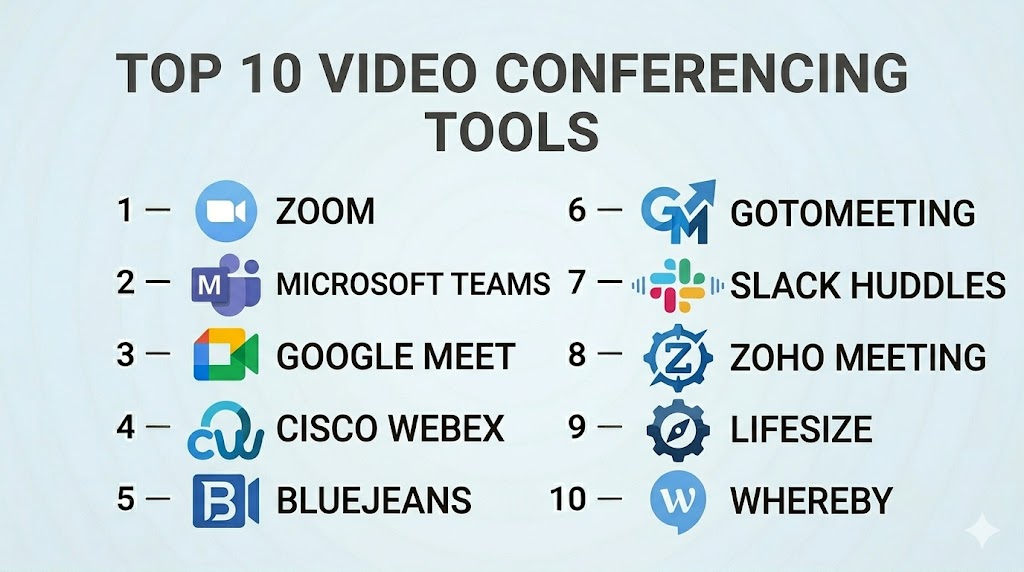
Top 10 Video Conferencing Tools
#1 — Zoom
Short description: Zoom provides a cloud-based video conferencing platform for meetings, webinars, and collaboration with high-quality audio and video.
Key Features
- HD video and audio conferencing
- Screen sharing and annotation
- Virtual backgrounds and meeting recording
- Breakout rooms for small group discussions
- AI transcription and real-time captions
- Integration with calendar and productivity tools
Pros
- Highly reliable and scalable
- Feature-rich for diverse meeting needs
Cons
- Security concerns in early versions
- Can be expensive for large enterprises
Platforms / Deployment
- Web / Windows / macOS / iOS / Android
- Cloud
Security & Compliance
- Encryption, SSO, MFA
- SOC 2, ISO 27001, GDPR
Integrations & Ecosystem
- Slack, Salesforce, Microsoft 365
- API access for custom integrations
- LMS and webinar tools
Support & Community
- 24/7 support and live chat
- Comprehensive knowledge base
- Large active user community
#2 — Microsoft Teams
Short description: Microsoft Teams combines video conferencing with team collaboration, messaging, and file sharing within the Microsoft 365 ecosystem.
Key Features
- Video and audio meetings
- Persistent chat and threaded conversations
- File collaboration via OneDrive and SharePoint
- Meeting recording and transcription
- Calendar integration
- Third-party app support
Pros
- Deep Microsoft 365 integration
- Enterprise-grade security and compliance
Cons
- Interface complexity for new users
- Resource-heavy on older hardware
Platforms / Deployment
- Web / Windows / macOS / iOS / Android
- Cloud / Hybrid
Security & Compliance
- SSO, MFA, encryption
- SOC 2, ISO 27001, GDPR, HIPAA
Integrations & Ecosystem
- Outlook, Power BI, SharePoint
- APIs for custom apps
- Workflow automation via Power Automate
Support & Community
- Enterprise support tiers
- Documentation and tutorials
- Community forums
#3 — Google Meet
Short description: Google Meet is a video conferencing platform integrated with Google Workspace for seamless scheduling, joining, and collaboration.
Key Features
- HD video and audio
- Live captions and noise cancellation
- Integration with Google Calendar and Gmail
- Screen sharing and collaborative whiteboarding
- Breakout rooms
- Recording and analytics
Pros
- Seamless Google Workspace integration
- Easy for end-users to join meetings
Cons
- Limited advanced features for webinars
- Dependent on Google ecosystem
Platforms / Deployment
- Web / Windows / macOS / iOS / Android
- Cloud
Security & Compliance
- Encryption, SSO
- SOC 2, ISO 27001, GDPR
Integrations & Ecosystem
- Google Calendar, Gmail
- Google Drive and Docs
- APIs for workflow automation
Support & Community
- Email and live support
- Help center resources
- Community forums
#4 — Cisco Webex
Short description: Cisco Webex offers enterprise-grade video conferencing, messaging, and collaboration with AI-powered meeting features.
Key Features
- HD video and audio
- AI meeting assistant and transcription
- Team messaging and file sharing
- Screen sharing and virtual backgrounds
- Analytics and reporting
- Mobile and desktop access
Pros
- Strong security and reliability
- Suitable for large enterprise meetings
Cons
- Complex UI for new users
- Higher pricing for advanced features
Platforms / Deployment
- Web / Windows / macOS / iOS / Android
- Cloud / Hybrid
Security & Compliance
- Encryption, SSO, MFA
- SOC 2, ISO 27001, GDPR
Integrations & Ecosystem
- Microsoft 365, Salesforce
- API access
- Workflow integration tools
Support & Community
- 24/7 enterprise support
- Tutorials and documentation
- Active community
#5 — BlueJeans
Short description: BlueJeans by Verizon delivers video conferencing with Dolby voice audio, analytics, and integration capabilities for business teams.
Key Features
- HD video and audio with Dolby Voice
- Meeting recording and transcription
- Screen sharing and whiteboarding
- Event and webinar hosting
- Analytics dashboards
- Integrations with productivity apps
Pros
- High-quality audio
- Advanced analytics for meetings
Cons
- Smaller integration ecosystem
- Pricing may be higher for SMBs
Platforms / Deployment
- Web / Windows / macOS / iOS / Android
- Cloud
Security & Compliance
- Encryption, MFA, SSO
- SOC 2, GDPR
Integrations & Ecosystem
- Slack, Microsoft 365, Salesforce
- API for custom workflows
- LMS integration
Support & Community
- Email and chat support
- Knowledge base
- Community forum
#6 — GoToMeeting
Short description: GoToMeeting provides online meeting solutions with HD video, screen sharing, and robust administrative controls.
Key Features
- HD video and audio
- Screen sharing and annotation
- Meeting recording and transcription
- Calendar integration
- Custom branding options
- Analytics and reporting
Pros
- Simple setup and user-friendly
- Good for SMBs and mid-sized teams
Cons
- Limited advanced collaboration features
- Fewer integrations than competitors
Platforms / Deployment
- Web / Windows / macOS / iOS / Android
- Cloud
Security & Compliance
- Encryption, SSO
- SOC 2, GDPR
Integrations & Ecosystem
- Outlook, Google Workspace
- APIs for custom integrations
- CRM and productivity tools
Support & Community
- 24/7 support
- Help center and tutorials
- User community
#7 — Slack Huddles
Short description: Slack Huddles provides lightweight video and audio conferencing integrated with Slack channels for quick team discussions.
Key Features
- Audio and video calls within Slack
- Screen sharing
- Instant access from channels
- Mobile and desktop support
- Recording and transcription (with paid plans)
- Emoji reactions and interactive tools
Pros
- Seamless integration with Slack messaging
- Quick and lightweight for team meetings
Cons
- Limited feature set for large meetings
- Dependent on Slack ecosystem
Platforms / Deployment
- Web / Windows / macOS / iOS / Android
- Cloud
Security & Compliance
- Encryption, SSO, MFA
- SOC 2, GDPR
Integrations & Ecosystem
- Google Workspace, Office 365
- Slack API for bots and workflows
- Productivity tools
Support & Community
- Slack support portal
- Tutorials and community
- Slack community forums
#8 — Zoho Meeting
Short description: Zoho Meeting provides secure video conferencing and webinar hosting with integration to Zoho ecosystem tools.
Key Features
- Video and audio meetings
- Webinar hosting and registration
- Screen sharing and presentation tools
- Meeting recording and transcription
- Calendar integration
- Security controls and encryption
Pros
- Strong Zoho ecosystem integration
- Cost-effective for SMBs
Cons
- Limited advanced features compared to enterprise tools
- Smaller user base
Platforms / Deployment
- Web / Windows / macOS / iOS / Android
- Cloud
Security & Compliance
- SSO, encryption
- GDPR, SOC 2
Integrations & Ecosystem
- Zoho CRM, Zoho Projects
- APIs for workflow automation
- Email and calendar apps
Support & Community
- Email and live support
- Documentation and tutorials
- Community forums
#9 — Lifesize
Short description: Lifesize delivers HD video conferencing and team collaboration with cloud and room system support.
Key Features
- HD video and audio
- Meeting room system integration
- Screen sharing and virtual backgrounds
- Recording and analytics
- Mobile and desktop apps
- Integration with calendars and productivity tools
Pros
- Excellent video and audio quality
- Integrates with meeting rooms and hardware
Cons
- Higher cost for small teams
- Setup can be complex for hardware
Platforms / Deployment
- Web / Windows / macOS / iOS / Android
- Cloud / Hybrid
Security & Compliance
- Encryption, SSO
- SOC 2, GDPR
Integrations & Ecosystem
- Microsoft 365, Google Workspace
- APIs for custom apps
- Calendar and productivity apps
Support & Community
- 24/7 enterprise support
- Knowledge base
- Community forum
#10 — Whereby
Short description: Whereby is a browser-based video conferencing platform offering simple, no-download meetings for teams and clients.
Key Features
- Browser-based video meetings
- Screen sharing and recording
- Custom branding options
- Room links for instant access
- Mobile and desktop support
- Integration with calendars
Pros
- No downloads required
- Simple and user-friendly
Cons
- Limited features for large enterprise meetings
- Browser-only may limit advanced controls
Platforms / Deployment
- Web / iOS / Android
- Cloud
Security & Compliance
- Encryption
- Not publicly stated
Integrations & Ecosystem
- Google Calendar, Outlook
- Zapier integrations
- Productivity tools
Support & Community
- Email and chat support
- Tutorials and help center
- Active user forums
Comparison Table (Top 10)
| Tool Name | Best For | Platform(s) Supported | Deployment | Standout Feature | Public Rating |
|---|---|---|---|---|---|
| Zoom | Enterprise & SMB | Web / Windows / macOS / iOS / Android | Cloud | Scalable HD meetings | N/A |
| Microsoft Teams | Enterprise | Web / Windows / macOS / iOS / Android | Cloud / Hybrid | Integrated with Microsoft 365 | N/A |
| Google Meet | SMB & Enterprise | Web / Windows / macOS / iOS / Android | Cloud | Seamless Google Workspace integration | N/A |
| Cisco Webex | Enterprise | Web / Windows / macOS / iOS / Android | Cloud / Hybrid | Enterprise-grade security | N/A |
| BlueJeans | Enterprise | Web / Windows / macOS / iOS / Android | Cloud | Dolby Voice audio | N/A |
| GoToMeeting | SMB | Web / Windows / macOS / iOS / Android | Cloud | Simple and reliable | N/A |
| Slack Huddles | SMB | Web / Windows / macOS / iOS / Android | Cloud | Quick lightweight meetings | N/A |
| Zoho Meeting | SMB | Web / Windows / macOS / iOS / Android | Cloud | Zoho ecosystem integration | N/A |
| Lifesize | Enterprise | Web / Windows / macOS / iOS / Android | Cloud / Hybrid | Room system integration | N/A |
| Whereby | Freelancer & SMB | Web / iOS / Android | Cloud | Browser-based simplicity | N/A |
Evaluation & Scoring of Video Conferencing Tools
| Tool Name | Core | Ease | Integrations | Security | Performance | Support | Value | Weighted Total |
|---|---|---|---|---|---|---|---|---|
| Zoom | 9 | 9 | 9 | 9 | 9 | 8 | 8 | 8.9 |
| Microsoft Teams | 9 | 8 | 9 | 9 | 9 | 8 | 8 | 8.8 |
| Google Meet | 8 | 9 | 8 | 8 | 8 | 7 | 8 | 8.0 |
| Cisco Webex | 9 | 8 | 8 | 9 | 9 | 8 | 7 | 8.4 |
| BlueJeans | 8 | 8 | 8 | 8 | 8 | 7 | 7 | 7.8 |
| GoToMeeting | 8 | 9 | 7 | 8 | 8 | 7 | 7 | 7.7 |
| Slack Huddles | 7 | 9 | 7 | 8 | 7 | 7 | 7 | 7.5 |
| Zoho Meeting | 7 | 8 | 7 | 8 | 7 | 7 | 7 | 7.4 |
| Lifesize | 8 | 8 | 8 | 8 | 8 | 7 | 7 | 7.8 |
| Whereby | 7 | 9 | 6 | 7 | 7 | 7 | 7 | 7.3 |
Interpretation: Scores are comparative, evaluating features, usability, integrations, security, reliability, support, and value.
Which Video Conferencing Tool Is Right for You?
Solo / Freelancer
Whereby and Zoom offer easy-to-join, browser-based solutions for individual users.
SMB
Google Meet, GoToMeeting, and Zoho Meeting provide cost-effective solutions with integrated calendars and basic collaboration tools.
Mid-Market
Microsoft Teams, Zoom, and BlueJeans balance collaboration features, security, and integrations.
Enterprise
Cisco Webex, Microsoft Teams, Zoom, and Lifesize provide scalability, enterprise security, and advanced analytics.
Budget vs Premium
Budget: Zoho Meeting, Whereby. Premium: Microsoft Teams, Cisco Webex, BlueJeans.
Feature Depth vs Ease of Use
Feature-rich: Microsoft Teams, Zoom, Cisco Webex. Ease of use: Whereby, GoToMeeting.
Integrations & Scalability
Choose solutions supporting CRM, productivity apps, and APIs for scalable workflows.
Security & Compliance Needs
Enterprise users should focus on platforms with encryption, MFA, SOC 2, ISO 27001, and GDPR compliance.
Frequently Asked Questions (FAQs)
1. What pricing models are typical for video conferencing tools?
Most platforms offer per-user subscription pricing with tiered feature sets.
2. Can video conferencing replace in-person meetings?
Yes, particularly for distributed teams, client calls, and webinars.
3. Do these tools include recording features?
Many platforms provide meeting recording, transcription, and cloud storage.
4. Are video calls secure?
Top solutions offer encryption, SSO, MFA, and enterprise compliance.
5. Can these tools integrate with other business apps?
Yes, integrations with CRM, calendar, productivity, and collaboration tools are standard.
6. Do they support mobile devices?
All top platforms provide iOS and Android apps.
7. Are they scalable for large teams?
Yes, cloud-based solutions can accommodate hundreds to thousands of participants.
8. Are analytics included?
Yes, tools often provide meeting engagement and usage metrics.
9. How do I choose the right platform?
Evaluate features, integrations, security, scalability, and user adoption.
10. Can video conferencing handle hybrid work?
Yes, platforms support mixed in-person and remote participation.
Conclusion
Video conferencing tools streamline communication across remote, hybrid, and global teams. Zoom and Microsoft Teams lead in features and integrations, while Whereby and Zoho Meeting offer simplicity and affordability. Businesses should align their choice with team size, workflow requirements, compliance needs, and integration ecosystems. Pilot testing and evaluating user adoption is crucial for maximizing the ROI of video conferencing platforms.

Find Trusted Cardiac Hospitals
Compare heart hospitals by city and services — all in one place.
Explore Hospitals
Video conferencing tools comparison clearly highlights how features like screen sharing, meeting security, recording, and collaboration tools improve remote communication and team productivity.