Introduction
Waterfall Project Management Tools are software platforms designed to support the traditional, sequential project management methodology known as Waterfall. In Waterfall, project phases such as requirements gathering, design, implementation, testing, and deployment follow a linear progression. These tools help teams plan, track, and monitor each phase to ensure projects are delivered on time, within scope, and according to specifications.
In modern workplaces, Waterfall tools are still critical for industries like construction, manufacturing, engineering, and regulated sectors where structured processes and formal documentation are essential. These platforms enable managers to define tasks, allocate resources, set deadlines, and maintain detailed project documentation. Modern Waterfall tools also integrate AI-driven analytics, automation, and reporting to improve project visibility and reduce risk.
Real-world use cases include construction project planning, software release scheduling, manufacturing process tracking, regulatory compliance projects, and IT infrastructure rollouts. When evaluating Waterfall tools, buyers should consider Gantt chart functionality, task dependencies, milestone tracking, reporting, automation, resource management, collaboration features, integrations, scalability, and security compliance.
Best for: Project managers, engineering teams, IT operations, regulated industries, enterprises with complex projects.
Not ideal for: Teams adopting agile or hybrid methodologies, small teams with simple workflows, or projects requiring high flexibility and iterative development.
Key Trends in Waterfall Project Management Tools
- AI-powered project analytics and predictive completion dates.
- Automation of recurring tasks, milestone tracking, and notifications.
- Integration with collaboration platforms, documentation tools, and reporting software.
- Cloud-based and hybrid deployment options for distributed teams.
- Enhanced reporting dashboards for resource utilization, project health, and risk assessment.
- Compliance-ready features for ISO, HIPAA, and industry-specific regulations.
- Cross-project portfolio management for enterprise-scale visibility.
- Mobile applications to track projects remotely.
- Customizable templates and workflows to fit unique organizational processes.
- Flexible pricing models catering to SMBs and large enterprises.
How We Selected These Tools (Methodology)
- Evaluated market adoption, customer reviews, and industry recognition.
- Assessed feature completeness, including Gantt charts, milestone tracking, and reporting.
- Measured performance and reliability signals from real-world users.
- Reviewed security posture, including SSO, MFA, encryption, and compliance features.
- Analyzed integration capabilities with productivity, collaboration, and reporting tools.
- Considered customer fit across industries, team sizes, and project complexity.
- Balanced enterprise-grade tools with SMB-friendly options.
- Reviewed support tiers, onboarding experience, and community resources.
- Considered ease of use and accessibility for both technical and non-technical users.
- Evaluated pricing and overall value relative to features offered.
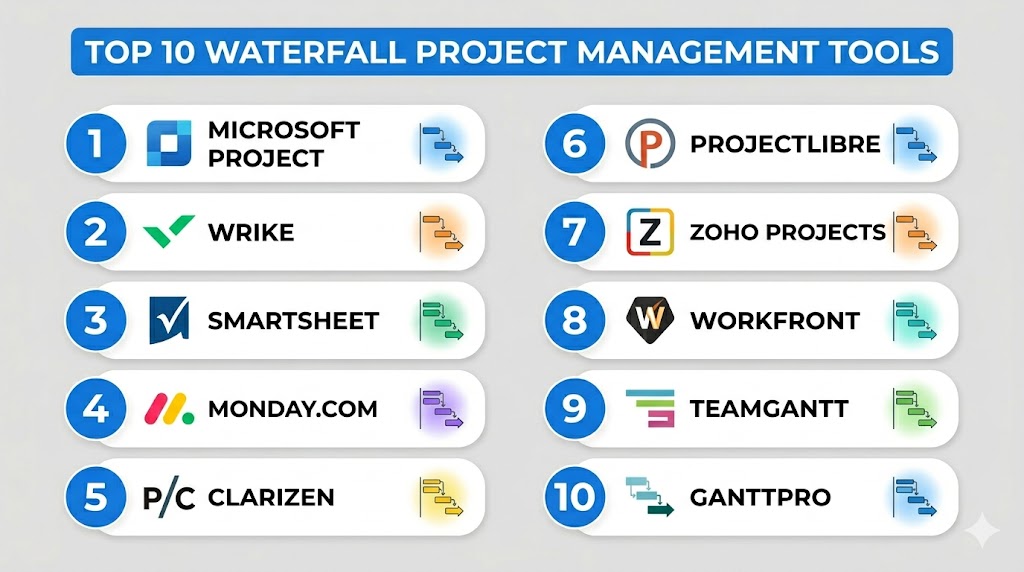
Top 10 Waterfall Project Management Tools
#1 — Microsoft Project
Short description: Microsoft Project is a comprehensive project management platform with robust Gantt chart, task scheduling, and resource management features for enterprise teams.
Key Features
- Advanced Gantt charts and task dependencies
- Resource allocation and workload management
- Reporting and analytics dashboards
- Integration with Microsoft 365 apps
- Project templates for multiple industries
- Timeline and milestone tracking
- Cloud and desktop support
Pros
- Enterprise-grade functionality
- Strong integration with Microsoft ecosystem
- Flexible reporting and project tracking
Cons
- High learning curve
- Costly for small teams
- Overkill for simple projects
Platforms / Deployment
Windows, Web, iOS, Android / Cloud / Self-hosted
Security & Compliance
SSO, encryption, RBAC; ISO 27001, SOC 2 Not publicly stated
Integrations & Ecosystem
- Microsoft Teams
- SharePoint
- Power BI
- Outlook
- APIs for custom integrations
Support & Community
Comprehensive documentation, enterprise support, active community
#2 — Wrike
Short description: Wrike combines project planning, task management, and reporting with Gantt chart support, suitable for both enterprise and mid-market teams.
Key Features
- Customizable Gantt charts
- Real-time dashboards
- Task assignments and dependencies
- Automation rules for repetitive tasks
- Resource management tools
- Collaboration and file sharing
- Mobile applications
Pros
- Flexible and customizable workflows
- Strong collaboration features
- Robust reporting
Cons
- Can be complex for small teams
- Paid tiers required for advanced features
- Limited offline functionality
Platforms / Deployment
Web, Windows, macOS, iOS, Android / Cloud / Hybrid
Security & Compliance
SSO, encryption, audit logs; SOC 2 Not publicly stated
Integrations & Ecosystem
- Slack
- Salesforce
- Google Workspace
- Zapier
- API access
Support & Community
Documentation, training webinars, responsive customer support
#3 — Smartsheet
Short description: Smartsheet is a flexible, spreadsheet-inspired project management tool supporting Waterfall methodologies with Gantt charts and automation.
Key Features
- Gantt charts and task dependencies
- Automated workflows and alerts
- Resource management dashboards
- Collaboration with attachments and comments
- Templates for multiple project types
- Reporting and analytics
- Mobile apps
Pros
- Familiar spreadsheet interface
- Strong automation and reporting
- Scales for large teams
Cons
- Requires subscription for full features
- Some users may find interface complex
- Limited offline use
Platforms / Deployment
Web, iOS, Android / Cloud
Security & Compliance
SSO, encryption; ISO 27001 Not publicly stated
Integrations & Ecosystem
- Slack
- Google Workspace
- Microsoft 365
- Jira
- Zapier
Support & Community
Comprehensive help center, community forums, premium support options
#4 — Monday.com
Short description: Monday.com offers visual project management with Gantt charts, workflows, and automation, supporting structured Waterfall processes for teams of all sizes.
Key Features
- Visual Gantt charts and timelines
- Automation of repetitive tasks
- Resource and workload management
- Dashboards and reporting
- Templates for Waterfall workflows
- Collaboration tools and comments
- Mobile apps
Pros
- Intuitive and visual interface
- Strong automation capabilities
- Suitable for cross-department projects
Cons
- Advanced features require paid plans
- Can be overwhelming for simple projects
- Limited offline capabilities
Platforms / Deployment
Web, iOS, Android / Cloud
Security & Compliance
SSO, encryption; SOC 2 Not publicly stated
Integrations & Ecosystem
- Slack
- Google Workspace
- Jira
- Zapier
- Calendar apps
Support & Community
Documentation, tutorials, community forums, email support
#5 — Clarizen
Short description: Clarizen is an enterprise-focused Waterfall project management tool with strong workflow automation, resource management, and portfolio visibility.
Key Features
- Gantt charts and milestone tracking
- Resource allocation dashboards
- Automated workflows and alerts
- Portfolio management
- Advanced reporting and analytics
- Collaboration tools
- Mobile apps
Pros
- Enterprise-grade functionality
- Comprehensive reporting
- Scales for complex projects
Cons
- High cost
- Steep learning curve
- May be too complex for SMBs
Platforms / Deployment
Web, iOS, Android / Cloud
Security & Compliance
SSO, MFA, encryption; SOC 2 Not publicly stated
Integrations & Ecosystem
- Salesforce
- Slack
- Google Workspace
- APIs for custom integrations
Support & Community
Dedicated enterprise support, documentation, and training resources
#6 — ProjectLibre
Short description: ProjectLibre is an open-source Waterfall project management software offering Gantt charts, resource management, and task tracking.
Key Features
- Gantt charts and task dependencies
- Resource allocation and cost tracking
- Baseline comparisons
- Reporting features
- Multi-language support
- Desktop applications
Pros
- Open-source and free
- Compatible with Microsoft Project files
- Lightweight and simple
Cons
- Limited cloud capabilities
- Minimal collaboration tools
- Support relies on community
Platforms / Deployment
Windows, macOS, Linux / Self-hosted
Security & Compliance
Varies / N/A
Integrations & Ecosystem
- Microsoft Project compatibility
- Local file storage
- Minimal API integrations
Support & Community
Community forums, documentation, user-driven support
#7 — Zoho Projects
Short description: Zoho Projects provides Waterfall project management with task dependencies, Gantt charts, and reporting for small to medium enterprises.
Key Features
- Gantt charts with task dependencies
- Milestone tracking
- Automated workflows
- Collaboration and comments
- Reporting and dashboards
- Resource allocation
- Mobile apps
Pros
- Affordable for SMBs
- Easy to use
- Integration with Zoho ecosystem
Cons
- Limited enterprise features
- Advanced customization requires higher tiers
- Reporting options less flexible
Platforms / Deployment
Web, iOS, Android / Cloud
Security & Compliance
SSO, encryption; SOC 2 Not publicly stated
Integrations & Ecosystem
- Zoho CRM
- Slack
- Google Workspace
- Zapier
Support & Community
Documentation, email and chat support, online tutorials
#8 — Workfront
Short description: Workfront is an enterprise-grade project management tool with advanced Waterfall planning, workflow automation, and resource management.
Key Features
- Gantt charts and timelines
- Automated workflows
- Resource and portfolio management
- Advanced reporting and analytics
- Collaboration tools
- Task dependencies
- Mobile access
Pros
- Ideal for complex enterprise projects
- Strong reporting and analytics
- Automation reduces manual work
Cons
- Expensive
- Complex interface for beginners
- Best suited for larger teams
Platforms / Deployment
Web, iOS, Android / Cloud
Security & Compliance
SSO, MFA, encryption; SOC 2 Not publicly stated
Integrations & Ecosystem
- Slack
- Salesforce
- Microsoft 365
- Jira
Support & Community
Enterprise support, documentation, training programs
#9 — TeamGantt
Short description: TeamGantt provides simple, visual Gantt charts for Waterfall project planning, ideal for SMBs and small teams.
Key Features
- Drag-and-drop Gantt charts
- Task dependencies and milestones
- Collaboration and file sharing
- Reporting dashboards
- Time tracking
- Mobile apps
Pros
- Simple and visual interface
- Affordable and easy to use
- Suitable for small teams
Cons
- Limited automation
- Fewer enterprise-level features
- Paid tiers required for full access
Platforms / Deployment
Web, iOS, Android / Cloud
Security & Compliance
SSO, encryption; Not publicly stated
Integrations & Ecosystem
- Slack
- Google Workspace
- Zapier
Support & Community
Documentation, tutorials, email support
#10 — GanttPRO
Short description: GanttPRO is a Waterfall project management tool focused on Gantt charts, planning, and resource management for teams of all sizes.
Key Features
- Gantt charts with dependencies
- Resource and workload management
- Task management and milestones
- Collaboration and comments
- Reporting dashboards
- Templates for common project types
- Mobile apps
Pros
- Intuitive Gantt-based interface
- Flexible for multiple teams
- Cloud-based for remote access
Cons
- Limited advanced automation
- Reporting less extensive than enterprise tools
- Paid plans needed for full features
Platforms / Deployment
Web, iOS, Android / Cloud
Security & Compliance
SSO, encryption; Not publicly stated
Integrations & Ecosystem
- Slack
- Google Workspace
- Zapier
Support & Community
Documentation, tutorials, email support
Comparison Table (Top 10)
| Tool Name | Best For | Platform(s) Supported | Deployment | Standout Feature | Public Rating |
|---|---|---|---|---|---|
| Microsoft Project | Enterprise | Windows, Web, iOS, Android | Cloud / Self-hosted | Advanced Gantt charts | N/A |
| Wrike | Enterprise / Mid-market | Web, Windows, macOS, iOS, Android | Cloud / Hybrid | Automation rules | N/A |
| Smartsheet | SMB to Enterprise | Web, iOS, Android | Cloud | Spreadsheet-like interface | N/A |
| Monday.com | Cross-department teams | Web, iOS, Android | Cloud | Workflow automation | N/A |
| Clarizen | Enterprise | Web, iOS, Android | Cloud | Portfolio management | N/A |
| ProjectLibre | SMB / Open-source | Windows, macOS, Linux | Self-hosted | Free and compatible | N/A |
| Zoho Projects | SMB | Web, iOS, Android | Cloud | Affordable and easy | N/A |
| Workfront | Enterprise | Web, iOS, Android | Cloud | Advanced analytics | N/A |
| TeamGantt | SMB | Web, iOS, Android | Cloud | Simple visual Gantt charts | N/A |
| GanttPRO | SMB / Mid-market | Web, iOS, Android | Cloud | Gantt-focused planning | N/A |
Evaluation & Scoring of Waterfall Project Management Tools
| Tool Name | Core (25%) | Ease (15%) | Integrations (15%) | Security (10%) | Performance (10%) | Support (10%) | Value (15%) | Weighted Total |
|---|---|---|---|---|---|---|---|---|
| Microsoft Project | 9 | 7 | 9 | 8 | 9 | 8 | 7 | 8.2 |
| Wrike | 8 | 8 | 8 | 8 | 8 | 8 | 8 | 8.0 |
| Smartsheet | 8 | 8 | 8 | 7 | 8 | 8 | 8 | 7.9 |
| Monday.com | 9 | 8 | 8 | 8 | 8 | 8 | 8 | 8.2 |
| Clarizen | 9 | 7 | 8 | 8 | 9 | 8 | 7 | 8.0 |
| ProjectLibre | 7 | 8 | 7 | 7 | 7 | 7 | 9 | 7.6 |
| Zoho Projects | 8 | 8 | 8 | 7 | 8 | 8 | 8 | 7.9 |
| Workfront | 9 | 7 | 8 | 8 | 9 | 8 | 7 | 7.9 |
| TeamGantt | 7 | 9 | 7 | 7 | 7 | 7 | 8 | 7.6 |
| GanttPRO | 8 | 8 | 8 | 7 | 8 | 8 | 8 | 7.9 |
Interpretation: Scores are comparative, showing strengths in features, ease of use, integrations, security, performance, support, and value. Higher weighted totals indicate better overall suitability for structured Waterfall projects.
Which Waterfall Project Management Tool Is Right for You?
Solo / Freelancer
TeamGantt, ProjectLibre, and Zoho Projects provide lightweight, easy-to-use platforms for small projects.
SMB
Smartsheet, Monday.com, and Wrike balance automation, Gantt charts, and reporting for small and mid-sized teams.
Mid-Market
Monday.com, Wrike, GanttPRO, and Smartsheet offer structured workflows, reporting, and integrations for growing teams.
Enterprise
Microsoft Project, Clarizen, Workfront, and Monday.com deliver enterprise-grade portfolio management, automation, and compliance features.
Budget vs Premium
Free and low-cost: ProjectLibre, TeamGantt.
Premium plans: Microsoft Project, Clarizen, Workfront, Monday.com for advanced enterprise features.
Feature Depth vs Ease of Use
TeamGantt, Zoho Projects, ProjectLibre prioritize ease of use; Microsoft Project and Clarizen provide deep enterprise capabilities.
Integrations & Scalability
Wrike, Monday.com, Microsoft Project, Workfront integrate with enterprise apps and scale across multiple departments.
Security & Compliance Needs
Enterprises requiring robust access controls, audit trails, and compliance features should consider Microsoft Project, Workfront, and Clarizen.
Frequently Asked Questions (FAQs)
- What is a Waterfall Project Management Tool?
A software platform to plan, track, and manage sequential project phases with milestones, dependencies, and reporting. - Who benefits most from Waterfall tools?
Project managers, engineering teams, IT operations, and regulated industries with structured workflows. - Do I need Waterfall tools if I use spreadsheets?
Spreadsheets provide basic tracking; tools offer Gantt charts, dependencies, automation, and collaboration. - Are these tools suitable for remote teams?
Yes, most offer cloud-based access, mobile apps, and real-time collaboration. - Can small teams benefit from Waterfall tools?
Yes, lightweight options like TeamGantt and ProjectLibre are ideal for SMBs and freelancers. - What is the difference between Waterfall and Agile tools?
Waterfall is sequential and linear; Agile is iterative and flexible. Tools are optimized accordingly. - Do these tools integrate with other software?
Yes, integrations include collaboration platforms, CRMs, reporting tools, and APIs. - Is training required for these tools?
Some enterprise-grade tools like Microsoft Project and Clarizen require onboarding; simpler platforms are intuitive. - Do Waterfall tools improve project success rates?
Yes, by providing visibility, dependencies, and structured workflows that reduce delays and errors. - How do I choose the right Waterfall tool?
Consider project complexity, team size, budget, reporting needs, and integration requirements.
Conclusion
Waterfall Project Management Tools remain essential for structured, sequential projects where planning, documentation, and milestone tracking are critical. The best tool depends on your team size, workflow complexity, and integration needs. Freelancers and SMBs may find TeamGantt, ProjectLibre, and Zoho Projects sufficient. Mid-market teams benefit from Smartsheet, Monday.com, and Wrike, while enterprises should consider Microsoft Project, Clarizen, and Workfront for full portfolio management, automation, and compliance capabilities. Evaluating features, integrations, ease of use, and scalability ensures teams select the tool that optimizes efficiency and project success. Shortlisting 2–3 tools and running a pilot can provide a practical, low-risk way to determine the best fit for your organization.

Find Trusted Cardiac Hospitals
Compare heart hospitals by city and services — all in one place.
Explore Hospitals
This explains how waterfall project management follows a step-by-step process from planning to delivery in a very structured way.