Introduction
Workflow Automation Platforms are cloud-based or hybrid tools that enable businesses to automate repetitive tasks, orchestrate processes, and streamline complex workflows across applications and teams. They reduce manual effort, increase operational efficiency, and improve accuracy by automating routine operations.workflow automation has become critical as enterprises adopt multi-cloud environments, microservices architectures, and AI-driven process optimization. These platforms allow organizations to respond faster to market demands, scale operations, and improve compliance while freeing employees from mundane tasks.
Real-world use cases include:
- Automating HR onboarding, payroll, and approval workflows.
- Synchronizing CRM and marketing systems for automated campaigns.
- Streamlining IT ticketing, incident management, and service requests.
- Orchestrating finance workflows such as invoice approvals and expense reports.
- Coordinating multi-department project approvals and document routing.
Evaluation Criteria for Buyers:
- Ease of workflow creation and low-code/no-code interfaces.
- Integration with cloud apps, on-premise systems, and APIs.
- Real-time monitoring, analytics, and reporting.
- Security features, role-based access, and compliance.
- Scalability for enterprise usage.
- Support for AI-driven automation and decision rules.
- Multi-environment support for test/staging/production.
- Pricing flexibility and cost-effectiveness.
Best for: Enterprises, SMBs, and teams seeking to automate repetitive or multi-system workflows across HR, finance, IT, marketing, and operations.
Not ideal for: Organizations with minimal process complexity or very small teams where manual workflows suffice.
Key Trends in Workflow Automation Platforms
- AI-assisted decision-making for routing and approvals.
- Enhanced cloud-native deployment and hybrid support.
- Integration with robotic process automation (RPA) tools.
- Real-time analytics dashboards with predictive insights.
- Prebuilt templates and connectors for enterprise SaaS applications.
- Event-driven automation using webhooks, triggers, and APIs.
- Low-code and no-code workflow builders for business users.
- Advanced monitoring, SLA enforcement, and alerting.
- Compliance and security features such as SSO, MFA, and audit logs.
- Usage-based and subscription pricing for scalability and flexibility.
How We Selected These Tools (Methodology)
- Evaluated market adoption and vendor mindshare.
- Assessed feature completeness including automation, integration, and analytics.
- Reviewed reliability and performance metrics in production.
- Verified security posture and compliance certifications.
- Checked integration capabilities across cloud, on-premise, and hybrid systems.
- Considered suitability for solo developers, SMBs, and enterprise deployments.
- Examined ease-of-use, low-code/no-code features, and workflow templates.
- Reviewed documentation, training, and support tiers.
- Prioritized AI-assisted features and event-driven automation.
- Balanced cost-effectiveness and scalability for 2026+ workflows.
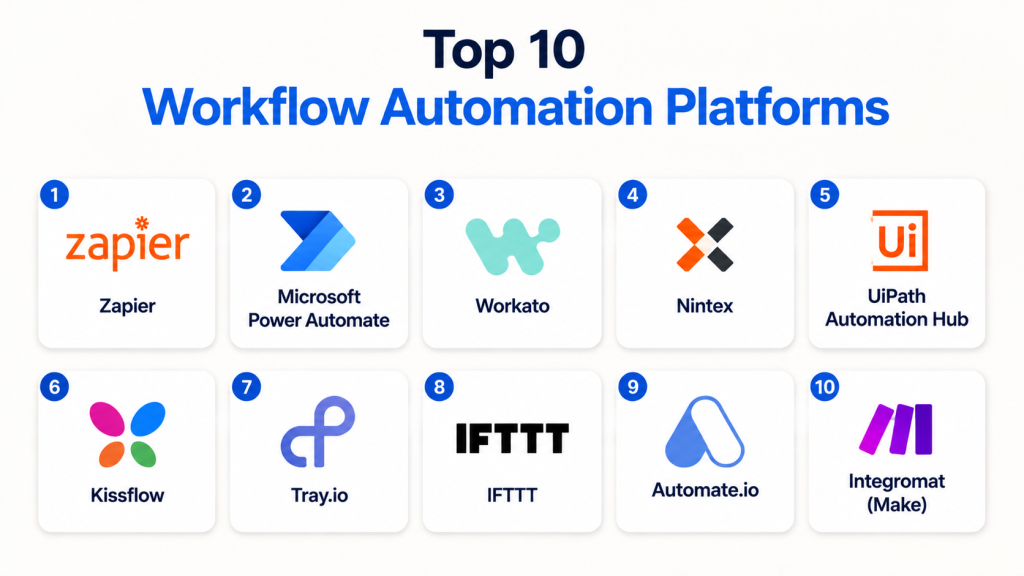
Top 10 Workflow Automation Platforms
1- Zapier
Short description: Cloud-based platform enabling task automation and app integrations for SMBs and mid-market teams.
Key Features
- Drag-and-drop workflow builder
- 5,000+ prebuilt connectors
- Multi-step automation with conditional logic
- Real-time triggers and scheduled workflows
- Webhook and API integration
- Monitoring dashboards and alerts
Pros
- No-code solution suitable for business users
- Quick setup and easy onboarding
- Extensive SaaS ecosystem
Cons
- Limited enterprise-grade compliance
- High-volume automation requires premium plans
- Complex workflows may be slower
Platforms / Deployment
- Web
- Cloud
Security & Compliance
- OAuth 2.0, encryption
- Not publicly stated
Integrations & Ecosystem
Supports Slack, Salesforce, Google Workspace, and more.
- SaaS connectors
- REST/GraphQL APIs
- Webhook integrations
Support & Community
- Documentation, tutorials
- Paid support tiers
- Active user forums
2- Microsoft Power Automate
Short description: Enterprise workflow automation tool integrated with Microsoft 365 and Azure for business process automation.
Key Features
- Integration with Microsoft ecosystem
- Desktop and cloud flow automation
- AI-assisted automation for approvals and routing
- Prebuilt templates for common workflows
- Monitoring dashboards
- Hybrid deployment support
Pros
- Seamless integration with Microsoft apps
- Strong enterprise-grade compliance
- Supports RPA for repetitive tasks
Cons
- Best suited for Microsoft ecosystem
- Pricing can be complex
- Requires learning for advanced automations
Platforms / Deployment
- Web, Windows, iOS, Android
- Cloud / Hybrid
Security & Compliance
- SSO, MFA, RBAC
- ISO 27001, SOC 2, GDPR
Integrations & Ecosystem
- Microsoft 365, Dynamics 365, Azure services
- REST APIs
- SaaS connectors
Support & Community
- Microsoft Docs and learning paths
- Enterprise support tiers
- Large community of users and developers
3- Workato
Short description: Enterprise-grade automation platform connecting apps, workflows, and APIs for complex business processes.
Key Features
- Multi-step workflow automation
- API and webhook triggers
- Prebuilt templates for enterprise workflows
- Real-time monitoring and error handling
- AI-assisted workflow suggestions
- Cloud-native deployment
Pros
- Enterprise-ready with scalability
- Supports complex integrations and business rules
- Extensive SaaS ecosystem
Cons
- Premium pricing
- Steep learning curve
- Cloud-only deployment
Platforms / Deployment
- Web
- Cloud
Security & Compliance
- OAuth 2.0, encryption, RBAC
- SOC 2, GDPR
Integrations & Ecosystem
Supports Salesforce, NetSuite, Slack, HubSpot.
- SaaS connectors
- REST/GraphQL APIs
- Event-driven workflows
Support & Community
- Documentation and tutorials
- Paid enterprise support
- Active user community
4- Nintex
Short description: Workflow automation and process orchestration platform with low-code tools for enterprises.
Key Features
- Drag-and-drop workflow designer
- Document generation and e-signature integrations
- AI-driven process optimization
- Monitoring dashboards and analytics
- Hybrid cloud and on-prem deployment
- Prebuilt connectors for enterprise SaaS apps
Pros
- Low-code solution for business users
- Strong enterprise adoption
- Hybrid deployment flexibility
Cons
- Costly for small businesses
- Custom integrations may require technical expertise
- Some features limited in standard plans
Platforms / Deployment
- Web
- Cloud / Hybrid
Security & Compliance
- SSO, MFA, encryption
- ISO 27001, GDPR
Integrations & Ecosystem
Supports SharePoint, Salesforce, SAP, Oracle.
- SaaS connectors
- REST APIs
- Workflow automation templates
Support & Community
- Enterprise support tiers
- Documentation and tutorials
- Active forums
5- UiPath Automation Hub
Short description: Platform focused on orchestrating robotic process automation (RPA) with workflow automation.
Key Features
- RPA integration with workflows
- AI-assisted task automation
- Enterprise-grade governance
- Prebuilt automation templates
- Real-time monitoring dashboards
- Cloud and on-prem deployment
Pros
- Strong RPA capabilities
- Enterprise governance features
- Scalable across departments
Cons
- Complex for small teams
- Premium licensing required
- Learning curve for RPA workflows
Platforms / Deployment
- Web
- Cloud / Hybrid
Security & Compliance
- Encryption, RBAC, SSO
- SOC 2, GDPR
Integrations & Ecosystem
Supports SAP, Salesforce, Oracle, UiPath bots.
- APIs and webhooks
- Enterprise SaaS integrations
Support & Community
- Documentation, tutorials
- Enterprise support
- Active RPA community
6 — Kissflow
Short description: Kissflow is a no-code workflow automation platform for SMBs and mid-market companies.
Key Features
- Visual workflow builder
- Approval and task automation
- Process monitoring dashboards
- Integration with cloud apps
- Collaboration tools
Pros
- Easy for non-technical users
- Quick deployment
- Affordable for SMBs
Cons
- Limited enterprise-grade capabilities
- Less AI/ML integration
- Fewer advanced analytics
Platforms / Deployment
- Web / Cloud
Security & Compliance
- GDPR, encryption, MFA
Integrations & Ecosystem
- CRM, G Suite, Slack
- API support
- Cloud SaaS integration
Support & Community
- Documentation, email support, tutorials
7 — Tray.io
Short description: Tray.io is a general automation platform for integrating cloud apps and automating complex workflows.
Key Features
- Multi-step workflow automation
- API-first integrations
- Scheduled and event-triggered workflows
- Customizable connectors
- Analytics dashboards
Pros
- Highly flexible for developers
- Supports complex logic and integrations
- Scalable for mid-market and enterprise
Cons
- Requires technical expertise
- Learning curve for business users
- Higher cost for SMBs
Platforms / Deployment
- Web / Cloud
Security & Compliance
- SOC 2, GDPR, encryption
Integrations & Ecosystem
- CRM, ERP, databases, SaaS apps
- Custom API connectors
- Webhooks and SDK support
Support & Community
- Documentation, onboarding support, professional services
8 — IFTTT
Short description: IFTTT (If This Then That) is a simple automation platform connecting apps and devices for SMB workflows.
Key Features
- App-to-app triggers
- Pre-built automation recipes
- Conditional logic
- Scheduled and real-time triggers
- Cloud integration
Pros
- Extremely easy to use
- Quick setup for basic automations
- Free tier available
Cons
- Limited enterprise capabilities
- Less control over complex workflows
- Fewer analytics and reporting options
Platforms / Deployment
- Web / iOS / Android / Cloud
Security & Compliance
- GDPR, encryption
Integrations & Ecosystem
- 600+ apps supported
- Webhooks
- Cloud service integrations
Support & Community
- Documentation, forums, tutorials
9 — Automate.io
Short description: Automate.io is a workflow automation platform for SMBs and mid-market teams, integrating cloud apps.
Key Features
- Multi-step workflow automation
- App integrations
- Triggers and actions
- Conditional logic
- Analytics dashboards
Pros
- Easy for business users
- Affordable pricing
- Quick deployment
Cons
- Limited enterprise features
- Smaller app ecosystem
- Advanced workflows require premium plan
Platforms / Deployment
- Web / Cloud
Security & Compliance
- GDPR, encryption
Integrations & Ecosystem
- CRM, CMS, cloud apps
- API support
- Webhooks
Support & Community
- Documentation, email support, tutorials
10 — Integromat (Make)
Short description: Make (formerly Integromat) is a visual workflow automation platform connecting apps and automating complex processes.
Key Features
- Visual workflow builder
- Multi-step automation
- Conditional logic and filters
- Scheduled and event triggers
- Analytics and reporting
Pros
- Visual workflow design
- Flexible logic for automation
- Extensive app integrations
Cons
- Learning curve for beginners
- Less suitable for enterprise RPA
- Premium features require paid plan
Platforms / Deployment
- Web / Cloud
Security & Compliance
- GDPR, encryption
Integrations & Ecosystem
- CRM, ERP, SaaS apps
- API and webhooks
- Custom connectors
Support & Community
Documentation, tutorials, support
Comparison Table (Top 10)
| Tool Name | Best For | Platform(s) Supported | Deployment | Standout Feature | Public Rating |
|---|---|---|---|---|---|
| Zapier | SMBs & mid-market | Web | Cloud | No-code automation | N/A |
| Microsoft Power Automate | Enterprise | Web, Windows, iOS, Android | Cloud / Hybrid | Microsoft ecosystem integration | N/A |
| Workato | Enterprise | Web | Cloud | Multi-step automation | N/A |
| Nintex | Enterprise | Web | Cloud / Hybrid | Low-code process orchestration | N/A |
| UiPath Automation Hub | Enterprise | Web | Cloud / Hybrid | RPA integration | N/A |
| Kissflow | SMB & mid-market | Web | Cloud | Low-code workflow builder | N/A |
| Tray.io | Mid-market & enterprise | Web | Cloud / Hybrid | API & SaaS automation | N/A |
| IFTTT | SMB | Web, Mobile | Cloud | Consumer & business app automation | N/A |
| Automate.io | SMB | Web | Cloud | Multi-step automation | N/A |
| Integromat (Make) | SMB & mid-market | Web | Cloud | Visual scenario builder | N/A |
Evaluation & Scoring of Workflow Automation Platforms
| Tool Name | Core (25%) | Ease (15%) | Integrations (15%) | Security (10%) | Performance (10%) | Support (10%) | Value (15%) | Weighted Total (0–10) |
|---|---|---|---|---|---|---|---|---|
| Zapier | 8 | 9 | 8 | 7 | 8 | 8 | 8 | 8.1 |
| Microsoft Power Automate | 9 | 8 | 8 | 8 | 9 | 8 | 7 | 8.3 |
| Workato | 9 | 7 | 8 | 8 | 9 | 8 | 7 | 8.2 |
| Nintex | 8 | 8 | 8 | 8 | 8 | 7 | 7 | 7.9 |
| UiPath Automation Hub | 9 | 7 | 8 | 8 | 9 | 8 | 7 | 8.2 |
| Kissflow | 7 | 8 | 7 | 7 | 7 | 7 | 7 | 7.2 |
| Tray.io | 8 | 8 | 8 | 7 | 8 | 7 | 7 | 7.7 |
| IFTTT | 7 | 9 | 6 | 6 | 7 | 6 | 7 | 7.0 |
| Automate.io | 8 | 8 | 7 | 7 | 7 | 7 | 7 | 7.3 |
| Integromat (Make) | 8 | 8 | 8 | 7 | 8 | 7 | 7 | 7.6 |
Which Workflow Automation Platform Is Right for You?
Solo / Freelancer
- Zapier, IFTTT, Automate.io for lightweight automation and app connections.
SMB
- Kissflow, Tray.io, Integromat (Make) for low-code workflow creation and SaaS automation.
Mid-Market
- Workato, Tray.io, Nintex for orchestrating multi-department processes and hybrid cloud systems.
Enterprise
- Microsoft Power Automate, UiPath Automation Hub, Nintex for enterprise-grade automation, RPA integration, and compliance.
Budget vs Premium
- Free or low-cost options: Zapier, IFTTT, Automate.io
- Premium enterprise solutions: Workato, Microsoft Power Automate, UiPath
Feature Depth vs Ease of Use
- Beginner-friendly: Zapier, IFTTT
- Advanced features: Workato, UiPath, Nintex
Integrations & Scalability
- Workato, Tray.io, Microsoft Power Automate support high-volume, complex enterprise integrations.
Security & Compliance Needs
- Microsoft Power Automate, UiPath, Nintex offer enterprise security, compliance certifications, and auditing.
Frequently Asked Questions (FAQs)
1. What pricing models do workflow automation platforms use?
Most platforms provide subscription tiers, usage-based plans, or free trial tiers. Enterprise plans often include advanced analytics, integrations, and support.
2. Can I automate workflows without coding experience?
Yes, Zapier, IFTTT, and Kissflow allow no-code automation. Advanced workflows may require technical skills, especially for API or RPA integrations.
3. How long does workflow deployment take?
Simple automations can be deployed in hours. Complex multi-step enterprise workflows can take days to weeks for setup, testing, and validation.
4. Do these platforms support hybrid or cloud integrations?
Yes, Microsoft Power Automate, Workato, and Nintex support hybrid and cloud deployments, connecting SaaS, cloud, and on-premises systems.
5. Can RPA be integrated with workflow automation?
Platforms like UiPath Automation Hub and Microsoft Power Automate allow RPA bots to be triggered as part of automated workflows.
6. Are these platforms secure for enterprise use?
Enterprise-grade tools provide encryption, SSO, RBAC, and compliance with SOC 2, ISO 27001, and GDPR.
7. How many apps can be integrated?
Platforms like Zapier, Workato, and Tray.io offer thousands of prebuilt connectors for SaaS applications and custom APIs.
8. Do they offer monitoring and analytics?
Yes, dashboards provide workflow execution logs, error tracking, performance metrics, and alerts for SLA management.
9. Are these platforms scalable?
Enterprise platforms like Workato, Microsoft Power Automate, and UiPath scale to thousands of events per second for large organizations.
10. Which tool is best for beginners?
Zapier, IFTTT, and Automate.io are beginner-friendly, while Workato, UiPath, and Nintex are suitable for enterprise automation.
Conclusion
Workflow Automation Platforms streamline repetitive processes, improve efficiency, and enable enterprise-scale orchestration. Small teams benefit from Zapier, IFTTT, or Automate.io, while mid-market and enterprise teams gain value from Workato, Microsoft Power Automate, and UiPath. The best choice depends on organization size, integration complexity, scalability, and security requirements. Shortlist 2–3 tools, run pilot workflows, and validate performance and compliance before enterprise deployment.

Find Trusted Cardiac Hospitals
Compare heart hospitals by city and services — all in one place.
Explore Hospitals
I learned how workflow automation platforms can simplify repetitive tasks and improve efficiency across different business processes. I’d like to understand more about which tool works best for small teams.