Introduction
Image editing software refers to tools designed to modify, enhance, or manipulate digital images. These tools are essential for marketers, designers, photographers, and social media managers to produce professional-quality visuals efficiently. With AI-powered automation and cloud-based workflows, modern image editing software has become more accessible and sophisticated, allowing teams to optimize content for web, mobile, and print channels.
Real-world use cases include:
- Enhancing product photography for e-commerce platforms.
- Creating social media graphics for campaigns and ads.
- Editing and restoring old or scanned photographs.
- Designing banners, posters, and promotional materials.
- Supporting content creation in digital marketing and branding.
Evaluation criteria for buyers:
- Ease of use and learning curve
- Feature richness, including AI tools
- Platform support and deployment flexibility
- Security and compliance
- Integration with other creative tools and ecosystems
- Performance, reliability, and rendering speed
- Community support and documentation
- Cost and pricing flexibility
Best for: Freelancers, creative teams, marketing agencies, photographers, and design studios looking to streamline image production.
Not ideal for: Users who require only basic editing or prefer native operating system tools; those with minimal visual design needs may find simpler software sufficient.
Key Trends in Image Editing Software
- AI-driven automatic retouching and background removal.
- Cloud-based collaborative editing for distributed teams.
- Mobile-first capabilities for on-the-go content creation.
- Integration with social media publishing and workflow platforms.
- Increased support for 3D assets and generative AI elements.
- Subscription-based pricing with flexible usage tiers.
- Cross-platform support including web, Windows, macOS, iOS, and Android.
- Emphasis on privacy and data protection compliance.
- Advanced color grading, HDR, and RAW image support.
- Modular plugin ecosystems for specialized editing tasks.
How We Selected These Tools (Methodology)
- Market adoption and industry mindshare across professionals and enterprises.
- Feature completeness including AI automation, layer editing, and batch processing.
- Reliability and performance benchmarks, including rendering speed.
- Security posture evaluation, including encryption and access controls.
- Integration and ecosystem compatibility with creative suites and cloud storage.
- Customer segment fit for freelancers, SMBs, and enterprise teams.
- Update frequency and developer responsiveness.
- Community engagement and educational resources.
- Cross-platform availability.
- Pricing flexibility and value-for-money considerations.
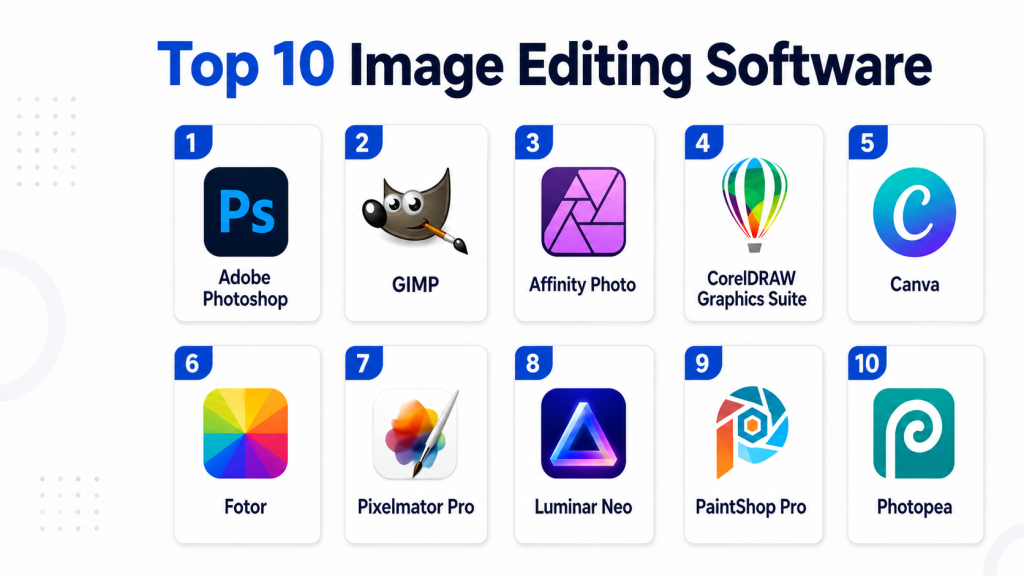
Top 10 Image Editing Software Tools
1 — Adobe Photoshop
Short description: Industry-standard software for professional image editing and digital artistry, suitable for photographers, designers, and marketing teams.
Key Features
- Advanced layer and mask management.
- AI-powered content-aware fill and object removal.
- Non-destructive editing workflows.
- Extensive brush and text tools for creative work.
- Cloud document storage for team collaboration.
- RAW file editing and color grading tools.
- Plugin support for specialized tasks.
Pros
- Unmatched industry adoption and resources.
- Powerful AI-assisted tools streamline complex edits.
- Strong ecosystem with Adobe Creative Cloud.
Cons
- Steep learning curve for beginners.
- Subscription-based pricing can be costly.
- Resource-intensive on lower-end hardware.
Platforms / Deployment
- Windows, macOS / Cloud-enabled
Security & Compliance
- Supports SSO, MFA, encryption; GDPR compliant
Integrations & Ecosystem
Adobe Photoshop integrates seamlessly with Illustrator, Lightroom, and After Effects.
- Adobe Creative Cloud apps
- Cloud storage synchronization
- API access for automation
- Third-party plugins
Support & Community
Comprehensive tutorials, forums, and enterprise support plans.
2 — GIMP
Short description: Free, open-source image editor providing professional-grade features for creative individuals and developers.
Key Features
- Layer and mask support
- Advanced color editing
- Scriptable automation
- Wide range of plugins
- Cross-platform compatibility
- RAW image support
- Flexible interface customization
Pros
- Completely free and open-source.
- Highly customizable and extendable.
- Active developer and user community.
Cons
- Interface less intuitive than commercial alternatives.
- Limited official support and documentation.
- Some advanced features lag behind paid software.
Platforms / Deployment
- Windows, macOS, Linux / Self-hosted
Security & Compliance
Not publicly stated
Integrations & Ecosystem
Supports plugins and extensions; integrates with file conversion and scripting tools.
- Script-Fu and Python plugins
- Third-party brushes and filters
- File conversion utilities
Support & Community
Active community forums and tutorials; no formal enterprise support.
3 — Affinity Photo
Short description: Professional photo editor offering a cost-effective alternative to Photoshop, optimized for photographers and creatives.
Key Features
- Non-destructive layer editing
- RAW and HDR editing
- Live blend modes
- Advanced retouching tools
- Focus stacking
- Batch processing
- Mac and Windows optimized
Pros
- One-time purchase model.
- Powerful editing features rivaling Photoshop.
- Smooth performance on modern hardware.
Cons
- Limited plugin ecosystem.
- Less prevalent in industry workflows.
- Collaboration tools are minimal.
Platforms / Deployment
- Windows, macOS / Desktop
Security & Compliance
Not publicly stated
Integrations & Ecosystem
Integrates with Affinity Publisher and Designer; supports PSD import/export.
- Affinity suite apps
- PSD file support
- Plugin support limited
Support & Community
Official support forums, knowledge base, and tutorials.
4 — CorelDRAW Graphics Suite
Short description: Comprehensive graphics suite for vector and raster editing, targeting designers, marketers, and print professionals.
Key Features
- Vector illustration tools
- Photo editing and layout
- AI-assisted image tracing
- Color management for print
- Asset library and templates
- Cloud document sharing
- Multi-page design support
Pros
- Integrated design suite for vector and raster.
- Powerful layout and typography tools.
- Cloud collaboration support.
Cons
- Subscription can be expensive.
- Learning curve for beginners.
- Mac version has fewer features than Windows.
Platforms / Deployment
- Windows, macOS / Cloud-enabled
Security & Compliance
Not publicly stated
Integrations & Ecosystem
Supports file exchange with Adobe formats and stock content libraries.
- Stock photo libraries
- Adobe format import/export
- Cloud storage integration
Support & Community
Official support channels, tutorials, and active design community.
5 — Canva
Short description: User-friendly online design platform, ideal for marketers, social media managers, and SMBs for quick content creation.
Key Features
- Drag-and-drop editor
- Template library
- AI design suggestions
- Stock image integration
- Collaboration tools
- Brand kit management
- Export in multiple formats
Pros
- Extremely easy to use with minimal training.
- Excellent for team collaboration.
- Large template and asset library.
Cons
- Limited advanced photo editing features.
- Dependent on internet connection.
- Some features behind paid plans.
Platforms / Deployment
- Web, iOS, Android / Cloud
Security & Compliance
Supports SSO, encryption; GDPR compliant
Integrations & Ecosystem
Integrates with social media, Google Drive, and Slack.
- Google Workspace
- Social media platforms
- Slack
- Stock photo providers
Support & Community
Help center, tutorials, community forums.
6 — Fotor
Short description: Cloud-based image editor with AI tools, designed for quick edits, photo enhancements, and content creation for non-professionals.
Key Features
- AI background remover
- Photo retouching
- HDR effects
- Collage templates
- Batch processing
- Cloud storage
- Cross-device synchronization
Pros
- Simplified AI-based editing tools.
- Accessible for beginners.
- Fast cloud-based performance.
Cons
- Limited control for professional editing.
- Advanced tools require premium plan.
- Cloud dependency.
Platforms / Deployment
- Web, Windows, macOS, iOS, Android / Cloud
Security & Compliance
Not publicly stated
Integrations & Ecosystem
Integrates with cloud storage and social media.
- Dropbox and Google Drive
- Social sharing tools
- Basic plugin support
Support & Community
Online tutorials and email support.
7 — Pixelmator Pro
Short description: macOS-exclusive professional image editor focused on speed, usability, and AI-assisted tools.
Key Features
- Machine learning-based enhancements
- Layer-based editing
- RAW and HDR support
- Non-destructive adjustments
- Advanced retouching
- GPU acceleration
- One-click improvements
Pros
- Optimized for Apple hardware.
- Intuitive interface for designers.
- Modern AI tools built-in.
Cons
- macOS only.
- Smaller community than Photoshop.
- Limited plugin support.
Platforms / Deployment
- macOS / Desktop
Security & Compliance
Not publicly stated
Integrations & Ecosystem
Supports integration with iCloud and other Apple apps.
- iCloud storage
- Affinity and Adobe file import
- Minimal plugin ecosystem
Support & Community
Official tutorials, documentation, and Apple ecosystem support.
8 — Luminar Neo
Short description: AI-powered photo editor designed for photographers seeking quick enhancements and creative effects.
Key Features
- AI sky replacement
- AI portrait enhancement
- Layer support
- RAW editing
- Presets and filters
- Batch processing
- Masking tools
Pros
- Powerful AI automation.
- Intuitive for photographers.
- Efficient workflow for large libraries.
Cons
- Limited vector or design tools.
- Performance can lag on older hardware.
- Not ideal for complex compositions.
Platforms / Deployment
- Windows, macOS / Desktop
Security & Compliance
Not publicly stated
Integrations & Ecosystem
Supports plugin integration and Adobe file formats.
- Adobe file support
- Presets marketplace
- Third-party plugin support
Support & Community
Online tutorials, community forums, and email support.
9 — PaintShop Pro
Short description: Comprehensive photo editing and graphic design software for Windows users, with a focus on cost-effective professional tools.
Key Features
- Layer and mask editing
- AI-powered tools
- RAW and HDR support
- Batch processing
- Photo restoration tools
- Plugin support
- Text and vector tools
Pros
- Affordable one-time purchase.
- Strong feature set for photographers.
- Supports many plugins and extensions.
Cons
- Windows-only.
- Interface less modern than competitors.
- Limited collaboration features.
Platforms / Deployment
- Windows / Desktop
Security & Compliance
Not publicly stated
Integrations & Ecosystem
Integrates with file converters and stock libraries.
- Plugin marketplace
- Stock images
- File format compatibility
Support & Community
Official tutorials, forums, and knowledge base.
10 — Photopea
Short description: Free, browser-based image editor compatible with Photoshop and GIMP file formats for quick editing tasks.
Key Features
- Layer support
- PSD and XCF file compatibility
- Vector tools
- Filters and effects
- Non-destructive editing
- Cloud-based access
- No installation required
Pros
- Free and browser-based.
- Familiar interface for Photoshop users.
- Quick access without installation.
Cons
- Limited offline functionality.
- Performance depends on browser.
- Fewer advanced features than desktop tools.
Platforms / Deployment
- Web / Cloud
Security & Compliance
Not publicly stated
Integrations & Ecosystem
Supports file import/export from cloud services.
- Dropbox, Google Drive
- Browser extensions
- Limited plugin support
Support & Community
Online tutorials, community forums, and active social media guides.
Comparison Table (Top 10)
| Tool Name | Best For | Platform(s) Supported | Deployment | Standout Feature | Public Rating |
|---|---|---|---|---|---|
| Adobe Photoshop | Professionals & Agencies | Windows, macOS | Cloud-enabled | Industry-standard features, AI-powered editing | N/A |
| GIMP | Open-source enthusiasts | Windows, macOS, Linux | Self-hosted | Free, extensible, scriptable | N/A |
| Affinity Photo | Photographers & Designers | Windows, macOS | Desktop | Cost-effective professional editing | N/A |
| CorelDRAW Graphics Suite | Print & Graphic Designers | Windows, macOS | Cloud-enabled | Vector and raster suite | N/A |
| Canva | Marketers & SMBs | Web, iOS, Android | Cloud | Templates & collaborative design | N/A |
| Fotor | Beginners & marketers | Web, Windows, macOS, iOS, Android | Cloud | AI-based quick edits | N/A |
| Pixelmator Pro | Mac professionals | macOS | Desktop | AI-assisted enhancements | N/A |
| Luminar Neo | Photographers | Windows, macOS | Desktop | AI sky replacement & portrait enhancement | N/A |
| PaintShop Pro | Windows photographers | Windows | Desktop | Affordable professional tools | N/A |
| Photopea | Quick browser-based editing | Web | Cloud | PSD/XCF compatibility in browser | N/A |
Evaluation & Scoring of Image Editing Software
| Tool Name | Core (25%) | Ease (15%) | Integrations (15%) | Security (10%) | Performance (10%) | Support (10%) | Value (15%) | Weighted Total |
|---|---|---|---|---|---|---|---|---|
| Adobe Photoshop | 10 | 8 | 9 | 9 | 9 | 9 | 6 | 8.9 |
| GIMP | 7 | 6 | 7 | 5 | 7 | 6 | 10 | 6.8 |
| Affinity Photo | 9 | 8 | 6 | 6 | 8 | 7 | 9 | 8.0 |
| CorelDRAW | 8 | 7 | 8 | 6 | 8 | 7 | 7 | 7.6 |
| Canva | 6 | 10 | 8 | 8 | 7 | 8 | 8 | 7.8 |
| Fotor | 5 | 9 | 6 | 5 | 6 | 6 | 9 | 6.5 |
| Pixelmator Pro | 7 | 9 | 5 | 5 | 8 | 7 | 8 | 7.3 |
| Luminar Neo | 8 | 8 | 6 | 5 | 7 | 6 | 7 | 7.0 |
| PaintShop Pro | 7 | 7 | 6 | 5 | 7 | 6 | 8 | 6.8 |
| Photopea | 6 | 9 | 5 | 5 | 6 | 6 | 10 | 6.9 |
Interpretation: Weighted totals reflect overall suitability; higher scores indicate versatile and professional-ready tools. Buyers should weigh priorities like cost, AI features, and ecosystem integration.
Which Image Editing Software Tool Is Right for You?
Solo / Freelancer
Canva, Photopea, Fotor, or Affinity Photo provide affordability, ease of use, and fast output.
SMB
Canva, Adobe Photoshop, Affinity Photo, and CorelDRAW enable team collaboration and scalable workflows.
Mid-Market
Adobe Photoshop, CorelDRAW, Luminar Neo, and Pixelmator Pro provide professional features and support for multi-user environments.
Enterprise
Adobe Photoshop, CorelDRAW Graphics Suite, and Affinity Photo suit enterprise creative teams with integration needs and cloud-based collaboration.
Budget vs Premium
Fotor, Photopea, and GIMP excel for cost-conscious users; Photoshop, CorelDRAW, and Affinity Photo cater to premium workflows with advanced capabilities.
Feature Depth vs Ease of Use
Adobe Photoshop offers unmatched feature depth; Canva and Fotor prioritize intuitive design and rapid results.
Integrations & Scalability
Adobe and Corel suites integrate with cloud storage, stock libraries, and productivity tools, suitable for scaling across teams and projects.
Security & Compliance Needs
Photoshop and Canva have enterprise-grade compliance. Open-source tools like GIMP rely on user-managed security.
Frequently Asked Questions (FAQs)
1. What is the best free image editing software?
GIMP and Photopea are excellent free options; they provide advanced editing without subscription costs but may lack enterprise support.
2. Can I edit images on mobile devices?
Yes, Canva, Fotor, and Adobe Photoshop Express support iOS and Android for on-the-go editing.
3. Which tool is best for professional photographers?
Adobe Photoshop, Luminar Neo, and Affinity Photo offer advanced RAW editing, color grading, and AI enhancements for professional workflows.
4. Are these tools suitable for social media content?
Yes, Canva and Fotor are optimized for quick content creation and template-based social media graphics.
5. Do these tools support AI features?
Yes, many include AI-assisted retouching, object removal, sky replacement, and automatic adjustments (Photoshop, Luminar, Fotor).
6. Can multiple users collaborate in real-time?
Cloud-based platforms like Canva and Adobe Creative Cloud support collaborative editing with version tracking and team management.
7. Is training required to use these tools?
Photoshop and CorelDRAW have a steep learning curve; simpler tools like Canva or Photopea require minimal training.
8. How do these tools handle file compatibility?
Most support standard formats like JPG, PNG, PSD, TIFF; Photoshop and Affinity Photo can read/write PSD files seamlessly.
9. Are there any offline options?
Affinity Photo, Photoshop (desktop), Pixelmator Pro, and Luminar Neo function offline; Canva and Photopea rely on web/cloud access.
10. What factors should I consider before choosing?
Consider your budget, desired features, platform compatibility, team collaboration needs, and AI automation capabilities.
Conclusion
Selecting the right image editing software depends on your role, skill level, and content requirements. Freelancers may prefer lightweight or browser-based tools like Photopea or Canva, while enterprises and professional studios benefit from feature-rich tools like Adobe Photoshop or CorelDRAW. AI-assisted capabilities improve productivity and creativity. Buyers should shortlist 2–3 options, pilot them with actual projects, and validate integrations, security, and performance before scaling adoption. Balancing cost, usability, and feature depth ensures the chosen tool aligns with long-term creative goals. Next Steps: Shortlist 2–3 tools, run a pilot with real projects, validate integrations, security, and AI features, then scale usage across creative workflows.

Find Trusted Cardiac Hospitals
Compare heart hospitals by city and services — all in one place.
Explore Hospitals
Image editing software tools are explained clearly, and the comparison helps in understanding how different platforms support photo editing, design, and creative workflows efficiently.