Introduction
Workflow Form Automation Tools are platforms that allow organizations to design, manage, and automate forms and approval processes seamlessly. These tools streamline data collection, reduce manual errors, and accelerate workflows by automating repetitive tasks and routing submissions to the right stakeholders. with increasing remote work, digital transformation, and regulatory compliance demands, these platforms have become essential for enterprises and SMBs seeking efficiency and governance.
Real-world use cases include:
- HR teams automating leave requests, onboarding forms, and performance reviews.
- Finance teams streamlining expense approvals, invoices, and budget requests.
- IT departments managing ticket submissions, access requests, and asset tracking.
- Marketing teams collecting campaign briefs, approvals, and content sign-offs.
- Legal and compliance teams managing contract submissions and approval workflows.
Buyers should evaluate:
- Workflow automation and conditional routing
- Form creation flexibility and templates
- Integration with ERP, CRM, and collaboration tools
- Security, encryption, and access controls
- Audit trails and compliance reporting
- AI-assisted workflow suggestions
- Reporting and analytics dashboards
- User experience and onboarding ease
- Deployment flexibility (Cloud / On-prem / Hybrid)
Best for: Enterprises, SMBs, and cross-functional teams needing automated approvals and data collection processes.
Not ideal for: Teams with minimal form submission needs or those already using integrated tools within other platforms without complex workflows.
Key Trends in Workflow Form Automation Tools
- AI-driven form auto-fill and workflow recommendations
- Multi-step approval routing and conditional logic automation
- Integrations with ERP, CRM, HRIS, and analytics platforms
- Cloud-first, hybrid, and low-code deployment options
- Enhanced security including encryption, RBAC, MFA, and SSO
- Compliance monitoring for GDPR, HIPAA, SOC 2, and ISO 27001
- Mobile-optimized workflows for remote and hybrid teams
- Analytics dashboards for submission trends and bottleneck tracking
- Pre-built workflow templates and reusable automation components
- Subscription-based, scalable pricing models for SMB to enterprise
How We Selected These Tools (Methodology)
- Reviewed market adoption and user base
- Evaluated workflow and automation capabilities
- Checked reliability, uptime, and performance signals
- Assessed security posture and compliance certifications
- Examined integration ecosystem with common business software
- Considered fit for SMB, mid-market, and enterprise segments
- Analyzed AI-assisted features and smart automation
- Reviewed documentation, onboarding, and user experience
- Evaluated support tiers and community strength
- Balanced feature set against value and pricing
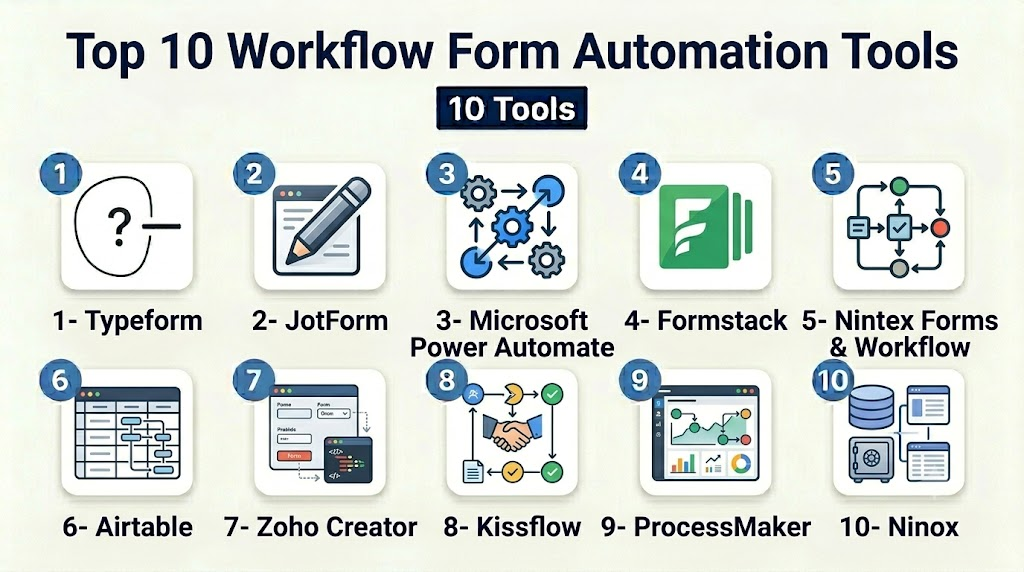
Top 10 Workflow Form Automation Tools
1- Typeform
Short description: Typeform provides conversational forms with workflow automation suitable for marketing, HR, and internal approvals.
Key Features
- Drag-and-drop form builder
- Conditional logic and branching workflows
- Automated approval routing
- Integration with CRM and marketing tools
- Analytics and reporting dashboards
- Mobile-responsive forms
- Multi-language support
Pros
- Highly engaging forms
- Easy to implement automated routing
- Strong analytics for decision-making
Cons
- Limited offline capabilities
- Premium pricing for advanced workflows
- AI features available only in higher-tier plans
Platforms / Deployment
- Web / iOS / Android
- Cloud
Security & Compliance
- SSO/SAML, encryption
- GDPR compliant
Integrations & Ecosystem
- HubSpot, Salesforce, Slack
- Zapier, Google Sheets
- API for custom automation
Support & Community
- Knowledge base, tutorials
- Email and chat support
- Active user community
2- JotForm
Short description: JotForm combines form building with workflow automation for SMBs and enterprises, including e-signatures and approvals.
Key Features
- Conditional logic and multi-step approvals
- Drag-and-drop form builder
- E-signature support
- Template library for recurring workflows
- Analytics and submission tracking
- Mobile-friendly forms
- Integration with CRM and cloud storage
Pros
- Easy-to-use for SMBs
- Robust automation for approvals
- Wide variety of pre-built templates
Cons
- Advanced features require paid tiers
- Performance may degrade with large form volumes
- Limited workflow visualization
Platforms / Deployment
- Web / iOS / Android
- Cloud
Security & Compliance
- Encryption, SSO
- GDPR, HIPAA (applicable plans)
Integrations & Ecosystem
- Salesforce, HubSpot, Google Workspace
- PayPal, Stripe, Zapier
- API for workflow integration
Support & Community
- Tutorials and documentation
- Live chat and email support
- Community forums
3- Microsoft Power Automate
Short description: Power Automate enables workflow form automation integrated with Microsoft 365, suitable for enterprise teams managing approvals and tasks.
Key Features
- Drag-and-drop workflow automation
- Conditional triggers and approvals
- Integration with Microsoft 365 suite
- Audit logs and reporting
- AI-assisted workflow suggestions
- Mobile-optimized task automation
- Multi-step approval routing
Pros
- Deep integration with Microsoft ecosystem
- Enterprise-grade security
- Scalable for global teams
Cons
- Steeper learning curve for beginners
- Cost increases with advanced automation
- Limited templates outside Microsoft ecosystem
Platforms / Deployment
- Web / Windows / iOS / Android
- Cloud
Security & Compliance
- SSO, MFA, RBAC, encryption
- SOC 2, ISO 27001, GDPR
Integrations & Ecosystem
- Teams, SharePoint, Outlook
- Power BI, Dynamics 365
- API access for custom workflows
Support & Community
- Microsoft support tiers
- Extensive documentation
- Active enterprise community
4- Formstack
Short description: Formstack automates form-based workflows across departments including HR, finance, and IT for enterprise-scale efficiency.
Key Features
- Conditional logic and workflow automation
- E-signature integration
- Approval routing and notifications
- Integration with CRM, ERP, and cloud storage
- Analytics and reporting dashboards
- Role-based permissions
- Template library for reusable forms
Pros
- Enterprise-grade automation
- Strong compliance and audit support
- Integrates widely with business systems
Cons
- Higher cost for SMBs
- Learning curve for complex workflows
- Some advanced features require add-ons
Platforms / Deployment
- Web / Windows / macOS / iOS / Android
- Cloud
Security & Compliance
- SSO/SAML, encryption, RBAC
- GDPR, HIPAA, SOC 2
Integrations & Ecosystem
- Salesforce, HubSpot, Zapier
- Google Workspace, Microsoft 365
- API access for custom workflow integrations
Support & Community
- Enterprise onboarding and support
- Knowledge base and tutorials
- Community forum
5- Nintex Forms & Workflow
Short description: Nintex offers a comprehensive platform for workflow automation with integrated forms for approvals, data collection, and analytics.
Key Features
- Drag-and-drop workflow automation
- Conditional forms and branching
- Integration with SharePoint and Office 365
- Automated notifications and reminders
- Audit trails and compliance dashboards
- Template library
- AI-assisted workflow suggestions
Pros
- Enterprise-grade features
- Tight integration with Microsoft ecosystem
- Scalable for large teams
Cons
- Premium pricing
- Complex setup for beginners
- Limited mobile customization
Platforms / Deployment
- Web / Windows / iOS / Android
- Cloud / Hybrid
Security & Compliance
- Encryption, SSO, MFA
- GDPR, SOC 2
Integrations & Ecosystem
- SharePoint, Teams, Power BI
- Salesforce, CRM integrations
- API for custom workflows
Support & Community
- Enterprise support tiers
- Training programs and documentation
- Active user community
6- Airtable
Short description: Airtable enables workflow automation through forms and tables, suitable for project management and team approvals.
Key Features
- Form creation linked to Airtable bases
- Workflow automation using “Automations”
- Conditional approvals
- Integration with cloud and collaboration tools
- Reporting and dashboards
- Templates for repeated processes
- Mobile-responsive forms
Pros
- Flexible for SMBs and mid-market
- Easy collaboration
- Low-code automation
Cons
- Less enterprise compliance support
- Limited AI workflow suggestions
- Premium features require subscription
Platforms / Deployment
- Web / Windows / macOS / iOS / Android
- Cloud
Security & Compliance
- SSO, encryption
- GDPR compliant
Integrations & Ecosystem
- Slack, Google Workspace, Zapier
- API access for custom automations
- Project management tools
Support & Community
- Knowledge base and tutorials
- Chat and email support
- Active community forums
7- Zoho Creator
Short description: Zoho Creator is a low-code platform that automates forms and workflows for SMBs and enterprise teams.
Key Features
- Form builder with automation rules
- Multi-step approval routing
- Conditional logic and workflows
- Integration with Zoho ecosystem
- Reporting and analytics
- Mobile access
- AI-assisted automation suggestions
Pros
- Low-code, easy to customize
- Strong integration within Zoho apps
- Scalable for SMBs to enterprises
Cons
- Learning curve for complex automation
- Limited third-party integrations outside Zoho
- Some advanced AI features require premium plans
Platforms / Deployment
- Web / iOS / Android
- Cloud
Security & Compliance
- SSO, encryption, RBAC
- GDPR, SOC 2
Integrations & Ecosystem
- Zoho CRM, Zoho Projects
- Slack, Google Workspace
- API and custom workflow support
Support & Community
- Documentation and training
- Email and live chat support
- Community forums
8- Kissflow
Short description: Kissflow automates workflows and forms across HR, finance, and operations with visual process modeling.
Key Features
- Drag-and-drop form builder
- Workflow automation and approvals
- Template library for recurring workflows
- Integration with business apps
- Analytics and reporting dashboards
- Mobile access
- Role-based permissions
Pros
- Visual workflow modeling
- Easy to implement automation
- Suitable for SMBs and mid-market
Cons
- Advanced features require higher tiers
- Limited AI assistance
- Enterprise compliance features may be basic
Platforms / Deployment
- Web / iOS / Android
- Cloud
Security & Compliance
- Encryption, SSO
- GDPR compliant
Integrations & Ecosystem
- Google Workspace, Slack, Zapier
- CRM and ERP integrations
- API for custom workflows
Support & Community
- Knowledge base and tutorials
- Chat and email support
- Community forums
9- ProcessMaker
Short description: ProcessMaker is an enterprise workflow automation platform that integrates forms, approvals, and BPM for complex business processes.
Key Features
- Drag-and-drop form builder
- Workflow and process modeling
- Conditional approvals and routing
- Integration with ERP and CRM systems
- Reporting and analytics dashboards
- Mobile-responsive forms
- AI-assisted process suggestions
Pros
- Enterprise-grade workflow automation
- Strong BPM integration
- Scalable for large organizations
Cons
- Complex setup
- Higher pricing
- Learning curve for non-technical users
Platforms / Deployment
- Web / Windows / Linux / iOS / Android
- Cloud / Self-hosted / Hybrid
Security & Compliance
- SSO, MFA, encryption, RBAC
- GDPR, SOC 2
Integrations & Ecosystem
- Salesforce, SAP, Google Workspace
- API for custom workflows
- BI and analytics integrations
Support & Community
- Enterprise support
- Documentation and training programs
- Community forums
10- Ninox
Short description: Ninox enables workflow automation and form management for SMBs with low-code customization and approvals.
Key Features
- Form creation and low-code automation
- Workflow and approval routing
- Template library
- Analytics and reporting
- Mobile-responsive forms
- Integration with cloud services
- Role-based access
Pros
- Low-code customization
- Affordable for SMBs
- Easy collaboration
Cons
- Limited enterprise compliance features
- Fewer third-party integrations
- Advanced automation requires technical setup
Platforms / Deployment
- Web / macOS / Windows / iOS / Android
- Cloud
Security & Compliance
- Encryption, SSO
- GDPR compliant
Integrations & Ecosystem
- Google Workspace, Zapier, Slack
- API for custom workflows
- Cloud storage integrations
Support & Community
- Tutorials and knowledge base
- Chat and email support
- Community forums
Comparison Table (Top 10)
| Tool Name | Best For | Platform(s) Supported | Deployment | Standout Feature | Public Rating |
|---|---|---|---|---|---|
| Typeform | Conversational forms | Web, iOS, Android | Cloud | Interactive forms with AI suggestions | N/A |
| JotForm | SMB & enterprise | Web, iOS, Android | Cloud | E-signatures and multi-step approvals | N/A |
| Microsoft Power Automate | Enterprise Microsoft teams | Web, Windows, iOS, Android | Cloud | Workflow automation | N/A |
| Formstack | HR, Finance, IT | Web, Windows, macOS, iOS, Android | Cloud | Workflow & compliance automation | N/A |
| Nintex | Enterprise approvals | Web / Windows / iOS / Android | Cloud / Hybrid | Process automation & integration | N/A |
| Airtable | SMB projects | Web, Windows, macOS, iOS, Android | Cloud | Low-code form automation | N/A |
| Zoho Creator | SMB/enterprise | Web, iOS, Android | Cloud | Low-code workflow automation | N/A |
| Kissflow | SMB & mid-market | Web, iOS, Android | Cloud | Visual workflow modeling | N/A |
| ProcessMaker | Enterprise BPM | Web, Windows, Linux, iOS, Android | Cloud/Self-hosted/Hybrid | BPM & workflow automation | N/A |
| Ninox | SMB automation | Web, macOS, Windows, iOS, Android | Cloud | Low-code workflow forms | N/A |
Evaluation & Scoring of Workflow Form Automation Tools
| Tool Name | Core (25%) | Ease (15%) | Integrations (15%) | Security (10%) | Performance (10%) | Support (10%) | Value (15%) | Weighted Total (0–10) |
|---|---|---|---|---|---|---|---|---|
| Typeform | 9 | 9 | 8 | 8 | 9 | 8 | 8 | 8.5 |
| JotForm | 9 | 8 | 9 | 8 | 8 | 8 | 8 | 8.3 |
| Microsoft Power Automate | 9 | 7 | 8 | 9 | 8 | 8 | 7 | 8.2 |
| Formstack | 9 | 7 | 8 | 9 | 8 | 8 | 7 | 8.2 |
| Nintex | 9 | 7 | 8 | 9 | 8 | 8 | 7 | 8.2 |
| Airtable | 8 | 8 | 7 | 7 | 8 | 8 | 8 | 7.9 |
| Zoho Creator | 8 | 8 | 7 | 8 | 8 | 8 | 8 | 8.0 |
| Kissflow | 8 | 8 | 7 | 7 | 8 | 7 | 8 | 7.8 |
| ProcessMaker | 9 | 7 | 8 | 9 | 8 | 8 | 7 | 8.2 |
| Ninox | 8 | 7 | 7 | 7 | 8 | 7 | 8 | 7.7 |
Which Workflow Form Automation Tool Is Right for You?
Solo / Freelancer
- Typeform or Airtable for simple automation and form submissions.
SMB
- JotForm, Zoho Creator, or Ninox for multi-step approvals and integration with business apps.
Mid-Market
- Kissflow, Airtable, or Zoho Creator for moderate workflow automation with visual modeling.
Enterprise
- Formstack, Nintex, Microsoft Power Automate, or ProcessMaker for complex, multi-department workflows with compliance support.
Budget vs Premium
- Free/small-scale: Airtable, Typeform
- Enterprise: Formstack, Nintex, ProcessMaker for advanced automation, security, and analytics
Feature Depth vs Ease of Use
- Typeform, JotForm, Airtable: prioritize ease of use
- Nintex, Formstack, ProcessMaker: prioritize depth and compliance
Integrations & Scalability
- Formstack, Nintex, Power Automate for enterprise-scale integrations
- SMBs: Zoho Creator, Airtable, JotForm
Security & Compliance Needs
- Enterprises handling sensitive data: Formstack, Nintex, Microsoft Power Automate for SOC 2, GDPR compliance
- SMBs: Airtable, Typeform, Zoho Creator for standard encryption
Frequently Asked Questions (FAQs)
1- What pricing models are common?
Most offer per-user monthly subscriptions, with enterprise plans adding automation, analytics, and compliance features.
2- How easy is onboarding?
Simple tools like Typeform and Airtable have minimal setup; enterprise platforms require structured training.
3- Can workflows be fully automated?
Yes, platforms support conditional approvals, notifications, and multi-step routing to reduce manual tasks.
4- Are these tools secure?
Enterprise tools provide encryption, RBAC, SSO, and compliance with GDPR, HIPAA, and SOC 2 standards.
5- Do these tools integrate with other systems?
Yes, integrations with CRM, ERP, analytics, cloud storage, and collaboration platforms are common.
6- Are AI features available?
AI can assist with workflow recommendations, auto-fill, anomaly detection, and intelligent routing.
7- Can workflows handle complex approvals?
Yes, tools support multi-step approvals, branching logic, and dynamic form conditions.
8- Are forms mobile-optimized?
Yes, all top platforms offer responsive forms and workflow access on mobile devices.
9- Can these tools provide analytics?
Dashboards track submissions, approval times, bottlenecks, and overall workflow efficiency.
10- How to choose the right tool?
Evaluate team size, workflow complexity, integrations, compliance requirements, and budget. Pilot 2–3 tools before full adoption.
Conclusion
Choosing the right Workflow Form Automation Tool depends on team size, workflow complexity, and compliance needs. Freelancers and SMBs may prefer Typeform, Airtable, or Zoho Creator for simplicity and affordability. Mid-market teams can leverage Kissflow or Zoho Creator for moderate workflow automation. Enterprises benefit from Formstack, Nintex, Microsoft Power Automate, or ProcessMaker for complex, multi-department workflows with compliance. Consider integration capabilities, AI-assisted insights, security, and mobile optimization. Shortlist 2–3 tools, run pilots to evaluate fit, and validate compliance, security, and integration before full deployment. With the right platform, teams can increase productivity, reduce errors, and streamline approvals efficiently.

Find Trusted Cardiac Hospitals
Compare heart hospitals by city and services — all in one place.
Explore Hospitals
Workflow and form automation tools deliver the greatest value when they eliminate repetitive manual tasks while maintaining consistency across business processes. By combining digital forms, automated approvals, and real-time tracking, these platforms improve operational efficiency, reduce errors, and enable faster, more transparent decision-making.