Introduction
Data Collection Mobile Apps are specialized software tools designed to capture, organize, and transmit data directly from mobile devices. These apps are widely used by organizations to streamline field data entry, survey collection, inspections, and remote monitoring. with the expansion of hybrid work, IoT integration, and AI-driven analytics, mobile data collection has become critical for operational efficiency and real-time decision-making.
Real-world use cases include:
- Field research and market surveys for marketing and academic purposes.
- Health organizations collecting patient data in remote or mobile clinics.
- Supply chain teams conducting inventory and warehouse inspections.
- Environmental monitoring and citizen science data collection.
- Utility and infrastructure teams capturing maintenance and operational data.
Buyers should evaluate:
- Offline data capture and synchronization capabilities
- Customizable form creation and workflows
- Integration with analytics, ERP, and CRM systems
- AI-assisted data validation and anomaly detection
- Security, encryption, and compliance
- GPS, barcode, or sensor data support
- Reporting, dashboards, and analytics
- Ease of use and mobile UX
- Deployment and device management flexibility
Best for: Field teams, researchers, supply chain managers, health workers, and organizations requiring real-time data capture across multiple locations.
Not ideal for: Teams that primarily operate in-office with stable internet connectivity or already rely on centralized desktop data entry platforms.
Key Trends in Data Collection Mobile Apps
- AI-assisted data validation and predictive analytics
- Enhanced offline capabilities with auto-sync when online
- Integration with IoT sensors, QR/barcode scanners, and GPS tracking
- Cloud-first deployment with hybrid and multi-device support
- Mobile-first UX with low-code form customization
- GDPR, HIPAA, SOC 2, and ISO 27001 compliance for sensitive data
- Workflow automation and multi-step form approvals
- Real-time dashboards and mobile reporting
- Dynamic forms with conditional logic and adaptive fields
- Subscription-based, scalable pricing for SMBs and enterprises
How We Selected These Tools (Methodology)
- Evaluated market adoption and mindshare among enterprises and SMBs
- Assessed feature completeness including offline mode, sensors, and workflow automation
- Reviewed reliability and performance signals under field conditions
- Checked security posture, encryption, and compliance certifications
- Examined integration ecosystem with analytics, ERP, and CRM platforms
- Considered fit for SMB, mid-market, and enterprise customers
- Analyzed AI-assisted features and anomaly detection capabilities
- Evaluated ease of onboarding and mobile UX
- Reviewed support options, documentation, and community engagement
- Balanced value and pricing models for different organization sizes
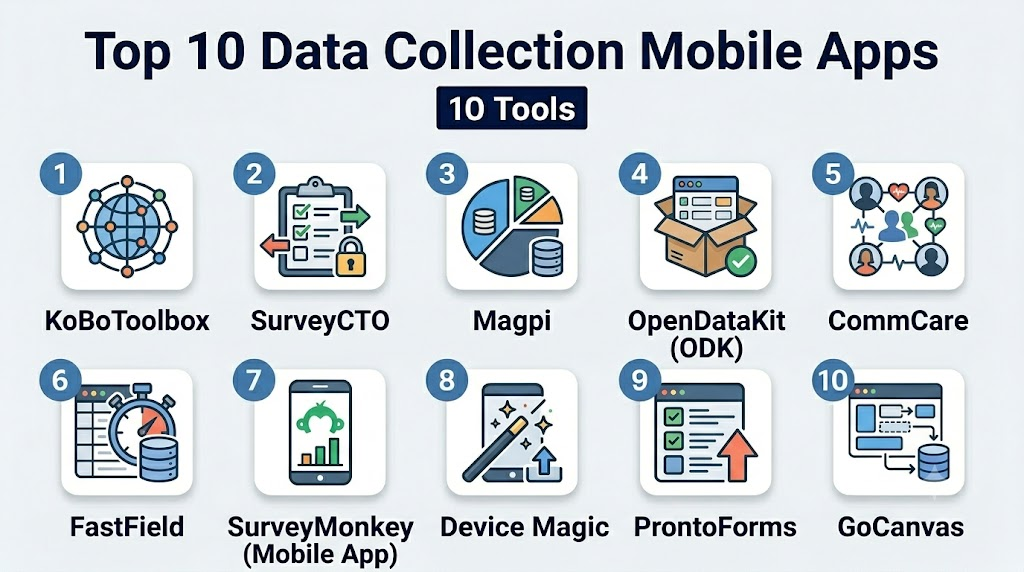
Top 10 Data Collection Mobile Apps
1- KoBoToolbox
Short description: KoBoToolbox enables NGOs and research teams to collect data in challenging field environments with offline support and robust analytics.
Key Features
- Offline form data capture and auto-sync
- Multi-language form support
- GPS, barcode, and photo integration
- Workflow and approval routing
- Analytics dashboards and reporting
- Template and survey library
- API access for custom integrations
Pros
- Strong offline capabilities for remote data collection
- Open-source with active support community
- Easy deployment for NGOs and field researchers
Cons
- Advanced analytics limited compared to enterprise platforms
- Setup can require technical knowledge
- UI can be less polished for casual users
Platforms / Deployment
- Web / iOS / Android
- Cloud / On-prem (self-hosted)
Security & Compliance
- Encryption for data in transit and at rest
- Not publicly stated for HIPAA/SOC 2
Integrations & Ecosystem
- Excel and CSV exports
- API for integration with analytics tools
- GIS and mapping platforms
Support & Community
- Community forums
- Documentation and tutorials
- NGO-focused support
2- SurveyCTO
Short description: SurveyCTO offers enterprise-grade mobile data collection with offline functionality, workflow automation, and real-time monitoring.
Key Features
- Offline form collection and synchronization
- Advanced skip logic and branching
- Workflow automation and approval routing
- GPS, images, and sensor integration
- Real-time monitoring and dashboards
- Secure data storage with encryption
- API for integrations
Pros
- Enterprise-ready features
- Strong offline data support
- High reliability in field conditions
Cons
- Pricing can be high for small teams
- Requires training for advanced features
- Mobile UI may feel complex for casual users
Platforms / Deployment
- Web / iOS / Android
- Cloud
Security & Compliance
- SSO, encryption
- GDPR, ISO 27001
Integrations & Ecosystem
- Data analytics platforms
- CRM and ERP integration
- API for custom workflows
Support & Community
- Documentation and webinars
- Email support
- Active user community
3- Magpi
Short description: Magpi provides mobile data collection and workflow automation for health, research, and humanitarian projects with real-time reporting.
Key Features
- Offline data capture with auto-sync
- GPS, barcode, and photo inputs
- Conditional forms and workflows
- Real-time dashboards
- Automated reporting and alerts
- Template library for surveys and forms
- API access for integration
Pros
- Suitable for fieldwork in remote areas
- Real-time monitoring and alerts
- Customizable templates for recurring surveys
Cons
- Limited advanced analytics
- Setup may require technical support
- UI less intuitive for non-technical users
Platforms / Deployment
- Web / iOS / Android
- Cloud
Security & Compliance
- Encryption in transit and at rest
- GDPR compliant
Integrations & Ecosystem
- Data visualization tools
- API for analytics integration
- CSV and Excel exports
Support & Community
- Tutorials and documentation
- Email support
- Community forums
4- OpenDataKit (ODK)
Short description: ODK is an open-source mobile data collection platform ideal for field researchers and NGOs needing customizable surveys and offline functionality.
Key Features
- Offline form collection with auto-sync
- Customizable surveys and workflows
- GPS, photos, and sensor data capture
- Multi-language support
- Analytics dashboard
- Integration with cloud storage and databases
- Template and question library
Pros
- Open-source and highly flexible
- Strong offline support
- Suitable for research and NGOs
Cons
- Requires technical expertise to deploy
- UI less polished than commercial apps
- Limited built-in analytics
Platforms / Deployment
- Web / iOS / Android
- Cloud / On-prem (self-hosted)
Security & Compliance
- Encryption for data at rest and in transit
- Not publicly stated for compliance certifications
Integrations & Ecosystem
- GIS and mapping tools
- Data warehouses
- API for analytics and reporting
Support & Community
- Community support forums
- Documentation and guides
- Developer community
5- CommCare
Short description: CommCare enables mobile data collection for health, social services, and humanitarian work with offline and workflow automation.
Key Features
- Offline data capture with auto-sync
- Case management and workflow automation
- GPS, images, and sensor inputs
- Conditional forms and multi-step approvals
- Analytics dashboards
- Customizable templates
- Integration APIs
Pros
- Strong focus on healthcare and field service
- Reliable offline functionality
- Workflow automation capabilities
Cons
- Cost may be high for small organizations
- Learning curve for complex workflows
- UI can feel heavy for casual users
Platforms / Deployment
- Web / iOS / Android
- Cloud
Security & Compliance
- SSO, encryption, audit logs
- GDPR, HIPAA
Integrations & Ecosystem
- Data visualization tools
- CRM and health management systems
- API access for custom integration
Support & Community
- Tutorials and documentation
- Email support
- Active NGO user community
6- FastField
Short description: FastField provides mobile forms and data capture with workflow automation for field inspections, surveys, and audits.
Key Features
- Offline mobile form capture
- Customizable form builder
- Workflow automation with approvals
- GPS, barcode, and photo support
- Real-time reporting and dashboards
- Template library
- API integration
Pros
- Enterprise-grade mobile forms
- Strong workflow automation
- Offline-first functionality
Cons
- Higher pricing for small teams
- Limited AI-assisted features
- Learning curve for complex workflows
Platforms / Deployment
- Web / iOS / Android
- Cloud
Security & Compliance
- Encryption, SSO, MFA
- GDPR, SOC 2
Integrations & Ecosystem
- ERP and CRM tools
- Cloud storage services
- API for analytics and custom workflows
Support & Community
- Knowledge base and tutorials
- Email and chat support
- Enterprise support tiers
7- SurveyMonkey (Mobile App)
Short description: SurveyMonkey’s mobile app enables surveys and data collection with real-time reporting and workflow automation.
Key Features
- Mobile survey creation
- Conditional logic and branching
- Offline data capture
- Workflow approvals and notifications
- Analytics dashboards
- Integration with CRM and cloud tools
- Template library
Pros
- Trusted survey platform
- Easy to use for SMBs
- Real-time reporting
Cons
- Limited field sensor integration
- Some advanced workflow features require premium plans
- Offline mode less robust than specialized apps
Platforms / Deployment
- Web / iOS / Android
- Cloud
Security & Compliance
- Encryption, SSO
- GDPR compliant
Integrations & Ecosystem
- Salesforce, HubSpot
- Google Workspace, Zapier
- API for custom integration
Support & Community
- Documentation and tutorials
- Email and chat support
- Community forums
8- Device Magic
Short description: Device Magic provides mobile data collection and workflow automation for field operations, inspections, and reporting.
Key Features
- Offline mobile forms
- GPS, barcode, photo capture
- Workflow and approval automation
- Analytics dashboards
- Template library
- API for integrations
- Real-time notifications
Pros
- Reliable offline functionality
- Strong field workflow support
- Integration with analytics and reporting
Cons
- Premium pricing for advanced features
- UI may feel dated
- Some integrations require technical setup
Platforms / Deployment
- Web / iOS / Android
- Cloud
Security & Compliance
- Encryption, SSO
- GDPR, SOC 2
Integrations & Ecosystem
- CRM and ERP integration
- Cloud storage platforms
- API for custom workflows
Support & Community
- Tutorials and knowledge base
- Email support
- Active user community
9- ProntoForms
Short description: ProntoForms enables mobile forms, workflow automation, and real-time reporting for field service, inspections, and audits.
Key Features
- Offline mobile data capture
- Workflow and approval routing
- GPS, barcode, and photo support
- Analytics and dashboards
- Integration with ERP, CRM
- Template library
- Real-time notifications
Pros
- Enterprise-grade field data collection
- Strong reporting and analytics
- Workflow automation
Cons
- Premium pricing for SMBs
- Learning curve for complex workflows
- Limited AI assistance
Platforms / Deployment
- Web / iOS / Android
- Cloud
Security & Compliance
- Encryption, SSO
- SOC 2, GDPR
Integrations & Ecosystem
- Salesforce, SAP, Microsoft 365
- Cloud storage and analytics tools
- API support
Support & Community
- Knowledge base and documentation
- Enterprise support tiers
- Community forums
10- GoCanvas
Short description: GoCanvas provides mobile forms, workflow automation, and reporting for field teams in operations, inspections, and services.
Key Features
- Drag-and-drop form builder
- Workflow automation and approvals
- Offline data capture
- GPS, barcode, photo support
- Analytics dashboards
- Template library
- Integration API
Pros
- Easy to use for field teams
- Reliable offline functionality
- Workflow automation
Cons
- Advanced features require premium plans
- Limited AI-assisted analytics
- Setup may require training
Platforms / Deployment
- Web / iOS / Android
- Cloud
Security & Compliance
- Encryption, SSO
- GDPR, SOC 2
Integrations & Ecosystem
- Salesforce, Google Workspace, Zapier
- API for custom workflows
- Cloud storage integration
Support & Community
- Documentation and tutorials
- Email and chat support
- Active community
Comparison Table (Top 10)
| Tool Name | Best For | Platform(s) Supported | Deployment | Standout Feature | Public Rating |
|---|---|---|---|---|---|
| KoBoToolbox | NGOs & research | Web, iOS, Android | Cloud / On-prem | Offline-first surveys | N/A |
| SurveyCTO | Enterprise data | Web, iOS, Android | Cloud | Enterprise-grade offline collection | N/A |
| Magpi | Health & humanitarian | Web, iOS, Android | Cloud | Real-time reporting | N/A |
| ODK | Field research | Web, iOS, Android | Cloud / On-prem | Open-source offline support | N/A |
| CommCare | Health & social services | Web, iOS, Android | Cloud | Case management & workflow | N/A |
| FastField | Inspections & audits | Web, iOS, Android | Cloud | Offline & workflow automation | N/A |
| SurveyMonkey | SMB & surveys | Web, iOS, Android | Cloud | Conditional logic & approvals | N/A |
| Device Magic | Field operations | Web, iOS, Android | Cloud | Mobile workflow & approvals | N/A |
| ProntoForms | Field service | Web, iOS, Android | Cloud | Real-time analytics & workflow | N/A |
| GoCanvas | Operations & inspections | Web, iOS, Android | Cloud | Drag-and-drop forms & offline | N/A |
Evaluation & Scoring of Data Collection Mobile Apps
| Tool Name | Core (25%) | Ease (15%) | Integrations (15%) | Security (10%) | Performance (10%) | Support (10%) | Value (15%) | Weighted Total (0–10) |
|---|---|---|---|---|---|---|---|---|
| KoBoToolbox | 9 | 8 | 7 | 8 | 9 | 8 | 8 | 8.2 |
| SurveyCTO | 9 | 7 | 8 | 8 | 9 | 8 | 7 | 8.0 |
| Magpi | 8 | 8 | 7 | 8 | 8 | 8 | 7 | 7.9 |
| ODK | 8 | 7 | 7 | 8 | 8 | 7 | 7 | 7.7 |
| CommCare | 9 | 7 | 8 | 8 | 9 | 8 | 7 | 8.0 |
| FastField | 9 | 8 | 8 | 8 | 8 | 8 | 7 | 8.1 |
| SurveyMonkey | 8 | 9 | 7 | 7 | 8 | 7 | 8 | 7.9 |
| Device Magic | 9 | 7 | 8 | 8 | 8 | 8 | 7 | 8.0 |
| ProntoForms | 9 | 7 | 8 | 8 | 8 | 8 | 7 | 8.0 |
| GoCanvas | 8 | 8 | 7 | 7 | 8 | 7 | 7 | 7.7 |
Which Data Collection Mobile App Is Right for You?
Solo / Freelancer
- KoBoToolbox or Magpi for simple offline surveys and research projects.
SMB
- SurveyCTO, FastField, or SurveyMonkey for structured data collection with workflow automation.
Mid-Market
- CommCare, Device Magic, or GoCanvas for moderate scale and multi-step approvals.
Enterprise
- SurveyCTO, ProntoForms, or FastField for large-scale field operations with compliance requirements.
Budget vs Premium
- Free/small teams: KoBoToolbox, ODK
- Enterprise-grade: SurveyCTO, ProntoForms, FastField
Feature Depth vs Ease of Use
- KoBoToolbox, SurveyMonkey: prioritize ease of use
- CommCare, SurveyCTO, ProntoForms: prioritize advanced workflow automation
Integrations & Scalability
- Enterprise apps like SurveyCTO, ProntoForms, FastField provide deep integration with ERP, CRM, and analytics platforms.
Security & Compliance Needs
- CommCare, SurveyCTO, FastField meet HIPAA, GDPR, and SOC 2 requirements for regulated data collection.
Frequently Asked Questions (FAQs)
1- What pricing models are common?
Most offer subscription-based per-user or enterprise licenses; NGOs and small teams may have free or lower-tier plans.
2- How easy is onboarding?
Simple apps like KoBoToolbox and Magpi require minimal setup; enterprise platforms like SurveyCTO and CommCare offer structured onboarding.
3- Can these apps work offline?
Yes, offline data capture with auto-sync when online is a core feature in nearly all top apps.
4- Are these apps secure for sensitive data?
Enterprise apps include encryption, RBAC, SSO, and compliance with HIPAA, GDPR, or SOC 2 standards.
5- Do these apps integrate with other systems?
Yes, they commonly integrate with ERP, CRM, analytics, and cloud storage platforms, often via APIs.
6- Can AI assist with data validation?
Some apps offer AI-assisted anomaly detection, predictive analytics, and form validation for higher-quality data.
7- Can these apps handle complex forms?
Yes, they support conditional logic, multi-step forms, dynamic fields, and workflow approvals.
8- Are forms mobile-friendly?
All listed apps are optimized for iOS and Android devices, ensuring usability in the field.
9- How is collected data analyzed?
Built-in dashboards and reporting tools allow real-time visualization, trend tracking, and export to analytics platforms.
10- How do I choose the right tool?
Consider team size, offline needs, workflow complexity, integrations, compliance requirements, and budget. Pilot 2–3 apps before full adoption.
Conclusion
Selecting the right Data Collection Mobile App depends on the scale of field operations, data complexity, and compliance requirements. Freelancers and small teams may prefer KoBoToolbox or Magpi for simplicity and offline functionality. SMBs can leverage SurveyCTO, FastField, or SurveyMonkey for structured workflows. Enterprises benefit from CommCare, ProntoForms, or FastField for large-scale operations with compliance needs. Evaluate integration capabilities, AI-assisted validation, security, and mobile optimization. Shortlist 2–3 apps, run pilot tests, and validate compliance and workflow automation before full deployment. With the right app, teams can collect accurate data efficiently, streamline approvals, and gain actionable insights in real time.

Find Trusted Cardiac Hospitals
Compare heart hospitals by city and services — all in one place.
Explore Hospitals
Mobile data collection apps are most effective when they capture accurate information directly in the field, even without a constant internet connection. Features such as offline data entry, GPS tagging, photo capture, and real-time synchronization help organizations improve data quality, reduce manual paperwork, and accelerate decision-making.