Introduction
Mobile App Development Platforms are software solutions that enable organizations and developers to create mobile applications for iOS, Android, and web without starting from scratch. These platforms provide visual interfaces, prebuilt components, APIs, and tools for deployment, streamlining app creation while reducing development time and costs.
Mobile apps are now critical for engaging customers, improving internal workflows, and enabling new revenue streams. Mobile App Development Platforms allow businesses to maintain a competitive edge by accelerating development and supporting iterative updates.
Real-world use cases include:
- Customer-facing apps for e-commerce, banking, or service delivery
- Field service and operations management apps
- Internal workflow automation and employee productivity tools
- Event registration and engagement apps
- Cross-platform MVPs for startups and product testing
Key evaluation criteria for buyers:
- Cross-platform support (iOS, Android, Web)
- Visual design and workflow automation
- Integration with APIs, CRM, and databases
- Security, compliance, and user authentication
- Scalability and performance
- Ease of use and learning curve
- Template libraries and prebuilt components
- Deployment options (cloud, hybrid, on-premises)
- Support, documentation, and community
- Pricing and value for money
Best for: SMBs, enterprises, agencies, and product teams seeking rapid mobile app development with cross-platform deployment.
Not ideal for: Organizations needing highly customized native applications with deep platform-specific capabilities, or those with extremely complex backend logic requiring traditional development.
Key Trends in Mobile App Development Platforms
- AI-assisted development for UI/UX optimization and workflow automation
- Cross-platform frameworks for web, iOS, and Android apps
- Low-code and no-code integration capabilities
- Embedded analytics and monitoring dashboards
- Cloud-native, serverless, and hybrid deployment options
- Integration with enterprise systems and third-party services
- Security and compliance frameworks (SSO, MFA, GDPR, SOC 2)
- Template-driven app development for speed
- Subscription and usage-based pricing models
- Increasing adoption for MVPs and rapid prototyping
How We Selected These Tools (Methodology)
- Market adoption and global mindshare
- Feature completeness for UI/UX, backend logic, and deployment
- Reliability and performance signals from active users
- Security posture including encryption and access controls
- Integration and ecosystem support with third-party apps
- Customer fit across solo developers, SMBs, mid-market, and enterprises
- Ease of use and learning curve for non-developers
- Community and support infrastructure
- Deployment flexibility and scalability
- Pricing model and overall value
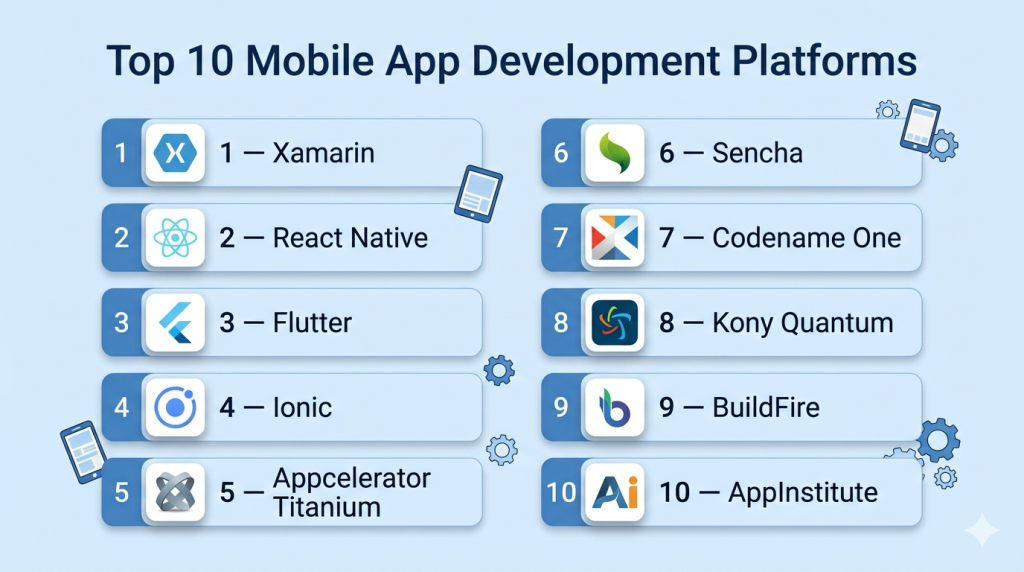
Top 10 Mobile App Development Platforms
#1 — Xamarin
Short description: Xamarin allows developers to build cross-platform mobile applications using C# and .NET, targeting enterprises and development teams seeking native performance with code reuse.
Key Features
- Single codebase for iOS, Android, and Windows
- Integration with Visual Studio
- Access to native APIs and SDKs
- Component marketplace for rapid development
- Automated testing and debugging tools
- Performance monitoring
Pros
- High code reuse across platforms
- Native-like performance and UI
Cons
- Requires familiarity with C# and .NET
- Heavier apps compared to lightweight frameworks
Platforms / Deployment
- Windows / macOS / iOS / Android / Cloud
Security & Compliance
- SSO, encryption
- Not publicly stated
Integrations & Ecosystem
- Visual Studio
- Azure services
- REST APIs
- Third-party SDKs
Support & Community
- Microsoft documentation, forums, and community
- Tutorials and support tiers available
#2 — React Native
Short description: React Native is an open-source framework for building mobile applications using JavaScript and React, ideal for startups, SMBs, and tech-savvy teams.
Key Features
- Single codebase for iOS and Android
- Native UI components
- Hot reload for fast development
- Integration with third-party libraries
- Performance optimization tools
Pros
- Strong community and ecosystem
- Fast development cycles
Cons
- Some native modules require custom coding
- Performance may lag for complex apps
Platforms / Deployment
- Web / iOS / Android / Cloud
Security & Compliance
- Not publicly stated
Integrations & Ecosystem
- Node.js packages
- Firebase
- APIs and third-party SDKs
Support & Community
- Active open-source community
- Tutorials and forums
#3 — Flutter
Short description: Flutter is Google’s open-source framework for building cross-platform apps using Dart, enabling highly performant apps with consistent UI across iOS and Android.
Key Features
- Single codebase for iOS and Android
- Customizable widgets for native UI
- Hot reload for rapid iteration
- Integration with Firebase
- Strong testing and debugging tools
Pros
- High performance and smooth UI
- Rich set of prebuilt widgets
Cons
- Learning Dart is required
- Larger app size compared to native apps
Platforms / Deployment
- Web / iOS / Android / Cloud
Security & Compliance
- Not publicly stated
Integrations & Ecosystem
- Firebase
- REST APIs
- Third-party SDKs
- Plugin ecosystem
Support & Community
- Google-supported tutorials and documentation
- Active Flutter community
#4 — Ionic
Short description: Ionic is a hybrid mobile app development framework that allows building cross-platform apps using web technologies like HTML, CSS, and JavaScript.
Key Features
- Web technology-based development
- Cross-platform deployment
- Prebuilt UI components
- Integration with Angular, React, Vue
- Native plugin support
- Testing and debugging tools
Pros
- Fast prototyping and deployment
- Large component library
Cons
- Performance may lag for complex apps
- Heavy reliance on webview
Platforms / Deployment
- Web / iOS / Android / Cloud
Security & Compliance
- SSL, encryption
- Not publicly stated
Integrations & Ecosystem
- REST APIs
- Firebase, Cordova, Capacitor
- Third-party SDKs
Support & Community
- Tutorials, forums, and documentation
- Active developer community
#5 — Appcelerator Titanium
Short description: Appcelerator Titanium enables development of cross-platform mobile applications using JavaScript, focusing on enterprise apps and complex integrations.
Key Features
- Single JavaScript codebase for iOS and Android
- Access to native APIs
- Prebuilt UI components
- Cloud services integration
- Testing and debugging
Pros
- Enterprise-focused and scalable
- Native performance support
Cons
- Smaller community than Flutter or React Native
- Requires JavaScript knowledge
Platforms / Deployment
- Web / iOS / Android / Cloud
Security & Compliance
- Not publicly stated
Integrations & Ecosystem
- REST APIs
- Cloud services
- Third-party SDKs
Support & Community
- Tutorials and forums
- Enterprise support available
#6 — Sencha
Short description: Sencha provides a robust framework for enterprise-grade mobile apps, emphasizing cross-platform UI, data management, and performance.
Key Features
- Prebuilt UI components and layouts
- Cross-platform deployment
- Data package management
- Testing and debugging tools
- Integration with enterprise systems
Pros
- Enterprise-grade scalability
- Robust UI components
Cons
- Higher learning curve
- Licensing cost
Platforms / Deployment
- Web / iOS / Android / Cloud
Security & Compliance
- Not publicly stated
Integrations & Ecosystem
- APIs, databases, enterprise connectors
Support & Community
- Enterprise support and documentation
#7 — Codename One
Short description: Codename One is a low-code mobile app platform allowing Java developers to create native cross-platform applications.
Key Features
- Single Java codebase
- Cross-platform deployment
- Native UI rendering
- Cloud build and deployment services
- API integration
Pros
- Strong for Java developers
- Native UI support
Cons
- Smaller ecosystem
- Less visual design support
Platforms / Deployment
- Web / iOS / Android / Cloud
Security & Compliance
- Not publicly stated
Integrations & Ecosystem
- REST APIs
- Cloud build integration
Support & Community
- Tutorials, forums, and documentation
#8 — Kony Quantum
Short description: Kony Quantum provides a full-featured enterprise mobile app platform for building cross-platform applications with integrated backend and analytics.
Key Features
- Visual IDE with drag-and-drop
- Multi-platform deployment
- API integration and backend services
- Analytics and monitoring
- Prebuilt templates and components
Pros
- Enterprise-grade features
- Rapid prototyping and deployment
Cons
- Higher cost
- Complex for small teams
Platforms / Deployment
- Web / iOS / Android / Cloud / Hybrid
Security & Compliance
- SSL, SSO/SAML
- Not publicly stated
Integrations & Ecosystem
- REST APIs, enterprise connectors
- Analytics platforms
Support & Community
- Enterprise support, documentation
#9 — BuildFire
Short description: BuildFire is a low-code mobile app platform for iOS and Android, targeting SMBs and enterprises needing quick app deployment.
Key Features
- Drag-and-drop builder
- Multi-platform deployment
- Plugin marketplace
- Push notifications and analytics
- Custom development options
Pros
- Rapid deployment
- Easy for non-developers
Cons
- Limited complex backend support
- Subscription pricing for premium features
Platforms / Deployment
- Web / iOS / Android / Cloud
Security & Compliance
- SSL, GDPR compliance
- Not publicly stated
Integrations & Ecosystem
- REST APIs
- Analytics, CRM, and cloud services
Support & Community
- Documentation, support, and tutorials
#10 — AppInstitute
Short description: AppInstitute enables small businesses to create mobile apps for iOS and Android using templates and visual editors with low-code features.
Key Features
- Drag-and-drop visual editor
- Template-driven app creation
- Multi-platform deployment
- Push notifications
- Analytics and performance tools
Pros
- Easy to use for SMBs
- Quick deployment
Cons
- Limited complex features
- Not ideal for enterprise apps
Platforms / Deployment
- Web / iOS / Android / Cloud
Security & Compliance
- SSL, GDPR compliance
- Not publicly stated
Integrations & Ecosystem
- REST APIs
- CRM, analytics, and marketing tools
Support & Community
- Tutorials, forums, and documentation
Comparison Table (Top 10)
| Tool Name | Best For | Platform(s) Supported | Deployment | Standout Feature | Public Rating |
|---|---|---|---|---|---|
| Xamarin | Enterprise & dev teams | Web / iOS / Android | Cloud | C# code reuse & native performance | N/A |
| React Native | Startups & SMBs | Web / iOS / Android | Cloud | Cross-platform with JS | N/A |
| Flutter | Cross-platform apps | Web / iOS / Android | Cloud | Rich UI & hot reload | N/A |
| Ionic | Hybrid apps | Web / iOS / Android | Cloud | Web tech & prebuilt UI components | N/A |
| Appcelerator | Enterprise apps | Web / iOS / Android | Cloud | Native performance & JS support | N/A |
| Sencha | Enterprise UI | Web / iOS / Android | Cloud | Enterprise-grade UI components | N/A |
| Codename One | Java developers | Web / iOS / Android | Cloud | Native UI & Java support | N/A |
| Kony Quantum | Enterprise solutions | Web / iOS / Android | Cloud / Hybrid | Full-feature enterprise | N/A |
| BuildFire | SMB apps | Web / iOS / Android | Cloud | Plugin marketplace & low-code | N/A |
| AppInstitute | SMB apps | Web / iOS / Android | Cloud | Easy template-based app creation | N/A |
Evaluation & Scoring of Mobile App Development Platforms
| Tool Name | Core (25%) | Ease (15%) | Integrations (15%) | Security (10%) | Performance (10%) | Support (10%) | Value (15%) | Weighted Total (0–10) |
|---|---|---|---|---|---|---|---|---|
| Xamarin | 9 | 7 | 8 | 7 | 9 | 7 | 7 | 8.0 |
| React Native | 8 | 8 | 8 | 7 | 8 | 7 | 7 | 7.85 |
| Flutter | 9 | 8 | 8 | 7 | 8 | 7 | 7 | 8.0 |
| Ionic | 8 | 8 | 7 | 7 | 7 | 7 | 7 | 7.55 |
| Appcelerator | 8 | 7 | 7 | 7 | 8 | 7 | 7 | 7.6 |
| Sencha | 8 | 7 | 7 | 7 | 8 | 7 | 7 | 7.6 |
| Codename One | 7 | 7 | 6 | 7 | 7 | 6 | 7 | 6.9 |
| Kony Quantum | 9 | 7 | 8 | 7 | 8 | 7 | 7 | 7.95 |
| BuildFire | 7 | 8 | 6 | 7 | 7 | 6 | 7 | 7.05 |
| AppInstitute | 7 | 8 | 6 | 7 | 7 | 6 | 7 | 7.05 |
Interpretation: Higher weighted totals indicate platforms with balanced features, usability, and integration capabilities. Scores are comparative and should be evaluated according to project complexity, deployment needs, and team skill.
Which Mobile App Development Platforms Tool Is Right for You?
Solo / Freelancer
- BuildFire, AppInstitute, Codename One for quick prototyping and mobile app creation
SMB
- React Native, Flutter, Ionic for cross-platform apps and internal tools
Mid-Market
- Kony Quantum, Appcelerator, Sencha for scalable enterprise mobile solutions
Enterprise
- Xamarin, Kony Quantum, Sencha for complex, integrated mobile applications
Budget vs Premium
- Budget: AppInstitute, BuildFire, Codename One
- Premium: Xamarin, Kony Quantum, Flutter
Feature Depth vs Ease of Use
- Simple and fast: BuildFire, AppInstitute
- Advanced functionality: Xamarin, Flutter, Kony Quantum
Integrations & Scalability
- Enterprise-ready: Xamarin, Kony Quantum, Sencha
- Moderate: React Native, Ionic
Security & Compliance Needs
- Enterprise-grade: Xamarin, Kony Quantum, Sencha
- Standard compliance: AppInstitute, BuildFire
Frequently Asked Questions (FAQs)
1. What pricing models are common?
Subscription-based models are typical, tiered by app complexity, users, and deployment options. Enterprise plans provide additional support and security.
2. How difficult is onboarding?
Tools like AppInstitute and BuildFire are beginner-friendly. Xamarin, Kony Quantum, and Flutter may require development knowledge.
3. Can apps be deployed on multiple platforms?
Yes. Most platforms support iOS, Android, and web deployment.
4. Are AI capabilities included?
Some platforms integrate AI-assisted development, automated testing, and workflow suggestions.
5. Can teams collaborate in real-time?
Yes. Platforms like Xamarin, Kony Quantum, and Flutter support team collaboration, version control, and code reviews.
6. Are mobile apps secure?
Most platforms provide SSL, encryption, and role-based access. Enterprise tools include additional compliance frameworks.
7. Can platforms integrate with external systems?
Yes. Integrations include REST/SOAP APIs, CRM, analytics, and backend databases.
8. Can these platforms handle complex workflows?
Yes. Enterprise platforms such as Kony Quantum and Xamarin handle complex, multi-step workflows.
9. What common mistakes do users make?
- Overcomplicating app logic
- Ignoring performance optimization
- Failing to leverage integrations and automation
10. Are there alternatives to mobile app development platforms?
Yes. Traditional native development, cross-platform frameworks, and no-code app builders may be alternatives depending on requirements.
Conclusion
Mobile App Development Platforms streamline the creation of cross-platform applications, enabling teams to deliver mobile experiences faster and more efficiently. Selection depends on team size, skill, complexity, deployment, and integration requirements. Small teams and SMBs may choose BuildFire, AppInstitute, or Codename One for rapid prototyping, while mid-market and enterprise organizations benefit from Xamarin, Kony Quantum, or Flutter for scalable, integrated mobile apps. Testing pilot apps and validating workflows, integrations, and performance is recommended before full-scale deployment to ensure the chosen platform meets organizational goals securely and efficiently.

Find Trusted Cardiac Hospitals
Compare heart hospitals by city and services — all in one place.
Explore Hospitals
Choosing a mobile app platform is not only about features or development speed. In real projects, the ease of maintaining the app after launch can make a big difference, especially when APIs, operating systems, or business needs change. It would also help teams to check how easily an app can be updated and supported over time before making a final choice.