Introduction
Time Tracking Software is a set of tools that helps organizations, teams, and freelancers monitor how time is spent across projects, tasks, and client engagements. These tools provide real-time insights into productivity, enable accurate billing, and ensure resource optimization. By capturing work hours systematically, businesses can improve accountability, reduce time wastage, and generate actionable reports for decision-making.
In today’s fast-paced work environment, distributed teams and hybrid work models have made time tracking more critical than ever. Teams need reliable insights into task completion, workload distribution, and project progress. Time Tracking Software provides transparency, supports payroll accuracy, and integrates seamlessly with project management systems to improve overall operational efficiency.
Common use cases include monitoring employee work hours, tracking billable time for clients, evaluating project timelines, managing workloads across teams, and generating compliance and payroll reports. Buyers should evaluate tools based on ease of use, reporting capabilities, integration with project management and accounting tools, mobile access, automation features, AI-enabled insights, security compliance, scalability, and pricing.
Best for: Project managers, team leads, HR departments, and freelancers needing precise time tracking and reporting.
Not ideal for: Teams with highly unstructured workflows or organizations that rely entirely on manual tracking.
Key Trends in Time Tracking Software
- AI-assisted task recognition and automatic time categorization
- Mobile-first tracking for remote and field teams
- Integration with HR, payroll, and project management systems
- Automation of reminders and timesheet approvals
- Real-time dashboards for productivity and utilization monitoring
- Cloud-first deployment with hybrid accessibility
- Predictive analytics for project completion forecasts
- Compliance with GDPR, SOC 2, ISO 27001, and labor regulations
- Subscription and flexible pricing models tailored for SMBs and enterprises
- Custom reporting and KPI tracking for individual and team performance
How We Selected These Tools (Methodology)
- Evaluated market adoption and brand recognition
- Assessed core functionality for time tracking, reporting, and automation
- Reviewed performance and reliability signals from real-world deployments
- Analyzed security features including encryption, SSO, MFA, and audit logs
- Considered integration capabilities with popular project management and accounting tools
- Evaluated scalability for small teams, SMBs, and enterprise-level organizations
- Reviewed ease of use and onboarding processes for technical and non-technical users
- Compared AI-driven analytics and automation capabilities
- Checked pricing models and perceived value across different team sizes
- Evaluated support, documentation, and community resources
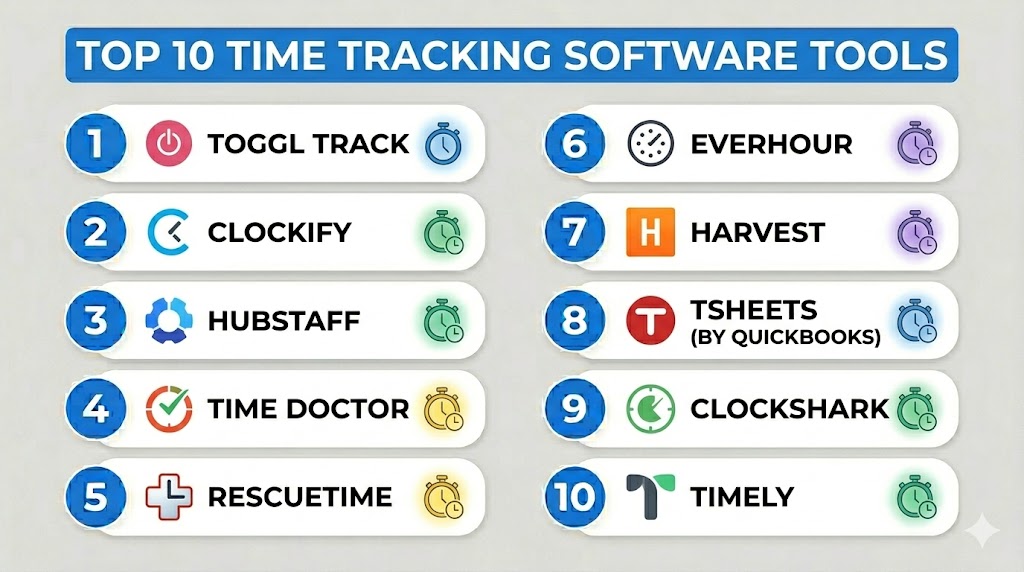
Top 10 Time Tracking Software Tools
#1 — Toggl Track
Short description: Cloud-based time tracking tool for freelancers, teams, and enterprises, focused on ease of use and reporting.
Key Features
- One-click time tracking across tasks and projects
- Automatic idle detection and reminders
- Detailed reporting and analytics dashboards
- Integration with project management and accounting tools
- Mobile apps for iOS and Android
- Offline mode with sync capability
- Team management features
Pros
- Extremely user-friendly
- Quick onboarding for new users
- Strong reporting and analytics
Cons
- Limited advanced project management features
- Free plan has restrictions
- Some integrations require premium subscription
Platforms / Deployment
Web, Windows, macOS, iOS, Android / Cloud
Security & Compliance
SSO, encryption; SOC 2, GDPR Not publicly stated
Integrations & Ecosystem
- Asana, Jira, Trello, Slack, QuickBooks
- API for custom integrations
Support & Community
Documentation, email support, webinars, and community forums
#2 — Clockify
Short description: Free and scalable time tracking software for teams and enterprises, offering simple reporting and project tracking.
Key Features
- Unlimited time tracking for teams
- Project and task-based tracking
- Detailed reporting and export capabilities
- Team management dashboards
- Integrations with project and productivity tools
- Mobile and desktop apps
- Pomodoro timer and reminders
Pros
- Free version supports unlimited users
- Simple and intuitive interface
- Flexible reporting options
Cons
- UI can feel basic for enterprise users
- Limited automation
- Some features require paid plan
Platforms / Deployment
Web, Windows, macOS, iOS, Android / Cloud
Security & Compliance
SSO, encryption; Not publicly stated
Integrations & Ecosystem
- Trello, Jira, Asana, Zapier
- API for automation
Support & Community
Documentation, email support, online knowledge base
#3 — Hubstaff
Short description: Time tracking software with GPS tracking, payroll integration, and productivity monitoring for remote teams.
Key Features
- Time tracking with GPS and screenshots
- Productivity monitoring and reporting
- Payroll and invoicing integration
- Team scheduling and timesheets
- Mobile and desktop apps
- Offline time tracking
- Integration with accounting and project management tools
Pros
- Ideal for remote teams
- Strong payroll features
- Automated reporting
Cons
- Privacy concerns with screenshots
- Premium plans required for advanced features
- Learning curve for beginners
Platforms / Deployment
Web, Windows, macOS, iOS, Android / Cloud
Security & Compliance
SSO, encryption; Not publicly stated
Integrations & Ecosystem
- QuickBooks, Xero, Trello, Asana
- API and webhooks
Support & Community
Documentation, chat and email support, tutorials
#4 — Time Doctor
Short description: Employee time tracking tool with productivity analytics and distraction alerts for remote and on-site teams.
Key Features
- Time tracking with distraction alerts
- Employee monitoring and reporting
- Payroll and invoicing
- Productivity analytics dashboards
- Mobile and desktop apps
- Offline time capture
- Integrations with project and accounting software
Pros
- Comprehensive productivity tracking
- Good for remote workforce management
- Payroll automation
Cons
- Employee monitoring may be intrusive
- Interface can be complex for small teams
- Some features require advanced plans
Platforms / Deployment
Web, Windows, macOS, iOS, Android / Cloud
Security & Compliance
SSO, encryption; Not publicly stated
Integrations & Ecosystem
- Asana, Trello, Jira, QuickBooks
- API for custom integrations
Support & Community
Documentation, tutorials, email support, community forum
#5 — RescueTime
Short description: Time tracking software with focus on personal productivity, automatic categorization of activities, and analytics dashboards.
Key Features
- Automatic activity tracking
- Detailed productivity reports
- Goal setting and alerts
- Offline and mobile tracking
- Browser and application tracking
- Team dashboards (for business plans)
- FocusTime distraction blocking
Pros
- Ideal for personal productivity improvement
- Minimal manual input required
- Detailed insights into time usage
Cons
- Limited project-level tracking
- Team features require premium plan
- No full payroll integration
Platforms / Deployment
Web, Windows, macOS, iOS, Android / Cloud
Security & Compliance
Encryption; Not publicly stated
Integrations & Ecosystem
- Calendar apps, Slack, Jira, API access
Support & Community
Documentation, email support, online community
#6 — Everhour
Short description: Time tracking software integrated with project management platforms for accurate tracking and reporting.
Key Features
- In-app time tracking for tasks
- Real-time dashboards and reporting
- Budgeting and invoicing
- Team time management
- Integration with Asana, Trello, Jira
- Mobile and desktop apps
- Timesheet approvals
Pros
- Seamless PM tool integrations
- Strong reporting and analytics
- User-friendly interface
Cons
- Requires integration for full functionality
- Limited offline capabilities
- Advanced features need paid plan
Platforms / Deployment
Web, Windows, macOS, iOS, Android / Cloud
Security & Compliance
SSO, encryption; Not publicly stated
Integrations & Ecosystem
- Asana, Trello, Jira, Slack, Zapier
- API for custom automation
Support & Community
Documentation, tutorials, email support
#7 — Harvest
Short description: Simple time tracking and expense management software suitable for freelancers and teams.
Key Features
- Time tracking with start/stop timers
- Expense tracking and invoicing
- Team timesheets and reporting
- Integration with project management tools
- Mobile and desktop apps
- Budget and project forecasting
- Automatic reminders
Pros
- Easy to use
- Strong billing features
- Good integration with PM tools
Cons
- Limited advanced analytics
- Some features require premium plan
- Smaller team features can be basic
Platforms / Deployment
Web, Windows, macOS, iOS, Android / Cloud
Security & Compliance
Encryption; Not publicly stated
Integrations & Ecosystem
- Asana, Trello, QuickBooks, Zapier
Support & Community
Documentation, webinars, email support
#8 — TSheets (by QuickBooks)
Short description: Time tracking software with GPS, scheduling, and payroll integration, ideal for remote and field teams.
Key Features
- Mobile time tracking with GPS
- Employee scheduling
- Timesheets and reporting
- Payroll and invoicing integration
- Alerts and notifications
- Team dashboard
- Offline tracking
Pros
- Excellent for mobile workforce
- Payroll integration simplifies admin
- Simple interface
Cons
- Premium pricing for advanced features
- Limited analytics compared to competitors
- Learning curve for managers
Platforms / Deployment
Web, Windows, iOS, Android / Cloud
Security & Compliance
SSO, encryption; Not publicly stated
Integrations & Ecosystem
- QuickBooks, Xero, Asana, Slack
Support & Community
Documentation, email support, tutorials
#9 — ClockShark
Short description: Time tracking and scheduling software for field service and construction teams.
Key Features
- GPS and mobile tracking
- Job and project tracking
- Scheduling and shift management
- Timesheets and payroll reporting
- Mobile apps with offline tracking
- Team dashboards
- Alerts and notifications
Pros
- Ideal for field service teams
- Easy payroll integration
- Mobile-friendly
Cons
- Limited office team features
- Advanced analytics require higher plan
- Smaller integration ecosystem
Platforms / Deployment
Web, iOS, Android / Cloud
Security & Compliance
SSO, encryption; Not publicly stated
Integrations & Ecosystem
- QuickBooks, Xero, Zapier
Support & Community
Documentation, tutorials, email support
#10 — Timely
Short description: AI-powered automatic time tracking tool designed for productivity insights and billing accuracy.
Key Features
- Automatic tracking of apps, websites, and tasks
- Team dashboards and reporting
- Project and client allocation
- Billing and invoicing
- AI-generated time suggestions
- Mobile and desktop apps
- Offline tracking
Pros
- Minimal manual entry
- AI insights improve productivity
- Accurate billing and reporting
Cons
- Premium pricing
- Learning curve for new users
- Limited offline capabilities
Platforms / Deployment
Web, Windows, macOS, iOS, Android / Cloud
Security & Compliance
SSO, encryption; Not publicly stated
Integrations & Ecosystem
- Slack, Asana, Trello, API access
Support & Community
Documentation, email support, webinars
Comparison Table (Top 10)
| Tool Name | Best For | Platform(s) Supported | Deployment | Standout Feature | Public Rating |
|---|---|---|---|---|---|
| Toggl Track | Freelancers & Teams | Web, Windows, macOS, iOS, Android | Cloud | Ease of use & reporting | N/A |
| Clockify | Teams & SMBs | Web, Windows, macOS, iOS, Android | Cloud | Free unlimited tracking | N/A |
| Hubstaff | Remote Teams | Web, Windows, macOS, iOS, Android | Cloud | GPS & payroll | N/A |
| Time Doctor | Remote/Hybrid Teams | Web, Windows, macOS, iOS, Android | Cloud | Productivity monitoring | N/A |
| RescueTime | Personal & Teams | Web, Windows, macOS, iOS, Android | Cloud | Automatic tracking & analytics | N/A |
| Everhour | Teams & Agencies | Web, Windows, macOS, iOS, Android | Cloud | PM tool integrations | N/A |
| Harvest | Freelancers & Small Teams | Web, Windows, macOS, iOS, Android | Cloud | Time + expense tracking | N/A |
| TSheets | Field Teams | Web, Windows, iOS, Android | Cloud | GPS + payroll | N/A |
| ClockShark | Construction/Field Teams | Web, iOS, Android | Cloud | Job tracking & scheduling | N/A |
| Timely | Knowledge Workers | Web, Windows, macOS, iOS, Android | Cloud | AI-powered tracking | N/A |
Evaluation & Scoring of Time Tracking Software
| Tool Name | Core (25%) | Ease (15%) | Integrations (15%) | Security (10%) | Performance (10%) | Support (10%) | Value (15%) | Weighted Total |
|---|---|---|---|---|---|---|---|---|
| Toggl Track | 9 | 9 | 8 | 8 | 9 | 8 | 8 | 8.6 |
| Clockify | 8 | 9 | 8 | 7 | 8 | 8 | 9 | 8.2 |
| Hubstaff | 8 | 8 | 8 | 8 | 8 | 8 | 8 | 8.0 |
| Time Doctor | 8 | 8 | 8 | 8 | 8 | 8 | 8 | 8.0 |
| RescueTime | 7 | 9 | 7 | 7 | 8 | 8 | 8 | 7.8 |
| Everhour | 8 | 8 | 8 | 8 | 8 | 8 | 8 | 8.0 |
| Harvest | 8 | 9 | 7 | 7 | 8 | 8 | 8 | 7.9 |
| TSheets | 8 | 8 | 7 | 8 | 8 | 8 | 8 | 7.9 |
| ClockShark | 8 | 8 | 7 | 7 | 8 | 8 | 8 | 7.8 |
| Timely | 9 | 8 | 8 | 8 | 8 | 8 | 8 | 8.2 |
Interpretation: Higher weighted scores indicate strong usability, reporting, and integration capabilities for diverse teams.
Which Time Tracking Software Tool Is Right for You?
Solo / Freelancer
Toggl Track, Harvest, and Clockify offer intuitive, cost-effective tracking for individual productivity.
SMB
Clockify, Everhour, and Timely provide integration with project management tools and reporting for small teams.
Mid-Market
Hubstaff, Time Doctor, and Everhour offer productivity analytics, payroll, and team monitoring features.
Enterprise
Microsoft Project integrations with Time Doctor, Hubstaff, and Timely deliver scalable time tracking with compliance and reporting.
Budget vs Premium
Budget-friendly: Clockify, Harvest, Toggl Track
Premium enterprise-grade: Hubstaff, Time Doctor, Timely
Feature Depth vs Ease of Use
Harvest, Toggl Track, and Clockify prioritize simplicity; Hubstaff, Time Doctor, and Timely offer advanced analytics and monitoring.
Integrations & Scalability
Everhour, Hubstaff, and Timely provide extensive integrations and scale across teams.
Security & Compliance Needs
Enterprises requiring strong compliance should prioritize Hubstaff, Time Doctor, and Timely.
Frequently Asked Questions (FAQs)
- What is Time Tracking Software?
Software that logs hours, tasks, and activities for projects or teams to improve productivity and billing accuracy. - Who uses Time Tracking Software?
Freelancers, project managers, remote teams, and enterprises seeking workflow optimization. - Do these tools integrate with project management platforms?
Yes, most integrate with Jira, Asana, Trello, Slack, and accounting tools. - Can small teams benefit from time tracking tools?
Yes, lightweight tools like Harvest, Clockify, and Toggl Track are ideal for small teams. - Do these tools support mobile tracking?
Most provide iOS and Android apps for field and remote employees. - Can these tools automate time tracking?
Some tools, like Timely and RescueTime, use AI or automation to log work automatically. - Do these tools support payroll integration?
Enterprise tools like Hubstaff, TSheets, and ClockShark provide payroll and invoicing features. - Is training required to use these tools?
Simple tools require minimal onboarding; enterprise tools may need training sessions. - Can time tracking software generate reports?
Yes, detailed reporting is a core feature, enabling analytics and productivity insights. - How do I choose the right tool?
Consider team size, workflow complexity, integrations, budget, and reporting needs.
Conclusion
Time Tracking Software is essential for monitoring productivity, optimizing team workloads, and ensuring accurate billing across projects. Freelancers and small teams benefit from tools like Toggl Track, Harvest, and Clockify for simplicity and affordability. SMBs can leverage Everhour, Timely, and Clockify for enhanced reporting and integrations. Mid-market and enterprise organizations should consider Hubstaff, Time Doctor, and Timely for comprehensive monitoring, payroll, and compliance features. Running a trial with 2–3 tools helps identify the best fit, improving productivity, transparency, and project efficiency.

Find Trusted Cardiac Hospitals
Compare heart hospitals by city and services — all in one place.
Explore Hospitals
Very informative article, the comparison of time tracking software and their features is clear and easy to understand.
It really helped me get a better idea of which tool can be useful for different types of work needs.