Introduction
Disaster Recovery (DR) tools are software solutions that help organizations plan, implement, and automate the recovery of IT systems and data in case of failures, outages, cyberattacks, or natural disasters. These tools ensure business continuity by minimizing downtime and data loss, which is critical in today’s complex, hybrid IT landscapes. As enterprises increasingly rely on cloud infrastructure, virtualized environments, and remote endpoints, a reliable DR strategy becomes essential.
Modern organizations use DR tools for a variety of purposes, including restoring critical business applications, maintaining regulatory compliance, safeguarding against ransomware, and reducing downtime costs. Key use cases include:
- Rapid restoration of virtual machines and servers after a hardware or software failure.
- Automated orchestration of failover for cloud and on-premises workloads.
- Business continuity planning for natural disasters or human errors.
- Testing and validation of recovery procedures to meet compliance requirements.
- Integration with backup tools to provide end-to-end resiliency.
Key evaluation criteria buyers should consider:
- Supported platforms (Windows, Linux, macOS, VMware, Hyper-V, cloud)
- Deployment type (cloud, on-premises, hybrid)
- Recovery time objective (RTO) and recovery point objective (RPO)
- Automation and orchestration features
- Integration with backup and monitoring tools
- Security and compliance certifications
- Granular and full-system recovery capabilities
- Scalability and multi-site support
- Reporting and alerting functionality
- Licensing and pricing flexibility
Best for: IT managers, system administrators, and enterprise IT teams responsible for business continuity planning. Industries such as finance, healthcare, retail, and manufacturing benefit most due to high reliance on IT systems.
Not ideal for: Small organizations with limited infrastructure or low-risk tolerance may rely on simpler backup solutions and may not require full DR suites.
Key Trends in Disaster Recovery (DR) Tools
- AI-assisted orchestration: AI helps prioritize recovery processes and predicts potential failures.
- Cloud-native and hybrid DR: Simplifies failover and replication across on-prem and cloud environments.
- Automation and policy-driven recovery: Reduces human error and accelerates recovery times.
- Immutable and ransomware-resistant backups: Ensures data cannot be encrypted or altered by attackers.
- Granular and cross-platform recovery: Supports single file, application-level, or full-system restoration.
- Compliance and reporting focus: Prebuilt templates for GDPR, HIPAA, SOC 2, and other standards.
- Integration with monitoring and ITSM tools: DR workflows trigger alerts and tickets automatically.
- Multi-site and geo-redundant support: Improves resilience for distributed organizations.
- Subscription and pay-as-you-go pricing: Offers flexibility for SMBs and enterprises.
- Focus on remote and edge environments: DR coverage for endpoints, remote offices, and hybrid workloads.
How We Selected These Tools (Methodology)
- Assessed market adoption and mindshare across SMB, mid-market, and enterprise segments.
- Evaluated feature completeness including cloud, on-prem, and hybrid DR support.
- Reviewed reliability and performance signals through vendor documentation and case studies.
- Analyzed security posture with focus on encryption, RBAC, MFA, and audit logs.
- Checked integration and ecosystem support with monitoring, backup, and ITSM tools.
- Considered customer fit across segments and infrastructure sizes.
- Examined automation, orchestration, and failover capabilities.
- Assessed reporting, testing, and compliance features.
- Evaluated scalability for multi-site and hybrid deployments.
- Reviewed support options, community engagement, and documentation quality.
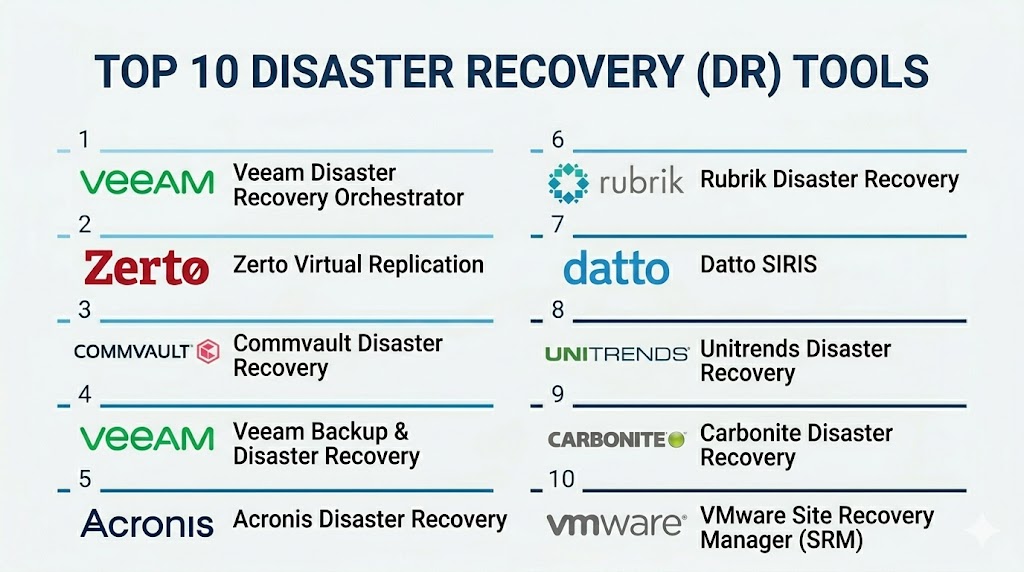
Top 10 Disaster Recovery (DR) Tools
#1 — Veeam Disaster Recovery Orchestrator
Short description: Veeam DR Orchestrator automates recovery processes for virtual, physical, and cloud environments. It’s ideal for IT teams requiring predictable failover and compliance-ready DR plans.
Key Features
- DR plan automation and orchestration
- Virtual and physical server recovery
- Multi-site replication
- RPO and RTO monitoring
- Compliance reporting
- Policy-based failover testing
- Cloud integration
Pros
- Fast orchestration of recovery
- Centralized monitoring for compliance
Cons
- Complex setup for large environments
- Premium cost for advanced features
Platforms / Deployment
- Windows, Linux, VMware, Hyper-V
- Cloud / On-premises / Hybrid
Security & Compliance
- Encryption, RBAC, audit logs
- Not publicly stated
Integrations & Ecosystem
Connects with Veeam Backup & Replication, cloud providers, ITSM tools.
- VMware and Hyper-V
- Cloud storage connectors
- APIs for automation
- Monitoring system integrations
Support & Community
Comprehensive documentation; active vendor and user community.
#2 — Zerto Virtual Replication
Short description: Zerto provides continuous replication and disaster recovery orchestration, optimized for hybrid and multi-cloud environments. Suitable for enterprises with mission-critical applications.
Key Features
- Continuous data replication
- Automated failover and failback
- Multi-cloud and hybrid support
- Granular application recovery
- Orchestration workflows
- Compliance and reporting dashboards
Pros
- Minimal RPO and RTO
- Strong multi-cloud support
Cons
- Premium pricing
- Requires VMware or Hyper-V expertise
Platforms / Deployment
- Windows, Linux, VMware, Hyper-V
- Cloud / On-premises / Hybrid
Security & Compliance
- Encryption, audit logs
- Not publicly stated
Integrations & Ecosystem
Integrates with backup solutions, cloud providers, ITSM, and monitoring.
- APIs for automation
- Multi-cloud connectors
- Workflow integration
Support & Community
Vendor support available; active enterprise community.
#3 — Commvault Disaster Recovery
Short description: Commvault offers enterprise DR with automation, orchestration, and policy-driven failover for on-premises, virtual, and cloud workloads.
Key Features
- Multi-cloud and hybrid support
- Automated recovery orchestration
- Granular and full-system restore
- Compliance reporting
- Deduplication and compression
- Policy-based RPO/RTO management
Pros
- Enterprise scalability
- Comprehensive compliance support
Cons
- Complex licensing
- Advanced configuration required
Platforms / Deployment
- Windows, Linux, VMware, Hyper-V, cloud
- Cloud / On-premises / Hybrid
Security & Compliance
- Encryption, RBAC, MFA
- Not publicly stated
Integrations & Ecosystem
Connects with backup, monitoring, ITSM, and cloud platforms.
- API automation
- Workflow integration
- Cloud connectors
Support & Community
Vendor support; active enterprise user forums.
#4 — Veeam Backup & Disaster Recovery
Short description: Combines backup and DR orchestration, allowing quick recovery for hybrid environments. Ideal for enterprises seeking unified protection.
Key Features
- Automated DR testing and failover
- Cloud and on-premises recovery
- RPO and RTO tracking
- Policy-driven orchestration
- Granular recovery options
Pros
- Unified backup and DR
- Strong multi-site support
Cons
- Advanced orchestration may be complex
- Cost scales with endpoints
Platforms / Deployment
- Windows, Linux, VMware, Hyper-V
- Cloud / On-premises / Hybrid
Security & Compliance
- Encryption, audit logs
- Not publicly stated
Integrations & Ecosystem
Works with cloud providers, ITSM, and monitoring tools.
- API extensibility
- Automation workflows
Support & Community
Vendor documentation; active user base
#5 — Acronis Disaster Recovery
Short description: Cloud-first DR solution with integrated cybersecurity for SMBs and enterprises. Provides orchestration, replication, and rapid recovery.
Key Features
- Cloud replication
- Policy-based failover
- Integrated security features
- Granular file and system restore
- Compliance reporting
- RPO/RTO monitoring
Pros
- Security and DR combined
- Easy cloud deployment
Cons
- Limited advanced enterprise features
- Cloud costs may vary
Platforms / Deployment
- Windows, Linux, macOS
- Cloud / Hybrid
Security & Compliance
- Encryption, MFA
- GDPR support
Integrations & Ecosystem
Integrates with cloud services, backup tools, and monitoring systems.
- APIs for automation
- ITSM connectors
- Workflow integration
Support & Community
Vendor support; moderate community.
#6 — Rubrik Disaster Recovery
Short description: Rubrik provides converged data management with policy-driven DR and cloud archival. Targets enterprises with multi-cloud and hybrid IT.
Key Features
- Automated recovery orchestration
- Multi-cloud failover
- Granular recovery
- Immutable snapshots
- Analytics and reporting
- Policy-driven DR plans
Pros
- Fast recovery and orchestration
- Scalable for enterprises
Cons
- Premium pricing
- Learning curve for orchestration
Platforms / Deployment
- Windows, Linux, VMware, Hyper-V
- Cloud / On-premises / Hybrid
Security & Compliance
- Encryption, RBAC
- Not publicly stated
Integrations & Ecosystem
Integrates with cloud storage, ITSM, monitoring tools.
- APIs for automation
- Cloud connectors
- Workflow integration
Support & Community
Enterprise support; active community.
#7 — Datto SIRIS
Short description: DR tool for SMBs and MSPs offering rapid failover, cloud backup, and orchestration capabilities.
Key Features
- Cloud and hybrid DR
- Instant virtualization
- Automated failover
- Ransomware detection
- Multi-site replication
- Policy-based orchestration
Pros
- Quick recovery for SMBs
- MSP-friendly features
Cons
- Limited enterprise capabilities
- Cloud dependency
Platforms / Deployment
- Windows, macOS, Linux
- Cloud / Hybrid
Security & Compliance
- Encryption, MFA
- Not publicly stated
Integrations & Ecosystem
Integrates with RMM, cloud storage, and monitoring tools.
- APIs for automation
- Workflow connectors
Support & Community
Vendor support and MSP resources.
#8 — Unitrends Disaster Recovery
Short description: Enterprise DR solution providing multi-platform recovery, cloud integration, and orchestration.
Key Features
- Multi-cloud and hybrid support
- Automated orchestration
- Granular and full-system recovery
- Deduplication and compression
- Compliance reporting
- RPO/RTO management
Pros
- Comprehensive enterprise DR
- Cloud and on-prem integration
Cons
- High cost for large deployments
- Advanced setup required
Platforms / Deployment
- Windows, Linux, VMware, Hyper-V
- Cloud / On-premises / Hybrid
Security & Compliance
- Encryption, RBAC
- Not publicly stated
Integrations & Ecosystem
Integrates with ITSM, monitoring, and cloud services.
- APIs for automation
- Workflow integration
- Cloud connectors
Support & Community
Vendor support; enterprise community active.
#9 — Carbonite Disaster Recovery
Short description: Provides simple cloud-based DR for SMBs, with automated failover and restore capabilities.
Key Features
- Cloud replication
- Automated failover
- Granular restore
- Endpoint protection
- Policy-driven scheduling
- Compliance reporting
Pros
- Easy to deploy
- Affordable for SMBs
Cons
- Limited enterprise orchestration
- Recovery granularity is basic
Platforms / Deployment
- Windows, macOS
- Cloud
Security & Compliance
- Encryption
- Not publicly stated
Integrations & Ecosystem
Cloud connectors and endpoint monitoring integrations.
- API support limited
- Basic workflow automation
Support & Community
Vendor support available; moderate community.
#10 — VMware Site Recovery Manager (SRM)
Short description: SRM orchestrates DR for VMware environments, automating failover, failback, and testing procedures. Ideal for VMware-centric enterprises.
Key Features
- Automated failover and failback
- DR plan orchestration
- Integration with VMware vSphere
- Multi-site replication
- Compliance reporting
- Policy-driven recovery testing
Pros
- Deep VMware integration
- Reliable failover orchestration
Cons
- Limited to VMware environments
- Requires VMware expertise
Platforms / Deployment
- VMware vSphere
- On-premises / Hybrid
Security & Compliance
- RBAC, audit logs
- Not publicly stated
Integrations & Ecosystem
Integrates with VMware, vSAN, backup solutions.
- APIs for workflow automation
- Monitoring tool connectors
Support & Community
Vendor support and active VMware community.
Comparison Table (Top 10)
| Tool Name | Best For | Platform(s) Supported | Deployment | Standout Feature | Public Rating |
|---|---|---|---|---|---|
| Veeam DR Orchestrator | Enterprise | Windows, Linux, VMware, Hyper-V | Cloud/On-prem/Hybrid | Orchestration & automation | N/A |
| Zerto Virtual Replication | Enterprise | Windows, Linux, VMware, Hyper-V | Cloud/On-prem/Hybrid | Continuous replication | N/A |
| Commvault DR | Enterprise | Windows, Linux, macOS, VMware, Hyper-V | Cloud/On-prem/Hybrid | Policy-driven automation | N/A |
| Veeam Backup & DR | Enterprise | Windows, Linux, VMware, Hyper-V | Cloud/On-prem/Hybrid | Unified backup & DR | N/A |
| Acronis DR | SMB/Enterprise | Windows, Linux, macOS | Cloud/Hybrid | Security integrated DR | N/A |
| Rubrik DR | Enterprise | Windows, Linux, VMware, Hyper-V | Cloud/On-prem/Hybrid | Converged data management | N/A |
| Datto SIRIS | SMB/MSP | Windows, macOS, Linux | Cloud/Hybrid | Instant virtualization | N/A |
| Unitrends DR | Enterprise | Windows, Linux, VMware, Hyper-V | Cloud/On-prem/Hybrid | Orchestration & recovery | N/A |
| Carbonite DR | SMB | Windows, macOS | Cloud | Easy cloud DR | N/A |
| VMware SRM | Enterprise | VMware vSphere | On-prem/Hybrid | Automated VMware failover | N/A |
Evaluation & Scoring of Disaster Recovery (DR) Tools
| Tool Name | Core (25%) | Ease (15%) | Integrations (15%) | Security (10%) | Performance (10%) | Support (10%) | Value (15%) | Weighted Total (0–10) |
|---|---|---|---|---|---|---|---|---|
| Veeam DR Orchestrator | 9 | 7 | 8 | 8 | 9 | 7 | 8 | 8.2 |
| Zerto Virtual Replication | 9 | 6 | 8 | 8 | 9 | 7 | 7 | 7.9 |
| Commvault DR | 9 | 6 | 8 | 8 | 8 | 7 | 7 | 7.8 |
| Veeam Backup & DR | 8 | 7 | 8 | 8 | 8 | 7 | 7 | 7.7 |
| Acronis DR | 8 | 7 | 7 | 8 | 8 | 7 | 7 | 7.5 |
| Rubrik DR | 9 | 7 | 8 | 8 | 9 | 7 | 7 | 7.9 |
| Datto SIRIS | 8 | 8 | 7 | 7 | 8 | 7 | 7 | 7.5 |
| Unitrends DR | 8 | 7 | 7 | 8 | 8 | 7 | 7 | 7.5 |
| Carbonite DR | 7 | 9 | 6 | 7 | 7 | 6 | 8 | 7.3 |
| VMware SRM | 8 | 6 | 7 | 7 | 8 | 7 | 7 | 7.4 |
Interpretation: Weighted scores reflect feature depth, ease of use, integrations, security, performance, and value. Higher totals indicate stronger overall suitability. Scores should be considered comparatively; selection depends on platform coverage, recovery objectives, and enterprise needs.
Which Disaster Recovery (DR) Tool Is Right for You?
Solo / Freelancer
- Carbonite DR or Acronis DR provide simple, affordable, cloud-based recovery for small setups.
SMB
- Datto SIRIS or Acronis DR offer cloud and hybrid options, automated failover, and endpoint coverage.
Mid-Market
- Acronis DR, Veeam Backup & DR, or Rubrik DR provide scalable orchestration, multi-site support, and compliance reporting.
Enterprise
- Veeam DR Orchestrator, Commvault DR, Zerto Virtual Replication, or VMware SRM deliver enterprise-grade DR with full orchestration, granular recovery, and multi-cloud support.
Budget vs Premium
- Budget-friendly: Carbonite, Datto SIRIS
- Premium enterprise: Veeam, Commvault, Rubrik, Zerto
Feature Depth vs Ease of Use
- High feature depth: Veeam DR Orchestrator, Commvault DR, Zerto
- Ease of use: Carbonite, Acronis DR
Integrations & Scalability
- Rubrik, Veeam, and Zerto offer strong integrations with ITSM, monitoring, and cloud platforms for scaling.
Security & Compliance Needs
- Enterprises with strict regulatory requirements should prioritize encryption, MFA, RBAC, and audit logging supported by Veeam, Commvault, and Rubrik.
Frequently Asked Questions (FAQs)
1. How much do disaster recovery tools cost?
Pricing varies by deployment type, number of endpoints, and advanced features. SMBs may choose subscription-based cloud DR, while enterprises may invest in premium orchestration suites.
2. How long does deployment take?
Cloud solutions can be deployed within days, while enterprise on-prem DR may require weeks for configuration, testing, and integration.
3. Do these tools protect against ransomware?
Yes. Many DR tools offer immutable backups, continuous replication, and ransomware detection to minimize data loss.
4. Can DR tools recover individual files?
Yes. Most solutions provide granular restore for files, databases, VMs, or full systems.
5. Do they support cloud workloads?
Modern DR tools cover hybrid and multi-cloud environments including AWS, Azure, and VMware Cloud.
6. How often should DR plans be tested?
DR plans should be tested regularly, typically quarterly, to validate recovery time objectives and ensure compliance readiness.
7. Are DR tools secure?
Leading tools include encryption at rest and in transit, RBAC, MFA, and audit logs to maintain data security and regulatory compliance.
8. Can DR automation be customized?
Yes. Automation allows policy-driven failover, failback, and orchestrated recovery across systems and applications.
9. How do I choose between cloud and on-prem DR?
Cloud DR simplifies offsite replication and reduces infrastructure costs; on-prem DR provides greater control for compliance-sensitive environments.
10. Are open-source DR tools viable?
Open-source DR options exist but often lack enterprise-grade orchestration, automation, support, and cross-platform recovery features.
Conclusion
Disaster Recovery tools are essential for ensuring business continuity and resilience against outages, cyberattacks, and disasters. Modern DR solutions provide cloud and hybrid deployment, automated orchestration, granular recovery, and compliance reporting, allowing organizations to minimize downtime and protect critical workloads. The right DR tool depends on factors such as platform coverage, RPO/RTO requirements, scalability, integrations, and budget. IT teams should shortlist potential solutions, run pilot tests, and validate orchestration, security, and recovery capabilities to ensure effective DR readiness.

Find Trusted Cardiac Hospitals
Compare heart hospitals by city and services — all in one place.
Explore Hospitals
Disaster recovery plans often look good on paper, but real recovery can reveal unexpected problems. Running regular recovery drills can show whether backups, access, network settings, and applications actually work together. These tests can help teams find gaps before a real outage happens.