Introduction
AI Image Generation Tools are platforms powered by artificial intelligence that create visual content, from realistic images to abstract art, based on text prompts or predefined inputs. These tools have become essential in for businesses, designers, marketers, and content creators looking to streamline creative workflows, reduce production time, and scale visual content operations without relying solely on human designers.
Real-world use cases include generating marketing visuals, designing social media content, creating illustrations for blogs, building product imagery for e-commerce, and generating synthetic datasets for AI model training. When evaluating AI image generation tools, buyers should consider output quality, style variety, speed of generation, customization and control, integration with design and marketing tools, cost-effectiveness, cloud or on-prem deployment, scalability, licensing options, and compliance with data privacy standards.
Best for: Marketing teams, designers, creative agencies, e-commerce businesses, and SaaS companies that need scalable, high-quality visuals.
Not ideal for: Teams that require highly specialized, brand-consistent visuals without AI intervention or those with minimal design needs.
Key Trends in AI Image Generation Tools
- Integration with advanced generative AI models and large pre-trained datasets
- Support for multi-modal content generation, including text-to-image and image-to-image
- AI-assisted image editing and style transfer
- Real-time collaboration for design teams
- Custom model training on proprietary datasets
- Licensing and usage rights management for generated content
- Cloud-based platforms for scalable, distributed access
- Automated generation of social media, e-commerce, and marketing visuals
- API-first design for seamless integration into workflows
- Ethical AI considerations and bias mitigation in image generation
How We Selected These Tools (Methodology)
- Assessment of market adoption and brand recognition
- Evaluation of core image generation features and model capabilities
- Performance, reliability, and speed of generation
- Security and compliance standards adherence
- Integration with design, CMS, and marketing platforms
- Support for multi-language text-to-image prompts
- Flexibility for individual, SMB, and enterprise use cases
- Pricing models and value for the level of features provided
- Community adoption, tutorials, and developer support
- Ease of use and learning curve for creative professionals
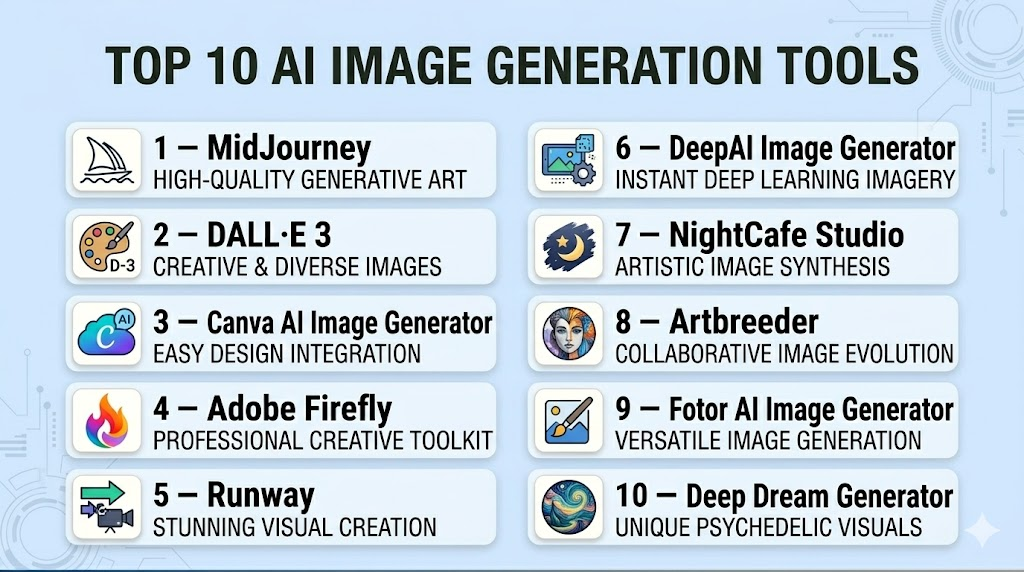
Top 10 AI Image Generation Tools
#1 — MidJourney
Short description: MidJourney is a cutting-edge AI image generator that produces high-quality, creative visuals from text prompts. It is widely used by designers and content creators for artistic and marketing purposes.
Key Features
- Text-to-image generation
- Style customization and prompt modifiers
- High-resolution output
- Discord-based collaborative interface
- Iterative refinement of images
- Multi-style templates
- Community sharing and inspiration
Pros
- Produces visually striking, creative images
- Strong community support
- Flexible style generation
Cons
- Learning curve for advanced prompts
- Subscription-based access
- Limited API integration
Platforms / Deployment
- Web / Windows / macOS
- Cloud
Security & Compliance
- Not publicly stated
Integrations & Ecosystem
- Discord platform
- Export to common image formats
- Limited plugin ecosystem
Support & Community
Active Discord community, tutorials, and documentation.
#2 — DALL·E 3
Short description: DALL·E 3, by OpenAI, is a state-of-the-art AI platform for generating realistic and imaginative images from textual descriptions, widely used for marketing, creative, and educational content.
Key Features
- Text-to-image AI generation
- Complex scene rendering
- High-resolution export
- Style and artistic controls
- Prompt engineering guidance
- Iterative refinement
Pros
- Exceptional image realism and creativity
- Easy-to-use interface
- Supports complex and abstract prompts
Cons
- Subscription or API cost
- Limited offline use
- Requires prompt optimization
Platforms / Deployment
- Web / Cloud
- Cloud
Security & Compliance
- Not publicly stated
Integrations & Ecosystem
- OpenAI API
- Integration with creative software
- Plugin support for workflow automation
Support & Community
Documentation, community forums, and official tutorials.
#3 — Canva AI Image Generator
Short description: Canva AI integrates generative AI into the Canva design platform, allowing marketers and designers to create visuals quickly within familiar workflows.
Key Features
- Text-to-image generation within Canva
- Editable templates and design assets
- Style and color customization
- Collaboration tools for teams
- Export to multiple formats
- Integration with Canva’s design library
Pros
- Easy for non-designers
- Collaborative team support
- Quick production for marketing content
Cons
- Less advanced AI compared to dedicated platforms
- Requires Canva subscription
- Limited creative style control
Platforms / Deployment
- Web / macOS / Windows / iOS / Android
- Cloud
Security & Compliance
- Not publicly stated
Integrations & Ecosystem
- Canva design tools
- Plugin ecosystem for social media and marketing
- API access for enterprise plans
Support & Community
Tutorials, support forums, and dedicated enterprise support.
#4 — Adobe Firefly
Short description: Adobe Firefly brings AI-powered image generation to the Adobe Creative Cloud ecosystem, enabling designers to create, modify, and enhance images efficiently.
Key Features
- AI image generation integrated with Creative Cloud
- Style and effect customization
- Text-to-image and image-to-image transformations
- Generative fill and editing tools
- High-resolution export
- Support for multiple artistic styles
Pros
- Seamless integration with Adobe suite
- Professional-grade image quality
- Wide variety of artistic controls
Cons
- Subscription required
- Learning curve for advanced features
- Limited standalone access
Platforms / Deployment
- Web / Windows / macOS
- Cloud
Security & Compliance
- Not publicly stated
Integrations & Ecosystem
- Adobe Photoshop, Illustrator, and After Effects
- Creative Cloud Libraries
- API for enterprise workflow
Support & Community
Adobe tutorials, forums, and enterprise support.
#5 — Runway
Short description: Runway provides AI-powered content creation tools, including image generation and video synthesis, targeting creative professionals and marketing teams.
Key Features
- Text-to-image AI generation
- Video-to-image generation
- Style transfer and editing
- Collaborative workspace
- Cloud-based rendering
- Export in multiple formats
Pros
- Multi-modal content generation
- Collaborative workflows
- Creative flexibility
Cons
- Paid subscription for full features
- Advanced features require training
- Limited offline functionality
Platforms / Deployment
- Web / Windows / macOS
- Cloud
Security & Compliance
- Not publicly stated
Integrations & Ecosystem
- API for automation
- Cloud storage integration
- Export to standard creative formats
Support & Community
Tutorials, community forums, and customer support.
#6 — DeepAI Image Generator
Short description: DeepAI Image Generator offers AI-based image creation with a focus on open-access usage for developers and content creators.
Key Features
- Text-to-image AI generation
- Multiple style options
- API for developer integration
- High-resolution image export
- Lightweight interface
Pros
- Free and open access tier
- Developer-friendly API
- Quick generation for simple tasks
Cons
- Limited style control
- Less sophisticated than premium tools
- Requires fine-tuning prompts
Platforms / Deployment
- Web / Linux / Windows
- Cloud
Security & Compliance
- Not publicly stated
Integrations & Ecosystem
- API integration
- Export to standard formats
- Developer tools support
Support & Community
Documentation and support forums.
#7 — NightCafe Studio
Short description: NightCafe Studio allows creators to generate high-quality AI images with artistic styles, suitable for marketing, social media, and personal projects.
Key Features
- Style-based text-to-image generation
- Artistic filters and effects
- Batch generation capabilities
- Community sharing
- High-resolution outputs
Pros
- Creative freedom for artistic content
- Easy to use
- Community inspiration
Cons
- Free tier limited
- Subscription required for high-res outputs
- Occasional repetitive styles
Platforms / Deployment
- Web / Windows / macOS
- Cloud
Security & Compliance
- Not publicly stated
Integrations & Ecosystem
- Export to design tools
- Community gallery
- API access for premium users
Support & Community
Community forums and tutorials.
#8 — Artbreeder
Short description: Artbreeder specializes in AI-generated art and image manipulation, enabling creators to blend images and adjust visual parameters dynamically.
Key Features
- AI blending and morphing
- Style adjustments and genetic algorithm
- High-resolution downloads
- Collaborative creative options
- Multi-category image generation
Pros
- Creative and experimental visual outputs
- Supports collaborative projects
- High-quality image generation
Cons
- Not suitable for commercial-scale marketing
- Limited control over realism
- Subscription needed for premium features
Platforms / Deployment
- Web / Windows / macOS
- Cloud
Security & Compliance
- Not publicly stated
Integrations & Ecosystem
- Export for creative software
- Community galleries
- API for advanced users
Support & Community
Tutorials, community forums, and email support.
#9 — Fotor AI Image Generator
Short description: Fotor integrates AI image generation with a user-friendly design suite for marketing, social media, and creative content generation.
Key Features
- Text-to-image generation
- Image editing and style templates
- High-resolution output
- Batch processing
- Multi-language prompt support
Pros
- Easy for beginners
- Integrated editing features
- Quick generation
Cons
- Less advanced than specialized AI tools
- Premium plan needed for full features
- Limited creative control
Platforms / Deployment
- Web / Windows / macOS / iOS / Android
- Cloud
Security & Compliance
- Not publicly stated
Integrations & Ecosystem
- Export to social media and design tools
- API access for enterprise
- Template library
Support & Community
Knowledge base, tutorials, and email support.
#10 — Deep Dream Generator
Short description: Deep Dream Generator creates surreal, artistic AI images from text prompts, popular with designers and digital artists.
Key Features
- AI text-to-image generation
- Dream-like artistic styles
- Customizable parameters
- Community inspiration gallery
- High-resolution outputs
Pros
- Unique artistic styles
- Community-driven inspiration
- Easy to use
Cons
- Not suited for realistic marketing images
- Limited commercial support
- Subscription required for high-res output
Platforms / Deployment
- Web / Windows / macOS
- Cloud
Security & Compliance
- Not publicly stated
Integrations & Ecosystem
- Export for design tools
- API access for premium users
- Community gallery
Support & Community
Tutorials, community forums, and email support.
Comparison Table (Top 10)
| Tool Name | Best For | Platform(s) Supported | Deployment | Standout Feature | Public Rating |
|---|---|---|---|---|---|
| MidJourney | Creative art & marketing | Web, Windows, macOS | Cloud | High-quality artistic images | N/A |
| DALL·E 3 | Realistic AI image generation | Web | Cloud | Complex scene rendering | N/A |
| Canva AI Image Generator | Marketing & social media | Web, Windows, macOS, iOS | Cloud | Integrated design workflow | N/A |
| Adobe Firefly | Professional design | Web, Windows, macOS | Cloud | Creative Cloud integration | N/A |
| Runway | Multi-modal content | Web, Windows, macOS | Cloud | Image & video generation | N/A |
| DeepAI Image Generator | Developer-friendly images | Web, Linux, Windows | Cloud | API access for developers | N/A |
| NightCafe Studio | Artistic visuals | Web, Windows, macOS | Cloud | Style-based creative images | N/A |
| Artbreeder | Collaborative art creation | Web, Windows, macOS | Cloud | Image blending & morphing | N/A |
| Fotor AI Image Generator | Quick marketing visuals | Web, Windows, macOS, iOS, Android | Cloud | User-friendly integrated editing | N/A |
| Deep Dream Generator | Surreal artistic images | Web, Windows, macOS | Cloud | Dream-like creative style | N/A |
Evaluation & Scoring of AI Image Generation Tools
| Tool Name | Core (25%) | Ease (15%) | Integrations (15%) | Security (10%) | Performance (10%) | Support (10%) | Value (15%) | Weighted Total |
|---|---|---|---|---|---|---|---|---|
| MidJourney | 9 | 8 | 7 | 7 | 9 | 8 | 8 | 8.3 |
| DALL·E 3 | 9 | 8 | 8 | 7 | 9 | 8 | 8 | 8.4 |
| Canva AI Image Generator | 8 | 9 | 8 | 7 | 8 | 8 | 8 | 8.2 |
| Adobe Firefly | 9 | 8 | 8 | 7 | 9 | 8 | 8 | 8.4 |
| Runway | 8 | 8 | 7 | 7 | 8 | 7 | 8 | 7.9 |
| DeepAI Image Generator | 7 | 8 | 7 | 7 | 7 | 7 | 8 | 7.4 |
| NightCafe Studio | 8 | 8 | 7 | 7 | 8 | 7 | 7 | 7.7 |
| Artbreeder | 8 | 8 | 7 | 7 | 8 | 7 | 7 | 7.7 |
| Fotor AI Image Generator | 8 | 9 | 7 | 7 | 8 | 7 | 8 | 8.0 |
| Deep Dream Generator | 8 | 8 | 7 | 7 | 8 | 7 | 7 | 7.7 |
Scores are comparative based on features, usability, integrations, performance, support, and value.
Which AI Image Generation Tools Tool Is Right for You?
Solo / Freelancer
DeepAI, Fotor, or NightCafe Studio for affordable, beginner-friendly creative output.
SMB
Canva AI, MidJourney, and Runway for scalable marketing and content creation.
Mid-Market
Adobe Firefly, DALL·E 3, and Artbreeder for professional design and multi-style content generation.
Enterprise
MidJourney, Adobe Firefly, and Runway for high-volume, multi-user creative teams requiring API integrations and collaboration.
Budget vs Premium
Budget tiers suffice for small-scale projects, while premium plans offer high-resolution exports, advanced style customization, and team features.
Feature Depth vs Ease of Use
Deep Dream Generator and NightCafe are beginner-friendly, while Adobe Firefly and DALL·E 3 offer advanced creative control.
Integrations & Scalability
Enterprise users need CMS, marketing platform, and workflow integration for large-scale operations.
Security & Compliance Needs
Data-sensitive workflows require cloud security, access control, and adherence to privacy regulations.
Frequently Asked Questions (FAQs)
1. What types of images can AI tools generate?
From realistic photographs and illustrations to abstract and artistic visuals, based on text prompts.
2. Are these tools suitable for commercial use?
Most platforms provide licensing for commercial projects, though terms vary.
3. Can I customize styles and parameters?
Yes, advanced tools allow style selection, color palettes, and image modification.
4. How accurate is AI-generated imagery?
Quality varies with platform and prompt clarity; refinement may be needed.
5. Are these platforms cloud-based?
Yes, most AI image generators operate in the cloud for scalability and accessibility.
6. Can these tools integrate with design software?
Many provide API or export options compatible with Photoshop, Illustrator, and CMS tools.
7. What file formats are supported?
Common formats include PNG, JPEG, and high-resolution exports for print or web.
8. Do these tools support batch processing?
Some platforms, like NightCafe and Runway, allow batch generation for multiple images.
9. Is AI-generated content original?
Most outputs are generated based on AI models; verification is advised for sensitive or unique content.
10. Are there limitations on usage?
Free or trial plans often have limits on daily generations or output quality.
Conclusion
AI Image Generation Tools are revolutionizing creative production, allowing teams and individuals to generate high-quality visuals efficiently. From social media graphics to professional illustrations, these platforms help scale creativity and reduce reliance on manual design. Choosing the right tool depends on budget, team size, desired output quality, and integration needs. Testing a few options and aligning them with workflows ensures maximum value from AI image generation solutions.

Find Trusted Cardiac Hospitals
Compare heart hospitals by city and services — all in one place.
Explore Hospitals
When teams generate many versions, it can become difficult to know which image is approved, which one is final, and where it is being used. A simple naming and versioning process can help teams avoid using an old or unapproved image. This becomes especially important when AI images are used across many marketing channels.