Introduction
AI Video Generation Tools are advanced platforms that leverage artificial intelligence to automate the creation of video content. These tools enable marketers, educators, content creators, and businesses to generate professional-quality videos from text prompts, images, or existing footage. In the demand for AI video generation is growing rapidly as companies seek to scale content production, enhance marketing campaigns, create e-learning modules, and produce personalized video experiences efficiently.
Real-world use cases include automated marketing video creation, social media content production, product demonstrations, explainer videos for training, and personalized customer communication. When evaluating AI video generation tools, buyers should consider output quality, customization features, supported media types, editing capabilities, speed of rendering, ease of use, scalability, integration with existing content management systems, licensing and compliance, and pricing structures.
Best for: Marketing teams, digital agencies, e-learning providers, SMEs, and large enterprises looking to scale video content efficiently.
Not ideal for: Companies with minimal video content needs, or when highly specialized or cinematic-quality videos are required that AI alone may not deliver.
Key Trends in AI Video Generation Tools
- Multi-modal AI for text-to-video, image-to-video, and voice-to-video
- Real-time and near-real-time video rendering
- Integration with content creation and marketing platforms
- Automated scene transitions, captions, and effects
- AI-assisted voiceover and background music generation
- Ethical AI and content moderation features
- Cloud-native platforms for scalability and collaborative workflows
- Personalization and dynamic video generation for customer engagement
- Subscription-based and enterprise licensing models
- AI-powered video editing and style transfer
How We Selected These Tools (Methodology)
- Evaluation of market adoption and brand visibility
- Assessment of core video generation and editing features
- Performance, speed, and reliability metrics
- Security posture including access controls and compliance standards
- Compatibility with CMS, marketing platforms, and team collaboration tools
- Support for multiple media types, including text, images, and audio
- Flexibility for individual creators, SMBs, and enterprise teams
- Licensing, usage rights, and pricing considerations
- User interface, ease of adoption, and learning curve
- Community support, documentation, and tutorials
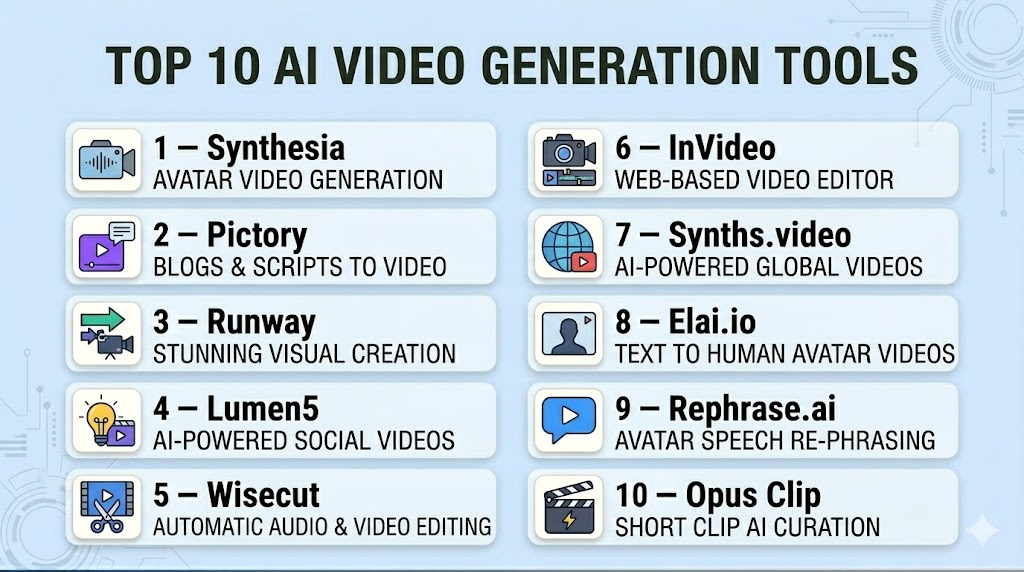
Top 10 AI Video Generation Tools
#1 — Synthesia
Short description: Synthesia allows users to generate professional AI videos from text input. It’s widely used in marketing, training, and corporate communications to create human-like video content quickly.
Key Features
- Text-to-video generation with AI avatars
- Multi-language support
- Customizable avatars and backgrounds
- Automatic subtitles and captions
- Branding and style customization
- Integration with learning and marketing platforms
- Cloud-based rendering
Pros
- High-quality, realistic AI avatars
- Fast video generation
- Multi-language capabilities
Cons
- Limited control over fine-grained animation
- Subscription required
- Less suited for cinematic content
Platforms / Deployment
- Web
- Cloud
Security & Compliance
- Not publicly stated
Integrations & Ecosystem
- LMS and CMS integrations
- API for enterprise use
- Export to common video formats
Support & Community
- Documentation, tutorials, and email support
#2 — Pictory
Short description: Pictory transforms scripts or long-form content into engaging short videos using AI. It’s ideal for content marketers and social media managers.
Key Features
- Script-to-video conversion
- Auto-summarization of long videos
- Text overlays and captions
- Stock footage library
- AI voiceovers
- Multiple aspect ratios for social platforms
Pros
- Easy for non-video creators
- Quick content repurposing
- AI-generated captions
Cons
- Limited creative control
- Requires subscription for full features
- Less suitable for complex video projects
Platforms / Deployment
- Web
- Cloud
Security & Compliance
- Not publicly stated
Integrations & Ecosystem
- Social media export
- API for automation
- Stock video and audio libraries
Support & Community
- Tutorials, community forums, and support
#3 — Runway
Short description: Runway provides AI video generation with a focus on professional content creation, including video editing and style transfer. It’s targeted at designers and media teams.
Key Features
- AI-assisted video editing
- Style transfer and effects
- Image-to-video generation
- Real-time collaboration
- Cloud rendering
- Export to multiple formats
Pros
- Multi-modal creative tools
- Collaborative workflows
- High-quality output
Cons
- Paid subscription required
- Advanced features need learning
- Limited offline support
Platforms / Deployment
- Web / Windows / macOS
- Cloud
Security & Compliance
- Not publicly stated
Integrations & Ecosystem
- API for automation
- Cloud storage integration
- Export to standard video tools
Support & Community
- Tutorials, forums, and customer support
#4 — Lumen5
Short description: Lumen5 converts text content into engaging videos, helping marketers quickly produce content for social media and advertising campaigns.
Key Features
- Blog-to-video conversion
- Drag-and-drop interface
- AI-assisted storyboard creation
- Stock media library
- Text overlay automation
- Multiple video templates
Pros
- Easy to use for marketers
- Quick social video creation
- Integrated stock assets
Cons
- Limited creative flexibility
- Subscription needed for HD output
- Not ideal for complex animations
Platforms / Deployment
- Web
- Cloud
Security & Compliance
- Not publicly stated
Integrations & Ecosystem
- Social media publishing
- Marketing platform integration
- API access for enterprise
Support & Community
- Tutorials, guides, and customer support
#5 — Wisecut
Short description: Wisecut uses AI to automate video editing, including scene detection, captioning, and background music, aimed at YouTubers and content creators.
Key Features
- Auto-editing of video content
- Scene detection and trimming
- Caption generation
- Background music automation
- Multi-language voiceovers
Pros
- Saves time on editing
- AI-driven captions and music
- User-friendly interface
Cons
- Limited advanced effects
- Subscription required
- Less suitable for professional cinematic videos
Platforms / Deployment
- Web
- Cloud
Security & Compliance
- Not publicly stated
Integrations & Ecosystem
- Video export
- Cloud storage integration
- API access for enterprise
Support & Community
- Tutorials, guides, and email support
#6 — InVideo
Short description: InVideo allows users to create AI-driven marketing videos from scripts or templates, suitable for businesses of all sizes.
Key Features
- Script-to-video
- Pre-made templates
- AI voiceovers
- Text-to-video capabilities
- Stock media integration
Pros
- Quick video creation for marketing
- Template variety
- Beginner-friendly interface
Cons
- Limited creative flexibility
- Subscription required for HD output
- Not suited for long-format content
Platforms / Deployment
- Web
- Cloud
Security & Compliance
- Not publicly stated
Integrations & Ecosystem
- CMS integration
- Social media publishing
- Stock media library
Support & Community
- Tutorials, guides, and email support
#7 — Synths.video
Short description: Synths.video converts blog posts or scripts into narrated video content with AI avatars, popular among content marketers.
Key Features
- Text-to-video AI avatars
- Automatic voiceovers
- Captioning and translation
- Custom branding
- Multiple video resolutions
Pros
- Human-like AI presenters
- Quick video creation
- Multi-language support
Cons
- Limited advanced editing
- Paid subscription
- Less suited for cinematic content
Platforms / Deployment
- Web
- Cloud
Security & Compliance
- Not publicly stated
Integrations & Ecosystem
- Social media export
- API for automation
- Branding templates
Support & Community
- Guides, tutorials, and support team
#8 — Elai.io
Short description: Elai.io offers AI video generation with avatars and voiceover capabilities, targeting corporate communications and training videos.
Key Features
- Text-to-video with avatars
- AI voiceover
- Multiple languages
- Customizable templates
- Branding options
Pros
- Fast production of corporate content
- Multi-language capabilities
- Avatar customization
Cons
- Limited animation control
- Subscription needed
- Less creative flexibility
Platforms / Deployment
- Web
- Cloud
Security & Compliance
- Not publicly stated
Integrations & Ecosystem
- LMS integration
- API for automation
- Video export options
Support & Community
- Documentation, tutorials, and support
#9 — Rephrase.ai
Short description: Rephrase.ai creates AI-generated videos with human avatars from text input, used for marketing, sales, and training.
Key Features
- AI avatars and lip-syncing
- Text-to-speech in multiple languages
- Branding and template options
- Customizable backgrounds
- High-resolution output
Pros
- Realistic AI presenters
- Multi-language support
- Quick video generation
Cons
- Subscription-based
- Limited creative flexibility
- Not suited for cinematic content
Platforms / Deployment
- Web
- Cloud
Security & Compliance
- Not publicly stated
Integrations & Ecosystem
- Marketing automation tools
- API access
- Video export for platforms
Support & Community
- Tutorials, guides, and customer support
#10 — Opus Clip
Short description: Opus Clip converts long-form videos into short, shareable clips with AI-powered scene detection, captions, and music.
Key Features
- Long-to-short video AI editing
- Scene detection and trimming
- Automatic captions
- AI background music
- Export for social media
Pros
- Speeds up social content creation
- AI-assisted editing
- User-friendly interface
Cons
- Limited advanced creative control
- Paid subscription
- Not suitable for full-length film projects
Platforms / Deployment
- Web
- Cloud
Security & Compliance
- Not publicly stated
Integrations & Ecosystem
- Social media export
- Cloud storage
- API for enterprise workflows
Support & Community
- Tutorials, documentation, and support
Comparison Table (Top 10)
| Tool Name | Best For | Platform(s) Supported | Deployment | Standout Feature | Public Rating |
|---|---|---|---|---|---|
| Synthesia | Corporate & marketing videos | Web | Cloud | AI avatars and multi-language | N/A |
| Pictory | Script-to-video creation | Web | Cloud | Auto-summarization and captions | N/A |
| Runway | Professional creative teams | Web, Windows, macOS | Cloud | Multi-modal content | N/A |
| Lumen5 | Marketing & social content | Web | Cloud | Blog-to-video conversion | N/A |
| Wisecut | YouTube creators | Web | Cloud | AI-driven editing | N/A |
| InVideo | Marketing videos | Web | Cloud | Templates and AI voiceovers | N/A |
| Synths.video | Marketing content | Web | Cloud | AI avatars | N/A |
| Elai.io | Training & corporate videos | Web | Cloud | Multi-language avatars | N/A |
| Rephrase.ai | Sales & marketing | Web | Cloud | Realistic AI presenters | N/A |
| Opus Clip | Social media clips | Web | Cloud | Auto scene detection | N/A |
Evaluation & Scoring of AI Video Generation Tools
| Tool Name | Core (25%) | Ease (15%) | Integrations (15%) | Security (10%) | Performance (10%) | Support (10%) | Value (15%) | Weighted Total |
|---|---|---|---|---|---|---|---|---|
| Synthesia | 9 | 8 | 8 | 7 | 9 | 8 | 8 | 8.4 |
| Pictory | 8 | 9 | 8 | 7 | 8 | 8 | 8 | 8.2 |
| Runway | 9 | 8 | 8 | 7 | 9 | 8 | 8 | 8.4 |
| Lumen5 | 8 | 9 | 7 | 7 | 8 | 7 | 8 | 8.0 |
| Wisecut | 8 | 8 | 7 | 7 | 8 | 7 | 8 | 7.9 |
| InVideo | 8 | 9 | 7 | 7 | 8 | 7 | 8 | 8.0 |
| Synths.video | 9 | 8 | 7 | 7 | 9 | 8 | 8 | 8.3 |
| Elai.io | 8 | 8 | 7 | 7 | 8 | 7 | 8 | 7.9 |
| Rephrase.ai | 9 | 8 | 7 | 7 | 9 | 8 | 8 | 8.3 |
| Opus Clip | 8 | 8 | 7 | 7 | 8 | 7 | 8 | 7.9 |
Scores are comparative based on feature richness, ease of use, integrations, security, performance, support, and value.
Which AI Video Generation Tools Tool Is Right for You?
Solo / Freelancer
Pictory, Wisecut, and Opus Clip offer cost-effective, beginner-friendly solutions for short-form videos.
SMB
InVideo, Lumen5, and Synths.video are ideal for marketing campaigns and social media content production.
Mid-Market
Synthesia, Runway, and Rephrase.ai provide professional video generation with multi-language support and avatar customization.
Enterprise
Synthesia, Runway, and Elai.io support large-scale, multi-user operations with API integrations and collaboration tools.
Budget vs Premium
Budget-friendly tools suffice for small content needs, while premium plans deliver advanced customization, multi-language avatars, and high-resolution outputs.
Feature Depth vs Ease of Use
Beginner-focused platforms like Wisecut and Opus Clip offer simplicity, while Synthesia and Runway offer advanced features for professional teams.
Integrations & Scalability
Enterprise workflows benefit from API integrations, cloud scalability, and compatibility with LMS, CMS, and marketing platforms.
Security & Compliance Needs
Businesses dealing with sensitive content should prioritize cloud security, access controls, and compliance with privacy regulations.
Frequently Asked Questions (FAQs)
1. What types of videos can AI platforms generate?
They can produce marketing, training, explainer, social media, and personalized customer videos based on text, images, or scripts.
2. Are AI-generated videos suitable for commercial use?
Yes, most platforms allow commercial usage under subscription or licensing agreements.
3. Can AI tools add voiceovers automatically?
Yes, many platforms offer AI-generated voiceovers in multiple languages.
4. How accurate are AI-generated video scenes?
Accuracy depends on prompt clarity and platform sophistication; refinement may be needed for complex content.
5. Are these tools cloud-based?
Yes, almost all AI video generators are cloud-based for scalability and accessibility.
6. Can these videos be integrated with other software?
Most tools offer export options or APIs for integration with CMS, marketing, and social platforms.
7. What formats are supported?
Commonly MP4, MOV, and other high-resolution video formats for social media or professional use.
8. Do AI tools support batch processing?
Some platforms like Lumen5 and Opus Clip allow batch or bulk video generation.
9. Is the content unique?
AI generates new content from models; verification is recommended for sensitive or branded material.
10. Are there any usage limitations?
Free or trial plans usually have limits on number of videos, length, or quality.
Conclusion
AI Video Generation Tools have transformed how businesses, creators, and marketers produce video content. They help teams scale production, reduce time, and personalize communication effectively. Selecting the right tool depends on budget, team size, desired output quality, and workflow integration. Experimenting with multiple tools and aligning them with organizational needs ensures the best outcomes from AI video generation technology.

Find Trusted Cardiac Hospitals
Compare heart hospitals by city and services — all in one place.
Explore Hospitals
When many people create videos using different prompts and templates, the tone, visuals, and voice can easily become inconsistent. Teams should use approved templates, brand guidelines, and a simple review step before publishing. This can make large-scale AI video production feel more professional and consistent.