Introduction
Configuration Management Databases (CMDB) are centralized repositories that store information about IT assets, configurations, and relationships between them. In simple terms, a CMDB provides a “single source of truth” for IT environments, enabling organizations to track their hardware, software, network devices, and the dependencies that connect them.
In today’s fast-evolving IT landscape, where hybrid cloud, microservices, and IoT devices are increasingly common, CMDBs are critical for operational efficiency, risk management, and compliance. Organizations use CMDBs to improve incident management, change management, and asset tracking while reducing downtime and avoiding misconfigurations.
Real-world use cases include:
- Mapping dependencies between applications and infrastructure to accelerate incident resolution
- Supporting ITIL-compliant change management processes
- Conducting impact analysis before deploying changes or updates
- Maintaining compliance and audit readiness by tracking asset configurations
- Enabling visibility for cloud, on-prem, and hybrid environments
When evaluating CMDB tools, buyers should consider:
- Discovery and inventory automation
- Relationship mapping and dependency visualization
- Change and incident management integration
- Reporting, dashboards, and analytics capabilities
- API and integration support with ITSM and monitoring platforms
- Security and compliance readiness
- Deployment flexibility (cloud, on-prem, hybrid)
- Scalability for complex environments
- Ease of use and user experience
- Cost and licensing models
Best for: IT operations teams, IT managers, CIOs, and large enterprises with complex IT environments, highly regulated industries, or hybrid-cloud infrastructures.
Not ideal for: Very small IT teams or organizations with minimal infrastructure complexity; lightweight asset tracking tools may suffice.
Key Trends in Configuration Management Databases (CMDB)
- AI-assisted discovery and automated relationship mapping
- Real-time CMDB updates with event-driven integrations
- Cloud-native CMDB solutions supporting SaaS, IaaS, and hybrid environments
- Enhanced analytics for predictive impact assessment and risk management
- Integration with ITSM, DevOps, and monitoring platforms for unified visibility
- Automation in change management and incident remediation
- Role-based access controls and zero-trust security implementations
- Subscription-based and SaaS pricing models replacing traditional licensing
- Improved visualization of service dependencies and business impact
- Compliance-focused CMDBs for GDPR, HIPAA, and industry-specific regulations
How We Selected These Tools (Methodology)
- Evaluated market adoption, industry recognition, and vendor presence
- Assessed completeness of features, including discovery, relationship mapping, and analytics
- Analyzed performance, reliability, and scalability in large environments
- Reviewed security posture, audit capabilities, and compliance features
- Examined ecosystem and integration support with ITSM, monitoring, and DevOps tools
- Considered suitability across organization sizes and industry segments
- Factored in usability, onboarding experience, and user interface intuitiveness
- Balanced cloud-native, hybrid, and on-prem deployment options
- Evaluated pricing models and total cost of ownership
- Prioritized tools that provide actionable insights, not just raw inventory
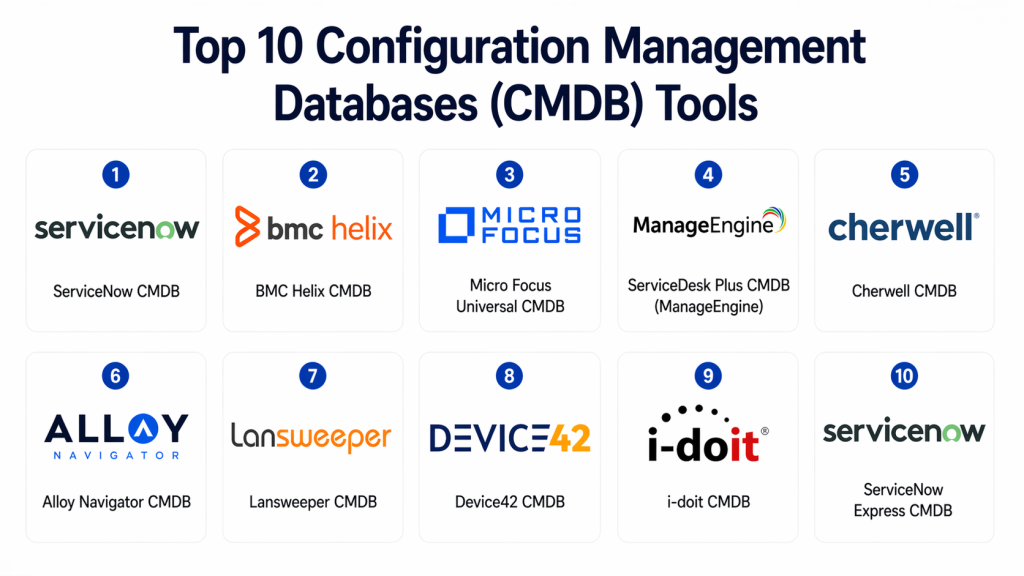
Top 10 Configuration Management Databases (CMDB) Tools
#1 — ServiceNow CMDB
Short description : ServiceNow CMDB provides a centralized platform for tracking IT assets, configurations, and relationships. It integrates with ServiceNow ITSM to enhance incident, change, and problem management workflows. Ideal for large enterprises seeking a scalable and unified service management ecosystem.
Key Features
- Automated discovery and inventory
- Relationship mapping and dependency visualization
- Integration with ITSM modules
- Real-time impact analysis and change tracking
- Dashboards and reporting
- Cloud and on-prem asset management
Pros
- Highly scalable and enterprise-grade
- Seamless ITSM integration
Cons
- Expensive for small teams
- Steeper learning curve
Platforms / Deployment
- Web
- Cloud / Hybrid
Security & Compliance
- SSO/SAML, MFA, audit logs, encryption
- SOC 2, ISO 27001, GDPR
Integrations & Ecosystem
ServiceNow CMDB integrates extensively across enterprise IT platforms.
- ITSM modules
- Cloud and monitoring platforms
- APIs for custom workflows
Support & Community
Strong documentation, enterprise support, and active community forums.
#2 — BMC Helix CMDB
Short description : BMC Helix CMDB is designed to provide real-time visibility into IT infrastructure, applications, and service dependencies. It is ideal for large organizations seeking AI-driven insights and automation in IT operations management.
Key Features
- Automated discovery and dependency mapping
- Change impact analysis
- AI-powered insights for risk and performance
- ITSM integration
- Cloud and hybrid infrastructure tracking
Pros
- Excellent for complex IT environments
- Advanced analytics and AI integration
Cons
- High cost
- Configuration complexity
Platforms / Deployment
- Windows / Linux / Web
- Cloud / On-prem
Security & Compliance
- RBAC, audit logs, encryption
- Not publicly stated
Integrations & Ecosystem
- ITSM and monitoring tools
- APIs for automation
- ERP and DevOps platform integration
Support & Community
Enterprise-level support with knowledge base and community forums.
#3 — Micro Focus Universal CMDB
Short description : Micro Focus Universal CMDB enables dynamic discovery, modeling, and visualization of IT infrastructure. It supports enterprises in maintaining accurate configuration data for better operational decision-making.
Key Features
- Discovery of hardware, software, and services
- Relationship and dependency mapping
- Integration with ITSM and ITOM modules
- Automated CMDB reconciliation
- Dashboards and reporting
Pros
- Strong discovery and modeling capabilities
- Flexible integration options
Cons
- Complex deployment
- Licensing can be expensive
Platforms / Deployment
- Windows / Linux / Web
- Cloud / On-prem / Hybrid
Security & Compliance
- RBAC, audit logs
- Not publicly stated
Integrations & Ecosystem
- ITSM systems
- Monitoring and cloud platforms
- API extensibility
Support & Community
Documentation and enterprise support available.
#4 — ServiceDesk Plus CMDB (ManageEngine)
Short description : ServiceDesk Plus CMDB offers a simplified and cost-effective CMDB solution for mid-market organizations. It integrates ITSM functionalities to enhance incident and change management processes.
Key Features
- Asset discovery and inventory
- Relationship mapping
- ITSM integration
- Automated alerts and updates
- Reporting dashboards
Pros
- Affordable and user-friendly
- Quick deployment
Cons
- Limited enterprise scalability
- Fewer advanced analytics
Platforms / Deployment
- Windows / Web
- Cloud / On-prem
Security & Compliance
- RBAC, audit trails
- Not publicly stated
Integrations & Ecosystem
- ITSM tools
- APIs for integration
- Monitoring solutions
Support & Community
Active support with documentation and forums.
#5 — Cherwell CMDB
Short description : Cherwell CMDB integrates with Cherwell ITSM to provide full visibility of IT assets and services. It supports automated discovery and mapping for enterprise environments.
Key Features
- Discovery and asset inventory
- Relationship and dependency tracking
- ITSM integration
- Reporting and dashboards
- Change and impact analysis
Pros
- Strong ITSM integration
- Flexible and configurable
Cons
- Cloud capabilities limited
- Complex UI for new users
Platforms / Deployment
- Windows / Web
- Cloud / On-prem / Hybrid
Security & Compliance
- SSO/SAML, audit logs
- Not publicly stated
Integrations & Ecosystem
- ITSM modules
- APIs
- ERP integrations
Support & Community
Enterprise support with documentation.
#6 — Alloy Navigator CMDB
Short description : Alloy Navigator CMDB provides integrated asset and configuration management suitable for SMBs and mid-market organizations. It emphasizes simplicity and ease of use while supporting ITSM workflows.
Key Features
- Asset and configuration tracking
- Relationship mapping
- ITSM integration
- Reporting dashboards
- Automated alerts
Pros
- Simple and intuitive
- Affordable
Cons
- Less suitable for very large enterprises
- Cloud functionality limited
Platforms / Deployment
- Windows / Web
- Cloud / On-prem
Security & Compliance
- Audit logs, encryption
- Not publicly stated
Integrations & Ecosystem
- ITSM tools
- APIs
- Monitoring integrations
Support & Community
Support documentation and moderate community.
#7 — Lansweeper CMDB
Short description : Lansweeper CMDB focuses on discovery and asset inventory for SMBs and mid-market organizations. It is a practical solution for environments with mixed hardware and software assets.
Key Features
- Automated discovery
- Relationship mapping
- Inventory dashboards
- Integration with ITSM tools
- Reporting and alerts
Pros
- Affordable and lightweight
- Quick deployment
Cons
- Limited enterprise analytics
- Fewer advanced features
Platforms / Deployment
- Windows / Linux / Web
- Cloud / On-prem
Security & Compliance
- Audit logs
- Not publicly stated
Integrations & Ecosystem
- ITSM and monitoring tools
- APIs for integrations
- Cloud connectors
Support & Community
Documentation, email support, and active user community.
#8 — Device42 CMDB
Short description : Device42 CMDB is geared towards enterprises seeking detailed discovery and dependency mapping for data centers, cloud, and hybrid IT environments.
Key Features
- Automated discovery
- Dependency mapping
- Data center visualization
- ITSM integration
- Cloud and hybrid tracking
Pros
- Excellent for complex environments
- Strong visualization
Cons
- Expensive for SMBs
- Steep learning curve
Platforms / Deployment
- Web
- Cloud / On-prem
Security & Compliance
- Audit logs, encryption
- Not publicly stated
Integrations & Ecosystem
- ITSM tools
- Cloud platforms
- API extensibility
Support & Community
Enterprise support with documentation.
#9 — i-doit CMDB
Short description : i-doit CMDB provides open-source, flexible configuration management capabilities. Suitable for organizations seeking cost-effective CMDB functionality with community support.
Key Features
- Asset and configuration tracking
- Relationship mapping
- ITSM integration
- Reporting dashboards
- Open-source customization
Pros
- Cost-effective
- Flexible and customizable
Cons
- Limited enterprise-grade support
- Requires technical expertise
Platforms / Deployment
- Windows / Linux / Web
- On-prem / Cloud
Security & Compliance
- Audit logs
- Not publicly stated
Integrations & Ecosystem
- ITSM integration
- APIs for custom workflows
- Monitoring connectors
Support & Community
Community support with documentation.
#10 — ServiceNow Express CMDB
Short description : ServiceNow Express CMDB is a lightweight version of ServiceNow CMDB, ideal for SMBs needing simplified configuration management. It integrates with ITSM for essential visibility.
Key Features
- Simplified asset and configuration tracking
- ITSM integration
- Reporting and dashboards
- Automated updates and alerts
- Dependency mapping
Pros
- Easy to deploy
- User-friendly interface
Cons
- Limited scalability
- Fewer advanced analytics
Platforms / Deployment
- Web
- Cloud
Security & Compliance
- SSO/SAML, audit logs
- Not publicly stated
Integrations & Ecosystem
- ITSM modules
- APIs for integration
- Monitoring tools
Support & Community
Documentation and vendor support.
Comparison Table (Top 10)
| Tool Name | Best For | Platform(s) Supported | Deployment | Standout Feature | Public Rating |
|---|---|---|---|---|---|
| ServiceNow CMDB | Enterprises | Web | Cloud / Hybrid | ITSM integration | N/A |
| BMC Helix CMDB | Large-scale IT | Windows / Linux / Web | Cloud / On-prem | AI insights | N/A |
| Micro Focus UCMDB | Enterprise IT | Windows / Linux / Web | Cloud / On-prem / Hybrid | Modeling & visualization | N/A |
| ServiceDesk Plus CMDB | Mid-market | Windows / Web | Cloud / On-prem | Ease of use | N/A |
| Cherwell CMDB | Enterprise | Windows / Web | Cloud / On-prem / Hybrid | ITSM integration | N/A |
| Alloy Navigator CMDB | SMB / Mid-market | Windows / Web | Cloud / On-prem | Simplicity | N/A |
| Lansweeper CMDB | SMB | Windows / Linux / Web | Cloud / On-prem | Discovery | N/A |
| Device42 CMDB | Enterprise | Web | Cloud / On-prem | Dependency visualization | N/A |
| i-doit CMDB | Cost-conscious orgs | Windows / Linux / Web | On-prem / Cloud | Open-source flexibility | N/A |
| ServiceNow Express CMDB | SMB | Web | Cloud | User-friendly | N/A |
Evaluation & Scoring of Configuration Management Databases (CMDB)
| Tool Name | Core (25%) | Ease (15%) | Integrations (15%) | Security (10%) | Performance (10%) | Support (10%) | Value (15%) | Weighted Total |
|---|---|---|---|---|---|---|---|---|
| ServiceNow CMDB | 10 | 7 | 9 | 9 | 9 | 8 | 6 | 8.55 |
| BMC Helix CMDB | 9 | 6 | 8 | 8 | 9 | 7 | 6 | 7.95 |
| Micro Focus UCMDB | 9 | 6 | 8 | 7 | 8 | 7 | 6 | 7.80 |
| ServiceDesk Plus CMDB | 7 | 9 | 7 | 7 | 7 | 7 | 8 | 7.70 |
| Cherwell CMDB | 8 | 7 | 8 | 8 | 8 | 7 | 7 | 7.95 |
| Alloy Navigator CMDB | 7 | 8 | 7 | 7 | 7 | 7 | 7 | 7.30 |
| Lansweeper CMDB | 7 | 8 | 6 | 7 | 7 | 7 | 8 | 7.20 |
| Device42 CMDB | 9 | 6 | 8 | 8 | 9 | 7 | 6 | 7.95 |
| i-doit CMDB | 6 | 7 | 6 | 7 | 6 | 6 | 8 | 6.75 |
| ServiceNow Express CMDB | 7 | 9 | 7 | 7 | 7 | 7 | 7 | 7.35 |
Interpretation: Scores compare tools based on feature completeness, usability, integrations, security, reliability, support, and value. Higher scores indicate enterprise readiness; mid-range scores are suitable for SMBs or mid-market adoption.
Which Configuration Management Databases (CMDB) Tool Is Right for You?
Solo / Freelancer
Lightweight CMDBs like ServiceNow Express or Alloy Navigator provide basic visibility without complexity.
SMB
ServiceDesk Plus CMDB or Alloy Navigator are cost-effective, easy-to-use options with essential CMDB functionality.
Mid-Market
Cherwell CMDB or Lansweeper provide strong asset visibility and integration with ITSM systems for growing organizations.
Enterprise
ServiceNow CMDB, BMC Helix CMDB, Micro Focus UCMDB, and Device42 are best suited for large, complex environments with extensive IT assets.
Budget vs Premium
Budget-focused tools prioritize usability and affordability, while premium solutions offer deep analytics, automation, and compliance tracking.
Feature Depth vs Ease of Use
Enterprise-grade tools provide robust functionality but require more training; SMB-friendly CMDBs emphasize simplicity and faster deployment.
Integrations & Scalability
Ensure the chosen CMDB integrates with ITSM, monitoring, cloud platforms, and APIs to scale with organizational growth.
Security & Compliance Needs
Regulated industries should select tools with audit logs, RBAC, SSO/MFA, and compliance reporting capabilities.
Frequently Asked Questions (FAQs)
1. What is the main purpose of a CMDB?
A CMDB centralizes information about IT assets and configurations, enabling improved change, incident, and problem management.
2. Can CMDBs handle cloud and hybrid environments?
Yes, modern CMDBs provide discovery, mapping, and tracking for both on-prem and cloud assets.
3. How does a CMDB support ITIL processes?
CMDBs provide visibility and dependency mapping that underpins change management, incident resolution, and service impact analysis.
4. Are CMDB tools secure?
Most enterprise CMDBs offer RBAC, SSO/SAML, MFA, encryption, and audit logs for security and compliance.
5. How long does implementation take?
SMB-focused CMDBs deploy within days, while enterprise-grade solutions may require weeks to configure and integrate.
6. Do CMDBs support automated discovery?
Yes, automated discovery and dependency mapping are standard features in most modern CMDB tools.
7. Can CMDBs integrate with ITSM platforms?
Absolutely; CMDBs often integrate seamlessly with ITSM, monitoring, and DevOps tools.
8. What are common mistakes in CMDB adoption?
Incomplete discovery, poor governance, ignoring integration, and failing to maintain accurate data are common pitfalls.
9. Are open-source CMDBs reliable?
Open-source CMDBs like i-doit provide flexibility but may lack enterprise support and advanced analytics.
10. How do CMDBs improve operational efficiency?
By providing a centralized view of assets and dependencies, CMDBs help reduce downtime, prevent misconfigurations, and optimize change management.
Conclusion
Configuration Management Databases are essential for organizations managing complex IT landscapes. Choosing the right CMDB depends on your organization’s size, IT complexity, compliance requirements, and integration needs. Enterprise tools like ServiceNow CMDB, BMC Helix, and Micro Focus UCMDB offer advanced features and scalability, while SMB-focused solutions like Alloy Navigator and ServiceDesk Plus provide simplicity and cost-effectiveness. By evaluating deployment options, feature depth, integration capabilities, and security, organizations can implement a CMDB that ensures operational efficiency, reduces risk, and supports IT service management objectives. The next step is to shortlist suitable tools, run pilot implementations, and validate their ability to integrate into your existing IT ecosystem.

Find Trusted Cardiac Hospitals
Compare heart hospitals by city and services — all in one place.
Explore Hospitals
CMDB helps in tracking IT assets and their relationships in a structured way, which makes incident handling, change management, and impact analysis much more efficient.