Introduction
Document Conversion Tools are software solutions designed to convert files from one format to another—such as PDF to Word, Excel to CSV, images to text (OCR), or documents to web-friendly formats. These tools help ensure compatibility, accessibility, and usability across different platforms, devices, and workflows.As businesses increasingly operate in multi-format environments, document conversion tools have become essential for improving productivity and maintaining data integrity. Whether it’s digitizing paper records, converting contracts for editing, or preparing documents for publishing, these tools eliminate manual rework and reduce errors.
Common Use Cases
- Converting PDFs to editable Word or Excel files
- Digitizing scanned documents using OCR
- Preparing documents for web publishing (HTML, EPUB)
- Migrating legacy file formats
- Automating bulk document conversion workflows
What Buyers Should Evaluate
- Accuracy of conversion (especially OCR)
- Supported file formats
- Batch processing capabilities
- Automation and API support
- Ease of use
- Integration with business systems
- Security and data privacy
- Output quality and formatting retention
- Pricing flexibility
Best for: Enterprises, legal teams, publishers, IT teams, and businesses handling large volumes of documents across formats.
Not ideal for: Users with occasional, simple conversion needs—basic free tools may be sufficient.
Key Trends in Document Conversion Tools
- AI-powered OCR improvements for higher accuracy in scanned documents
- Cloud-based conversion platforms enabling remote workflows
- API-first architectures for embedding conversion into apps
- Automation of bulk conversions in enterprise workflows
- Multi-language support for global operations
- Enhanced security controls for sensitive documents
- Integration with cloud storage platforms
- Real-time conversion capabilities
- Support for modern formats like EPUB and HTML5
- Usage-based pricing models for scalability
How We Selected These Tools (Methodology)
- Strong market adoption and credibility
- Comprehensive format support and conversion accuracy
- Reliable performance at scale
- Proven security practices
- Robust integration ecosystem and APIs
- Usability across technical and non-technical users
- Coverage across enterprise, SMB, and developer tools
- Quality of documentation and support
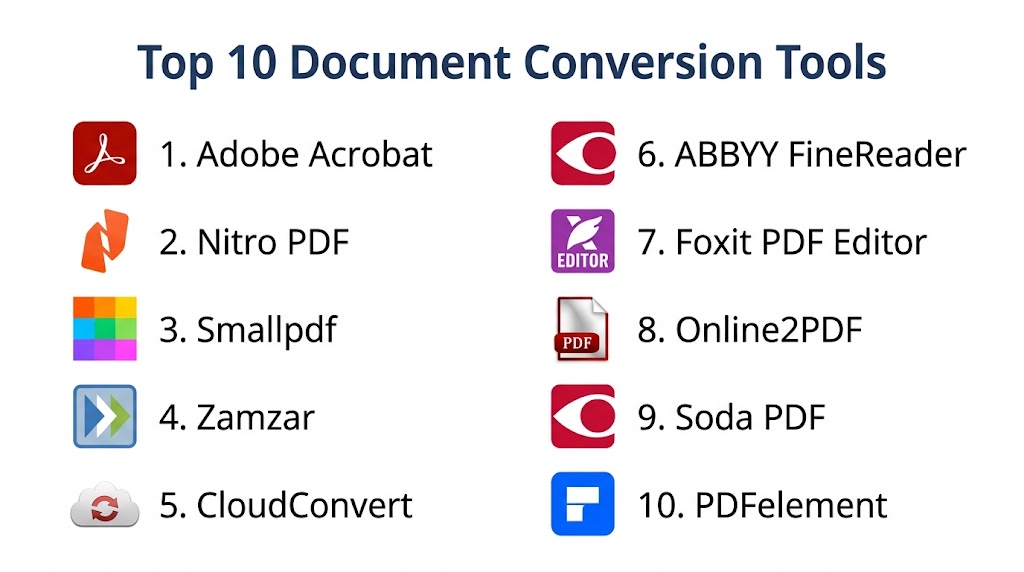
Top 10 Document Conversion Tools
#1 — Adobe Acrobat
Short description: Industry-leading PDF tool for converting, editing, and managing documents across formats.
Key Features
- PDF to Word, Excel, PowerPoint conversion
- OCR for scanned documents
- Editing and annotation tools
- Batch processing
- Cloud document storage
- eSignature support
Pros
- High conversion accuracy
- Widely trusted and feature-rich
Cons
- Expensive subscription
- Heavy software
Platforms / Deployment
Windows / macOS / Web / Cloud
Security & Compliance
Encryption, secure document handling (certifications not publicly stated here)
Integrations & Ecosystem
Integrates with Microsoft Office and cloud platforms
- APIs available
- Cloud storage integrations
- Enterprise tools
Support & Community
Extensive documentation and global support
#2 — Nitro PDF
Short description: Business-focused PDF solution offering conversion, editing, and collaboration tools.
Key Features
- PDF conversion tools
- Batch processing
- Cloud collaboration
- OCR capabilities
- Workflow automation
Pros
- Cost-effective alternative
- Easy to use
Cons
- Limited advanced features
- UI can feel dated
Platforms / Deployment
Windows / Web / Cloud
Security & Compliance
Not publicly stated
Integrations & Ecosystem
Integrates with Office tools and cloud storage
- APIs
- Workflow tools
Support & Community
Moderate support availability
#3 — Smallpdf
Short description: Cloud-based document conversion tool focused on simplicity and accessibility.
Key Features
- PDF conversions
- Compression tools
- OCR
- Web-based interface
- Drag-and-drop functionality
Pros
- Very easy to use
- Accessible from anywhere
Cons
- Limited advanced features
- Internet required
Platforms / Deployment
Web / Cloud
Security & Compliance
Not publicly stated
Integrations & Ecosystem
Integrates with cloud storage platforms
- API access
- Browser tools
Support & Community
Basic support
#4 — Zamzar
Short description: Online file conversion tool supporting a wide range of formats.
Key Features
- Supports 1000+ formats
- Email-based delivery
- Simple interface
- No installation required
- Batch conversion
Pros
- Wide format support
- Easy to use
Cons
- Slower processing
- Limited free usage
Platforms / Deployment
Web / Cloud
Security & Compliance
Not publicly stated
Integrations & Ecosystem
Minimal integrations
- API available
Support & Community
Basic support
#5 — CloudConvert
Short description: Advanced online conversion platform with strong API and automation capabilities.
Key Features
- 200+ format support
- API-based conversion
- Batch processing
- Custom workflows
- High-quality output
Pros
- Developer-friendly
- High flexibility
Cons
- Requires setup for automation
- Pricing complexity
Platforms / Deployment
Web / Cloud
Security & Compliance
Not publicly stated
Integrations & Ecosystem
Strong API ecosystem
- Custom integrations
- Cloud storage
Support & Community
Good developer documentation
#6 — ABBYY FineReader
Short description: Advanced OCR and document conversion tool for high-accuracy text recognition.
Key Features
- OCR technology
- PDF conversion
- Document comparison
- Multi-language support
- Batch processing
Pros
- Best-in-class OCR
- High accuracy
Cons
- Expensive
- Learning curve
Platforms / Deployment
Windows / macOS
Security & Compliance
Not publicly stated
Integrations & Ecosystem
Limited integrations
- APIs available
Support & Community
Strong enterprise support
#7 — Foxit PDF Editor
Short description: Lightweight alternative to Adobe Acrobat with strong conversion capabilities.
Key Features
- PDF conversion
- OCR
- Editing tools
- Collaboration features
- Security controls
Pros
- Lightweight
- Affordable
Cons
- UI less polished
- Limited advanced automation
Platforms / Deployment
Windows / macOS / Web
Security & Compliance
Encryption, RBAC (certifications not publicly stated)
Integrations & Ecosystem
Integrates with cloud services
- APIs
- Collaboration tools
Support & Community
Active user community
#8 — Online2PDF
Short description: Free online conversion tool for basic PDF transformations.
Key Features
- PDF merging and conversion
- Batch processing
- Compression
- Basic editing
Pros
- Free to use
- Simple interface
Cons
- Limited file size
- No enterprise features
Platforms / Deployment
Web
Security & Compliance
Not publicly stated
Integrations & Ecosystem
No major integrations
Support & Community
Limited support
#9 — Soda PDF
Short description: Versatile PDF tool offering conversion, editing, and collaboration features.
Key Features
- File conversion
- OCR
- Editing tools
- Cloud integration
- Batch processing
Pros
- Feature-rich
- Flexible deployment
Cons
- Pricing tiers confusing
- Performance issues at scale
Platforms / Deployment
Windows / Web / Cloud
Security & Compliance
Not publicly stated
Integrations & Ecosystem
Cloud storage integrations
- APIs
Support & Community
Moderate support
#10 — PDFelement
Short description: User-friendly PDF conversion and editing tool for individuals and businesses.
Key Features
- PDF conversion
- OCR
- Editing tools
- Batch processing
- Template support
Pros
- Easy to use
- Affordable
Cons
- Limited enterprise features
- Performance varies
Platforms / Deployment
Windows / macOS
Security & Compliance
Not publicly stated
Integrations & Ecosystem
Basic integrations
- APIs
Support & Community
Good onboarding resources
Comparison Table (Top 10)
| Tool Name | Best For | Platform(s) | Deployment | Standout Feature | Public Rating |
|---|---|---|---|---|---|
| Adobe Acrobat | Enterprises | Multi-platform | Cloud | Industry standard | N/A |
| Nitro PDF | SMB | Windows/Web | Cloud | Cost-effective | N/A |
| Smallpdf | Individuals | Web | Cloud | Simplicity | N/A |
| Zamzar | General use | Web | Cloud | Format support | N/A |
| CloudConvert | Developers | Web | Cloud | API-first | N/A |
| ABBYY FineReader | OCR | Desktop | Local | OCR accuracy | N/A |
| Foxit | SMB/Enterprise | Multi-platform | Cloud | Lightweight | N/A |
| Online2PDF | Free users | Web | Cloud | Free usage | N/A |
| Soda PDF | SMB | Multi-platform | Cloud | Versatility | N/A |
| PDFelement | Individuals | Desktop | Local | Ease of use | N/A |
Evaluation & Scoring of Document Conversion Tools
| Tool | Core | Ease | Integrations | Security | Performance | Support | Value | Total |
|---|---|---|---|---|---|---|---|---|
| Adobe | 10 | 8 | 9 | 9 | 9 | 9 | 7 | 8.8 |
| Nitro | 8 | 8 | 7 | 6 | 7 | 7 | 8 | 7.5 |
| Smallpdf | 7 | 10 | 6 | 6 | 7 | 6 | 8 | 7.4 |
| Zamzar | 7 | 9 | 5 | 5 | 6 | 6 | 7 | 6.7 |
| CloudConvert | 9 | 7 | 9 | 6 | 8 | 7 | 8 | 7.9 |
| ABBYY | 10 | 7 | 6 | 7 | 9 | 8 | 6 | 8.1 |
| Foxit | 8 | 8 | 7 | 7 | 8 | 7 | 8 | 7.7 |
| Online2PDF | 6 | 9 | 4 | 4 | 6 | 5 | 9 | 6.5 |
| Soda | 8 | 8 | 6 | 6 | 7 | 7 | 7 | 7.2 |
| PDFelement | 8 | 9 | 6 | 6 | 7 | 7 | 8 | 7.5 |
Interpretation:
These scores are relative comparisons. Enterprise tools score higher in features and security, while simpler tools excel in usability and affordability.
Which Document Conversion Tool Is Right for You?
Solo / Freelancer
Use Smallpdf or PDFelement for ease and affordability.
SMB
Nitro PDF or Foxit are balanced choices.
Mid-Market
CloudConvert or Soda PDF for flexibility.
Enterprise
Adobe Acrobat or ABBYY FineReader.
Budget vs Premium
Budget: Online2PDF
Premium: Adobe Acrobat
Feature Depth vs Ease
Advanced: ABBYY, CloudConvert
Easy: Smallpdf
Integrations & Scalability
Best: CloudConvert
Security & Compliance Needs
Best: Adobe Acrobat
Frequently Asked Questions (FAQs)
1. What is document conversion software?
It converts files from one format to another automatically.
2. Is OCR necessary?
Yes, for scanned documents and images.
3. Are free tools safe?
Depends on provider; sensitive data should use trusted tools.
4. Can I convert in bulk?
Yes, most enterprise tools support batch processing.
5. Do these tools support APIs?
Some tools like CloudConvert provide APIs.
6. What formats are supported?
PDF, DOCX, XLSX, HTML, images, and more.
7. Is installation required?
Cloud tools don’t require installation.
8. How accurate is conversion?
Varies by tool; OCR accuracy differs.
9. Can I integrate with CRM?
Some tools support integrations.
10. What are alternatives?
Manual editing or basic converters.
Conclusion
Document conversion tools play a critical role in modern digital workflows, enabling businesses to seamlessly transition between file formats while preserving data integrity and formatting. As organizations increasingly handle diverse document types—from PDFs and spreadsheets to scanned records—the need for accurate, scalable, and secure conversion solutions continues to grow. These tools not only save time but also reduce operational friction by automating repetitive tasks.However, selecting the right tool depends heavily on your specific requirements. A freelancer may prioritize simplicity and affordability, while an enterprise will focus on scalability, compliance, and integration depth. Tools like Smallpdf and PDFelement are ideal for everyday users, whereas Adobe Acrobat and ABBYY FineReader offer advanced capabilities for high-volume and compliance-driven environments.

Find Trusted Cardiac Hospitals
Compare heart hospitals by city and services — all in one place.
Explore Hospitals
This explains why good conversion tools are important to keep document format and data accurate.