Introduction
Incident Management Tools are software solutions designed to help organizations detect, respond to, and resolve operational incidents efficiently. These tools centralize alerts, automate workflows, and facilitate collaboration among IT, DevOps, and security teams, ensuring that service disruptions are minimized and business continuity is maintained. By providing real-time visibility and structured processes, incident management platforms empower teams to act quickly and reduce downtime.
In 2026, with increasingly complex IT environments, cloud adoption, and distributed applications, incident management has become crucial. Real-world use cases include IT system outages affecting enterprise applications, cybersecurity incidents requiring rapid containment, DevOps workflow failures during deployments, and customer service disruptions in SaaS platforms. Organizations also use these tools to track incident resolution times, maintain compliance records, and improve post-incident analysis.
Best for: IT operations, DevOps, SRE, security teams, mid-market to enterprise organizations, companies with complex digital services or high availability requirements.
Not ideal for: Organizations with minimal IT infrastructure or low criticality services where basic alerting or logging is sufficient.
Key criteria for evaluating incident management tools include:
- Real-time alerting and notifications
- Multi-channel incident detection
- Workflow automation and orchestration
- Collaboration and communication features
- Reporting and analytics for post-incident review
- Integration with monitoring and observability tools
- Scalability to support large incident volumes
- Compliance and security capabilities
- Ease of setup and usability
- Cost-effectiveness
Key Trends in Incident Management Tools
- AI-driven incident detection for faster anomaly identification
- Automated escalation workflows to reduce manual intervention
- Integration with observability and monitoring stacks
- Cross-platform alerts via email, SMS, chat, and collaboration tools
- Cloud-native and hybrid deployment options for flexibility
- Predictive analytics for proactive incident prevention
- Post-incident analytics and root cause tracking
- Multi-team collaboration features for DevOps, IT, and security
- Flexible pricing models, including subscription and usage-based plans
- Enhanced compliance tracking for audit-ready reporting
How We Selected These Tools (Methodology)
- Evaluated market adoption and brand recognition among IT teams
- Assessed feature completeness, including alerting, workflows, and reporting
- Measured performance and reliability in high-incident scenarios
- Reviewed security posture, including encryption, SSO, and RBAC
- Considered integration capabilities with monitoring, collaboration, and ticketing systems
- Analyzed fit across different organizational sizes and industries
- Looked at automation and AI capabilities for incident detection and resolution
- Considered deployment flexibility for cloud, on-premises, or hybrid models
- Evaluated support, documentation, and community strength
- Balanced cost versus value for SMBs to large enterprises
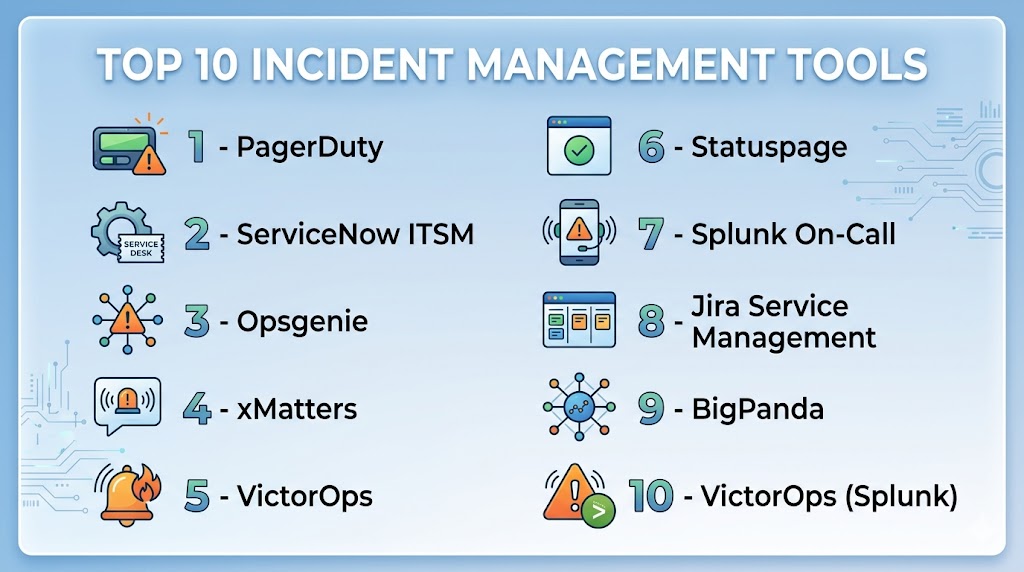
Top 10 Incident Management Tools
#1 — PagerDuty
Short description : PagerDuty provides real-time incident management and alerting for IT, DevOps, and security teams. It centralizes incidents from monitoring tools and automates escalation workflows for faster resolution.
Key Features
- Multi-source alert aggregation
- Automated incident routing and escalation
- AI-driven noise reduction and event correlation
- On-call scheduling and notifications
- Analytics and reporting dashboards
- Integration with ITSM, monitoring, and collaboration tools
Pros
- Rapid alerting and response automation
- Strong AI-assisted incident management
- Extensive integrations with observability platforms
Cons
- Costly for smaller teams
- Learning curve for complex workflows
- Cloud-only deployment
Platforms / Deployment
- Web, iOS, Android
- Cloud
Security & Compliance
- SOC 2, ISO 27001
- SSO, MFA, encryption
Integrations & Ecosystem
Integrates with monitoring, APM, and ITSM platforms.
- Slack, Microsoft Teams, Jira
- AWS, Azure, GCP
- APIs for custom workflow automation
Support & Community
Enterprise support, online documentation, and active user community.
#2 — ServiceNow ITSM
Short description : ServiceNow ITSM includes incident management as part of its IT service management suite. It is designed for enterprise organizations to streamline incident tracking, workflows, and resolution processes.
Key Features
- Centralized incident tracking
- Automated routing and prioritization
- SLA management and compliance reporting
- Analytics for root cause identification
- Integration with IT operations and DevOps tools
Pros
- Enterprise-grade process automation
- Comprehensive reporting and dashboards
- Strong ITIL alignment
Cons
- Complex setup and configuration
- High cost for smaller teams
- Customization requires expertise
Platforms / Deployment
- Web
- Cloud / Hybrid
Security & Compliance
- SOC 2, ISO 27001
- Encryption, RBAC, MFA
Integrations & Ecosystem
Integrates with monitoring, ticketing, and collaboration platforms.
- Jira, Slack, Microsoft Teams
- Cloud platforms: AWS, Azure, GCP
- APIs for workflow automation
Support & Community
Enterprise support, training programs, and strong ITSM community.
#3 — Opsgenie
Short description : Opsgenie is an alerting and incident management tool designed for DevOps and SRE teams. It ensures timely responses with automated escalation and on-call scheduling.
Key Features
- Multi-channel alert notifications
- Customizable escalation policies
- On-call scheduling and rotations
- Analytics and reporting for SLA compliance
- Integration with monitoring and collaboration tools
Pros
- Flexible alert management
- Easy on-call scheduling
- Integrates well with observability and DevOps stacks
Cons
- Limited analytics compared to full ITSM suites
- Pricing can grow with large teams
- Requires monitoring tool integration for full benefits
Platforms / Deployment
- Web, iOS, Android
- Cloud
Security & Compliance
- SOC 2
- SSO, encryption, MFA
Integrations & Ecosystem
- Monitoring tools: Datadog, New Relic
- Slack, Teams, Jira
- APIs for custom alerts and workflows
Support & Community
Documentation, online training, and enterprise support.
#4 — xMatters
Short description : xMatters provides automated incident notification, collaboration, and resolution workflows. It is aimed at IT operations and DevOps teams managing large-scale incidents.
Key Features
- Automated alerting and notifications
- Workflow orchestration for incident response
- On-call scheduling and escalations
- Reporting and analytics dashboards
- Integration with monitoring and ITSM platforms
Pros
- Streamlined incident resolution
- Strong automation and workflow customization
- Multi-channel notifications
Cons
- Can be complex to configure
- Enterprise-focused pricing
- Learning curve for workflow design
Platforms / Deployment
- Web, iOS, Android
- Cloud
Security & Compliance
- SOC 2
- Encryption, SSO
Integrations & Ecosystem
- Jira, ServiceNow, Slack
- Monitoring platforms: Datadog, Nagios
- APIs for custom workflows
Support & Community
Enterprise support, online guides, and training.
#5 — VictorOps
Short description : VictorOps, part of Splunk, delivers real-time alerting and incident management for DevOps and IT teams, combining monitoring, collaboration, and post-incident reporting.
Key Features
- Incident alerting and routing
- On-call scheduling and escalation
- Collaboration via chat and video
- Analytics for incident response metrics
- Integration with monitoring and observability tools
Pros
- Unified alerting and communication
- Strong DevOps workflow integration
- Real-time incident dashboards
Cons
- Requires subscription for full features
- Best suited for DevOps-centric teams
- Cloud-only deployment
Platforms / Deployment
- Web, iOS, Android
- Cloud
Security & Compliance
- SOC 2
- Encryption, SSO, MFA
Integrations & Ecosystem
- Datadog, New Relic, Prometheus
- Slack, Teams, Jira
- APIs for custom incident workflows
Support & Community
Enterprise support, online documentation, and community forums.
#6 — Statuspage
Short description : Statuspage focuses on incident communication and user notifications, enabling teams to communicate outages and service impacts transparently to stakeholders.
Key Features
- Public and private status pages
- Incident notification to users and stakeholders
- Automation of status updates
- Integration with monitoring and incident tools
- Analytics on incident communication impact
Pros
- Transparent communication for users
- Reduces support inquiries
- Easy to configure for SMBs and enterprises
Cons
- Focuses on communication, not root cause analysis
- Requires integration for full incident management
- Limited internal workflow automation
Platforms / Deployment
- Web
- Cloud
Security & Compliance
- Encryption, SSO
- Not publicly stated
Integrations & Ecosystem
- Monitoring tools: Datadog, Pingdom
- Communication tools: Slack, email
- APIs for automated updates
Support & Community
Documentation, customer support, and online tutorials.
#7 — Splunk On-Call
Short description : Splunk On-Call provides incident alerting, management, and collaboration for IT and DevOps teams, enabling fast response and post-incident analysis.
Key Features
- Automated alerting and routing
- On-call schedules and escalations
- Post-incident reports and analytics
- Multi-channel notifications
- Integration with observability and monitoring tools
Pros
- Strong integration with Splunk observability stack
- Automated workflow and routing
- Real-time collaboration
Cons
- Subscription cost
- Best suited for teams already using Splunk
- Cloud-only deployment
Platforms / Deployment
- Web, iOS, Android
- Cloud
Security & Compliance
- SOC 2, ISO 27001
- Encryption, SSO, MFA
Integrations & Ecosystem
- Splunk APM, Datadog, New Relic
- Slack, Teams, Jira
- APIs for custom automation
Support & Community
Enterprise support, training, and documentation.
#8 — Jira Service Management
Short description : Jira Service Management offers ITIL-aligned incident management with automation, reporting, and integration capabilities for IT and DevOps teams.
Key Features
- Incident tracking and escalation
- Automation rules for routing and resolution
- SLA tracking and reporting
- Collaboration and notifications
- Integration with Atlassian ecosystem and monitoring tools
Pros
- Strong ITSM process alignment
- Flexible workflows and automation
- Seamless integration with Jira projects
Cons
- Learning curve for non-Atlassian users
- May require add-ons for advanced analytics
- Cloud subscription costs
Platforms / Deployment
- Web
- Cloud / Self-hosted
Security & Compliance
- SOC 2, ISO 27001
- Encryption, SSO, MFA
Integrations & Ecosystem
- Jira, Confluence
- Monitoring tools: Datadog, New Relic
- APIs for custom workflows
Support & Community
Documentation, enterprise support, and active Atlassian community.
#9 — BigPanda
Short description : BigPanda unifies incident alerts, automates correlation, and accelerates resolution for large IT operations and DevOps teams.
Key Features
- Event correlation and noise reduction
- Automated incident creation and routing
- Real-time collaboration dashboards
- Root cause analysis tools
- Integration with monitoring, ITSM, and collaboration platforms
Pros
- Reduces alert noise
- Accelerates incident resolution
- Scales for enterprise environments
Cons
- Cloud-only deployment
- Cost can be high for SMBs
- Configuration complexity
Platforms / Deployment
- Web
- Cloud
Security & Compliance
- SOC 2
- Encryption, SSO
Integrations & Ecosystem
- Datadog, Splunk, New Relic
- Slack, Teams, Jira
- APIs for automation and custom workflows
Support & Community
Enterprise support, documentation, and online resources.
#10 — VictorOps (Splunk)
Short description : VictorOps offers alerting, on-call management, and incident collaboration for DevOps and IT operations, integrating seamlessly with Splunk and other monitoring tools.
Key Features
- Incident alerting and routing
- On-call scheduling and escalation
- Collaboration via chat and video
- Analytics for incident response metrics
- Integration with monitoring and ITSM tools
Pros
- Unified alerting and communication
- Strong DevOps workflow integration
- Real-time dashboards
Cons
- Requires subscription for full features
- Cloud-only deployment
- Best suited for DevOps-centric teams
Platforms / Deployment
- Web, iOS, Android
- Cloud
Security & Compliance
- SOC 2
- Encryption, SSO, MFA
Integrations & Ecosystem
- Datadog, New Relic, Prometheus
- Slack, Teams, Jira
- APIs for custom incident workflows
Support & Community
Enterprise support, online documentation, and community forums.
Comparison Table (Top 10)
| Tool Name | Best For | Platform(s) Supported | Deployment | Standout Feature | Public Rating |
|---|---|---|---|---|---|
| PagerDuty | Enterprise IT & DevOps | Web, iOS, Android | Cloud | AI-driven alerting & automation | N/A |
| ServiceNow ITSM | Enterprise ITSM | Web | Cloud / Hybrid | ITIL-aligned workflows | N/A |
| Opsgenie | DevOps & SRE | Web, iOS, Android | Cloud | Escalation & on-call management | N/A |
| xMatters | IT & DevOps | Web, iOS, Android | Cloud | Workflow orchestration | N/A |
| VictorOps | DevOps-centric teams | Web, iOS, Android | Cloud | Real-time collaboration | N/A |
| Statuspage | Communication & transparency | Web | Cloud | Public/private incident updates | N/A |
| Splunk On-Call | DevOps & IT | Web, iOS, Android | Cloud | Integrated with Splunk stack | N/A |
| Jira Service Management | ITSM & DevOps | Web | Cloud / Self-hosted | ITIL-aligned incident tracking | N/A |
| BigPanda | Enterprise IT | Web | Cloud | Event correlation & noise reduction | N/A |
| VictorOps (Splunk) | DevOps & IT | Web, iOS, Android | Cloud | Alerting & dashboards | N/A |
Evaluation & Scoring of Incident Management Tools
| Tool Name | Core (25%) | Ease (15%) | Integrations (15%) | Security (10%) | Performance (10%) | Support (10%) | Value (15%) | Weighted Total (0–10) |
|---|---|---|---|---|---|---|---|---|
| PagerDuty | 9 | 8 | 9 | 9 | 9 | 8 | 6 | 8.5 |
| ServiceNow ITSM | 9 | 7 | 8 | 9 | 9 | 8 | 6 | 8.3 |
| Opsgenie | 8 | 8 | 8 | 8 | 8 | 7 | 7 | 7.9 |
| xMatters | 8 | 7 | 8 | 8 | 8 | 7 | 6 | 7.7 |
| VictorOps | 8 | 7 | 8 | 8 | 8 | 7 | 6 | 7.7 |
| Statuspage | 7 | 8 | 7 | 7 | 7 | 6 | 7 | 7.1 |
| Splunk On-Call | 8 | 7 | 8 | 8 | 8 | 7 | 6 | 7.7 |
| Jira Service Management | 8 | 7 | 8 | 8 | 8 | 7 | 6 | 7.7 |
| BigPanda | 8 | 7 | 8 | 8 | 8 | 7 | 6 | 7.7 |
| VictorOps (Splunk) | 8 | 7 | 8 | 8 | 8 | 7 | 6 | 7.7 |
Interpretation: Weighted totals reflect comparative strengths in features, usability, integrations, and security. High scores indicate a balanced and reliable tool for incident management, but team requirements and scale should guide selection.
Which Incident Management Tool Is Right for You?
Solo / Freelancer
Statuspage or Pingdom (with minimal alerting) for simple incident tracking and communication.
SMB
Opsgenie, PagerDuty, or xMatters for lightweight alerting and workflow automation without enterprise overhead.
Mid-Market
VictorOps, Splunk On-Call, or Jira Service Management for structured incident management and integrations with monitoring tools.
Enterprise
ServiceNow ITSM, PagerDuty, and BigPanda provide AI-driven automation, advanced analytics, and multi-team collaboration.
Budget vs Premium
Open-source or entry-level SaaS options reduce cost but offer limited automation. Premium tools provide advanced AI and large-scale workflow capabilities.
Feature Depth vs Ease of Use
PagerDuty and BigPanda offer depth for enterprise teams; Statuspage and Opsgenie provide simpler interfaces for smaller teams.
Integrations & Scalability
Enterprise-scale teams benefit from ServiceNow, PagerDuty, and BigPanda for extensive integrations and high-volume incident handling.
Security & Compliance Needs
Organizations with regulatory requirements should prioritize ServiceNow ITSM, PagerDuty, or Splunk On-Call for robust compliance and audit features.
Frequently Asked Questions (FAQs)
1. What pricing models are available for incident management tools?
Most offer subscription-based pricing; some provide usage-based tiers. Costs vary by number of users, alerts, and integrations.
2. How long does onboarding typically take?
Small teams can deploy in hours; enterprise setups may require weeks for workflow configuration and monitoring integration.
3. Can these tools scale for large IT environments?
Yes, tools like PagerDuty, ServiceNow, and BigPanda are designed for high-volume incidents and multi-team collaboration.
4. Are AI features common?
Enterprise tools increasingly include AI for anomaly detection, event correlation, and automated response.
5. What platforms are supported?
Web-based dashboards are standard; mobile apps for iOS and Android provide on-call and alert management.
6. How secure are incident management tools?
Enterprise-grade solutions offer encryption, RBAC, SSO, MFA, and adherence to SOC 2, ISO 27001, and GDPR where stated.
7. Can they integrate with monitoring and observability tools?
Yes, integrations with APM, logs, metrics, and CI/CD pipelines are common.
8. Do they replace ITSM?
Incident management tools complement ITSM; some enterprise suites like ServiceNow integrate both capabilities.
9. What are common implementation mistakes?
Neglecting workflow customization, over-notifying users, and failing to integrate monitoring tools are common errors.
10. Are open-source options viable?
Some open-source tools exist but are often less feature-rich than commercial solutions and may require additional support.
Conclusion
Incident Management Tools are essential for minimizing downtime, improving response times, and maintaining business continuity in modern IT environments. Selecting the right tool depends on organizational size, complexity, and operational needs. Enterprise teams benefit from ServiceNow, PagerDuty, and BigPanda for advanced AI-assisted incident management and scalability, while SMBs and mid-market teams can leverage Opsgenie, xMatters, or VictorOps for efficient alerting and workflow automation. Evaluating deployment, integration, compliance, and feature depth ensures that teams can respond effectively to incidents, maintain service reliability, and optimize user satisfaction. Organizations should shortlist suitable tools, pilot them in real-world conditions, and validate integrations and workflows to maximize operational efficiency.

Find Trusted Cardiac Hospitals
Compare heart hospitals by city and services — all in one place.
Explore Hospitals
After an incident is resolved, it is also important to check whether the same problem could happen again. A short review of what caused the issue, what fixed it, and what should be changed can help teams learn from each incident. This can reduce repeated incidents over time.