Introduction
Live streaming studio software refers to applications that enable creators to produce, mix, broadcast, and manage live video and audio content in real time. These tools provide control over multiple camera feeds, overlays, graphics, audio mixing, scene transitions, chat integrations, and distribution to platforms like YouTube, Twitch, Facebook Live, and custom RTMP endpoints. Whether for gaming, webinars, virtual events, product launches, educational broadcasts, or interactive live shows, live streaming studios bridge the gap between professional video production and real‑time audience engagement.
Live streaming has become central to entertainment, corporate communication, performance art, and community building as audiences increasingly consume real‑time and on‑demand content. With improved internet speeds, accessible hardware, and sophisticated software capabilities, creators can now deliver polished live experiences without needing broadcast‑level studios.
Real‑world use cases:
- Gaming and e‑sports broadcasts with multi‑camera views, overlays, and live chat engagement
- Virtual events and webinars with presenter switching, screen share, and Q&A integration
- Live performances and concerts streamed to global audiences
- Corporate town halls or product announcements with branded graphics and controlled transitions
- Educational livestreams with slide integration, picture‑in‑picture, and annotation tools
What buyers should evaluate:
- Multi‑source video mixing and scene management
- Custom graphics, overlays, and animated transitions
- Audio mixing, noise suppression, and music integration
- Real‑time audience interaction (chat, polls, alerts)
- Platform distribution and multi‑destination streaming
- Recording options and local archive quality
- Cloud vs desktop deployment and performance
- Integration with hardware (capture cards, microphones, cameras)
- Ease of use and learning curve
- Community, support, and extensibility
Best for:
Live streamers, content creators, online educators, broadcasters, marketers, event producers, and community managers who need professional live production tools with distribution capabilities.
Not ideal for:
Users needing only simple prerecorded video uploads or occasional streaming without advanced mixing; in these cases lightweight streaming tools or platform‑native features may suffice.
Key Trends in Live Streaming Studio Software
- AI‑assisted production tools (auto camera switching, noise suppression, scene suggestions)
- Cloud‑based and browser‑based streaming environments for remote collaboration
- Multi‑platform simultaneous streaming (multistreaming)
- Integrated audience engagement features (live chat overlays, polls, real‑time alerts)
- Advanced audio processing with echo cancellation and adaptive leveling
- Template libraries and motion graphics packs for rapid branding
- Interoperability with conferencing platforms for hybrid events
- Remote guest and co‑host integrations with low latency
- Accessibility enhancements (automated captions, translations)
- Subscription and usage‑based pricing models for scalability
How We Selected These Tools (Methodology)
- Reviewed feature completeness (scenes, transitions, audio/video mixing)
- Assessed reliability and performance in long live sessions
- Evaluated platform support across OS and cloud delivery
- Considered integration with streaming destinations and third‑party services
- Checked ease of setup and learning curve
- Balanced professional, indie, and open‑source offerings
- Reviewed community and vendor support channels
- Assessed extensibility and plugin ecosystems
- Considered value relative to features and scalability
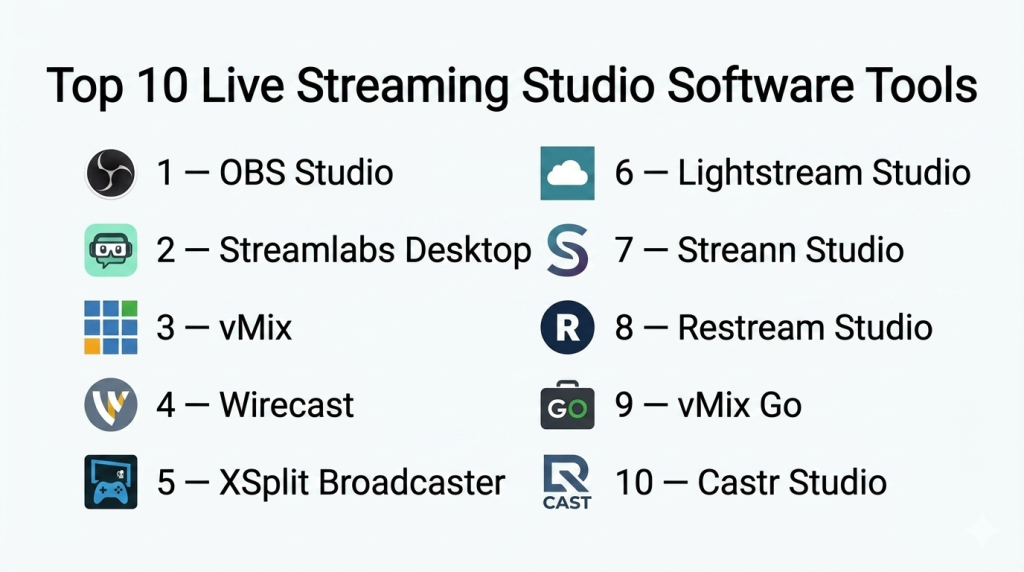
Top 10 Live Streaming Studio Software Tools
#1 — OBS Studio
Short description: OBS Studio is a free, open‑source live production and streaming suite widely used by content creators, gamers, and professionals for broadcasting to multiple platforms.
Key Features
- Multi‑source video and audio mixing
- Scene transitions and custom layouts
- Plugin ecosystem for extended features
- Virtual camera output
- Native recording and live broadcasting
- Cross‑platform support
Pros
- Completely free with extensive community plugins
- No watermark or usage limits
- Highly customizable for advanced workflows
Cons
- Steeper learning curve for beginners
- UI is functional but less polished than commercial tools
Platforms / Deployment
Windows / macOS / Linux / Self‑hosted
Security & Compliance
Not publicly stated
Integrations & Ecosystem
Plugin ecosystem allows custom features:
- Virtual cameras for conferencing tools
- Audio and effects plugins
- Custom scripts and extensions
Support & Community
Large open‑source community, tutorials, and forums.
#2 — Streamlabs Desktop
Short description: Streamlabs Desktop (built on OBS) is a creator‑focused streaming platform with integrated design themes, alerts, and monetization features.
Key Features
- Pre‑built overlay themes and alerts
- Integrated tipping and monetization tools
- Chat and event list panels
- Scene transitions and widgets
- Multistream support in some tiers
- Cloud backup of settings
Pros
- Beginner‑friendly with ready‑to‑use templates
- Integrated creator tools (alerts, merch links)
- Intuitive UI
Cons
- Some features locked behind subscription
- Slight performance overhead due to extra features
Platforms / Deployment
Windows / macOS / Hybrid
Security & Compliance
Not publicly stated
Integrations & Ecosystem
Works with:
- Alerts (bits, follows, subs)
- Chat overlays
- Donation/tipping integrations
Support & Community
Active community, creator resources, and theme marketplace.
#3 — vMix
Short description: vMix is a professional live production and streaming solution offering advanced features like instant replay, NDI support, and multi‑camera inputs.
Key Features
- Multi‑input support (cameras, media, NDI)
- Instant replay and slow‑motion
- Advanced audio mixing
- Virtual sets and effects
- ISO recording of individual inputs
- Multi‑destination streaming
Pros
- Highly professional feature set
- Ideal for live events, sports, and multi‑camera shows
- Good performance on optimized machines
Cons
- Windows only
- Licensing costs for higher feature tiers
Platforms / Deployment
Windows / Self‑hosted
Security & Compliance
Not publicly stated
Integrations & Ecosystem
- NDI and network camera support
- External hardware mixing boards
- Output to multiple platforms
Support & Community
Professional documentation and active user forums.
#4 — Wirecast
Short description: Wirecast is a broadcast‑grade streaming and production software with extensive live mixing, graphics, and streaming capabilities.
Key Features
- Multi‑camera switching
- Telestration and scoreboards
- Social media integration
- Replay and instant review
- Presenter support and virtual sets
- Destination distribution
Pros
- Broad professional tools for live events
- Scalable for enterprise workflows
- Strong support and training resources
Cons
- High cost compared with entry‑level tools
- Can be resource intensive
Platforms / Deployment
Windows / macOS / Hybrid
Security & Compliance
Not publicly stated
Integrations & Ecosystem
- Social and streaming networks
- External hardware decks
- Broadcast workflows
Support & Community
Vendor training and documentation, robust support.
#5 — XSplit Broadcaster
Short description: XSplit Broadcaster provides easy‑to‑use live production with scene transitions, plugin marketplace, and professional features.
Key Features
- Scene and source management
- Integrated audio mixer
- Plugin marketplace
- Stream annotations and alerts
- Virtual camera support
- Recording and broadcast
Pros
- User‑friendly interface
- Strong plugin ecosystem
- Good for gaming and live shows
Cons
- Subscription required for some features
- Windows‑centric
Platforms / Deployment
Windows / Hybrid
Security & Compliance
Not publicly stated
Integrations & Ecosystem
- Plugin store
- Game capture tools
- Third‑party integrations
Support & Community
Active support and community tutorials.
#6 — Lightstream Studio
Short description: Lightstream is a cloud‑based streaming studio that allows creators to stream and mix live content from browsers with minimal setup.
Key Features
- Browser‑based production
- Cloud scenes and overlays
- Remote guest integration
- Multi‑destination streaming
- Cloud asset management
- Simple UI
Pros
- No download required
- Ideal for remote and lightweight workflows
- Collaborative real‑time editing
Cons
- Cloud dependency
- May lack depth compared to desktop tools
Platforms / Deployment
Web / Cloud
Security & Compliance
Not publicly stated
Integrations & Ecosystem
- Cloud storage
- Remote guest inputs
- Social platform streaming
Support & Community
Vendor docs and online resources.
#7 — Streann Studio
Short description: Streann Studio is a cloud‑centric live streaming platform emphasizing multi‑screen experiences and interactive features.
Key Features
- Multi‑screen and multi‑platform support
- Interactive overlays and alerts
- Audience engagement tools
- Cloud mixing and effects
- Stream scheduling and automation
Pros
- Scalable for enterprise workflows
- Focus on audience engagement
- Cloud collaboration features
Cons
- Advanced workflows might require configuration
- Reliance on cloud connectivity
Platforms / Deployment
Web / Cloud
Security & Compliance
Not publicly stated
Integrations & Ecosystem
- Multi‑platform distribution
- Engagement widgets
- Cloud assets
Support & Community
Support resources and enterprise support tiers.
#8 — Restream Studio
Short description: Restream Studio combines cloud live production with multi‑destination streaming and audience interaction tools.
Key Features
- Browser‑based studio
- Multi‑platform streaming (multi‑destination)
- Guest invites and co‑hosts
- On‑screen overlays and graphics
- Live chat integration
- Recording and playback
Pros
- Excellent for multi‑destination streaming
- Simple UI for remote collaboration
- Audience interaction built in
Cons
- Cloud subscription costs
- Less deep editing than desktop studios
Platforms / Deployment
Web / Cloud
Security & Compliance
Not publicly stated
Integrations & Ecosystem
- Multi‑platform output
- Guest links and collaboration
- Chat integration
Support & Community
Documentation and community guides.
#9 — vMix Go
Short description: vMix Go is a localized broadcast appliance version of vMix, designed for event streaming and portable production.
Key Features
- Portable live streaming appliance
- Multi‑camera mixing
- Instant replay
- Integrated switching hardware
- On‑device recording
- Stream distribution
Pros
- Hardware‑optimized live studio
- Great for events and sports
- Robust production capabilities
Cons
- Higher cost
- Hardware dependency
Platforms / Deployment
Self‑contained appliance / Self‑hosted
Security & Compliance
Not publicly stated
Integrations & Ecosystem
- External hardware camera support
- NDI and capture cards
- Stream distribution
Support & Community
Professional technical support and training options.
#10 — Castr Studio
Short description: Castr Studio provides cloud livestream production with multi‑destination output and basic overlay tools.
Key Features
- Multi‑destination streaming
- Cloud switching and layout tools
- Recording and scheduling
- Simulcast support
- Live analytics
Pros
- Good for multi‑platform broadcast
- Simple setup
- Cloud recording
Cons
- Limited advanced production tools
- Subscription dependency
Platforms / Deployment
Web / Cloud
Security & Compliance
Not publicly stated
Integrations & Ecosystem
- Multi‑destination distribution
- Live analytics
- Basic layout tools
Support & Community
Vendor documentation and online resources.
Comparison Table (Top 10)
| Tool Name | Best For | Platform(s) Supported | Deployment | Standout Feature | Public Rating |
|---|---|---|---|---|---|
| OBS Studio | Free multi‑source production | Windows/macOS/Linux | Self‑hosted | Open‑source custom workflows | N/A |
| Streamlabs Desktop | Creator‑focused streaming | Windows/macOS | Hybrid | Integrated alerts and themes | N/A |
| vMix | Professional multi‑camera | Windows | Self‑hosted | Instant replay & NDI | N/A |
| Wirecast | Broadcast‑grade streams | Windows/macOS | Hybrid | Comprehensive production tools | N/A |
| XSplit Broadcaster | Game & show streaming | Windows | Hybrid | Plugin ecosystem | N/A |
| Lightstream Studio | Browser‑based production | Web | Cloud | Cloud studio | N/A |
| Streann Studio | Interactive livestreams | Web | Cloud | Engagement tools | N/A |
| Restream Studio | Multi‑platform streaming | Web | Cloud | Multi‑destination streaming | N/A |
| vMix Go | Event streaming appliance | Appliance | Self‑hosted | Portable production | N/A |
| Castr Studio | Cloud simulcasting | Web | Cloud | Multi‑destination output | N/A |
Evaluation & Scoring of Live Streaming Studio Software
| Tool Name | Core (25%) | Ease (15%) | Integrations (15%) | Security (10%) | Performance (10%) | Support (10%) | Value (15%) | Weighted Total |
|---|---|---|---|---|---|---|---|---|
| OBS Studio | 9 | 7 | 8 | 6 | 8 | 8 | 10 | 8.25 |
| Streamlabs Desktop | 8 | 9 | 8 | 6 | 8 | 8 | 9 | 8.25 |
| vMix | 10 | 6 | 9 | 6 | 9 | 8 | 7 | 8.10 |
| Wirecast | 10 | 6 | 9 | 6 | 9 | 9 | 6 | 7.95 |
| XSplit Broadcaster | 8 | 8 | 8 | 6 | 8 | 8 | 8 | 8.05 |
| Lightstream Studio | 7 | 9 | 7 | 6 | 7 | 8 | 8 | 7.75 |
| Streann Studio | 7 | 7 | 8 | 6 | 7 | 8 | 8 | 7.65 |
| Restream Studio | 8 | 9 | 9 | 6 | 8 | 8 | 8 | 8.15 |
| vMix Go | 9 | 6 | 8 | 6 | 9 | 8 | 6 | 7.75 |
| Castr Studio | 7 | 8 | 7 | 6 | 7 | 7 | 8 | 7.60 |
How to interpret the scores:
- Scores reflect comparative assessments across feature completeness, ease, integrations, and value.
- Higher scores indicate strong tools for broad usage scenarios.
- Scores consider both professional and creator workflows.
Which Live Streaming Studio Tool Is Right for You?
Solo / Freelancer
- OBS Studio, Streamlabs Desktop, and Restream Studio provide cost‑effective ways to produce polished live streams with minimal setup.
SMB
- XSplit Broadcaster, Lightstream Studio, and Streamlabs Desktop balance usability, visuals, and teamwork features.
Mid‑Market
- vMix, Wirecast, and Restream Studio deliver scalable production capabilities for consistent content output.
Enterprise
- Wirecast and vMix Go offer professional broadcast features, hardware integration, and redundancy for corporate or large audience streams.
Budget vs Premium
- Budget: OBS Studio, Lightstream Studio
- Premium: vMix, Wirecast, vMix Go
Feature Depth vs Ease of Use
- Depth: vMix, Wirecast
- Ease: Streamlabs Desktop, Restream Studio
Integrations & Scalability
- Best: Restream Studio, Streamlabs Desktop, vMix
Security & Compliance Needs
- Determine account access, cloud data policies, and stream integrity when using cloud‑based tools.
Frequently Asked Questions (FAQs)
1. What is live streaming studio software?
Live streaming studio software lets creators mix video/audio sources, apply overlays, and stream to platforms in real time.
2. Do I need special hardware?
Not always — many tools work with webcams and microphones, though capture cards enhance multi‑camera setups.
3. Can I stream to multiple platforms simultaneously?
Yes — many platforms support multi‑destination or simulcasting capabilities.
4. What’s the difference between cloud and desktop studios?
Desktop apps run locally; cloud studios are accessible via browser and support remote collaboration.
5. Is green screen supported?
Most tools support chroma key and background replacement.
6. Do these tools record live streams?
Yes — recording is standard for archiving or republishing.
7. Can I invite guests to live streams?
Several cloud studios offer remote guest integration.
8. Do I need a high‑end PC to stream?
Higher resolutions and effects benefit from strong hardware, but basic streaming can run on modest machines.
9. Are there built‑in monetization tools?
Some creator‑focused tools integrate alerts and donation features.
10. Which tool is best for beginners?
Streamlabs Desktop and Restream Studio provide intuitive interfaces with templates.
Conclusion
Live streaming studio software powers real‑time content creation and distribution across entertainment, corporate, event, and educational landscapes. OBS Studio and Streamlabs Desktop provide strong foundations for creators at any level, vMix and Wirecast serve professional broadcast environments, and cloud solutions like Restream Studio and Lightstream Studio offer flexibility for remote, collaborative workflows. Prioritize your needs — multi‑camera support, graphics, ease of use, or cloud collaboration — and test a few platforms with real content to choose the best tool for your streaming goals.

Find Trusted Cardiac Hospitals
Compare heart hospitals by city and services — all in one place.
Explore Hospitals
Live streaming software can bring many sources together, but a small setup issue can affect the whole broadcast. Checking the camera, microphone, internet connection, scenes, and backup source before going live can prevent avoidable interruptions. Having a simple fallback plan is also useful when a device or connection suddenly fails.