Introduction
Note-taking Apps are no longer just digital notebooks—they are your personal command center for thinking, organizing, and executing ideas. In a world overloaded with information, the ability to capture, structure, and retrieve knowledge instantly is a massive advantage. These tools act as your second brain, helping you stay focused, productive, and in control.
Modern note-taking apps go far beyond plain text. With AI-powered summaries, real-time collaboration, knowledge linking, and deep integrations, they are transforming how individuals and teams work. Whether you’re managing projects, documenting processes, or capturing insights, the right app helps you turn ideas into action—faster and smarter.
Common use cases include:
- Capturing ideas, notes, and to-do lists instantly
- Building a personal knowledge base (“second brain”)
- Managing meeting notes and AI-generated summaries
- Documenting workflows, processes, and projects
- Organizing research, study material, and content
What buyers should evaluate:
- Speed and simplicity of note capture
- AI capabilities (summarization, transcription)
- Organization system (folders, tags, backlinks)
- Real-time collaboration features
- Cross-device syncing and offline access
- Integration with productivity tools
- Search and retrieval capabilities
- Security and privacy controls
- Export and sharing options
- Pricing and scalability
Best for: Founders, professionals, students, creators, and teams who want to think clearly, stay organized, and move faster.
Not ideal for: Users who only need basic reminders or minimal text storage without structured organization.
Key Trends in Note-taking Apps
- AI-powered note summarization and content generation
- Rise of “second brain” systems with linked notes
- Real-time collaboration and shared workspaces
- Voice-to-text and meeting transcription becoming standard
- Deep integration with project management tools
- Offline-first and privacy-focused solutions gaining traction
- Markdown and developer-friendly workflows
- Visual note-taking (combining whiteboards + notes)
- Automation of tagging, categorization, and organization
- Unified workspaces combining notes, tasks, and databases
How We Selected These Tools (Methodology)
- Strong adoption across individuals and organizations
- Feature completeness (notes, tasks, collaboration, AI)
- Performance and reliability across devices
- Integration with modern productivity ecosystems
- Security and privacy considerations
- Balance between simplicity and advanced functionality
- Innovation in AI and automation
- Ease of onboarding and usability
- Strength of community and ecosystem
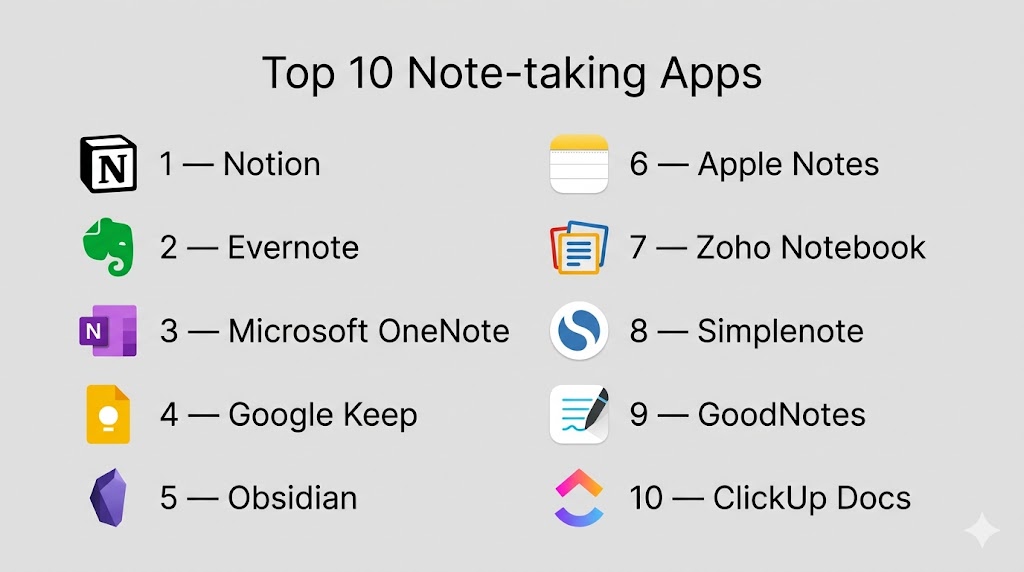
Top 10 Note-taking Apps
#1 — Notion
Short description: A powerful all-in-one workspace that transforms notes into fully customizable productivity systems.
Key Features
- Notes, databases, and wikis
- AI writing and summarization
- Templates for workflows
- Real-time collaboration
- Task and project management
- Custom dashboards
- Embeddable content
Pros
- Extremely flexible and scalable
- Combines multiple tools into one
Cons
- Steep learning curve
- Can feel overwhelming initially
Platforms / Deployment
Web / Windows / macOS / iOS / Android
Security & Compliance
Not publicly stated
Integrations & Ecosystem
Notion fits seamlessly into modern workflows.
- Slack
- Google Drive
- APIs for automation
Support & Community
Massive global community with rich templates and guides.
#2 — Evernote
Short description: A veteran note-taking app known for powerful organization and search capabilities.
Key Features
- Notes and notebooks
- Web clipping
- Advanced search
- Tagging system
- Cross-device sync
- Task management
- AI-assisted features
Pros
- Strong organization system
- Reliable syncing
Cons
- Premium pricing
- Interface feels less modern
Platforms / Deployment
Web / Windows / macOS / iOS / Android
Security & Compliance
Not publicly stated
Integrations & Ecosystem
- Google Drive
- Slack
- Email tools
Support & Community
Large, long-standing user base.
#3 — Microsoft OneNote
Short description: A flexible digital notebook that brings free-form note-taking with enterprise integration.
Key Features
- Free-form canvas
- Sections and notebooks
- Handwriting support
- Collaboration tools
- Cloud sync
- Multimedia notes
Pros
- Free and powerful
- Excellent for structured notes
Cons
- Interface can feel cluttered
- Occasional sync issues
Platforms / Deployment
Windows / macOS / Web / iOS / Android
Security & Compliance
Enterprise-grade controls (details not publicly stated)
Integrations & Ecosystem
- Microsoft 365
- Outlook
- Teams
Support & Community
Strong enterprise adoption.
#4 — Google Keep
Short description: A lightning-fast note-taking app designed for quick capture and simplicity.
Key Features
- Sticky notes interface
- Voice notes
- Reminders
- Color-coded organization
- Checklists
- Real-time sync
Pros
- Extremely simple and fast
- Free to use
Cons
- Limited advanced features
- Basic organization
Platforms / Deployment
Web / Android / iOS
Security & Compliance
Not publicly stated
Integrations & Ecosystem
- Google Docs
- Gmail
- Google Drive
Support & Community
Widely adopted globally.
#5 — Obsidian
Short description: A powerful “second brain” tool that turns notes into a connected knowledge network.
Key Features
- Backlinks and graph view
- Local-first storage
- Markdown support
- Plugin ecosystem
- Offline access
- Knowledge graph visualization
Pros
- Highly customizable
- Privacy-focused
Cons
- Steep learning curve
- Limited built-in collaboration
Platforms / Deployment
Windows / macOS / Linux / iOS / Android
Security & Compliance
Local storage (privacy-focused)
Integrations & Ecosystem
- Plugin ecosystem
- Markdown workflows
Support & Community
Strong productivity-focused community.
#6 — Apple Notes
Short description: A simple yet powerful app offering seamless note-taking within the Apple ecosystem.
Key Features
- Notes and folders
- Checklists
- Handwriting support
- Multimedia notes
- iCloud sync
- Search functionality
Pros
- Free and reliable
- Smooth Apple integration
Cons
- Apple-only ecosystem
- Limited advanced features
Platforms / Deployment
macOS / iOS
Security & Compliance
Not publicly stated
Integrations & Ecosystem
- Apple ecosystem
- iCloud
Support & Community
Strong Apple user base.
#7 — Zoho Notebook
Short description: A visually engaging note-taking app with multimedia support and modern design.
Key Features
- Card-based note system
- AI-powered notes
- Multimedia capture
- Cross-device sync
- Clean UI
- Cloud storage
Pros
- Visually appealing
- Easy to use
Cons
- Limited advanced workflows
- Smaller ecosystem
Platforms / Deployment
Web / Windows / macOS / iOS / Android
Security & Compliance
Not publicly stated
Integrations & Ecosystem
- Zoho ecosystem
- Cloud tools
Support & Community
Growing adoption.
#8 — Simplenote
Short description: A minimalist note-taking app focused on speed, clarity, and distraction-free writing.
Key Features
- Plain text notes
- Sync across devices
- Version history
- Tagging system
- Fast interface
Pros
- Extremely fast
- Completely free
Cons
- No rich formatting
- Limited features
Platforms / Deployment
Web / Windows / macOS / Linux / iOS / Android
Security & Compliance
Not publicly stated
Integrations & Ecosystem
Minimal integrations
Support & Community
Active open-source backing.
#9 — GoodNotes
Short description: A handwriting-focused app built for digital note-taking with stylus support.
Key Features
- Handwritten notes
- PDF annotation
- Notebook organization
- Apple Pencil support
- Templates
Pros
- Excellent handwriting experience
- Ideal for students
Cons
- Apple-focused
- Limited collaboration
Platforms / Deployment
iOS / macOS
Security & Compliance
Not publicly stated
Integrations & Ecosystem
- Apple ecosystem
Support & Community
Popular among students.
#10 — ClickUp Docs
Short description: A collaborative documentation tool that combines notes with task and project management.
Key Features
- Docs and notes
- Real-time collaboration
- Task integration
- Templates
- AI writing tools
- Workflow automation
Pros
- Combines notes and execution
- Strong for teams
Cons
- Complex setup
- Learning curve
Platforms / Deployment
Web / Windows / macOS / iOS / Android
Security & Compliance
Not publicly stated
Integrations & Ecosystem
- Project management tools
- Automation workflows
Support & Community
Growing enterprise adoption.
Comparison Table (Top 10)
| Tool Name | Best For | Platform(s) Supported | Deployment | Standout Feature | Public Rating |
|---|---|---|---|---|---|
| Notion | All-in-one | Multi-platform | Cloud | Custom workflows | N/A |
| Evernote | Organization | Multi-platform | Cloud | Search & tagging | N/A |
| OneNote | Structured notes | Multi-platform | Cloud | Free-form canvas | N/A |
| Google Keep | Quick capture | Web, Mobile | Cloud | Simplicity | N/A |
| Obsidian | Knowledge base | Multi-platform | Local | Linked notes | N/A |
| Apple Notes | Apple users | iOS, macOS | Cloud | Seamless sync | N/A |
| Zoho Notebook | Visual notes | Multi-platform | Cloud | Card UI | N/A |
| Simplenote | Minimalism | Multi-platform | Cloud | Speed | N/A |
| GoodNotes | Handwriting | Apple | Local | Stylus support | N/A |
| ClickUp Docs | Teams | Multi-platform | Cloud | Notes + tasks | N/A |
Evaluation & Scoring of Note-taking Apps
| Tool Name | Core | Ease | Integrations | Security | Performance | Support | Value | Weighted Total |
|---|---|---|---|---|---|---|---|---|
| Notion | 10 | 7 | 9 | 7 | 8 | 8 | 8 | 8.4 |
| Evernote | 9 | 8 | 8 | 7 | 8 | 8 | 7 | 8.0 |
| OneNote | 9 | 8 | 9 | 8 | 8 | 8 | 9 | 8.6 |
| Google Keep | 7 | 10 | 8 | 7 | 8 | 7 | 10 | 8.4 |
| Obsidian | 9 | 6 | 7 | 9 | 9 | 7 | 9 | 8.2 |
| Apple Notes | 8 | 9 | 6 | 7 | 9 | 8 | 10 | 8.3 |
| Zoho Notebook | 8 | 9 | 7 | 7 | 8 | 7 | 9 | 8.1 |
| Simplenote | 6 | 10 | 5 | 7 | 8 | 7 | 10 | 7.8 |
| GoodNotes | 8 | 9 | 5 | 7 | 8 | 7 | 8 | 7.9 |
| ClickUp Docs | 9 | 7 | 9 | 7 | 8 | 8 | 8 | 8.3 |
How to interpret scores:
These scores highlight relative strengths—not absolute winners. A higher score means stronger overall capability, but the best tool is the one that fits your workflow. Always evaluate based on how you capture, organize, and use information daily.
Which Note-taking App Is Right for You?
Solo / Freelancer
Obsidian and Simplenote are perfect for focused, distraction-free workflows.
SMB
Notion and ClickUp Docs offer flexibility and collaboration.
Mid-Market
OneNote and Evernote provide a strong balance of usability and features.
Enterprise
Notion and OneNote lead with scalability and integrations.
Budget vs Premium
Google Keep and Simplenote offer strong free value, while Notion delivers premium flexibility.
Feature Depth vs Ease of Use
Notion offers depth; Google Keep offers simplicity and speed.
Integrations & Scalability
Notion and ClickUp lead in ecosystem integrations.
Security & Compliance Needs
Privacy-focused users should consider Obsidian.
Frequently Asked Questions (FAQs)
1. What are note-taking apps?
They are tools for capturing, organizing, and managing digital information.
2. What is the best note-taking app?
It depends on your workflow—Notion and OneNote are widely used.
3. Are free apps enough?
Yes, many free apps provide powerful features.
4. What is a “second brain”?
A system where notes are interconnected for better thinking and recall.
5. Are AI features useful?
Yes, they speed up summarization and organization.
6. Can I collaborate in real time?
Yes, most modern apps support collaboration.
7. Do these apps work offline?
Some tools offer offline functionality.
8. Are note-taking apps secure?
Security varies by provider.
9. Can I integrate with other tools?
Yes, most apps integrate with productivity ecosystems.
10. How do I choose the right app?
Choose based on your workflow, complexity, and collaboration needs.
Conclusion
Note-taking Apps have evolved into powerful engines for thinking, organizing, and executing ideas at scale. They are no longer just tools—they are your personal knowledge system that helps you stay sharp, focused, and productive. Whether you prefer the flexibility of Notion, the structure of OneNote, or the simplicity of Google Keep, the right choice depends on how you think and work. The smartest move is to test a few tools in real scenarios, see how they fit your daily workflow, and choose the one that makes your thinking faster, clearer, and more actionable.

Find Trusted Cardiac Hospitals
Compare heart hospitals by city and services — all in one place.
Explore Hospitals
This explains how note-taking apps help keep ideas organized and easy to find anytime.