Introduction
Pharmacy Management Systems (PMS) are software platforms designed to help pharmacies, hospital dispensaries, and retail pharmacy chains manage prescription workflows, inventory, billing, compliance, reporting, and patient interactions. In plain English, these tools automate the complex operational, clinical, and administrative processes of running a pharmacy efficiently. because pharmacies are increasingly required to integrate digital prescription services, manage controlled substances securely, optimize inventory, comply with regulatory mandates, and provide real-time patient engagement. Modern PMS platforms often include AI-powered features for inventory forecasting, clinical alerts, and billing optimization.
Real-world use cases include:
- Tracking and managing medication inventory and stock levels
- Processing prescriptions and refills accurately and quickly
- Managing insurance claims, billing, and reimbursements
- Ensuring compliance with state and federal regulations, including controlled substance monitoring
- Engaging patients with reminders, counseling, and medication tracking
Evaluation Criteria for Buyers:
- Core pharmacy workflows: prescriptions, refills, inventory, and billing
- Integration with EHRs, insurance, and electronic prescribing networks
- Ease of use for pharmacists, technicians, and support staff
- Compliance and audit-readiness with federal and state regulations
- Reporting and analytics for inventory, revenue, and operational efficiency
- Mobile and remote access for multi-location operations
- AI-driven features for alerts, recommendations, and inventory forecasting
- Security features such as role-based access, encryption, and audit logs
- Scalability for single pharmacies, chains, or hospital systems
- Vendor support, training, and implementation assistance
Best for: community pharmacies, hospital dispensaries, pharmacy chains, and healthcare systems requiring secure, compliant, and integrated medication management workflows.
Not ideal for: small independent pharmacies with minimal digital needs, businesses already using broader healthcare management suites covering pharmacy functions, or organizations not handling prescriptions or regulated substances.
Key Trends in Pharmacy Management Systems
- Cloud-based platforms dominate for centralized inventory, billing, and compliance management.
- AI-driven inventory and demand forecasting improves stock optimization and reduces wastage.
- Integration with EHRs and e-prescribing networks enables seamless prescription processing and reduces errors.
- Real-time compliance monitoring for controlled substances and regulatory reporting is critical.
- Patient engagement tools including reminders, portals, and counseling notifications are growing.
- Mobile and remote access allows pharmacists and staff to operate across multiple locations efficiently.
- Automation of billing and insurance claims improves revenue cycle and reduces manual work.
- Telepharmacy support is becoming important for remote prescription verification and consultation.
- Data analytics and dashboards are essential for operational insights, medication trends, and business intelligence.
- Enhanced cybersecurity protocols including MFA, encryption, and audit logs are non-negotiable due to sensitive patient and prescription data.
How We Selected These Tools
- Evaluated market adoption and mindshare among retail, hospital, and chain pharmacies
- Assessed feature completeness across prescription management, inventory, billing, and reporting
- Verified reliability and performance through real-world operational usage
- Analyzed security posture including role-based access, audit logs, and encryption
- Checked integration capabilities with EHRs, insurance providers, and e-prescribing networks
- Considered customer fit for single-location, multi-location, and enterprise pharmacy operations
- Evaluated AI or automation support for inventory, alerts, and clinical decision support
- Reviewed compliance readiness for federal and state pharmacy regulations
- Considered vendor support, onboarding, and training resources
- Prioritized scalability and multi-site management capabilities
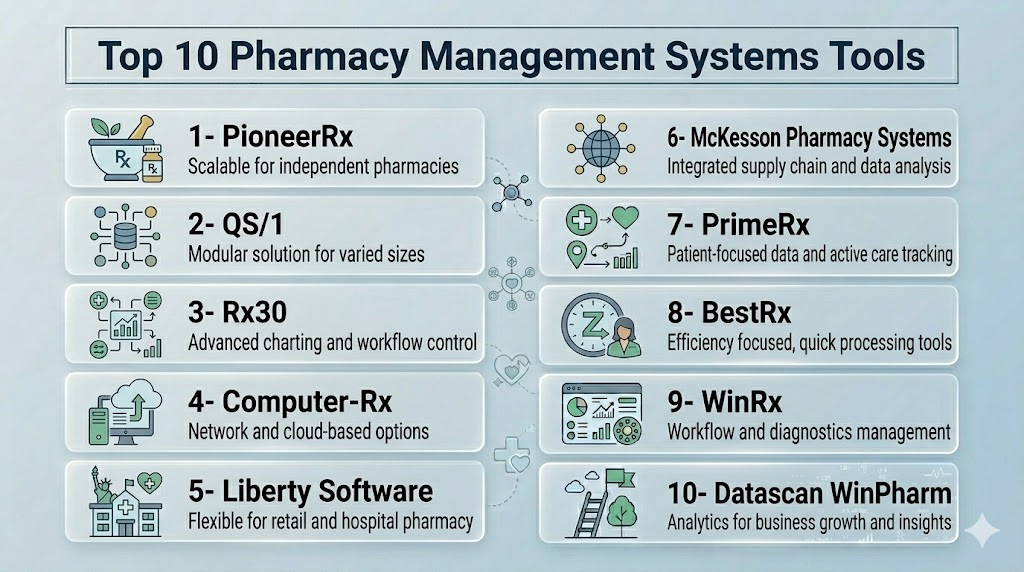
Top 10 Pharmacy Management Systems Tools
1- PioneerRx
Short description: PioneerRx is a cloud-enabled pharmacy management platform designed for independent and community pharmacies, focusing on prescription processing, workflow automation, and patient engagement.
Key Features
- Prescription and refill management
- Inventory control with automatic stock alerts
- Clinical alerts for drug interactions and adherence
- Reporting and analytics dashboards
- Patient portal for medication reminders
- Insurance and billing management
- Workflow automation for pharmacy operations
Pros
- Strong automation and workflow optimization
- User-friendly interface for pharmacists and technicians
- Integrated patient engagement tools
Cons
- May be costly for very small independent pharmacies
- Advanced reporting features require setup and training
- Limited telepharmacy functionality
Platforms / Deployment
Windows / Web / iOS / Android
Cloud
Security & Compliance
HIPAA compliance, role-based access, encryption, audit logs
Integrations & Ecosystem
Supports e-prescribing, insurance clearinghouses, point-of-sale, and lab integrations.
- EHRs
- E-prescribing networks
- Billing platforms
- Inventory suppliers
- Telepharmacy integrations
Support & Community
Vendor-provided onboarding, training, and support; active user community.
2- QS/1
Short description: QS/1 is a pharmacy management platform used by independent, outpatient, and institutional pharmacies to manage prescriptions, billing, and clinical workflows.
Key Features
- Prescription processing and e-prescribing
- Inventory management and automated reorder alerts
- POS and billing integration
- Patient medication counseling tools
- Reporting and analytics
- Medication adherence monitoring
- Integration with healthcare systems and clearinghouses
Pros
- Comprehensive pharmacy workflow coverage
- Suitable for independent and institutional pharmacies
- Good reporting and analytics capabilities
Cons
- Interface may require training for new users
- Advanced integrations may incur extra cost
- Telepharmacy features are limited
Platforms / Deployment
Windows / Web
Cloud / Hybrid
Security & Compliance
HIPAA, role-based access, encryption, audit logs
Integrations & Ecosystem
Connects with EHRs, POS systems, insurance networks, and e-prescribing platforms.
- EHRs
- Billing platforms
- Pharmacy suppliers
- ePrescribing networks
Support & Community
Vendor-led support, training, and documentation; active user forums.
3- Rx30
Short description: Rx30 provides pharmacy management solutions for independent and chain pharmacies, focusing on workflow efficiency, prescription accuracy, and financial management.
Key Features
- Prescription management
- Inventory tracking and replenishment
- Billing and insurance claim processing
- Clinical decision support
- Patient management and reminders
- Reporting dashboards
- Workflow automation tools
Pros
- Efficient workflow automation
- Strong prescription accuracy tools
- Integration-ready with common pharmacy networks
Cons
- User interface may feel dated for some staff
- Telepharmacy integration is limited
- Some features require add-ons
Platforms / Deployment
Windows / Web
Cloud
Security & Compliance
HIPAA compliance, role-based access, encryption, audit logs
Integrations & Ecosystem
Supports e-prescribing, insurance claims, inventory suppliers, lab integrations.
- EHR integration
- ePrescribing networks
- Billing platforms
- Pharmacy automation systems
Support & Community
Training and support provided by vendor; user community available.
4- Computer-Rx
Short description: Computer-Rx is a pharmacy management platform tailored for independent and outpatient pharmacies, focusing on prescription processing, inventory, and reporting.
Key Features
- Prescription and refill management
- Inventory tracking and alerts
- Billing and insurance claim support
- Patient management and engagement
- Reporting and analytics
- Clinical decision alerts
- Workflow optimization
Pros
- Easy-to-use for independent pharmacies
- Strong inventory control features
- Affordable for smaller pharmacies
Cons
- Less suitable for large chain pharmacies
- Limited advanced analytics
- Telepharmacy support is minimal
Platforms / Deployment
Windows / Web
Cloud
Security & Compliance
HIPAA compliance, encryption, audit logs
Integrations & Ecosystem
Integrates with e-prescribing networks, insurance, and lab systems.
- E-prescribing networks
- Insurance clearinghouses
- POS systems
Support & Community
Vendor support, documentation, and basic onboarding resources.
5- McKesson Pharmacy Systems
Short description: McKesson provides enterprise pharmacy management systems for retail and hospital pharmacies, with features covering clinical workflows, inventory, and regulatory compliance.
Key Features
- Prescription management
- Inventory and supply chain management
- Billing and financial workflow
- Clinical alerts and medication safety
- Reporting and analytics
- Multi-location management
- Integration with healthcare systems
Pros
- Enterprise-grade reliability and scale
- Strong inventory and supply chain tools
- Regulatory compliance support
Cons
- May be overkill for small independent pharmacies
- Higher total cost
- Implementation and training require planning
Platforms / Deployment
Windows / Web
Cloud / Hybrid
Security & Compliance
HIPAA, role-based access, encryption, audit logs, SOC 2 Not publicly stated
Integrations & Ecosystem
- EHR and hospital systems
- POS and billing platforms
- Supplier and distributor integrations
- E-prescribing networks
Support & Community
Enterprise support, onboarding services, and dedicated account management.
6- Liberty Software
Short description: Liberty Software provides a pharmacy management solution for independent and outpatient pharmacies with a focus on prescription processing, inventory, and billing.
Key Features
- Prescription and refill management
- Inventory tracking
- Billing and insurance integration
- Patient engagement tools
- Reporting and analytics
- Clinical alerts
- Workflow automation
Pros
- Affordable and practical for independent pharmacies
- Simple interface and setup
- Effective prescription processing
Cons
- Limited multi-location features
- Analytics are basic
- Telepharmacy support minimal
Platforms / Deployment
Windows / Web
Cloud
Security & Compliance
HIPAA, role-based access, encryption, audit logs
Integrations & Ecosystem
Supports e-prescribing, POS systems, and insurance claim platforms.
- EHR integration
- ePrescribing
- Billing platforms
Support & Community
Vendor support and training available; smaller user community.
7- PioneerRx
Short description: PioneerRx is a pharmacy management software for independent and community pharmacies, focusing on automation, clinical decision support, and patient engagement.
Key Features
- Prescription and refill management
- Inventory automation
- Clinical decision alerts
- Billing and claims support
- Patient portals
- Reporting and analytics
- Workflow optimization
Pros
- User-friendly interface
- Strong workflow automation
- Integrated patient engagement
Cons
- May be costlier than simpler PMS
- Advanced reporting requires setup
- Telepharmacy support limited
Platforms / Deployment
Windows / Web / iOS / Android
Cloud
Security & Compliance
HIPAA, encryption, audit logs, MFA, SSO
Integrations & Ecosystem
Supports e-prescribing, insurance networks, POS systems, and lab integrations.
- EHR systems
- Pharmacy automation tools
- Billing platforms
Support & Community
Vendor-led training, implementation, and support; active user community.
8- QS/1 ScriptPro
Short description: QS/1 ScriptPro is a pharmacy management platform for retail and institutional pharmacies, emphasizing prescription accuracy, inventory, and workflow efficiency.
Key Features
- Prescription management
- Inventory control
- Billing and insurance integration
- Clinical alerts
- Reporting and analytics
- Patient engagement
- Automated refill processing
Pros
- Strong prescription accuracy tools
- Workflow optimization
- Good reporting
Cons
- User interface may feel dated
- Telepharmacy limited
- Add-on modules increase cost
Platforms / Deployment
Windows / Web
Cloud / Hybrid
Security & Compliance
HIPAA, encryption, audit logs
Integrations & Ecosystem
- EHR integration
- ePrescribing
- Billing platforms
- Inventory suppliers
Support & Community
Vendor-provided support and documentation; moderate user community.
9- Rx30
Short description: Rx30 provides PMS solutions for independent and chain pharmacies, focusing on workflow efficiency, prescription accuracy, and billing.
Key Features
- Prescription management
- Inventory control
- Billing and claims
- Reporting and dashboards
- Patient engagement
- Clinical decision alerts
- Workflow automation
Pros
- Efficient workflow automation
- Strong prescription accuracy
- Integration-ready
Cons
- Interface may require training
- Telepharmacy limited
- Some features require add-ons
Platforms / Deployment
Windows / Web
Cloud
Security & Compliance
HIPAA, encryption, audit logs
Integrations & Ecosystem
E-prescribing networks, POS, insurance, lab integrations.
- Billing platforms
- EHR connections
- Pharmacy automation tools
Support & Community
Vendor-led training, support, and onboarding; active user community.
10- Computer-Rx
Short description: Computer-Rx is a PMS platform for independent and outpatient pharmacies, focusing on prescription management, inventory, and workflow efficiency.
Key Features
- Prescription and refill management
- Inventory alerts
- Billing and insurance
- Clinical decision support
- Reporting and analytics
- Workflow automation
- Patient engagement
Pros
- Affordable for smaller pharmacies
- Simple interface
- Inventory control features
Cons
- Limited enterprise features
- Analytics are basic
- Telepharmacy support minimal
Platforms / Deployment
Windows / Web
Cloud
Security & Compliance
HIPAA, encryption, audit logs
Integrations & Ecosystem
E-prescribing, POS systems, insurance platforms.
- EHR integration
- ePrescribing networks
- Billing connections
Support & Community
Vendor-provided onboarding, support, and documentation.
Comparison Table
| Tool Name | Best For | Platform(s) Supported | Deployment | Standout Feature | Public Rating |
|---|---|---|---|---|---|
| PioneerRx | Independent/community pharmacies | Windows / Web / iOS / Android | Cloud | Workflow automation and patient engagement | N/A |
| QS/1 | Retail & institutional pharmacies | Windows / Web | Cloud / Hybrid | Prescription accuracy and inventory | N/A |
| Rx30 | Independent & chain pharmacies | Windows / Web | Cloud | Efficient workflow automation | N/A |
| Computer-Rx | Independent & outpatient pharmacies | Windows / Web | Cloud | Inventory alerts and simple interface | N/A |
| Liberty Software | Independent pharmacies | Windows / Web | Cloud | Affordable prescription management | N/A |
| McKesson Pharmacy Systems | Enterprise retail/hospital pharmacies | Windows / Web | Cloud / Hybrid | Enterprise-scale inventory & compliance | N/A |
| Rx30 | Independent & chain pharmacies | Windows / Web | Cloud | Prescription accuracy & reporting | N/A |
| QS/1 ScriptPro | Retail & institutional pharmacies | Windows / Web | Cloud / Hybrid | Automated refill processing | N/A |
| Computer-Rx | Independent pharmacies | Windows / Web | Cloud | Inventory management & workflow | N/A |
| PioneerRx | Community pharmacies | Windows / Web / iOS / Android | Cloud | Patient engagement & clinical alerts | N/A |
Evaluation & Scoring of Pharmacy Management Systems
| Tool Name | Core 25% | Ease 15% | Integrations 15% | Security 10% | Performance 10% | Support 10% | Value 15% | Weighted Total 0–10 |
|---|---|---|---|---|---|---|---|---|
| PioneerRx | 9 | 8 | 8 | 8 | 8 | 8 | 8 | 8.25 |
| QS/1 | 8 | 7 | 8 | 8 | 8 | 7 | 7 | 7.70 |
| Rx30 | 8 | 7 | 7 | 7 | 8 | 7 | 7 | 7.35 |
| Computer-Rx | 7 | 8 | 7 | 7 | 7 | 7 | 7 | 7.15 |
| Liberty Software | 7 | 8 | 6 | 7 | 7 | 7 | 8 | 7.15 |
| McKesson Pharmacy Systems | 9 | 7 | 8 | 8 | 9 | 8 | 7 | 8.10 |
| QS/1 ScriptPro | 8 | 7 | 7 | 7 | 8 | 7 | 7 | 7.35 |
| Rx30 | 8 | 7 | 7 | 7 | 8 | 7 | 7 | 7.35 |
| Computer-Rx | 7 | 8 | 7 | 7 | 7 | 7 | 7 | 7.15 |
| PioneerRx | 9 | 8 | 8 | 8 | 8 | 8 | 8 | 8.25 |
Which Pharmacy Management System Tool Is Right for You?
Solo / Freelancer
Independent or small pharmacies should prioritize affordability, simple interface, and core prescription and inventory management. PioneerRx or Liberty Software are practical choices.
SMB
Small to mid-sized pharmacies need stronger billing, inventory, and clinical alert workflows. PioneerRx or QS/1 are ideal.
Mid-Market
Mid-sized chains or hospital outpatient pharmacies should evaluate McKesson Pharmacy Systems, Rx30, and QS/1 ScriptPro for integration, workflow automation, and compliance features.
Enterprise
Large pharmacy chains or hospital networks should prioritize McKesson Pharmacy Systems, PioneerRx, and QS/1 ScriptPro for scalability, multi-location support, and enterprise-grade reporting.
Budget vs Premium
Budget solutions focus on essential prescription, inventory, and billing functions. Premium platforms provide automation, AI-driven alerts, clinical decision support, and analytics.
Feature Depth vs Ease of Use
Smaller pharmacies value ease of use; enterprise users value feature depth, integration, and advanced reporting.
Integrations & Scalability
Check for EHR, e-prescribing, insurance, POS, pharmacy automation, and lab system integrations. Multi-location scalability is essential for chains or hospital systems.
Security & Compliance Needs
Ensure HIPAA compliance, role-based access, encryption, audit trails, and MFA for all sensitive patient and medication data.
1. What is a Pharmacy Management System?
A Pharmacy Management System (PMS) is software designed to handle prescription processing, inventory tracking, billing, compliance, and patient engagement. It helps pharmacists streamline daily workflows, reduce errors, and manage regulatory requirements efficiently. Modern PMS also supports analytics and multi-location operations for better decision-making.
2. How much does pharmacy management software cost?
Costs vary depending on the vendor, modules, pharmacy size, and implementation complexity. Typical expenses include subscription or license fees, setup, data migration, staff training, and ongoing support. Small independent pharmacies often pay less, while large chains or hospital systems incur higher costs.
3. Do these systems support e-prescribing?
Yes, most modern pharmacy management systems integrate with e-prescribing networks. This allows secure electronic submission and receipt of prescriptions, reduces manual entry errors, and improves turnaround time for patients. Integration with EHRs is also commonly supported.
4. How does a PMS help with compliance?
A PMS helps maintain regulatory compliance through audit trails, controlled substance tracking, clinical alerts, and documentation workflows. It ensures adherence to HIPAA, state pharmacy laws, and DEA requirements. These features reduce risk during audits and improve patient safety.
5. Can a PMS manage inventory effectively?
Yes, these systems automate inventory tracking, stock alerts, reorder points, and supplier management. They help reduce expired or out-of-stock medications, optimize storage, and maintain accurate records for audits and financial reporting.
6. Do pharmacy systems support multi-location operations?
Many PMS platforms are designed for multi-site pharmacies, allowing centralized inventory, consistent workflows, shared reporting, and consolidated billing. Cloud-based solutions make it easy to manage several locations from one platform.
7. Are mobile apps available for pharmacy management?
Yes, several modern PMS platforms provide mobile or tablet apps. Pharmacists and technicians can manage prescriptions, track inventory, review alerts, and communicate with patients remotely. Mobile access improves efficiency and workflow flexibility.
8. Can a PMS integrate with other healthcare systems?
Most PMS platforms support integration with EHRs, insurance providers, e-prescribing networks, accounting software, and laboratory systems. Integrations reduce duplicate data entry, improve accuracy, and enhance patient care coordination.
9. How do I choose the right pharmacy management system?
Evaluate your pharmacy size, workflow needs, integration requirements, compliance needs, staff usability, and budget. Run demos, test real workflows like prescription processing, billing, and inventory management, and ensure vendor support is sufficient.
10. What alternatives exist to a dedicated PMS?
Alternatives include manual paper-based systems, spreadsheets, generic EHRs, or standalone billing and inventory tools. These may work for very small operations but lack automation, regulatory compliance, clinical alerts, and integrated workflows offered by modern PMS platforms.
Conclusion
Pharmacy Management Systems help pharmacies manage prescription processing, inventory control, billing, compliance, patient communication, and reporting in one organized workflow. The right platform depends on the pharmacy’s size, service model, prescription volume, payer requirements, integration needs, and budget. Independent pharmacies may prefer tools like PioneerRx, Liberty Software, BestRx, or PrimeRx, while larger pharmacy chains and hospital pharmacies may need stronger enterprise capabilities from systems like McKesson Pharmacy Systems, QS/1, or Rx30. Buyers should not choose only by brand name or feature count because usability, support, compliance readiness, and integration fit matter just as much. The best next step is to shortlist 2–3 tools, run demos using real prescription and billing workflows, validate security and compliance controls, check integration needs, and pilot the system before making the final decision.

Find Trusted Cardiac Hospitals
Compare heart hospitals by city and services — all in one place.
Explore Hospitals
Pharmacy management systems are most valuable when they streamline prescription processing, inventory control, billing, and patient record management within a single platform. By automating routine workflows, improving medication tracking, and supporting regulatory compliance, these solutions help pharmacies enhance operational efficiency, reduce dispensing errors, and deliver better patient care.