Introduction
Prompt Engineering Tools are specialized platforms designed to help developers, AI practitioners, and organizations craft, optimize, and manage prompts for large language models (LLMs) and other generative AI systems. These tools simplify the process of designing effective prompts, testing responses, and scaling prompt-based workflows across multiple AI models, reducing trial-and-error time and improving output quality.
In the current AI landscape, high-quality prompt engineering is essential to achieving accurate, reliable, and contextually appropriate AI outputs. Organizations increasingly use these tools to automate content generation, enhance chatbots, improve decision-making, and streamline AI-powered workflows.
Real-world use cases include:
- Crafting high-quality prompts for chatbots and virtual assistants
- Optimizing prompts for content generation across multiple AI models
- Automating data labeling and summarization tasks
- Scaling multi-step workflows using AI agents
- Testing and refining prompts for enterprise applications
Key evaluation criteria:
- Prompt versioning and management
- Multi-model support and orchestration
- Testing and simulation capabilities
- Collaboration and sharing features
- Performance analytics and output tracking
- Security, compliance, and audit logging
- Integrations with AI APIs and enterprise tools
- Ease of use and learning curve
- Pricing and scalability
Best for: AI developers, enterprises, content teams, and organizations running multi-model AI workflows
Not ideal for: Small teams experimenting with a single AI model, or users without technical expertise
Key Trends in Prompt Engineering Tools
- Growing demand for multi-model prompt management and orchestration
- Integration of AI-assisted prompt optimization and evaluation
- Collaboration and versioning support for distributed teams
- Pre-built prompt templates for specific industries or tasks
- Analytics and monitoring to track prompt effectiveness
- Increased focus on security, compliance, and audit-ready logs
- Open-source and community-driven frameworks for experimentation
- Integration with LLM orchestration and workflow automation tools
- AI-driven recommendation engines for prompt improvement
- Platform-agnostic deployment models, supporting cloud and hybrid architectures
How We Selected These Tools (Methodology)
- Evaluated market adoption and community engagement
- Assessed feature completeness, including multi-model support and orchestration
- Reviewed reliability and performance signals from user feedback and benchmarks
- Examined security and compliance features
- Considered integration capabilities with APIs, LLMs, and enterprise tools
- Evaluated suitability for various organizational sizes and industry use cases
- Analyzed scalability and support for high-volume AI workflows
- Reviewed documentation quality, onboarding experience, and community support
- Prioritized frameworks with active development and extensibility
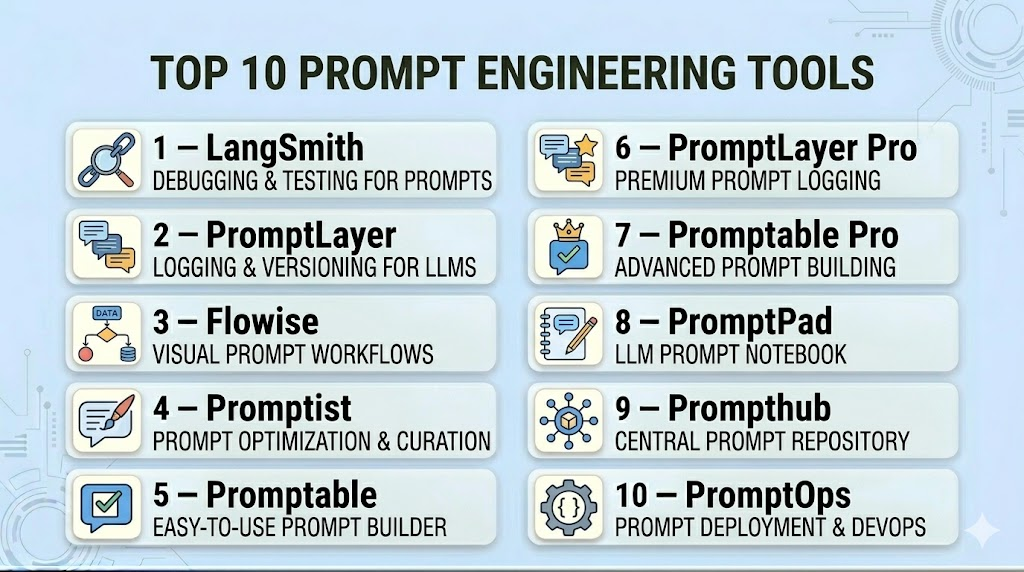
Top 10 Prompt Engineering Tools
#1 — LangSmith
Short description: LangSmith provides a centralized platform for designing, testing, and tracking prompts for multiple AI models. It allows developers and teams to version prompts, analyze outputs, and integrate with existing AI workflows for efficient prompt management.
Key Features
- Multi-model prompt support
- Prompt versioning and history tracking
- Output analysis and performance metrics
- Workflow automation for AI prompts
- Collaboration and sharing for teams
- API and SDK integrations
Pros
- Centralized management for multiple models
- Detailed analytics for prompt optimization
Cons
- Primarily enterprise-focused
- May require technical expertise for advanced features
Platforms / Deployment
- Web / Windows / macOS / Linux
- Cloud / Hybrid
Security & Compliance
- Not publicly stated
Integrations & Ecosystem
- LLM APIs (OpenAI, Hugging Face)
- Enterprise workflow tools
- Python SDK and REST APIs
Support & Community
- Comprehensive documentation
- Active community forums
#2 — PromptLayer
Short description: PromptLayer captures, logs, and tracks prompt performance across multiple LLMs. It enables developers to analyze prompt outputs, manage versions, and optimize for specific use cases.
Key Features
- Logging and analytics of prompts
- Multi-model integration
- Version control for prompt iterations
- Performance metrics and reporting
- API support for custom workflows
Pros
- Detailed logging and output tracking
- Supports multiple LLM providers
Cons
- Focused primarily on developer workflows
- Limited visual UI
Platforms / Deployment
- Web / Cloud API
- Cloud
Security & Compliance
- Not publicly stated
Integrations & Ecosystem
- OpenAI, Hugging Face, custom LLMs
- Python SDK for automation
- API integration for pipelines
Support & Community
- Developer documentation
- GitHub community support
#3 — Flowise
Short description: Flowise allows developers to build and visualize AI workflows, connecting prompts to LLMs and APIs. It supports orchestration of multi-step AI tasks for prompt optimization and testing.
Key Features
- Drag-and-drop workflow builder
- Multi-model prompt integration
- Real-time testing and output visualization
- API and tool integration
- Collaboration for teams
Pros
- Visual workflow management
- Supports multi-step AI orchestration
Cons
- Less focused on detailed prompt analytics
- Requires familiarity with AI workflows
Platforms / Deployment
- Web / Linux / macOS
- Cloud / Self-hosted
Security & Compliance
- Not publicly stated
Integrations & Ecosystem
- OpenAI, Azure, Hugging Face
- REST APIs
- Python SDK for custom integration
Support & Community
- Tutorials and documentation
- Community forums for troubleshooting
#4 — Promptist
Short description: Promptist focuses on prompt generation, testing, and optimization for content and task-specific AI models. It provides AI-driven suggestions to refine prompts for better outputs.
Key Features
- AI-assisted prompt recommendations
- Version control and history tracking
- Multi-model testing
- Output performance metrics
- Integration with content workflows
Pros
- Optimizes prompts with AI suggestions
- Streamlined versioning
Cons
- May not support complex workflow orchestration
- Limited enterprise integrations
Platforms / Deployment
- Web / macOS / Linux
- Cloud
Security & Compliance
- Not publicly stated
Integrations & Ecosystem
- OpenAI, custom AI models
- Python and API support
- Workflow automation tools
Support & Community
- Documentation and tutorials
- Developer community support
#5 — Promptable
Short description: Promptable provides a collaborative environment for designing, sharing, and testing AI prompts. It is ideal for teams working on content, chatbots, or multi-step AI workflows.
Key Features
- Team collaboration features
- Prompt versioning and testing
- Analytics dashboard for prompt performance
- API integrations
- Multi-model support
Pros
- Collaborative features for teams
- Insightful analytics
Cons
- Focused more on content workflows
- May require learning curve for developers
Platforms / Deployment
- Web / Cloud
- Cloud
Security & Compliance
- Not publicly stated
Integrations & Ecosystem
- LLM APIs
- REST and SDK support
- Workflow automation tools
Support & Community
- Tutorials and community forums
- Documentation
#6 — PromptLayer Pro
Short description: An enterprise-focused extension of PromptLayer, providing advanced analytics, versioning, and workflow orchestration for multi-LLM projects.
Key Features
- Enterprise-grade analytics
- Multi-step prompt workflows
- Integration with internal tools
- Multi-model orchestration
- Logging and monitoring
Pros
- Enterprise-ready features
- Supports complex prompt pipelines
Cons
- Higher cost for small teams
- Primarily enterprise-focused
Platforms / Deployment
- Web / Cloud
- Cloud / Hybrid
Security & Compliance
- Not publicly stated
Integrations & Ecosystem
- API integration with AI and business tools
- Python SDK
- Workflow automation support
Support & Community
- Enterprise support
- Documentation
#7 — Promptable Pro
Short description: Advanced version of Promptable with deeper analytics, reporting, and orchestration features for teams managing multiple prompt workflows.
Key Features
- Advanced analytics and reporting
- Multi-model workflow orchestration
- Team collaboration features
- Versioning and history tracking
- API integration
Pros
- Optimized for enterprise teams
- Detailed performance insights
Cons
- Less suitable for solo developers
- Subscription cost higher
Platforms / Deployment
- Web / Cloud
- Cloud
Security & Compliance
- Not publicly stated
Integrations & Ecosystem
- LLM APIs, custom AI models
- Workflow automation
- Python and REST support
Support & Community
- Documentation
- Enterprise support
#8 — PromptPad
Short description: PromptPad focuses on rapid prompt testing and iteration for creative and technical applications. Provides analytics and collaboration tools for teams.
Key Features
- Rapid prompt iteration
- Performance monitoring
- Multi-LLM support
- Collaboration and sharing
- API integration
Pros
- Fast prompt testing
- Collaboration-friendly
Cons
- Limited complex workflow support
- Analytics less comprehensive
Platforms / Deployment
- Web / Cloud
- Cloud
Security & Compliance
- Not publicly stated
Integrations & Ecosystem
- OpenAI, Hugging Face
- API and SDK support
Support & Community
- Tutorials
- Community forums
#9 — Prompthub
Short description: Prompthub provides centralized management of prompts, workflows, and versioning, with a focus on performance monitoring and multi-team collaboration.
Key Features
- Centralized prompt repository
- Multi-model orchestration
- Versioning and history tracking
- Analytics dashboard
- Collaboration features
Pros
- Centralized management
- Performance insights
Cons
- Limited visual workflow builder
- Requires learning curve
Platforms / Deployment
- Web / Cloud
- Cloud
Security & Compliance
- Not publicly stated
Integrations & Ecosystem
- LLM APIs
- REST API and SDK support
Support & Community
- Documentation and tutorials
#10 — PromptOps
Short description: PromptOps enables orchestration, analytics, and version control for large-scale prompt workflows across multiple AI models, optimized for enterprise applications.
Key Features
- Multi-LLM orchestration
- Analytics and monitoring
- Versioning and collaboration
- API and workflow integration
Pros
- Enterprise-grade orchestration
- Performance tracking
Cons
- Enterprise-focused cost
- Less suited for individual developers
Platforms / Deployment
- Web / Cloud
- Cloud / Hybrid
Security & Compliance
- Not publicly stated
Integrations & Ecosystem
- LLM APIs
- Python SDK
- Workflow automation tools
Support & Community
- Enterprise support
- Documentation
Comparison Table (Top 10)
| Tool Name | Best For | Platform(s) Supported | Deployment | Standout Feature | Public Rating |
|---|---|---|---|---|---|
| LangSmith | Multi-LLM orchestration | Web, Windows, macOS, Linux | Cloud, Hybrid | Centralized management | N/A |
| PromptLayer | Logging & analytics | Web | Cloud | Prompt performance tracking | N/A |
| Flowise | Workflow orchestration | Web, Linux, macOS | Cloud, Self-hosted | Visual workflow builder | N/A |
| Promptist | AI-assisted optimization | Web, Linux, macOS | Cloud | Prompt suggestions | N/A |
| Promptable | Team collaboration | Web, Cloud | Cloud | Collaboration and sharing | N/A |
| PromptLayer Pro | Enterprise analytics | Web, Cloud | Cloud, Hybrid | Multi-step workflow orchestration | N/A |
| Promptable Pro | Enterprise teams | Web, Cloud | Cloud | Detailed analytics | N/A |
| PromptPad | Rapid testing | Web, Cloud | Cloud | Fast prompt iteration | N/A |
| Prompthub | Centralized repository | Web, Cloud | Cloud | Multi-team collaboration | N/A |
| PromptOps | Enterprise orchestration | Web, Cloud | Cloud, Hybrid | Multi-LLM orchestration | N/A |
Evaluation & Scoring of Prompt Engineering Tools
| Tool Name | Core (25%) | Ease (15%) | Integrations (15%) | Security (10%) | Performance (10%) | Support (10%) | Value (15%) | Weighted Total (0–10) |
|---|---|---|---|---|---|---|---|---|
| LangSmith | 9 | 8 | 9 | 7 | 8 | 8 | 8 | 8.3 |
| PromptLayer | 8 | 7 | 8 | 7 | 7 | 7 | 8 | 7.6 |
| Flowise | 8 | 7 | 7 | 7 | 8 | 7 | 7 | 7.5 |
| Promptist | 8 | 7 | 7 | 7 | 7 | 7 | 7 | 7.4 |
| Promptable | 8 | 8 | 7 | 7 | 8 | 7 | 7 | 7.6 |
| PromptLayer Pro | 9 | 7 | 8 | 7 | 8 | 7 | 7 | 7.8 |
| Promptable Pro | 8 | 7 | 8 | 7 | 8 | 7 | 7 | 7.6 |
| PromptPad | 7 | 8 | 7 | 7 | 7 | 7 | 7 | 7.3 |
| Prompthub | 8 | 7 | 7 | 7 | 7 | 7 | 7 | 7.4 |
| PromptOps | 8 | 7 | 8 | 7 | 8 | 7 | 7 | 7.6 |
Scoring is comparative across frameworks, considering features, usability, integrations, security, performance, support, and value.
Which Prompt Engineering Tool Is Right for You?
Solo / Freelancer
- Opt for lightweight, open-source or developer-friendly tools like Flowise or Promptist for experimentation and learning workflows.
SMB
- Promptable and PromptPad provide collaborative and manageable options for small teams with multiple prompt-based projects.
Mid-Market
- PromptLayer Pro and Promptable Pro offer multi-step orchestration, analytics, and team collaboration for mid-sized teams.
Enterprise
- LangSmith and PromptOps deliver enterprise-grade orchestration, monitoring, and compliance, ideal for large-scale prompt workflows.
Budget vs Premium
- Open-source and entry-level tools are cost-effective for small teams. Premium frameworks offer full-featured analytics, orchestration, and enterprise support.
Feature Depth vs Ease of Use
- Choose developer-oriented tools for depth (Flowise, LangSmith). Teams prioritizing ease may prefer Promptable and PromptPad.
Integrations & Scalability
- Enterprise frameworks scale efficiently and integrate with LLM APIs, workflow automation, and enterprise systems.
Security & Compliance Needs
- Organizations with sensitive data should select frameworks with audit logging, access control, and enterprise compliance support.
Frequently Asked Questions (FAQs)
1. What are prompt engineering tools used for?
They help create, optimize, test, and manage prompts for LLMs, improving output quality and consistency.
2. Can these tools support multiple AI models?
Yes, most frameworks support multi-model orchestration across OpenAI, Hugging Face, and custom AI models.
3. Are prompt engineering tools suitable for solo developers?
Yes, lightweight and open-source tools provide efficient workflows for freelancers and individual experimentation.
4. Do these tools offer analytics on prompts?
Enterprise tools like LangSmith provide analytics dashboards to track prompt performance and optimization impact.
5. Can they improve chatbot responses?
Yes, by testing and refining prompts, these tools enhance accuracy and context awareness in AI-driven chatbots.
6. How steep is the learning curve?
Open-source and developer-focused tools may require programming knowledge; enterprise solutions offer simplified interfaces.
7. Do they integrate with existing workflows?
Yes, most support API integrations and SDKs to embed into current AI pipelines.
8. Are these tools secure?
Security depends on deployment; enterprise-grade tools offer compliance features and audit logging.
9. Can prompt engineering tools reduce AI usage costs?
Yes, optimizing prompts can reduce unnecessary API calls and improve model efficiency.
10. What alternatives exist?
Direct API usage without orchestration is an alternative for simple tasks. Prompt engineering tools are preferred for multi-step workflows and optimization.
Conclusion
Prompt engineering tools are essential for organizations seeking consistent, high-quality outputs from LLMs. Selecting the right tool depends on team size, workflow complexity, integrations, and security needs. Developer-focused frameworks provide flexibility and control, while enterprise solutions offer orchestration, analytics, and compliance features. Evaluating core capabilities, usability, integrations, and support will help teams optimize AI workflows effectively. Start by piloting selected frameworks, assessing performance, and validating security and scalability before full deployment.

Find Trusted Cardiac Hospitals
Compare heart hospitals by city and services — all in one place.
Explore Hospitals
A prompt that worked well with one model or dataset may give different results after the model or business process changes. Teams should review older prompts regularly and remove ones that are no longer reliable. This can reduce confusion and prevent outdated prompts from being used in production.