Introduction
Computer Vision Platforms are specialized tools that enable businesses and developers to build, deploy, and manage computer vision models at scale. They provide capabilities for image and video analysis, object detection, facial recognition, and pattern recognition across multiple domains. With the exponential growth of visual data in , these platforms are essential for automating visual insights, improving operational efficiency, and enhancing AI-driven decision-making.
Real-world use cases include automated quality inspection in manufacturing, security and surveillance systems, autonomous vehicles and drones, retail customer behavior analysis, and medical imaging for diagnostics. Buyers evaluating computer vision platforms should consider:
- Accuracy and reliability of image and video analysis
- Support for real-time processing and streaming data
- Integration with machine learning and MLOps pipelines
- Pre-trained models versus custom model support
- Scalability and deployment options (cloud, edge, hybrid)
- Privacy and compliance features (GDPR, HIPAA)
- Multi-modal data support (images, video, 3D, thermal)
- Collaboration and access control
- Automation and workflow integration
- Pricing and licensing flexibility
Best for: AI teams, computer vision engineers, enterprises deploying visual intelligence at scale, and industries like manufacturing, retail, healthcare, and autonomous systems.
Not ideal for: Small teams or projects with limited visual data, or teams requiring only basic image processing without advanced model deployment.
Key Trends in Computer Vision Platforms
- Increasing adoption of deep learning models for high-accuracy image and video analysis
- Pre-trained model libraries for faster deployment and reduced training time
- Real-time inference and edge computing for low-latency applications
- Privacy-preserving computer vision, anonymization, and synthetic data support
- Integration with MLOps pipelines for model lifecycle management
- Multi-modal data processing including 3D, infrared, and LiDAR data
- Cloud-native SaaS solutions alongside hybrid and on-prem deployments
- Automation of labeling, annotation, and data augmentation
- Subscription-based and pay-per-use pricing models
- Industry-specific solutions for healthcare, automotive, and retail
How We Selected These Tools (Methodology)
- Evaluated market adoption and enterprise usage
- Reviewed feature completeness including model training, deployment, and monitoring
- Analyzed performance, scalability, and real-time capabilities
- Examined security posture, privacy, and compliance certifications
- Checked integration with ML frameworks, pipelines, and data sources
- Considered fit for solo developers, SMBs, mid-market, and enterprise teams
- Reviewed visualization, reporting, and collaboration features
- Prioritized active development, community support, and vendor responsiveness
- Assessed ease of use, onboarding speed, and learning curve
- Balanced open-source flexibility with enterprise-grade capabilities
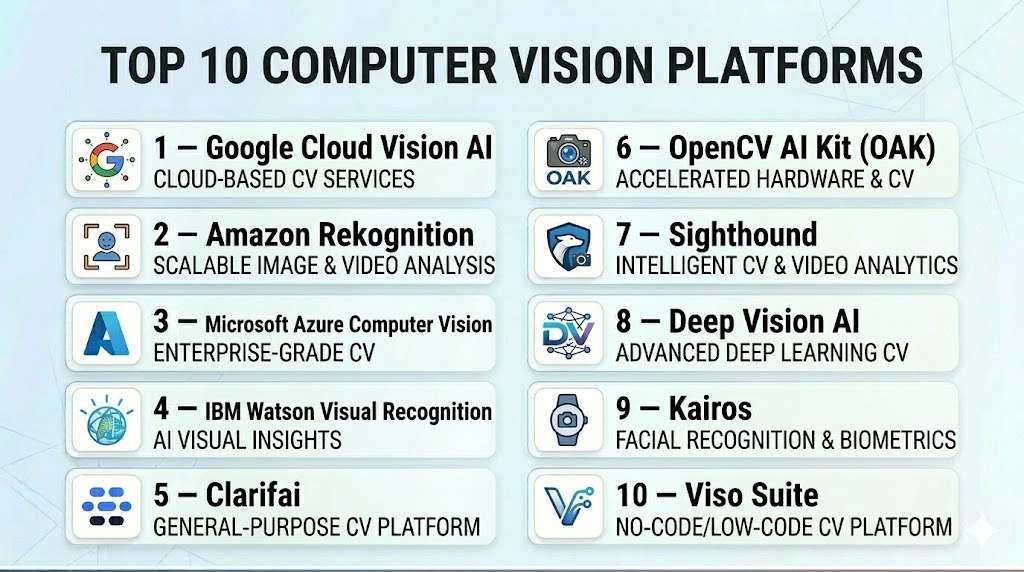
Top 10 Computer Vision Platforms
#1 — Google Cloud Vision AI
Short description : Google Cloud Vision AI provides image and video analysis using pre-trained deep learning models. Ideal for businesses seeking scalable cloud-based visual intelligence.
Key Features
- Object detection, labeling, and OCR
- Facial recognition and sentiment analysis
- Pre-trained and custom model support
- Cloud API for integration
- Real-time image and video processing
- AutoML capabilities
Pros
- Scalable and cloud-native
- Wide range of pre-trained models
- Strong integration with Google Cloud ecosystem
Cons
- Cloud-only deployment
- Subscription costs can be high
- Data privacy relies on cloud policies
Platforms / Deployment
- Web / Cloud
- Cloud
Security & Compliance
- GDPR, SOC 2
- Encryption, access control
Integrations & Ecosystem
- Google Cloud APIs
- TensorFlow integration
- REST API and SDK
Support & Community
Enterprise support, documentation, and community forums.
#2 — Amazon Rekognition
Short description : Amazon Rekognition enables object, scene, and facial recognition for images and videos. It suits enterprises requiring scalable cloud-based vision solutions.
Key Features
- Object, activity, and scene detection
- Facial analysis and comparison
- Video analysis with real-time streaming
- Integration with AWS ecosystem
- API for automated pipelines
- Security and compliance tools
Pros
- Deep integration with AWS
- Scalable cloud infrastructure
- Easy API-based usage
Cons
- Limited on-prem deployment
- Subscription-based pricing
- Customization requires advanced setup
Platforms / Deployment
- Web / Cloud
- Cloud
Security & Compliance
- SOC 2, GDPR, HIPAA
- Encryption, IAM, RBAC
Integrations & Ecosystem
- AWS services (S3, Lambda)
- Python SDK and REST API
- CI/CD pipelines
Support & Community
AWS enterprise support and documentation.
#3 — Microsoft Azure Computer Vision
Short description : Azure Computer Vision provides image and video analysis using pre-trained and custom models. Suitable for organizations leveraging the Microsoft ecosystem.
Key Features
- Object detection and OCR
- Spatial analysis and video indexing
- Custom vision model training
- API and SDK support
- Real-time image processing
- Integration with Power Platform
Pros
- Enterprise-grade cloud platform
- Pre-trained and customizable models
- Strong Microsoft ecosystem integration
Cons
- Cloud-only deployment
- Pricing scales with usage
- Advanced features require Azure experience
Platforms / Deployment
- Web / Cloud
- Cloud
Security & Compliance
- SOC 2, GDPR, ISO 27001
- Encryption and access control
Integrations & Ecosystem
- Python SDK, REST APIs
- Power Platform and Azure ML integration
- Edge device support
Support & Community
Enterprise support, tutorials, and documentation.
#4 — IBM Watson Visual Recognition
Short description : IBM Watson Visual Recognition provides AI-driven image and video analysis, including object and facial recognition. Ideal for enterprises with diverse visual data needs.
Key Features
- Pre-trained visual recognition models
- Custom model training
- Object and facial detection
- Video and image analytics
- API and SDK access
- Integration with IBM Cloud services
Pros
- Flexible deployment options
- Enterprise-grade security and compliance
- Integration with IBM ecosystem
Cons
- Learning curve for new users
- Cloud-focused features
- Subscription costs
Platforms / Deployment
- Web / Cloud
- Cloud / Hybrid
Security & Compliance
- SOC 2, GDPR, HIPAA
- Encryption, RBAC, audit logs
Integrations & Ecosystem
- IBM Cloud APIs
- Python SDK
- Integration with MLOps pipelines
Support & Community
Enterprise support, documentation, and tutorials.
#5 — Clarifai
Short description : Clarifai is a computer vision platform providing AI-driven image and video recognition, custom model training, and multi-modal data processing.
Key Features
- Image and video recognition
- Custom model training
- Visual search capabilities
- API and SDK access
- Real-time inference
- Multi-modal data support
Pros
- Customizable models
- Strong API integration
- Scalable for enterprise applications
Cons
- Cloud subscription required
- Advanced features may require technical expertise
- Limited on-prem support
Platforms / Deployment
- Web / Cloud
- Cloud / Hybrid
Security & Compliance
- SOC 2, GDPR
- Encryption and RBAC
Integrations & Ecosystem
- Python SDK, REST API
- Integration with ML pipelines and cloud storage
Support & Community
Professional support, tutorials, and documentation.
#6 — OpenCV AI Kit (OAK)
Short description : OpenCV AI Kit provides open-source computer vision tools, suitable for embedded and edge applications.
Key Features
- Real-time image processing
- Object and facial recognition
- Depth sensing and spatial AI
- Open-source SDK
- Edge device support
Pros
- Free and open-source
- Suitable for edge deployment
- Flexible and extensible
Cons
- Requires technical setup
- Limited cloud integration
- Smaller community support
Platforms / Deployment
- Windows / macOS / Linux / Web
- Self-hosted / Edge
Security & Compliance
- Not publicly stated
Integrations & Ecosystem
- Python, C++ SDK
- Integration with embedded systems
- REST API for custom pipelines
Support & Community
Open-source community and documentation.
#7 — Sighthound
Short description : Sighthound offers computer vision solutions for video and image analysis, emphasizing facial recognition and security applications.
Key Features
- Facial recognition
- Object detection in video streams
- Real-time processing
- API and SDK
- Custom model support
Pros
- Optimized for security and surveillance
- Real-time inference
- Pre-trained models
Cons
- Limited multi-modal data
- Cloud subscription required for full features
- Less suitable for research pipelines
Platforms / Deployment
- Web / Windows / Linux
- Cloud / Hybrid
Security & Compliance
- GDPR, SOC 2
- Encryption and access control
Integrations & Ecosystem
- Python SDK, REST APIs
- Video stream processing
- CI/CD integration
Support & Community
Enterprise support and tutorials.
#8 — Deep Vision AI
Short description : Deep Vision AI provides custom computer vision models with pre-trained model support and cloud deployment for scalable analytics.
Key Features
- Custom and pre-trained models
- Image and video analysis
- API and SDK access
- Cloud deployment with scaling
- Integration with ML pipelines
Pros
- Flexible model customization
- Scalable cloud infrastructure
- Multi-domain support
Cons
- Cloud subscription required
- Setup complexity for advanced features
- Less offline support
Platforms / Deployment
- Web / Linux
- Cloud / Hybrid
Security & Compliance
- SOC 2, GDPR
- Encryption and RBAC
Integrations & Ecosystem
- Python SDK, REST API
- TensorFlow, PyTorch integration
- Cloud ML pipelines
Support & Community
Enterprise support and documentation.
#9 — Kairos
Short description : Kairos focuses on facial recognition and emotion detection for human-centric computer vision applications.
Key Features
- Facial recognition
- Emotion detection
- API and SDK access
- Cloud-based processing
- Multi-device support
Pros
- Optimized for identity verification
- Cloud-ready
- Pre-trained facial models
Cons
- Limited general object detection
- Cloud subscription required
- Narrow domain focus
Platforms / Deployment
- Web / Cloud
- Cloud
Security & Compliance
- SOC 2, GDPR
- Encryption and RBAC
Integrations & Ecosystem
- Python SDK, REST API
- Integration with surveillance and identity systems
Support & Community
Enterprise support and documentation.
#10 — Viso Suite
Short description : Viso Suite offers end-to-end computer vision platform capabilities, including model building, deployment, monitoring, and edge integration.
Key Features
- Image and video analysis
- Model training and deployment
- Edge and cloud integration
- Monitoring and analytics
- API and SDK support
Pros
- End-to-end computer vision lifecycle
- Edge and cloud deployment
- Scalable for enterprise
Cons
- Premium pricing
- Learning curve for complex features
- Cloud focus
Platforms / Deployment
- Web / Windows / Linux
- Cloud / Edge
Security & Compliance
- SOC 2, GDPR
- Encryption, RBAC, audit logs
Integrations & Ecosystem
- Python SDK, REST API
- Integration with ML pipelines and IoT devices
Support & Community
Enterprise support, onboarding guides, and tutorials.
Comparison Table (Top 10)
| Tool Name | Best For | Platform(s) Supported | Deployment | Standout Feature | Public Rating |
|---|---|---|---|---|---|
| Google Cloud Vision AI | Scalable cloud image analysis | Web | Cloud | Pre-trained & custom models | N/A |
| Amazon Rekognition | Video & facial recognition | Web | Cloud | Real-time video analysis | N/A |
| Azure Computer Vision | Microsoft ecosystem users | Web | Cloud | Custom vision model training | N/A |
| IBM Watson Visual Rec. | Enterprise image analytics | Web | Cloud / Hybrid | Video & image analytics | N/A |
| Clarifai | Multi-modal AI | Web | Cloud / Hybrid | Customizable models | N/A |
| OpenCV AI Kit (OAK) | Edge & embedded CV | Windows/macOS/Linux/Web | Self-hosted / Edge | Real-time image processing | N/A |
| Sighthound | Surveillance & facial analysis | Web/Windows/Linux | Cloud / Hybrid | Optimized for video streams | N/A |
| Deep Vision AI | Custom cloud CV solutions | Web/Linux | Cloud / Hybrid | Scalable custom model deployment | N/A |
| Kairos | Facial recognition & emotion | Web | Cloud | Pre-trained identity models | N/A |
| Viso Suite | End-to-end CV lifecycle | Web/Windows/Linux | Cloud / Edge | Full lifecycle & edge integration | N/A |
Evaluation & Scoring of Computer Vision Platforms
| Tool Name | Core (25%) | Ease (15%) | Integrations (15%) | Security (10%) | Performance (10%) | Support (10%) | Value (15%) | Weighted Total (0–10) |
|---|---|---|---|---|---|---|---|---|
| Google Cloud Vision AI | 9 | 8 | 8 | 7 | 9 | 8 | 7 | 8.1 |
| Amazon Rekognition | 9 | 8 | 8 | 7 | 9 | 8 | 7 | 8.1 |
| Azure Computer Vision | 9 | 8 | 8 | 7 | 8 | 8 | 7 | 8.0 |
| IBM Watson Visual Rec. | 8 | 7 | 7 | 7 | 8 | 7 | 7 | 7.5 |
| Clarifai | 8 | 8 | 7 | 7 | 8 | 7 | 7 | 7.6 |
| OpenCV AI Kit (OAK) | 7 | 7 | 6 | 6 | 7 | 6 | 8 | 6.9 |
| Sighthound | 8 | 7 | 6 | 7 | 8 | 7 | 7 | 7.3 |
| Deep Vision AI | 8 | 7 | 7 | 7 | 8 | 7 | 7 | 7.5 |
| Kairos | 7 | 7 | 6 | 7 | 7 | 6 | 7 | 6.9 |
| Viso Suite | 9 | 7 | 8 | 7 | 8 | 8 | 7 | 7.9 |
These scores provide comparative insights into core capabilities, usability, integration, security, and overall enterprise value.
Which Computer Vision Platforms Tool Is Right for You?
Solo / Freelancer
OpenCV AI Kit (OAK), Clarifai, or Deep Vision AI for lightweight, flexible, or edge-focused development.
SMB
Clarifai, Viso Suite, or Sighthound for small teams needing cloud deployment and pre-trained model capabilities.
Mid-Market
Google Cloud Vision AI, Amazon Rekognition, and Azure Computer Vision for scalable cloud-based analytics and CI/CD integration.
Enterprise
IBM Watson Visual Recognition, Google Cloud Vision AI, and Viso Suite for full lifecycle management, compliance, and multi-team workflows.
Budget vs Premium
Open-source options like OpenCV AI Kit are cost-effective; cloud platforms offer premium dashboards, enterprise support, and integration.
Feature Depth vs Ease of Use
Enterprise platforms like Google Cloud Vision AI and Azure Computer Vision provide rich features; OpenCV AI Kit prioritizes flexibility and code-level control.
Integrations & Scalability
Cloud-native platforms integrate with pipelines, storage, and multi-modal datasets for scalable deployments.
Security & Compliance Needs
Enterprise platforms offer encryption, RBAC, audit logs, and compliance with GDPR, HIPAA, and SOC 2; open-source may require custom security configuration.
Frequently Asked Questions (FAQs)
1. What are typical pricing models?
Open-source tools are free; SaaS platforms use subscriptions based on usage, team size, or API calls.
2. How quickly can teams onboard?
SaaS platforms offer guided onboarding; open-source tools require setup and infrastructure configuration.
3. Can multiple users collaborate on models?
Yes, enterprise platforms provide role-based access, shared workspaces, and versioned models.
4. Are computer vision platforms secure?
Enterprise tools include encryption, RBAC, audit logging, and compliance; open-source requires manual configuration.
5. Do these tools support multiple frameworks?
Yes, platforms commonly support TensorFlow, PyTorch, Keras, and OpenCV libraries.
6. Can they process real-time video streams?
Yes, cloud and edge platforms can handle real-time image and video analysis.
7. Are pre-trained models included?
Many platforms include pre-trained models for object detection, facial recognition, and OCR.
8. Can these platforms integrate with ML pipelines?
Yes, APIs and SDKs allow seamless integration with ML workflows and MLOps pipelines.
9. Do these tools support edge computing?
Some platforms, such as OpenCV AI Kit and Viso Suite, support edge deployment for low-latency applications.
10. Are open-source platforms production-ready?
Yes, but enterprise-grade monitoring, compliance, and multi-team collaboration may require additional setup.
Conclusion
Computer Vision Platforms are essential for businesses leveraging visual data for AI applications. Open-source platforms like OpenCV AI Kit provide flexibility and edge computing capabilities, while cloud platforms such as Google Cloud Vision AI, Amazon Rekognition, and Azure Computer Vision offer scalable, enterprise-ready solutions with pre-trained models and MLOps integration. Enterprise tools like IBM Watson Visual Recognition and Viso Suite deliver full lifecycle management, compliance, and multi-team support. Choosing the right platform depends on team size, deployment requirements, visual data complexity, and integration needs. Conducting trials and pilot projects is recommended to validate performance, ease of use, and scalability.

Find Trusted Cardiac Hospitals
Compare heart hospitals by city and services — all in one place.
Explore Hospitals
A model may work well during testing but give different results if lighting, camera position, or the background changes. Teams should regularly test real production images and recalibrate when needed. This can help keep computer vision results reliable after deployment.