Introduction
Source Code Management (SCM) tools are essential for modern software development, providing version control, collaborative workflows, and automation to manage the codebase efficiently. In SCM tools have evolved to support distributed teams, CI/CD pipelines, AI-driven code insights, and cloud-native workflows, making them critical for businesses deploying software rapidly and securely.
Real-world use cases include managing enterprise-scale software projects, collaborating across remote development teams, maintaining audit trails for compliance, automating build and deployment processes, and tracking code changes with branching and merging strategies. Buyers evaluating SCM tools should consider integration with CI/CD, ease of collaboration, security compliance, scalability, cloud and on-prem support, performance, developer adoption, code review capabilities, pricing models, and API/extension support.
Best for: Developers, DevOps teams, IT managers, and organizations of all sizes looking for secure, collaborative, and scalable code management.
Not ideal for: Small or hobbyist projects that don’t require advanced collaboration, branching, or compliance features.
Key Trends in Source Code Management (SCM) Tools
- AI-assisted code reviews and automated merge suggestions
- Integrated DevOps workflows with native CI/CD pipelines
- Cloud-first and hybrid repository management
- Enhanced security, including RBAC, MFA, and audit logging
- Multi-cloud support for distributed development environments
- GitOps adoption and infrastructure-as-code integration
- Advanced analytics for code health and team productivity
- Support for diverse programming languages and frameworks
- Low-code/no-code API integrations
- Subscription and pay-as-you-go pricing models
How We Selected These Tools (Methodology)
- Market adoption and mindshare among developers
- Completeness of version control features
- Reliability and performance in cloud and enterprise setups
- Security and compliance posture including encryption and audit trails
- Integration ecosystem with CI/CD and DevOps tools
- Scalability and suitability for teams of all sizes
- Ease of use and learning curve for developers
- Support and community engagement
- Total cost of ownership and pricing model flexibility
- AI-driven enhancements for code productivity
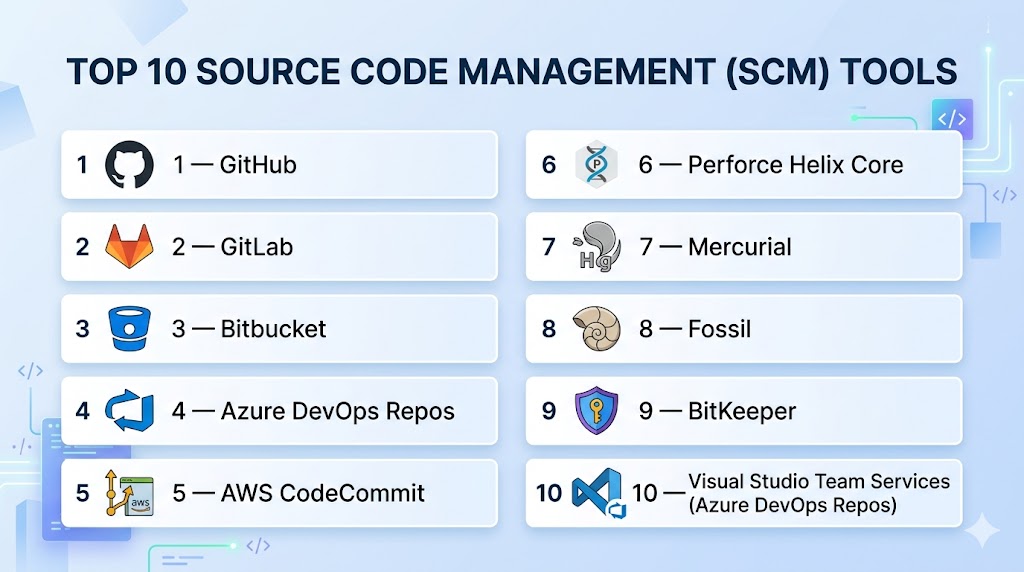
Top 10 Source Code Management (SCM) Tools
#1 — GitHub
Short description: GitHub is a cloud-hosted Git repository platform that enables collaborative software development, code review, and automation through GitHub Actions. Ideal for developers of all sizes, from individual projects to enterprise teams.
Key Features
- Pull requests and code review workflow
- GitHub Actions for CI/CD automation
- Branch protection and RBAC
- Project boards and issue tracking
- Cloud-hosted repository management
- Marketplace for integrations and extensions
Pros
- Large developer community
- Seamless collaboration for distributed teams
Cons
- Some enterprise features require paid tiers
- Primarily cloud-hosted
Platforms / Deployment
- Web / Windows / macOS / Linux
- Cloud
Security & Compliance
- RBAC, SAML, MFA, audit logs
- GDPR, SOC 2
Integrations & Ecosystem
- CI/CD tools, Slack, Jira, Docker, Kubernetes
- REST API, webhooks
Support & Community
- Extensive documentation, active developer community, enterprise support available
#2 — GitLab
Short description: GitLab provides an all-in-one DevOps platform combining SCM, CI/CD, and project management, suitable for enterprise-scale development teams.
Key Features
- Repository management with branching and merging
- Native CI/CD pipelines
- Issue tracking and project boards
- Container registry
- Code analytics and visualization
Pros
- Full DevOps lifecycle support
- Cloud and self-hosted deployment
Cons
- Complex interface for beginners
- Enterprise features are subscription-based
Platforms / Deployment
- Web / Windows / macOS / Linux
- Cloud / Self-hosted
Security & Compliance
- RBAC, MFA, SAML
- SOC 2, GDPR
Integrations & Ecosystem
- Jira, Slack, Docker, Kubernetes
- REST APIs
Support & Community
- Community forum, documentation, enterprise support
#3 — Bitbucket
Short description: Bitbucket by Atlassian offers Git and Mercurial repositories with deep integration into Jira and Confluence for teams using Atlassian tools.
Key Features
- Git and Mercurial support
- Pull requests and code review
- Branch permissions and access control
- Bitbucket Pipelines for CI/CD
- Jira issue tracking integration
Pros
- Seamless integration with Atlassian ecosystem
- Cloud-hosted and on-prem deployment options
Cons
- Limited features outside Atlassian tools
- Mercurial support being phased out
Platforms / Deployment
- Web / Windows / macOS / Linux
- Cloud / Self-hosted
Security & Compliance
- SAML, RBAC, MFA
- Varies / N/A
Integrations & Ecosystem
- Jira, Confluence, Slack, CI/CD tools
- REST APIs
Support & Community
- Atlassian documentation, forums, enterprise support
#4 — Azure DevOps Repos
Short description: Azure DevOps Repos provides Git repositories with integrated pipelines, boards, and project tracking, optimized for Microsoft enterprise teams.
Key Features
- Git repository hosting
- Branch policies and pull requests
- Azure Pipelines integration
- Code search and analytics
- Large file storage support
Pros
- Tight integration with Microsoft ecosystem
- Enterprise-grade security and compliance
Cons
- Works best with Azure services
- Learning curve for non-Microsoft environments
Platforms / Deployment
- Web / Windows / macOS / Linux
- Cloud / Hybrid
Security & Compliance
- RBAC, MFA, SAML
- SOC 2, ISO 27001
Integrations & Ecosystem
- Azure Pipelines, Jira, Slack, Docker
- REST API
Support & Community
- Microsoft documentation, enterprise support, community forums
#5 — AWS CodeCommit
Short description: AWS CodeCommit is a fully managed Git service on AWS, providing secure, scalable repositories with seamless integration into AWS DevOps workflows.
Key Features
- Fully managed Git hosting
- Encryption at rest and in transit
- Integration with AWS CodePipeline
- Webhooks for notifications
- High availability and scalability
Pros
- Cloud-native for AWS environments
- Secure and scalable
Cons
- Limited features outside AWS ecosystem
- Less suited for multi-cloud setups
Platforms / Deployment
- Web / Windows / macOS / Linux
- Cloud
Security & Compliance
- Encryption, RBAC, MFA
- SOC 2, ISO 27001, HIPAA
Integrations & Ecosystem
- AWS CodePipeline, Jenkins, Slack
- REST APIs
Support & Community
- AWS documentation, forums, enterprise support
#6 — Perforce Helix Core
Short description: Helix Core is an enterprise-grade SCM tool optimized for large codebases and binary assets, offering centralized version control with high performance.
Key Features
- Centralized version control
- Fine-grained access control
- Atomic commits and branching
- Large file support
- CI/CD pipeline integration
Pros
- High performance for large repositories
- Enterprise-grade security and control
Cons
- Proprietary licensing
- Steeper learning curve
Platforms / Deployment
- Web / Windows / macOS / Linux
- Cloud / Self-hosted
Security & Compliance
- RBAC, SAML, audit logs
- SOC 2, ISO 27001
Integrations & Ecosystem
- Jenkins, Jira, IDE plugins
- APIs for automation
Support & Community
- Enterprise support, documentation, professional services
#7 — Mercurial
Short description: Mercurial is a distributed SCM system offering simplicity and high performance for code versioning across diverse development environments.
Key Features
- Distributed version control
- Simple branching and merging
- CLI and GUI tools
- Cross-platform support
- High-speed operations for large repositories
Pros
- Lightweight and fast
- Easy for individual developers
Cons
- Smaller community than Git
- Limited CI/CD integrations
Platforms / Deployment
- Windows / macOS / Linux
- Self-hosted / Hybrid
Security & Compliance
- Encryption support
- Varies / N/A
Integrations & Ecosystem
- CI/CD pipelines, IDE plugins
- API support
Support & Community
- Community documentation and forums
#8 — Fossil
Short description: Fossil is a lightweight SCM tool with integrated bug tracking, wiki, and web interface, suitable for small to medium development teams.
Key Features
- Distributed version control
- Built-in bug tracking and wiki
- Web interface management
- Branching and merging
- Cross-platform support
Pros
- All-in-one lightweight solution
- Easy setup
Cons
- Limited enterprise integrations
- Smaller community
Platforms / Deployment
- Windows / macOS / Linux
- Self-hosted
Security & Compliance
- TLS/SSL for web interface
- Varies / N/A
Integrations & Ecosystem
- Minimal third-party integrations
- API support
Support & Community
- Documentation and community forums
#9 — BitKeeper
Short description: BitKeeper is a hybrid SCM system supporting both distributed and centralized workflows, widely used in enterprise and open-source projects.
Key Features
- Distributed and centralized version control
- Branching and merging
- High-performance repository handling
- Access control and auditing
- CI/CD integrations
Pros
- Scales for large enterprise projects
- Secure and reliable
Cons
- Proprietary licensing
- Smaller community
Platforms / Deployment
- Windows / macOS / Linux
- Cloud / Self-hosted
Security & Compliance
- RBAC, audit logs
- SOC 2, ISO 27001
Integrations & Ecosystem
- Jenkins, IDE plugins, CI/CD tools
- APIs
Support & Community
- Enterprise support and documentation
#10 — Visual Studio Team Services (Azure DevOps Repos)
Short description: Azure DevOps Repos offers Git and TFVC repositories integrated with pipelines, boards, and collaboration tools for enterprise teams.
Key Features
- Git and TFVC support
- Branch policies and pull requests
- Integrated CI/CD pipelines
- Code analytics and search
- Cloud and on-prem deployment
Pros
- Enterprise-grade features
- Tight Microsoft ecosystem integration
Cons
- Best suited for Azure-heavy environments
- Learning curve for non-Microsoft teams
Platforms / Deployment
- Web / Windows / macOS / Linux
- Cloud / Hybrid
Security & Compliance
- RBAC, MFA, SAML
- SOC 2, ISO 27001
Integrations & Ecosystem
- Jira, Slack, Docker, Kubernetes
- REST APIs
Support & Community
- Microsoft support, documentation, forums
Comparison Table (Top 10)
| Tool Name | Best For | Platform(s) Supported | Deployment | Standout Feature | Public Rating |
|---|---|---|---|---|---|
| GitHub | Cloud developers | Web/Win/macOS/Linux | Cloud | GitHub Actions | N/A |
| GitLab | DevOps teams | Web/Win/macOS/Linux | Cloud/Self-hosted | Full DevOps | N/A |
| Bitbucket | Atlassian users | Web/Win/macOS/Linux | Cloud/Self-hosted | Jira integration | N/A |
| Azure DevOps Repos | Enterprise | Web/Win/macOS/Linux | Cloud/Hybrid | Pipeline integration | N/A |
| AWS CodeCommit | AWS users | Web/Win/macOS/Linux | Cloud | Fully managed Git | N/A |
| Perforce Helix Core | Large codebases | Web/Win/macOS/Linux | Cloud/Self-hosted | High performance | N/A |
| Mercurial | Lightweight distributed | Win/macOS/Linux | Self-hosted/Hybrid | Simple workflows | N/A |
| Fossil | Small teams | Win/macOS/Linux | Self-hosted | Integrated bug tracking | N/A |
| BitKeeper | Enterprise | Win/macOS/Linux | Cloud/Self-hosted | Hybrid workflow | N/A |
| Visual Studio Team Services | Enterprise | Web/Win/macOS/Linux | Cloud/Hybrid | Git & TFVC support | N/A |
Evaluation & Scoring of SCM Tools
| Tool Name | Core (25%) | Ease (15%) | Integrations (15%) | Security (10%) | Performance (10%) | Support (10%) | Value (15%) | Weighted Total |
|---|---|---|---|---|---|---|---|---|
| GitHub | 9 | 9 | 9 | 8 | 8 | 8 | 8 | 8.6 |
| GitLab | 9 | 8 | 8 | 8 | 8 | 8 | 8 | 8.2 |
| Bitbucket | 8 | 8 | 7 | 8 | 7 | 7 | 8 | 7.6 |
| Azure DevOps Repos | 9 | 8 | 8 | 9 | 8 | 8 | 8 | 8.3 |
| AWS CodeCommit | 8 | 8 | 7 | 8 | 8 | 7 | 7 | 7.7 |
| Perforce Helix Core | 9 | 7 | 8 | 9 | 9 | 8 | 8 | 8.4 |
| Mercurial | 7 | 8 | 6 | 7 | 7 | 6 | 7 | 7.0 |
| Fossil | 6 | 8 | 5 | 6 | 6 | 6 | 6 | 6.3 |
| BitKeeper | 8 | 7 | 7 | 8 | 8 | 7 | 7 | 7.6 |
| Visual Studio Team Services | 9 | 8 | 8 | 9 | 8 | 8 | 8 | 8.3 |
Which SCM Tool Is Right for You?
Solo / Freelancer
- GitHub, Mercurial – lightweight, free tiers, easy to set up
SMB
- GitLab, Bitbucket – collaboration features, integrated pipelines
Mid-Market
- Azure DevOps, AWS CodeCommit – scalable, enterprise-grade features
Enterprise
- Perforce Helix Core, Visual Studio Team Services – high performance, robust security
Budget vs Premium
- Budget: GitHub, Mercurial, Fossil
- Premium: Perforce Helix Core, Azure DevOps
Feature Depth vs Ease of Use
- Feature-rich: GitLab, Perforce Helix Core
- Ease-of-use: GitHub, Bitbucket
Integrations & Scalability
- Enterprise: Perforce Helix Core, Azure DevOps
- Developer-focused: GitHub, GitLab
Security & Compliance Needs
- High compliance: Azure DevOps, Perforce Helix Core, GitLab
Frequently Asked Questions (FAQs)
1. Are SCM tools free?
Many offer free tiers for individuals and small teams; enterprise features require subscriptions.
2. Can SCM tools integrate with CI/CD?
Yes; all support integration with pipelines for automated builds and deployments.
3. Are these tools suitable for distributed teams?
Yes; cloud-hosted SCM tools enable collaboration across remote teams.
4. Do they support multiple programming languages?
Yes; all support mainstream languages including Java, Python, Node.js, and more.
5. Can they manage large binary files?
Perforce Helix Core and Git LFS are optimized for large files.
6. Are security features included?
Most provide RBAC, MFA, SAML, and audit logs.
7. Do they integrate with project management tools?
Yes; GitLab, Bitbucket, GitHub, and Azure DevOps integrate with Jira, Trello, Asana, and others.
8. Can I self-host these tools?
GitLab, Bitbucket, Mercurial, Perforce, and Fossil support self-hosting.
9. Do SCM tools support code review?
Yes; pull/merge requests facilitate collaborative code review.
10. Are they suitable for enterprise compliance?
Yes; top tools provide audit trails, encryption, and SOC 2 or ISO certifications.
Conclusion
Selecting the right SCM tool is critical for modern software development. GitHub and GitLab are ideal for collaborative, small to mid-sized teams, while Perforce Helix Core and Azure DevOps Repos excel in enterprise environments requiring scalability, security, and robust compliance. Teams should assess integration needs, team size, security, and workflow requirements, run pilot projects, and validate security and CI/CD capabilities before full adoption.

Find Trusted Cardiac Hospitals
Compare heart hospitals by city and services — all in one place.
Explore Hospitals
Source code management also becomes important when several developers work on the same project at the same time. Clear branching and merge practices can help avoid conflicts and make changes easier to track. Keeping the repository organized as the team grows can save a lot of time later.