Introduction
Postal Mail Automation Tools are platforms that automate the creation, printing, and mailing of physical letters, invoices, postcards, and marketing materials. By connecting digital workflows to postal carriers, these solutions reduce manual handling, errors, and operational overhead while ensuring timely and trackable delivery. businesses are increasingly blending digital and physical communications. Postal mail automation integrates with CRMs, marketing platforms, and accounting systems, helping companies scale direct mail campaigns efficiently. Modern tools also incorporate analytics, address validation, and AI-powered routing for improved ROI.
Real-world use cases include:
- Sending invoices and payment reminders for SMBs and enterprises.
- Automating customer onboarding letters, contracts, or welcome kits.
- Running direct mail marketing campaigns for segmented audiences.
- Distributing regulatory or compliance notifications efficiently.
- Sending membership updates, newsletters, or fundraising materials for nonprofits.
What buyers should evaluate:
- Integration with CRM, ERP, and marketing platforms
- Automation features (batch sending, scheduling, triggers)
- Address validation and postal carrier support
- Volume scalability and cost per mail piece
- Reporting and delivery tracking
- Security and compliance (GDPR, CCPA)
- API access and extensibility
- Onboarding and customer support quality
- International shipping capabilities
- Subscription vs pay-per-mail pricing
Best for: Marketing teams, finance departments, SMBs to enterprises, subscription-based businesses, and organizations sending high-volume customer correspondence.
Not ideal for: Companies with very low mail volumes, or those fully digital in communications; simple in-house printing may suffice.
Key Trends in Postal Mail Automation Tools
- AI-assisted address verification and postal routing.
- Cloud-first platforms with API-driven integration for automation.
- Hybrid direct mail campaigns combining print and digital touchpoints.
- Subscription and pay-as-you-go pricing for flexibility.
- Increased support for international mail and cross-border tracking.
- Analytics dashboards measuring campaign ROI and delivery efficiency.
- Automated compliance with GDPR, CCPA, and postal regulations.
- Integration with marketing automation platforms and CRMs.
- Mobile-friendly interfaces for campaign monitoring on the go.
- Environmentally conscious print options and carbon tracking for mail.
How We Selected These Tools (Methodology)
- Evaluated market adoption and industry mindshare.
- Assessed feature completeness, including automation, tracking, and integrations.
- Reviewed reliability, delivery performance, and scalability.
- Checked security posture, encryption, and compliance capabilities.
- Studied ecosystem connectivity with CRM, ERP, and marketing platforms.
- Considered customer fit across SMB, mid-market, and enterprise segments.
- Evaluated ease of onboarding, documentation, and support availability.
- Prioritized platforms supporting cloud, hybrid, or API-driven automation.
- Reviewed flexibility for domestic and international mail campaigns.
- Balanced cost against functionality for ROI evaluation.
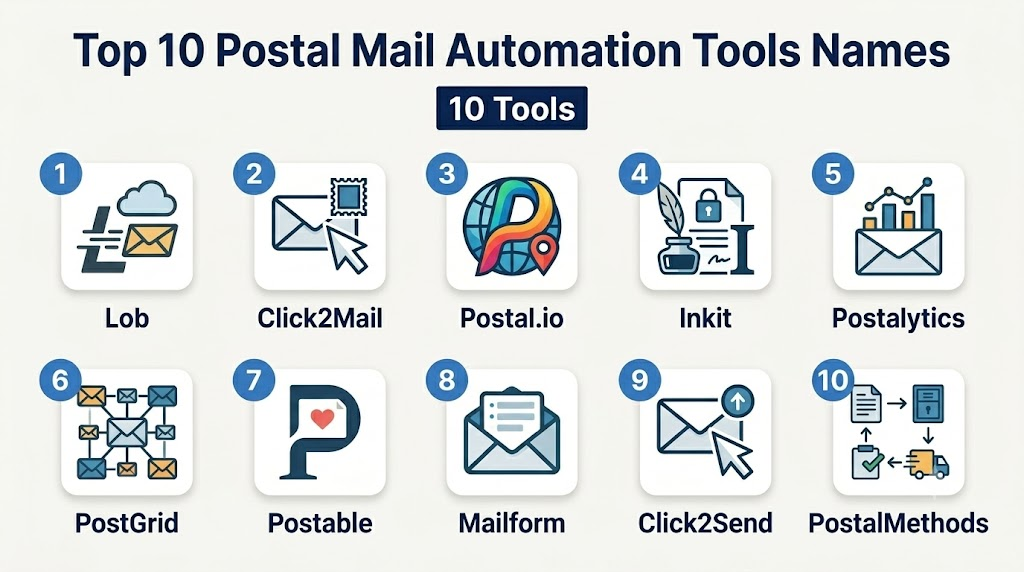
Top 10 Postal Mail Automation Tools
1- Lob
Short description: Lob automates printing and mailing of letters, postcards, and checks for enterprises and SMBs.
Key Features
- Print and mail letters, postcards, and checks
- Address verification and validation
- API for custom automation
- Campaign tracking and analytics
- International mail support
- Batch mailing and scheduling
- Integration with CRMs and marketing platforms
Pros
- Strong API and developer-friendly
- Reliable delivery tracking
- Scales from SMBs to enterprises
Cons
- Pricing may be high for very small volumes
- Limited offline support
Platforms / Deployment
- Web / Windows / macOS / Linux
- Cloud
Security & Compliance
- Not publicly stated
Integrations & Ecosystem
Supports:
- Salesforce
- HubSpot
- Stripe
- Zapier for workflow automation
- Custom API integration
Support & Community
- Email and phone support
- Developer documentation
- Moderate community resources
2- Click2Mail
Short description: Click2Mail enables automated document and marketing mailings for businesses and organizations.
Key Features
- Batch mailings and recurring schedules
- Templates for letters and postcards
- API access for automation
- Address standardization
- Postal tracking and analytics
- Mail merge capabilities
Pros
- Easy-to-use interface
- Supports multiple mail formats
- USPS-certified platform
Cons
- Slower delivery for bulk campaigns
- Limited international support
Platforms / Deployment
- Web / Windows / macOS
- Cloud
Security & Compliance
- Not publicly stated
Integrations & Ecosystem
- API for ERP/CRM
- Email system integration
- Batch processing workflow
Support & Community
- Email and phone support
- User guides and tutorials
- Limited online forum
3- Postal.io
Short description: Postal.io focuses on direct mail and gifting automation, integrating with CRM and marketing tools.
Key Features
- Automated direct mail campaigns
- CRM integrations
- Personalized letters and gifts
- Campaign tracking dashboards
- Global mailing options
- API-driven workflows
Pros
- Personalized mail at scale
- Strong marketing integration
- International support
Cons
- Higher cost for small campaigns
- Limited print material options
Platforms / Deployment
- Web
- Cloud
Security & Compliance
- Not publicly stated
Integrations & Ecosystem
- Salesforce
- HubSpot
- Marketo
- Zapier
Support & Community
- Customer support via email
- Onboarding assistance
- Community webinars
4- Inkit
Short description: Inkit automates printing and mailing of letters, postcards, and checks for transactional and marketing purposes.
Key Features
- Trigger-based mailing
- CRM and marketing integration
- Batch mailing support
- Address verification
- Delivery tracking
- Reporting dashboards
Pros
- Fast automation setup
- Supports high-volume mailing
- Flexible API
Cons
- Limited offline templates
- International mailing options vary
Platforms / Deployment
- Web / Windows / macOS
- Cloud
Security & Compliance
- Not publicly stated
Integrations & Ecosystem
- Salesforce, HubSpot, Stripe, Zapier
Support & Community
- Email and chat support
- Documentation and API guides
5- Postalytics
Short description: Postalytics provides end-to-end automation for direct mail marketing campaigns.
Key Features
- Automated drip campaigns
- CRM integration
- Tracking and analytics
- Address verification
- Personalized postcards and letters
- API automation
Pros
- Marketing-focused features
- Campaign performance dashboards
- Easy to scale
Cons
- Limited non-marketing document features
- Subscription-based pricing can be costly
Platforms / Deployment
- Web
- Cloud
Security & Compliance
- Not publicly stated
Integrations & Ecosystem
- HubSpot
- Salesforce
- Zapier
Support & Community
- Email support
- Onboarding tutorials
- Community webinars
6- PostGrid
Short description: PostGrid automates sending letters, postcards, and checks with API-driven workflows.
Key Features
- Direct mail API
- Address verification
- Batch sending
- Campaign tracking
- Custom templates
Pros
- Developer-friendly
- Scalable for enterprise
- Reliable USPS integration
Cons
- Limited marketing automation
- Learning curve for non-developers
Platforms / Deployment
- Web / Linux / Windows / macOS
- Cloud
Security & Compliance
- Not publicly stated
Integrations & Ecosystem
- Salesforce, HubSpot, Zapier, API
Support & Community
- Email and chat
- Developer documentation
7- Postable
Short description: Postable simplifies sending personalized greeting cards, letters, and thank-you notes.
Key Features
- Personalized letters and cards
- Easy-to-use editor
- Address verification
- Scheduled sending
- Batch mailing
Pros
- Simple UI
- Focus on personalization
- Ideal for SMBs
Cons
- Limited enterprise integrations
- Fewer bulk campaign analytics
Platforms / Deployment
- Web / iOS / Android
- Cloud
Security & Compliance
- Not publicly stated
Integrations & Ecosystem
- Email import
- CRM export
Support & Community
- Email support
- Knowledge base
8- Mailform
Short description: Mailform automates printing and sending letters, postcards, and checks for SMBs and organizations.
Key Features
- Simple document upload
- USPS and international mail support
- Address validation
- Campaign tracking
- API access
Pros
- Easy to use
- Affordable for small businesses
- Supports international mailing
Cons
- Limited automation
- Fewer CRM integrations
Platforms / Deployment
- Web
- Cloud
Security & Compliance
- Not publicly stated
Integrations & Ecosystem
- Zapier
- Google Sheets
Support & Community
- Email support
- Onboarding guides
9- Click2Send
Short description: Click2Send enables automated postal mail and print campaigns through cloud-based APIs.
Key Features
- Cloud-based mailing automation
- Address verification
- Campaign tracking
- Batch printing and mailing
- API integration
Pros
- Supports API-driven workflows
- Scalable for enterprise campaigns
- Flexible mail formats
Cons
- Limited marketing templates
- Learning curve for non-technical users
Platforms / Deployment
- Web / Windows / macOS
- Cloud
Security & Compliance
- Not publicly stated
Integrations & Ecosystem
- Salesforce, HubSpot, Zapier
Support & Community
- Email and chat support
- API documentation
10- PostalMethods
Short description: PostalMethods provides secure, automated mail sending for transactional and marketing purposes.
Key Features
- API-driven automation
- Batch mailing
- Address validation
- Tracking and reporting
- Multiple mail formats
Pros
- Reliable for transactional mail
- Developer-friendly API
- USPS integration
Cons
- Limited advanced marketing automation
- Interface less modern
Platforms / Deployment
- Web / Windows / macOS
- Cloud
Security & Compliance
- Not publicly stated
Integrations & Ecosystem
- API integration
- Zapier
- CRM export
Support & Community
- Email support
- Developer resources
Comparison Table (Top 10)
| Tool Name | Best For | Platform(s) Supported | Deployment | Standout Feature | Public Rating |
|---|---|---|---|---|---|
| Lob | Enterprise / SMB | Web, Windows, macOS, Linux | Cloud | API automation & analytics | N/A |
| Click2Mail | SMBs & Orgs | Web, Windows, macOS | Cloud | USPS-certified mail | N/A |
| Postal.io | Marketing & CRM | Web | Cloud | Personalized gifts & mail | N/A |
| Inkit | Transactional mail | Web, Windows, macOS | Cloud | Trigger-based mail | N/A |
| Postalytics | Marketing campaigns | Web | Cloud | Drip mail automation | N/A |
| PostGrid | Developer automation | Web, Windows, Linux | Cloud | Direct mail API | N/A |
| Postable | Personalized letters | Web, iOS, Android | Cloud | Easy UI & personalization | N/A |
| Mailform | SMB & international | Web | Cloud | Affordable international mail | N/A |
| Click2Send | Enterprise / API | Web, Windows, macOS | Cloud | API-driven mail campaigns | N/A |
| PostalMethods | Transactional / marketing | Web, Windows, macOS | Cloud | USPS integration | N/A |
Evaluation & Scoring of Postal Mail Automation Tools
| Tool Name | Core (25%) | Ease (15%) | Integrations (15%) | Security (10%) | Performance (10%) | Support (10%) | Value (15%) | Weighted Total |
|---|---|---|---|---|---|---|---|---|
| Lob | 9 | 8 | 9 | 7 | 9 | 8 | 8 | 8.5 |
| Click2Mail | 8 | 8 | 7 | 7 | 8 | 7 | 8 | 7.7 |
| Postal.io | 8 | 7 | 8 | 7 | 8 | 7 | 7 | 7.5 |
| Inkit | 8 | 8 | 7 | 7 | 8 | 7 | 7 | 7.6 |
| Postalytics | 8 | 8 | 8 | 7 | 8 | 7 | 7 | 7.7 |
| PostGrid | 8 | 7 | 8 | 7 | 8 | 7 | 7 | 7.5 |
| Postable | 7 | 9 | 6 | 6 | 7 | 7 | 8 | 7.3 |
| Mailform | 7 | 8 | 6 | 6 | 7 | 7 | 8 | 7.2 |
| Click2Send | 8 | 7 | 8 | 7 | 8 | 7 | 7 | 7.5 |
| PostalMethods | 7 | 7 | 7 | 7 | 7 | 7 | 7 | 7.0 |
Which Postal Mail Automation Tool Is Right for You?
Solo / Freelancer
- Postable or Mailform are simple, affordable, and easy to use.
- Ideal for low-volume personalized mail and greeting campaigns.
SMB
- Lob, Click2Mail, or Postal.io provide workflow integration and scalability.
- Support batch campaigns and moderate volume marketing.
Mid-Market
- Postalytics, Inkit, or PostGrid provide advanced automation and tracking.
- Suitable for CRM-integrated campaigns and regular transactional mail.
Enterprise
- Lob, Click2Send, and PostalMethods support high-volume, international, and automated mail.
- Robust APIs and analytics dashboards for large-scale operations.
Budget vs Premium
- Budget: Postable, Mailform
- Premium: Lob, Postal.io, Click2Send
Feature Depth vs Ease of Use
- Ease: Postable, Mailform
- Feature depth: Lob, Postalytics, PostalMethods
Integrations & Scalability
- CRM, ERP, and marketing platforms: Lob, Postal.io, Inkit
- API-driven automation for large campaigns
Security & Compliance Needs
- GDPR and data privacy: Lob, PostalMethods, Click2Send
- Always check postal regulatory compliance
Frequently Asked Questions (FAQs)
1- What is postal mail automation?
Postal mail automation connects your digital workflows to physical mail, allowing businesses to send letters, invoices, postcards, and marketing materials automatically. These platforms handle printing, addressing, and mailing, reducing manual errors and labor. They are particularly useful for high-volume communication and time-sensitive correspondence. Automation also provides tracking and reporting for better oversight of campaigns.
2- How secure are these tools?
Most postal mail automation platforms encrypt documents during transmission and storage, protecting sensitive customer and business information. They include address verification to ensure accurate delivery and audit trails for compliance purposes. Some tools comply with GDPR, CCPA, and postal regulations, providing legal and regulatory safeguards. Businesses should verify each platform’s certifications and security features before sending critical documents.
3- Can I integrate with my CRM or marketing platforms?
Yes, many tools offer native integrations or APIs to connect directly with CRMs, ERPs, and marketing platforms. This allows mail campaigns to trigger automatically from customer events, purchase history, or subscription changes. Integration streamlines the workflow, eliminates duplicate data entry, and ensures consistency across digital and physical communications. It also helps measure campaign performance in one centralized dashboard.
4- Are these tools suitable for small businesses?
Some platforms, like Postable and Mailform, are designed for small businesses and offer simple interfaces, low-volume pricing, and minimal setup. They allow SMBs to send personalized letters, invoices, or postcards efficiently without investing in complex infrastructure. While enterprise-grade tools may offer more features, small businesses can benefit from affordable automation and tracking capabilities that fit their scale.
5- Can I send international mail through these platforms?
Yes, several tools, including Lob and Postal.io, provide support for international addresses. International mail typically involves additional verification and postage considerations. Platforms may offer customs documentation, tracking, and delivery estimates. It’s important to check each provider’s coverage for your target countries and ensure compliance with local postal regulations for smooth delivery.
6- How is pricing structured for postal mail automation?
Pricing models vary: some providers use subscriptions, others charge per mail piece, and some offer tiered plans based on volume and features. Small businesses may prefer pay-per-mail or low-volume subscription plans. Enterprises often opt for higher-tier subscriptions with batch processing, API access, and analytics dashboards. Total costs may also include printing, postage, and integration fees.
7- Can mail workflows be automated?
Yes, many platforms support automated workflows, such as sending a letter when a new customer signs up or a payment reminder when an invoice is due. APIs allow developers to integrate mail campaigns directly into internal systems. Automated batching, scheduling, and delivery reduce human error, increase efficiency, and free staff to focus on higher-value tasks. Workflow automation is especially important for recurring communications.
8- How is delivery tracked and reported?
Most tools offer dashboards that track mail status, including printing, postage, in-transit updates, and confirmation of delivery. Users can view metrics such as open rates (for marketing inserts), delivery success, and geographic distribution. Detailed reports help evaluate campaign ROI, identify delays, and support regulatory compliance. Some platforms provide exportable reports for accounting or marketing analysis.
9- How long does it take to send mail?
Domestic mail typically ships within 1–3 business days after processing, depending on volume and scheduling. International mail may take longer, and delivery times vary by country and postal service. Batch processing can affect speed, and peak seasons may introduce delays. Platforms provide estimated delivery times and tracking tools to help manage expectations for recipients and internal teams.
10- How do I migrate from traditional manual mailing?
Migrating requires assessing current mailing volume, frequency, and workflow. Platforms with APIs or batch processing allow you to replace manual processes gradually. Start with pilot campaigns, validate addresses, and ensure integration with existing CRM or ERP systems. Training staff and testing small-scale automation reduces risk, improves adoption, and ensures a smooth transition from traditional mail to automated systems.
Conclusion
Postal mail automation tools modernize physical mail workflows, combining efficiency, tracking, and integration with digital systems. Selecting the right solution depends on business size, volume, compliance, and integration requirements. SMBs benefit from simple and affordable tools, while enterprises need API-driven, high-volume platforms with analytics. Start by shortlisting 2–3 tools, test pilot campaigns, validate security and delivery tracking, and scale confidently. These platforms bridge traditional mail with modern, automated business operations.

Find Trusted Cardiac Hospitals
Compare heart hospitals by city and services — all in one place.
Explore Hospitals
Postal mail automation tools are most valuable when they bridge traditional mail with modern digital workflows. By automating document generation, printing, mailing, and delivery tracking, these platforms help organizations reduce manual effort, lower operational costs, and ensure timely, accurate communication with customers and stakeholders.