Introduction
Cloud file storage refers to services that allow individuals and organizations to store, manage, and access files in the cloud rather than on local devices or on-premises servers. These tools provide secure, scalable, and accessible storage for documents, multimedia, and enterprise data across multiple devices and locations. By centralizing file storage in the cloud, teams can collaborate more effectively, enforce consistent security policies, and simplify data management.
In the rise of remote work, hybrid IT environments, and large-scale data generation makes cloud file storage indispensable for organizations of all sizes. Real-world use cases include:
- Centralizing company documents for cross-team collaboration.
- Secure storage and sharing of large media files.
- Version control and backup for critical project files.
- Simplifying compliance with data retention and auditing requirements.
- Supporting remote and mobile workforce productivity.
Key evaluation criteria buyers should consider:
- Platform compatibility (Windows, macOS, Linux, iOS, Android)
- Cloud deployment model and redundancy
- File sharing, collaboration, and versioning capabilities
- Security and encryption standards
- Compliance with GDPR, HIPAA, SOC 2, ISO 27001
- Integration with productivity apps and collaboration tools
- Storage scalability and tiering options
- Automation, lifecycle management, and backup
- User access controls and audit logs
- Pricing flexibility and storage limits
Best for: IT managers, teams, and organizations of all sizes needing secure, accessible, and scalable file storage with collaborative and compliance features. Industries such as finance, healthcare, legal, media, and education benefit most.
Not ideal for: Individuals or teams with minimal data storage needs or organizations already using built-in storage from existing SaaS providers may not require a dedicated cloud file storage platform.
Key Trends in Cloud File Storage
- AI-assisted file organization: Automatic tagging, indexing, and metadata management.
- Collaboration-focused tools: Real-time editing, commenting, and co-authoring.
- Hybrid and multi-cloud support: Central management across different cloud providers.
- Advanced security features: Encryption at rest and in transit, MFA, RBAC, and audit logs.
- Integration with productivity suites: Microsoft 365, Google Workspace, Slack, and project management tools.
- Compliance-ready storage: Automated retention, e-discovery, and audit support.
- Storage optimization: Deduplication, compression, and tiering for cost efficiency.
- Subscription and scalable pricing: Pay-as-you-grow models for SMBs and enterprises.
- Cross-platform accessibility: Web, mobile, and desktop clients for multi-device access.
- AI-powered search: Improved file discovery using content indexing and semantic search.
How We Selected These Tools (Methodology)
- Reviewed market adoption and mindshare across SMB, mid-market, and enterprise users.
- Evaluated feature completeness including file storage, sharing, collaboration, and security.
- Assessed reliability and performance through vendor documentation and user reviews.
- Considered security posture, focusing on encryption, MFA, RBAC, and compliance support.
- Checked integration and ecosystem support with cloud apps, collaboration suites, and workflow tools.
- Evaluated scalability for growing file storage and multi-cloud environments.
- Reviewed automation, versioning, and lifecycle management.
- Assessed search and retrieval efficiency.
- Analyzed ease of deployment, user onboarding, and support.
- Examined vendor support tiers and active user communities.
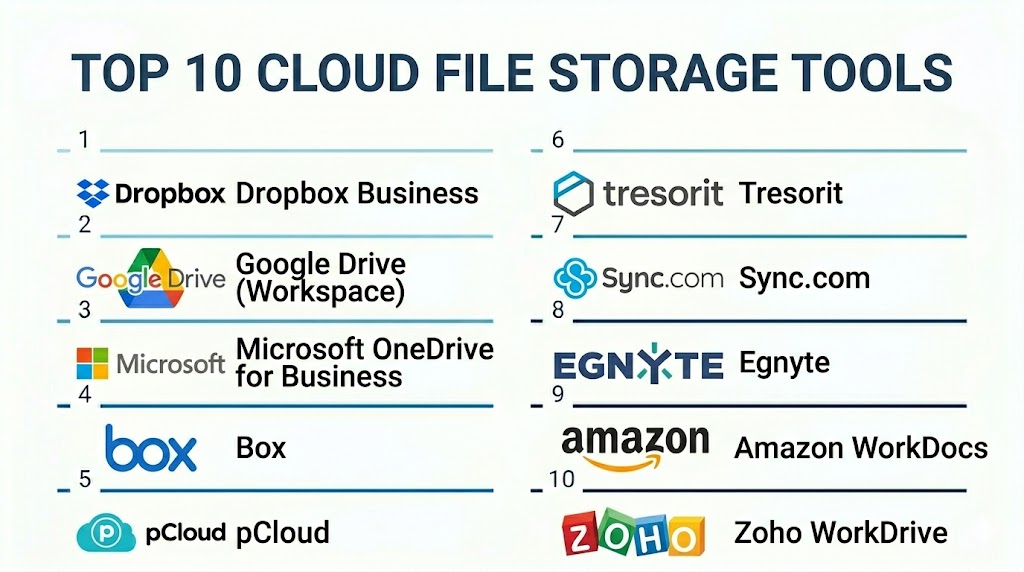
Top 10 Cloud File Storage Tools
#1 — Dropbox Business
Short description: Dropbox Business provides cloud storage with real-time file collaboration, syncing, and secure sharing. Ideal for SMBs and mid-sized teams seeking productivity-focused storage.
Key Features
- File syncing across devices
- Shared team folders with granular access controls
- Real-time collaboration and commenting
- Version history and file recovery
- Admin controls and reporting dashboards
- Integration with Microsoft 365, Slack, and Google Workspace
Pros
- User-friendly interface
- Strong collaboration features
Cons
- Advanced admin and security features require higher plans
- Costs scale with team size
Platforms / Deployment
- Windows, macOS, Linux, iOS, Android, Web
- Cloud
Security & Compliance
- Encryption, MFA
- SOC 2, GDPR
Integrations & Ecosystem
Integrates with productivity tools and workflow apps.
- Slack
- Microsoft 365
- Google Workspace
- APIs for automation
Support & Community
24/7 support; active user community forums.
#2 — Google Drive (Workspace)
Short description: Google Drive offers cloud storage with collaboration tools integrated into Google Workspace. Suitable for individuals, SMBs, and enterprises using Google apps.
Key Features
- File storage and sharing
- Real-time collaboration in Docs, Sheets, Slides
- Version history and recovery
- Team Drives for departmental storage
- Integration with Google Workspace apps
Pros
- Seamless integration with Google Workspace
- Excellent real-time collaboration
Cons
- Limited features outside Google ecosystem
- Storage pricing varies with plan
Platforms / Deployment
- Web, Windows, macOS, iOS, Android
- Cloud
Security & Compliance
- Encryption, MFA
- SOC 2, GDPR
Integrations & Ecosystem
Integrates across Google Workspace and third-party apps.
- Slack
- Salesforce
- API support for workflow automation
Support & Community
Google support channels; active online community.
#3 — Microsoft OneDrive for Business
Short description: OneDrive for Business provides cloud storage and collaboration tightly integrated with Microsoft 365. Ideal for enterprises and SMBs using Microsoft applications.
Key Features
- File storage and sharing
- Integration with Teams, SharePoint, and Office apps
- Versioning and file restore
- Policy-driven access controls
- Compliance reporting
Pros
- Native integration with Microsoft 365
- Strong enterprise features
Cons
- Less intuitive for non-Microsoft users
- Advanced features require premium plans
Platforms / Deployment
- Windows, macOS, iOS, Android, Web
- Cloud / Hybrid
Security & Compliance
- Encryption, MFA, RBAC
- GDPR, HIPAA, SOC 2
Integrations & Ecosystem
Integrates with Microsoft 365 apps, SharePoint, Teams.
- APIs for automation
- Backup connectors
- Workflow integrations
Support & Community
Microsoft support; extensive enterprise community.
#4 — Box
Short description: Box provides secure cloud storage with collaboration, workflow automation, and compliance tools. Suitable for enterprises managing sensitive data.
Key Features
- Secure file storage and sharing
- Workflow automation and approvals
- Granular access controls and permissions
- Real-time collaboration
- Compliance and audit reporting
Pros
- Enterprise-grade security
- Robust workflow and automation
Cons
- Costly for large teams
- May require additional training for advanced features
Platforms / Deployment
- Web, Windows, macOS, iOS, Android
- Cloud
Security & Compliance
- Encryption, MFA, RBAC
- SOC 2, ISO 27001, HIPAA, GDPR
Integrations & Ecosystem
Integrates with Salesforce, Slack, Microsoft 365, Google Workspace.
- API for custom workflows
- ITSM integration
- Reporting dashboards
Support & Community
24/7 enterprise support; active user forums.
#5 — pCloud
Short description: pCloud offers cloud file storage with client-side encryption, file sharing, and team collaboration. Ideal for SMBs and individual users needing secure storage.
Key Features
- Encrypted file storage
- File sharing and collaboration
- File versioning
- Client-side encryption options
- Cross-platform syncing
Pros
- Affordable plans
- Strong security features
Cons
- Enterprise workflow integrations are limited
- Fewer automation options
Platforms / Deployment
- Windows, macOS, Linux, iOS, Android, Web
- Cloud
Security & Compliance
- Client-side encryption, MFA
- Not publicly stated
Integrations & Ecosystem
Integrates with productivity apps via APIs.
- Microsoft Office
- Google Workspace
- Workflow connectors
Support & Community
Email and chat support; moderate community.
#6 — Tresorit
Short description: Tresorit provides highly secure cloud storage with end-to-end encryption and compliance features, targeting SMBs and enterprises handling sensitive data.
Key Features
- End-to-end encrypted storage
- File sharing with access control
- Version history and file recovery
- Collaboration tools
- Compliance reporting
Pros
- Strong privacy and security
- Suitable for regulated industries
Cons
- Higher cost for storage plans
- Limited integrations
Platforms / Deployment
- Windows, macOS, Linux, iOS, Android, Web
- Cloud
Security & Compliance
- End-to-end encryption, MFA
- GDPR, SOC 2
Integrations & Ecosystem
Integrates with workflow tools and productivity apps.
- Microsoft Office
- API for custom workflows
- Cloud connectors
Support & Community
Vendor support available; smaller but active community.
#7 — Sync.com
Short description: Sync.com offers encrypted cloud file storage with collaboration features, ideal for SMBs and privacy-conscious teams.
Key Features
- End-to-end encryption
- File sharing and access control
- File versioning
- Team collaboration tools
- Automated backups
Pros
- Privacy-focused
- Simple to use
Cons
- Limited enterprise workflow integration
- Fewer cloud app connectors
Platforms / Deployment
- Windows, macOS, iOS, Android, Web
- Cloud
Security & Compliance
- End-to-end encryption, MFA
- GDPR
Integrations & Ecosystem
Integrates with productivity apps via APIs.
- Microsoft Office
- Google Workspace
- Workflow automation connectors
Support & Community
Email support; growing user community.
#8 — Egnyte
Short description: Egnyte provides hybrid cloud storage for enterprises with collaboration, workflow automation, and compliance management.
Key Features
- Hybrid cloud storage
- Real-time collaboration
- Workflow and approvals
- Compliance reporting
- Granular access controls
- File versioning
Pros
- Hybrid storage flexibility
- Strong enterprise features
Cons
- Higher pricing for smaller teams
- Complex setup
Platforms / Deployment
- Windows, macOS, iOS, Android, Web
- Cloud / Hybrid
Security & Compliance
- Encryption, RBAC
- SOC 2, GDPR
Integrations & Ecosystem
Integrates with Microsoft 365, Slack, Salesforce, and ITSM platforms.
- API automation
- Cloud connectors
- Workflow integration
Support & Community
24/7 support; active enterprise community.
#9 — Amazon WorkDocs
Short description: Amazon WorkDocs provides secure cloud file storage and collaboration tightly integrated with AWS ecosystem. Ideal for enterprises leveraging AWS services.
Key Features
- File storage and sharing
- Collaboration and commenting
- Integration with AWS services
- Version history and recovery
- Access controls and audit logs
Pros
- Seamless AWS integration
- Scalable for large teams
Cons
- Limited outside AWS ecosystem
- Learning curve for non-AWS users
Platforms / Deployment
- Web, Windows, macOS, iOS, Android
- Cloud
Security & Compliance
- Encryption, MFA
- SOC 2, ISO 27001
Integrations & Ecosystem
Integrates with AWS services, workflow tools.
- APIs for automation
- ITSM connectors
- Reporting dashboards
Support & Community
AWS enterprise support; active online community.
#10 — Zoho WorkDrive
Short description: Zoho WorkDrive offers cloud file storage with collaboration and team management features for SMBs and mid-market teams.
Key Features
- Team file storage
- Collaboration and document sharing
- Version history and restore
- Role-based access
- Workflow and approvals
Pros
- Integrated with Zoho productivity suite
- Affordable for SMBs
Cons
- Less enterprise-ready for large organizations
- Fewer integrations outside Zoho ecosystem
Platforms / Deployment
- Web, Windows, macOS, iOS, Android
- Cloud
Security & Compliance
- Encryption, MFA
- GDPR
Integrations & Ecosystem
Integrates with Zoho apps and third-party productivity tools.
- APIs for workflow
- Slack and Microsoft connectors
Support & Community
Vendor support; growing community of SMB users.
Comparison Table (Top 10)
| Tool Name | Best For | Platform(s) Supported | Deployment | Standout Feature | Public Rating |
|---|---|---|---|---|---|
| Dropbox Business | SMB / Mid-market | Windows, macOS, Linux, iOS, Android, Web | Cloud | File collaboration | N/A |
| Google Drive | SMB / Enterprise | Windows, macOS, iOS, Android, Web | Cloud | Workspace integration | N/A |
| OneDrive for Business | Enterprise | Windows, macOS, iOS, Android, Web | Cloud / Hybrid | Microsoft 365 integration | N/A |
| Box | Enterprise | Windows, macOS, iOS, Android, Web | Cloud | Workflow automation | N/A |
| pCloud | SMB / Individuals | Windows, macOS, Linux, iOS, Android, Web | Cloud | Client-side encryption | N/A |
| Tresorit | SMB / Enterprise | Windows, macOS, Linux, iOS, Android, Web | Cloud | End-to-end encryption | N/A |
| Sync.com | SMB / Privacy-focused | Windows, macOS, iOS, Android, Web | Cloud | Secure collaboration | N/A |
| Egnyte | Enterprise | Windows, macOS, iOS, Android, Web | Cloud / Hybrid | Hybrid cloud flexibility | N/A |
| Amazon WorkDocs | Enterprise | Windows, macOS, iOS, Android, Web | Cloud | AWS integration | N/A |
| Zoho WorkDrive | SMB / Mid-market | Windows, macOS, iOS, Android, Web | Cloud | Team collaboration | N/A |
Evaluation & Scoring of Cloud File Storage
| Tool Name | Core (25%) | Ease (15%) | Integrations (15%) | Security (10%) | Performance (10%) | Support (10%) | Value (15%) | Weighted Total (0–10) |
|---|---|---|---|---|---|---|---|---|
| Dropbox Business | 8 | 9 | 8 | 8 | 8 | 7 | 8 | 8.2 |
| Google Drive | 8 | 9 | 8 | 8 | 8 | 7 | 8 | 8.2 |
| OneDrive for Business | 8 | 8 | 8 | 8 | 8 | 7 | 8 | 8.0 |
| Box | 8 | 7 | 8 | 9 | 8 | 7 | 7 | 7.8 |
| pCloud | 7 | 8 | 7 | 9 | 7 | 7 | 8 | 7.7 |
| Tresorit | 7 | 7 | 7 | 10 | 7 | 7 | 7 | 7.5 |
| Sync.com | 7 | 8 | 7 | 9 | 7 | 6 | 7 | 7.3 |
| Egnyte | 8 | 7 | 8 | 8 | 8 | 7 | 7 | 7.7 |
| Amazon WorkDocs | 7 | 7 | 7 | 8 | 7 | 7 | 7 | 7.2 |
| Zoho WorkDrive | 7 | 8 | 7 | 8 | 7 | 6 | 8 | 7.5 |
Interpretation: Weighted scores reflect comparative strength in features, usability, integrations, security, performance, support, and value. Higher totals indicate stronger overall suitability for SMBs and enterprises. Selection should consider platform ecosystem, team size, compliance requirements, and budget.
Which Cloud File Storage Tool Is Right for You?
Solo / Freelancer
- pCloud or Sync.com provide secure, affordable storage for individual users and small teams.
SMB
- Dropbox Business, Google Drive, or Zoho WorkDrive offer collaboration and versioning with affordable pricing.
Mid-Market
- OneDrive for Business, Box, and Egnyte provide scalable storage, workflow automation, and multi-cloud access.
Enterprise
- Box, Amazon WorkDocs, Tresorit, and Egnyte deliver enterprise-grade security, hybrid cloud support, and advanced compliance.
Budget vs Premium
- Budget-friendly: pCloud, Sync.com, Zoho WorkDrive
- Premium enterprise: Box, Tresorit, Amazon WorkDocs
Feature Depth vs Ease of Use
- Feature-rich: Box, Egnyte, Tresorit
- Ease-of-use: Google Drive, Dropbox, Zoho WorkDrive
Integrations & Scalability
- Box, Egnyte, OneDrive offer strong integration with productivity, ITSM, and cloud platforms.
Security & Compliance Needs
- Tresorit, Box, and Egnyte provide advanced encryption, RBAC, and audit logs for regulated industries.
Frequently Asked Questions (FAQs)
1. How much do cloud file storage tools cost?
Pricing depends on storage volume, number of users, and enterprise features. Many providers offer subscription or per-user pricing models.
2. How long does deployment take?
Cloud-based solutions can be deployed in hours; enterprise hybrid setups may take several days for configuration and migration.
3. Are cloud file storage tools secure?
Yes. Leading tools offer encryption, MFA, RBAC, and audit logs to protect data and ensure compliance.
4. Can these tools integrate with productivity apps?
Yes. Most integrate with Microsoft 365, Google Workspace, Slack, Salesforce, and other SaaS apps.
5. Can I restore previous versions of files?
Yes. Versioning features allow restoration of prior file versions and recovery from accidental changes.
6. Do these tools support collaboration?
Yes. Real-time editing, commenting, and shared folders enable team collaboration across locations.
7. Can cloud storage be scaled easily?
Yes. Cloud file storage solutions scale dynamically to accommodate growing data and team size.
8. Are there offline access options?
Most tools provide desktop and mobile apps for offline file access and synchronization.
9. Can these solutions support hybrid environments?
Yes. Tools like Egnyte and Box support both cloud and on-premises storage with centralized management.
10. Are open-source cloud storage options viable?
Open-source solutions exist but typically lack enterprise-grade collaboration, compliance, and support features.
Conclusion
Cloud file storage solutions are essential for managing, securing, and collaborating on data across modern hybrid and remote work environments. They combine accessibility, security, compliance, and collaboration features to support teams of all sizes. Choosing the right tool depends on organizational size, compliance requirements, platform ecosystems, and budget. IT teams should pilot solutions, evaluate integrations, and verify security measures to ensure efficient, scalable, and secure cloud storage for all business-critical files.

Find Trusted Cardiac Hospitals
Compare heart hospitals by city and services — all in one place.
Explore Hospitals
Cloud file storage is easy to scale, but old files can quietly use a lot of storage over time. Having clear retention and cleanup rules can help teams control storage costs without deleting useful information. It is also important to make sure deleted files can still be recovered when needed.