Introduction
File Sync & Share (FSS) tools are platforms that enable individuals and teams to store, synchronize, and share files across devices and locations in real time. These tools simplify collaboration, provide secure access to documents, and ensure that teams can work efficiently regardless of geography or device type. Modern FSS solutions include cloud storage, version control, access controls, and compliance features.
In with remote work, hybrid teams, and increasing regulatory requirements, FSS tools are more critical than ever. Real-world use cases include:
- Real-time collaboration on documents and projects across teams.
- Securely sharing large files internally and externally.
- Ensuring version control and file consistency across multiple devices.
- Meeting compliance and data retention regulations.
- Streamlining workflow integrations with productivity and project management apps.
Key evaluation criteria buyers should consider:
- Cross-platform accessibility (Windows, macOS, Linux, iOS, Android, Web)
- Cloud deployment, hybrid options, and redundancy
- File versioning and recovery capabilities
- Collaboration features such as commenting and co-editing
- Security measures including encryption, MFA, and RBAC
- Compliance with GDPR, HIPAA, SOC 2, ISO 27001
- Integration with productivity and collaboration suites
- Storage scalability and cost structure
- Automation for file sharing, backup, and retention policies
- User management and reporting dashboards
Best for: IT managers, team leaders, and organizations of all sizes needing secure, collaborative file access. Particularly valuable in technology, finance, healthcare, legal, and education sectors.
Not ideal for: Teams with minimal file sharing needs or those who can rely on built-in OS or SaaS-native storage solutions.
Key Trends in File Sync & Share Tools
- AI-enhanced collaboration: AI assists in file tagging, content search, and workflow automation.
- Hybrid and multi-cloud support: Centralized management across various cloud providers.
- Advanced security and encryption: End-to-end encryption, multi-factor authentication, RBAC.
- Integrated productivity tools: Co-editing, commenting, task assignments.
- Compliance-focused storage: Automated retention policies and audit logging.
- Cross-platform support: Seamless access across desktop, mobile, and web apps.
- Real-time sync and offline access: Ensures productivity regardless of connectivity.
- Subscription and pay-as-you-grow pricing models: Flexibility for SMBs and enterprises.
- Automated versioning and recovery: Minimizes risk of data loss.
- Enhanced analytics: File usage tracking, storage optimization, and workflow insights.
How We Selected These Tools (Methodology)
- Evaluated market adoption and mindshare across SMB, mid-market, and enterprise segments.
- Reviewed feature completeness, including file sync, sharing, collaboration, and compliance.
- Assessed security posture, focusing on encryption, RBAC, MFA, and audit capabilities.
- Checked integration and ecosystem support with productivity suites and workflow tools.
- Evaluated ease of use, user interface, and deployment speed.
- Assessed scalability and storage management capabilities.
- Reviewed automation, versioning, and file recovery options.
- Considered mobile and cross-platform support.
- Analyzed support tiers, documentation, and community engagement.
- Examined pricing models and total cost of ownership.
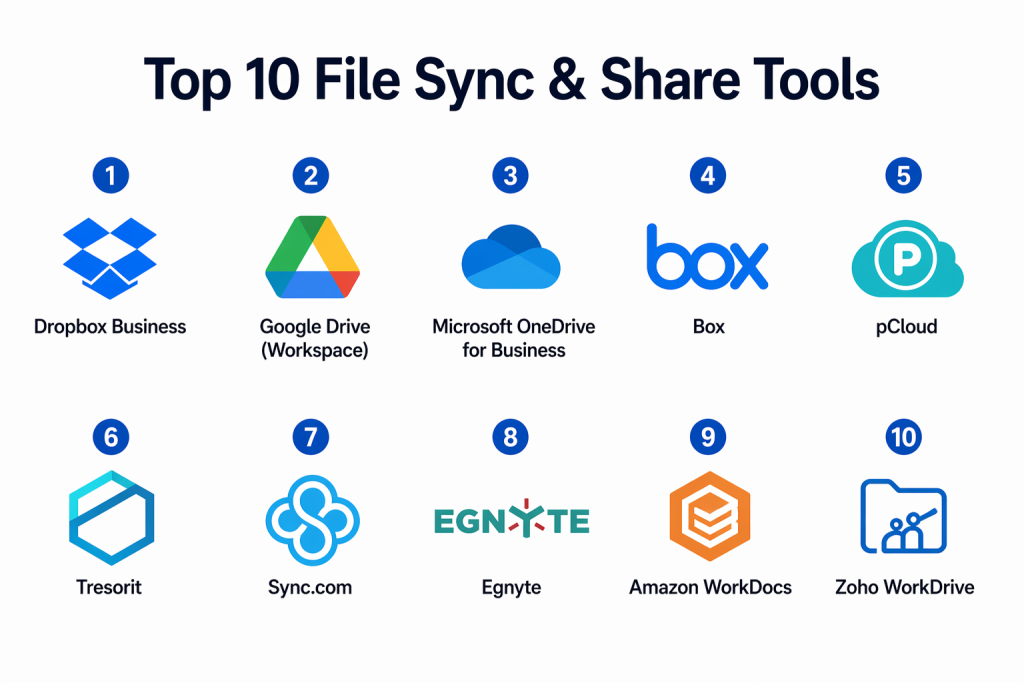
Top 10 File Sync & Share Tools
#1 — Dropbox Business
Short description: Provides cloud-based file sync, sharing, and real-time collaboration. Ideal for SMBs and mid-sized teams seeking productivity and collaboration-focused storage.
Key Features
- File syncing across devices
- Team folders with access controls
- Real-time collaboration and commenting
- Version history and file recovery
- Admin reporting dashboards
- Integration with Microsoft 365, Slack, Google Workspace
Pros
- User-friendly interface
- Strong collaboration features
Cons
- Advanced admin features require higher plans
- Costs increase with team size
Platforms / Deployment
- Windows, macOS, Linux, iOS, Android, Web
- Cloud
Security & Compliance
- Encryption, MFA
- SOC 2, GDPR
Integrations & Ecosystem
Integrates with productivity apps and workflow tools.
- Slack
- Microsoft 365
- Google Workspace
- APIs for automation
Support & Community
24/7 support; active user community.
#2 — Google Drive (Workspace)
Short description: Cloud storage with real-time collaboration tools integrated into Google Workspace. Suitable for individuals, SMBs, and enterprises.
Key Features
- File storage and sharing
- Real-time collaboration in Docs, Sheets, Slides
- Version history and restore
- Team Drives for departmental storage
- Integration with Google Workspace apps
Pros
- Seamless Workspace integration
- Excellent real-time collaboration
Cons
- Limited outside Google ecosystem
- Storage pricing varies
Platforms / Deployment
- Web, Windows, macOS, iOS, Android
- Cloud
Security & Compliance
- Encryption, MFA
- SOC 2, GDPR
Integrations & Ecosystem
Connects to Google Workspace and third-party apps.
- Slack
- Salesforce
- API support for automation
Support & Community
Google support; active community forums.
#3 — Microsoft OneDrive for Business
Short description: Cloud storage integrated with Microsoft 365 apps, enabling team collaboration and secure file sharing.
Key Features
- File storage and sharing
- Teams and SharePoint integration
- Version history and restore
- Policy-driven access controls
- Compliance reporting
Pros
- Native Microsoft 365 integration
- Strong enterprise features
Cons
- Less intuitive for non-Microsoft users
- Advanced features require premium plans
Platforms / Deployment
- Windows, macOS, iOS, Android, Web
- Cloud / Hybrid
Security & Compliance
- Encryption, MFA, RBAC
- GDPR, HIPAA, SOC 2
Integrations & Ecosystem
Integrates with Microsoft 365 apps, Teams, SharePoint.
- APIs for automation
- Backup connectors
- Workflow integrations
Support & Community
Microsoft support; extensive enterprise community.
#4 — Box
Short description: Enterprise-grade cloud storage with collaboration, workflow automation, and compliance tools for secure file sharing.
Key Features
- Secure file storage and sharing
- Workflow automation and approvals
- Granular access controls
- Real-time collaboration
- Compliance and audit reporting
Pros
- Enterprise-grade security
- Robust workflow automation
Cons
- Expensive for large teams
- May require training for advanced features
Platforms / Deployment
- Web, Windows, macOS, iOS, Android
- Cloud
Security & Compliance
- Encryption, MFA, RBAC
- SOC 2, ISO 27001, HIPAA, GDPR
Integrations & Ecosystem
Integrates with Salesforce, Slack, Microsoft 365, Google Workspace.
- API for workflows
- ITSM integration
- Reporting dashboards
Support & Community
24/7 enterprise support; active community.
#5 — pCloud
Short description: Cloud storage offering client-side encryption, file sharing, and team collaboration for SMBs and individuals.
Key Features
- Encrypted file storage
- File sharing and collaboration
- File versioning
- Client-side encryption
- Cross-platform syncing
Pros
- Affordable
- Strong security
Cons
- Limited enterprise integrations
- Fewer automation features
Platforms / Deployment
- Windows, macOS, Linux, iOS, Android, Web
- Cloud
Security & Compliance
- Client-side encryption, MFA
- Not publicly stated
Integrations & Ecosystem
Integrates with productivity apps via APIs.
- Microsoft Office
- Google Workspace
- Workflow connectors
Support & Community
Email and chat support; moderate community.
#6 — Tresorit
Short description: Highly secure cloud storage with end-to-end encryption and compliance features, targeting SMBs and enterprises.
Key Features
- End-to-end encrypted storage
- File sharing with access control
- Version history and recovery
- Collaboration tools
- Compliance reporting
Pros
- Strong privacy
- Suitable for regulated industries
Cons
- Higher cost
- Limited integrations
Platforms / Deployment
- Windows, macOS, Linux, iOS, Android, Web
- Cloud
Security & Compliance
- End-to-end encryption, MFA
- GDPR, SOC 2
Integrations & Ecosystem
Integrates with productivity and workflow apps.
- Microsoft Office
- API for custom workflows
- Cloud connectors
Support & Community
Vendor support; smaller but active community.
#7 — Sync.com
Short description: Encrypted cloud storage with team collaboration features, ideal for privacy-focused SMBs.
Key Features
- End-to-end encryption
- File sharing and access control
- File versioning
- Team collaboration
- Automated backups
Pros
- Privacy-focused
- Easy to use
Cons
- Limited enterprise integrations
- Fewer connectors
Platforms / Deployment
- Windows, macOS, iOS, Android, Web
- Cloud
Security & Compliance
- End-to-end encryption, MFA
- GDPR
Integrations & Ecosystem
Integrates with productivity apps via APIs.
- Microsoft Office
- Google Workspace
- Workflow automation connectors
Support & Community
Email support; growing community.
#8 — Egnyte
Short description: Hybrid cloud storage for enterprises with collaboration, workflow automation, and compliance management.
Key Features
- Hybrid cloud storage
- Real-time collaboration
- Workflow and approvals
- Compliance reporting
- Granular access controls
- File versioning
Pros
- Hybrid flexibility
- Strong enterprise features
Cons
- Expensive for small teams
- Complex setup
Platforms / Deployment
- Windows, macOS, iOS, Android, Web
- Cloud / Hybrid
Security & Compliance
- Encryption, RBAC
- SOC 2, GDPR
Integrations & Ecosystem
Integrates with Microsoft 365, Slack, Salesforce, ITSM.
- API automation
- Cloud connectors
- Workflow integration
Support & Community
24/7 support; active enterprise community.
#9 — Amazon WorkDocs
Short description: Cloud file storage with collaboration tightly integrated into AWS, ideal for enterprises using AWS ecosystem.
Key Features
- File storage and sharing
- Collaboration and commenting
- Integration with AWS services
- Version history and recovery
- Access controls and audit logs
Pros
- Seamless AWS integration
- Scalable
Cons
- Limited outside AWS
- Learning curve
Platforms / Deployment
- Web, Windows, macOS, iOS, Android
- Cloud
Security & Compliance
- Encryption, MFA
- SOC 2, ISO 27001
Integrations & Ecosystem
Integrates with AWS services, workflow tools.
- APIs for automation
- ITSM connectors
- Reporting dashboards
Support & Community
AWS enterprise support; active online community.
#10 — Zoho WorkDrive
Short description: Cloud file storage with collaboration and team management features for SMBs and mid-market teams.
Key Features
- Team file storage
- Collaboration and document sharing
- Version history and restore
- Role-based access
- Workflow and approvals
Pros
- Integrated with Zoho productivity suite
- Affordable for SMBs
Cons
- Less enterprise-ready
- Fewer integrations outside Zoho ecosystem
Platforms / Deployment
- Web, Windows, macOS, iOS, Android
- Cloud
Security & Compliance
- Encryption, MFA
- GDPR
Integrations & Ecosystem
Integrates with Zoho apps and third-party productivity tools.
- APIs for workflow
- Slack and Microsoft connectors
Support & Community
Vendor support; growing SMB community.
Comparison Table (Top 10)
| Tool Name | Best For | Platform(s) Supported | Deployment | Standout Feature | Public Rating |
|---|---|---|---|---|---|
| Dropbox Business | SMB/Mid-market | Windows, macOS, Linux, iOS, Android, Web | Cloud | File collaboration | N/A |
| Google Drive | SMB/Enterprise | Windows, macOS, iOS, Android, Web | Cloud | Workspace integration | N/A |
| OneDrive for Business | Enterprise | Windows, macOS, iOS, Android, Web | Cloud/Hybrid | Microsoft 365 integration | N/A |
| Box | Enterprise | Windows, macOS, iOS, Android, Web | Cloud | Workflow automation | N/A |
| pCloud | SMB/Individuals | Windows, macOS, Linux, iOS, Android, Web | Cloud | Client-side encryption | N/A |
| Tresorit | SMB/Enterprise | Windows, macOS, Linux, iOS, Android, Web | Cloud | End-to-end encryption | N/A |
| Sync.com | SMB | Windows, macOS, iOS, Android, Web | Cloud | Secure collaboration | N/A |
| Egnyte | Enterprise | Windows, macOS, iOS, Android, Web | Cloud/Hybrid | Hybrid cloud flexibility | N/A |
| Amazon WorkDocs | Enterprise | Windows, macOS, iOS, Android, Web | Cloud | AWS integration | N/A |
| Zoho WorkDrive | SMB/Mid-market | Windows, macOS, iOS, Android, Web | Cloud | Team collaboration | N/A |
Evaluation & Scoring of File Sync & Share Tools
| Tool Name | Core (25%) | Ease (15%) | Integrations (15%) | Security (10%) | Performance (10%) | Support (10%) | Value (15%) | Weighted Total (0–10) |
|---|---|---|---|---|---|---|---|---|
| Dropbox Business | 8 | 9 | 8 | 8 | 8 | 7 | 8 | 8.2 |
| Google Drive | 8 | 9 | 8 | 8 | 8 | 7 | 8 | 8.2 |
| OneDrive for Business | 8 | 8 | 8 | 8 | 8 | 7 | 8 | 8.0 |
| Box | 8 | 7 | 8 | 9 | 8 | 7 | 7 | 7.8 |
| pCloud | 7 | 8 | 7 | 9 | 7 | 7 | 8 | 7.7 |
| Tresorit | 7 | 7 | 7 | 10 | 7 | 7 | 7 | 7.5 |
| Sync.com | 7 | 8 | 7 | 9 | 7 | 6 | 7 | 7.3 |
| Egnyte | 8 | 7 | 8 | 8 | 8 | 7 | 7 | 7.7 |
| Amazon WorkDocs | 7 | 7 | 7 | 8 | 7 | 7 | 7 | 7.2 |
| Zoho WorkDrive | 7 | 8 | 7 | 8 | 7 | 6 | 8 | 7.5 |
Interpretation: Weighted scores show comparative strength in features, usability, integrations, security, performance, support, and value. Selection should consider platform ecosystems, team size, and compliance requirements.
Which File Sync & Share Tools Tool Is Right for You?
Solo / Freelancer
- pCloud or Sync.com provide secure, cost-effective storage for individuals and small teams.
SMB
- Dropbox Business, Google Drive, or Zoho WorkDrive offer collaboration, versioning, and simple administration.
Mid-Market
- OneDrive for Business, Box, and Egnyte provide scalable storage, workflow automation, and hybrid access.
Enterprise
- Box, Amazon WorkDocs, Tresorit, and Egnyte deliver enterprise-grade security, compliance, and hybrid cloud support.
Budget vs Premium
- Budget-friendly: pCloud, Sync.com, Zoho WorkDrive
- Premium: Box, Tresorit, Amazon WorkDocs
Feature Depth vs Ease of Use
- Feature-rich: Box, Egnyte, Tresorit
- Ease-of-use: Google Drive, Dropbox, Zoho WorkDrive
Integrations & Scalability
- Box, Egnyte, OneDrive provide strong integrations with productivity, ITSM, and cloud platforms.
Security & Compliance Needs
- Tresorit, Box, Egnyte offer advanced encryption, RBAC, and audit logging for regulated industries.
Frequently Asked Questions (FAQs)
1. How much do file sync & share tools cost?
Pricing depends on storage volume, user count, and enterprise features. Many providers offer per-user subscriptions or pay-as-you-grow plans.
2. How long does deployment take?
Cloud solutions can be set up in hours; enterprise hybrid deployments may require days for configuration and migration.
3. Are these tools secure?
Yes. Leading FSS tools provide encryption, MFA, RBAC, and audit logs to ensure data privacy and compliance.
4. Can these tools integrate with productivity apps?
Yes. Most integrate with Microsoft 365, Google Workspace, Slack, Salesforce, and other SaaS applications.
5. Can I restore previous file versions?
Yes. Versioning allows restoration of prior file versions to prevent accidental data loss.
6. Do these solutions support collaboration?
Yes. Real-time editing, commenting, and shared folders enable team collaboration across locations.
7. Can storage scale easily?
Yes. Cloud-based FSS platforms scale to accommodate growing team size and storage needs.
8. Is offline access possible?
Most tools provide desktop and mobile apps that allow offline access and automatic syncing.
9. Can hybrid environments be supported?
Yes. Solutions like Egnyte and Box allow integration with both cloud and on-premises storage.
10. Are open-source FSS options viable?
Open-source tools exist but usually lack enterprise-grade security, integrations, compliance, and support features.
Conclusion
File Sync & Share tools are essential for secure, collaborative, and scalable file management in modern hybrid and remote work environments. They provide real-time collaboration, versioning, security, and compliance features to meet business needs. Selection should consider platform compatibility, compliance, team size, and budget. IT teams should pilot solutions, validate integrations, and confirm security measures to ensure efficient and reliable file sharing across the organization.

Find Trusted Cardiac Hospitals
Compare heart hospitals by city and services — all in one place.
Explore Hospitals
File sync tools can create problems when two people edit the same file at nearly the same time. Clear version history and conflict handling can help teams avoid losing important changes. It is also useful to test how the tool behaves when users work offline and reconnect later.