Introduction
Database Administration Tools are software solutions designed to simplify, streamline, and optimize database management. They help database administrators (DBAs) manage configurations, monitor performance, secure data, automate routine tasks, and maintain compliance across multiple database systems.
With organizations increasingly relying on complex data architectures, ensuring proper database administration is crucial for performance, security, and uptime. Real-world use cases include monitoring database health for high-traffic applications, automating backups and patching, managing user access and permissions, tracking database activity for audits, and analyzing query performance for optimization.
Key evaluation criteria for buyers include:
- Compatibility with multiple database engines
- Monitoring and alerting capabilities
- Backup, recovery, and failover support
- Security and access control features
- Automation for routine maintenance
- Performance analytics and reporting
- Scalability across database clusters
- Ease of use and user interface
- Integration with DevOps and observability tools
- Vendor support and documentation
Best for: DBAs, IT operations teams, and enterprises with large, heterogeneous database environments. Suitable for mid-market to enterprise organizations.
Not ideal for: Small businesses with minimal databases or those relying solely on cloud-native database services with built-in admin tools.
Key Trends in Database Administration Tools
- AI-powered insights for query optimization and anomaly detection.
- Automated maintenance and patch management to reduce manual workloads.
- Cloud-native administration and hybrid database support.
- Integration with AIOps and DevOps toolchains for unified observability.
- Advanced security features including role-based access control and encryption.
- Predictive performance analytics to avoid downtime.
- Real-time alerts and dashboards for proactive management.
- API-first design for extensibility and integrations.
- Compliance tracking for GDPR, HIPAA, SOC 2, and other regulations.
- Flexible SaaS and subscription pricing models for scalability.
How We Selected These Tools (Methodology)
- Evaluated market adoption and vendor reputation.
- Reviewed feature sets, including monitoring, security, and automation capabilities.
- Considered performance and reliability signals from real-world deployments.
- Assessed security and compliance capabilities.
- Analyzed integration capabilities and ecosystem support.
- Reviewed suitability across enterprise, mid-market, and SMB environments.
- Compared ease of use and dashboard functionality.
- Examined support structures, onboarding, and community engagement.
- Evaluated pricing and licensing models relative to features.
- Prioritized tools with AI and automation capabilities for future-ready administration.
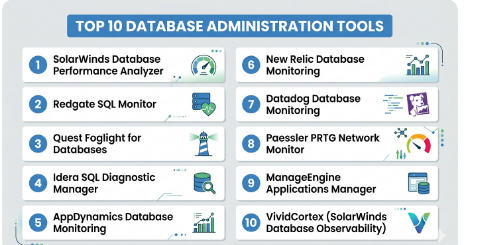
Top 10 Database Administration Tools
#1 — SolarWinds Database Performance Analyzer
Short description : SolarWinds DPA provides detailed insights into database performance, helping administrators optimize queries, prevent downtime, and manage multi-database environments effectively. Ideal for enterprises with diverse database types.
Key Features
- Multi-database performance monitoring
- Query tuning and optimization
- Historical trend analysis
- Real-time alerting
- Cross-platform support (SQL, Oracle, MySQL)
- Customizable dashboards
- Integration with ITSM tools
Pros
- Comprehensive performance insights
- Easy-to-read dashboards and visualizations
- Strong alerting and reporting system
Cons
- Resource-intensive monitoring
- Licensing can be expensive
Platforms / Deployment
- Windows / Linux
- Cloud / Self-hosted
Security & Compliance
- Not publicly stated
Integrations & Ecosystem
- ITSM tools (ServiceNow, Jira)
- Slack / email alerts
- REST APIs for dashboards
Support & Community
- Vendor support available
- Active user community
#2 — Redgate SQL Monitor
Short description : Redgate SQL Monitor is a specialized tool for SQL Server administrators to monitor, alert, and analyze database performance across multiple servers, ensuring uptime and query efficiency.
Key Features
- SQL Server monitoring
- Performance trend analysis
- Real-time alerting
- Historical reporting
- Custom dashboards
Pros
- Intuitive interface
- Quick deployment
- Effective alerting
Cons
- Limited to SQL Server
- Some advanced analytics require higher-tier license
Platforms / Deployment
- Windows
- Cloud / Self-hosted
Security & Compliance
- Not publicly stated
Integrations & Ecosystem
- PowerShell support
- REST API for reporting
- Integration with monitoring dashboards
Support & Community
- Strong documentation
- Active community forums
#3 — Quest Foglight for Databases
Short description : Quest Foglight provides multi-database monitoring and administration, delivering deep analytics for SQL, Oracle, and NoSQL systems, enabling DBAs to proactively manage performance and resources.
Key Features
- Multi-database monitoring
- Alerting and notifications
- Performance analytics
- Capacity planning insights
- Historical trend tracking
Pros
- Wide database support
- Advanced analytics
- Customizable dashboards
Cons
- Steep learning curve
- Costly for smaller organizations
Platforms / Deployment
- Windows / Linux
- Cloud / Self-hosted
Security & Compliance
- Not publicly stated
Integrations & Ecosystem
- ITSM integrations
- APIs for dashboards
- SNMP support
Support & Community
- Vendor support with tiers
- Professional user community
#4 — Idera SQL Diagnostic Manager
Short description : Idera SQL Diagnostic Manager helps administrators monitor SQL Server health, optimize queries, and troubleshoot performance issues efficiently.
Key Features
- Real-time SQL Server monitoring
- Query performance optimization
- Alerting and reporting
- Historical trend analysis
- Dashboard customization
Pros
- Quick installation
- Effective alerting
- Comprehensive SQL Server support
Cons
- Limited to SQL Server
- Interface can feel dated
Platforms / Deployment
- Windows
- Cloud / Self-hosted
Security & Compliance
- Not publicly stated
Integrations & Ecosystem
- Notification systems
- API access
- PowerShell integration
Support & Community
- Vendor documentation
- Technical support
#5 — AppDynamics Database Monitoring
Short description : AppDynamics integrates database monitoring with application performance, offering end-to-end insights into SQL and NoSQL database operations.
Key Features
- Query performance analysis
- APM integration
- Real-time alerts
- Historical performance trends
- Root cause analytics
Pros
- Holistic view across apps and databases
- AI-powered anomaly detection
- Multi-database support
Cons
- High cost
- Complex setup
Platforms / Deployment
- Web / Windows / Linux / macOS
- Cloud / Hybrid
Security & Compliance
- Not publicly stated
Integrations & Ecosystem
- ITSM tools
- API support
- Third-party alerting
Support & Community
- Extensive documentation
- Enterprise support
#6 — New Relic Database Monitoring
Short description : New Relic provides monitoring for SQL and NoSQL databases integrated with application performance monitoring, helping DevOps teams maintain optimal operations.
Key Features
- Real-time monitoring
- Query optimization
- Alerts and notifications
- Dashboards and reporting
- Multi-database support
Pros
- SaaS-based deployment
- Developer-friendly dashboards
- Supports multiple database types
Cons
- Subscription costs for larger environments
- Limited free tier features
Platforms / Deployment
- Web / Windows / Linux
- Cloud
Security & Compliance
- Not publicly stated
Integrations & Ecosystem
- PagerDuty, Slack
- REST APIs
- Third-party observability tools
Support & Community
- Knowledge base and documentation
- Customer support
#7 — Datadog Database Monitoring
Short description : Datadog offers real-time monitoring for databases across hybrid environments, with AI-driven insights for anomaly detection and performance optimization.
Key Features
- Multi-database monitoring
- Alerting and anomaly detection
- Query performance insights
- Dashboards and reporting
- Integration with APM and logs
Pros
- Cloud-native and scalable
- AI anomaly detection
- Centralized observability
Cons
- Complex initial configuration
- Subscription cost scales with usage
Platforms / Deployment
- Web / Windows / Linux / macOS
- Cloud / Hybrid
Security & Compliance
- Not publicly stated
Integrations & Ecosystem
- Slack, PagerDuty, ServiceNow
- API access
- Logging tools
Support & Community
- Strong documentation
- Vendor support
#8 — Paessler PRTG Network Monitor
Short description : PRTG monitors database performance along with network metrics, enabling small to medium-sized IT teams to maintain database health.
Key Features
- Multi-database support
- Alerts and notifications
- Performance trend analysis
- Dashboards
- API support
Pros
- Affordable for SMBs
- Easy deployment
- Multi-sensor monitoring
Cons
- UI can feel outdated
- Advanced analytics limited
Platforms / Deployment
- Windows / Web
- Cloud / Self-hosted
Security & Compliance
- Not publicly stated
Integrations & Ecosystem
- REST API
- SNMP monitoring
- ITSM integrations
Support & Community
- Vendor support plans
- Online knowledge base
#9 — ManageEngine Applications Manager
Short description : ManageEngine provides real-time database monitoring, tracking queries and workload metrics for SQL, Oracle, and NoSQL databases.
Key Features
- Query-level performance insights
- Real-time monitoring
- Alerting
- Historical reporting
- Multi-database support
Pros
- Comprehensive monitoring
- User-friendly dashboards
- Integration with IT management suite
Cons
- Limited cloud-native features
- Licensing complexity
Platforms / Deployment
- Windows / Linux / Web
- Cloud / Self-hosted / Hybrid
Security & Compliance
- Not publicly stated
Integrations & Ecosystem
- ITSM integration
- API access
- Alerts via email/SMS
Support & Community
- Documentation
- Vendor support
#10 — VividCortex (SolarWinds Database Observability)
Short description : VividCortex provides cloud-native database observability with AI-powered insights for query performance, resource utilization, and anomaly detection.
Key Features
- Real-time performance monitoring
- Historical data analytics
- Query optimization
- Alerts for anomalies
- Integration with DevOps tools
Pros
- Cloud-native
- AI-driven insights
- Developer-focused
Cons
- Higher cost
- Learning curve for analytics
Platforms / Deployment
- Web / Windows / Linux / macOS
- Cloud
Security & Compliance
- Not publicly stated
Integrations & Ecosystem
- CI/CD integration
- API access
- Slack, PagerDuty notifications
Support & Community
- Documentation and onboarding
- Vendor support
Comparison Table (Top 10)
| Tool Name | Best For | Platform(s) Supported | Deployment | Standout Feature | Public Rating |
|---|---|---|---|---|---|
| SolarWinds DPA | Enterprises | Windows, Linux | Cloud / Self-hosted | Wait-time analysis | N/A |
| Redgate SQL Monitor | SQL Server admins | Windows | Cloud / Self-hosted | SQL monitoring | N/A |
| Quest Foglight | Multi-DB environments | Windows, Linux | Cloud / Self-hosted | Multi-database support | N/A |
| Idera SQL Diagnostic Manager | SQL Server | Windows | Cloud / Self-hosted | Query optimization | N/A |
| AppDynamics DB Monitoring | DevOps teams | Web, Windows, Linux, macOS | Cloud / Hybrid | APM integration | N/A |
| New Relic DB Monitoring | Cloud apps | Web, Windows, Linux | Cloud | Real-time insights | N/A |
| Datadog DB Monitoring | Hybrid environments | Web, Windows, Linux | Cloud / Hybrid | AI anomaly detection | N/A |
| Paessler PRTG | SMBs | Windows, Web | Cloud / Self-hosted | Multi-sensor monitoring | N/A |
| ManageEngine AM | IT teams | Windows, Linux, Web | Cloud / Self-hosted / Hybrid | Multi-database insights | N/A |
| VividCortex | Developer teams | Web, Windows, Linux, macOS | Cloud | Observability | N/A |
Evaluation & Scoring of Database Administration Tools
| Tool Name | Core | Ease | Integrations | Security | Performance | Support | Value | Weighted Total |
|---|---|---|---|---|---|---|---|---|
| SolarWinds DPA | 9 | 8 | 8 | 7 | 9 | 8 | 7 | 8.2 |
| Redgate SQL Monitor | 8 | 9 | 7 | 7 | 8 | 8 | 8 | 8.0 |
| Quest Foglight | 9 | 7 | 8 | 7 | 9 | 7 | 7 | 8.0 |
| Idera SQL DM | 8 | 8 | 7 | 7 | 8 | 7 | 8 | 7.9 |
| AppDynamics | 9 | 7 | 8 | 7 | 9 | 8 | 7 | 8.1 |
| New Relic | 8 | 8 | 8 | 7 | 8 | 7 | 8 | 7.9 |
| Datadog | 9 | 7 | 8 | 7 | 9 | 8 | 7 | 8.1 |
| Paessler PRTG | 7 | 8 | 7 | 6 | 7 | 7 | 8 | 7.3 |
| ManageEngine AM | 8 | 8 | 8 | 7 | 8 | 7 | 8 | 7.9 |
| VividCortex | 9 | 7 | 8 | 7 | 9 | 8 | 7 | 8.1 |
Which Database Administration Tool Is Right for You?
Solo / Freelancer
- Lightweight tools like Paessler PRTG or New Relic for cloud monitoring.
SMB
- Tools like Redgate SQL Monitor or ManageEngine AM for SQL and multi-database support.
Mid-Market
- SolarWinds DPA or Datadog for predictive insights and scalability.
Enterprise
- Quest Foglight, AppDynamics, or VividCortex for comprehensive observability and AI insights.
Budget vs Premium
- Budget: Paessler PRTG, Idera SQL DM
- Premium: SolarWinds DPA, AppDynamics, VividCortex
Feature Depth vs Ease of Use
- Full-featured: Quest Foglight, SolarWinds DPA
- Easier deployment: Redgate SQL Monitor, Paessler PRTG
Integrations & Scalability
- Cloud-native: Datadog, New Relic, VividCortex
- Enterprise-scale: Quest Foglight, AppDynamics
Security & Compliance Needs
- Role-based access, audit logs, encryption: SolarWinds DPA, AppDynamics, VividCortex
Frequently Asked Questions (FAQs)
1. What is the pricing model for database administration tools?
Pricing is typically subscription-based or per-server licensing, varying with the number of monitored databases.
2. Can these tools monitor cloud databases?
Yes, tools like Datadog, New Relic, and VividCortex support cloud, on-prem, and hybrid environments.
3. Are alerts provided in real-time?
Yes, real-time alerting with customizable thresholds is standard across these tools.
4. Do they support multiple database types?
Yes, enterprise tools like Quest Foglight and SolarWinds DPA support SQL, Oracle, MySQL, PostgreSQL, and NoSQL.
5. Is setup complex?
Setup ranges from simple SaaS deployment (Paessler PRTG) to complex enterprise configurations (Quest Foglight, AppDynamics).
6. Are APIs available for integration?
Most tools provide APIs for dashboards, reporting, and third-party integrations.
7. Do these tools offer historical reporting?
Yes, all top tools provide historical trend analysis for performance optimization.
8. Do they use AI for monitoring?
Premium tools like Datadog and VividCortex utilize AI for anomaly detection and predictive performance analysis.
9. Can SMBs use enterprise tools?
Yes, but SaaS versions or lightweight editions are preferred to reduce cost and complexity.
10. How do they ensure security?
Features include role-based access control, encryption, audit logs, and support for SSO/SAML in some tools.
Conclusion
Database administration tools are essential for maintaining optimal performance, uptime, and security of modern database environments. Selection depends on the scale of operations, database types, deployment preferences, and budget. SMBs benefit from lightweight SaaS tools, while enterprises gain value from AI-driven insights and full observability. The best approach is to shortlist potential tools, conduct pilot deployments, and verify integration, monitoring, and reporting capabilities before making a decision.

Find Trusted Cardiac Hospitals
Compare heart hospitals by city and services — all in one place.
Explore Hospitals
Detailed monitoring can use extra CPU, memory, storage, or network resources, especially across many databases. Teams should review the monitoring setup and keep only the data and checks they really need. This helps maintain good visibility without adding unnecessary load to production systems.