Introduction
Medical Imaging PACS Systems help healthcare organizations store, retrieve, view, distribute, and manage medical images such as X-rays, CT scans, MRIs, ultrasounds, mammography images, cardiology images, and other diagnostic studies. In simple terms, PACS replaces film-based imaging workflows with digital image management so radiologists, clinicians, and care teams can access imaging studies quickly and securely. PACS matters now because imaging volumes are rising, radiology teams are under pressure, and healthcare organizations need faster reporting, better interoperability, stronger cybersecurity, and more scalable image storage. Modern PACS platforms are also moving toward cloud deployment, enterprise imaging, AI-assisted workflows, zero-footprint viewers, and tighter EHR integration.
Real-world use cases include:
- Radiology image reading across hospitals, clinics, and imaging centers.
- Multi-site image sharing between departments and care facilities.
- Specialist review for cardiology, oncology, orthopedics, and emergency care.
- Teleradiology workflows for remote reading and distributed teams.
- Long-term imaging archive for clinical history and compliance needs.
- Pre-surgical planning using prior imaging for complex surgeries.
- AI-assisted diagnostic workflows for triage and automated measurements.
- Interdisciplinary team collaboration for tumor boards, cardiology review, and multi-specialty consults.
What buyers should evaluate:
- Vendor support and migration experience
- DICOM and HL7 support
- Viewer performance and diagnostic usability
- EHR, RIS, VNA, and reporting integrations
- Cloud, hybrid, or on-premises deployment options
- AI workflow readiness
- Security, audit logs, and role-based access
- Storage scalability and disaster recovery
- Multi-site image sharing
- Radiologist productivity tools
Best for: Medical Imaging PACS Systems are best for hospitals, imaging centers, radiology groups, specialty clinics, enterprise health systems, teleradiology providers, and diagnostic imaging departments that need reliable image storage, viewing, routing, and reporting workflows.
Not ideal for: PACS may not be necessary for very small practices that only need occasional image viewing or organizations that already rely fully on an enterprise imaging platform managed by a parent health system. In those cases, a lightweight DICOM viewer, cloud image sharing tool, or EHR-native imaging module may be enough.
Key Trends in Medical Imaging PACS Systems
- Cloud PACS adoption is accelerating to improve scalability, resilience, and remote access.
- Enterprise imaging is replacing department-only PACS to unify radiology, cardiology, pathology, ophthalmology, orthopedics, and point-of-care imaging.
- AI orchestration is becoming a workflow requirement for triage, automated measurements, and worklist prioritization.
- Zero-footprint viewers enable browser-based access for clinicians and referring physicians.
- Cybersecurity expectations are stricter including encryption, audit logs, MFA, SSO, backup, and vendor security documentation.
- DICOMweb and FHIR adoption increases interoperability and cloud-native workflows.
- Teleradiology and distributed reading are now mainstream.
- Storage cost optimization is critical with lifecycle policies, compression, and tiered storage.
- Radiologist experience drives productivity with hanging protocols, prior comparisons, and worklist management.
- Vendor-neutral architecture is more attractive to avoid lock-in and enable multi-vendor interoperability.
How We Selected These Tools Methodology
- Market adoption and recognition among hospitals, imaging centers, and radiology groups.
- Feature completeness including archive, diagnostic viewer, worklist support, image sharing, and administration.
- Enterprise imaging readiness for multi-site and multi-specialty imaging.
- Performance and reliability signals like viewer speed, uptime, and high-volume support.
- Interoperability and integrations with DICOM, HL7, EHR, RIS, VNA, AI, and reporting.
- Security posture signals including access controls, encryption, disaster recovery, and compliance readiness.
- Deployment flexibility for cloud, hybrid, and on-premises.
- Customer fit across segments from enterprise hospitals to imaging centers.
- Workflow depth for radiologists, including hanging protocols, priors, and collaborative review.
- Long-term scalability to support imaging growth, remote reading, and AI integration.
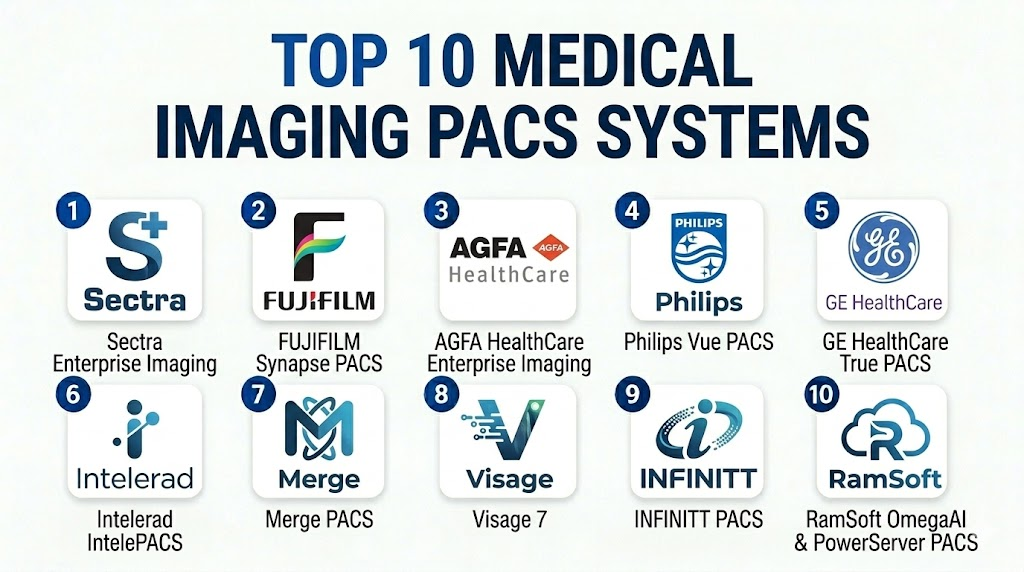
Top 10 Medical Imaging PACS Systems Tools
1- Sectra Enterprise Imaging
Short description: Enterprise PACS and imaging platform for hospitals and radiology departments; designed for high-volume diagnostic workflows and multi-site imaging.
Key Features
- Enterprise imaging for radiology and other specialties
- Diagnostic viewer for high-volume reading
- Multi-site image access and collaboration
- Cloud and on-premises deployment
- Workflow tools for radiologists and teams
- AI-enabled imaging workflow support
- VNA and image sharing integration
Pros
- Scales well for multi-site enterprise environments
- Strong workflow depth for radiology
- High-volume image management capability
Cons
- Complex for smaller imaging centers
- Enterprise implementation requires planning
- Quote-based pricing
Platforms / Deployment
Web / Windows / Varies
Cloud / Hybrid / On-premises
Security & Compliance
Not publicly stated; buyers should check SSO/SAML, MFA, encryption, audit logs, RBAC, HIPAA/GDPR readiness, disaster recovery.
Integrations & Ecosystem
Connects with EHR, RIS, reporting tools, VNAs, modalities, AI tools.
- EHR systems
- RIS & reporting
- DICOM modalities
- VNA integration
- AI imaging applications
- Enterprise collaboration
Support & Community
Enterprise support, implementation, training; SLAs and migration support vary by contract and region.
2- FUJIFILM Synapse PACS
Short description: PACS platform for hospitals and imaging centers; emphasizes workflow efficiency and enterprise access.
Key Features
- Diagnostic viewer and image management
- Multi-modality imaging workflows
- Enterprise archive integration
- Radiology workflow features
- Web-based access options
- Fujifilm imaging ecosystem integration
- Workflow management for teams
Pros
- Strong hospital and imaging center fit
- Reliable PACS functionality
- Supports enterprise imaging strategies
Cons
- Integration and deployment complexity varies
- Cloud/hybrid/viewer options must be validated
- Pricing not publicly transparent
Platforms / Deployment
Web / Windows / Varies
Cloud / Hybrid / On-premises
Security & Compliance
Not publicly stated; verify encryption, RBAC, audit logs, SSO/MFA, HIPAA.
Integrations & Ecosystem
Integrates with EHR, RIS, reporting, modalities, VNAs, analytics.
- EHR systems
- RIS platforms
- DICOM modalities
- VNA solutions
- Reporting & dictation
- Enterprise imaging workflows
Support & Community
Healthcare IT support, implementation, training; upgrade and migration support may vary.
3- AGFA HealthCare Enterprise Imaging
Short description: PACS for hospitals and healthcare networks; supports image management, collaboration, and multi-department workflows.
Key Features
- Enterprise imaging for radiology & other specialties
- Diagnostic viewer & workflow tools
- Multi-site image sharing
- Vendor-neutral imaging approach
- Web-based access
- Workflow management
- VNA & archive integration
Pros
- Fits enterprise imaging consolidation
- Supports multiple departments
- Multi-site collaboration
Cons
- Enterprise setup requires planning
- Smaller centers may not need full depth
- Pricing not publicly transparent
Platforms / Deployment
Web / Windows / Varies
Cloud / Hybrid / On-premises
Security & Compliance
Not publicly stated; buyers should verify encryption, RBAC, audit logs, SSO/MFA, HIPAA.
Integrations & Ecosystem
Connects to EHR, RIS, reporting, modalities, AI tools, and archives.
Support & Community
Enterprise support and training; review migration and long-term maintenance options.
4- Philips Vue PACS
Short description: Radiology PACS platform for hospitals aligned with Philips imaging ecosystem; supports advanced visualization.
Key Features
- Diagnostic viewing & image management
- Radiology workflow support
- Multi-modality access
- Enterprise imaging capabilities
- Advanced visualization tools
- Collaboration & access tools
- Philips ecosystem integration
Pros
- Fits hospitals using Philips imaging infrastructure
- Enterprise-ready PACS
- Supports radiology workflow efficiently
Cons
- Product naming varies by region
- Implementation requires integration planning
- Pricing & roadmap must be verified
Platforms / Deployment
Web / Windows / Varies
Cloud / Hybrid / On-premises
Security & Compliance
Not publicly stated; verify encryption, RBAC, audit logs, SSO/MFA, HIPAA/GDPR.
Integrations & Ecosystem
EHR, RIS, reporting, modalities, enterprise workflows, AI tools.
Support & Community
Enterprise support, upgrade planning, technical assistance, training.
5- GE HealthCare True PACS
Short description: PACS aligned with GE HealthCare imaging infrastructure; used in hospitals and imaging centers.
Key Features
- Radiology PACS workflow & diagnostic viewing
- Multi-modality support
- Workflow tools
- Integration with GE ecosystem
- Enterprise deployment options
- High-volume imaging support
- Operational efficiency tools
Pros
- Strong GE imaging ecosystem alignment
- Enterprise imaging modernization
- Trusted brand in radiology IT
Cons
- Legacy environment integration planning required
- Deployment varies by region
- Public pricing limited
Platforms / Deployment
Web / Windows / Varies
Cloud / Hybrid / On-premises
Security & Compliance
Not publicly stated; verify encryption, RBAC, audit logs, SSO/MFA, HIPAA.
Integrations & Ecosystem
Connects with modalities, EHR, RIS, reporting, VNA, and analytics.
Support & Community
Enterprise support, implementation services, training, migration support.
6- Intelerad IntelePACS
Short description: PACS for radiology groups, imaging centers, and distributed reading teams.
Key Features
- PACS platform & diagnostic viewing
- Remote reading & distributed workflows
- Multi-site access
- RIS/EHR/reporting integration
- Workflow tools
- Scalability for imaging operations
- Collaboration features
Pros
- Strong for teleradiology & distributed teams
- Practical for multi-site operations
- Supports remote access
Cons
- Enterprise scalability must be validated
- Integration depth varies
- Support model depends on region
Platforms / Deployment
Web / Windows / Varies
Cloud / Hybrid / On-premises
Security & Compliance
Not publicly stated; buyers should verify encryption, RBAC, audit logs, SSO/MFA, HIPAA.
Integrations & Ecosystem
RIS, EHR, reporting, modalities, VNA, distributed reading.
Support & Community
Implementation, migration, training, and technical support vary.
7- Merge PACS
Short description: PACS for hospitals and imaging centers; supports image management, viewing, and reporting.
Key Features
- Image archive & diagnostic viewer
- Worklist & workflow tools
- Multi-modality support
- RIS/EHR/reporting integration
- Clinical image distribution
- Imaging center & hospital workflows
- Operational reporting
Pros
- Established PACS vendor
- Core PACS workflows
- Fits hospitals & imaging centers
Cons
- Legacy upgrade planning needed
- Roadmap verification required
- Pricing details limited
Platforms / Deployment
Web / Windows / Varies
Cloud / Hybrid / On-premises
Security & Compliance
Not publicly stated; verify encryption, RBAC, audit logs, SSO/MFA, HIPAA.
Integrations & Ecosystem
Connects to RIS, EHR, reporting, modalities, VNA, analytics.
Support & Community
Implementation, training, migration, maintenance support.
8- Visage 7
Short description: High-performance enterprise PACS for large imaging workloads; known for viewer speed and server-side rendering.
Key Features
- High-performance viewer
- Server-side rendering & fast access
- Multi-site & remote reading
- Enterprise PACS
- Workflow tools
- Integration with EHR/RIS/reporting
- AI workflow support
Pros
- Fast diagnostic access
- High-volume radiology performance
- Modern viewer improves productivity
Cons
- Implementation planning required
- Premium positioning
- Full platform fit must be validated
Platforms / Deployment
Web / Windows / macOS / Varies
Cloud / Hybrid / On-premises
Security & Compliance
Not publicly stated; verify encryption, RBAC, audit logs, SSO/MFA, HIPAA.
Integrations & Ecosystem
EHR, RIS, reporting, VNA, AI, modalities.
Support & Community
Enterprise implementation, training, support, infrastructure guidance.
9- INFINITT PACS
Short description: PACS for hospitals and imaging centers; supports image management, diagnostic viewing, and workflow.
Key Features
- PACS archive & viewer
- Radiology workflow support
- Multi-modality imaging
- RIS/EHR/reporting integration
- VNA/cloud options
- Operational workflow tools
- Remote access features
Pros
- Flexible PACS & VNA-oriented solution
- Fits hospitals & imaging centers
- Cloud or hybrid deployments
Cons
- Regional support varies
- Enterprise scalability should be validated
- Public security details limited
Platforms / Deployment
Web / Windows / Varies
Cloud / Hybrid / On-premises
Security & Compliance
Not publicly stated; verify encryption, audit logs, RBAC, SSO/MFA, HIPAA.
Integrations & Ecosystem
DICOM modalities, EHR, RIS, reporting, VNA, image sharing.
Support & Community
Onboarding, migration, training, technical support vary by region.
10- RamSoft OmegaAI and PowerServer PACS
Short description: Cloud-focused PACS for imaging centers and radiology groups; supports workflow flexibility and distributed access.
Key Features
- PACS & imaging workflow
- Cloud-first deployment
- Diagnostic viewing & management
- RIS integration
- Patient & provider access
- Imaging center operations
- Operational efficiency tools
Pros
- Cloud-oriented workflow
- PACS + operational management
- Flexibility for imaging centers
Cons
- Enterprise scalability should be validated
- Specialty workflows may need review
- Security certifications must be verified
Platforms / Deployment
Web / Windows / Varies
Cloud / Hybrid
Security & Compliance
Not publicly stated; verify encryption, RBAC, audit logs, SSO/MFA, HIPAA.
Integrations & Ecosystem
Modalities, reporting, EHR, workflow, cloud operations, referring physician access.
Support & Community
Onboarding, migration, training, technical support, cloud operations.
Comparison Table Top 10
| Tool Name | Best For | Platform(s) Supported | Deployment | Standout Feature | Public Rating |
|---|---|---|---|---|---|
| Sectra Enterprise Imaging | Enterprise hospitals | Web/Windows | Cloud/Hybrid/On-prem | Enterprise imaging workflow depth | N/A |
| FUJIFILM Synapse PACS | Hospitals & imaging centers | Web/Windows | Cloud/Hybrid/On-prem | Established PACS ecosystem | N/A |
| AGFA HealthCare Enterprise Imaging | Enterprise imaging consolidation | Web/Windows | Cloud/Hybrid/On-prem | Multi-department support | N/A |
| Philips Vue PACS | Hospitals aligned with Philips | Web/Windows | Cloud/Hybrid/On-prem | Advanced visualization & workflow | N/A |
| GE HealthCare True PACS | GE-aligned hospitals | Web/Windows | Cloud/Hybrid/On-prem | GE ecosystem integration | N/A |
| Intelerad IntelePACS | Teleradiology & distributed reading | Web/Windows | Cloud/Hybrid/On-prem | Remote reading workflows | N/A |
| Merge PACS | Hospitals & imaging centers | Web/Windows | Cloud/Hybrid/On-prem | Core PACS image management | N/A |
| Visage 7 | Enterprise performance-focused | Web/Windows/macOS | Cloud/Hybrid/On-prem | High-speed viewer & rendering | N/A |
| INFINITT PACS | Hospitals & imaging centers | Web/Windows | Cloud/Hybrid/On-prem | Flexible PACS + VNA | N/A |
| RamSoft OmegaAI & PowerServer PACS | Imaging centers, cloud-first | Web/Windows | Cloud/Hybrid | Cloud imaging + workflow | N/A |
Evaluation & Scoring of Medical Imaging PACS Systems
| Tool Name | Core 25% | Ease 15% | Integrations 15% | Security 10% | Performance 10% | Support 10% | Value 15% | Weighted Total |
|---|---|---|---|---|---|---|---|---|
| Sectra Enterprise Imaging | 9 | 8 | 9 | 8 | 9 | 9 | 7 | 8.40 |
| FUJIFILM Synapse PACS | 8 | 8 | 8 | 8 | 8 | 8 | 7 | 7.85 |
| AGFA HealthCare Enterprise Imaging | 8 | 7 | 9 | 8 | 8 | 8 | 7 | 7.85 |
| Philips Vue PACS | 8 | 7 | 8 | 8 | 8 | 8 | 7 | 7.70 |
| GE HealthCare True PACS | 8 | 7 | 8 | 8 | 8 | 8 | 7 | 7.70 |
| Intelerad IntelePACS | 8 | 8 | 8 | 8 | 8 | 8 | 8 | 8.00 |
| Merge PACS | 7 | 7 | 8 | 8 | 7 | 7 | 7 | 7.25 |
| Visage 7 | 9 | 8 | 8 | 8 | 10 | 8 | 6 | 8.15 |
| INFINITT PACS | 7 | 8 | 7 | 7 | 8 | 7 | 8 | 7.45 |
| RamSoft OmegaAI & PowerServer PACS | 8 | 8 | 7 | 7 | 8 | 8 | 8 | 7.75 |
Which PACS Tool Is Right for You?
Solo / Freelancer
- Hosted or cloud PACS like Intelerad or RamSoft
- Focus on secure access, viewer speed, and reporting workflow
SMB
- Small imaging centers: RamSoft, Intelerad, INFINITT, FUJIFILM
- Prioritize usability, support, storage, and workflow coverage
Mid-Market
- Multi-site hospitals: FUJIFILM, AGFA, Intelerad, Visage 7, GE HealthCare
- Focus on integration, scalability, and radiologist productivity
Enterprise
- Large health systems: Sectra, AGFA, Visage 7, Philips, GE HealthCare
- Enterprise-grade workflow, AI integration, and multi-site management
Budget vs Premium
- Budget: RamSoft, INFINITT, Intelerad
- Balanced: FUJIFILM, Merge
- Premium: Sectra, AGFA, Visage 7, Philips, GE HealthCare
Feature Depth vs Ease of Use
- Deep & complex: Sectra, AGFA, Visage 7
- Balanced: FUJIFILM, Merge
- Simple & operational: RamSoft, Intelerad
Integrations & Scalability
- Enterprise PACS require EHR, RIS, VNA, AI, modality, and cloud integration.
- Mid-market and SMB PACS focus on usability and future growth.
Security & Compliance
Validate encryption, RBAC, SSO/MFA, audit logs, HIPAA/GDPR readiness, backups, disaster recovery.
Here’s a set of 12 FAQs for the PACS blog rewritten with 4–5 line answers for clarity and readability:
1. What is a Medical Imaging PACS System?
A PACS system stores, retrieves, and manages diagnostic images like X-rays, CTs, MRIs, and ultrasounds digitally. It allows radiologists and clinicians to access studies quickly, share them across locations, and streamline reporting workflows, replacing traditional film-based imaging processes.
2. How much does a PACS system cost?
PACS pricing varies based on imaging volume, number of users, storage needs, deployment model, and support. Costs often include licensing, storage, migration, and integration. Organizations should evaluate total cost of ownership instead of just upfront software fees.
3. Which PACS system is best for large hospitals?
Large hospitals typically consider Sectra, AGFA, Visage 7, Philips Vue, or GE HealthCare True PACS. The choice depends on enterprise workflow depth, multi-site access, integration with EHR/RIS/VNA, AI readiness, and the organization’s long-term imaging strategy.
4. Which PACS system is best for imaging centers?
Imaging centers often prefer RamSoft, Intelerad, INFINITT, or FUJIFILM Synapse PACS. Factors to consider include ease of use, remote reading capabilities, storage scalability, reporting workflow, and cost efficiency for small to mid-sized operations.
5. What is the difference between PACS and VNA?
PACS focuses on viewing and managing images for clinical use, while a VNA (Vendor-Neutral Archive) is designed to store imaging data long-term in a standardized format. Many organizations use both to ensure interoperability and flexible storage options.
6. Can PACS integrate with EHR systems?
Yes, most modern PACS systems support integration with EHRs using DICOM, HL7, or APIs. Integration enables seamless image launch, contextual patient data, reporting, and documentation, which improves workflow efficiency and reduces manual data entry.
7. What are common PACS implementation mistakes?
Common mistakes include insufficient planning for data migration, neglecting radiologist workflow, skipping integration testing, underestimating storage requirements, and failing to include cybersecurity reviews. A phased pilot rollout can prevent these issues.
8. Are cloud PACS systems secure?
Cloud PACS can be secure when configured correctly, using encryption, access controls, MFA/SSO, audit logs, and regular backups. Buyers should validate vendor security documentation, HIPAA compliance, and disaster recovery protocols before deployment.
9. How long does PACS implementation take?
Implementation duration depends on organization size, imaging volume, integrations, and migration needs. Small imaging centers may deploy within weeks, while enterprise hospitals may require several months for full integration and training across sites.
10. Can PACS support AI imaging tools?
Yes, many PACS platforms support AI integration for triage, lesion detection, workflow optimization, and image analysis. Buyers should confirm how AI results are displayed in the worklist, viewer, and reports, and whether the PACS can handle AI workflow orchestration.
Conclusion
Medical Imaging PACS Systems are essential for hospitals, imaging centers, radiology groups, and healthcare networks that need secure, fast, and reliable access to diagnostic images. The right PACS platform depends on your imaging volume, deployment preference, integration needs, radiologist workflow, security requirements, and long-term enterprise imaging strategy. Sectra, AGFA, and Visage 7 are strong choices for enterprise environments, while Intelerad, RamSoft, and INFINITT can be practical for imaging centers and distributed reading teams. Buyers should not select a PACS only by brand name; they should test real workflows, validate EHR/RIS/VNA integrations, review security controls, and compare total ownership cost. A smart next step is to shortlist 2–3 tools, run a pilot with radiologists and IT teams, and choose the platform that best supports clinical speed, scalability, and secure imaging operations.

Find Trusted Cardiac Hospitals
Compare heart hospitals by city and services — all in one place.
Explore Hospitals
Medical imaging PACS (Picture Archiving and Communication System) platforms are most effective when they securely store, manage, and share diagnostic images across healthcare teams. By integrating with imaging devices, Radiology Information Systems (RIS), and electronic health records, these solutions improve image accessibility, speed up diagnosis, enhance collaboration, and support more efficient patient care.