Introduction
Real-time analytics platforms are specialized data processing systems designed to ingest, analyze, and visualize data the moment it enters a system. Unlike traditional batch processing, which collects data over hours or days before analyzing it, real-time platforms operate with sub-second latency. These systems enable organizations to transition from reactive decision-making to proactive, instantaneous action by converting live data streams into actionable intelligence.
In the fast-paced digital economy of, the value of data decays rapidly. Whether it is detecting a fraudulent credit card transaction, monitoring the health of a global cloud infrastructure, or adjusting dynamic pricing for an e-commerce site, the ability to process data “in-motion” is a critical requirement. These platforms serve as the central nervous system for modern enterprises, ensuring that insights are delivered at the speed of business.
Real-world use cases:
- Fraud Detection: Financial institutions analyzing transaction patterns in milliseconds to block unauthorized activity.
- IoT Monitoring: Tracking sensor data from industrial machinery to predict and prevent hardware failure before it happens.
- Personalized Marketing: Delivering tailored offers to mobile users based on their current physical location and browsing behavior.
- Supply Chain Optimization: Monitoring live logistics data to reroute shipments in response to weather or traffic disruptions.
- Cybersecurity: Identifying and neutralizing network intrusions as they occur by analyzing live traffic logs.
Evaluation criteria for buyers:
- Latency Performance: The speed at which data travels from ingestion to insight (typically measured in milliseconds).
- Scalability: The platform’s ability to handle massive spikes in data volume without performance degradation.
- Data Integration: Compatibility with various sources like Kafka, Kinesis, and cloud storage.
- Query Language: Support for familiar languages like SQL vs. proprietary scripting.
- Streaming & Batch Convergence: Ability to analyze both live and historical data in a single view.
- Ease of Use: The complexity involved in setting up and maintaining data pipelines.
- Machine Learning Integration: Capabilities for applying AI models to live data streams.
- Security & Governance: Robustness of encryption, access controls, and data lineage tracking.
- Visualization Capabilities: Quality of built-in dashboards and real-time alerting systems.
- Total Cost of Ownership: Balancing licensing or consumption costs against hardware requirements.
Best for: Data engineers, SREs, technical managers, and developers at data-driven organizations requiring sub-second insights from high-velocity data streams.
Not ideal for: Small businesses with simple reporting needs, static data environments, or organizations that only require daily or weekly batch reports.
Key Trends in Real-time Analytics Platforms
- Serverless Streaming: A shift toward serverless architectures that automatically scale compute resources based on live data throughput, eliminating manual cluster management.
- Generative AI for Querying: Integration of Natural Language Processing (NLP) that allows non-technical users to ask questions of live data using plain English.
- Unified Real-time Data Meshes: The emergence of decentralized data architectures that allow different departments to share live data streams securely and instantly.
- Edge-to-Cloud Analytics: Processing data at the “edge” (on sensors or local gateways) to reduce latency before sending refined insights to a central cloud platform.
- Vector Database Convergence: The blending of real-time analytics with vector search to support AI-driven recommendation engines and semantic search.
- Predictive Real-time Alerting: Moving beyond simple threshold alerts to AI-driven “anomaly detection” that identifies subtle deviations in live data patterns.
- Zero-ETL Integrations: Direct connections between data sources and analytics platforms that remove the need for complex, time-consuming data transformation steps.
- Enhanced Data Privacy at Scale: Implementation of automated masking and differential privacy directly within the streaming pipeline to meet global compliance standards.
How We Selected These Tools (Methodology)
To identify the premier real-time analytics platforms, we utilized a framework that prioritizes technical robustness and enterprise reliability. Our selection methodology included:
- Operational Latency: Prioritizing platforms that demonstrate consistent sub-second response times under load.
- Enterprise Adoption: Identifying tools widely used in high-stakes environments like fintech, e-commerce, and cybersecurity.
- Developer Mindshare: Evaluating the strength of documentation, SDK availability, and community support.
- Functional Breadth: Ensuring tools offer a complete lifecycle from data ingestion to visualization or alerting.
- Infrastructure Flexibility: Favoring platforms that support multi-cloud, hybrid-cloud, or on-premises deployment.
- Security Posture: Reviewing the presence of enterprise-grade security controls and compliance certifications.
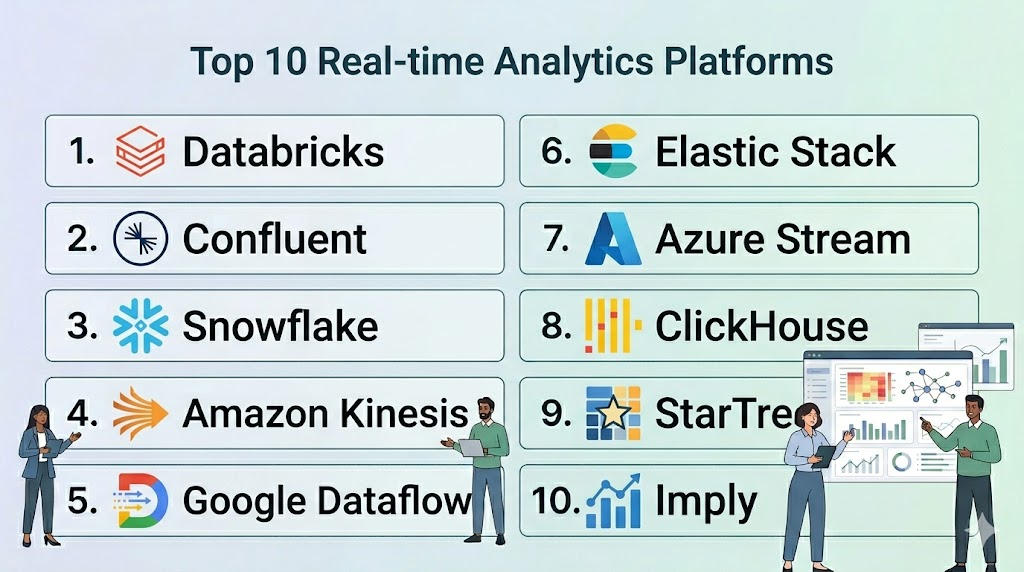
Top 10 Real-time Analytics Platforms
#1 — Databricks
Short description: A unified Data and AI platform built on top of Apache Spark, offering high-performance real-time processing through Spark Structured Streaming.
Key Features
- Delta Live Tables: Simplifies the creation of reliable, maintainable, and testable data processing pipelines.
- Unity Catalog: Provides a unified governance layer for all data and AI assets across the platform.
- Photon Engine: A vectorized query engine that significantly accelerates Spark processing speeds.
- Serverless SQL: Allows for instant scaling of compute resources for real-time querying without managing clusters.
- MLflow Integration: Seamlessly deploy and monitor machine learning models on live data streams.
- Lakehouse Architecture: Combines the performance of a data warehouse with the flexibility of a data lake.
Pros
- Exceptional performance for both streaming and complex batch processing.
- Unified environment for data engineering, data science, and SQL analytics.
Cons
- Pricing can be complex and can escalate quickly with high-volume usage.
- Requires a skilled team familiar with the Spark ecosystem to maximize value.
Platforms / Deployment
- AWS / Azure / Google Cloud
- Cloud
Security & Compliance
- SSO, MFA, RBAC, Encryption at rest/transit.
- SOC 2, ISO 27001, HIPAA, GDPR.
Integrations & Ecosystem
Databricks integrates deeply with the modern cloud data stack and open-source ecosystems.
- Apache Kafka / Confluent
- AWS Kinesis / Azure Event Hubs
- Tableau / Power BI
- dbt (data build tool)
Support & Community
Robust enterprise support tiers and a massive global community of Spark and Delta Lake developers.
#2 — Confluent (Apache Kafka)
Short description: A cloud-native platform built by the original creators of Apache Kafka, designed to serve as the central nervous system for data-in-motion.
Key Features
- ksqlDB: A streaming SQL engine that allows users to build real-time applications using familiar SQL syntax.
- Fully Managed Connectors: Over 120 pre-built connectors to link Kafka to any data source or destination.
- Stream Governance: The industry’s first governance suite for streaming data, including schema registry and lineage.
- Infinite Storage: Decouples storage from compute, allowing users to retain data in Kafka indefinitely.
- Stream Designer: A visual interface for building and deploying streaming data pipelines.
- Cluster Linking: Seamlessly mirrors data across different cloud providers or regions.
Pros
- The gold standard for high-throughput, low-latency event streaming.
- Highly flexible and platform-agnostic, working across all major cloud providers.
Cons
- Steep learning curve for teams new to the “event-driven” paradigm.
- Operational complexity can be high if managed outside of Confluent’s fully managed service.
Platforms / Deployment
- AWS / Azure / Google Cloud / On-prem
- Cloud / Hybrid / Self-hosted
Security & Compliance
- RBAC, ACLs, Secret management, SSO.
- SOC 2 Type II, ISO 27001, HIPAA, PCI DSS.
Integrations & Ecosystem
Confluent is the hub of the streaming world, integrating with almost every enterprise data tool.
- Snowflake / BigQuery
- Elasticsearch / MongoDB
- Salesforce / ServiceNow
- Prometheus / Grafana
Support & Community
Industry-leading support for Kafka and a global ecosystem of event-driven architecture experts.
#3 — Snowflake
Short description: While primarily known as a data warehouse, Snowflake’s “Snowpipe” and “Dynamic Tables” offer powerful real-time ingestion and transformation capabilities.
Key Features
- Snowpipe Streaming: Provides low-latency, row-set ingestion directly into Snowflake tables.
- Dynamic Tables: Simplifies data engineering by automatically updating results based on incoming data streams.
- Snowpark: Enables developers to write code in Python, Java, or Scala for real-time data processing.
- Unistore: Allows for transactional and analytical workloads to run within a single platform.
- Data Sharing: Instant, secure sharing of live data without moving or copying files.
- Cortex: Integrated AI services for analyzing and summarizing live data using LLMs.
Pros
- Extremely easy to set up and manage with zero infrastructure maintenance.
- Unified platform for batch, streaming, and transactional data.
Cons
- Not as low-latency as dedicated stream processors for “per-event” actions.
- Consumption-based pricing requires careful monitoring to prevent budget overruns.
Platforms / Deployment
- AWS / Azure / Google Cloud
- Cloud
Security & Compliance
- End-to-end encryption, MFA, SSO, Private Link support.
- SOC 2, ISO 27001, FedRAMP, HIPAA.
Integrations & Ecosystem
Huge marketplace of third-party integrations and native data shares.
- Fivetran / Airbyte
- Informatica / Matillion
- Looker / Sigma Computing
- Datadog
Support & Community
Comprehensive professional support and a rapidly growing community of Snowflake “Data Heroes.”
#4 — Amazon Kinesis
Short description: A fully managed AWS service that makes it easy to collect, process, and analyze real-time, streaming data at any scale.
Key Features
- Kinesis Data Streams: High-speed data ingestion for custom real-time applications.
- Kinesis Data Firehose: The easiest way to load streaming data into AWS data stores like S3 and Redshift.
- Kinesis Data Analytics: Analyze streaming data using SQL or Apache Flink.
- Video Streams: Specifically designed to ingest and store live video data for analytics and ML.
- On-demand Mode: Automatically scales capacity in response to varying data traffic.
- Integration with AWS Lambda: Trigger serverless functions instantly based on incoming data.
Pros
- Deeply integrated with the broader AWS ecosystem.
- Cost-effective for organizations already heavily invested in Amazon Web Services.
Cons
- Limited to the AWS environment; not suitable for multi-cloud strategies.
- Sharding and partition management can be complex for very large workloads.
Platforms / Deployment
- AWS
- Cloud
Security & Compliance
- KMS encryption, IAM roles, VPC endpoints.
- SOC 1/2/3, ISO 27001, HIPAA, FedRAMP.
Integrations & Ecosystem
Primarily focused on the AWS universe but supports standard data formats.
- Amazon S3 / Redshift / DynamoDB
- AWS Glue / OpenSearch
- Splunk
- Tableau
Support & Community
Standard AWS support plans and a massive library of AWS-certified technical documentation.
#5 — Google Cloud Dataflow
Short description: A serverless, fully managed service for unified stream and batch data processing based on the Apache Beam model.
Key Features
- Unified Programming Model: Use the same code for both batch and streaming data processing.
- Autoscaling: Dynamic work rebalancing and scaling to handle unpredictable data loads.
- Flex Templates: Allows for reusable data pipeline templates that can be shared across teams.
- Dataflow Prime: A next-generation engine that optimizes resource utilization and simplifies troubleshooting.
- Streaming Engine: Decouples compute from storage for improved performance and lower latency.
- Integration with Vertex AI: Directly apply Google’s AI models to live data streams.
Pros
- True serverless experience with minimal operational overhead.
- Excellent handling of “out-of-order” data through advanced windowing and watermarking.
Cons
- Locked into the Google Cloud Platform ecosystem.
- Apache Beam can have a challenging learning curve for developers.
Platforms / Deployment
- Google Cloud
- Cloud
Security & Compliance
- VPC Service Controls, CMEK (Customer-Managed Encryption Keys).
- SOC 2, ISO 27001, HIPAA, GDPR.
Integrations & Ecosystem
Optimized for the Google Data and AI stack.
- BigQuery / Bigtable
- Pub/Sub
- Looker
- Apache Beam
Support & Community
Google Cloud support services and a strong community around the open-source Apache Beam project.
#6 — Elastic Stack (ELK)
Short description: A powerful set of tools (Elasticsearch, Logstash, Kibana) for searching, analyzing, and visualizing data in real-time, particularly logs and metrics.
Key Features
- Elasticsearch: A distributed, RESTful search and analytics engine for massive datasets.
- Logstash: A server-side data processing pipeline that ingests data from multiple sources.
- Kibana: An interface for visualizing data and navigating the Elastic Stack.
- Beats: Lightweight data shippers that send data from the edge to Elasticsearch.
- Machine Learning: Built-in anomaly detection for identifying unusual patterns in live data.
- Search AI: Specialized features for semantic search and vector-based analytics.
Pros
- Unrivaled for log analytics, observability, and security monitoring.
- Extremely fast search and retrieval capabilities for unstructured data.
Cons
- Can be resource-intensive and expensive to scale for very large datasets.
- Managing self-hosted clusters requires significant DevOps expertise.
Platforms / Deployment
- Windows / macOS / Linux / AWS / Azure / GCP
- Cloud / Hybrid / Self-hosted
Security & Compliance
- Role-based access, encryption, Audit logging, SSO.
- SOC 2, ISO 27001, HIPAA, PCI DSS (Elastic Cloud).
Integrations & Ecosystem
Broad ecosystem focused on observability and security.
- Kafka / RabbitMQ
- Docker / Kubernetes
- PagerDuty / Slack
- Terraform
Support & Community
Strong enterprise support and one of the largest open-source communities in the world.
#7 — Azure Stream Analytics
Short description: A fully managed real-time analytical engine from Microsoft designed for high-velocity data from devices, sensors, and applications.
Key Features
- SQL-based Syntax: Use familiar SQL language to define complex streaming logic.
- Edge Processing: Run analytics directly on IoT devices using Azure IoT Edge.
- Reference Data Joining: Easily join live streams with historical or static data for richer context.
- ML Integration: Call Azure Machine Learning functions directly from the streaming query.
- Visual Studio Integration: Develop and debug streaming pipelines within a familiar IDE.
- Built-in Connectors: Direct integration with Azure’s event hubs and data stores.
Pros
- Seamless integration for organizations already on the Microsoft Azure platform.
- Low barrier to entry for users with SQL skills.
Cons
- Limited to the Azure ecosystem.
- Not as flexible for complex, non-SQL-based data transformations.
Platforms / Deployment
- Azure
- Cloud / Edge
Security & Compliance
- MFA, VNET support, Azure Active Directory integration.
- SOC 1/2/3, ISO 27001, HIPAA, FedRAMP.
Integrations & Ecosystem
Centered around the Microsoft stack.
- Azure Event Hubs / IoT Hub
- Power BI
- Azure Synapse / Cosmos DB
- Azure Functions
Support & Community
Standard Microsoft Azure support and professional services.
#8 — ClickHouse
Short description: An open-source, column-oriented database management system that allows for generating analytical reports in real-time using SQL.
Key Features
- Columnar Storage: Highly efficient storage and querying of massive datasets.
- Vectorized Execution: Uses modern CPU features to process data at lightning speeds.
- Real-time Ingestion: Supports high-speed insertion of data from Kafka and other sources.
- Materialized Views: Automatically calculates and stores query results in real-time.
- Linear Scalability: Easily scales to handle petabytes of data across multiple nodes.
- SQL Dialect: Robust SQL support with specialized functions for time-series and array data.
Pros
- Blazing-fast query performance, often outperforming traditional data warehouses.
- Extremely storage-efficient through advanced compression algorithms.
Cons
- Does not support full transactional (ACID) updates like a traditional DB.
- Community edition requires significant management effort for high-availability setups.
Platforms / Deployment
- Windows / macOS / Linux / Cloud
- Cloud / Self-hosted
Security & Compliance
- RBAC, SSL, Encryption at rest.
- SOC 2 (ClickHouse Cloud).
Integrations & Ecosystem
Widely supported by modern data tools and collectors.
- Kafka / Vector
- Grafana / Superset
- Metabase
- Vector databases
Support & Community
ClickHouse Cloud provides enterprise support; the open-source community is large and very active.
#9 — StarTree (Apache Pinot)
Short description: A real-time OLAP (Online Analytical Processing) datastore designed to answer analytical queries with low latency, even at extremely high throughput.
Key Features
- Pluggable Indexing: Supports various indexing techniques like star-tree, inverted, and range.
- Upsert Support: Ability to update existing records in real-time, rare for OLAP systems.
- Tiered Storage: Automatically moves older data to cheaper storage to manage costs.
- Query Console: A built-in UI for running SQL queries and managing the cluster.
- Deep Integration with Kafka: Native “exactly-once” ingestion from streaming sources.
- Smart Multi-tenancy: Allows multiple teams to share a single cluster with resource isolation.
Pros
- Optimized for “user-facing” analytics where thousands of users query the same data.
- Incredible performance for filtering and aggregating across billions of rows.
Cons
- Complex architecture that can be difficult for small teams to deploy.
- Primarily focused on “analytical” queries; not a general-purpose database.
Platforms / Deployment
- AWS / GCP / Azure
- Cloud / Hybrid / Self-hosted
Security & Compliance
- SSO, Encryption, RBAC.
- SOC 2 (StarTree Cloud).
Integrations & Ecosystem
Focused on the modern data-in-motion stack.
- Confluent / Redpanda
- Presto / Trino
- Tableau
- Apache Flink
Support & Community
StarTree provides enterprise support for the Apache Pinot ecosystem.
#10 — Imply (Apache Druid)
Short description: A high-performance, real-time analytics database built to power modern analytics applications that require sub-second response times.
Key Features
- Interactive Querying: Optimized for sub-second responses even on petabyte-scale datasets.
- High Concurrency: Supports thousands of simultaneous users without slowing down.
- Time-Series Optimization: Specialized storage and indexing for time-stamped data.
- Continuous Ingestion: Connects directly to streaming sources for immediate data availability.
- Automatic Compaction: Keeps data storage optimized without manual intervention.
- Multi-Stage Query Engine: Enables complex joins and aggregations across large datasets.
Pros
- Perfect for building “analytics-as-a-service” internal and external dashboards.
- Proven reliability in massive production environments (e.g., Netflix, Salesforce).
Cons
- Significant operational overhead for self-hosted versions.
- Memory-intensive, which can lead to high infrastructure costs.
Platforms / Deployment
- AWS / Azure / GCP / Linux
- Cloud / Hybrid / Self-hosted
Security & Compliance
- LDAP/Active Directory integration, RBAC, Encryption.
- SOC 2 Type II (Imply Cloud).
Integrations & Ecosystem
Part of the big data ecosystem.
- Apache Kafka / Flink
- Superset / Pivot (Imply’s visualization tool)
- Hadoop / Spark
- Prometheus
Support & Community
Imply provides professional services and support for the Apache Druid project.
Comparison Table (Top 10)
| Tool Name | Best For | Platform(s) Supported | Deployment | Standout Feature | Public Rating |
| Databricks | Data Science & ML | AWS, Azure, GCP | Cloud | Photon Query Engine | 4.7/5 |
| Confluent | Event-Driven Apps | AWS, Azure, GCP | Hybrid | ksqlDB Streaming SQL | 4.8/5 |
| Snowflake | Cloud Data Warehousing | AWS, Azure, GCP | Cloud | Dynamic Tables | 4.6/5 |
| Amazon Kinesis | AWS-Native Streaming | AWS | Cloud | Lambda Integration | 4.5/5 |
| Google Dataflow | Serverless Pipeline | Google Cloud | Cloud | Unified Batch/Stream | 4.5/5 |
| Elastic Stack | Log & Search Analytics | Multi-Platform | Hybrid | Real-time Text Search | 4.7/5 |
| Azure Stream | Azure/IoT Ecosystem | Azure | Cloud | SQL-based Streaming | 4.3/5 |
| ClickHouse | Ultra-fast OLAP | Multi-Platform | Hybrid | Columnar Performance | 4.8/5 |
| StarTree | User-facing Analytics | AWS, Azure, GCP | Hybrid | Real-time Upserts | N/A |
| Imply | High-Concurrency Dash | AWS, Azure, GCP | Hybrid | Time-Series Focus | 4.4/5 |
Evaluation & Scoring of Real-time Analytics Platforms
The scores below reflect a comparative analysis of how these platforms perform in an enterprise environment where speed and reliability are paramount.
| Tool Name | Core (25%) | Ease (15%) | Integrations (15%) | Security (10%) | Performance (10%) | Support (10%) | Value (15%) | Weighted Total |
| Databricks | 10 | 6 | 9 | 9 | 10 | 9 | 7 | 8.70 |
| Confluent | 10 | 5 | 10 | 9 | 10 | 9 | 8 | 8.60 |
| Snowflake | 8 | 10 | 10 | 10 | 8 | 9 | 7 | 8.65 |
| Amazon Kinesis | 7 | 8 | 9 | 9 | 8 | 9 | 8 | 7.95 |
| Google Dataflow | 8 | 8 | 8 | 9 | 9 | 8 | 8 | 8.15 |
| Elastic Stack | 9 | 6 | 9 | 9 | 8 | 9 | 7 | 8.15 |
| Azure Stream | 7 | 9 | 8 | 9 | 7 | 9 | 8 | 7.85 |
| ClickHouse | 10 | 4 | 7 | 7 | 10 | 7 | 9 | 7.70 |
| StarTree | 9 | 5 | 8 | 8 | 10 | 8 | 7 | 7.85 |
| Imply | 9 | 5 | 9 | 8 | 9 | 8 | 7 | 7.75 |
How to Interpret These Scores:
- Weighted Total: A score above 8.5 indicates a top-tier platform that excels across the board.
- Core Feature Score: Reflects the technical depth of the streaming and processing engine.
- Ease of Use Score: Reflects the “time-to-insight” and operational overhead. Tools like Snowflake lead here.
Which Real-time Analytics Platform Tool Is Right for You?
Solo / Freelancer
For a single developer or freelancer, Snowflake is the best choice due to its zero-maintenance model. It allows you to build sophisticated real-time pipelines using standard SQL without needing a DevOps team.
SMB
Small and medium businesses should consider Confluent Cloud or Databricks Serverless. These platforms provide enterprise-grade streaming power with a “pay-as-you-go” model that aligns costs directly with data volume.
Mid-Market
Companies with established data teams but limited infrastructure resources should look at Google Cloud Dataflow or Amazon Kinesis. These cloud-native tools allow for rapid scaling and deep integration with existing cloud services.
Enterprise
Large-scale enterprises with massive concurrency needs (like thousands of users accessing live dashboards) should evaluate StarTree (Apache Pinot) or Imply (Apache Druid). These are designed specifically to handle “user-facing” analytics at an extreme scale.
Budget vs Premium
- Budget: ClickHouse (Open-source self-hosted), Elastic Stack (Basic).
- Premium: Databricks, Confluent, Snowflake.
Feature Depth vs Ease of Use
- High Depth: SideFX Houdini of data (SideFX is a 3D tool, but Databricks and Confluent are the equivalents in data).
- High Ease: Azure Stream Analytics, Snowflake.
Integrations & Scalability
- Top Integrations: Confluent, Snowflake.
- Top Scalability: ClickHouse, Databricks.
Security & Compliance Needs
Organizations in highly regulated sectors (Banking, Gov) should prioritize Snowflake, Databricks, or Confluent, as they offer the most mature governance and compliance frameworks.
Frequently Asked Questions (FAQs)
- What is the difference between real-time analytics and batch analytics?
Batch analytics processes data in large chunks at scheduled intervals (e.g., daily), while real-time analytics processes data instantly as it is generated, providing results in milliseconds.
- How do I measure the “real-time” speed of a platform?
Speed is usually measured by “end-to-end latency,” which is the time from the event occurring at the source to the point where it is visible in a dashboard or triggers an alert.
- Do these platforms require me to rewrite all my SQL queries?
Most modern platforms (Databricks, Snowflake, ClickHouse) support standard SQL, though some may require slight syntax adjustments for streaming-specific operations like “windowing.”
- Can these platforms handle data from IoT sensors?
Yes, platforms like Amazon Kinesis and Azure Stream Analytics are specifically optimized to ingest and process high-frequency telemetry data from millions of IoT devices.
- Is it expensive to move to a real-time analytics model?
Real-time processing can be more expensive than batch due to the continuous compute resources required. However, serverless options allow you to scale costs with your actual data volume.
- What is “exactly-once” processing and why does it matter?
Exactly-once ensures that each data point is processed exactly one time—no more, no less. This is critical for financial applications where duplicate processing could lead to errors.
- Do I need a separate visualization tool for real-time data?
Many platforms (Elastic, Confluent, Azure) have built-in dashboards, but for complex needs, they are often paired with real-time visualization tools like Grafana or Power BI.
- How does AI fit into real-time analytics?
AI is used for “in-stream” inference, where a model evaluates live data to predict outcomes (e.g., scoring a transaction for fraud probability) as the data passes through.
- What is the significance of the “Zero-ETL” trend?
Zero-ETL allows data to be moved from sources to analytics platforms without a separate transformation step, reducing latency and simplifying the overall data architecture.
- Can real-time platforms handle historical data as well?
Yes, platforms like Snowflake and Databricks are “Lakehouses,” meaning they can run queries that combine live streaming data with petabytes of historical batch data.
Conclusion
The transition from batch processing to real-time analytics is no longer an optional upgrade; it is a necessity for surviving in a 2026 business environment. While Confluent and Databricks offer the highest technical ceiling for complex event-driven architectures, Snowflake provides the most accessible entry point for organizations looking for immediate results.The key to success is matching the platform to your specific “latency-to-value” ratio. For those beginning this transition, we recommend a pilot project focused on a single high-impact use case—such as live security monitoring or real-time inventory tracking—to validate performance before scaling across the entire enterprise.

Find Trusted Cardiac Hospitals
Compare heart hospitals by city and services — all in one place.
Explore Hospitals
Real-time analytics platforms are explained clearly, and the comparison helps in understanding how instant data processing and insights support faster decision-making.