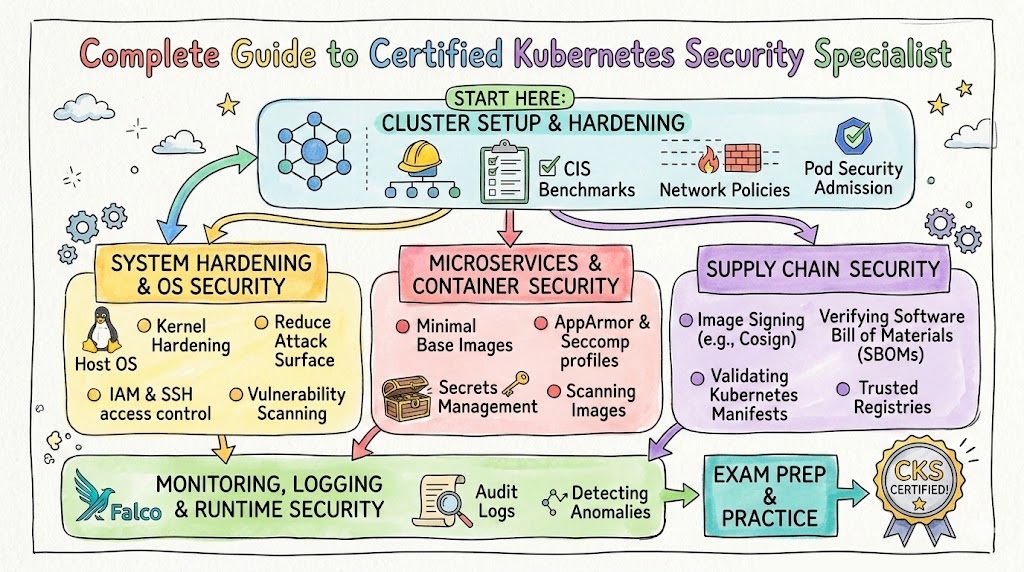
If you already work with Kubernetes and want to move into security-focused roles, the Certified Kubernetes Security Specialist (CKS) is one of the strongest practical certifications you can pursue. It helps you prove that you can secure Kubernetes clusters, workloads, images, and runtime behavior—not just operate them.This guide is written for working engineers, software engineers, and managers (India + global) who want a clear, practical, and career-focused understanding of the CKS path. It covers what the certification is, who should take it, what skills you gain, how to prepare in different timelines, common mistakes, role-based recommendations, and what to do next.DevOpsSchool’s CKS certification page describes the program as an industry-recognized online training course and highlights security-focused topics such as cluster setup/hardening, system hardening, supply chain security, and runtime monitoring/logging. It also lists a typical duration of 10–15 hours for the course page’s training format summary.
Why Certified Kubernetes Security Specialist Matters
Kubernetes is now a standard platform for containerized applications. But many teams still have a gap between “cluster operations” and “secure cluster operations.” That is where CKS becomes valuable.
The DevOpsSchool CKS page explains that the certification is important because it validates practical Kubernetes security skills across areas like hardening, monitoring, logging, and incident response, and it emphasizes the performance-based nature of the exam preparation focus.
In real work, this matters because security issues in Kubernetes are rarely about one thing. They usually involve a mix of:
- weak RBAC
- over-permissive service accounts
- insecure images
- missing network policies
- poor secrets handling
- runtime visibility gaps
- weak incident response readiness
A CKS-aligned learning path helps you build habits for preventing these issues before they become production incidents.
Who Should Read This Guide
This guide is especially useful if you are:
- A DevOps Engineer who already deploys on Kubernetes
- An SRE who handles production reliability and wants stronger security controls
- A Platform Engineer building internal Kubernetes platforms
- A Cloud Engineer supporting managed Kubernetes services
- A Security Engineer expanding into cloud-native/container security
- A Software Engineer shipping workloads on Kubernetes and wanting better security practices
- An Engineering Manager who wants to plan team upskilling in Kubernetes security
The DevOpsSchool CKS page also lists a broad target audience including Kubernetes administrators, cloud administrators, security engineers, DevOps engineers, SREs, developers, consultants, and IT managers/directors.
What Is Certified Kubernetes Security Specialist (CKS)?
The DevOpsSchool CKS page describes CKS as a certification focused on professionals responsible for securing Kubernetes environments, and it outlines security domains such as cluster setup, cluster hardening, system hardening, microservice vulnerabilities, supply chain security, and monitoring/logging/runtime security.
In simple terms, CKS helps you answer this question confidently:
“Can I secure Kubernetes in real production situations—not just describe security concepts?”
That includes securing:
- the cluster
- nodes
- workloads
- secrets
- images
- network communication
- runtime behavior
- audit and detection workflows
What You Will Learn in a CKS-Aligned Journey
Based on the CKS agenda and training objectives shown on DevOpsSchool’s CKS page, the learning focus includes areas like network security policies, CIS benchmark checks, ingress security, RBAC, service account controls, kernel hardening tools (AppArmor/seccomp), secrets handling, image scanning, registry controls, and audit/runtime monitoring.
Core knowledge areas you should master
1) Cluster Setup Security
You should be able to secure the cluster foundation before applications go live.
Examples:
- applying network policies
- securing ingress
- reviewing security configuration via benchmarks
- protecting metadata/endpoints
- reducing GUI exposure when not needed
2) Cluster Hardening
You should understand how to reduce unnecessary permissions and access.
Examples:
- RBAC design
- API access restriction
- service account permission minimization
- safe update practices
3) System Hardening
Kubernetes security is not only YAML. You also need host and OS-level awareness.
Examples:
- reducing host OS attack surface
- limiting external network exposure
- using kernel hardening tools
- minimizing excessive IAM permissions
4) Minimizing Microservice Vulnerabilities
You must secure applications running in the cluster, not just the cluster itself.
Examples:
- secret handling
- workload isolation
- runtime sandboxing in multi-tenant cases
- mTLS-based pod-to-pod security
5) Supply Chain Security
Many incidents start before runtime—inside the build and image pipeline.
Examples:
- smaller base images
- trusted registries
- image signing/validation practices
- static analysis of workloads and Dockerfiles
- vulnerability scanning
6) Monitoring, Logging, and Runtime Security
You need visibility and response capability, not only preventive controls.
Examples:
- runtime event monitoring
- audit log usage
- threat detection
- attack phase detection and investigation
- immutability practices at runtime
Certification Table
Below is a practical certification table for the certifications referenced in this guide. The primary focus is Certified Kubernetes Security Specialist (CKS), and the roadmap rows help with sequencing and next steps.
| Certification | Track | Level | Who it’s for | Prerequisites | Skills covered | Recommended order |
|---|---|---|---|---|---|---|
| Certified Kubernetes Security Specialist (CKS) | Kubernetes Security / DevSecOps | Advanced (specialist) | DevOps, SRE, Platform, Security Engineers working on Kubernetes | Kubernetes admin experience + hands-on cluster usage | Cluster hardening, RBAC, image security, runtime security, network policy, secrets, monitoring/logging | After solid Kubernetes operations experience |
| Master in DevOps Engineering (MDE) | DevOps / DevSecOps / SRE (broad) | Comprehensive program | Engineers/managers who want a broad roadmap across DevOps, DevSecOps, SRE | IT basics + willingness to learn tools/process | DevOps, DevSecOps, SRE concepts + broad tooling exposure | Before specialization, or as a broad career accelerator |
| DevOpsSchool Certification Catalog (Provider-wide) | Multi-track | Mixed | Anyone selecting next certifications by role/path | Depends on certification | Role-based and track-based options | Use for planning next steps after CKS |
Certified Kubernetes Security Specialist
What it is
Certified Kubernetes Security Specialist (CKS) is a Kubernetes security-focused certification path for professionals who secure clusters and containerized workloads. It focuses on practical skills such as hardening, access control, workload security, supply chain security, and runtime detection/monitoring.
Who should take it
- DevOps Engineers working with Kubernetes in staging/production
- SREs who manage reliability and incident response for container platforms
- Platform Engineers building internal Kubernetes platforms
- Security Engineers moving into cloud-native security
- Cloud Engineers managing Kubernetes services
- Software Engineers deploying applications to Kubernetes who want stronger secure-by-default habits
- Technical managers who want to understand what “good Kubernetes security” looks like
Skills you’ll gain
- Kubernetes cluster security baseline review and hardening
- RBAC design and permission minimization
- Service account risk reduction
- Network policy implementation for segmentation
- Ingress security control basics
- Secrets handling and secure workload configuration
- Host/system hardening awareness (AppArmor, seccomp concepts)
- Image hardening and vulnerability scanning workflows
- Registry trust and supply chain control practices
- Runtime monitoring and audit logging usage
- Threat detection and investigation mindset for Kubernetes workloads
Real-world projects you should be able to do after it
- Build a secure Kubernetes baseline for a new project environment
- Apply RBAC roles and bindings for app teams with least privilege
- Implement network policies to isolate namespaces/services
- Harden a cluster by reducing risky defaults and insecure access patterns
- Set up a container image scanning checkpoint in CI/CD
- Define a trusted registry policy and image validation process
- Audit and improve service account usage across namespaces
- Enable and review Kubernetes audit logs for suspicious access
- Design a basic runtime alerting workflow for container security events
- Run a security review of a microservice deployment and produce remediation steps
Preparation plan (7–14 days / 30 days / 60 days)
7–14 days (Fast-track revision plan)
Best for people who already work on Kubernetes daily.
- Day 1–2: Review Kubernetes security domains and exam-style tasks
- Day 3–4: RBAC, service accounts, API access hardening
- Day 5–6: Network policies, ingress hardening, secrets handling
- Day 7–8: Image security, supply chain controls, scanning
- Day 9–10: Runtime security, audit logs, incident investigation basics
- Day 11–12: Hands-on lab repetition (speed + accuracy)
- Day 13–14: Mock tasks and weak-area revision
30 days (Balanced plan)
Best for working engineers with limited daily study time.
- Week 1: Kubernetes security concepts + cluster setup/hardening
- Week 2: RBAC, service accounts, network policies, secrets
- Week 3: Supply chain security + image scanning + workload hardening
- Week 4: Monitoring/logging/runtime security + mock labs + revision
Recommended rhythm:
- 60–90 minutes on weekdays
- 2–4 hours on weekends for labs
60 days (Deep learning + practical adoption plan)
Best for managers transitioning to hands-on or engineers building strong foundations.
- Weeks 1–2: Kubernetes fundamentals review (objects, scheduling, networking, authn/authz basics)
- Weeks 3–4: Cluster and system hardening
- Weeks 5–6: Workload security, secrets, policies, microservice protections
- Weeks 7–8: Supply chain security and runtime monitoring
- Weeks 9–10: Simulated projects + remediation exercises
- Weeks 11–12: Mock practice + documentation speed + final revision
Common mistakes
- Studying only theory and skipping command-line practice
- Focusing on tools but ignoring Kubernetes native security controls
- Memorizing YAML without understanding why controls are needed
- Ignoring RBAC and service account permission design
- Not practicing network policy troubleshooting
- Treating image scanning as the entire supply chain story
- Forgetting audit logs and runtime visibility
- Not practicing under time pressure
- Working in only one namespace/use case and missing broader scenarios
- Overlooking host/system hardening considerations
Best next certification after this
A strong next step depends on your role:
- Same specialization depth: continue deeper into cloud-native security and platform hardening projects
- Cross-track growth: broaden into DevSecOps/SRE workflows
- Leadership growth: take a broader program like Master in DevOps Engineering (MDE) for architecture-level view across DevOps, DevSecOps, and SRE. The MDE page specifically positions the program across these three areas.
How CKS Fits Into a Modern Engineering Career
CKS is not just a “security badge.” It is a role multiplier.
For engineers
It helps you reduce production risk and improves your design decisions for Kubernetes deployments.
For managers
It helps you identify whether a team can:
- secure workloads before release
- define policy boundaries
- detect suspicious behavior
- respond faster to incidents
For organizations
It supports stronger DevSecOps and platform engineering maturity because it pushes teams toward secure defaults, repeatable hardening, and operational visibility.
Choose Your Path
This section is designed for people who do not want just one certification—they want a career path.
1) DevOps Path (Build → Deploy → Operate → Secure)
Best for engineers who manage CI/CD, infrastructure automation, and release pipelines.
Path focus
- Build strong automation habits
- Understand Kubernetes operations
- Add security controls into delivery workflows
- Improve observability and resilience
Where CKS fits
- After you already operate Kubernetes workloads
- As the security specialization that makes your DevOps profile stronger
Outcome
- Better production readiness
- Safer releases
- Stronger credibility for platform ownership
2) DevSecOps Path (Shift Security Into Delivery)
Best for engineers/security professionals who want to secure pipelines, workloads, and runtime operations.
Path focus
- Threat-aware CI/CD
- Supply chain security
- Kubernetes workload security
- Runtime monitoring and incident response alignment
Where CKS fits
- Core specialization certification in the Kubernetes segment of DevSecOps
- Practical bridge between policy and implementation
Outcome
- You can speak both “security” and “operations” language
- Higher impact in cloud-native security programs
3) SRE Path (Reliability With Security-by-Default)
Best for SREs supporting production services at scale.
Path focus
- Reliability engineering
- Incident response
- Observability
- Performance and availability
- Secure operations for Kubernetes workloads
Where CKS fits
- Helps reduce incident frequency caused by weak access, weak configs, and insecure workloads
- Improves detection and audit visibility skills
Outcome
- Better reliability through better security posture
- Stronger incident investigation capability
4) AIOps/MLOps Path (Cloud-Native Platforms for ML Systems)
Best for engineers who run ML systems or data/ML platforms on Kubernetes.
Path focus
- ML workloads on Kubernetes
- Secure pipelines and registries
- Secrets management
- Multi-tenant workload isolation
- Runtime monitoring
Where CKS fits
- Critical when you operate shared clusters, notebooks, inference services, or model pipelines
- Helps reduce security risk in fast-moving ML environments
Outcome
- Safer ML platform operations
- Stronger governance and production confidence
5) DataOps Path (Secure Data Platforms on Kubernetes)
Best for data platform engineers building pipelines, streaming workloads, and analytics services.
Path focus
- Data workflow orchestration
- Containerized services
- Access control
- Secrets and credential handling
- Runtime visibility for data platform services
Where CKS fits
- Helps secure namespace boundaries, secrets, and service-to-service access
- Supports safer operation of data workloads in shared clusters
Outcome
- Better operational trust for data pipelines
- Reduced risk of credential exposure and cross-service access problems
6) FinOps Path (Cost-Aware and Secure Platform Operations)
Best for cloud/platform teams balancing cost, governance, and operational risk.
Path focus
- Cloud usage governance
- Platform standardization
- Policy-based controls
- Resource hygiene
- Secure platform baselines
Where CKS fits
- Security misconfiguration often creates hidden cost (incidents, rework, outages, compliance effort)
- CKS thinking supports policy discipline and cleaner platform design
Outcome
- Better governance maturity
- Stronger balance between performance, cost, and risk
Role → Recommended Certifications Mapping
This mapping is practical and role-first. It uses the CKS specialization and broader DevOpsSchool provider/program options for planning.
| Role | Recommended starting focus | Why | Recommended certification direction |
|---|---|---|---|
| DevOps Engineer | Kubernetes operations + CI/CD security basics | You already ship workloads; CKS adds security depth | Start with Kubernetes ops maturity, then CKS, then broader MDE for cross-domain growth |
| SRE | Runtime security + audit logging + hardening | Reliability and security overlap in production incidents | CKS (strong fit), then SRE-focused learning + broader MDE |
| Platform Engineer | Multi-tenant cluster security + policy controls | You define the platform defaults others depend on | CKS early, then architecture/program-level expansion via MDE |
| Cloud Engineer | Managed Kubernetes security + IAM + network controls | Cloud + Kubernetes security boundaries are critical | CKS plus provider-wide cloud/DevOps certifications via DevOpsSchool catalog |
| Security Engineer | Cloud-native and container security execution | CKS adds practical Kubernetes implementation skills | CKS first, then DevSecOps-focused progression through DevOpsSchool tracks |
| Data Engineer | Secure data services on Kubernetes | Secrets, access control, image hygiene matter in data platforms | Kubernetes basics → CKS (if operating K8s data services) → DataOps path certifications from provider catalog |
| FinOps Practitioner | Governance + secure platform controls awareness | Cost, governance, and risk decisions connect in platform ops | FinOps path first, then selective Kubernetes security awareness via CKS concepts |
| Engineering Manager | Team capability planning across DevOps/DevSecOps/SRE | You need roadmap visibility more than deep command memorization | MDE for broad understanding + CKS awareness for team specialization planning |
The MDE page explicitly positions the program as a combined DevOps, DevSecOps, and SRE learning path, which makes it useful for managers and engineers planning multi-track growth.
Next Certifications to Take
Using the broader direction indicated by the Master in DevOps Engineering (MDE) page (DevOps + DevSecOps + SRE positioning), here are three practical next-step options after CKS.
1) Same Track Option (Security/Kubernetes Depth)
Choose this if: you want to become the go-to Kubernetes security specialist in your team.
Focus
- Advanced cluster hardening patterns
- Runtime detection/response operations
- Policy automation
- Secure platform design
Why it’s good
- Strong role specialization
- Immediate production impact
- High value in platform teams and regulated environments
2) Cross-Track Option (DevSecOps / SRE Expansion)
Choose this if: you want broader responsibility beyond cluster security.
Focus
- CI/CD security controls
- Supply chain governance across the pipeline
- Observability + incident response workflows
- Reliability and security collaboration
Why it’s good
- Improves career flexibility
- Helps you move into lead/platform roles
- Aligns with how modern organizations run engineering teams
3) Leadership Option (Broad Program / Architecture View)
Recommended option: Master in DevOps Engineering (MDE)
Choose this if: you want to move toward architecture, consulting, management, or multi-team enablement.
What the MDE page signals
- Broad DevOps + DevSecOps + SRE orientation
- Structured learning path for wider organizational roles
- Useful for professionals transitioning into broader responsibilities
Why it’s good
- Helps you connect tools, process, culture, and governance
- Good for managers and senior engineers planning team skill matrices
Practical Study Strategy for Busy Working Professionals
Many engineers delay CKS because they think they need long uninterrupted study time. You do not.
Weekday study model (working professionals)
- 45–90 minutes: concept + one hands-on task
- 15 minutes: notes and command revision
- 10 minutes: “what could go wrong in production?” reflection
Weekend study model
- 2–4 hours of lab practice
- Repeat tasks from memory (important)
- Write your own troubleshooting checklist
- Time-box yourself to build speed
Manager-friendly learning model
If you are a manager and not deeply hands-on:
- learn the security domains
- understand common failure modes
- review sample configurations
- join practical demos
- evaluate team readiness using a checklist (RBAC, policies, secrets, image controls, runtime visibility)
This way, you can support team decisions without pretending to be the person executing every command.
Common Career Outcomes After CKS
CKS alone does not guarantee a job. But it can significantly improve your profile when combined with experience and hands-on evidence.
Typical improvements people see
- More confidence in Kubernetes security reviews
- Better interview conversations for platform/DevSecOps roles
- Stronger credibility in production incident discussions
- Improved ability to design secure deployment standards
- Better collaboration with security and compliance teams
What hiring teams often expect with CKS
They may expect you to:
- understand hardening fundamentals
- implement secure configs
- identify risky defaults
- respond to runtime security events
- explain trade-offs (security vs usability vs delivery speed)
That is why hands-on practice and project examples matter as much as the certification itself.
List of Top Following Institutions Which Provide Help in Training cum Certifications for Certified Kubernetes Security Specialist
Below are the institutions/brands you listed. These are useful for learners who want training support, mentoring, guided labs, or certification-aligned preparation. Since your instruction is to avoid external links, I am keeping this section descriptive and provider-focused.
DevOpsSchool
DevOpsSchool is a strong choice for learners who want structured, instructor-led support and a broader certification ecosystem under one provider. Its CKS page presents a clear topic-wise agenda and positions the training around practical security domains like hardening, supply chain security, and runtime monitoring. It is useful for working professionals who want guided preparation plus broader DevOps/DevSecOps/SRE growth paths.
Cotocus
Cotocus can be valuable for organizations and teams looking for implementation support alongside learning. It is often considered by professionals who want practical consulting exposure and problem-solving orientation, especially when training is tied to business use cases and delivery outcomes.
ScmGalaxy
ScmGalaxy is typically considered by learners exploring DevOps and automation ecosystems with a practical training-first mindset. It can be useful for people who want to strengthen fundamentals before moving into advanced Kubernetes security specialization.
BestDevOps
BestDevOps is often used by learners comparing certification and job-oriented technical training options. It may help candidates who want a structured curriculum, guided preparation, and training support while building toward cloud-native roles.
DevSecOpsSchool
DevSecOpsSchool is especially relevant for people who want a stronger security-first learning route. For CKS learners, a DevSecOps-focused environment can help connect Kubernetes security topics with CI/CD security, supply chain controls, and compliance-aware practices.
SRESchool
SRESchool can be a good fit for learners who approach Kubernetes security from a reliability and operations perspective. This is especially useful for SREs who want to improve runtime monitoring, incident handling, and production resilience while strengthening security controls.
AIOpsSchool
AIOpsSchool can support professionals working on intelligent operations, monitoring, and automation practices. For CKS candidates, it can complement runtime visibility and operational analytics thinking, especially in modern cloud-native environments.
DataOpsSchool
DataOpsSchool is relevant for engineers who run data platforms and pipelines on cloud-native infrastructure. CKS knowledge becomes more valuable when data services run on Kubernetes and need better secrets, access control, and workload isolation.
FinOpsSchool
FinOpsSchool is helpful for practitioners focused on cloud cost governance, optimization, and platform policy discipline. While FinOps and Kubernetes security are different specialties, they often meet in platform standardization, governance, and operational maturity conversations.
FAQs
1) Is CKS difficult?
Yes, it is usually considered challenging because it is practical and security-focused. It is easier if you already work with Kubernetes daily and have hands-on experience with RBAC, networking, and troubleshooting.
2) Do I need to be a security engineer before taking CKS?
No. Many DevOps Engineers, SREs, and Platform Engineers take it to build Kubernetes security depth. What matters most is Kubernetes hands-on practice.
3) How much time do I need to prepare?
It depends on your current level:
- 7–14 days for fast revision (experienced users)
- 30 days for a balanced working-professional plan
- 60 days for deeper learning and practice
4) Should I learn Kubernetes first or directly start CKS?
Learn Kubernetes operations first. CKS builds on Kubernetes working knowledge. If you are still struggling with basic cluster objects and troubleshooting, build that foundation first.
5) Is CKS useful for managers?
Yes, especially engineering managers who lead platform, SRE, or DevSecOps teams. Even if you are not deeply hands-on, CKS knowledge helps with team skill planning and security readiness discussions.
6) Does CKS help in DevSecOps roles?
Absolutely. It is one of the strongest certifications for the Kubernetes part of DevSecOps because it connects cluster controls, workload security, supply chain thinking, and runtime monitoring.
7) Can a software engineer benefit from CKS?
Yes, especially if you deploy microservices on Kubernetes. It improves your understanding of secure deployment patterns, secrets handling, network exposure, and runtime risks.
8) Is CKS only for self-managed Kubernetes clusters?
No. Even with managed Kubernetes, teams still need strong security practices for workloads, RBAC, secrets, policies, and runtime monitoring.
9) What is the biggest mistake in CKS preparation?
Studying only notes and videos without doing hands-on practice under time pressure.
10) What is better after CKS: deeper security or broader DevOps/SRE?
It depends on your career goal:
- Specialist role → go deeper into cloud-native security
- Senior/lead role → expand into DevSecOps/SRE and architecture
- Manager/consultant role → take a broader program like MDE
11) Does CKS improve career outcomes immediately?
It can improve interview quality and credibility, but results are stronger when you can show practical project work and explain real decisions you made.
12) Is CKS worth it for someone outside India?
Yes. Kubernetes and cloud-native security skills are globally relevant. The role value comes from practical skills, which are portable across geographies and industries.
13) Can I combine CKS with SRE learning?
Yes, and it is a strong combination. Security and reliability often overlap in production incident prevention and response.
14) What kind of companies value CKS?
Companies running Kubernetes in production—especially SaaS, fintech, platforms, e-commerce, healthcare tech, and enterprises modernizing infrastructure.
FAQs
1) What does CKS stand for?
CKS stands for Certified Kubernetes Security Specialist, a Kubernetes security-focused certification for professionals responsible for securing Kubernetes environments.
2) What topics are usually covered in CKS preparation?
Key topics include cluster setup and hardening, system hardening, minimizing microservice vulnerabilities, supply chain security, and monitoring/logging/runtime security. These are clearly reflected on the DevOpsSchool CKS page agenda and training sections.
3) Who should take CKS first in a team?
Usually the people who already manage Kubernetes platforms or production workloads:
- Platform Engineers
- DevOps Engineers
- SREs
- Security Engineers working with cloud-native systems
4) Is CKS a theory certification?
It is best approached as a practical skills certification. You need hands-on repetition, not only conceptual understanding.
5) Can beginners take CKS?
Beginners can start learning the topics, but for certification success, it is much better to first build Kubernetes operational fundamentals and real practice.
6) How do I know I am ready for CKS?
You are likely ready when you can:
- apply RBAC correctly
- write and troubleshoot network policies
- secure workloads and secrets
- review image/security risks
- investigate logs and runtime alerts in a structured way
7) What makes CKS valuable in real projects?
It improves secure-by-default thinking. Instead of fixing security late, you start designing safer Kubernetes deployments from the beginning.
8) What should I do right after completing CKS?
Choose one of these:
- deepen into Kubernetes security specialization
- expand into DevSecOps/SRE practices
- broaden into architecture/leadership with a program like MDE
Conclusion
Certified Kubernetes Security Specialist (CKS) is a high-value certification for engineers and managers who want stronger cloud-native security capability—not just more theory. It helps you build practical skills in Kubernetes hardening, access control, workload security, supply chain protection, and runtime monitoring, which are all directly relevant to modern production systems. If your work touches Kubernetes in any serious way, CKS can become a powerful career accelerator when combined with hands-on labs and real project application. Start with a realistic preparation timeline, practice daily, and then choose your next path—specialist, cross-track, or leadership—based on the kind of role you want to grow into.

Find Trusted Cardiac Hospitals
Compare heart hospitals by city and services — all in one place.
Explore Hospitals
A very useful and informative blog that explains the Certified Kubernetes Security Specialist path in simple words and helps readers understand why Kubernetes security is so important in modern cloud environments. I liked that the article clearly shows the key skills, security focus areas, and practical learning value of this certification for professionals working with containers and Kubernetes platforms. It is a valuable read for DevOps engineers, security professionals, and learners who want clear and practical knowledge about building a stronger career in cloud-native security.
This blog explains the Certified Kubernetes Security Specialist path in a clear and simple way. I like that it shows how Kubernetes security, cluster hardening, access control, and runtime protection are important for real-world work, which makes it very helpful for professionals who want to build stronger cloud and container security skills.